Eight Kilobytes
Eight Kilobytes
Chase Pierce
First edition · PostgreSQL 18 · 2026-10-05
Publisher: Flagon
Start reading · Print the whole book
Almost everything about PostgreSQL performance comes down to one number: 8,192. That’s the size of a page, the unit Postgres reads, writes, and caches. A fast query touches few pages. A slow one touches many, or waits on someone else who is. Once you can see the pages, most of the mystery goes away.
You’ve probably met the symptoms already. The dashboard that was instant at launch and crawls now. The migration that “does nothing” and took the site down anyway. The table that keeps growing faster than the data in it. And the standing offer to fix all of it with a bigger instance. This book is the alternative to that offer.
Count the pages, then earn the bigger box
The book starts at the bytes on disk and works up: how rows are stored and changed, how indexes and the planner find them, how to change a schema without an outage, and how to run Postgres in production. Along the way it builds two habits. Before you add an index, raise a setting, or blame the ORM, ask how many pages the work touches. And before you buy a bigger database, or a second one, use up the cheap fixes and prove in numbers that you’ve outgrown them.
That includes knowing where Postgres stops. On the same two million events, two column stores kept the data in under a fifth of the bytes and answered about ten times faster than a tuned Postgres. The book shows how far one Postgres goes, and the signal that tells you it’s time for something else.
It’s written for application developers who use Postgres every day, often through an ORM. You need basic SQL, not internals.
Every claim that matters comes with a check
Every query ran against PostgreSQL 18, on a sample schema you can load in a minute, and every claim that matters comes with a lab check you can rerun on your own machine. Each chapter is a short essay you can read on its own; deep dives hold the machinery and the full measurements for when you want them.
Free, and written in the open
Read it here, chapter by chapter, or download the whole thing as a PDF. It’s versioned in git like everything else we publish, so when Postgres changes, the book does too. If something’s wrong or unclear, that’s a bug: open an issue or send a fix.
Contents
Figures
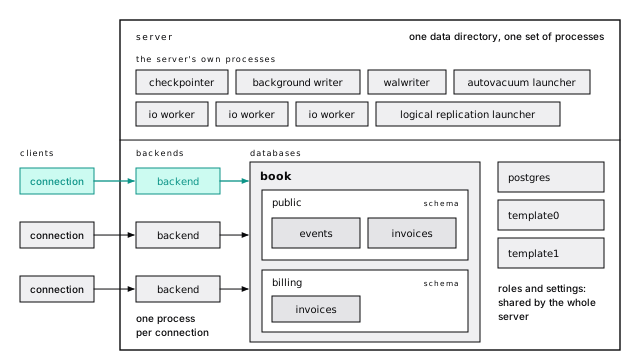
- Figure 2-1 — One server, many databases, a process per connection. Each connection gets its own backend process, which works in one database; inside it, schemas hold the tables. Beside the backends, the server runs its own processes, and roles and settings belong to the whole server.
- Figure 3-1 — A page lives in one of three places. A hit in shared_buffers is a memory lookup; a miss, which EXPLAIN calls "read", costs a system call and a copy if the kernel has the page cached, and a trip to the device if it doesn't. Postgres can't tell those last two apart.
- Figure 4-1 — Line pointers from the front, tuples from the back. The two grow toward each other, and the page is full when they meet.
- Figure 5-1 — Finding a page is one hash lookup. The tag lands in one of 128 separately locked partitions. A hit pins the buffer and is done; a miss has to evict a victim, maybe write it out, and read the page in.
- Figure 5-2 — The hand takes a point from every buffer it passes. It skips pinned buffers and evicts the first one it finds at zero. A page read constantly is back at 5 before the hand returns, so it never gets there.
- Figure 6-1 — An update is an insert plus a stamp. The old version stays in slot 1, stamped with the updater's XID and a ctid pointing at (0,4); the new version is a complete copy in slot 4. Four tuples now hold three rows.
- Figure 7-1 — HOT keeps the new version where the indexes can already find it. A cold update puts the new version on another page and adds an entry to every index. A HOT update writes it on the same page, chained from the old one through t_ctid, and no index changes; after pruning, lp1 becomes a redirect to the new version.
- Figure 8-1 — A commit waits for the log, not the pages. The update dirties a page in shared_buffers and appends a WAL record. COMMIT waits only until that record is flushed to the sequential WAL; the checkpointer or background writer writes the page to the data files later.
- Figure 8-2 — Recovery starts at the redo point. A checkpoint begins at its redo point, writes the dirty pages, and logs its checkpoint record when done. Everything before the redo point is already in the data files, so after a crash, replay starts there.
- Figure 8-3 — Every checkpoint resets the images. The first change to a page after a checkpoint carries a full 8 KB image of it; later changes to that page are small records. After the next checkpoint, the first change pays again.
- Figure 11-1 — InnoDB finds rows by key, Postgres by address. In InnoDB the table is the primary key B-tree, so a secondary index entry holds the key and every row found through it descends that tree again. In Postgres every index, the primary key included, points straight at a page in the heap.
- Figure 13-1 — Increasing keys append; random keys scatter. New identity or UUIDv7 keys all land on the rightmost leaf, which stays in memory. UUIDv4 keys land on any leaf, a full leaf splits 50/50, and pages settle around 70 percent full against 90 for appends.
- Figure 17-1 — A lookup reads one page per level, then the heap. The primary key of events is 1 root page, 19 internal pages and 5,465 leaves over a heap of 35,173 pages, so finding a row reads three pages in the tree and one in the heap.
- Figure 21-1 — Find the node, then fix the estimate or the work. If estimated and actual rows differ 10x or more, fix the statistics or the query that misleads them; if the rows are right, fix the index, the shape or the prices. Reach for enable_* and hints only at the end.
- Figure 22-1 — OFFSET counts from the front; keyset starts at the bookmark. OFFSET 1000000 reads 1,000,020 index entries and 21,422 pages to show 20. The keyset query seeks to where the last page ended and reads the next 20 in 5 pages, the same on every page.
- Figure 25-1 — The second write wins, silently. Both transactions read 100, and tx2 waits for tx1's row lock, then writes a value computed from that stale read. The balance ends at 80, and tx1's spend is lost with no error.
- Figure 25-2 — One waiting lock stops every query. The migration waits for the idle reporting transaction, and every query after it, even a plain read, waits behind the migration. When reporting commits, the migration runs in a millisecond and the line drains.
- Figure 32-1 — Recovery is a base backup plus replay. Restore the base backup, then replay archived WAL forward until recovery_target_time. Replay stops just before the 14:02 mistake and the server opens there.
- Figure 38-1 — A replica replays the primary's WAL forever. The walsender streams WAL to the standby's walreceiver, the startup process replays it into pages, and the standby reports its LSN positions back to pg_stat_replication. It takes reads and refuses writes with 25006.
- Figure 39-1 — Deleting a month is work; dropping one is a file. The delete left 164,383 dead tuples and wrote 32 MB of WAL, and the vacuum after it wrote another 12 MB. Detaching and dropping the month's partition unlinks its files and wrote under 150 KB.
- Figure 40-1 — The shard key decides who does the work. A query that names account_id goes to the one shard holding that account, where its rows sit together. A query without it goes to every shard, and the results are merged.
Tables
- Table 1-1 — The machine comes first; then jump to what hurts
- Table 1-2 — One ordinary SaaS schema runs through every chapter
- Table 2-1 — A handful of psql commands cover this book
- Table 3-1 — Memory is cheap; everything else is expensive
- Table 3-2 — Round trips cost more than queries
- Table 4-1 — A row costs more than its columns
- Table 5-1 — Your query shouldn't be the one writing dirty pages
- Table 5-2 — Big operations get a ring
- Table 7-1 — A cold update pays for every index
- Table 7-2 — Every column an index mentions is indexed
- Table 7-3 — Leave room on the page, or every update moves
- Table 7-4 — Leave room on the page, or every update moves
- Table 7-5 — A long transaction turns HOT off
- Table 7-6 — Bottom-up index deletion is the safety net
- Table 8-1 — wal_compression is a cheap win
- Table 8-2 — Commit means flush
- Table 9-1 — Four promises, four mechanisms
- Table 9-2 — Only serializable rules out every anomaly
- Table 10-1 — The defaults are wrong for big tables
- Table 10-2 — Wraparound stops writes before anything is corrupted
- Table 11-1 — Where rows and old versions live decides the rest
- Table 11-2 — Secondary lookups cost two descents in InnoDB
- Table 11-3 — Integer division truncates, and NULLs sort last
- Table 11-4 — Most MySQL idioms have a direct Postgres equivalent
- Table 12-1 — Integers run out sooner than you think
- Table 12-2 — Pick a collation provider whose order never changes
- Table 13-1 — Random keys write nearly four times the WAL
- Table 13-2 — Random keys write nearly four times the WAL
- Table 13-3 — Every id format trades order against what it leaks
- Table 14-1 — Store each fact once
- Table 14-2 — The insert pays for every check
- Table 14-3 — History is a table you design
- Table 15-1 — Each model is one shape, made fast
- Table 15-2 — Entity-attribute-value is a trap
- Table 15-3 — Closure tables store every ancestor pair
- Table 16-1 — Contrib is the safest shelf, though some of it is obsolete
- Table 16-2 — A crashing extension drops every connection, so vet it
- Table 17-1 — Every index is a tax on writes
- Table 18-1 — Beyond the B-tree
- Table 18-2 — For containment, jsonb_path_ops beats the default
- Table 18-3 — GIN filters trigrams; GiST ranks by similarity
- Table 18-4 — A thousandth of the size, nearly the same pages
- Table 18-5 — The operator picks the index type
- Table 20-1 — Every price is relative to one sequential page
- Table 20-2 — Extended statistics measure columns together
- Table 21-1 — The 5% rule is wrong in both directions
- Table 21-2 — Join order is a search, and searches get expensive
- Table 22-1 — OFFSET reads every row it skips
- Table 23-1 — Store the tsvector; don't index the expression
- Table 23-2 — Search extensions put BM25 in the index
- Table 23-3 — ef_search trades latency for recall
- Table 24-1 — The primary is your most expensive CPU
- Table 24-2 — A row trigger costs about a microsecond a row
- Table 25-1 — Row locks live in the row, not in pg_locks
- Table 26-1 — Pick the index build that matches the table's traffic
- Table 26-2 — Pick the index build that matches the table's traffic
- Table 26-3 — Run a concurrent build alone, untimed, and check it's valid
- Table 26-4 — Widening a type is free; most other type changes rewrite
- Table 28-1 — Transaction pooling breaks session state
- Table 29-1 — Ask one question
- Table 30-1 — Context decides reload or restart
- Table 30-2 — Autovacuum's defaults suit small tables and slow disks
- Table 30-3 — Cheap logging answers most 3 a.m. questions
- Table 32-1 — Write down RPO and RTO first
- Table 32-2 — pg_dump leaves out roles; dump them separately
- Table 32-3 — pg_upgrade --link is fast and one-way
- Table 33-1 — The app never owns its tables
- Table 34-1 — Some jobs stay yours whoever runs the box
- Table 34-2 — Some jobs stay yours whoever runs the box
- Table 34-3 — The provider adds its own gate on CREATE EXTENSION
- Table 34-4 — Throttled I/O shows as flat IOPS and rising latency
- Table 34-5 — Failover is DNS, and your pool has to notice
- Table 35-1 — Know the shape and you know the tradeoffs
- Table 35-2 — Superuser access and retention rule services out
- Table 36-1 — 10. Scale out only for the signal that asks for it
- Table 36-2 — Eight changes, in the playbook's order
- Table 36-3 — Eight changes, in the playbook's order
- Table 37-1 — Measure before you buy anything
- Table 37-2 — Precompute what you show
- Table 38-1 — Synchronous commit costs a round trip
- Table 38-2 — Streaming for failover, logical for a job
- Table 39-1 — Range fits time; list and hash have narrow jobs
- Table 39-2 — Retention: detach, then drop
- Table 39-3 — Every partition a query can't prune costs planning time
- Table 39-4 — Every partition a query can't prune costs planning time
- Table 40-1 — Each option moves the hard parts somewhere else
- Table 40-2 — Each option moves the hard parts somewhere else
- Table 41-1 — Column stores keep a tenth of the bytes
- Table 41-2 — Postgres read every page for every query
- Table 41-3 — Column stores were about ten times faster, and still faster on one core
- Table 41-4 — Column stores were about ten times faster, and still faster on one core
- Table 41-5 — Rollups and a column extension close much of the gap
- Table 41-6 — Know the signal before you need it
Parts
| Part | Chapters |
|---|---|
| Front matter | 1–2 |
| The machine | 3–11 |
| Designing for it | 12–16 |
| Finding rows fast | 17–24 |
| Changing it | 25–27 |
| Running it | 28–36 |
| Scaling out | 37–41 |
| Back matter | 42–44 |
About this edition
© 2026 Flagon, Inc. All rights reserved. This English web edition reproduces the first edition of Eight Kilobytes: PostgreSQL from the page up, published 2026-10-05, with examples run against PostgreSQL 18. The original book text and figures are available online at Flagon. The book’s license permits online reading and reserves republication rights to Flagon, Inc.; this project records the source and version explicitly.
The lab kit and its MIT-licensed source files remain available from the original Eight Kilobytes lab.
1 Before you start
Here are two queries against the same table, on the same server, a few seconds apart:
The first touched 4 pages. The second touched 35,173.
Both return almost nothing, both look simple, and an ORM would generate either without complaint. One is how a database idles at 3% CPU. The other is how someone gets paged at 2 a.m.
That gap is why this book exists.
Count the pages
Most PostgreSQL advice arrives as folklore. Add an index. Raise shared_buffers. Run vacuum. Each is right some of the time, and without a model of the server you can’t tell which time this is.
The model is smaller than you’d think. Postgres stores everything (tables, indexes, the bookkeeping beside them) in 8 KB pages, and it reads, writes and caches whole pages. A slow query nearly always did one of two things: touched far more pages than it needed, or made far more round trips than it needed.
So the first habit this book builds is one sentence long: count the pages.
- When you design a table, ask how many rows fit on a page.
- When you add an index, ask how many pages a lookup touches before and after.
- When you read a plan, read the
Buffers:line first. It counts pages. - When a table grows faster than its data, ask what is sitting in those pages that you didn’t put there.
You don’t need to think about bytes all day. You need a feel for what fits in 8 KB, because nearly every performance property of Postgres follows from it. Hence the title.
Earn the bigger box
The second habit is about money. When a database gets slow, the easiest thing to buy is a bigger one, and it works, for a while. Then the data catches up, and you’re paying more every month for the same problem.
An index costs nothing per month. A rewritten query costs an afternoon. A pooler, a vacuum setting, or a smaller row costs a little reading. So we hold one opinion harder than any other in this book: use up the cheap fixes before you buy hardware, and when you do upgrade, prove the need in numbers (Earn the bigger box). Every chapter is, one way or another, a cheap fix and the evidence that it worked.
Start with one database, and leave on evidence
A growing product collects databases: a cache, a document store, a queue, a search engine, a vector store. Each brings its own backups, upgrades, failure modes, and pager, and its data has to stay in sync with all the others.
Postgres covers most of that list from one server, in the same transaction as the rest of your data. Documents go in jsonb. A queue is a table and for update skip locked. Full-text search and vectors live next to the rows they describe. Time series fit BRIN and monthly partitions, and maps run on PostGIS. It’s one size that fits most, and most reaches further than you’d guess (You don’t need another database (yet)).
Most isn’t all, and this book says where the line is. On the same two million events, two column stores kept the data in under a fifth of the bytes and answered about ten times faster than a tuned Postgres, and still at least twice as fast on one core. Search relevance at scale, streams, global writes, and very large vector sets have lines of their own (Where Postgres loses).
So we start every product on one Postgres, and add a second system only for a property we can name and a number that proves we need it, with Postgres still the source of truth. It’s the bigger box again, applied to architecture: start grounded, and leave on evidence.
Every claim comes with a proof
You shouldn’t take a database book’s word for anything, this one included. So every claim that matters ships with its evidence.
Every query here ran against a real PostgreSQL 18 server, on a sample schema you can load in a minute. The plans are real plans, the sizes are real sizes, and when a chapter says an index helps, it shows the pages read before and after. Prove it boxes sit next to the claims that matter. Each holds the exact check from that chapter’s lab script, a lab.prove(...) that fails loudly if the claim isn’t true, so you can rerun the evidence instead of trusting us.
That’s also how the book stays honest. When Postgres changes, a check fails, and the chapter gets fixed.
You know SQL; this is what’s underneath it
You write application code and use Postgres every day, through an ORM or by hand. You know select, join, group by, insert and update. Maybe you recently became “the database person” because someone had to.
What you lack is a model of what’s underneath: why an update makes a table bigger, why last month’s fast query is slow now, why the planner ignores the index you just built. Without it, tuning is guessing. Every internal concept is explained the first time it appears. No C, no source code, no production experience required.
Read it at two depths
Every chapter is two books in one. The simple track is a short essay: the argument, the one piece of evidence that proves it, and what to do. Read only that, in every chapter, and you get the whole book. The deep dives hold the internals, the full measurements, and the edge cases, each one placed right after the paragraph it deepens.
On the site, the Simple / Deep dive switch at the top of a chapter sets the depth for the whole book; in Simple mode each deep dive folds to one line you can open on its own. On paper, every deep dive is printed, set apart so you can skip it, and each Prove it box prints as the claims its checks make, plus the lab file that holds them.
Why I wrote this
I’m Chase Pierce, and I started Flagon to build software, and a company, in the open.
I don’t have a war story about how I got here. I picked Postgres for plain reasons and kept picking it. Over MySQL, because it does more: transactional schema changes, richer types, and an extension system that lets the database grow into what you need. Over Oracle and SQL Server, because it’s open source, runs anywhere, and has no license to count cores against. Those reasons have held up on every project since.
What never held up was the advice around it. The book I wanted didn’t exist in one place. Internals books assume you want to work on the server itself. Tuning guides hand you settings without the model that explains them. Blog posts are right for someone’s workload, on someone’s version, in some year. I wanted the model, the evidence, and the opinions together, written for the person who just inherited the database. So I wrote it, and made every claim carry a check, because a claim you can’t rerun is one more piece of folklore.
The rest of the book says “we”. That’s Flagon’s voice, and it’s also you and me at the same terminal, looking at the same plan. When we hold an opinion, we say so plainly and show the numbers behind it. When you find a mistake, it’s a bug: open an issue or send a fix.
The machine comes first; then jump to what hurts
| Part | What it covers |
|---|---|
| The machine | Latency, pages, the buffer cache, MVCC, HOT updates, the write-ahead log, ACID, vacuum, and how all of it differs from MySQL |
| Designing for it | Types, keys, constraints, data models, extensions |
| Finding rows fast | Indexes, EXPLAIN, the planner, query patterns, search, functions |
| Changing it | Locks, migrations that keep the site up, bulk loading |
| Running it | Connections, benchmarking, configuration, monitoring, backups, security, managed services, a playbook for slow databases |
| Scaling out | Scaling up first, replication, partitioning, sharding, and where Postgres loses |
First comes a primer, Know the nouns first: a crash course in SQL and the server’s vocabulary: tables, queries, updates, joins, indexes, databases, schemas, roles, the catalog. Skip it if search_path and pg_class are old friends. The machine is the foundation. If you read nothing else, read Everything is a page and Updates are inserts; almost every later chapter leans on them. Then jump to whatever is hurting. A slow query ruining your week? Start with Read the plan, not the clock. Coming from MySQL? Postgres is not MySQL flags the habits that don’t transfer.
Every chapter ends with “The short version” and “Further reading”.
Every example ran on PostgreSQL 18
The book targets PostgreSQL 18. Almost every example ran on 18.6; the few chapters that needed a third-party image pinned another minor release and say so (Citus in Shard last on 18.4, pg_duckdb in Where Postgres loses on 18.1). Most of it applies to any release from 13 on, and newer features are tagged with the version that introduced them, like MERGE (PostgreSQL 15+). Page layout, MVCC, vacuum, the planner and the write-ahead log have changed in detail, not in shape.
Output from psql and EXPLAIN sits in its own block right after the query that produced it, trimmed with ... where long. Some of it will differ on your machine, and that’s expected:
- Transaction IDs, OIDs and file names are assigned by the server as it runs. Yours will differ; the relationships between them won’t.
- Timings depend on hardware and load. Ours ran on a laptop, inside Docker, next to other workloads, and a few labs that write heavily turn on
synchronous_commit = offto finish faster (they say so), so treat every millisecond as rough. - Buffer counts and row counts are the evidence. For a given data set and plan, they come out the same every time. A whole query’s count can run a few dozen pages past the table itself, for the catalog and other small reads: a full scan of the 35,173-page
eventsheap reports about 35,249. - Sizes are the binary values
pg_size_prettyreports: the 288,137,216-byteeventsheap is 275 MB, not 288.
Callouts flag what you must not miss. Read every warning; each one describes a way to take down a production database.
Run your own PostgreSQL 18
You need Docker, and bash: any Linux or macOS terminal, or Git Bash or WSL on Windows. The lab kit is a small Compose project: PostgreSQL 18 with the example data, plus one script per chapter that turns the chapter’s claims into checks. Download it and run a chapter:
A chapter’s number or name works too (./lab 3, ./lab storage), and ./lab alone lists them all. The first run starts the server and builds the example database, which takes about a minute. Each run gets a fresh copy of the data, prints PROVED: for every claim that holds, and stops at the first one that doesn’t. ./lab all runs every chapter and lists any that failed; the lab page explains the rest.
The server listens only on your machine, at 127.0.0.1:5418, if you’d rather use a GUI client. A few chapters (replication, sharding, the MySQL comparison) need more than one server; for those, ./lab starts the extra containers and removes them afterwards.
The kit’s postgres user is a superuser. That matters: some of the book’s best tools (pageinspect above all, which reads the raw bytes of a page) are superuser-only by default, and managed services generally don’t give you one. When you’re finished, docker compose down -v throws it all away.
One ordinary SaaS schema runs through every chapter
Every chapter uses the same small SaaS schema: accounts, their users, the projects they own, and a large table of events (deploys, builds, comments, alerts, logins) that grows forever. It’s deliberately ordinary, and big enough for the planner to make real decisions and for mistakes to cost something you can measure:
| Table | Rows | Heap size | Columns worth knowing |
|---|---|---|---|
| accounts | 1,000 | 72 KB | plan |
| users | 100,000 | 9 MB | account_id, email (unique together) |
| projects | 20,000 | 1.5 MB | account_id, owner_id, archived_at |
| events | 2,000,000 | 275 MB | account_id, project_id, user_id, kind, payload (jsonb), created_at |
Every table has a bigint identity id and a created_at. The data is generated from a fixed random seed and dated back from one fixed moment, October 6, 2026, so your plans, counts and dates will match ours.
Two things are intentional, so don’t “fix” them yet:
eventshas no secondary indexes, only its primary key. The indexing chapters add them one at a time, so you can see exactly what each one buys.- Only one foreign key column is indexed, and only by accident.
users.account_idleads theunique (account_id, email)constraint’s index; no other referencing column has one. Postgres doesn’t index referencing columns for you, and that’s one of the most common mistakes in real schemas. Constraints, chosen on purpose shows what it costs.
The whole seed is seed.sql in the kit: five extensions, four tables, and an insert per table. The interesting part is the generator. Here is events and the statement that fills it:
setseed makes random() return the same sequence every run, so the same projects get the same events. created_at is spread evenly over the year before October 6, 2026, and the order by inserts rows in time order, which is why recent events sit together at the end of the table (a fact the latency and indexing chapters lean on). The repeated array entries skew the mix: deploys and builds are common, comments, alerts and logins an eighth each, and a quarter of statuses are failed. The final vacuum analyze leaves every page marked all-visible and the planner’s statistics fresh.
The kit loads it into a database called book (about 345 MB) and marks it as a template. Copying a template is far cheaper than rerunning the seed, so explore in a copy:
Many chapters update every row, delete half a table, or add and drop indexes. Never touch book itself (the kit doesn’t even allow connections to it). When you’ve made a mess in scratch, drop database scratch and copy again.
Break things here, not in production
Some examples are destructive on purpose: they update millions of rows, hold transactions open, or delete half a table to watch vacuum work. Run them on your disposable server, never on a database anyone depends on. Where a technique is meant for production (a migration pattern, a monitoring query, a setting), the text says so, with what it locks and what it costs.
After a short primer on the nouns, the first stop is the hardware, because a page costs wildly different amounts of time depending on where it is when you ask for it.
The short version
- Nearly every Postgres performance question reduces to pages touched and round trips made. Count the pages.
- Use up the cheap fixes before you buy hardware, and prove the need in numbers when you do. Earn the bigger box.
- Start on one Postgres. Add a second system only for a property you can name and a number that proves you need it.
- Read the
Buffers:line of a plan before the timing. Buffer and row counts are repeatable; milliseconds aren’t. - Every claim that matters has a Prove it check. Rerun it instead of trusting us.
- Read the simple track for the argument; open a deep dive when you want the internals or the full measurements.
- Get the lab kit for a disposable PostgreSQL 18 with the example data in a template called
book. - Rerun any chapter’s evidence with
./lab <chapter>from the kit’s folder; the Prove it boxes show the checks. - Work in a copy (
create database scratch template book) and drop it when you’ve made a mess.
Further reading
- PostgreSQL 18 documentation, PGDG. The reference this whole book leans on; learn to find your way around it.
- PostgreSQL 18 release notes, PGDG. The source for every “(PostgreSQL 18+)” tag in the book.
- Versioning policy, PGDG. Five-year support windows, and how long your major version has left.
- psql reference, PGDG. The client behind every example; its backslash commands repay an hour of reading.
- Set returning functions, PGDG. How
generate_seriesbuilds the seed, and how to build your own test data.
2 Know the nouns first
This book argues about pages, plans, and locks. Those arguments assume some SQL and a handful of Postgres nouns. If you’ve written select, insert, and update against Postgres and know what a schema is, skim the headings below and move on; you lose nothing. If you haven’t, this primer is your crash course: the least you need to follow every chapter after it.
Fair warning about what comes next: the rest of the book assumes everything here and goes deep fast, down to the bytes on disk, because that’s where the answers to “why is this slow?” live. Every claim in this chapter runs against the lab server, like the rest of the book, so even the basics come with proof.
A table is rows that share the same columns
Postgres keeps your data in tables. A table has named, typed columns, and every row holds one value for each column, or NULL, which means “no value” (not zero, and not an empty string). Here’s the book’s biggest table, events:
Read it line by line and you’ve met most of what a schema says. bigint is a large integer, text is a string of any length, jsonb is a JSON document, and timestamptz is a moment in time. not null forbids NULL, and default fills in a value when you don’t give one. The id is the primary key: a value no other row shares, which Postgres numbers for you, so any row can be found by it. Each references line is a foreign key: account_id must name a row that exists in accounts.
events holds two million rows, every one with the same seven columns. A table is the shape; the rows are the data.
01-basicsSELECT asks, and changes nothing
You read with select. Name the columns you want, the table they come from, and a where clause that keeps only the rows you care about; order by sorts them and limit stops early:
Two more words cover most reports. count(*) counts rows, and group by counts them per value:
A select never changes anything. It doesn’t even take a transaction ID (XID), the number Postgres stamps on every change. That doesn’t make it free. The whole book is about how many pages a select has to read to answer you.
01-basicsINSERT adds a row, and in Postgres so does UPDATE
Three statements change data. insert adds rows, update changes them, and delete removes them. Here they are on notes, a scratch table with an id and a body:
Always give update and delete a where. Without one, they apply to every row in the table, and Postgres won’t ask whether you meant it.
Here’s the first thing that makes Postgres Postgres. An update doesn’t change the row where it sits. It writes a complete new copy of the row, on the same page if there’s room, and marks the old copy as replaced. A delete marks the row dead and leaves it in place. Both old copies stay on the page until vacuum, a background cleanup, clears them. On a one-row table, one update left two copies on the page, and after the delete there were still two copies of a row the table no longer has.
That one fact explains why tables grow, why vacuum exists, and why a busy table can be twice the size of its data. The book calls it Updates are inserts, and it comes back in nearly every chapter.
01-basicsJOIN puts the tables back together
A good schema stores each fact once: a user’s email lives in users, an account’s plan in accounts. A join brings them back together by matching rows across tables, almost always on a foreign key:
The u and a are short names for the tables, and on says which rows match: here, the account whose id is the user’s account_id. User 295 belongs to account 296. A plain join keeps only rows that match on both sides; left join keeps every row on the left, with NULLs where nothing matched.
01-basicsAn index makes one read cheap and every write dearer
Ask for one user by email, and without help Postgres reads the whole users table to find it: 1,126 pages for one row. (The unique (account_id, email) constraint has an index, but it’s sorted by account first, so finding an email through it means searching it once per account, and the planner reads the table instead.) An index is a separate, sorted structure that points at rows, like the index at the back of a book. Build one on email and the same lookup reads 4 pages:
Indexes aren’t free. Every insert, and every update that changes an indexed column, has to update each index too. So index the columns your queries actually search on, not every column you have. The B-tree does the heavy lifting shows how an index finds a row in a handful of pages.
01-basicsThat’s enough SQL to follow the book. The rest of this chapter is the server underneath it.
One server runs many databases, and they don’t share tables
A Postgres server is one data directory and the processes running on it. The documentation calls it a cluster, which has nothing to do with several machines; it’s one server. It holds many databases. The lab server has four:
A connection picks one database and sees only that one. Try to read another and Postgres refuses:
That’s a design decision, not a missing feature: each database has its own tables, its own catalog, and its own extensions. Roles, tablespaces, and the server’s configuration file are the exceptions, shared by the whole server. If two parts of your app need to join their data, they belong in one database, in two schemas.
create database copies template1 unless you name another template; template0 is a pristine spare. The lab marks book as a template too, which is why create database scratch template book is far cheaper than loading the data again.
01-basicsEvery connection is its own process
When your app connects, the server starts a new operating-system process to serve it, a backend, and that process lives until the connection closes. Ten connections are ten processes, each with its own memory. That one fact explains why connections are expensive, why max_connections is a ceiling and not a capacity, and why every production app ends up behind a pooler (Connections aren’t free).
The server runs its own processes too. On the lab server, beside the one client:
Most of the book is about what those do: the WAL writer flushes the write-ahead log in the background, the checkpointer and background writer write changed pages back to their files, the autovacuum launcher starts vacuum workers, and the io workers (PostgreSQL 18+) do reads on the backends’ behalf.
01-basicsSchemas are folders, and search_path picks the one you meant
Inside a database, tables live in schemas: named folders, one level deep. Every new database has one called public, and if you’ve never created another, everything you own is in it. public.invoices and billing.invoices are two different tables.
When you write a bare invoices, Postgres looks through the schemas named in search_path, in order, and uses the first match. Put billing first and the same query reads a different table. That’s convenient for organizing a big schema. It’s also how a function can end up calling something you didn’t write, which is why the security chapter pins search_path on every function that runs with elevated rights.
01-basicsA role is a user, a group, or both
Postgres has one kind of principal, the role. A role with the LOGIN attribute is what you’d call a user; a role without it is a group; and any role can be a member of another and inherit its privileges. Every table has an owner role, which can do anything to it, and every other role gets only what it’s granted.
The habit to build now: your application should connect as a role that owns nothing and isn’t a superuser, so a bug in the app can’t drop a table. Trust no tenant shows the setup.
01-basicsEvery statement runs in a transaction
Postgres never runs a statement outside a transaction. Send one update on its own and Postgres wraps it in a transaction that commits when the statement finishes; that’s autocommit, and it’s what your driver does unless you say begin. Two statements sent that way are two transactions, each paying for its own commit.
Inside begin and commit, everything lands together or not at all, and in Postgres “everything” includes schema changes. A create table rolled back is gone, so a migration that runs in one transaction and fails leaves nothing half-done (ACID, honestly). It also means a long transaction holds everything it touched, locks included, until it ends. You’ll meet that open transaction again and again in this book.
01-basicsThe server describes itself in tables
Everything Postgres knows about your schema lives in ordinary tables you can query, the system catalog. pg_class lists every table and index, pg_attribute their columns, pg_roles the roles, pg_settings every setting. The pg_stat_ views count what the server has been doing. psql’s backslash commands, like \d events, are queries over these tables.
The catalog already counts pages for you:
That’s the planner’s picture of events: 35,173 pages and about two million rows, updated by vacuum and analyze. That page count is the number this whole book keeps returning to.
01-basicsA setting has a value, a source, and a scope
Postgres has a few hundred settings, like work_mem, the memory one sort may use (4 MB by default). Each one has a value, a place that value came from, and a scope. The configuration file sets the server’s default. alter database and alter role override it for one database or one role. set changes it for your session, and set local for one transaction, after which it snaps back.
You’ll use the narrow scopes most. A report that needs more memory for one big sort should set local work_mem inside its transaction, not raise it for every connection on the server. show work_mem reads the current value, and pg_settings tells you where it came from (The settings that matter).
01-basicsExtensions arrive with one command
An extension adds types, functions, operators, or index methods to one database with create extension. Some ship with Postgres (the “contrib” modules); others you install on the server first. The lab database has the five this book leans on: pg_stat_statements to rank queries, pageinspect to read raw pages, pgstattuple and pg_buffercache to measure tables and the cache, and pg_trgm for text search.
Managed services allow a fixed list, so check it before you design around one (Extensions worth knowing).
01-basicsYour data is files you never touch
Under it all, every table and index is a file in the server’s data directory, named by numbers, not by your table names:
288,137,216 bytes is 35,173 pages of 8,192 bytes, the same count the catalog gave. Postgres reads and writes those files a page at a time, and that’s where the rest of the book begins. Everything is a page opens one up.
Never edit, copy, or delete anything in the data directory by hand, least of all pg_wal. The server is the only thing that understands those files, and a copy taken from under a running server is not a backup.
01-basicsA handful of psql commands cover this book
Every example in the book ran in psql, the command-line client that ships with Postgres. GUI clients work fine, but a handful of backslash commands are worth knowing by heart:
| Command | Does |
|---|---|
\d name | describes a table: columns, indexes, constraints |
\dt, \di, \dn, \du | lists tables, indexes, schemas, roles |
\x | prints wide rows vertically, one column per line |
\timing | prints each statement’s time |
\e | opens the last query in your editor |
Add \? for the rest. When a backslash command shows you something useful, \set ECHO_HIDDEN on prints the catalog query behind it, which is the fastest way to learn the catalog.
The short version
- A table is rows that share typed columns. The primary key finds a row; a foreign key points at one in another table.
selectreads and changes nothing. In Postgres anupdatewrites a new copy of the row, and adeleteleaves the old row in place, until vacuum clears them.- An index turned 1,126 pages into 4 for one lookup, and every write pays to keep it current.
- One server holds many databases that can’t query each other; inside one, schemas are folders and
search_pathpicks among them. Roles are shared by the whole server, and apps should connect as one that owns nothing. - Every connection is a process with its own memory, which is why connections cost what they do.
- Every statement runs in a transaction. Schema changes roll back too, and an open transaction holds what it touched.
- The catalog is queryable tables, settings have scopes (use the narrowest), and tables are files of 8 KB pages you never touch by hand.
Further reading
- The SQL Language, PostgreSQL documentation. The manual’s own tutorial: tables, queries, joins, and updates, one short page each.
- Architectural Fundamentals, PostgreSQL documentation. The two-page version of the process model, from the tutorial.
- Schemas, PostgreSQL documentation. Schemas,
search_path, and the usage patterns the manual recommends. - Database Roles, PostgreSQL documentation. Roles, attributes, and membership.
- System Catalogs, PostgreSQL documentation. Every catalog table, column by column, for when
\disn’t enough. - psql, PostgreSQL documentation. Every backslash command and variable.
3 Where the time goes
An endpoint that lists a team’s projects takes 180 ms in production. You copy the query from the logs, run it in psql, and it finishes in 0.4 ms. Again: 0.3 ms. The database is clearly fine.
Then you count. The endpoint doesn’t run one query. It runs one to fetch 100 projects, one per project for the owner, and one per project for the latest deploy. That’s 201 queries, each fast on the server, each crossing the network and back. At half a millisecond per round trip, the network alone costs 100 ms before the database does any work.
Nothing in that story is slow. It’s counted wrong. Know roughly what each kind of operation costs and you can estimate a query, an access pattern, or a loop in your code before you measure it.
Memory is cheap; everything else is expensive
You can’t estimate a query until you know what its parts cost. Here is the latency ladder for a database. Rows marked “measured” come from the lab kit on our laptop; the rest are orders of magnitude, not guarantees.
| Operation | Typical latency |
|---|---|
| CPU L1 cache reference | about 1 ns |
| Main memory (RAM) reference | about 100 ns |
| Read an 8 KB page from the OS page cache | 4 to 5 µs (measured) |
| Random read from local NVMe | tens of µs |
| Round trip within one availability zone | 100 to 500 µs |
| Random read from network block storage | under 0.5 ms to several ms |
| Round trip across availability zones | about 0.5 to 2 ms |
| Durable write (fsync) on our laptop SSD | 0.65 ms quiet, 18 ms busy (measured) |
| Round trip across regions | 30 to 150 ms |
Three lessons drive almost every database decision. Memory is cheap; everything else is expensive, so the first question about any query is how many pages it touches, and where they are. The network isn’t free, even nearby: a same-zone round trip costs about as much as a network disk read. And durability is the slowest thing on every write, which is why the write-ahead log exists.
The CPU, memory, SSD and network rows follow the classic ladder in Numbers Every Programmer Should Know By Year (1 ns L1, 100 ns RAM, 16 µs SSD random read, 500 µs datacenter round trip, 150 ms California to the Netherlands and back). The network storage row comes from AWS’s own volume type documentation: io2 Block Express volumes average under 500 µs per I/O, and general-purpose gp3 volumes promise “single-digit millisecond” latency. Cross-zone round trips depend on the provider and the zones; AWS says only that its zones are within 100 km of each other, so measure yours. One disk can also swing widely with load: our laptop’s fsync measured 0.65 ms quiet and 18 ms while other containers hammered the same disk.
A query is pages and round trips
A rough model, good enough for most decisions:
For a typical application query the CPU term is small and the first two dominate. To see the page term, take the two queries from the preface and ask Postgres to report what it did:
That’s a query plan, and you’ll read hundreds in this book. Four rules get you through them until Read the plan, not the clock covers the rest. Each line is a step, a node; the most indented runs first and feeds the one above. actual rows is what a node produced, per loop. Buffers: counts the 8 KB pages it touched: hit means the page was already in Postgres’s memory, read means Postgres had to ask the operating system. And read that line first: timings bounce with cache and load, page counts don’t. (PostgreSQL 18 shows it by default; before 18, write explain (analyze, buffers).)
Four pages, all in memory: three in the primary key index (the B-tree chapter shows its shape) and one in the table, holding the row.
02-latencyNow a filter on a column with no index:
35,173 pages to find 85 rows: every page of the table. It still took only about 30 ms, because three processes shared the work and the “read” pages came from the operating system’s memory, not the disk.
Four pages against 35,173, both “simple”. Once an hour in a report, 30 ms is fine. On every page view, it’s the most expensive thing your database does. The skill here is noticing the ratio.
The scan’s count is the same on every run: 35,173 is every page of events, and 85 is how many events project 4242 has.
02-latencyNeither plan asked for buffers; PostgreSQL 18 reports them anyway. The lab checks that against the JSON form of a plain explain (analyze).
02-latencyRun the primary key lookup on a fresh copy and the first execution shows a few more pages, read rather than hit, while Postgres loads the index’s metadata page and the path down the tree. Run it again and it settles at four.
A page lives in one of three places
When Postgres needs a page, it looks in three places, each far slower than the last: a desk, a filing cabinet across the room, a warehouse across town.
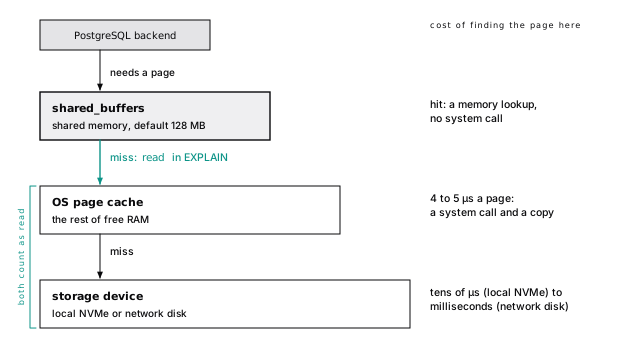
shared_buffers is Postgres’s own cache of pages, shared by every server process. The default is 128 MB, tiny on purpose; the usual production starting point is about 25% of RAM (The settings that matter). The buffer cache decides what stays shows how it chooses what to keep.
The OS page cache is the kernel’s cache of file contents, in whatever RAM is otherwise free. Every page Postgres reads also lands there, so a hot page can sit in both caches at once. That double buffering is why shared_buffers isn’t set to 90% of RAM.
“Read” does not mean “from disk”
In a plan, read means “not in shared_buffers, so Postgres asked the kernel”. Whether the kernel went to the device, Postgres can’t see. The clock can: the lab kit turns on track_io_timing, which adds an I/O Timings line. Here are 2,000 primary key lookups scattered across the table:
3,139 pages read in 15.0 ms: about 5 µs per page (4 to 5 µs across our runs). No storage device does random reads that fast; those pages came from the OS page cache. Tens of microseconds or more per page means a device.
The query behind those numbers:
Don’t divide the sequential scan’s numbers instead. In PostgreSQL 18 a sequential scan reads ahead through asynchronous I/O and combines neighboring pages into larger reads (up to io_combine_limit, 128 KB by default), so most of its I/O time overlaps with other work and the per-page figure means little. Random reads, one page at a time, are the honest test.
02-latencyBig scans don’t flush the cache
You might expect that full scan of the 275 MB events table to push everything else out of a 128 MB cache. It doesn’t. A big sequential scan recycles a small private ring of buffers (2,304 KB in PostgreSQL 18 with default settings), so one report can’t evict the pages your application lives on (Big operations get a ring).
Every commit waits for the disk
Reads can be cached. Commits can’t, not if they must survive a crash. On commit, Postgres writes a record to its write-ahead log and waits for the disk to confirm it’s durable. That wait is an fsync, and your hardware sets its price: about 0.65 ms on our quiet laptop SSD, 18 ms with other containers writing to the same disk, and well under a millisecond on good server storage.
A client that commits one row at a time pays one flush per row. At 0.65 ms that’s about 1,500 commits per second at the very best; at 18 ms, about 55. So 10,000 rows in 10,000 transactions cost 10,000 flushes, and in one transaction, one.
Batch your writes (Load it fast), and for write-heavy systems buy storage with fast fsync before fast reads. Commit means flush measures the commit rate, and the two ways around the wait: many sessions sharing one flush, and not waiting at all.
Postgres has a server setting called fsync. Setting it to off makes benchmarks look wonderful and turns any crash or power loss into possible silent corruption of the whole cluster, not just the last few transactions. synchronous_commit = off is the safe version of the idea, and you can set it per session or per transaction: a crash may lose commits from the last fraction of a second (at most three times wal_writer_delay, 600 ms by default), but the database stays consistent.
pg_test_fsync ships with Postgres. Run it on the volume where your data lives; in the lab kit, open a shell with docker compose exec postgres bash first:
fdatasync is the server’s wal_sync_method on Linux: 0.65 ms here. Unsynced writes ran at 2.6 to 2.9 million per second across our runs. That gap, three orders of magnitude, is the price of durability.
IOPS are capped by reads in flight, not by what you paid
Every read that misses both caches, and every commit, lands on storage. If you’re on a managed service, your data most likely lives on network block storage: a volume that looks like a local disk but sits on servers down the hall, so every cache miss is a network request. That storage is sold by three numbers that are easy to confuse: latency (how long one I/O takes), IOPS (I/Os per second), and throughput (bytes per second).
Queue depth, the number of I/Os in flight, connects them: IOPS achieved = I/Os in flight / latency. A process that waits for one 1 ms read at a time gets 1,000 IOPS, however many you paid for. (That’s Little’s law; it holds for the line at the post office too.) Big scans can keep many reads in flight; an index lookup that misses the cache is one round trip to the storage servers.
Do the arithmetic. AWS gp3 starts at 3,000 IOPS and 125 MiB/s: about 3,000 random cold page reads per second, for every connection combined. Buy faster volumes when you’ve measured that you’re I/O bound, never instead of an index. On a managed service this is usually the first ceiling you hit (The volume is your bottleneck now).
On gp3’s baseline of 3,000 IOPS and 125 MiB/s:
- Random page reads: 3,000 IOPS times 8 KB is about 24 MB/s. Index lookups on a big table that doesn’t fit in memory are capped at about 3,000 cold pages per second, across all connections.
- Sequential scans: the 275 MB
eventstable read cold at 125 MiB/s takes about 2.2 seconds. A 100 GB table takes over 13 minutes, and a nightly report doing that saturates the volume for everyone else.
Provisioned-IOPS volumes (io1/io2-style) sell more IOPS and lower, steadier latency at a higher price.
Burst credits have exact numbers too. A gp2 volume under 1 TiB bursts to 3,000 IOPS on a balance that lasts at least 30 minutes at full burst, and many smaller instance types can drive their maximum EBS performance for 30 minutes at least once every 24 hours before falling back to a baseline that can be several times lower. gp3 volumes don’t burst; they hold their provisioned numbers.
Burst credits run out in the middle of the job
gp2 volumes and many smaller instance types run on burst credits: fast for a while, then back to a much lower baseline when the credits run out. Testing goes fine, and so does the first half hour of a heavy job; then latency climbs with no change in traffic. If an I/O cliff lines up with time under load rather than with load, check your burst balance before your queries.
Local NVMe is fast and dies with the host
Local NVMe reads in tens of microseconds and dies with the host. Use it only with replication and backups built for losing a node at any moment (Local NVMe: fast, and gone with the host). Network volumes survive the host and charge you latency on every miss.
Size RAM to the working set
The most effective hardware decision for Postgres is enough RAM for your working set: the pages your workload touches over, say, an hour. Not the whole database; the part that’s used.
All of events is 318 MB with its index. But suppose the application mostly shows the last week. Events arrive in time order, so the latest 7 days sit together at the end of the table: 675 pages, about 5 MB, smaller than users. That’s the common shape: a big tail that’s rarely read and a hot head that’s read constantly. Your working set is the hot head of each table, plus the index pages that find it, plus whatever periodic jobs touch.
If the working set fits in RAM (shared_buffers plus the OS page cache), almost every read takes microseconds. If it doesn’t, every query becomes a storage-latency query, and no amount of IOPS will make it feel like memory. RAM is usually cheaper than IOPS, and much cheaper than engineering time.
How big everything is, heap and indexes:
A row’s ctid is its physical address, a page number and a slot (A line pointer lets a tuple move without changing its address takes it apart); casting it to a point pulls out the page number. The sample data ends on October 6, 2026, so we measure back from the newest event rather than from now():
02-latencyWatch it run shows how to measure what your cache is serving.
Round trips cost more than queries
Back to the endpoint from the start. Timed end to end with pgbench, the load generator that ships with Postgres (pgbench is already installed), a primary key lookup took 78 µs, trip included, with client and server on one laptop. Another host in the same zone adds roughly 100 to 500 µs per query; another zone, up to a couple of milliseconds; another region, 30 ms or more.
Now the N+1 math. A page showing 100 projects that loads each owner separately runs 101 queries:
| Where the app runs | Round trip | 101 queries | 2 queries |
|---|---|---|---|
| Same host | 0.08 ms | 8 ms | 0.2 ms |
| Same zone | 0.5 ms | 51 ms | 1 ms |
| Other zone | 1.5 ms | 152 ms | 3 ms |
| Other region | 60 ms | 6 s | 120 ms |
The queries didn’t get slower. Only the distance changed. That’s why N+1 bugs are invisible on a laptop and painful in production, and why moving the database to “a better region” without moving the app makes everything slower.
The ORM version looks innocent:
Fetch them in one query instead, with a join or an array parameter:
Fetching 100 rows by primary key this way took about a millisecond, in one round trip. Most ORMs can ask for it (“eager loading”, “includes”, “preload”); Queries that age well covers the SQL side.
100 rows, 213 pages, one round trip. (written counts dirty pages this backend had to write out before it could reuse their buffers, on a server busy with other labs; Your query shouldn’t be the one writing dirty pages explains it.)
02-latencyThe per-query number came from a two-line script, lookup.sql (100 µs per query on a busy run):
A new connection costs several round trips before it runs anything, so use a pool (Connections aren’t free). Transactions add trips too: begin, each statement, and commit are separate unless your driver pipelines them, so a five-statement transaction is at least seven. Pipelining sends several queries without waiting for each result (libpq has supported it since PostgreSQL 14, and several drivers expose it), which cuts latency for chatty workloads without restructuring queries.
Estimate before you measure
You can now estimate most queries without running them. Three same-zone round trips touching 50 cached pages: about 1.5 ms, nearly all network. 2,000 uncached pages on a network volume: 2 seconds, and more CPUs won’t help. A batch job committing every row on a disk with 2 ms fsync: 500 rows per second, at most.
When something is slow, ask which term is large: round trips, pages, or where the pages came from. The rest of the book shrinks each one, starting with the pages themselves.
The short version
- Query time is roughly round trips times network latency, plus pages touched times the cost of wherever those pages live: microseconds in memory, up to milliseconds on a network volume.
- Read the
Buffers:line of a plan first; page counts repeat, timings don’t.readmeans “missed shared_buffers”, not “came from disk”. - A commit waits for one WAL flush, whatever it contains. Batch rows into transactions, and measure your fsync with
pg_test_fsync. - Size RAM to the working set, not the whole database. On cloud volumes, IOPS achieved is I/Os in flight divided by latency; watch burst credits.
- N+1 queries cost round trips, not server time. Fetch related rows in one query, and keep the app in the same region and zone as the database.
Further reading
- Resource consumption settings, PGDG. The primary source for
shared_buffers,work_memand the I/O settings, includingio_method. - WAL reliability, PGDG. What a durable commit requires from the disk, and how write caches can lie.
- pg_test_fsync, PGDG. Measure your own fsync latency before choosing storage.
- Amazon EBS volume types, AWS. Real IOPS, throughput and latency figures for network block storage; the General Purpose SSD page documents gp3 baselines and gp2 burst credits.
- Numbers Every Programmer Should Know By Year, Colin Scott. The latency ladder, adjustable by year.
4 Everything is a page
Here are two tables with the same six columns, holding the same million rows:
The only difference is the order the columns were declared in. One is 27% bigger than the other: 27% more pages to scan, cache, back up, and replicate, forever.
Postgres doesn’t really store tables. It stores pages, and a table is whatever fits in them. Picture the page and you can say how many bytes any row takes, and how to make it take fewer. We’ll go from the outside in, mostly through pageinspect, an extension that reads raw pages from SQL.
A table is a file of pages
Every table and index is one or more ordinary files in the server’s data directory. You can ask which:
16764 is the database’s ID and 16644 the table’s relfilenode, the name of its file (yours will differ). From a shell in the container (docker compose exec postgres bash, then cd /var/lib/postgresql/18/docker):
As Know the nouns first showed, 288,137,216 bytes divided by 8,192 is exactly 35,173. The file is nothing but pages, one after another, numbered from 0. (Past 1 GB, a table continues in 16644.1, 16644.2, and so on.)
03-storageAnything that rewrites a whole table (truncate, vacuum full, some alter tables) writes a fresh file under a new name, so never assume the name is stable.
A table is more than its main file
events had three files, not one. Each is a fork with its own job: main holds the rows, _fsm is the free space map, and _vm is the visibility map; both maps get sections below. Unlogged tables add an empty _init fork that’s copied over them after a crash.
That’s why the honest answer to “how big is this table?” is rarely the main file alone:
pg_relation_size is the main fork only. pg_table_size adds the other forks and the table’s TOAST storage (below), and pg_total_relation_size adds every index. Use the total.
Every page has the same layout
Every one of those 35,173 pages is laid out like this. It’s the most important picture in this book:
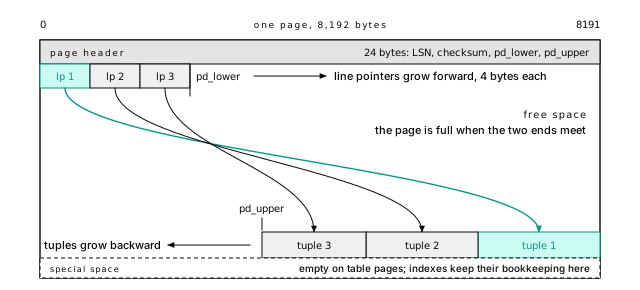
It works like a notebook page with a table of contents written from the top and the entries written from the bottom up.
A 24-byte page header records the page’s last change, a checksum, and where the free space starts and ends. Line pointers, 4 bytes each, grow from the front; each points at a tuple. Tuples grow from the back; a tuple is one version of a row, as stored on the page. The page is full when the two meet. (Indexes keep bookkeeping in the special space at the end; table pages leave it empty.)
This page has 56 rows. A 24-byte header plus 56 line pointers at 4 bytes each ends at 248: that’s lower. Tuples start at 384 (upper), leaving 136 bytes free, not enough for another row. special is 8192: no special space. flags is 4, the “all visible” flag you’ll meet with the visibility map.
03-storageA line pointer lets a tuple move without changing its address
The line pointer lets Postgres move a tuple within its page, to compact free space, without changing its address. That address is the row’s ctid, a page number and a line pointer number, and every table has it as a hidden column:
(0,1) means page 0, line pointer 1. Indexes store ctids: when an index lookup finds id = 2, what it finds is “page 0, slot 2”. Following a ctid to its table page is the fourth read in the four-page lookup from A query is pages and round trips.
A row’s ctid changes whenever the row is updated (Updates are inserts shows why) and whenever the table is rewritten. Use it to inspect; never store it or hand it to an application.
In InnoDB the table is the primary key B-tree. A Postgres table is a heap: rows go wherever there’s room, and every index, the primary key included, points at a ctid (Postgres is not MySQL).
8 KB is a compile-time choice, and you should keep it
Eight kilobytes isn’t a law of nature. It’s a constant, BLCKSZ, fixed when Postgres is compiled (./configure --with-blocksize, a power of two from 1 to 32 KB), and every file in the data directory is written in it. A server built for 16 KB pages can’t open a data directory made with 8 KB ones, and pg_upgrade won’t cross between them. A running server tells you what it was built with, and no setting changes it:
Bigger pages sound like fewer pages to count, and for some work they are. A sequential scan makes fewer, larger reads; an index fits more keys per page, so the tree is a little shallower; and wide rows stay inline longer, because the threshold for compressing and moving big values (TOAST, below) scales with the page.
But Postgres reads and caches whole pages, and sometimes logs them whole, so everything else gets worse. At 32 KB, a lookup that wants one row pulls four times the bytes into memory. The same shared_buffers holds a quarter as many pages, so your hot rows share the cache with four times as many cold neighbors. And the first change to a page after a checkpoint logs the whole page, so each of those full-page images can be up to four times the size.
So we keep 8 KB, and so should you. Managed services don’t let you choose it anyway. Every lever in this book changes how many rows fit on a page without a custom build: column order, narrower types, fillfactor, TOAST, and the right index. Larger pages pay off mainly for scan-heavy analytics on a server you compile yourself, and that’s the workload where a column store wins anyway (Where Postgres loses).
03-storageWe didn’t build a 32 KB server for this book, so this box is reasoning from how pages are used, not a lab run. The limits that scale with BLCKSZ:
- TOAST starts compressing a row at about a quarter of a page, roughly 2 KB here (Large values are compressed, then moved out of the row).
- Index entries can’t exceed about a third of a page, which is the error you hit indexing a long text column.
- The visibility map keeps two bits per page, so each bit covers more rows, and one changed row clears the bit for more of its neighbors.
- Full-page images in WAL are one page each, so bigger pages mean a bigger burst after every checkpoint.
Two neighbors are separate compile-time constants: wal_block_size (also 8 KB) and the 1 GB file segment size, which is why a big table continues in 16644.1. pg_controldata prints all three for a data directory, and tools that read raw pages, such as pageinspect, take their sizes from the server.
03-storageA row costs more than its columns
Open a page and count what each row actually stores. heap_page_items decodes every tuple on a page:
Tuple 1 is 144 bytes at offset 8048, ending exactly at the end of the page; tuple 2 sits right below it. Each starts with a 23-byte tuple header.
The header’s two most important fields are t_xmin, the transaction that inserted this version, and t_xmax, the one that deleted or locked it (0 if none). They’re the heart of Postgres’s concurrency control and get a chapter of their own (Updates are inserts). Here, every row was inserted by transaction 766, the seed, and none has been deleted. t_ctid is the tuple’s own address, or its newer version’s. t_hoff says the column values start at byte 24, after the header and a byte of alignment, in declaration order, end to end.
Twenty-four bytes of header and a 4-byte line pointer, on every row. A row of two integers is mostly overhead.
The whole header:
| Field | Size | What it is |
|---|---|---|
| t_xmin | 4 bytes | ID of the transaction that inserted this version |
| t_xmax | 4 bytes | ID of the transaction that deleted or locked it, or 0 |
| t_cid | 4 bytes | Command number within the transaction |
| t_ctid | 6 bytes | This tuple’s address, or the address of its newer version |
| t_infomask2 | 2 bytes | Number of columns, plus a few flags |
| t_infomask | 2 bytes | Status flags |
| t_hoff | 1 byte | Offset where the column data starts |
t_infomask on row 1 is 2306, and pageinspect (PostgreSQL 13+) decodes it:
The row has variable-width columns, its inserting transaction is known to have committed, and it has no valid deleter. The last two are hint bits, cached answers that A read can write explains.
Then the data. The first eight bytes are id, the integer 1, least significant byte first, as on any x86 or 64-bit ARM machine:
The next eight, a903..., are account_id: 0x03a9 is 937, exactly what select account_id from events where id = 1 returns.
03-storageNULLs cost one bit
A NULL takes no space in the data area. A row with any NULL carries a null bitmap in its header instead: one bit per column, 0 for NULL. In projects, an unarchived project has a NULL archived_at:
Rows 1 and 3 aren’t archived: their fifth bit is 0, and they’re 8 bytes shorter than row 2, which stores its timestamp. One bit instead of eight bytes. (Up to 8 columns, the bitmap fits in a spare byte of the header. Past 8, a row with any NULL needs a longer bitmap, which can push the start of its data from byte 24 to byte 32.)
03-storageColumn order is free space
Now the mystery from the start of the chapter. CPUs read a value fastest at an address that’s a multiple of its size, so Postgres lines values up that way: a bigint or timestamptz starts at a multiple of 8 bytes, an integer or date at a multiple of 4, a smallint at a multiple of 2, and a boolean anywhere. When an 8-byte column follows one that ended at an odd offset, Postgres pads the gap. Picture a parking lot where trucks may only park at every eighth line: let a motorbike take the first space, and the next seven go empty.
Here are the two tables from the start, column by column. pg_column_size says a padded row is 72 bytes and a packed one 52:
It compounds: each tuple also starts at a multiple of 8 on the page (so packed’s 52 bytes occupy 56), and each needs a line pointer. That’s 107 rows per page against 136, and 9,346 pages against 7,353.
The rule that falls out:
- Fixed-width 8-byte columns first:
bigint,timestamptz,double precision. - Then 4-byte ones:
integer,real,date. - Then 2-byte, then 1-byte:
smallint,boolean. - Variable-length columns (
text,jsonb,numeric) last. Short values need no alignment, so they pack tightly at the end.
For a few thousand rows, not at all. For a narrow table headed for hundreds of millions (events, logs, join tables, metrics), spend five minutes on it when you write the create table; reordering later means rewriting the table.
The two tables, loaded with the same million rows:
With 8,168 usable bytes per page after the header, and a 4-byte line pointer per row:
03-storageEvery type’s alignment is in pg_type.typalign: c (any byte), s (2), i (4) or d (8). uuid is a surprise: 16 bytes, but c, so it needs no padding.
The example schema does fine. An events row is the header, four 8-byte ids with no padding, kind as short text, payload as small jsonb, and created_at, which may pick up a few bytes of padding after the two variable-length columns. Measured rows are 136 to 144 bytes, about 66 of them JSON. The JSON is the cost worth watching; Types are a contract discusses when to promote a field out of jsonb into a real column.
Large values are compressed, then moved out of the row
A row must fit in an 8 KB page, yet a text value can be up to 1 GB. TOAST (The Oversized-Attribute Storage Technique) squares the two. When a row about to be stored is larger than about 2 KB (2,032 bytes with 8 KB pages, so at least four rows fit on a page), Postgres works through its variable-length columns, largest first:
- Compress the value in place.
- If the row is still too big, move the value into the table’s own TOAST table, cut into chunks of just under 2 KB, leaving an 18-byte pointer behind.
In a test table, 100,000 repeated characters compressed to 1,156 bytes and never left the row. 32,000 characters of random hex didn’t compress, so they moved out in 17 chunks, leaving a 50-byte row behind. Reading that value back means an index lookup in the TOAST table and 17 more tuple fetches, invisible in your SQL.
What that means for your queries:
select *isn’t free on wide tables. A list view that doesn’t show a document’s body shouldn’t fetch it, and most ORMs fetch every column unless told otherwise.- Changing a toasted value rewrites all of it. Change one key in a big
jsonbdocument and Postgres stores the whole document again. Keep a hot counter out of the document; better still, give it a narrow table of its own (Move hot counters to a narrow table). - Medium values are the awkward case. A 1 to 2 KB value isn’t toasted and makes every row large, so only a handful fit per page.
A table with one text column, filled with a short string, repeated characters (very compressible), and random hex (barely compressible):
Rows 4 and 5 left 50-byte tuples on the table’s page (a 24-byte header, 8 for id, and the 18-byte pointer). Their chunks are rows in the TOAST table that reltoastrelid in pg_class names:
The threshold is exact: a 2,028-byte row is stored as is, a 2,038-byte one is compressed. And pg_column_toast_chunk_id (PostgreSQL 17+) shows the update rule: an update to another column keeps the same TOAST pointer and copies nothing, while changing the value stores all 17 chunks again.
03-storage03-storage03-storageCompression is per column. The default is pglz; since PostgreSQL 14 you can choose lz4 (if the server was built with it, as most packaged builds are), which is generally much faster with similar ratios:
The same 100,000 characters that pglz stored in 1,156 bytes take 411. The setting applies only to newly stored values; if you store a lot of compressible text or JSON, default_toast_compression = lz4 server-wide is a reasonable choice.
Each column also has a storage strategy (plain, main, external, extended; text and jsonb default to extended, compress then move). Set external with alter table ... alter column ... set storage for data that’s already compressed, like images: compressing again wastes CPU, and substring operations can fetch only the chunks they need.
The toast_tuple_target storage parameter sets how small Postgres tries to make a row once toasting has started. It doesn’t move the trigger: in PostgreSQL 18 toasting still starts at a row over about 2 KB, whatever the parameter says. (The CREATE TABLE reference describes it as the minimum length that triggers toasting, but the server code checks the fixed threshold.) So a lower target leaves a 1.5 KB row alone, and once a row does cross 2 KB, moves more of its medium-sized columns out of line, trading smaller rows for more TOAST lookups.
03-storageFillfactor leaves room for updates
By default Postgres fills table pages completely; the fillfactor storage parameter tells inserts to stop earlier and leave room on each page. That room is for updates, which write a new version of the row and are much cheaper when it fits on the same page, so choosing the value is part of Leave room on the page, or every update moves.
Inserts find room without scanning the table
How does an insert find a page with room? Not by scanning the table. The _fsm fork records roughly how much each page has free, one byte per page in steps of 32 bytes: page 0 of events, with 136 bytes free, is recorded as 128 (after setting aside 4 for a line pointer). Finding a page with room takes a few reads. Vacuum updates the map, which is when space from deleted rows becomes reusable. When no page has room, the table grows at the end.
03-storageTwo bits per page let scans and vacuum skip work
Two bits per page are why an index-only scan can skip the table, and why vacuuming a big, mostly static table is cheap. The last fork, _vm, is the visibility map: two bits for each page of the table.
- all-visible: every row on the page is visible to every transaction, now and in the future.
- all-frozen: every row on the page is frozen, safe from transaction ID wraparound forever (Old rows must be frozen before the XID counter wraps).
The pg_visibility extension summarizes it:
Every page is all-visible, because the seed ended with vacuum analyze. Two parts of Postgres lean on this map. Index-only scans skip the table page when it’s all-visible and answer from the index alone (The B-tree does the heavy lifting). Vacuum skips all-visible pages (Vacuum is not optional). Any change to a page clears its bit; vacuum sets it again once every transaction can see the change.
The bit lives in two places: the map, and flag 4 in the page header.
03-storageCount pages before you create the table
Put the pieces together and you can predict a table’s size before it exists:
8,168 is the page’s 8,192 bytes minus its 24-byte header. events rows average about 139 bytes, so about 57 fit on a page, and 2,000,000 rows need about 35,100 pages. The real table has 35,173. Do that in your head the next time someone proposes a table that will take 50 million rows a month: how many pages, how many hot, and does it fit in memory?
Page count drives everything that follows, starting with which of those pages get to stay in memory. And every update and delete changes it, in ways that surprise most people the first time they look.
The short version
- A table is a file of 8 KB pages, plus forks for the free space map and visibility map. Ask
pg_total_relation_sizehow big it really is. - 8 KB is fixed when Postgres is built (
block_size, read-only). Change how many rows fit on a page with the schema, not a custom build. - Every row carries a 24-byte header and a 4-byte line pointer. Small rows are mostly overhead.
- A ctid is a physical address (page, slot) that changes on every update. Never store it.
- NULLs cost one bit, not the width of the column.
- Order columns from 8-byte fixed-width types down to 1-byte types, variable-length last. The wrong order cost 27% more space here.
- Values over about 2 KB are compressed, then moved to a TOAST table. Don’t
select *wide columns you don’t need. - Fillfactor leaves room on each page for updates; the HOT chapter covers choosing it.
Further reading
- Database page layout, PGDG. The 8 KB page, line pointers, and every tuple header field, from the source of truth.
- TOAST, PGDG. Thresholds, storage strategies, and compression options.
- Free space map and visibility map, PGDG. The two small forks that make inserts and vacuum fast.
- pageinspect, PGDG. Every function used in this chapter, and more.
- Heap table structure, Hironobu Suzuki, The Internals of PostgreSQL. A diagram-first companion explanation of the same layout.
5 The buffer cache decides what stays
Read a nine-page table once and Postgres gives each of its pages one point. Read it again: two points. By the fifth read every page has five, and there the counting stops. Those points, and a hand that goes round the cache taking them away, decide which pages stay in memory and which go. That’s the whole eviction policy, and it fits in a sentence.
A page costs microseconds or milliseconds depending on where it is (A page lives in one of three places). This chapter is the machinery that decides where it is. After that comes the memory each connection keeps for itself, which is what actually runs servers out of RAM. Everything below runs on the lab kit’s default 128 MB of shared_buffers, inspected with the pg_buffercache extension.
shared_buffers is an array of pages
shared_buffers is one big array of 8 KB slots, called buffers, allocated in shared memory at startup. Every process reads and writes pages through it. The default 128 MB is 16,384 buffers.
Think of a coat check: numbered hooks, each with a ticket. Each buffer’s ticket is a 64-byte descriptor: a tag naming the page it holds (which file, which fork, which block), how many processes are using it right now, a usage count, and whether it was changed in memory and not yet written (dirty). pg_buffercache shows one row per buffer with those fields decoded; the examples below read it through cached, a small view over pg_buffercache that keeps only this database’s tables and names them.
pg_shmem_allocations (PostgreSQL 13+) lists the pieces:
Buffer Blocks is the 128 MB of pages (plus 4 KB for alignment). Buffer Descriptors is exactly 1 MB: 16,384 descriptors padded to 64 bytes each, one CPU cache line, so two processes updating neighboring descriptors don’t fight over the same line.
The cached view joins pg_buffercache to pg_class. It filters on the database as well as the file number, because databases cloned from the same template start with the same file numbers:
The whole server is shared memory: shared_buffers plus the WAL buffers, lock tables, and the rest. show shared_memory_size reports 152 MB on the kit, the number to plan RAM and Linux huge pages around (Memory: budget it before you tune it; shared_memory_size_in_huge_pages, PostgreSQL 15+, says 76 here).
04-buffersFinding a page takes a hash lookup
A backend that wants block 7 of users doesn’t search 16,384 descriptors. It hashes the tag and looks it up in the buffer mapping table, a shared hash table from tag to buffer:
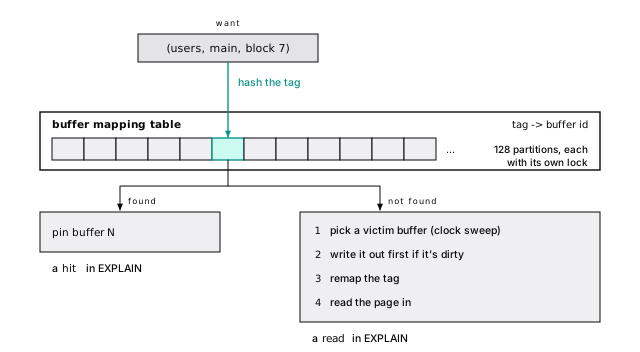
A hit is a quick lookup in one of 128 separately locked partitions, so backends rarely wait for each other. A miss does real work. When many sessions wait on BufferMapping (An active session with no wait event is on a CPU), they’re all missing at once: a working set that doesn’t fit, not a lock to tune.
A pin means “in use”
Before a backend touches a page, it pins the buffer. A pinned buffer can’t be evicted, so the page stays put while it’s read. Pins are short, but they last as long as a query sits on a page: an open cursor, or a slow client that stopped reading halfway, keeps its page pinned. That matters to vacuum. Vacuum can only clean a page nobody has pinned, so a parked cursor makes it skip the page or wait on a BufferPin event (Vacuum is not optional).
Open a cursor on accounts, fetch one row, and cached shows blocks 0, 1 and 2 each pinned by one backend. The cursor holds block 0, where its row came from. Blocks 1 and 2 are pinned too: since PostgreSQL 17, sequential scans read through a “read stream” that pins a few pages ahead so their I/O can already be in flight. While the pins exist, pg_buffercache_evict() (PostgreSQL 17+, superuser, for testing) refuses to evict those buffers. Commit, and the same call succeeds.
04-buffersUsage counts climb with every read
Each pin also bumps the buffer’s usage count, up to 5: the cache’s memory of how popular a page is. Evict accounts (nine pages), scan it, and count:
One scan, one point per page. Five scans, five points, and there it stays.
04-buffersThe clock sweep picks the victim
When a backend misses and every buffer is taken, something has to go. Postgres doesn’t keep a least-recently-used list (maintaining one on every hit would need a global lock). It runs a clock sweep:
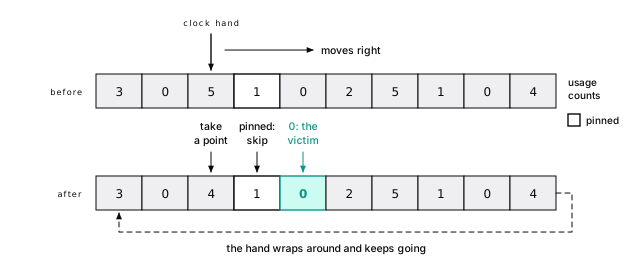
A page read once survives one pass of the hand. A page read constantly is back at 5 long before the hand returns, so it never reaches zero. Two consequences:
- One pass over cold data can’t push out the hot set. Cold pages arrive at count 1 and leave first, where a strict least-recently-used cache would evict everything older.
- Popularity is relative to churn. The hand moves as fast as backends miss. Miss a lot and it spins, and even popular pages fall out between visits. More misses cause more misses; that’s how a working set that outgrows the cache falls off a cliff.
Start from an empty cache: pg_buffercache_evict_all() (PostgreSQL 18, for testing only; never on a server you care about) throws out every unpinned page. Read accounts five times so its pages sit at 5. Then flood the cache: pg_prewarm reads the first 20,000 pages of events through the normal path, more than the 16,384 buffers there are.
Over 3,600 of the flood’s own pages are already gone, evicted by its newer ones, while the nine accounts pages survived, a point lighter per pass of the hand. Which older flood pages go depends on where the hand stood (on our runs, sometimes all of the first thousand, sometimes none). The shape doesn’t change.
pg_buffercache_usage_counts() (PostgreSQL 16+) gives the distribution server-wide. On the shared lab server, while a dozen labs ran at once, 13,578 of 16,384 buffers sat at 0 or 1 and 295 at 5: a cache too small for, or swept by, work that reads everything once. A cache doing its job on a steady workload has a fat tail at 4 and 5.
04-buffersYour query shouldn’t be the one writing dirty pages
An update changes the page in its buffer and marks it dirty; the data file isn’t touched. The change is already recorded in the write-ahead log, which must reach disk before the page does (Checkpoints put a limit on recovery). The page reaches the file later, written by one of three kinds of process:
| Who | When | Ideal share |
|---|---|---|
| Checkpointer | Every checkpoint writes all dirty buffers | Most writes |
| Background writer | Continuously, ahead of the clock hand | Some |
| Any backend | When the victim it picked is dirty | Few |
Watch the last row. A backend that picks a dirty victim must write it before reusing the buffer, and its query waits. When backends write a steady share of pages, shared_buffers is too small for the write load. pg_stat_io (PostgreSQL 16+) counts writes by process type (pg_stat_io catches backends writing dirty pages (PostgreSQL 16+)).
Update 50 accounts and cached shows two dirty pages on our runs: the one holding the old row versions and the one that received the new ones (Updates are inserts explains why there are two).
The checkpointer writes every buffer that was dirty when a checkpoint began, so recovery can start there. The background writer wakes every 200 ms (bgwriter_delay), finds dirty buffers the clock is about to reach, and writes up to 100 of them: at most 4 MB per second with the defaults. A backend writes when it has no choice; pg_buffercache_evict() shows the rule, flushing a dirty buffer before evicting it:
On our shared test server, one backend that ran a single scan while other labs bulk-loaded data had to write 2,909 other sessions’ dirty pages to make room.
04-buffersBig operations get a ring
A nightly report reading 275 MB through a 128 MB cache would flood it, if nothing stopped it. Something does. Operations that touch many pages once get a buffer ring: a small private set of buffers they recycle instead of taking new ones from the clock, so they evict their own pages, not yours.
| Operation | Ring | Size with defaults |
|---|---|---|
| Sequential scan of a table bigger than shared_buffers / 4 | bulkread | 256 KB, plus room for in-flight I/O: 2,304 KB in PostgreSQL 18 |
| VACUUM and ANALYZE | vacuum | vacuum_buffer_usage_limit, 2 MB (the setting is PostgreSQL 16+; 17 raised its default from 256 KB) |
| COPY FROM and CREATE TABLE AS | bulkwrite | 16 MB |
The scan threshold is a quarter of shared_buffers, 4,096 pages here. Scan events (35,173 pages) and users (1,126) once each from an empty cache, with parallel workers off:
The small table is cached whole. The big one went through its ring and left under 288 buffers behind, the size of one 2,304 KB ring (the exact count varies run to run).
Writes hold a surprise: insert ... select gets no ring. Load the same 2,000,000 integers both ways and COPY leaves one 16 MB ring in the cache, 2,048 pages, having written its own pages as it went. insert ... select leaves all 8,850 pages in shared_buffers, 69 MB of a 128 MB cache, with its dirty buffers for someone else to write. For a backfill into a new table, COPY or create table as is the polite way to load.
A ring stops one operation from evicting everyone else’s pages. It does nothing for the I/O: the report still reads all 35,173 pages, and because its pages don’t stay, the next run reads them all again. If a big scan runs often enough to matter, it needs an index or a summary table, not a bigger cache.
No ring is larger than an eighth of shared_buffers. The PostgreSQL 18 bulk-read ring is bigger than the classic 256 KB because asynchronous reads need buffers to land in: 8 KB times io_combine_limit (16) times effective_io_concurrency (16) on top, 288 buffers in all. The backend’s own I/O counters (pg_stat_get_backend_io(), PostgreSQL 18) show the full scan above reused buffers over 35,000 times in the bulkread context. With parallel workers, each worker gets its own ring.
The write experiment:
copied is 62 pages longer: COPY extends the file many pages at a time, and its last batch is still empty. Because a ring buffer full of new rows is dirty, COPY writes its own pages as it recycles them. That’s deliberate: a bulk load pays for its own writes instead of handing them to the background writer and to every other backend’s evictions.
04-buffersTemporary tables live in local buffers
Temporary tables never enter shared_buffers. Each session caches them in private local buffers, temp_buffers (8 MB by default), and a bigger temp table is read from its file on every scan. The setting can only be raised before the session first touches a temp table, so if your application builds big ones (reports, imports, staging), set it per role: alter role reporting set temp_buffers = '64MB'.
14 MB through 8 MB of buffers: every later scan reads all 1,792 pages again, because a sequential pass always evicts the page it will need next. (The first scan also set hint bits and wrote the pages back.) Raising the setting now fails:
In a fresh session with set temp_buffers = '32MB' first, the same scan shows Buffers: local hit=1792.
04-buffersThe OS page cache is the second tier
A miss in shared_buffers may still hit the kernel’s page cache. Rings send big scans there on every run, so that second tier is what makes a repeated report survivable, and it’s one reason to keep shared_buffers near a quarter of RAM rather than most of it (shared_buffers starts at 25% of RAM, not 80%).
A big table at usage 1 needs an index, not memory
Everything above is visible from SQL. This query ranks the current database’s tables and indexes by how much of the cache they hold:
Read it with the clock in mind. A table at a high percentage with average usage near 5 is your hot set, earning its place. A big table holding a large share of the cache at usage 1 is being read once and replaced: a candidate for an index, not more memory. The query walks every buffer, so run it on demand; pg_buffercache_usage_counts() (PostgreSQL 16+) is the cheap server-wide check, and most buffers at 0 or 1 means churn.
Warm the cache after a restart
A restart empties shared_buffers, and so does a failover to a replica that cached different pages. For the next hour every query that used to hit memory goes to the OS cache or the disk; on network storage, it can be the slowest hour of the week. pg_prewarm (a contrib extension) loads a relation on demand: select pg_prewarm('users') loaded all 1,126 pages, and the next full scan was all hits.
autoprewarm restores the last cache
Choosing tables by hand is guesswork. autoprewarm, part of the same extension, records what was in the cache and puts it back after a restart:
A background worker saves the list of cached blocks every 5 minutes and at shutdown, and loads them back at startup while the server accepts connections. It runs on standbys too, so after a failover the new primary starts from its own warm list. It costs one small file every few minutes; turn it on (managed services may not let you: Extensions come from an allowlist).
It works on indexes too (users_pkey is 276 pages) and takes a fork and a block range. Prewarmed pages get no special treatment: they start at usage count 1, and prewarming a table bigger than shared_buffers is the flood from earlier. Two other modes skip shared_buffers, 'read' and 'prefetch', for relations too big for it that still fit in RAM. autoprewarm’s list is a small text file, autoprewarm.blocks, one line per block; select autoprewarm_dump_now() saves it on demand.
04-bufferseffective_cache_size is a hint, not memory
effective_cache_size allocates nothing. It tells the planner how much data is probably cached, in both tiers, and a bigger value makes index scans look cheaper. Set it to 50 to 75% of the machine’s RAM (effective_cache_size is a hint: set it to 50% to 75% of RAM).
At 1 MB the planner assumes nearly every page fetched through the index is a fresh random read, and sorts a sequential scan instead. At 4 GB it walks the index. Nothing about memory changed; any session can set it. The cost model itself is in The planner is guessing.
Backend memory is private
Everything so far was shared. Each backend also has private memory, allocated as it works and invisible to other processes: a megabyte or two idle, a hundred or more mid-query (Memory: 1.5 MB idle, 109 MB mid-sort measured both). Two things decide most of it: working memory for queries, and caches of the system catalogs.
The biggest memory context names the culprit
Postgres allocates in memory contexts, arenas arranged in a tree, and frees a whole context when its job ends, a query’s when the query finishes. pg_backend_memory_contexts (PostgreSQL 14+) shows your own backend’s tree; for another, say a pooled connection that has grown to 2 GB, pg_log_backend_memory_contexts(pid) writes its tree to the server log. The biggest context names the culprit.
work_mem is per node, and you can see it
work_mem (4 MB by default) limits each sort or hash step of a plan, not each query. A merge join with two sorts holds two allowances at once: we caught a query with two Sort nodes holding just over 4 MB each. Add a hash join and that’s a third, at twice work_mem with the default hash_mem_multiplier. Multiply by connections, and that’s why we keep work_mem modest globally and raise it per role or per transaction (work_mem: multiply before you raise it).
Open the join as a cursor and fetch one row, so both sorts have finished and are held in memory:
Each sort sits at its own work_mem limit; the rest of each 300,000-row input spilled to temp files.
04-buffersThe catalog caches only grow
To plan a query, a backend needs the table’s definition, and it caches what it reads from the system catalogs for as long as the connection lives. Here’s one connection that ran a trivial query against each of 1,000 small tables:
About 9 KB per table and its index, in every backend that touched them, and discard all, which poolers run between clients, gives none of it back. With 10,000 partitions and 200 pooled connections, that’s gigabytes of RAM that show up in no plan.
Recycle connections: give pooled server connections a maximum lifetime (PgBouncer’s server_lifetime defaults to 3,600 seconds). An hour of growth is bounded; a month isn’t. And if tenants map to schemas, don’t route every tenant through every connection (Trust no tenant covers shared-table tenancy).
The source’s README for memory contexts says CacheMemoryContext is never reset or deleted: it holds the relcache (one entry per table or index opened) and the catcache (rows of the catalogs themselves).
04-buffersThe short version
- shared_buffers is an array of 8 KB buffers. The clock sweep evicts the first unpinned buffer at usage count 0, taking a point from each it passes: hot pages keep earning points, pages read once go after one pass.
- Changes dirty buffers in memory. The checkpointer should write most of them; backends that write their own victims are waiting on I/O. Check
pg_stat_io. - Big scans, VACUUM, and COPY or
create table asuse small rings and can’t flush your cache.insert ... selectdoesn’t, so prefer COPY orcreate table asfor bulk loads. - Temp tables use per-session
temp_buffers; set it per role if you build big ones. - See what’s cached with
pg_buffercache; turn on autoprewarm to come back warm after a restart or failover. effective_cache_sizeis a planner hint that can change plans; it allocates nothing.work_memis per sort or hash node, and catalog caches grow with every table a connection touches and never shrink. Cap connection lifetime in the pooler.
Further reading
- src/backend/storage/buffer/README, PostgreSQL source. The buffer manager’s own design notes: pins, content locks, the mapping partitions, clock sweep, and the rings.
- pg_buffercache, PGDG. Every column and function, including the summary, usage-count, and eviction functions and their version notes.
- pg_prewarm, PGDG. The prewarm modes and the autoprewarm settings.
- Resource consumption settings, PGDG.
shared_buffers,temp_buffers,work_mem,vacuum_buffer_usage_limit, and the background writer settings. - src/backend/utils/mmgr/README, PostgreSQL source. How memory contexts work and which ones live how long.
6 Updates are inserts
The users table in the example database is 9 MB. Run one statement against it:
Now it’s 18 MB, and its indexes grew from 8 MB to 12 MB. You changed no row’s size and added no rows, and the table doubled. Run vacuum and it’s still 18 MB.
None of this is a bug. It’s how Postgres lets many transactions read and write the same data without making readers wait for writers. The technique is multiversion concurrency control (MVCC), and its central rule fits in three words: updates are inserts. Once you see it in the pages, bloat, slow updates, vacuum that can’t keep up, and transaction ID wraparound stop being mysterious.
Readers never wait for writers
Picture a report that sums every account’s balance and takes ten seconds. Halfway through, another transaction moves money from an account the report hasn’t reached to one it has already counted. If the report reads whatever is on the page when it gets there, the money vanishes from its total.
One fix is locking: the report locks what it reads, and writers wait. Correct, and miserable. Postgres takes another route: it never overwrites a row in place. An update writes a new version of the row and leaves the old one where it is, marked with who replaced it. A reader that started before the update keeps seeing the old version; one that starts after sees the new one. Nobody waits.
The bill comes later: old versions pile up until nobody can need them, and vacuum has to clean them up. That pile is the bloat.
Every write gets a transaction ID
Two numbers in every row’s header are where the trouble in the rest of this book starts: bloat, vacuum work, and wraparound all trace back to them.
Every transaction that changes data gets a transaction ID (XID) from a server-wide counter at its first write; read-only transactions never take one. Every row version carries two of them in its header (A row costs more than its columns): xmin, the transaction that inserted it, and xmax, the one that deleted, replaced, or locked it (0 if none). Every events row has xmin 766, the seed, and xmax 0; select xmin, xmax, * from events shows them on any table.
(Our server was busy while we ran this chapter, so the XIDs below are large and jump between steps. Yours will differ.)
An update writes a whole new row
To watch versions being made, we need a page small enough to read in full. A per-account usage counter fits, the kind of row an application updates constantly:
Three rows, in slots 1 to 3 of page 0, inserted by transaction 869572. Now increment account 1’s counter. RETURNING with old and new (PostgreSQL 18+) shows both versions’ addresses:
The row moved to a new slot. The page now holds four tuples for three rows: the old version, still in slot 1 byte for byte, stamped with the updater’s XID and pointing at (0,4), and a complete new copy in slot 4:
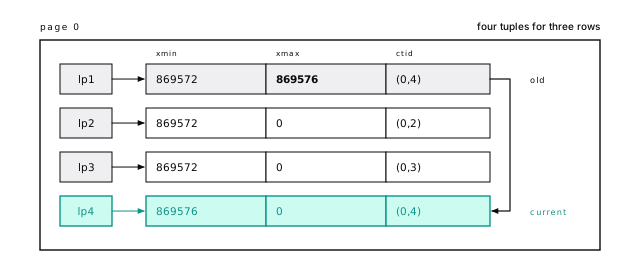
That’s the whole mechanism: an update inserts a new version and stamps the old one “replaced by 869576, see (0,4)”.
Every update writes a full new copy, however little changed. Increment a 4-byte counter in a 1 KB row and a new 1 KB tuple lands on the page. That’s why wide, frequently updated rows are expensive in Postgres, and why a hot counter belongs in its own narrow table, like account_usage.
HEAP_HOT_UPDATED on slot 1 and HEAP_ONLY_TUPLE on slot 4 mark this as a HOT update, the kind the HOT section below explains.
05-mvccThe lab also updates a counter in a row of about 1 KB and reads the new tuple’s length off the page: over 1,000 bytes. The write-ahead log is kinder. When the new version lands on the same page, Postgres logs only the bytes that changed, under 100 in our test, unless the record carries a full-page image or the server runs with wal_level = logical (Write it down first).
05-mvccA version is dead only when no snapshot can see it
Update account 1 twice more and its chain grows to (0,1) to (0,4) to (0,5) to (0,6): six tuples for three rows, three of them dead weight.
A version no transaction can ever see again is a dead tuple. “Ever” matters: a replaced version is dead only once every transaction that might still read it has finished. The oldest snapshot still running (a fixed view of what had committed, below) sets the xmin horizon: versions that died before it can go; the rest must stay. That line decides how much vacuum can clean, as the section on long transactions shows.
Dead tuples are removed two ways. Pruning happens on the fly, when a query reads a nearly full page: cheap, one page at a time, no index work. Vacuum does the full job, index entries included (Vacuum is not optional).
After vacuum account_usage, account 1’s three dead versions are gone and slot 1 is a redirect to slot 6, because the primary key index still points at (0,1). Tuples move; addresses don’t. That’s what the line pointer from A line pointer lets a tuple move without changing its address is for.
Before, the page held the whole chain:
After vacuum account_usage, with lp_off and lp_len added:
Slot 1 has lp_flags 2, redirect, with the target slot, 6, in its offset field. Slots 4 and 5 are 0, unused: they could be freed outright because they were heap-only, with no index entry pointing at them. Slot 6 moved to offset 8048. The fourth state, lp_flags 3, is dead: the tuple is gone but an index might still point at the slot. It stays until vacuum removes the index entries, then becomes unused.
05-mvccHOT updates skip the indexes
Indexes point at addresses, so a new version at a new address normally needs a new entry in every index on the table. Our updates to account 1 didn’t: they were HOT (heap-only tuple) updates, which stay on the same page and leave the indexes alone. That works only when no indexed column changed and the new version fits on the same page.
Break the first rule and the update goes cold. Index account_usage.updated_at, then update account 2’s updated_at, and the primary key gains a second entry for account 2, pointing at the new version’s slot, while account 1 still has its single entry after three HOT updates.
A packed page fails the second test. We loaded two copies of users, one at the default fillfactor of 100 and one at 85 (Fillfactor leaves room for updates), and updated every tenth row in each. At 100, not one of the 10,000 updates was HOT, and the table grew from 1,126 pages to 1,239. At 85, all 10,000 were HOT, and the table didn’t grow a page. Keep your updates HOT has the rest.
05-mvccA snapshot picks one version
With several versions of a row on the page, how does a query pick one? It works from a snapshot: a photograph of which transactions had committed, taken when the statement (or transaction) starts. You see a version if it was born before your photo and hadn’t died by then. At most one version in a chain passes.
Watch it from two sessions. Session A, transaction 869588, updates account 3 and leaves its transaction open:
Session B reads the same row:
B sees the old version, with A’s XID already in its xmax. A hadn’t committed when B’s photo was taken, so as far as B knows the old row hasn’t died and the new one hasn’t been born. B didn’t wait and didn’t block A.
When A commits, B’s next statement sees events_today = 100. Had A rolled back, nothing on the page would change: its version would carry an aborted xmin, invisible to everyone (Atomicity: nothing is ever undone).
InnoDB updates rows in place and keeps old versions in an undo log. Postgres keeps them in the table itself: rollback is instant and reads of current data are cheap, but every update writes a whole row and leaves a dead tuple for vacuum (Postgres is not MySQL).
The format is xmin:xmax:in-progress list. Every transaction below 868807 had finished. 869587 is one past the newest finished one; anything at or above it counts as still running, invisible whatever happens to it later. The list holds transactions in between that were still running (on a quiet server it’s usually short or empty). Session B took this snapshot while A was open, which is why A’s 869588 is invisible to it. Precisely: a version is visible when its xmin committed before the snapshot (or is your own transaction’s earlier work), and its xmax is empty, aborted, not yet committed as far as the snapshot knows, or only a lock.
At that moment both versions of account 3 were on the page, and pg_xact_status('869588') said in progress:
05-mvccA read can write
How does a reader know whether transaction 869588 committed? It asks the commit log (pg_xact), two bits per transaction, and the first reader to find out caches the answer on the tuple itself, in its hint bits.
Which means a read can write. The first select over freshly loaded rows sets hint bits on every tuple it reads, dirtying those pages so they’re written back to disk. After a bulk load, run vacuum analyze so that burst happens on your schedule, not your users’ (Vacuum and analyze before you open the doors).
After a plain select count(*) from hint_demo2, the same tuple reads {HEAP_HASVARWIDTH,HEAP_XMIN_COMMITTED,HEAP_XMAX_INVALID}: the select checked the commit log and wrote the answer into every tuple it read. With data checksums on, that write can cost a full-page image in the WAL too (With checksums, even a read writes WAL).
05-mvccA delete only stamps the row
A delete is simpler than an update: it stamps xmax and does nothing else. Delete a row and it’s still on the page at full size, with the deleter’s XID in its xmax. It’s gone from every new snapshot and still takes up the space. Deleting a million rows doesn’t shrink a table; it makes a million dead tuples for vacuum to turn into reusable space.
truncate is the exception. It stamps nothing: it swaps in a new, empty file, so a transaction whose snapshot predates it sees the table empty, not as it was (TRUNCATE). Don’t truncate a table that long-running readers, such as a report or a logical backup, may still be reading.
The row for account 4 was inserted just before, in a transaction that shows when an XID is assigned:
The delete itself:
Slot 7 is still in use at full size, with its t_ctid pointing at itself (there’s no newer version) and the flag HEAP_KEYS_UPDATED, which every delete sets and row locks care about.
05-mvccAn xmax isn’t always a delete. Row 42 of accounts, which nobody has touched, has xmax 766, the seed’s events transaction, with the flags HEAP_XMAX_KEYSHR_LOCK and HEAP_XMAX_LOCK_ONLY. Each event has a foreign key to accounts, and to stop the account being deleted mid-insert, Postgres took a lightweight for key share row lock on it. Row locks live in xmax, so even a foreign key check on insert writes to the referenced row’s page. When several transactions lock one row at once, xmax holds a MultiXact ID instead, pointing to a list in pg_multixact; MultiXacts have their own wraparound limits, which the vacuum chapter watches too. Row locks in general are in Everyone waits in line.
A repeatable read session takes its snapshot. Another session runs truncate imports and delete from deletes_demo (500 rows each) and commits. The first session looks again:
delete respects the snapshot. truncate swapped in a new empty file under an ACCESS EXCLUSIVE lock, and the old one is gone for everyone.
05-mvccVacuum frees space inside the table, not on disk
Now the experiment from the start of the chapter, measured. The pgstattuple extension reads every page of a table and reports how its space is used:
Run it fresh from the seed, again after update users set name = upper(name), and again after vacuum users:
The update doubled the table, and since none of it was HOT (the pages were full), both indexes got 100,000 new entries too. Vacuum removed the dead tuples and left an 18 MB table that’s half free space. Vacuum makes free space inside the pages, not on disk: it can only hand back empty pages at the very end of the file, and here the old versions filled the first half.
That space isn’t wasted; a second full update reused it, and the table stayed at 18 MB, not 27. A table updated in bulk settles at its live rows plus the dead ones that pile up between vacuums. That extra is bloat. A little is normal, even useful. A table at 5x its live data is a problem: every scan reads 5x the pages, and the cache holds 5x fewer useful rows. And it came from something that looks harmless in application code: a one-off backfill that touches every row.
05-mvccThe second full update was barely HOT: pg_stat_user_tables counted 50 HOT updates out of 100,000. The live rows were packed into the second half of the table, and all the free space was on other pages.
When you must update most of a large table, do it in batches of a few thousand rows with a vacuum (or enough autovacuum) in between, so later batches reuse the space earlier ones freed. Backfill in short batches that walk the primary key has the pattern. Shrinking an already bloated table takes a rewrite, covered in the vacuum chapter.
Long transactions hold everything back
Vacuum can only remove a dead tuple no snapshot could still see. So one old snapshot, anywhere in the database, holds back cleanup in every table. It’s one of the most common causes of runaway bloat, and you can watch it happen.
Session A starts a repeatable-read transaction (so its snapshot is fixed until it ends), reads something, and sits there. pg_stat_activity shows its snapshot’s horizon as backend_xmin, 868917: the oldest transaction still running when A took its snapshot. Meanwhile, session B deletes half of a table and vacuums it:
60,000 dead but not yet removable: the 50,000 just deleted, plus 10,000 left by the fillfactor experiment. The cutoff is exactly session A’s backend_xmin. A never touched users_ff100, and it doesn’t matter: its snapshot predates the delete, so it could still ask for those rows. Once A commits, the same vacuum removes all 60,000 and truncates the table from 1,239 pages to 1,126.
05-mvccIn production the blocker is a connection left idle in transaction by a missing commit, a six-hour analytics query, or a migration someone started in psql before lunch. The usual suspects: long transactions (including on a replica with hot_standby_feedback on), idle-in-transaction sessions (set idle_in_transaction_session_timeout), unconsumed replication slots, and forgotten prepared transactions. Alert when any transaction has been open longer than a few minutes; Vacuum can’t remove what an old snapshot might need has the queries that find each one.
Old rows must be frozen before the XID counter wraps
XIDs on disk are 32 bits, and Postgres compares them in a circle, so a row whose xmin fell more than about 2.1 billion transactions behind would suddenly look like it came from the future and vanish. Vacuum prevents that by freezing old rows, marking them visible to everyone forever, and a page whose rows are all frozen is skipped by every later vacuum. If freezing falls behind, usually because something holds the xmin horizon back, Postgres stops accepting writes; Wraparound stops writes before anything is corrupted covers the settings, the monitoring, and the recovery.
relfrozenxid is a table’s guarantee that no unfrozen tuple is older; account_usage’s was 869572, 27 transactions old. Freeze it explicitly (the deleted row for account 4 goes in the same pass):
Freezing sets the “committed” and “invalid” hint bits together, a combination that otherwise makes no sense; the pair means frozen. The original xmin stays for debugging but is no longer consulted. relfrozenxid jumps to the present (age 1), and the visibility map marks page 0 all-visible and all-frozen. You never run vacuum freeze by hand in normal operation; autovacuum freezes as part of its regular work.
05-mvccIsolation levels mostly decide when the snapshot is taken
Snapshots explain the isolation levels too: the main thing a level changes is when the snapshot is taken. Read committed, the default, takes one per statement, so two selects in one transaction can see different data. Repeatable read and serializable take one per transaction, so updating a row someone changed since then fails with a serialization error, and the application must retry (Only serializable rules out every anomaly and Everyone waits in line have the rest). At every level, an open transaction’s snapshot holds back vacuum. Keep transactions short.
The short version
- Postgres never updates a row in place. An
updatewrites a complete new version and stamps the old one with the updater’s XID; adeleteonly stamps it. Both leave dead tuples. - A snapshot decides which version of each row a query sees, so readers and writers never block each other.
- HOT updates skip every index when no indexed column changes and the new version fits on the page. Don’t index columns that change on every update without deciding it’s worth it.
- Vacuum turns dead tuples into reusable space inside the table; it rarely shrinks the file. Do big updates in batches.
- One long or idle-in-transaction session blocks cleanup in the whole database. Alert on transaction age.
- Old rows must be frozen before their XIDs fall about 2 billion transactions behind; the vacuum chapter covers watching it.
- The first read of fresh rows writes hint bits; after a bulk load, run
vacuum analyzebefore users hit the data.
Further reading
- Concurrency control: introduction and transaction isolation, PGDG. The official model, and exactly what each isolation level guarantees.
- Preventing transaction ID wraparound failures, PGDG. Freezing, the age settings, and what happens near the limit.
- src/backend/access/heap/README.tuplock, PostgreSQL source. How row locks and MultiXacts live in
xmax. - Hint Bits, PostgreSQL wiki. Why reads can write, in more detail.
- Concurrency control, Hironobu Suzuki, The Internals of PostgreSQL. The visibility rules worked through with diagrams.
7 Keep your updates HOT
Take a copy of users with six indexes and update 5,000 rows, bumping a counter that no index covers. Postgres writes 438 KB of WAL. Bump the same counter plus updated_at, which is indexed, the way most ORMs do on every save, and the same 5,000 rows write 2.96 MB: almost seven times as much. One row at a time, the gap swings wider still: 127 bytes for one update, 15,327 for the other, when two of the index pages it touched had to be logged whole. The difference is whether the update was HOT.
Every update writes a whole new version of the row at a new address (An update writes a whole new row), and indexes point at addresses. Left alone, every update would write a new entry into every index. HOT, short for heap-only tuple, is the escape hatch: the new version stays on the same page, and the indexes never hear about it.
You never turn HOT on. It’s always on, and your schema decides how often it works: which columns you index, how full you pack your pages, and how long your transactions stay open. Get those three right and nearly every update skips the indexes.
A cold update pays for every index
Call an update that isn’t HOT a cold update. It writes a new tuple (the whole row), plus one new entry in every index, even indexes whose columns didn’t change, plus WAL for all of it. A HOT update writes the tuple and its WAL. That’s it.
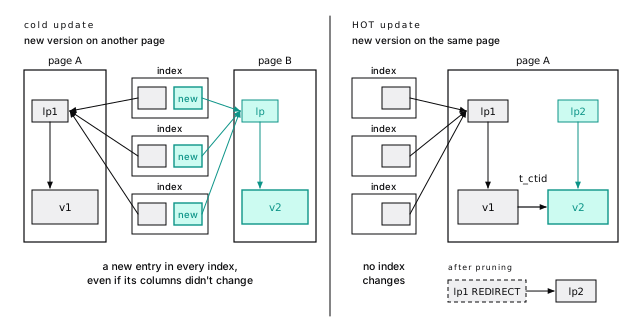
Here is the opening experiment in full. We updated 5,000 rows of a users copy, built with 10 percent free space on every page (fillfactor 90, below), two ways, with one, three, and six indexes on the table, away from any checkpoint. The HOT update bumped login_count, which no index covers. The cold one also bumped updated_at, which is indexed (with one index, that index is on updated_at):
| Indexes | HOT WAL | Cold WAL | Cold vs HOT | Buffers, HOT | Buffers, cold |
|---|---|---|---|---|---|
| 1 | 438 KB | 999 KB | 2.3x | 11,370 | 21,504 |
| 3 | 438 KB | 1.91 MB | 4.5x | 11,370 | 46,906 |
| 6 | 438 KB | 2.96 MB | 6.9x | 11,370 | 87,026 |
Read the HOT columns: 438 KB and 11,370 buffers whatever the index count. HOT updates don’t see your indexes. Each index adds about one HOT update’s worth of WAL to the cold side, and with six the cold batch touched 7.7 times the buffers.
Then the bill keeps coming. Vacuum after the HOT updates had nothing to remove from any index; after the cold ones it read every page of all six. And every replica replays the same WAL (Uber hit this asymmetry, and both sides were right).
06-hotThe pg_walinspect extension (PostgreSQL 15+) reads records back out of the log. After a checkpoint we ran four single-row updates on the six-index table, alternating HOT and cold:
- Update 1, HOT: one record carrying two full-page images (heap and visibility map), because both pages were touched for the first time since the checkpoint (The first change after a checkpoint logs the whole page).
- Update 2, cold: seven records, one heap and one per index, each with its own 8 KB image. 52,359 bytes, about 51 KB.
- Update 3, HOT: 71 bytes plus a 56-byte prune record. 127 bytes.
- Update 4, cold: seven records plus the prune. Four index inserts hit leaves already imaged (64 to 80 bytes); two didn’t and paid 7,400 bytes each. 15,327 bytes.
A cold update costs one extra record per index, and each is a chance at an 8 KB image. In the first 5,000-row batch after a checkpoint, images dominate both kinds: HOT wrote 10.0 MB, cold with six indexes 24.3 MB in 35,250 records (per row, one heap record plus one per index, and 250 deduplication passes on top). That’s 24.3 MB to every replica.
06-hotHOT needs an unindexed change and room on the page
An update misses HOT for one of two reasons, and the fix depends on which. We’ll name them and use the names for the rest of this chapter:
- An update is HOT-safe when it changes no indexed column. (Since PostgreSQL 16, columns covered only by BRIN indexes don’t count.)
- An update is HOT when it’s HOT-safe and the new version fits on the same page as the old one.
Every column an index mentions is indexed
“Indexed” means anywhere in any index definition, not just key columns. We gave a copy of projects five kinds of index:
Then ran one update at a time, watching n_tup_hot_upd in pg_stat_user_tables:
| Update | Why you might expect HOT | HOT? |
|---|---|---|
set archived_at = now() | no index stores archived_at | no |
set name = name || ' (old)' | name is only in INCLUDE | no |
set slug = upper(slug) | lower(upper(slug)) is the same value | no |
set created_at = created_at - interval '1 day' | only a BRIN index covers it | yes |
set budget = 1.00 (was 1.0) | equal as numbers | no |
set name = name, account_id = account_id, budget = budget | nothing changed | yes |
Read the “no” rows as warnings. A partial index’s predicate counts, so a soft-delete column used in partial indexes makes every archive and restore cold. INCLUDE columns count: a covering index costs you HOT on its passengers. Expression indexes count the column, not the result. BRIN points at ranges of pages, not rows, so it needs no new pointer.
Changed means different bytes
“Changed” isn’t the SET list, and it isn’t SQL equality: Postgres compares each indexed column’s old and new bytes. So set name = name is HOT-safe, good news for ORMs that write every column back. And 1.0 to 1.00 is cold although the numbers are equal, because the bytes aren’t.
A HOT version never leaves its page
The second condition is physical. A HOT version never leaves its page, so a lookup that lands on the page finds it there. If the new version doesn’t fit, it goes elsewhere and gets an entry in every index. You control that room with fillfactor, below.
The moment an index exists on a column, even one still being built with create index concurrently and not yet valid, updates of that column stop being HOT. The concurrent build waits out running transactions precisely so that every session treats the column as indexed before it starts. If a build fails and leaves an invalid index behind, drop it: ours was never finished and still made updates of its column cold.
06-hotThe lab also checks every row of the rules table.
06-hotA HOT lookup follows the chain without leaving the page
A HOT update works like a forwarding note taped to an old apartment door. The index keeps the old address; the old version says “moved to slot 3, same building”, and the lookup follows the note without leaving the page. The versions, linked through their t_ctid fields, form a HOT chain. The lp numbers are line pointers, the numbered slots at the top of a page (A line pointer lets a tuple move without changing its address):
- The index never moves. A lookup lands on
lp1and walks the chain to the version its snapshot can see: one index page, one heap page, however long the chain. - Pruning turns the chain into a redirect. Once old versions are dead to every snapshot, the next visitor prunes them (A version is dead only when no snapshot can see it), leaving
lp1as a redirect to the newest version, with no index touched. That’s half of HOT’s value: space comes back during normal traffic. - Only vacuum finishes the job. When the whole chain dies,
lp1stays as a dead stub until vacuum removes the index entry.
A counters table with 128 short rows fills one page to within 488 bytes. With another session holding a repeatable-read snapshot, we updated row 1 three times:
HEAP_HOT_UPDATED means “my successor is heap-only, follow my t_ctid”; HEAP_ONLY_TUPLE means “no index points at me”. bt_page_items shows one index entry for key 1, still at (0,1), and an index scan reads 2 buffers. Following a link, the scan checks that the next version’s xmin matches the previous xmax, because a slot can be freed and reused between visits: a ctid is an address, not an identity.
When the other session commits, the same select prints WAL: records=1 bytes=64. A read pruned the page: slot 1 is now a redirect (lp_flags 2) to 131, and 129 and 130 are unused (lp_flags 0). A page holds at most 291 line pointers, which keeps tiny rows from filling it with stubs.
06-hotPruning waits for a nearly full page
Whatever query touches the page prunes it, selects included, when two things hold. The page carries a hint, set by any update or delete, that it may hold dead versions. And it has less free space than the larger of its fillfactor reserve and 10 percent of the page (819 bytes). A roomy page isn’t pruned on access; vacuum gets it eventually.
Pruning is WAL-logged, so reads write. Don’t be surprised by WAL from a read-only workload (With checksums, even a read writes WAL has the other reason).
Three rows, two updates of row 1, then an index scan: no WAL, and page_header() shows 7,988 bytes free with a prune hint set. All five versions stay. The counters page started with 488 bytes free, under the 819-byte line, so its first visit pruned it. The rule is heap_page_prune_opt in the source.
Two more wrinkles. Pruning needs a cleanup lock (nobody else has the page pinned) and doesn’t wait for one, so a very busy page can skip pruning and send a HOT-safe update elsewhere. And an update can’t prune the page under the row it’s updating at that moment, so room for the next HOT update usually comes from an earlier visit.
06-hotLeave room on the page, or every update moves
A freshly loaded table is packed. Fillfactor is the percentage of each page that inserts may fill before moving on to the next one; the rest is held back for updates. It defaults to 100, so a freshly loaded page has no room to spare, and its first update goes cold, HOT-safe or not. You set it per table:
We made three copies of users with a login_count (two indexes) at fillfactor 100, 90, and 70, and ran 200,000 single-row updates on random users from four pgbench clients (pgbench is the load generator that ships with Postgres), autovacuum on:
| Fillfactor | HOT | Moved to a new page | Pages before / after | Index size after |
|---|---|---|---|---|
| 100 | 92.2% | 15,542 | 1,137 / 1,311 | 8,336 KB to 8,624 KB |
| 90 | 100% | 0 | 1,266 / 1,266 | 8,336 KB, unchanged |
| 70 | 100% | 0 | 1,613 / 1,613 | 8,336 KB, unchanged |
At fillfactor 100, 15,542 updates went cold, and the packed table ended up bigger than the fillfactor 90 one, with grown indexes on top. It paid for the headroom anyway, in the worst currency. Batch jobs are harsher: one update of 10 percent of the rows at fillfactor 100 got 0 of 10,000 HOT and wrote five times the WAL of the same statement at 90.
06-hotFillfactor 100 did better than you might expect in the pgbench run because pruning frees a slot or two per page once the first update moves a row off it. Concurrency and autovacuum timing move those numbers, so the lab runs a repeatable version: 50,000 random single-row updates from one session. Fillfactor 90 stays at 100 percent HOT; fillfactor 100 lands around 95 percent and starts to grow. Batches can’t lean on pruning, because one statement updates many rows on a page before anything is pruned.
The batch run, update ... set login_count = login_count + 1 where id % 10 = 0 on fresh copies:
| Fillfactor | HOT | WAL records | WAL | Buffers touched |
|---|---|---|---|---|
| 100 | 0 of 10,000 | 40,471 | 3.5 MB | 103,024 |
| 90 | 10,000 of 10,000 | 10,000 | 703 KB | 22,532 |
After five such batches, the fillfactor 100 table had worked up to 77 percent HOT and to exactly 1,266 pages, the size of the fillfactor 90 table, after paying 11,365 cold updates and 43 extra index pages to get there.
06-hotHeadroom costs space before it pays off
The reserve is empty on day one: fillfactor 90 made the table 11 percent bigger, 70 made it 42 percent bigger, and bloat estimators will call the reserve bloat. Leave append-only tables like events at 100. Start update-heavy tables at 90, and go to 70 or 80 for rows of several hundred bytes, or if n_tup_newpage_upd keeps climbing.
Setting it later applies only to new pages. Existing ones stay packed until a rewrite (Rebuild bloated tables without locking them); on a big live table, skip the rewrite and let new pages pick it up.
Fillfactor only helps HOT-safe updates. If an index covers the column you update, no amount of free space makes those updates HOT. Check which half of the rule you’re failing before you resize a table.
A busy table should be above 90 percent HOT
Postgres counts this for you. pg_stat_user_tables has n_tup_upd (all updates), n_tup_hot_upd (HOT ones), and n_tup_newpage_upd (PostgreSQL 16+: the new version went to another page, so it’s cold). A cold update that stayed on its page had room, so it changed an indexed column. One that moved had no room:
High index_changed: an index covers a column your updates change, and fillfactor won’t help. High no_room: the pages are full; lower fillfactor or hunt for long transactions (next section). Both: fix the indexes first, because a move counts as no_room even when an indexed column changed too.
Watch the change over a day, not lifetime totals. Above 90 percent is healthy on a table with real update traffic; a low number on a busy table is the first thing to fix.
On the lab database:
churn changes an indexed column on every update, and 127,233 of those also moved page, which is why “fix the indexes first”. Backends flush statistics up to about a second after a transaction ends. In a script, call select pg_stat_force_next_flush(); first, or read pg_stat_xact_user_tables inside the transaction. For one statement, explain (analyze, buffers, wal) inside a rolled-back transaction shows about one WAL record per row for HOT, one plus one per index for cold; across the workload, pg_stat_statements ranks statements by wal_bytes.
06-hotA long transaction turns HOT off
Pruning can only remove versions that are dead to every snapshot. One old snapshot anywhere in the database, and nothing newer can be pruned. Old versions pile up, pages fill, and HOT-safe updates start moving and writing index entries.
We repeated the five batches on a fresh fillfactor 90 table while another session sat in an open repeatable-read transaction:
| 50,000 updates, fillfactor 90 | HOT | Heap pages | Index pages |
|---|---|---|---|
| No open transaction | 100% | 1,266 to 1,266 | 1,042 to 1,042 |
| Another session holding a snapshot | 22.8% | 1,266 to 1,755 | 1,042 to 1,429 |
The other session never touched the table. It held a snapshot for a few seconds, and the HOT rate fell to 23 percent while the table and its indexes grew by more than a third, for good. The same snapshot blocks vacuum too (Vacuum can’t remove what an old snapshot might need). Keep transactions short and set idle_in_transaction_session_timeout.
06-hotHOT is a design decision you make once
Every cold update in this chapter came from an index or a full page. Both are schema choices, so you fix them once.
Don’t index updated_at
Almost every ORM sets updated_at on every save. Index it, and every update to that table is cold, on every index. Before indexing any column that changes on most updates (updated_at, last_seen_at, status, counters, locked_by), name the query that needs it:
- “What changed since my last sync?” is better served by an append-only change log or outbox table.
- A BRIN index on
updated_atis HOT-safe (PostgreSQL 16+), but HOT keeps rows where they are, so the values drift out of physical order fast. Measure first. - A rarely run admin query can scan. Ten seconds a day beats making millions of updates cold.
Move hot counters to a narrow table
A counter on a wide row copies the whole row on every increment and drags it through the cache for eight bytes. We put a view_count on a profiles table with a 416-byte bio (6,667 pages), and the same counter in a two-column side table (599 pages). Both stayed 100 percent HOT, but right after a checkpoint, 10,000 increments wrote 49.3 MB of WAL on the wide table and 4.9 MB on the narrow one: a tenth of the page images, and counters that stay in cache.
Do it for last_seen_at, login_count, rate limits, heartbeats: anything written far more often than its row. Batch very frequent increments. And don’t keep a count with a trigger on a busy table (A counter trigger serializes your writers).
In steady state the WAL gap closes (1.06 MB against 764 KB for the second batch), because an update that stays on its page logs only the changed bytes, unless wal_level is logical. And the 10 percent reserve is shared by ten times as many narrow rows: one statement bumping every fifth row kept 67 percent HOT on the wide table and 54 percent on the narrow one.
06-hotMake your ORM write less
An unconditional updated_at bump is a new row version, and cold if updated_at is indexed. A save with no real change is HOT-safe but still writes a version, WAL, and future vacuum work. Use dirty tracking, and in plain SQL, guard it:
Bottom-up index deletion is the safety net
Since PostgreSQL 14, a B-tree whose key didn’t change cleans up after cold updates: before splitting a leaf, it deletes entries there that point at dead versions. It’s a safety net, not a substitute for HOT. Every cold update still wrote and logged its entries, and the index whose key changed keeps its garbage until vacuum.
The churn table (id, email, and updated_at, each indexed; no vacuum) took 300,000 cold updates in 30 batches, all changing updated_at:
| Index | Key changed? | Heap pointers held | Pages before / after |
|---|---|---|---|
churn_updated_at_idx | yes | 400,000 | 276 / 1,098 |
churn_pkey | no | 196,685 | 276 / 551 |
churn_email_idx | no | 189,244 | 499 / 975 |
The updated_at index holds every live and stale entry. The other two deleted 68 and 70 percent of their stale entries on the fly.
06-hotThis is the trade Postgres made
Postgres indexes point at physical addresses: lookups are direct, and every cold update writes to every index. MySQL’s InnoDB made the opposite bet: an update there touches only the indexes whose columns changed, so indexing updated_at costs one index write per update, and here it can cost every index (An update writes one row, or every index). HOT narrows the gap, which is why the cost depends so much on your schema. You can nearly always reshape the tables that hurt. Do that before blaming the database.
The short version
- A cold update writes an entry in every index, plus WAL, vacuum work, and the same on every replica: 6.9 times a HOT update’s WAL with six indexes.
- HOT-safe means no indexed column changed; HOT means that plus room on the page. Know which half you’re failing.
- Indexed means anywhere in an index: key,
INCLUDE, expression, or partial predicate (BRIN-only columns excepted, PostgreSQL 16+). - Don’t index
updated_ator other columns that change on most updates without a query you can name. - Give update-heavy tables
fillfactor = 90(lower for wide rows); leave append-only tables at 100. - Track
n_tup_hot_updandn_tup_newpage_updagainstn_tup_updto see whether to fix indexes or room. - One held snapshot dropped our HOT rate from 100 to 23 percent and grew every index. Keep transactions short.
- Move constantly changing counters to a narrow table, and don’t write rows that didn’t change.
Further reading
- src/backend/access/heap/README.HOT, PGDG source. The design document: chains, redirects, pruning, and how
CREATE INDEXcopes with existing chains. - Heap-Only Tuples (HOT), PostgreSQL documentation. The two official conditions, including the summarizing-index exception.
- B-tree bottom-up index deletion, PostgreSQL documentation. How PostgreSQL 14+ limits index bloat from cold updates.
- HOT updates in PostgreSQL for better performance, Laurenz Albe, CYBERTEC. A compact practitioner’s walk-through of the conditions and fillfactor.
- The Part of PostgreSQL We Hate the Most, Andy Pavlo and Bohan Zhang. A researcher’s case against append-only versioning, with fleet data on how often updates are HOT.
8 Write it down first
On a laptop VM whose disk takes 7.7 ms to flush, a loop that inserts one row per transaction manages about 130 commits per second. Change one session setting and the same loop does 16,500. Run eight copies side by side and, instead of slowing each other down, together they do about 1,240.
None of that is about the rows. A single-row insert is a few hundred bytes of real work. The whole difference is one file, the write-ahead log, and the moment Postgres waits for it to reach disk.
Know what goes into that file, when it must hit disk, and why it swells after a checkpoint, and you can make writes cheap without making them unsafe.
Write the log, not the pages
Postgres changes pages in memory, in shared_buffers. A changed page is dirty, and sooner or later it has to go back to disk (Your query shouldn’t be the one writing dirty pages).
Writing every dirty page at every commit would be slow: scattered files, a full 8 KB write for a 20-byte change, hot pages written over and over. So Postgres does what a shop does at the till: it writes each sale in a ledger and restocks the shelves after closing. Each change goes into a compact record appended to one sequential log, the write-ahead log (WAL). A commit waits only for the log to reach disk; the data pages follow later, in batches. If the server crashes first, the log holds everything needed to redo the changes.
The name is the rule: the log record must reach disk before the page it describes.
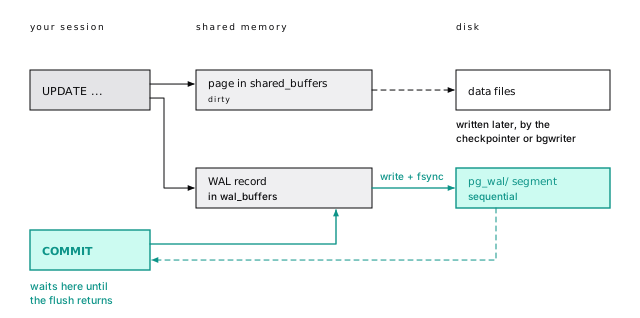
A sequential append is the cheapest durable write there is, and concurrent transactions can share one flush. That second fact explains the opening numbers.
Of the four ACID promises, the WAL keeps durability: a transaction is committed the instant its commit record is safely in the log (ACID, honestly takes all four letters apart).
A WAL record is small; a page image is not
A WAL record says “on block N of relation R, do this”, and it’s small. Update one row of wal_demo, a 200,000-row copy of events, and the log gets two records: a 150-byte HOT_UPDATE carrying the whole row change, and a 34-byte COMMIT, the record your COMMIT waits on.
That’s the quiet case. When the page hasn’t been logged since the last checkpoint (the periodic write of every dirty page, below), the same update also drags in an 8 KB page image. On most write workloads, images, not records, are where most of the WAL comes from.
The pg_walinspect extension (PostgreSQL 15+) reads WAL records from SQL. The update changed kind, which isn’t indexed, so it was HOT (Keep your updates HOT):
Filter by xid: the log is shared by every database in the cluster, so a range of LSNs also holds other sessions’ records.
07-walLSNs are byte offsets
Every WAL record has an address, its log sequence number (LSN): a byte offset into one endless stream, written like 2/8BE4C8B0. Subtract two LSNs (pg_wal_lsn_diff()) and you get bytes of WAL, which is how you’ll measure it.
LSNs also enforce the write-ahead rule. Each data page remembers the LSN of the last record that changed it, and Postgres won’t write the page until WAL is flushed that far. On disk, the stream is cut into 16 MB segment files in pg_wal/.
Three hex fields: the timeline (00000001, which changes after a failover or point-in-time restore), the high half of the LSN (00000002), and the segment within it (00000060, which is 0x60C91650 divided by 16 MB). pg_waldump, which ships with Postgres, prints the records in those files from the command line, with each block as rel tablespace/database/relfilenode blk N.
pg_current_wal_lsn() is the current position. Bracket a batch job with two readings and subtract, and you’ve measured the WAL the whole cluster wrote in that window: the 10,000-row insert below “measured” 1,901 KB on our idle lab kit, and once 5 MB while other databases were busy.
07-walEXPLAIN shows the WAL a statement writes
explain (analyze, wal) (PostgreSQL 13+) runs a statement and reports the WAL it generated. Unlike an LSN diff, it counts only this statement, so other sessions can’t skew it:
Ten thousand rows, 20,027 records: one heap insert and one primary-key insert per row, plus a few for new pages. About 193 bytes per row, the steady-state price of a table with one index. Each extra index adds a record per row. explain analyze really runs the statement, so wrap writes in begin; ... rollback;.
For a whole batch job, or a 60-second sample of production, subtract two LSN readings instead. That measures the cluster, not one statement, and it’s your WAL rate: the number that sizes replica bandwidth, backup storage, and max_wal_size.
The WAL: line shows records, bytes, fpi (full-page images, omitted when zero), and buffers full (PostgreSQL 18+): how often the WAL buffer filled and a backend had to write it out itself. Occasional is fine; constant means wal_buffers is small for your write rate. Across a workload, pg_stat_statements tracks wal_bytes per query (Watch it run).
07-wal07-walCheckpoints put a limit on recovery
Without checkpoints, crash recovery would replay WAL from the beginning of time. A checkpoint writes every dirty buffer to the data files and fsyncs them. When it finishes, every change before its start (the redo point) is safely on disk, so recovery can begin there:
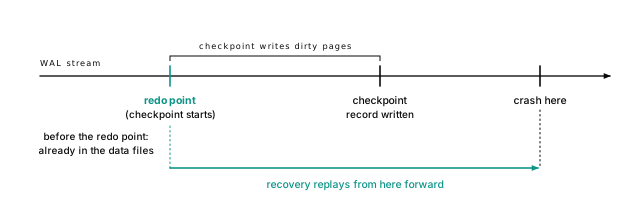
A checkpoint starts when checkpoint_timeout elapses (default 5 minutes), or sooner if WAL piles up. max_wal_size (default 1 GB) is the WAL Postgres tries to keep between checkpoints, and since a checkpoint’s writes are spread out while more WAL arrives, it requests one after a little over half of that: about 540 MB at the defaults.
pg_stat_checkpointer (PostgreSQL 17+) counts the first kind as num_timed and everything else as num_requested, which includes WAL-triggered checkpoints and every manual CHECKPOINT command (this chapter’s experiments run several). With log_checkpoints on, the server log names each one’s reason: time, wal, or immediate force wait for a manual one. On a healthy system, timed checkpoints dominate. During a bulk load, wal checkpoints are expected. On a steady production workload, raise max_wal_size until they’re rare.
The checkpointer spreads its writes over 90 percent of the interval (checkpoint_completion_target, default 0.9) so it doesn’t hammer the disk. Leave it there.
That’s our lab server after a run of bulk loads and manual CHECKPOINTs, never up long enough for a timed one. num_timed also counts timed checkpoints skipped because nothing had changed; PostgreSQL 18’s num_done counts the ones that actually ran.
The redo point is earlier than the checkpoint record because a checkpoint takes a while: it starts at the redo point, writes dirty pages, and logs completion at the end. Before PostgreSQL 17, the counters lived in pg_stat_bgwriter. log_checkpoints is on by default since PostgreSQL 15, and a “checkpoints are occurring too frequently” hint appears when WAL-triggered ones come closer than checkpoint_warning (30 seconds).
The first change after a checkpoint logs the whole page
Postgres pages are 8 KB, but storage typically guarantees atomic writes of only 4 KB. A power cut mid-write can leave half a new page and half an old one: a torn page, which no small “put this tuple at offset 46” record can repair.
So Postgres does something blunt and reliable: the first time a page changes after a checkpoint, its WAL record includes a complete image of the page. Recovery restores that full-page image (FPI), then applies later records on top. This is full_page_writes, on by default. Leave it on.
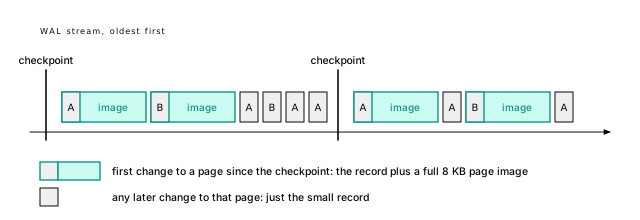
One experiment shows the cost. Checkpoint, update 1,100 rows scattered across wal_demo’s 3,759 pages, then run the same update again:
Same rows, same kind of change. Right after the checkpoint: 17.1 MB of WAL, almost all of it 2,204 page images. The second time, with every page already imaged: 384 KB.
That’s one forty-fifth of the WAL for the same work.
07-walOn a live system this makes a sawtooth: WAL jumps after each checkpoint as hot pages get their first images, then decays. Three rules follow:
- More frequent checkpoints mean more WAL. Each one resets every page’s “already imaged” state. Halving the interval can nearly double the WAL of a random-update workload, which is the main reason to raise
max_wal_sizeandcheckpoint_timeouton write-heavy systems. - Scattered writes cost more than clustered ones. 1,000 updates on 1,000 pages can mean 1,000 images; on 20 pages, 20. Random UUIDv4 keys (Pick your keys once) and every index on a cold update (A cold update pays for every index) pay this way.
- Fewer checkpoints mean longer crash recovery. That’s the trade, below.
With checksums, even a read writes WAL
A page doesn’t even have to change to be imaged. Readers set hint bits on a page to cache what they learned about a row’s transaction (A read can write). With data checksums, on by default since PostgreSQL 18, the first hint-bit change to a page after a checkpoint is logged as a full-page image, or a torn page would fail its checksum. (wal_log_hints = on does the same without checksums.)
So a read can write WAL: the first count(*) of a freshly loaded 1,667-page table wrote 1,667 page images, about 13 MB. Pay it, because checksums catch silent corruption, but make the burst happen on your schedule (Vacuum and analyze before you open the doors).
The insert left every row’s commit status unknown on the page. The select looks each one up, sets the hint bits, and, being the first change to each page since the checkpoint, logs one image per page.
07-walwal_compression is a cheap win
If page images are most of your WAL, shrink them. wal_compression compresses full-page images (not ordinary records) before they go into the log. It’s off by default. We ran the same image-heavy update after a checkpoint, once per setting. Each run followed a warm-up run that leaves the table in the same layout every time; that layout touches fewer pages than the very first run above, so there are fewer images:
| wal_compression | fpi | WAL bytes | vs off |
|---|---|---|---|
| off | 621 | 4,990,834 | 100% |
| lz4 | 619 | 2,927,214 | 59% |
| zstd | 620 | 1,723,491 | 35% |
Same number of images, each smaller. The price is CPU to compress on the writer and to decompress on replicas and in recovery. On any server with real write traffic, turn one on: less WAL I/O, less network to replicas, smaller archives. How well pages compress depends on what’s in them, so measure yours.
The values are off, pglz (also accepted as on), and lz4 and zstd (PostgreSQL 15+, if the server was built with them). A superuser can set it per session, so you can try each value in one session. After one warm-up run, so every run starts from the same table layout:
07-walCommit means flush
Now the opening numbers. With the default synchronous_commit = on, COMMIT returns only after the WAL through its commit record is written and fsynced. That flush is the latency floor of every write transaction. The one-row insert loop under pgbench, ten seconds per run:
| synchronous_commit | clients | commits/s | avg latency |
|---|---|---|---|
| on | 1 | 130 | 7.7 ms |
| on | 8 | 1,243 | 6.4 ms |
| off | 1 | 16,507 | 0.06 ms |
| off | 8 | 91,740 | 0.09 ms |
The numbers are from that 7.7 ms VM; good server storage flushes in well under a millisecond (Where the time goes). The shape holds everywhere:
- With one client, commits per second is roughly one over the fsync time. The CPU work is noise.
- With eight clients, throughput rose nearly tenfold with no rise in latency. That’s group commit.
- Without waiting for the flush, one client is more than a hundred times faster.
07-walMany commits share one flush
While one backend waits for its fsync, others queue their commit records behind it, and the next flush covers all of them. One fsync, many commits, nothing to turn on.
For your code, the number of commits matters more than the number of rows. 10,000 autocommit inserts cost 10,000 flushes; one transaction costs one (Every commit waits for the disk). That’s why an ORM import can drop from twenty minutes to twenty seconds when you wrap it in a transaction (Commit once per batch, not once per row).
synchronous_commit = off can lose about 600 ms of commits
With synchronous_commit = off, COMMIT returns once the commit record is in the WAL buffer, and the WAL writer flushes it within at most three times wal_writer_delay: about 600 ms at the default of 200 ms. If the machine crashes, commits that reported success inside that window can vanish (A real crash took three acknowledged commits watches three of them go). The database comes back consistent, as of a slightly earlier moment, never corrupt.
It can be set per transaction, so keep it on for the payment and turn it off for the analytics event:
Good candidates: telemetry, logs kept elsewhere, caches, heartbeats. Never anything a user was told is done. And don’t confuse it with fsync = off, which can corrupt the whole cluster (fsync = off and full_page_writes = off belong only in CI).
With replicas, synchronous_commit also takes local (don’t wait for any synchronous standby), remote_write, on, and remote_apply, each waiting for a synchronous standby to reach a further stage. Without synchronous standbys, all of them behave like local (Synchronous commit costs a round trip).
How much group commit helps depends on the disk: on a busy shared server we’ve seen closer to 2.5x than 10x. commit_delay and commit_siblings try to gather more company per flush; on modern hardware they rarely help.
Recovery only redoes
Suppose the machine loses power. On startup, Postgres finds the last checkpoint’s redo point (the diagram above) and replays WAL forward from there. Page images are restored outright, repairing torn writes. Transactions whose commit record made it are committed; the rest count as aborted, their row versions left invisible for vacuum.
Nothing is undone. Recovery only redoes, which is part of why it’s reliable.
Recovery time tracks the WAL between the redo point and the crash, which max_wal_size roughly bounds. Replaying a gigabyte typically takes seconds; tens of gigabytes, minutes. That’s the trade: fewer checkpoints mean fewer page images and a longer restart. A checkpoint every 15 to 30 minutes suits most systems.
- Read
pg_controlto find the last checkpoint and its redo point. - Read WAL from the redo point. Restore each full-page image over whatever is on disk. For any other record, skip it if the page’s LSN is already newer, otherwise apply it.
- Stop at the end of valid WAL, which a checksum on every record identifies, even after a partial final write.
- Treat transactions with a replayed commit record as committed, the rest as aborted.
- Run a checkpoint and accept connections.
WAL is the basis of everything else
An ordered log of every change gives you, almost for free:
- Streaming replication. A replica is a server in permanent crash recovery, replaying the primary’s WAL as it’s written (Copies of the truth).
- Point-in-time recovery. A base backup plus every archived segment after it restores to any moment (An untested backup is a rumor).
- Logical decoding. With
wal_level = logical, the WAL carries enough to decode row changes for other databases or queues.wal_levelneeds a restart, so decide early.
MySQL keeps a redo log, a binary log, and a doublewrite buffer. Postgres has one log for all three jobs; full-page images play the doublewrite buffer (Postgres is not MySQL).
Three things keep old WAL until the disk fills
Three things make Postgres keep old segments, and each has filled real production disks:
- A failing archive. If
archive_commandkeeps failing, segments pile up. - A replication slot nobody consumes. A slot keeps WAL until its consumer receives it, and an abandoned one keeps it forever (Replication slots are a promise to keep WAL).
max_slot_wal_keep_sizecaps it; it’s unlimited by default. wal_keep_size, set high on purpose.
An inactive slot with a growing retained_wal is a disk-full incident in progress. Slots hold back vacuum too (Vacuum can’t remove what an old snapshot might need).
When WAL fills the disk, don’t delete old files from pg_wal. If any were still needed for recovery, the database can no longer start. Fix the cause (repair the archive command, drop the abandoned slot, or add disk) and Postgres removes the segments itself at the next checkpoint.
Find where the WAL comes from before you cut it
When WAL volume is the bottleneck (replicas lag, archives grow, pg_wal fills the disk), measure first: pg_stat_wal has cluster totals including wal_fpi. If page images dominate, fix checkpoints and compression; if not, look at indexes and updates. The levers, roughly in order of impact:
- Space checkpoints out with a bigger
max_wal_size. - Turn on
wal_compression. - Drop unused indexes (An idx_scan of zero is a suspect, not a verdict).
- Make updates HOT (Keep your updates HOT).
- Use keys with locality: bigint identities or UUIDv7, not random UUIDs.
- Don’t update rows that didn’t change. A no-op update still writes a row version.
- Use unlogged tables for disposable data, which skip WAL and are emptied after a crash (Unlogged, then SET LOGGED, moves the WAL).
The same 10,000-row insert into an unlogged copy of wal_demo wrote under 1 percent of the logged table’s WAL. And update wal_demo set kind = kind where id <= 1000, which changes nothing, still wrote over 50,000 bytes: a new version per row, logged.
07-walThe short version
- Every change goes to the WAL before the data page. A commit is durable once its record is flushed, and that flush is the latency floor of every write.
- Measure a statement’s WAL with
explain (analyze, wal); LSN diffs measure the whole cluster. - The first change to a page after a checkpoint writes a full 8 KB image: the same 1,100-row update cost 17.1 MB right after a checkpoint and 384 KB a moment later.
- With data checksums (the PostgreSQL 18 default), setting hint bits can write page images too, so even reads can generate WAL.
- Prefer timed checkpoints: raise
max_wal_sizeuntil WAL-triggered ones are rare, and accept a longer crash recovery. - Turn on
wal_compression = lz4orzstd; it cut image-heavy WAL to 59% and 35% here. - Commit fewer times, not fewer rows.
synchronous_commit = offper transaction is a fair trade for disposable writes: you can lose about the last 600 ms, never consistency. - Watch replication slots and archiving, and never delete files from
pg_walby hand.
Further reading
- Write-Ahead Logging (WAL), PostgreSQL documentation. The official statement of the write-ahead rule and what it buys you.
- WAL configuration, PostgreSQL documentation. How checkpoints are triggered and paced, and what the checkpoint log lines mean.
- Write Ahead Log settings, PostgreSQL documentation. Every knob in this chapter:
full_page_writes,wal_compression,synchronous_commit, checkpoints. - Asynchronous commit, PostgreSQL documentation. Exactly what you can lose with
synchronous_commit = off, and how it differs fromfsync = off. - src/backend/access/transam/README, PostgreSQL source. The developers’ own description of WAL, checkpoints, and the write-ahead rule.
- ARIES: A Transaction Recovery Method, Mohan et al., ACM TODS, 1992. The classic paper on write-ahead recovery; Postgres takes the redo-only corner of the design space it maps.
9 ACID, honestly
We committed three rows, got COMMIT back three times, killed the server, started it again, and the rows were gone. Postgres was working exactly as configured. One session setting, synchronous_commit = off, had traded those rows for speed, and the trade was in the documentation all along.
ACID gets treated like a badge: the database “is ACID”, so your data is safe. It’s four separate promises, each kept by one specific mechanism, each with a price, a switch that turns it off, and an edge where it stops. Most data loss in Postgres-backed systems happens at those edges, not inside them.
Four promises, four mechanisms
Here’s the whole chapter on one table. The rest of it proves each row.
| Letter | Kept by | Costs | Switched off by | Ends at |
|---|---|---|---|---|
| Atomicity | row versions, pg_xact status | dead tuples per abort | autocommit | your transaction boundary |
| Consistency | your constraints | a check per write | not declaring them | rules across rows |
| Isolation | snapshots, locks, SSI | waits, retries | read committed | the level you chose |
| Durability | WAL flushed at commit | a flush per commit | synchronous_commit, fsync, lying disks | this machine’s disk |
They fail independently, so we’ll take them one at a time.
Atomicity: nothing is ever undone
Atomicity means a transaction happens completely or not at all. You probably picture an undo log: on rollback, the database puts the old values back.
Postgres has no undo. Rollback doesn’t touch the table at all.
A rollback leaves its rows on the page
Every row version carries the ID of the transaction that created it (xmin), and whether it counts depends on what the commit log, pg_xact, says about that transaction (Updates are inserts). It works like a checkbook register: a cancelled check isn’t erased, it’s stamped VOID.
Insert three rows into a small credits table of account balances and roll back. pageinspect still finds all three tuples on the page, byte for byte what the insert wrote, and pg_xact_status() says their transaction aborted. Two bits in pg_xact are the only thing hiding them. Every query that reads them checks that status and skips them, and they stay until vacuum removes them.
That’s the whole of rollback: flip a status, leave the mess for later. It’s why a rollback takes the same time for one row or ten million.
A failed statement changes nothing, and still costs
Atomicity applies to every statement too. Charge every account 10 credits, where account 1000, the last row, only has 5:
Nothing changed: 999 balances are still 100. But the update wrote 999 new row versions before it hit row 1000, and they’re all still in the table, dead:
The table grew from 6 pages to 11 for a statement that changed nothing, and wrote over 100,000 bytes of WAL. A failed bulk update costs about as much I/O as a successful one and leaves a table’s worth of dead tuples for vacuum. A batch job that fails on its last row and retries every five minutes is a bloat machine.
Validate before you write when failure is likely (where balance >= 10, or a pre-check query), and run big changes in batches so a failure wastes one batch, not the table. Inside a transaction, a savepoint gives the same all-or-nothing at a finer grain (Savepoints contain the damage).
08-acidRun the failed update by hand and the dead count can land a little under 999: a later read of a nearly full page can prune some aborted versions early (Pruning waits for a nearly full page). The lab holds an older snapshot open so the count is exact. The first query to read an aborted tuple also caches the verdict on it as a hint bit, HEAP_XMIN_INVALID, so later readers skip the pg_xact lookup (A read can write).
08-acidCommit is one small record
So what makes a transaction committed? The 34-byte COMMIT record from A WAL record is small; a page image is not: write it, flush the WAL through it, mark the transaction committed in pg_xact, then make it visible. The moment the flush returns is the moment of commit. A crash a microsecond later replays the record and the commit stands; a microsecond earlier, the transaction never happened (Recovery only redoes). A rollback’s ABORT record isn’t even flushed: a transaction with no commit record counts as aborted anyway.
Consistency is the part you write
The C is the odd letter out. Atomicity, isolation, and durability are things the database does. Consistency means “the transaction moves the data from one valid state to another”, and “valid” is defined by you: not null, check, unique, foreign keys, and exclusion constraints (Constraints, chosen on purpose is their home). Postgres enforces exactly the rules you declare, and not one more.
Constraints fire per statement, or at commit
Postgres checks most constraints as it writes each row, and foreign keys at the end of each statement. A unique, primary key, foreign key, or exclusion constraint declared deferrable initially deferred waits until COMMIT instead, so a transaction can insert invoice lines before their invoice. If the invoice never arrives, the COMMIT fails. (check and not null can’t be deferred.)
So COMMIT can fail. Deferred constraints, serialization failures, and lost connections all surface there, and after any earlier error COMMIT quietly comes back as ROLLBACK (One error aborts the whole transaction). Code that ignores the result of commit will tell users their data is saved when it isn’t.
The insert succeeded; the COMMIT failed, and nothing was kept. Insert invoice 777 before committing and the same transaction commits cleanly.
Rules across rows are invisible to constraints
Most real business rules span rows: “a free account has at most 3 seats”, “debits equal credits”. A check constraint sees only the row being written, so the usual next move is a trigger that counts the account’s seats and raises an exception at 3.
It works, one request at a time. Now two requests add a seat to an account that has 2, at the same moment. Each trigger counts 2, because the other insert hasn’t committed. Both commit. The account has 4 seats, and the trigger never raised.
Nothing was wrong with the code. A rule that reads other rows is only as strong as the isolation it runs under. Three fixes, strongest first:
- Make it a constraint. “No two rows conflict” is an exclusion constraint (An exclusion constraint makes overlaps impossible), and a count limit can become one: a
seat_numberwithcheck (seat_number between 1 and 3)andunique (account_id, seat_number)caps seats at three. - Run the writers at serializable, which aborts one of them with a retryable error.
- Serialize on a parent row:
perform 1 from accounts where id = new.account_id for no key updateat the top of the trigger. Usefor no key update, notfor update:for updatealso blocks the foreign key checks of every insert, into any table, that references that account, until the trigger’s transaction ends.
The trigger, and the race the lab runs against it:
08-acidA subquery in a check is refused outright (cannot use subquery in check constraint). Wrapping it in a function gets past the parser, and then lies to you. Postgres assumes a check’s result for a row never changes, so it won’t re-check when the other rows do, and a later dump and restore can fail on rows that no longer pass.
“Consistency” also means something else in distributed systems. In CAP and in replication talk, it’s whether every copy returns the latest write; ACID’s C is whether your rules hold. A replica can be perfectly ACID-consistent and still seconds behind (After a write, a replica can show the old value).
Isolation is a dial, not a guarantee
Isolation decides which effects of concurrent transactions yours can see. The ideal is that transactions behave as if they ran one at a time. Postgres offers that, at a price, and defaults to something weaker. Here’s the model; Pick an isolation level on purpose is the practical side.
Only serializable rules out every anomaly
An anomaly is a result no serial order of the transactions could produce. The SQL standard defines its levels by three of them; Berenson et al. showed in 1995 that the list was incomplete. What Postgres does at each level:
| Anomaly | Read committed | Repeatable read | Serializable |
|---|---|---|---|
| Dirty read: see uncommitted data | never | never | never |
| Non-repeatable read: a row changes between reads | yes | never | never |
| Phantom: new matching rows appear | yes | never | never |
| Lost update: read, compute, overwrite | yes, silently | error (40001) | error (40001) |
| Write skew: two read, each writes a different row | yes | yes | error (40001) |
| Read-only anomaly: a reader sees an impossible state | yes | yes | error (40001) |
- There’s no dirty read anywhere. Postgres accepts
read uncommittedand gives you read committed. - Read committed takes a snapshot per statement, repeatable read one per transaction (A snapshot picks one version). Request handlers want the first. A report that runs five queries and adds them up wants the second, or its totals won’t reconcile.
- Only serializable catches the bottom two rows, by making you retry. Lost update and write skew are demonstrated in Read committed loses updates computed in the app and Serializable catches the write skew repeatable read misses. The last row is here.
Even a read-only transaction can see the impossible
Here’s the anomaly that surprises people most, because the victim never writes anything. Billing works in periods. A control row holds the current period; charges are recorded against it; at month end someone closes the period by bumping the number, and a report totals the closed period. Three transactions:
At repeatable read, everything succeeds. T3 reported period 1 final at 3 charges totalling 600. Then T1 committed its charge into period 1, which now holds 4 charges and 700. No serial order produces that: if T1 ran before T2, the report would include its charge; if after, the charge would land in period 2.
At serializable, the report gets the same 3 charges, but T1’s commit fails with could not serialize access due to read/write dependencies among transactions. T1 retries, reads period 2, and its charge lands where it belongs. No two transactions wrote the same row, so only a level that tracks reads can catch it.
08-acidPostgres implements serializable with serializable snapshot isolation (Ports and Grittner, 2012). Every transaction runs on a snapshot, exactly as in repeatable read, and also records what it read as non-blocking SIReadLock entries. When one transaction writes something a concurrent one read, that’s a read-write dependency. Every serialization anomaly needs a “pivot”: a transaction with a dependency coming in and one going out. When Postgres sees one, it aborts a transaction with SQLSTATE 40001. Nobody blocks; somebody retries. Here, T1 is the pivot: the report read the period-1 charges before T1 added one (a dependency into T1), and T1 read the period that T2 then changed (a dependency out of T1). T1 is the one cancelled, and the error says so: Reason code: Canceled on identification as a pivot, during commit attempt.
The bookkeeping is coarse (it can track whole pages or relations instead of rows), so there are false positives, and the cost is real but usually modest. For long reports, begin isolation level serializable read only deferrable waits until it can take a snapshot that can’t be part of any anomaly, then runs without tracking and can never fail.
Durability is an fsync
Durability means a committed transaction survives a crash: its commit record reached disk before COMMIT returned. Commit means flush measured what that costs: one fsync per commit, and about 130 commits per second for one client on a disk with 7.7 ms flushes. Here we break it on purpose.
synchronous_commit = off loses a window
With synchronous_commit = off, COMMIT returns before its record is flushed, so a crash can take up to about 600 ms of acknowledged commits (synchronous_commit = off can lose about 600 ms of commits). The risk is loss, never corruption. The subtle part: the transaction is visible before it’s durable. Other sessions can read its rows, act on them, send an email about them, and then the crash erases them.
A real crash took three acknowledged commits
This chapter’s lab runs its own server so it can kill it. It widens the window (wal_writer_delay at 10 seconds, the maximum), commits three rows with synchronous_commit = off, and checks their WAL is still only in shared memory. Then it sends SIGKILL to the container: no shutdown checkpoint, no final flush. On restart, recovery replays to the end of valid WAL, and select count(*) from crash_test returns 0.
Three acknowledged commits, gone. The same inserts with the default synchronous_commit = on, and the same kill, come back with all three rows. And with wal_writer_delay at 1 second, rows committed more than 3 seconds before the kill survive. The window is real, and exactly as wide as the docs say.
So use it per transaction, only for writes you could lose.
The restart log tells the story:
“got 0” is the end of valid WAL, not an error. The lab knew the commits were still in memory because pg_current_wal_lsn() (how far WAL has been written out) was behind pg_current_wal_insert_lsn() (how far it’s been generated).
Killing the container killed Postgres, and the host’s kernel kept running. Anything Postgres had already handed to the operating system with write(), but not forced to disk with fsync(), sat in the kernel’s page cache and survived. That’s why the lab checks that the WAL hadn’t even been written before the kill.
A real power loss also takes the page cache, and then the disk’s own cache. Testing that needs pulled plugs or a VM you can hard-reset, and tools built for it (the docs point to diskchecker.pl). Our test shows the window between COMMIT returning and WAL leaving Postgres’s memory. Below that line is the operating system’s and the hardware’s job, and they can fail at it.
08-acid.shfsync = off and full_page_writes = off belong only in CI
Two settings remove durability for the whole server. fsync = off stops Postgres forcing anything to disk, and a power failure can leave data files and WAL out of step: “unrecoverable data corruption”, in the docs’ words. full_page_writes = off drops the page images that repair torn pages (The first change after a checkpoint logs the whole page), safe only on storage that can’t tear an 8 KB write, such as ZFS. Both make benchmarks look great. Use them on a throwaway CI database, and nowhere else.
fsync is only as honest as the drive
fsync only works if the drive tells the truth when it says “done”. Many consumer drives acknowledge a write once it’s in their own volatile cache, which a power cut erases. Use storage with power-loss protection, run pg_test_fsync on the volume, and distrust flushes faster than the hardware could physically manage (Where the time goes).
Keep data checksums on, too (the initdb default since PostgreSQL 18). A flipped bit from a disk or controller becomes an error instead of silently wrong rows. They detect damage; backups repair it (With checksums, even a read writes WAL has their WAL cost).
In 2018, Postgres developers found that on Linux a failed fsync() could report the error once and then mark the dirty pages clean, so retrying “succeeded” without the data reaching disk. Since then, Postgres treats an fsync failure on a data file as a crash (PANIC) and recovers from WAL rather than trusting a retry; the change shipped in PostgreSQL 12 and was backported to the versions supported at the time (Fsync Errors).
pg_upgrade requires matching checksum settings, so moving an old cluster without checksums onto a fresh 18 cluster needs initdb --no-data-checksums, or pg_checksums to enable them on the old cluster first, offline. Checksums protect data pages only, not memory or internal structures.
Durable here is not durable everywhere
Everything so far is about one machine’s disk. With default asynchronous replication, a commit returns once it’s flushed on the primary, and replicas get it a moment later. Fail over inside that moment and commits your users saw succeed are gone, with the new primary perfectly consistent (Asynchronous is the default, and it can lose commits). Synchronous replication closes the window for a network round trip per commit (Synchronous commit costs a round trip).
Decide how many acknowledged commits you can lose, as a number, before the incident decides for you.
ACID stops at one transaction in one database
Every guarantee above has the same boundary: one transaction, in one database. Your business operations rarely respect it.
Autocommit splits one operation into two
A transfer of 30 credits from account 1 to account 2 is one business operation. Written as two statements with no begin, it’s two transactions, and many ORMs work this way by default: each save() is its own commit. Crash the app between the two:
sum(balance) dropped by exactly 30. Thirty credits vanished, and no database guarantee was broken: each statement was atomic, consistent, isolated, and durable. The operation wasn’t, because nobody told the database it was one. Wrapped in begin and commit, the same crash rolls everything back.
Put every business operation in one explicit transaction, and find out what your ORM does by default. Keep it short: no HTTP calls or waiting on a user inside it, because an open transaction holds locks and holds back vacuum.
08-acidTwo-phase commit is rarely the answer
When one operation spans two databases, the textbook answer is two-phase commit. Postgres supports its side (prepare transaction, then commit prepared), but a prepared transaction belongs to no session: if the coordinator dies, it sits there through restarts, holding locks and holding back vacuum. That’s why max_prepared_transactions defaults to 0. And a message broker, a payment API, or an email service doesn’t speak two-phase commit at all.
After a SIGKILL and restart, transfer-42 is still in pg_prepared_xacts, its insert is still invisible, and an update of row 1 still waits on its lock. If you turn the feature on, alert on any row in pg_prepared_xacts older than a minute (Vacuum can’t remove what an old snapshot might need).
08-acid.shPut the message in the same transaction as the order
Here’s the case that bites almost every application. Placing an order writes the order and publishes an “order placed” message for other services. Two systems, so whichever you do first, a crash between them leaves them disagreeing: an order nobody hears about, or a message about an order that doesn’t exist.
The fix is to stop writing to two systems. Write the message into a table, in the same transaction as the order, and let a separate process deliver it:
Now atomicity covers both: the order and its message commit together or not at all. A relay process claims a batch with for update skip locked, publishes it, and deletes what it sent, in one transaction. That transaction is the one deliberate exception to “no network calls inside a transaction”: keep its batches small and give the relay’s role an idle_in_transaction_session_timeout, so a stuck broker can’t hold it open.
If the relay dies after publishing and before its delete commits, the next relay sends those messages again. That’s at-least-once delivery, and the deal is that consumers deduplicate by message id. It beats “sometimes the message is lost”. The same shape works for emails and charges: record the intent in the transaction, act after commit, and make the action safe to repeat (Retry the whole transaction).
skip locked lets several relays run side by side without double-claiming (A Postgres queue commits with the business write). In the lab, two relays asking for 5 messages each at once get 10 different ones. At very high volume, logical decoding can read outbox inserts straight from the WAL instead of polling, but a polling relay carries most applications a long way.
08-acidThe short version
- Rollback undoes nothing: aborted row versions stay on the page until vacuum. A failed statement still writes its rows, its WAL, and its bloat.
- A transaction is committed the moment its commit record is flushed. Check the result of every
COMMIT. - Consistency is only the rules you declare. A check that reads other rows is a race; use a constraint, serializable, or a lock on a parent row.
- Read uncommitted is read committed. Only serializable catches write skew and the read-only anomaly, and it needs retries.
synchronous_commit = offcan lose about 600 ms of acknowledged, already-visible commits. Use it per transaction, for data you can lose.- Never run production with
fsync = offorfull_page_writes = off. Use storage with power-loss protection and keep checksums on. - A commit is durable on one machine. With asynchronous replicas, a failover can lose acknowledged commits; pick your number before an incident does.
- Put each business operation in one explicit transaction. To notify another system, write an outbox row in the same transaction and relay it.
Further reading
- Transaction isolation, PostgreSQL documentation. The exact guarantees of each level, including serializable’s read-only deferrable mode.
- Reliability, PostgreSQL documentation. What a durable commit requires from disks, caches, and controllers, and how to test yours.
- Asynchronous commit, PostgreSQL documentation. The risk window of
synchronous_commit = off, in the developers’ own words. - A Critique of ANSI SQL Isolation Levels, Berenson, Bernstein, Gray, Melton, O’Neil, and O’Neil, SIGMOD 1995. The paper that showed the standard’s anomaly list was incomplete and defined snapshot isolation.
- Serializable Snapshot Isolation in PostgreSQL, Ports and Grittner, PVLDB 2012. How Postgres’s serializable level works, from the people who built it. The SSI wiki page has the batch-closing example this chapter adapts.
10 Vacuum is not optional
Sooner or later you’ll watch a table keep growing while pg_stat_user_tables says autovacuum ran on it an hour ago. You already know where the growth comes from: every update and delete leaves a dead row version behind (Updates are inserts). This chapter is about the process that’s supposed to clean up after them, and why it sometimes doesn’t.
When vacuum keeps up, nobody notices. Tables churn and stay the same size. Vacuum also keeps transaction IDs from running out, index-only scans working, and statistics fresh. When it falls behind, tables bloat, queries read pages they shouldn’t, and in the worst case the database stops accepting writes.
Vacuum is the only part of Postgres that everyone ignores until it’s the only thing anyone talks about. Learn it before then.
Measure dead tuples with pgstattuple
Start by measuring, with the same pgstattuple that watched users double in Vacuum frees space inside the table, not on disk. This time the table is vac_demo, a copy of the first half million events, autovacuum off. Update every second row, then look:
Same 500,000 live rows, plus 250,000 dead ones taking 31% of the table. The packed pages had no room for the new versions, so they went to 4,807 new pages at the end. Every sequential scan now reads 55% more pages.
pgstattuple is exact but reads the whole table. On big production tables, use pgstattuple_approx(), which skips all-visible pages, or the cheap estimates n_live_tup and n_dead_tup in pg_stat_user_tables.
09-vacuumVacuum does five jobs
Clearing those 250,000 dead rows is only the first of vacuum’s jobs. Plain VACUUM (not VACUUM FULL) works in place and takes only a SHARE UPDATE EXCLUSIVE lock, which blocks neither reads nor writes. It works a fixed route: it walks the table, then every index, then the table again.
InnoDB’s background purge threads clean old row versions out of its undo logs. Postgres’s old versions live in the table, so vacuum does purge’s job on the heap and every index, and one risk has no InnoDB equivalent: transaction ID wraparound (Postgres is not MySQL).
1. Remove dead row versions
A row version is dead when the transaction that deleted or replaced it committed and no running transaction could still need it. Vacuum computes that boundary, the xmin horizon from A version is dead only when no snapshot can see it, and its output calls it the removable cutoff: the oldest transaction ID any current snapshot might care about. Remember the phrase “dead but not yet removable”. It’s the most important line in vacuum’s output.
Indexes point at heap tuples by location (the TID, a (page, slot) address), so vacuum removes dead versions in stages. It prunes each heap page and collects the dead TIDs in memory; scans every index in full, deleting entries that point at them; then frees the heap slots. Every index multiplies vacuum’s cost. (Ordinary queries prune pages too, as they pass: Pruning waits for a nearly full page.)
The dead TIDs live in maintenance_work_mem (or autovacuum_work_mem). If they don’t fit, vacuum does an index pass, empties the list, and continues, so too little memory means several full scans of every index. index scans: 1 in the verbose output means once. PostgreSQL 17 replaced the TID array with a far more compact structure and lifted its 1 GB cap, so this is rare on 17+. On older versions, give vacuum enough memory that index scans: stays at 1.
2. Record the free space
Freed space goes into the free space map (FSM), so later writes fill existing pages instead of extending the file (Inserts find room without scanning the table). Vacuum makes the space reusable, not smaller.
After the vacuum, vac_demo was still 13,601 pages, but dead tuples went to zero and free space rose from 0.6% to 31.7%. Then we inserted 100,000 rows. Not one page was added; free space fell to 19.3%.
That’s the steady state you want: a table that churns but stays the same size. Bloat is what you get when that loop breaks.
09-vacuum3. Truncate empty pages at the end
Plain vacuum shrinks the file only when whole pages at the end are empty, taking a brief ACCESS EXCLUSIVE lock to cut them off. Delete the newest half of a time-ordered table and vacuum halves the file. Delete the oldest half and the space sits at the front: reusable, never returned to the operating system.
events is ordered by time, so the newest half sat at the end of the file. The truncation lock is short, but replicas replay it, which can cause a visible stall. Disable it per table with the vacuum_truncate storage parameter, or per run with vacuum (truncate false); PostgreSQL 18 adds a vacuum_truncate server setting too.
09-vacuum4. Freeze old tuples
Transaction IDs (XIDs) are stored in 32 bits, about 4.3 billion values, and the counter wraps around like an odometer. So Postgres compares XIDs in a circle: for any XID, about 2.1 billion are “in the past” and 2.1 billion “in the future”. A tuple whose inserting XID fell more than 2.1 billion behind the counter would suddenly look like it came from the future and vanish from every query. That’s transaction ID wraparound.
Freezing prevents it. Once a tuple’s inserting transaction is so old that every snapshot sees it as committed, vacuum marks the tuple frozen: visible to everyone, forever, whatever the counter says. Each table’s relfrozenxid says every older XID in it has been frozen out, and age(relfrozenxid), how many XIDs ago that was, must never approach two billion. Vacuum doesn’t bother freezing rows younger than vacuum_freeze_min_age (50 million transactions); vacuum (freeze) freezes everything it can, now. A page whose tuples are all frozen is marked all-frozen in the visibility map, so later vacuums never read it again.
Here is the three-row account_usage table from Updates are inserts, frozen explicitly:
HEAP_XMIN_FROZEN is the “committed” and “invalid” hint bits set together, a combination that otherwise makes no sense. The original t_xmin stays for debugging but is no longer consulted, relfrozenxid jumps to the present, and the visibility map marks the page all-visible and all-frozen. You never need vacuum (freeze) in normal operation; the settings below decide when autovacuum does it.
5. Maintain the visibility map
The visibility map (VM) keeps two bits per heap page: all-visible and all-frozen (Two bits per page let scans and vacuum skip work). Vacuum sets them; any change to the page clears them. Index-only scans skip the heap for all-visible pages, vacuum skips them, and freezing vacuums skip all-frozen ones.
So append-only tables need vacuum too. Nothing dies in them, but without vacuum their pages never become all-visible (no index-only scans) or all-frozen (so one day a giant anti-wraparound vacuum freezes the whole table at once). And vacuum (analyze) refreshes planner statistics while it’s there.
tuples: is job 1 and its dead but not yet removable count is the line to watch; index scan needed is job 1’s index pass; pages: 0 removed is job 3 finding nothing to truncate; frozen: is job 4; visibility map: is job 5. Free space (job 2) shows up only in pgstattuple.
Autovacuum fires on dead rows, inserts, or age
The autovacuum launcher wakes every minute (autovacuum_naptime) and starts a worker, up to autovacuum_max_workers (default 3), on any table past one of three thresholds:
- Dead tuples.
n_dead_tupexceedsautovacuum_vacuum_threshold + autovacuum_vacuum_scale_factor * reltuples: 50 plus 20% of the live rows. PostgreSQL 18 caps it atautovacuum_vacuum_max_threshold(100 million). - Inserts (PostgreSQL 13+).
n_ins_since_vacuumexceeds 1,000 plus 20% of the table. This gives append-only tables their visibility bits and freezing in small doses. In PostgreSQL 18 the scaled part counts only the not-yet-frozen share. - Age.
age(relfrozenxid)exceedsautovacuum_freeze_max_age(200 million). This is an anti-wraparound vacuum, and it runs even if autovacuum is disabled.
Analyze fires when changed rows exceed 50 plus 10% of the table.
The defaults are wrong for big tables
A scale factor of 0.2 means “vacuum when a fifth of the table is dead”:
| live rows | dead rows before autovacuum | what it means |
|---|---|---|
| 1,000 | 250 | fine |
| 2,000,000 | 400,050 | events today: 400k dead first |
| 100,000,000 | 20,000,050 | 20 million dead rows of bloat |
| 1,000,000,000 | 100,000,000 (PostgreSQL 18 cap) | 200 million without the cap |
On a big table, 20% dead is gigabytes of dead rows every query scans, and a vacuum that takes hours when it finally starts. Analyze has the same problem: at 10%, a year-long time-series table like events can go more than a month between analyzes, so its statistics miss the newest rows, the ones queries ask about most. The fix is per-table settings:
Now events is vacuumed at about 21,000 dead rows instead of 400,000. Frequent small vacuums beat rare huge ones in every way. Our rule: past a few million rows, use a scale factor of 0.01 to 0.05, or 0 with a fixed threshold (Autovacuum’s defaults suit small tables and slow disks has the global settings).
09-vacuumTurning autovacuum off never fixes anything: dead tuples pile up, statistics rot, and the anti-wraparound vacuum still comes, at the worst possible size. If autovacuum is expensive, make it run more often on less work, with more I/O budget so it finishes.
Autovacuum runs on a budget, and the default is small
Autovacuum throttles itself with a point budget: 1 point per page found in shared buffers, 2 per page read from outside, 20 per page dirtied. When a worker spends vacuum_cost_limit (200) points, it sleeps for autovacuum_vacuum_cost_delay (2 ms). Manual VACUUM isn’t throttled.
That’s 100,000 points per second: 50,000 pages read (about 390 MB/s, plenty) but only 5,000 pages dirtied (about 39 MB/s), shared by all three workers. On SSDs with real write volume, vacuum falls behind and bloat grows no matter how low the scale factors go. Raising autovacuum_vacuum_cost_limit to 1,000 to 2,000 is one of the most effective changes you can make. (Vacuum also reads through a small buffer ring, sized by vacuum_buffer_usage_limit: Big operations get a ring.)
Vacuum can’t remove what an old snapshot might need
The oldest thing that might still need old versions sets the removable cutoff. Long transactions hold everything back showed why: one idle repeatable-read session, which never touched the table, kept 60,000 dead rows in it until it committed. Here is what that looks like from vacuum’s side, and how to find each kind of holder.
The symptom is one line of vacuum (verbose): 0 removed, and a large count of dead but not yet removable, dead to everyone except the snapshot holding the cutoff. Vacuum runs, burns I/O, and removes nothing, which is the usual answer to “autovacuum is running but the table keeps bloating”. A session holding the cutoff shows up in pg_stat_activity with a non-null backend_xmin, often in the state idle in transaction.
How much it costs depends on the writes behind it. On a quiet table a few seconds costs nothing; on one taking thousands of updates a second, a few seconds is enough to push updates off HOT and grow the table for good (A long transaction turns HOT off). Three hours on a busy table is millions of dead rows, and the bloat outlives the transaction.
On vac_demo, with 100,000 rows updated:
The remain count (654,564) is vacuum’s estimate from the 60% of pages it scanned; it skipped the rest because the visibility map marked them all-visible. The table held 600,000 live rows.
09-vacuum09-vacuumWhat holds back the cutoff:
- Long-running transactions and queries, read-only ones included.
- Sessions idle in transaction: the app ran
BEGIN, then waited on a network call or leaked the connection. The most common real cause;idle_in_transaction_session_timeoutis the cure (Connections aren’t free). - Replication slots. A physical slot whose standby used
hot_standby_feedbackholds the cutoff for every table, and keeps holding it after the standby is gone. A logical slot holds it only for the system catalogs. Both keep WAL. - Replicas with
hot_standby_feedback = on, where a long replica query holds back the primary. - Orphaned prepared transactions (Two-phase commit is rarely the answer).
Slots and prepared transactions never appear in pg_stat_activity, and a standby’s feedback shows up there only as a walsender’s backend_xmin (or on its slot), so check pg_replication_slots and pg_prepared_xacts too (Four queries tell you whether vacuum is keeping up).
One session left idle in transaction over a weekend can hold back vacuum for its whole database; an abandoned physical replication slot can do it for the entire cluster. Set idle_in_transaction_session_timeout for application roles, alert on the oldest backend_xmin and on inactive slots, and set max_slot_wal_keep_size so a dead slot can’t also fill the disk.
Vacuum’s SHARE UPDATE EXCLUSIVE lock conflicts with most DDL, including ALTER TABLE, CREATE INDEX (even CONCURRENTLY), and another vacuum. A regular autovacuum that blocks a conflicting lock request cancels itself after deadlock_timeout, so frequent DDL or LOCK TABLE can keep a table from ever finishing a vacuum (log_autovacuum_min_duration logs the cancellations). Anti-wraparound vacuums don’t yield, which is one way a migration ends up queued behind one.
Index bloat often costs more than table bloat
Lookups spend their pages in indexes, so a bloated index slows every query that goes through it. Bloat is space that isn’t live data and won’t be reused soon; some free space is healthy, since the next updates land there. For tables, pgstattuple gives dead_tuple_percent plus free_percent. For B-tree indexes, pgstatindex reports leaf density.
A fresh B-tree packs its leaves to about 90%. After this chapter’s updates, each of which added a primary key entry for its new row version because none could stay on its page, vac_demo’s primary key was at 49%. REINDEX CONCURRENTLY (PostgreSQL 12+) rebuilds an index online, building a new copy and swapping it in:
23.6 MB down to 12.9 MB, 45% smaller, without blocking writes. Cheaper bloat estimates, without reading every page, are in Watch it run.
09-vacuumVACUUM FULL is an outage on a big table
VACUUM FULL rewrites the table into a new file holding only live rows, then rebuilds every index. On vac_demo it went from 13,601 pages to 10,961. The catch: an ACCESS EXCLUSIVE lock for the whole rewrite, blocking every read and write, and disk for a second copy. On a large table, that’s an outage. (CLUSTER is the same operation, ordering rows by an index.) Keep it for small tables and maintenance windows; rebuild big ones online (Rebuild bloated tables without locking them).
But first, ask why the table bloated. If vacuum was blocked or too slow, a rebuild just resets the clock. Fix the cause, and new writes reuse the free space already there, as the insert test showed.
The filenode changed: a brand-new file, with the old one deleted when the transaction committed.
09-vacuumWraparound stops writes before anything is corrupted
The database refuses new writes, and the log says it’s doing so to prevent data loss. Nothing is corrupt. You’ve used up most of the XID space, and Postgres stopped before the counter wraps.
Every writing transaction consumes an XID (read-only ones don’t). At 1,000 write transactions a second that’s 86 million a day, so a busy system goes through hundreds of millions a month. The defense is layered:
| XID age | Setting or limit | What happens |
|---|---|---|
| 150 million | vacuum_freeze_table_age | vacuums turn aggressive: every page not all-frozen |
| 200 million | autovacuum_freeze_max_age | anti-wraparound autovacuum, even if autovacuum is off |
| 1.6 billion | vacuum_failsafe_age (PostgreSQL 14+) | vacuum drops throttling and index cleanup to finish |
| 40 million from the end | warnings in the log and to clients | |
| 3 million from the end | no new XIDs: no writes at all |
“The end” is the wraparound point, about 2.1 billion XIDs.
Normally, anti-wraparound vacuums run every few hundred million transactions and nobody notices. Emergencies happen when something stops them finishing: a blocker holding the cutoff back (vacuum can’t freeze tuples newer than it), throttling so slow a huge table never finishes, or a run repeatedly blocked or killed.
It happens to real companies: Sentry in 2015 was down for most of a working day, and Mandrill in 2019 for about 40 hours. Same shape both times: vacuum fell behind on big, busy tables long before anyone looked.
Both incidents ended the same way. Sentry’s write-heavy database stopped accepting writes when autovacuum couldn’t keep up, and after hours of vacuuming, truncating one huge, non-critical table restored writes. Mandrill hit wraparound on a shard its hashing had made hotter than the rest; the highest estimate for the vacuum was 40 days, and truncating the largest tables (terabytes, where most were megabytes) let it finish about an hour later.
To avoid it:
- Monitor
age(datfrozenxid)per database andage(relfrozenxid)for the largest tables. Alert well before the failsafe, say at 500 million to 1 billion. - Keep vacuum blockers in check. They’re behind almost every wraparound incident.
- Let insert-driven autovacuum freeze append-only tables in small doses.
- Don’t kill anti-wraparound vacuums to let a migration through.
relfrozenxidonly advances when a run finishes, so the work toward it is lost, and autovacuum starts another one straight away.
If writes are already refused: remove the blocker (terminate the old session, resolve the prepared transaction, drop the dead slot), then run plain VACUUM (not VACUUM FULL, which needs an XID) on the oldest tables, unthrottled. Current documentation recommends normal multi-user mode over the old single-user procedure; see Routine Vacuuming for your version’s exact steps.
Multixact IDs, used when several transactions lock the same row (for example, many sessions’ foreign key checks taking FOR KEY SHARE), have their own counters, ages (mxid_age(relminmxid)), and freeze settings, and can wrap the same way (Shared row locks make multixacts, and multixacts wrap too).
PostgreSQL 18 also eagerly freezes a limited share of all-visible pages during normal vacuums (the eagerly scanned count in the verbose output, tuned by vacuum_max_eager_freeze_failure_rate), spreading out the cost the aggressive vacuum would otherwise pay at once.
Four queries tell you whether vacuum is keeping up
Run these when investigating, and turn the important ones into graphs and alerts (Watch it run collects them with the rest). Four questions:
- Which tables are closest to autovacuum, and has it run? A table whose
n_dead_tupstays far above its threshold is blocked or can’t keep up. - How far is each table from a forced freeze?
age(relfrozenxid)againstautovacuum_freeze_max_age. - What is holding back the cutoff? Sessions (
pg_stat_activity), slots (pg_replication_slots), and prepared transactions (pg_prepared_xacts): check all three. - What is vacuum doing right now?
pg_stat_progress_vacuum.
And make autovacuum report on itself: log_autovacuum_min_duration (default 10 minutes) logs every longer run with VACUUM VERBOSE detail. At 1s you get a running history of what was vacuumed, how long it took, and what was dead but not removable.
Which tables are closest to autovacuum, and has it run? On a fresh copy of the sample data after updating 6,000 events and 300 accounts:
The 300 crossed accounts’ threshold of 250, and autovacuum cleaned them up within a minute. The 6,000 on events are nowhere near 400,052. This uses global settings, so tables with per-table overrides trigger earlier than vacuum_at shows.
How far is each table from a forced freeze?
What is holding back the cutoff?
What is vacuum doing right now?
index_vacuum_count above 1 on a big table means vacuum ran out of memory for dead TIDs and scanned the indexes more than once. The vacuum_at in the first query uses reltuples, a sampled estimate, so it lands near the 400,050 that exactly 2,000,000 rows would give, not on it.
The short version
- Updates and deletes leave dead row versions; vacuum removes them and records the space for reuse. Plain vacuum doesn’t shrink the file except for empty pages at the end.
- Measure with
pgstattuple(exact) orn_dead_tup(cheap); measure indexes withpgstatindex, and fix index bloat withREINDEX CONCURRENTLY. - Vacuum also freezes old tuples and sets visibility map bits. Append-only tables need it too.
- Autovacuum fires at 50 + 20% dead rows by default. For tables past a few million rows, set per-table scale factors of 0.01 to 0.05.
- Raise
autovacuum_vacuum_cost_limitwell above 200 on SSDs; the default budget is shared by all workers. - “Dead but not yet removable” means something is holding back the cutoff: a long or idle-in-transaction session, a slot, a replica with feedback, or a prepared transaction. Find it and end it.
VACUUM FULLblocks the table for the whole rewrite; rebuild big tables online, and fix whatever caused the bloat first.- Alert on
age(datfrozenxid)long before the 1.6 billion failsafe, and never disable autovacuum or kill anti-wraparound vacuums.
Further reading
- Routine vacuuming, PostgreSQL documentation. The reference for freezing, wraparound, and the recovery steps if the server stops accepting writes.
- Vacuuming settings, PostgreSQL documentation. Every autovacuum, cost, and freeze setting, including the PostgreSQL 18 additions.
- pgstattuple, PostgreSQL documentation. Exact and approximate bloat measurement, with every output column explained.
- src/backend/access/heap/vacuumlazy.c, PostgreSQL source. The header comment walks through vacuum’s phases and PostgreSQL 18’s eager freezing.
- VACUUM won’t remove dead rows: 4 reasons why, Laurenz Albe, CYBERTEC. A crisp tour of everything that holds back the cutoff.
- Transaction ID Wraparound in Postgres, Sentry, and What We Learned from the Recent Mandrill Outage, Mailchimp. Two wraparound postmortems, worth reading before you need them.
11 Postgres is not MySQL
Here is a four-statement transaction. It inserts a row, then a duplicate that violates a unique constraint, then another row, then commits. Run it on MySQL and on Postgres, and look at what is in the table afterwards.
MySQL 8.4 keeps two rows. PostgreSQL 18 keeps none.
10-not-mysql.shNeither is wrong. They’re different machines that happen to speak similar SQL. MySQL (with InnoDB, which is what everyone means by MySQL today) and Postgres made opposite bets on two questions: where does a row live, and where does the old version of a row go when you change it. Almost every difference you’ll feel follows from those two bets, and seeing the other design is the fastest way to understand this one.
Every example ran on MySQL 8.4.11 and PostgreSQL 18.6, defaults on both, with the same data loaded into each.
Where rows and old versions live decides the rest
| Question | Postgres | MySQL (InnoDB) |
|---|---|---|
| Where does a row live? | In a heap: any page with room | In the primary key B-tree, in key order |
| What does an index point at? | A physical address (ctid) | The primary key value |
| Where do old versions go? | They stay in the table as dead tuples | Undo logs, outside the table |
| Who cleans them up? | Vacuum | Purge threads |
| Page size | 8 KB | 16 KB |
Primary key choice, update cost, bloat, and what long transactions do to you all follow from the first four rows.
The table is the primary key in InnoDB
In InnoDB the table is a B-tree, ordered by primary key, with full rows in its leaves: the clustered index. Think of a dictionary, where the entries are the book, in order. Postgres is a library: books go on whatever shelf has room (the heap), and every index, the primary key included, is a card catalog pointing at a shelf address, the ctid (Everything is a page).
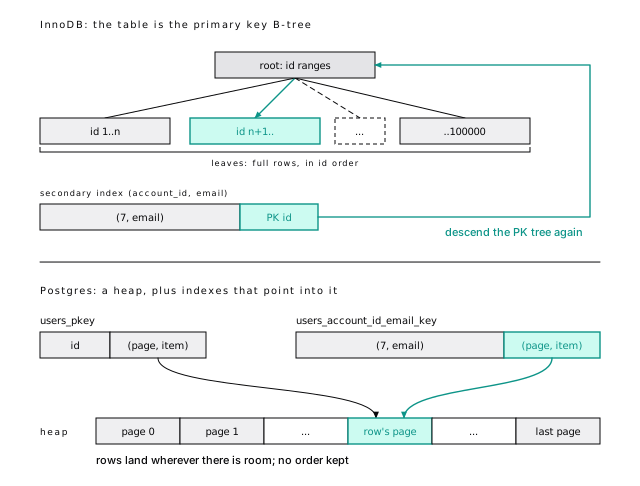
Secondary lookups cost two descents in InnoDB
An InnoDB secondary index entry holds the primary key value, not an address, so every row found through it pays a second descent of the primary key tree. We counted page requests on MySQL (Innodb_buffer_pool_read_requests) and buffers on Postgres:
| Query (100 rows) | MySQL page requests | Postgres buffers |
|---|---|---|
Primary key range, id between 5000 and 5099 | 15 | 7 |
Secondary lookup, account_id = 7 | 307 | 106 |
InnoDB pays on reads through secondary indexes; Postgres, as you’ll see, pays on writes. And that 7-buffer Postgres range scan is an accident of insert order: our rows were inserted in id order (pg_stats.correlation for id is 1). On InnoDB, neighboring keys are always physical neighbors. On Postgres, only if you inserted them that way.
10-not-mysql.shPostgres has a CLUSTER command, and its name misleads MySQL veterans. It rewrites the table once in the order of an index, under an ACCESS EXCLUSIVE lock, and then forgets about it. After cluster users using users_account_id_email_key, account 7’s 100 users went from 106 buffers to 6, the primary key range scan went from 7 to 102 (a table can only be in one order), and five new users for account 7 landed at the end of the heap, at (1123,58), nowhere near their neighbors on page 6. Use it rarely, on mostly read tables after a bulk load, and never as scheduled maintenance.
10-not-mysql.shOn the MySQL side, column types move the range-scan number: with name as TEXT instead of varchar(255), the same scan costs about 107 page requests, because InnoDB stops fetching rows in batches.
Covering indexes come for free in InnoDB, almost
Every InnoDB secondary index carries the primary key, so select id, email from users where account_id = 7 never touches the table: 15 page requests. Postgres indexes carry no primary key, so the same query visits 100 heap pages. Build an index on (account_id) include (id, email), let vacuum mark the pages all-visible, and it drops to 7 buffers (Covering indexes: cover the hot query, not every query).
Increasing keys still matter; short ones mostly don’t
On InnoDB, your primary key is your physical layout, so MySQL teams keep keys short and increasing. On Postgres, the heap doesn’t care, and other indexes store a 6-byte ctid however wide the key; only the primary key index feels a random key (Pick your keys once). “Increasing” survives; “short” matters less, except in the foreign key columns of other tables, which copy the key into every referencing row and its index.
Keep: increasing keys (identity or UUIDv7). Drop: “the table is ordered by the primary key, so range scans on it are cheap”; check pg_stats.correlation. Drop also: “extra indexes are cheap unless their columns change”. The next section explains why.
An update writes one row, or every index
A Postgres update writes a whole new row version at a new ctid, and unless it’s HOT (no indexed column changed, and the page had room), every index gets a new entry, including indexes on columns that didn’t change (A cold update pays for every index). InnoDB updates the row in place, copies the before-image to undo, and touches only the secondary indexes whose columns changed. The rest point at the primary key, which didn’t move.
Reading the WAL back confirms the left column: the name change was one 86-byte HOT_UPDATE, and the email change a heap UPDATE plus two index inserts, one of them into users_pkey. MySQL writes its own second copy: the binary log grew by 414 bytes for the name update and 422 for the email one, full before and after images, on top of the redo log.
Both rows live on the table’s last page, which has free space; on a freshly loaded table every other page is full, and there an update can’t be HOT. The binlog sizes come from show binary log status before and after.
10-not-mysql.shEach design pays for writes somewhere
So which design writes less? It depends on your workload, and anyone who answers without asking about your indexes is selling something. Postgres pays on writes to tables with many indexes whose updates miss HOT, and on cleanup, since dead versions sit in the table and its indexes until vacuum. InnoDB pays on reads through secondary indexes, and writes undo on every update. The practical lesson for Postgres: protect HOT (HOT is a design decision you make once).
Uber hit this asymmetry, and both sides were right
In July 2016 Uber published Why Uber Engineering Switched from Postgres to MySQL. Its central complaint was exactly this asymmetry: their updates touched indexed columns, so each wrote entries in every index, and because Postgres replication ships the physical WAL, all of it crossed the network to every replica. The fair reading, years later: both sides of the debate that followed were right about different workloads, and you can reshape most tables that hit the worst case before anyone needs to change databases.
The post also cited replica query cancellations, a 9.2 replication bug, painful major upgrades, and process-per-connection. Markus Winand pointed out that InnoDB moves the cost to reads and that Uber’s workload (a key-value layer of their own on top of the database) was unusual. Robert Haas, a longtime Postgres committer, accepted that write amplification was real and in-core logical replication was needed. Simon Riggs pointed to logical replication arriving in PostgreSQL 10, which it did.
Old versions live in the table, or in undo
Both databases use MVCC, so a reader sees the row as of its snapshot while a writer changes it. Postgres keeps old versions in the table, as dead tuples, which makes rollback instant and leaves the bill for vacuum. InnoDB keeps the current version in the table and old ones in undo logs; a reader that needs an older version walks back through the undo chain, and background purge threads discard undo once no snapshot needs it.
Purge is InnoDB’s vacuum, and most MySQL users never think about it. Treating vacuum the same way is the most expensive mistake a MySQL team makes in its first year on Postgres. And vacuum has a job purge doesn’t: freezing old rows so the 32-bit transaction counter can wrap safely. InnoDB’s 48-bit IDs never wrap in practice, so wraparound has no MySQL equivalent (Wraparound stops writes before anything is corrupted).
Long transactions hurt both
We held a snapshot open in one session while another ran 5,000 single-row updates. On InnoDB, the history list length (undo logs waiting for purge) went from 2 to 5,000, and drained once the snapshot ended, as background purge caught up (anywhere from a second to over a minute, run to run). On Postgres, vacuum reported 5,000 versions “dead but not yet removable”. InnoDB’s problem is a growing undo tablespace and slower reads down longer version chains; Postgres’s is bloat that outlives the transaction. Same cure: keep transactions short. (On MySQL, the history list length comes from information_schema.innodb_metrics.)
10-not-mysql.shMySQL defaults to repeatable read; Postgres doesn’t
MySQL defaults to REPEATABLE-READ, Postgres to read committed, and code ported between them silently changes meaning. Session A reads user 10, sleeps, and reads it again, while session B renames the user and commits:
A multi-statement report that relied on MySQL’s stable snapshot sees a moving target on Postgres; give it begin isolation level repeatable read. The reverse surprise is the read-modify-write: read a row, compute a new value in the application, write it back. At repeatable read, if another session changed and committed that row after your snapshot, Postgres fails your write with a serialization error (40001) and you retry. InnoDB’s repeatable read writes on top of the latest committed version instead, so your value, computed from the old snapshot, silently replaces the other session’s commit. A plain update ... set n = n + 1 is safe on both, because InnoDB’s update reads the latest version. Only serializable rules out every anomaly has the full matrix, and the Hermitage suite documents both behaviors.
At repeatable read on MySQL, session A reads user 11’s name into a variable, sleeps, and writes that name back with +A appended. Meanwhile session B renames the user to B and commits. A’s write succeeds without an error, the row ends up User 11 +A, and B’s committed rename is gone. The same shape on Postgres (A reads the row, B’s update commits, A updates the row) fails A’s update with could not serialize access due to concurrent update.
10-not-mysql.shYou can only lock a row that exists
To prevent phantoms, InnoDB locks the gaps between index entries a locking read scans, not just the rows it finds. Session A selects a nonexistent user for update; session B inserts a different nonexistent user and times out with ERROR 1205, blocked by A’s X,GAP lock.
On Postgres, session B’s insert succeeds at once. Row locks live in the tuple header, so you can only lock a row that exists. That removes a family of InnoDB deadlocks, and means that stopping two sessions from creating the same missing row takes a unique constraint, on conflict, or serializable.
performance_schema.data_locks shows A’s lock just before the next real entry, 8, 'user10007@example.com', 10007. That last value is the primary key, stored in the secondary index entry, as the diagram showed.
10-not-mysql.shErrors abort the whole transaction
Back to the opening. In MySQL, a failed statement rolls back itself and the transaction carries on. In Postgres, any error aborts the whole transaction: later statements get current transaction is aborted, commands ignored until end of transaction block, and commit comes back as ROLLBACK.
That breaks the most common porting pattern there is: “try the insert, catch the duplicate, carry on”. Use on conflict do nothing and check whether a row came back, or a savepoint (Savepoints contain the damage).
Some frameworks wrap each request or test in a transaction. On Postgres, one swallowed error inside it poisons everything after, and the error you finally see points at the wrong statement. Look for the first error in the transaction, not the last.
Processes get expensive sooner than threads
Postgres forks a process per connection; MySQL runs a thread per connection. Both get expensive in the thousands, but Postgres sooner: each backend keeps its own caches, and every snapshot looks at every other session. If your fleet opened 2,000 direct connections to MySQL, put a pooler in front of Postgres and size real connections by cores and disks (Connections aren’t free).
One log, not two
Postgres has one log, the WAL, for crash recovery, replicas, and point-in-time recovery (Write it down first). MySQL has a redo log for crash recovery and a binary log for replication, kept consistent by an internal two-phase commit.
The bigger difference is what replicas receive. MySQL replicas apply logical row events, so they can have extra indexes or a newer version. Postgres replicas replay the WAL byte for byte: copies of the disk, not of the data, on the same major version. Plan major upgrades around pg_upgrade or logical replication, not by promoting a newer replica.
DDL is transactional
In Postgres, this leaves no trace: the insert, the table, and the column all roll back.
On MySQL, DDL is atomic per statement but implicitly commits whatever transaction was open. The same sequence left account 1024 | Before DDL in the table: create table had committed the insert, and rollback rolled back nothing.
10-not-mysql.shThe hazard on both is the same: a schema change waits behind a long query, and everything after queues behind it. Use a short lock_timeout and retry, and keep migrations small, because a transactional one holds every lock until it commits (Change the schema, keep the site).
Small dialect differences add up
The rest are small differences in SQL itself. Together they’re why a straight port fails its test suite in a dozen places.
Strings compare exactly
MySQL 8.4’s default collation, utf8mb4_0900_ai_ci, is accent- and case-insensitive. Postgres compares exact characters: 'abc' = 'ABC', 'Bob@x.com' = 'bob@x.com', and 'resume' = 'résumé' are all true on MySQL and all false on Postgres. It matters most in unique constraints. MySQL rejects USER1000@Example.com as a duplicate of user1000@example.com; Postgres accepts it, and one account now has two users with the “same” email.
Decide what equality means for each column, in the schema. For emails, the usual choice is a unique index on lower(email) (An index stores exactly what you gave it); citext and ICU collations are the alternatives (Types are a contract).
10-not-mysql.shIdentity, not auto_increment
AUTO_INCREMENT becomes generated always as identity. Both hand out values outside transactions, so both leave gaps. This chapter already made some: MySQL’s bulk insert of 100,000 users left its counter at 131,071 (it reserves in growing batches) and the failed duplicate burned 131,072; Postgres’s rolled-back transaction burned 100,001 and 100,002.
Never build gapless numbering on a sequence. LAST_INSERT_ID() becomes returning id, and after bulk-loading explicit ids, reset the sequence with setval (Pick your keys once).
Upserts name their conflict
MySQL’s on duplicate key update fires on a conflict with any unique index, and its own documentation warns against it on tables with more than one. Postgres makes you name the arbiter:
excluded is the row you tried to insert; leave out the conflict target and Postgres refuses. on conflict do nothing replaces INSERT IGNORE, without also ignoring data conversion errors. Postgres also has SQL-standard MERGE (PostgreSQL 15+), which MySQL lacks, but for the single-row “insert or update” prefer on conflict: it’s atomic under concurrency, while two sessions running MERGE on the same new key can still collide (Queries that age well).
Integer division truncates, and NULLs sort last
| Expression | MySQL | Postgres |
|---|---|---|
7/2, 3/5 | 3.5000, 0.6000 | 3, 0 |
1/0 | NULL, with a warning | error: division by zero |
'a' || 'b' | 0 (logical OR) | ab |
order by x with a NULL | NULL first | NULL last |
Integer division truncates in Postgres, so the percentage that was 0.6 on MySQL is 0; cast one side (3::numeric / 5).
NULL sorts as larger than every value, so a “newest first” list ordered by completed_at desc suddenly starts with every unfinished row. Say nulls last, and match it in any index that serves the sort (sorting rows).
When you port concat() to ||, one rule carries over: a NULL operand makes the whole result NULL, so first_name || ' ' || last_name is NULL for anyone without a last name. concat_ws(' ', first_name, last_name) skips the NULLs. Watch the reverse port too: Postgres’s own concat() treats NULL as an empty string, unlike MySQL’s.
10-not-mysql.shForeign keys don’t index themselves
InnoDB creates an index on every foreign key column. Postgres creates nothing on the child side: the same projects table has account_id, owner_id, and PRIMARY indexes on MySQL, and only projects_pkey on Postgres. Without one, every delete of a parent row scans the child table (Each deleted parent scans the whole child table reads all 2,000,000 events). Index your foreign key columns unless you’ve measured that you don’t need to.
Postgres fixes estimates instead of taking hints
MySQL has /*+ ... */ hints and FORCE INDEX. Core Postgres has none, by long-standing policy. When the planner picks badly, the cause is almost always a bad estimate, and the fix is better information: analyze, a higher statistics target, extended statistics, or a rewritten query (The planner is guessing). The pg_hint_plan extension exists for emergencies.
A few more habits don’t transfer
- Identifiers fold to lower case. Double quotes make them case-sensitive (MySQL uses backticks and treats double quotes as strings). A table created as
"Users"must be quoted forever. Use unquoted snake_case, and set your ORM’s naming strategy before the first migration (identifiers). - GROUP BY means it, as under MySQL’s
ONLY_FULL_GROUP_BY: every selected column must be grouped, aggregated, or dependent on a grouped primary key. For “any value from the group”, PostgreSQL 16 addedany_value(). - jsonb, not json.
jsonbis the binary type MySQL users expect. Postgres indexes whole documents with GIN, and rewrites the whole row version on every update, so keep fast-changing fields out of big documents. - No
UPDATE ... LIMIT. Select the keys in a subquery. - Types. No
UNSIGNED, a realboolean, andDATETIMEbecomestimestamptz(Types are a contract).
Most MySQL idioms have a direct Postgres equivalent
| MySQL | Postgres |
|---|---|
AUTO_INCREMENT | generated always as identity |
LAST_INSERT_ID() | insert ... returning id |
INSERT ... ON DUPLICATE KEY UPDATE | insert ... on conflict (cols) do update |
INSERT IGNORE | insert ... on conflict do nothing |
`backticks` | no quoting (or "double quotes") |
IFNULL(a, b) | coalesce(a, b) |
GROUP_CONCAT(x) | string_agg(x, ',') |
TINYINT(1) | boolean |
DATETIME | timestamptz |
JSON | jsonb |
utf8mb4_0900_ai_ci equality | lower(col) index, citext, or ICU collation |
FORCE INDEX, /*+ ... */ | fix statistics |
SHOW PROCESSLIST | select * from pg_stat_activity |
OPTIMIZE TABLE | vacuum, or an online rebuild to shrink |
| purge, history list length | vacuum, n_dead_tup |
mysqldump | pg_dump |
The short version
- InnoDB stores the table in primary key order and points secondary indexes at the key. Postgres stores rows in a heap and points every index at a physical address.
- Postgres primary key range scans are cheap only if rows were inserted in key order (check
pg_stats.correlation). - A Postgres update that isn’t HOT writes an entry in every index. Index frequently updated columns sparingly.
- Old versions live in the Postgres table until vacuum removes them. Treat vacuum as a first-class job, and learn wraparound.
- Postgres defaults to read committed, has no gap locks, and its repeatable read raises errors instead of losing updates.
- Any error aborts the whole Postgres transaction. Replace “insert and catch the duplicate” with
on conflict. - Strings compare exactly, integer division truncates, NULLs sort last, and foreign keys aren’t indexed for you.
- DDL is transactional, but keep migrations short and set
lock_timeout.
Further reading
- Concurrency control, PostgreSQL documentation. Postgres’s isolation levels and locking, to read next to the MySQL pages below.
- Clustered and Secondary Indexes, MySQL 8.4 manual. The clustered index, the hidden row ID, and why secondary indexes carry the primary key.
- InnoDB Multi-Versioning, MySQL 8.4 manual. Hidden columns, undo logs, purge, and how secondary index entries are delete-marked.
- Transaction Isolation Levels, MySQL 8.4 manual. What InnoDB’s repeatable read does, and where next-key locks come from.
- Hermitage, Martin Kleppmann and contributors. A test suite that shows exactly which anomalies each database’s “repeatable read” permits.
- Why Uber Engineering Switched from Postgres to MySQL, Evan Klitzke, Uber, 2016. The write-amplification argument in full; read it alongside the responses linked above.
12 Types are a contract
This error has woken up more than one on-call engineer:
That’s the largest value a 4-byte integer holds. When an integer id’s sequence reaches it, every insert fails. Not some: every one. The fix rewrites the table, its indexes, and every table whose foreign key points at it. The decision behind it took two seconds, years earlier, in a migration nobody remembers.
Types are the cheapest decision you make and the most expensive to change. A type is a contract: how many bytes every row spends, which values can exist at all, and how comparison and arithmetic behave. For text, the collation is part of that contract, and it’s the one part that can change under you without a migration.
Every byte is paid per row
A query costs roughly the pages it touches, and a page holds 8 KB. Shrink a row from 125 bytes to 100 and every scan touches about 20 percent fewer pages. pg_column_size() tells you what any value costs, and alignment can pad a narrow column out to 8 bytes (Column order is free space).
Keep it in proportion: correctness first, then the freedom to change your mind, then bytes.
Integers run out sooner than you think
| Type | Bytes | Range |
|---|---|---|
smallint | 2 | about plus or minus 32 thousand |
integer | 4 | about plus or minus 2.1 billion |
bigint | 8 | about plus or minus 9.2 quintillion |
Ids are bigint
Use bigint for every primary key and every column that references one. Rolled-back inserts, on conflict attempts, and discarded bulk loads all consume sequence values, and the 4 bytes you’d save are small next to the 23-byte row header. Changing integer to bigint later rewrites every referencing table, a multi-week project on a large system (The int to bigint problem).
The running example’s events table holds 2,000,000 rows, leaving 2,145,483,647 values of integer headroom. That feels safe until you do the arithmetic: a pipeline writing 1,000 rows a second, counting retries, uses it up in about 25 days.
When unsure, pick the bigger type. Nobody has been paged because a column was too wide. The one exception to bigint is a key that something outside the database must mint first, which is a uuid (The database can’t always mint the id).
Money is numeric, never float
Floating-point types (real, double precision) store binary approximations, and most decimal fractions have no exact binary form. Add up a million dimes:
11-typesThat stray 0.00000133288 is how a one-cent discrepancy in an invoice reconciliation starts. Use numeric(p, s) with the currency’s minor-unit scale, or bigint cents, and either way a currency column. Floating point is for sensor readings, scores, and coordinates, where a tiny relative error is fine.
numeric(12, 2) rounds on input, but the declared scale applies only when a value is stored or cast, not to arithmetic:
You decide when and how to round, which is right for money: banker’s rounding, per line or per invoice, is a business rule. numeric is variable width (pg_column_size gives 8 bytes for 1, 14 for 123456789.12) and slower than integer math, which matters only when you sum hundreds of millions of rows. There, integer cents win.
Use text, and put the length in a check
text and varchar(n) are stored identically: 'hello' takes 9 bytes as either. char(n) pads, and takes 54 bytes as char(50). varchar(n) is text with a length check bolted onto the type, and that bolt is the problem. Length rules change, and a rule written into the type reads like a storage decision when it’s really validation. Say it as a constraint:
A check is named, can be swapped without touching the column type, can be added not valid and validated later without a long lock (Add a CHECK NOT VALID, then validate it), and can say things a length can’t, like “not empty”. varchar(255) is a MySQL habit with MySQL reasons (index prefix limits) that don’t exist here.
Trailing spaces are insignificant in comparisons and stripped on concatenation. Even ISO country codes are text with check (length(code) = 2). To be fair to varchar(n): raising n has been metadata-only for years. Lowering it still means work.
Collations decide what equal means
A collation is the set of rules for comparing and sorting text. It decides whether 'a' < 'B', where '_draft' sorts, and whether 'Ada@Example.com' equals 'ada@example.com'. Every text index is built in collation order, so the collation is baked into your indexes as firmly as the data.
The same six words, sorted under four collations on one server:
(Turned on its side to fit.) C and builtin sort by code point: capitals first, é after z. glibc’s en_US all but ignores punctuation; ICU puts it first. Four collations, three orders: same data, three answers to “what comes next”.
Pick a collation provider whose order never changes
| Provider | Rules come from | Changes when |
|---|---|---|
| libc | the OS C library (glibc) | you upgrade the OS |
| ICU | the ICU library | you upgrade ICU |
| builtin | Postgres itself | never, for sort order |
Unless someone chose otherwise, your database uses libc, because initdb copies the OS locale (this one: en_US.utf8 on glibc 2.41). The builtin provider arrived in PostgreSQL 17. Our default for a new database is builtin C.UTF-8, code-point order that never changes:
Byte comparisons, a sort order that survives every OS upgrade, and a plain B-tree that serves like 'abc%' (Prefix search needs the right operator class). Where people read the order, ask for it: order by name collate "unicode". Linguistic sorting where you need it, stability everywhere else.
PostgreSQL 18 adds pg_unicode_fast, which also does full Unicode case mapping (ß folds to ss). The lab checks all four orders from the sort demo.
11-typesFor emails, make lower() the unique key
Every collation above is deterministic: strings are equal only if their bytes are. So where email = 'USER1@EXAMPLE.COM' finds nothing when user1@example.com exists, and unique (account_id, email) happily accepts Ada@x.com next to ada@x.com: two accounts the user thinks are one. Four tools fix it:
lower()plus a unique expression index. Works everywhere; queries must saylower(email)exactly as the index does (An index stores exactly what you gave it).citext, a contrib type that callslower()for you.- A nondeterministic ICU collation (PostgreSQL 12+), where different bytes can compare equal. The most correct, but
likeworks on it only from PostgreSQL 18, and never through a B-tree. casefold()(PostgreSQL 18+), the Unicode-correctlower(). Under an ICU orpg_unicode_fastcollation,STRASSEandStraßematch; under libc or builtinC.UTF-8,ßstaysß.
For emails and usernames, lower() with a unique expression index is our default: boring and predictable.
MySQL’s default collation ignores case and accents; Postgres’s deterministic ones don’t. Pick a tool per column before the import (Strings compare exactly).
ks-level2 ignores case; ks-level1 ignores accents too. Equality uses the index, 7 pages for the uppercase lookup. like works only from PostgreSQL 18, and then as a scan:
All 834 pages for one row. Regular expressions and ilike fail outright.
11-typesAn OS upgrade can corrupt your indexes
A B-tree on text keeps keys in the order the collation said was right on the day each was inserted. Change the rules and a search walks the old order by the new rules, down the wrong branch. Nothing errors. Rows just stop being found.
This is not hypothetical. glibc 2.28 (2018) rewrote its collation data for most locales, and the OS releases that shipped it (Debian 10, RHEL 8, Ubuntu 18.10 among them) could reorder the keys of any libc-collated index (other than C or POSIX) upgraded in place or restored as a physical copy. A physical replica on a newer OS image has the same problem.
We simulated it on a scratch database. The primary key stopped finding 'Zebra', which was still in the table. Then it accepted a second 'Zebra'. Then reindex, the usual fix, failed on that duplicate. Missed rows first, then duplicates that break the repair.
Point a collation at different rules in the catalog, which is what an OS upgrade looks like from Postgres’s side (scratch database only):
In a new session, name = 'Zebra' returns nothing and name >= 'Tag1' and name < 'Tag2' counts 0; with index scans off, Zebra and 1,111 rows. Then:
11-typesDetect it before it bites
Postgres records the library’s version with each collation (and, since PostgreSQL 15, the database default) and warns on use when it changes. Your application won’t show that warning to anyone, so ask after every OS or image change:
Treat any mismatch as “rebuild before trusting”. Fix duplicates, reindex (concurrently) every text index under the collation, check with amcheck (which verifies each index’s order under today’s rules), then record the new version with alter collation ... refresh version.
refresh version fixes nothing. It only silences the warning. Treat OS upgrades, base image bumps, and new replica images as collation events, or use the builtin provider and stop worrying.
The session that uses a stale collation gets:
11-typesFor the database default, compare datcollversion with pg_database_collation_actual_version(oid). Since PostgreSQL 15 the database warns on every new connection; we edited a scratch database’s catalog row to claim an older glibc:
alter database w_edges refresh collation version answered NOTICE: changing version from 2.31 to 2.41, and fixed nothing else. Rebuild first, as the hint says, then refresh.
11-typesThe exposed indexes are those on text in a libc or ICU collation:
The default collation appears as provider d, so this lists default-collated indexes even in a builtin database. amcheck then verifies an index’s order under today’s rules, taking only a light lock:
Run it on a restored copy before an upgrade cutover, and on the big text indexes after one.
Timestamps: always timestamptz
Store moments as timestamptz, and never use timestamp (without time zone) for something that happened. No rule in this chapter has fewer exceptions.
The names mislead. timestamptz doesn’t store a zone; both types are 8 bytes. timestamptz is an absolute instant, kept as UTC. timestamp is a wall-clock reading: “22:51” in which city? Two app servers insert at the same instant, one session in New York time (a misconfigured pool, a forgotten cron box), one in UTC:
timestamptz recorded one instant twice. timestamp recorded two readings four hours apart, and every “last hour” dashboard on it is now quietly wrong. You can’t repair it: the zone was never stored.
Keep every connection at timezone = UTC, send timestamps with an explicit offset, and convert at the edge.
now() is the moment the transaction started, so an hour-long batch stamps every row with the same time. clock_timestamp() is the wall clock (date/time functions).
The honest exception is a future local time that must survive zone rule changes (“opens at 09:00 local on 2027-03-01”): store timestamp plus the zone name.
On March 8, 2026, New York jumped from 02:00 to 03:00:
1 day keeps the wall-clock time; 24 hours adds 86,400 seconds. This works with a named session zone, not a fixed offset. A plain timestamp gives 02:30 for the first, a time that never existed in New York.
11-typesnow() and clock_timestamp(), read before and after a two-second pg_sleep inside one transaction:
statement_timestamp() is the third option: the start of the current statement.
11-typesA timestamp beats a boolean; a check beats a new type
date is for things that really are days, like a birthday, not for “created on”, which is an instant you display as a day. Query time ranges half-open, >= '2026-10-01' and < '2026-11-01' (Date ranges are half-open), and know that '2026-01-31'::date + interval '1 month' is February 28.
Before adding a boolean, ask whether you’ll want to know when it became true. archived_at timestamptz answers “is it archived?” with is not null, and also when, for 7 more bytes. For state an audit cares about (verified, archived, cancelled), the timestamp wins.
To restrict a column to a set, our default is text plus a check, like the running example’s check (plan in ('free', 'team', 'enterprise')). Every tool understands it, and you can swap it online. Use a lookup table when values carry data of their own.
Enums are hard to take back
An enum takes 4 bytes and sorts in declaration order: good for a set that is truly stable and ordered, like log severity. Two traps. There is no drop value, so retiring one means a new type and a table rewrite. And a value added inside a transaction can’t be used until it commits, which breaks migration tools that add a value and seed rows in one transaction (ERROR: unsafe use of new value "audit" of enum type event_kind).
Store UUIDs as uuid
uuid is 16 bytes; as text it takes 40, and every index grows to match (Pick your keys once measures it).
The same goes for every type that knows its domain. inet and cidr validate addresses and answer “is this IP in that network” with one operator. Range types (tstzrange, daterange) make “no two bookings overlap” an exclusion constraint. And create domain email_address as text check (...) writes a repeated rule once.
Arrays are for lists that live and die with the row
Arrays fit small lists that belong to one row: tags, notification channels. They’re wrong when the elements are rows in disguise: they reference other tables (no foreign keys on elements), you update them one at a time (each update rewrites the whole row), or the list grows without bound. An array of user ids on a project is a membership table that hasn’t been created yet.
Use jsonb, and give the keys you query their own columns
json stores text and reparses it on every access; jsonb parses once and supports GIN indexes. Use jsonb, and keep json only for exact input, like a webhook body whose signature you verify.
jsonb isn’t free. Every row repeats every key: events.payload spends 63 to 69 bytes a row spelling out "status", "duration_ms", and "region", about five times what typed columns would take. And the planner has almost no statistics inside a document (Most documents belong in a jsonb column). Keys you filter, join, sort, or constrain on deserve columns.
Nor is it smaller: {"status":"ok","duration_ms":120,"region":"iad"} is 52 bytes as json, 68 as jsonb.
11-typesGenerated columns are virtual by default (PostgreSQL 18+)
PostgreSQL 18 makes generated columns virtual by default: computed on read, taking no space, and impossible to index. Stored ones are computed on write. Use virtual for cheap values you display, stored for values you filter or sort on, like a tsvector (Store the tsvector; don’t index the expression). Before PostgreSQL 18, stored was required syntax, so existing migrations and upgraded columns are safe; it’s new DDL written without the keyword that now gets a virtual column. Write stored when you mean it.
Four types cost more than they save
serial is a sequence, not a type
serial isn’t a type. It’s a sequence plus a nextval() default on a 4-byte integer, the type this chapter opened with, and the sequence never hears about ids inserted by hand:
bigint generated always as identity refuses the hand-picked id instead (Let the database number rows, and never trust the order).
Also avoid money (formatted by the server’s locale, ignorant of currency), char(n) (see above), and timetz (an offset without a date can’t know about daylight saving; the docs themselves discourage it).
The short version
bigintfor every id and every reference to one.- Money is
numericorbigintcents, plus a currency column. Never floating point. - Use
textwith a check constraint, notvarchar(n). Neverchar(n). - Default collations are case-sensitive. For emails, a unique index on
lower(email). - Treat every OS, glibc, or ICU upgrade as a collation event: check versions, reindex text indexes, then
refresh version. Or use builtinC.UTF-8(PostgreSQL 17+). timestamptzfor every moment, sessions in UTC, explicit offsets on input.- Prefer
archived_attois_archived,textplus a check to an enum,jsonbtojson, and columns for the JSON keys you query. - Identity, not
serial. In PostgreSQL 18, generated columns are virtual unless you writestored.
Further reading
- Data Types, PostgreSQL documentation. Every built-in type, with its storage size and input rules.
- Collation Support, PostgreSQL documentation. Providers, deterministic and nondeterministic collations.
- amcheck, PostgreSQL documentation. What
bt_index_checkverifies, and the locks it takes. - Locale data changes, PostgreSQL wiki. Which glibc and distribution versions changed sort order.
- How To Correct and Identify Indexes Affected by the GNU C 2.28 Update, Crunchy Data. A practitioner’s walk through finding and rebuilding affected indexes.
- Case-insensitive pattern matching in PostgreSQL, Laurenz Albe, CYBERTEC. The trade-offs between
lower(),citext, and nondeterministic collations, in depth. - Don’t Do This, PostgreSQL wiki. The community’s short list of type mistakes, with when each is acceptable.
13 Pick your keys once
Take three tables of a million rows that differ only in their primary key, and insert a second million into each, with checkpoints along the way as on a real server. With a random UUID key, that million wrote 551 MB of write-ahead log. With a time-ordered UUIDv7, 143 MB. With a plain bigint, 130 MB.
Nearly four times the WAL, all from where each new key lands in the index. And that’s only the half of key design that happens inside the database. The other half is the id you show the world, which, if it’s a counter, tells strangers how big you are.
A key is the column you can’t cheaply change later. Decide two things, once and separately: what you join on, and what you publish.
Natural keys change; surrogate keys don’t
A natural key identifies the thing in the real world, like an email. A surrogate key is invented by the database, like an identity column. Natural keys change (and a changed primary key means updating every child row), they’re wide, and they leak personal data into URLs and logs.
Our rule: every table gets a surrogate primary key, and natural keys become unique constraints, like unique (account_id, email) on users. The exceptions are codes that never change ('USD') and join tables, whose composite key (primary key (project_id, user_id)) is the pair of foreign keys (A join table needs an index in each direction).
Let the database number rows, and never trust the order
Postgres generates integer keys with a sequence, a tiny relation that hands out increasing numbers, attached with an identity column: id bigint generated always as identity primary key. generated always refuses hand-picked ids that would later collide with the sequence (serial shows the bug), and every foreign key column is bigint to match (Ids are bigint).
The numbers are for identity, not order. Sequences have gaps, because nextval() is never rolled back. They aren’t ordered by commit either: A takes 100, B takes 101 and commits first, and a poller reading where id > last_seen_id skips 100 forever. Build neither invoice numbering nor a change feed on them.
A rolled-back transaction never returns its sequence value, and neither does an insert that on conflict skips (sequence functions). Cached values die with their session, and a crash can skip some. A gapless counter is a separate row updated under a lock.
Importing rows that keep their old ids (overriding system value) leaves the sequence behind, so the next normal insert collides on id 1. After every bulk load, select setval(pg_get_serial_sequence('imported', 'id'), (select max(id) from imported));. And logical replication doesn’t copy sequence state (as of PostgreSQL 18), so reset each one after a logical-replication upgrade (Take minor releases promptly; rehearse major ones).
12-keysIncreasing keys append; random keys land anywhere
A UUID is a 128-bit number stored in 16 bytes. One digit names its version: version 4 is 122 random bits, version 7 starts with a 48-bit millisecond timestamp, then random bits. Four of each:
The v7 values on the left share a prefix and increase. The v4 values on the right land anywhere. That’s the whole story, because a B-tree keeps its keys sorted across 8 KB leaf pages (The B-tree does the heavy lifting), so where a new key goes depends only on its value.
Increasing keys (identity, UUIDv7) always land on the rightmost leaf, which stays in memory, like a ledger you only append to. Random keys (UUIDv4) land anywhere, like slipping each new page into a random spot in a binder. Three things follow:
- Half-full pages. A full page in the middle splits 50/50; pages settle around 70 percent full, against 90 for appends.
- A huge hot set. Any leaf might be written next, so the whole index must stay cached.
- Full-page writes. The first change to a page after a checkpoint logs an image of the whole page (The first change after a checkpoint logs the whole page). Appends pay that for a few right-edge pages per checkpoint. Random keys pay it for every leaf they touch for the first time since the last checkpoint, and in a big index that’s thousands of leaves per checkpoint: up to 8 KB of WAL for a 16-byte key.
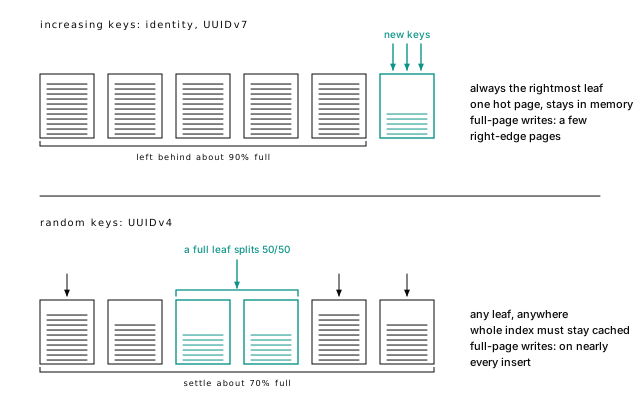
RFC 9562 (2024) defines the versions; besides 4 and 7, version 1 leaks a MAC address and 3 and 5 hash a name. gen_random_uuid() makes v4; PostgreSQL 18 adds uuidv7() and the alias uuidv4(), and 17 added functions to look inside:
For a v4 it returns null: there’s no time inside. Postgres fills the 12 bits after a v7’s version digit with sub-millisecond time and guarantees each value is a step past the last on that backend, so a tight loop never goes backward. A million calls in one statement spanned about 500 milliseconds, roughly 2,000 ids each, every one larger than the last.
12-keysRandom keys write nearly four times the WAL
Three tables, identical except for the key. We inserted a million rows into each, then another million in ten batches with a checkpoint before each, a stand-in for a busy server’s 5-minute checkpoint_timeout, and read each batch’s WAL from explain (analyze, wal, buffers). The second million:
| Second 1,000,000 rows | bigint | UUIDv4 | UUIDv7 |
|---|---|---|---|
| WAL generated | 130 MB | 551 MB | 143 MB |
| full-page images | 43 | 72,753 | 40 |
| buffers dirtied | 8,199 | 84,058 | 10,259 |
Each bigint and UUIDv7 batch wrote about 4 full-page images, the right edge of the heap and the index. Each UUIDv4 batch wrote thousands: 3.8 times the WAL of v7, 8 times the dirtied buffers. With other work on the server, we measured 590 to 630 MB. UUIDv7 behaved almost exactly like bigint.
The penalty repeats for every index on a v4 column, including every indexed foreign key pointing at it. Reads suffer too: the recent rows your app reads most are spread across the whole index instead of a few cached leaves.
The tables were id bigint generated always as identity, id uuid default gen_random_uuid(), and id uuid default uuidv7(), each beside an n int. The first million went in as one statement per table, after a checkpoint:
| 1,000,000 rows | bigint | UUIDv4 | UUIDv7 |
|---|---|---|---|
| PK index size | 21 MB | 38 MB | 30 MB |
| avg leaf density | 90.0% | 72.0% | 90.0% |
| WAL for the insert | 130 MB | 157 MB | 143 MB |
Here the WAL gap is modest, and that’s how a benchmark fools you: one statement between two checkpoints, the whole index in 128 MB of shared buffers, so each random leaf got at most one full-page image. The difference appears in steady state: big indexes, regular checkpoints, memory smaller than the data (A 60-second benchmark can miss every checkpoint). In the checkpointed batches, the WAL: line’s fpi (full-page images) was 4 per batch for bigint and v7, while v4’s climbed from 4,818 in the first batch to 9,443 in the last as the growing index gave random inserts more pages to hit.
After two million rows, pgstatindex gave the primary keys as 43, 76, and 60 MB; leaves 90, 71.6, and 90 percent full; and leaf_fragmentation 0, 50, and 0 percent, meaning half of v4’s leaves are out of order on disk. UUIDv4 needs about 25 percent more leaf pages than UUIDv7 at the same key width, purely from half-split pages. The lab reruns everything at a fifth of the scale and checks the ratios.
12-keysThe database can’t always mint the id
An identity column works because one writer does the counting: the database, at insert time. Everything that needs the id waits for returning id, and most of the time that wait is free. It stops being free when something has to know the id before the row reaches the database:
- Offline and local-first clients. A phone on a plane creates a project and three tasks that point at it. There’s no database to ask until it lands.
- Optimistic UI. The app shows the new comment, and links to it, before the request returns.
- A graph in one request. An import creates parents and children, and every child needs its parent’s id. With identity that’s a round trip per level, or a
returningdance to match rows back up. - Retries. A client that minted the id can resend the same row safely, because the id doubles as the idempotency key.
- More than one database writing. Regions, shards, or two databases you’ll merge each have their own sequence, and each hands out 42 (Counters collide across environments).
“UUIDs are modern” isn’t on the list, and neither is “it hides our row count”. Hiding the count is the public id’s job, whatever the key is.
When one of those is real, you have two ways out. Try the cheaper one first.
Keep the bigint key and accept a client id beside it. The client mints a uuid, the table stores it as client_id uuid not null with unique (account_id, client_id), and the server inserts with on conflict do nothing, so a retry inserts nothing. Joins stay at 8 bytes. This fits when nothing else unsynced points at the client’s new row: a comment, a form submission, a log line from a device.
Make the key a uuid when references cross the boundary. If offline children point at offline parents, or rows move between databases with their references intact, then translating client ids into server ids at sync time is a mapping table you’ll maintain forever. Let the client’s id be the key. Make it a UUIDv7 so it inserts like a sequence (143 MB of WAL per million rows against 130 MB for bigint), and accept that every foreign key pointing at it is 16 bytes instead of 8. For these apps, that’s the right price.
12-keysIf you need UUIDs, use UUIDv7
If you need UUIDs, PostgreSQL 18 builds the right one in: id uuid primary key default uuidv7() (on older versions, generate v7 in the app). Two caveats. A UUIDv7 reveals when the row was created, to the millisecond, to anyone holding it. And its order is per generator, so ids from two machines don’t give you exact event order.
Store it as uuid, never text. As text, a million of them made the primary key 87 percent bigger, and text compares case-sensitively through a collation, so an uppercase copy of an id is a new “unique” value.
One million UUIDv7 values, copied in sorted order into a text primary key and a uuid one, so only the type differs:
An uppercase UUID equals its lowercase form as uuid; as text it doesn’t.
12-keysA client’s UUIDv7 is input, not a clock
Postgres promises that the uuidv7() values one session mints never go backward. It promises nothing about ids your clients mint, because a UUIDv7 carries the clock of whatever device made it, and a device clock is whatever its owner set it to.
A phone set five years fast mints ids that sort after everything your servers will mint for five years.
A laptop that syncs a week of offline work inserts a week of old ids into the middle of the index, where they split pages like random keys. In the lab, two indexes started with the same 100,000 UUIDv7s spread over a week; one then got 20,000 ids minted now, the other 20,000 minted at random moments in that week, the shape of an offline client catching up. The 20,000 late ids left the leaves 54 percent full and the index 767 leaf pages, where the same ids arriving on time kept them 90 percent full in 460. A few late syncs are noise. An app where most writes arrive late pays the UUIDv4 price on them.
Three rules:
- Keep a server timestamp.
created_at timestamptz not null default now()is when the row arrived. The time inside a client’s id is a claim. Order feeds and keyset cursors by(created_at, id), never by a client-minted id alone. - Validate it like any input. Accept a well-formed UUID. Reject versions you didn’t ask for, and timestamps further in the future than the clock skew you’ll tolerate.
- A collision is a conflict, never an overwrite. Ids appear in URLs, so a client can send an id it didn’t mint. With
on conflict (id) do update, that rewrites someone else’s row, in someone else’s account. Insert withon conflict (id) do nothinginstead, and if nothing came back, look the id up with the caller’saccount_id. Found means it’s a retry: return that row. Not found means someone else holds the id: reject it with an error that says nothing about whose.
12-keysAccount 1 owns a note. Account 2 sends a row with the same id, which it saw in a URL, through the upsert a sync endpoint usually starts with:
The row still says account_id = 1, and its body is now account 2’s. Nothing failed, so nothing was logged. With do nothing, the insert returns no row, the note is untouched, and the follow-up lookup under account 2 finds nothing, which is the signal to refuse.
The safe version of the sync insert, in full:
12-keysNever hand out a counter
Most scaffolds put the primary key in the URL. The tutorial generates /invoices/10442, and that tells anyone who sees it more than you meant to say. A sequential id is a counter, and a counter answers questions: how many, how fast, what comes next.
Keep the counter for joins. Give the world something else.
A counter is an invitation
Change one digit in the URL and see what comes back. That’s the whole attack, and it has a name: an insecure direct object reference (IDOR), an endpoint that loads whatever id it’s handed without checking that the caller may see it. With sequential ids the attacker doesn’t guess. They count: 10443, 10444, and a loop for the rest.
The fix isn’t a different id. It’s an authorization check on every lookup (where account_id = $1 and id = $2), or row-level security adding it for you. OWASP’s guidance is blunt: unguessable ids are defense in depth, and access control is required regardless.
So why bother? Because defense in depth is real. A missing check on one endpoint out of two hundred is an ordinary bug. With sequential ids, that bug leaks the whole table by the end of the afternoon. With unguessable ids, it leaks only the ids that were already lying around in logs and screenshots.
Ids land in browser history, analytics, and support tickets. For “anyone with the link” sharing, issue a separate random token with a scope and an expiry, and check it like a credential.
Five ids give away your total
In the Second World War, Allied statisticians estimated German tank production from the serial numbers on captured tanks. Conventional intelligence said about 1,400 a month. The serial numbers said 246. Production records found after the war said 245 (the German tank problem).
The estimator is one line: having seen k ids with largest m, guess m + m/k - 1. Account 42 receives webhooks carrying event ids, and kept five:
Five ids from one customer estimate your whole platform’s event volume within about 2 percent (1,958,825 against 2,000,000). With all 2,084 of their own ids, within 0.1 percent.
12-keysTwo ids give away your growth
One id is a count. Two ids a known time apart are a rate: sign up today, sign up next week, subtract your user ids. On the book’s events it’s exact:
Repeat it monthly and you have someone else’s growth chart. Sometimes that’s harmless. Sometimes it’s exactly what a competitor wanted to know.
12-keysCounters collide across environments
Every environment has a project 1234, so a bug report about it doesn’t say which. Merging two databases means renumbering every key and reference (Route by tenant, never by id). Offline clients can’t mint ids. And 42 is a valid project id, user id, and invoice id, so the wrong one returns the wrong row instead of an error.
Every id format trades order against what it leaks
What sorts by time inserts like a sequence; what’s random inserts like v4. Pick by what you can afford to leak.
Details as of October 2026.
UUIDv4 hides creation time, at 3.8 times the WAL
122 random bits. As a primary key it’s the 3.8 times WAL measured above; as a public id beside the key, it’s the one that hides creation time. 36 characters in a URL, 26 in base32.
UUIDv7 is the default, and it reveals creation time
The default for any new id that must be unique outside one database. Anyone holding it can read its creation time, so a user’s id says when they signed up. A fixed uuidv7(interval ...) shift hides nothing, and a random one per row destroys the order you chose v7 for.
A ULID fits a uuid column byte for byte
The ULID spec has v7’s shape (48-bit milliseconds, 80 random bits) without version bits, written as 26 characters of Crockford base32. It fits a uuid column byte for byte, and the lab’s 200,000 ULID-shaped values packed leaves 90 percent full. Extensions that add a native type are third-party: vet them.
A KSUID is too wide for uuid
KSUID is 160 bits (32-bit seconds, then 128 random bits), too wide for uuid: store bytea, or text compared under C, since base62 needs uppercase sorted before lowercase.
A Snowflake id needs a unique machine id per writer
Twitter’s original Snowflake packed 41 bits of milliseconds, a 10-bit machine id, and a 12-bit sequence into a bigint. Every writer needs a unique machine id, and JavaScript loses precision above 2 to the 53rd, so APIs send these as strings. The shard-in-the-high-bits cousin is in Route by tenant, never by id.
A NanoID’s length is its collision budget
NanoID is 21 URL-safe random characters, stored as text. The length is your collision budget: by the birthday bound, one-in-a-billion odds arrive after about 750 ids at 8 characters and 410 trillion at 21. Good for invite codes and short links, behind a unique index; not for keys.
A prefix makes an id say what it is
A prefix names the type (cus_, prj_). A person can tell what an id is, a customer id pasted where an account id belongs is caught on sight, and a scanner can match sk_live_ to catch leaked secrets (Stripe’s write-up). The TypeID spec (0.3.0) standardizes it: a lowercase prefix, an underscore, and a UUIDv7 in 26 characters of lowercase Crockford base32.
Sqids and Hashids decode back to the counter
Sqids turns integers into short strings and back. The project says plainly it isn’t encryption, and once decoded, the counter leaks again.
Join on a bigint, publish a uuid
Two columns:
- The key is
bigint generated always as identity, compact and cheap to join on. If ids must be minted outside the database and other rows point at them before they arrive, make the keyuuidv7()instead (The database can’t always mint the id). - The public id is a separate
uuiddefaulting touuidv7(), on every table whose rows appear in URLs, APIs, or webhooks. The app renders it with a type prefix,prj_01j6b7yh69fq2vyabwvmba4nr5, and parses it back.
Joins stay at 8 bytes, the public id costs one index built in order, and you can change its format later without touching a foreign key. Use v4 for it where creation time is sensitive. Admin-only tables need no public id, and per-project issue numbers are fine: scoped to the tenant, they count only what the tenant already knows.
Encode in the app; SQL can do it for a report
Encode in the app, where TypeID libraries exist for most languages. For a view or a report, two short SQL functions do it: b32_encode(uuid) returns the 26 lowercase base32 characters, and b32_decode(text) turns them back into a uuid, or into null if the string is malformed. Both are immutable.
The encoder prepends two zero bits to the 128 to make 130, then reads them five at a time:
It matches the TypeID spec’s test vectors, and with an ascending alphabet and a fixed length, the strings sort exactly like the uuids. Malformed input decodes to null, so a mangled URL becomes a 404, not a 500. It isn’t free: 200,000 inserts with b32_encode in a column default took about 6 seconds, against under 1 with plain uuidv7(). On a hot write path, encode in the app.
12-keysStore the uuid, print the prefix
Storing the finished prj_... string as text took 31 bytes a value against 16 and made the unique index 57 percent bigger, for nothing. Store the uuid. On the way in, check the prefix matches the endpoint (a cus_ id sent to /projects is a 404), strip it, decode, and query:
An index scan of 3 pages: b32_decode is immutable, so the planner folds it into a constant. Add the tenant to the same where clause. The public id makes the row hard to guess; the account_id check makes it impossible to read.
Both indexes pack leaves about 90 percent full, because the encoding preserves order. The cost is pure width, plus text comparisons through a collation. The lookup:
12-keysMove an API off integer ids by accepting both
Already shipped /projects/4242? Moving off it is an ordinary expand and contract migration. Add public_id uuid with no default, then set default uuidv7() so every new row gets one. Backfill the old rows in batches with uuidv7(created_at - clock_timestamp()), so each embeds its own creation time. Then add a concurrent unique index and not null:
Then the app accepts both forms for a published deprecation period while emitting only the new one, counts the old form per client, and stops accepting integers when the count reaches zero. Until then, the authorization check keeps you safe, as it always did.
A volatile default added with the column would rewrite the table, hence the separate steps; set default on its own only changes the catalog, and it goes first so that rows inserted while the backfill runs don’t end up null. The batches follow Backfill in short batches that walk the primary key; the index comes after the backfill, which wrote ids in key order rather than time order; and not null goes through a CHECK first. Project 4242, created at 01:00:08.77786, became prj_01j6b7yh69fq2vyabwvmba4nr5, which embeds 01:00:08.777. So every creation date is readable from the id; use plain uuidv7() if the dates are sensitive. In the app, an all-digits ref increments a legacy_id metric and looks up by id; anything else is parsed and looked up by public_id, always with account_id in the where.
12-keysPut the tenant in the key
In a multi-tenant app, the tenant is part of every key, whether the schema says so or not. Say it.
Carry the tenant everywhere
Put account_id on every tenant-owned table, even when a join could derive it. Eight bytes a row buy filters without joins, indexes that lead with account_id so a tenant’s rows sit together, one-line row-level security policies, and a shard key that’s already everywhere (Keep the door open from day one).
Make cross-tenant references impossible
The running example has a quiet hole: nothing stops a project in account 1 from naming user 295, who belongs to account 296, as its owner_id. One buggy endpoint writes that, and a later query that trusts it leaks data across tenants. Put the tenant in the foreign key:
12-keysThe extra unique constraint looks redundant, since id alone is unique, but it’s what lets the foreign key check both columns. One index per referenced table is some of the cheapest insurance a multi-tenant system can buy, and it’s worth keeping even on tables whose other foreign keys you drop (Keep foreign keys where an orphan is a bug customers see).
The short version
- Surrogate primary keys,
bigint generated always as identity; natural keys becomeuniqueconstraints. Never rely on sequences being gapless or commit-ordered. - With regular checkpoints, random UUIDv4 keys cost 3.8 times the WAL of UUIDv7 (551 MB against 143 MB per million rows) and 8 times the dirtied buffers.
- If you need UUIDs, use
uuidv7()stored asuuid. It inserts like a sequence, and it reveals its creation time. - Identity breaks down when something must know the id before the database does: offline clients, optimistic UI, graphs built in one request, many writers. Accept a client id beside a
bigintkey, or make the key a UUIDv7 when references cross the boundary. - Treat a client’s UUIDv7 as input: keep a server
created_at, validate the id, and never let a conflict on it update another account’s row. - Never put a counter in a URL: five ids estimated our 2,000,000-row total within about 2 percent; two ids a week apart gave the exact weekly volume.
- Join on
bigint; publish a separateuuidv7()public id, rendered asprj_plus base32, stored asuuid. It’s defense in depth; the authorization check on every lookup is still the fix. - Put
account_idon every tenant table, lead indexes with it, and use composite foreign keys so cross-tenant references are impossible, even on tables whose other foreign keys you drop.
Further reading
- RFC 9562: Universally Unique IDentifiers (UUIDs), IETF. The standard that defines UUIDv7, its monotonicity methods, and why UUIDs aren’t security capabilities.
- UUID Functions, PostgreSQL documentation.
uuidv7()and itsshiftargument,uuidv4(), and the extraction functions. - Insecure Direct Object Reference Prevention Cheat Sheet, OWASP. Why guessable ids turn one missing check into a breach.
- TypeID specification, Jetify. Type prefixes on a base32 UUIDv7, with the test vectors our SQL encoder checks against.
14 Constraints, chosen on purpose
Deleting one project from the running example takes about 100 milliseconds on our machine. Fine, until you look at what it did: it read all 35,173 pages of events, 275 MB, to delete one row from a different table. One missing index did that.
Constraints are not paperwork. Each one is a guarantee the database enforces for every writer, forever, including the script someone runs by hand at 2 a.m. Application validation is a suggestion. A constraint is a fact.
Facts have a price, though, and foreign keys charge it on every write. So, up front: we are not big fans of foreign keys. We keep them where the data is the business and take them off the firehose, and this chapter measures why.
Store each fact once
Normalization is one rule wearing several names: store each fact in exactly one place. A fact stored twice can disagree with itself, and given enough writers, it will. Copy each account’s plan onto its 20 projects and upgrading the account through one project row leaves it on two plans at once. In the normalized schema, the plan lives in one row of accounts.
| Form | The rule, plainly | The bug it prevents |
|---|---|---|
| 1NF | one value per column, no packed lists | can’t constrain or edit one item |
| 2NF | columns depend on the whole key | half-key facts copied into many rows |
| 3NF | columns depend on the key, not each other | a parent’s fact copied into children |
| BCNF | whatever decides a column is a key | a rule between columns nobody checks |
Copying plan onto projects breaks 3NF, the most common violation, and also strands a new account’s plan until it has a project.
13-relationshipsNormalize until it hurts, then measure
A join costs a few pages; a copy costs a bug you find months later. Copy only where a measurement says so: rollups (Precompute what you show), facts frozen in time (an invoice line’s price), and the tenant id (Carry the tenant everywhere).
A copy needs exactly one writer
Every copy gets exactly one thing that keeps it equal to the original: a constraint when it’s part of a key, one trigger or one job when it’s derived. Never “every caller remembers”: that copy drifts the first time someone writes from psql. events.account_id copies what project_id implies, and a composite foreign key makes the copy provably equal. That’s the one foreign key events keeps when the others go (Keep foreign keys where an orphan is a bug customers see).
Two statements are the whole fix:
The unique constraint looks redundant, since id alone is unique, but a foreign key can only reference columns that a unique constraint covers exactly. not valid skips the existing two million rows and checks every new one; validate them later without blocking writes (Add foreign keys NOT VALID, then validate). Now moving an event to another account, or pointing it at another account’s project, fails on the line that tries.
13-relationshipsA foreign key is checked both ways, at different prices
projects.account_id bigint not null references accounts (id) is a foreign key: Postgres refuses a project whose account doesn’t exist, and an account delete that would orphan projects. It’s checked both ways, at very different prices.
Inserting a child looks up the parent’s primary key, a few pages, and takes a FOR KEY SHARE lock on the parent row until you commit. Deleting a parent runs select 1 from events where project_id = $1, and nothing requires an index on events.project_id. Without one, that’s a scan of the whole child table per deleted parent.
Check what your ORM generates, too. Schemas ported from MySQL, which creates the index silently, arrive without it (Foreign keys don’t index themselves).
Each deleted parent scans the whole child table
The running example has no indexes on its foreign key columns. Delete a project inside a transaction we roll back:
Read it twice. The plan is excellent: an index scan, 10 buffers. Then the trigger line: foreign keys are internal triggers, and this one took nearly all 99 milliseconds. pg_stat_xact_user_tables shows what it did: one sequential scan of all 2,000,000 events, to confirm that none reference the project.
13-relationshipsDelete 50 projects in one statement and the trigger line reads time=4214.089 calls=50: a full scan of events per project. The cost grows with the child table, the one that grows fastest.
One index turns 35,173 pages into 3
A 14 MB index. The check now reads 3 pages instead of 35,173, and the 50-project delete’s trigger time drops from 4,214 ms to about 1. A foreign key column without an index is a mistake, unless it references rows that are never deleted.
auto_explain with log_nested_statements = on (plus log_analyze, log_buffers, and log_level = notice) logs the trigger’s own query:
All 35,173 pages. With the index it’s a Bitmap Index Scan on events_project_id_idx reading 3. For 50 deletes, the checks read about 1,760,000 pages without the index and about 150 with it.
13-relationshipsOne catalog query lists the unindexed foreign keys
You don’t have to find them by hand. Run this after every port and every new table:
On the running example as loaded, before the index above, it lists five: account_id and owner_id on projects, and all three on events.
The query lists each foreign key whose columns aren’t the leading columns of some non-partial index. indkey holds an index’s column numbers, starting at position 0, so the slice takes as many leading columns as the key has, and @> asks whether they include every key column, in any order. A key on (a, b) is covered by an index on (b, a, c), not by one on (c, a, b): the delete’s lookup needs the key columns first. Partial indexes don’t count, because the check’s query may not match their predicate.
users.account_id is missing from the list because the index behind unique (account_id, email) leads with it.
13-relationshipsDecide what a parent’s delete does to its children
The default, no action, refuses to delete a parent with children. cascade deletes them too; set null clears the child’s column (since PostgreSQL 15, only the columns you name, which composite tenant keys need).
Use cascade deliberately
on delete cascade is right when the child means nothing without the parent: memberships, a settings row. Across large tables it’s dangerous: deleting one big account through cascades deletes millions of rows in one transaction, locking each and logging each. A cascade does the work of the delete statements it replaces; it only hides it. For big child tables, delete in batches from a job.
Foreign keys aren’t free, and aren’t always your friend
Here’s the half most schema advice skips. Every foreign key is a lookup on every write to the child, a lock on a parent row, and a rule that ties two tables together through every migration, load, and split you’ll ever do. We measured each, and the measurements are why we keep foreign keys only where the data is the business and writes come at the speed people click.
A foreign key closes a race the app can’t
The pros are real. Its lock makes a parent’s delete wait for the child’s insert, which closes a race no application check can. It catches a bad id on the line that sent it, not weeks later in a report. And it feeds the planner: a join of events to projects on two columns was estimated at the right 2,000,000 rows with a composite foreign key, and 1,999 without one.
Without the foreign key the planner multiplies the two conditions’ selectivities as if independent. A thousandfold underestimate is how a nested loop ends up running over two million rows. One pro you’ll hear doesn’t apply: Postgres drops an unused left join on the parent’s unique index alone, foreign key or not, and never removes an inner join because of a foreign key. (PostgreSQL 18’s self-join elimination removes a table joined to itself on a unique key; it needs no foreign key either.)
13-relationshipsThe insert pays for every check
We inserted 100,000 events into two copies of the table, with and without events’ three foreign keys:
| 100,000-row insert | No foreign keys | Three foreign keys |
|---|---|---|
| Time on our machine | about 100 ms | about 1,000 ms |
| Buffers touched | 305,467 | 2,103,290 |
| WAL | 22 MB | 35 MB |
About ten times the time on our machine (timings vary, so the lab checks only for more than four). The WAL is the surprise: the FOR KEY SHARE lock lives in the parent row’s header, so taking it is logged, once per distinct parent row. An insert into events writes to users.
13-relationshipsBe fair about where that bites. With 16 clients committing one event at a time, the disk capped both tables at 2,300 to 2,800 inserts a second. With synchronous_commit = off, the foreign keys cut throughput by a third: 88,000 to 99,000 a second without them, 60,000 to 62,000 with. They tax rows written: streams, bulk loads, backfills.
The checks touched about 18 more buffers per row, 6 per foreign key. The insert wrote 40,698 more WAL records, one per parent row it locked (1,000 accounts, 19,849 projects, 19,849 users), and those locks dirtied nearly every parent page, so the first change after a checkpoint logged each whole page (The first change after a checkpoint logs the whole page): 1,330 images, most of the extra 13 MB.
One hot parent makes multixacts
A row’s header holds one locker; a second makes Postgres swap in a multixact, a list of lockers, and every new locker creates a new list (Shared row locks make multixacts, and multixacts wrap too). Sixteen clients inserting events for one project for ten seconds made about 400,000 multixacts; spread over random parents, about 500.
At that rate the multixact freeze limit (the multixact age at which Postgres forces a vacuum of the whole table) arrives in under three hours, and your biggest customer’s row sets your anti-wraparound vacuum schedule.
Ten open inserts for project 7 left ten FOR KEY SHARE members on its row, and took nine multixacts holding 54 members to get there: storage grows with the square of the concurrency on one row. The full run made 389,000 to 441,000 multixacts and about a million members. A delete of the project waits for every locker.
13-relationshipsAdding one locks both tables
alter table ... add foreign key takes a SHARE ROW EXCLUSIVE lock on the child and the parent, even with not valid: while it’s held, a new project waits. Split it into not valid and validate, under a lock_timeout (Add foreign keys NOT VALID, then validate). It’s still a migration that touches the parent every time you add a child table.
A foreign key stops at the database boundary
A foreign key can’t reference another database or a service, and across shards it works only between colocated tables (Constraints must include the distribution column). Every foreign key across a line you’ll split one day is one you’ll remove then, under pressure. Bulk loads already drop them (Foreign keys: NOT VALID, then VALIDATE), admitting that during the load, something else kept the data straight.
Keep foreign keys where an orphan is a bug customers see
Keep them on accounts, users, projects, memberships, money: an orphan there is a bug a customer sees. Drop them, or declare them not enforced, on events, logs, metrics, audit trails, cross-boundary references, and imported data. In the running example that’s events, which keeps its foreign keys only because the demos need them.
Pick the keyword with care. not valid still checks every new row. PostgreSQL 18’s not enforced is documentation only: \d and diagram tools still show it, no trigger runs, orphans get in, and the planner ignores it. alter constraint ... enforced turns it on later, and checks every existing row as it does: it fails on the first orphan that got in, so clean them up first.
One foreign key stays even on the firehose: the composite tenant key, (project_id, account_id) referencing projects (id, account_id). It isn’t there for tidiness. It’s a security boundary that makes a cross-tenant reference impossible (Make cross-tenant references impossible), and an orphan check that runs minutes later can’t take back a leak.
It isn’t free, and it’s worth saying so. It references projects, so it pays everything measured above on that one parent: a lookup per row, a logged FOR KEY SHARE lock per distinct project per transaction, and the multixacts when many writers pile onto one busy project. Your biggest customer’s project row is exactly where those land. We pay it because a leak can’t be taken back; watch multixact age on projects so the bill never surprises you.
How each claim was checked. The lock: inside an open transaction that adds a not valid foreign key, pg_locks shows ShareRowExclusiveLock on both the child and projects, and a second session (opened with dblink) that tries to insert a project gives up on its 200 ms lock_timeout. The boundary: a postgres_fdw foreign table pointing at projects in another database can’t be referenced, and neither can a view; both fail with 42809. The keyword: one copy of the child declares its key not enforced, another not valid, and each is offered the same orphan.
13-relationshipsCheck what you no longer enforce
Dropping the constraint moves the job; it doesn’t delete it. One write path checks the parent it already read to authorize the request. A scheduled orphan check left-joins events to each parent from a high-water mark every few minutes, in full nightly, and pages someone when it finds a row. In full it read 36,500 pages; over the newest 10,000 rows, 1,534. Ids aren’t handed out in commit order (Let the database number rows, and never trust the order), so keep the mark a few minutes behind the newest id, and let the nightly full run catch any straggler.
That’s the trade: a lookup and a lock on every write, forever, or one query on a schedule. Where the data is the business, we pay for the lookup. On the firehose, we run the query.
Advance the mark only after a clean run, and only to an id a few minutes old. Because it never writes, a replica can run it. With two planted orphans, it returned exactly those two.
13-relationshipsA one-to-one split costs a join, so make it earn one
A one-to-one makes the foreign key the child’s primary key, as in account_billing (account_id bigint primary key references accounts (id)). Split a table this way only for columns that are optional as a group, large and rarely read, written at a different rate, or differently permissioned. Every split costs a join.
A join table needs an index in each direction
Users and projects meet in a join table:
The primary key prevents duplicates and serves “members of this project”. The second index serves “this user’s projects” and the check when a user is deleted, which the primary key can’t: user_id is its second column.
Replace polymorphic associations
The ORM pattern of commentable_type plus commentable_id can’t have a foreign key, so nothing stops a comment on a project that doesn’t exist. Use one nullable foreign key per parent (project_id, event_id) and check (num_nonnulls(project_id, event_id) = 1). Every reference is real, and a new parent type is a new column.
A check states a rule no code path can skip
Make every column not null unless you can say what null means for it. Beyond that, a check states a rule about one row, like check (status <> 'failed' or failure_reason is not null), which no code path can skip. Checks can’t see other rows (Rules across rows are invisible to constraints), and pass when the expression is null, so pair them with not null.
Nulls are distinct by default
null never equals null, so a unique constraint allows any number of rows with nulls in its columns. When that’s wrong, write unique nulls not distinct (PostgreSQL 15+).
An exclusion constraint makes overlaps impossible
An exclusion constraint generalizes unique: “no two rows satisfy this combination of operators”. Only one deploy may hold a project’s lock at a time:
Same project and overlapping range: refused. Application code can’t do this safely, because “check for an overlap, then insert” races. PostgreSQL 18’s primary key (project_id, valid_during without overlaps) is the shorthand for temporal keys, and makes “two plans in effect at once” impossible.
The temporal key behind “two plans in effect at once”, as the lab builds it:
Under the hood it’s the same GiST exclusion constraint as deploy_locks, which is why the error names the primary key as an exclusion constraint, and why it needs btree_gist for the bigint column. It also refuses an empty range, which matters for the history trigger at the end of this chapter. Each table already holds a row for project 42, and an overlapping insert into either one fails with 23P01.
13-relationshipsDeferrable constraints let a swap finish
A plain unique constraint is checked row by row, so swapping two steps’ positions in one update fails halfway. Declare it deferrable and it’s checked at the end of the statement, or at commit (Constraints fire per statement, or at commit). The price: no foreign key can reference it and no upsert can target it.
The swap, on a table with two rows at positions 1 and 2:
Without deferrable, the same update fails with 23505 on whichever row it moves first. initially immediate still checks at the end of each statement, so most code sees no difference; set constraints ... deferred pushes the check to commit for a transaction that needs several statements. It gives up two things: a foreign key can’t reference it (55000), and on conflict can’t use it as an arbiter.
13-relationshipsOne null makes not in return nothing
null means unknown, and x not in (a, null) means x <> a and x <> null, which can never be true. “Users with no events in project 42” counted 99,999 until one event had a null user_id, and then it counted 0, with no error. not exists still said 99,999. Use not exists, always (NOT IN is a trap; use NOT EXISTS).
13-relationshipsA soft delete needs a partial unique index
A soft delete sets a deleted_at timestamptz column instead of removing the row, and breaks unique constraints: the deleted “Project 1” still blocks a new one. A partial unique index enforces uniqueness among live rows only:
Then every query must filter deleted_at is null (a view or row-level security can do it centrally), and a job should purge old deleted rows.
History is a table you design
An update replaces the row, and no query sees the old version. “What was this project called in March?” needs history you keep on purpose:
| Audit rows | Trigger history | Temporal table | |
|---|---|---|---|
| Catches every writer | no | yes, except replica mode | yes |
| Knows who and why | yes | only what the app passes in | only if you add columns |
| “As of” query | replay | union of two tables | one range predicate |
Audit rows, written by the app in the same transaction, know why, but only for writers that remember (Start auditing with the server log; it’s free). A temporal table like project_plans keeps every version as a row with its range; use one when history is the product (prices, plans, entitlements).
A history trigger catches every writer, at an insert per row
A trigger catches every writer: on each update and delete, it copies the old version into projects_history with its valid_during range, keyed without overlaps. It costs an insert per changed row on every bulk update (A row trigger costs about a microsecond a row), and misses writers running as replica, as logical replication does (COPY fires triggers; replication roles don’t).
now() is the transaction’s start, so two updates in one transaction would make tstzrange(t, t), which is empty, and the without overlaps key refuses it; that intermediate version was never visible, so the trigger skips it. The app passes the user with set local app.user_id, local so it can’t leak to the next borrower of a pooled connection (Pooled connections leak tenants).
One edge to know about: now() is when each transaction started, not when it wrote. If a transaction that began earlier updates a row after a younger one has already committed a change to it, old.valid_from is later than this transaction’s now(). The trigger then skips that version’s history and moves valid_from backward. For history that must be exact under concurrent writers, stamp with clock_timestamp() instead and accept that a version can be a few microseconds long.
13-relationshipsThe short version
- Store each fact once; give every deliberate copy one writer.
- Index every foreign key column on the referencing side. Without it, deleting one project scanned all 35,173 pages of
events. - Foreign keys charge every write: several times the time for a 100,000-row insert with three (ten on our machine), a logged lock per parent row, multixacts on a hot parent, and a lock on both tables to add one.
- Keep them on core business entities. On firehoses, cross-boundary references, and imports, drop them or make them
not enforced, and run a scheduled orphan check. The composite tenant key stays everywhere: it’s a security boundary, worth its lookup and its locks onprojects. - Cascade only small dependent rows.
not nullby default, exclusion constraints for “no overlaps”,not existsinstead ofnot in, and history kept on purpose.
Further reading
- Constraints, PostgreSQL documentation. Every constraint type in one place, and the note that referencing columns aren’t indexed for you.
- CREATE TABLE, PostgreSQL documentation. Every constraint clause, deferrability,
not enforced,without overlaps, andperiod. - A Simple Guide to Five Normal Forms in Relational Database Theory, William Kent, Communications of the ACM, 1983. The normal forms in plain language, each with the anomaly it prevents.
15 You don't need another database (yet)
Here’s a session lookup in a 200,000-row Postgres table: 4 pages, a few microseconds of database time. The network round trip to fetch it costs more than the lookup does, and that would be just as true of a dedicated key-value store.
The preface promised one database for most of what a product needs. This chapter checks that promise one model at a time: key-value, documents, graphs, time series, queues, search, and vectors. For each one we look at how close Postgres gets, what it costs in pages, and the signal that it’s time for something else.
Each model is one shape, made fast
A data model is the shape a database assumes your data has; its storage engine is built to make that shape fast.
| Model | Optimized for | Postgres tools |
|---|---|---|
| key-value | get and put one value by key | primary keys, unlogged tables |
| document | nested records read and written whole | jsonb, GIN |
| graph | following relationships many hops deep | recursive CTEs, ltree |
| time series | append-only, time-ordered range scans | BRIN, partitioning |
| queue | each job to exactly one worker | for update skip locked |
| search | ranking text by relevance | tsvector, GIN |
| vector | nearest neighbors | the pgvector extension |
Each trades the relational model’s generality for speed on one pattern. Postgres’s extensibility (new types, operators, index methods) is how it borrows that speed back.
Key-value is a primary key lookup
A key-value store puts a value under a key and gets it back. In Postgres that’s a table with a primary key, and a primary key lookup is about as cheap as a database read gets:
Four pages in a 200,000-row table: a few B-tree pages and one heap page, microseconds of database time. The network round trip dominates, as it would for any networked store.
An unlogged table is emptied after a crash
The interesting word above is unlogged. An unlogged table skips the write-ahead log: the same 200,000 sessions wrote 41 MB of WAL into a normal table and none into this one. The trade-offs are severe:
- After a crash, an unlogged table is emptied. Not rolled back: truncated. A clean shutdown keeps it; a crash or failover doesn’t.
- It isn’t replicated, and physical base backups skip its data.
So use one for what a cache holds: sessions users can re-create, rate-limit counters, recomputable results. Never for anything you can’t lose. There’s no TTL: delete expired rows in batches, filter expires_at > now() on read, and give the table aggressive autovacuum (Vacuum is not optional).
14-modelsThe two inserts:
No WAL: line means zero (now and then a record or two of catalog housekeeping, never the rows). Postgres keeps an empty “init fork” of each unlogged table on disk and copies it over the data during crash recovery; that’s the truncation.
14-modelsA cache inside the database can’t shield it
Reach for a dedicated cache when you need very high operation rates at sub-millisecond latency, richer structures (sorted sets, pub/sub), or a shield for the database. That last job can’t be done from inside: a cache inside the database it protects doesn’t reduce that database’s load (Caching: a database is not a cache).
Most documents belong in a jsonb column
Most “unstructured” payloads belong in a jsonb column next to the rows they describe, not in a document store of their own. A document database stores nested records, each read and written whole; jsonb (Use jsonb, and give the keys you query their own columns) gives you that inside a column: ->> reaches in, @> tests containment, and SQL/JSON paths handle arrays and nesting.
A GIN index, which indexes every key and value of every document, serves containment queries; For containment, jsonb_path_ops beats the default measures its two flavors, and why it doesn’t help unselective queries.
The planner can’t see inside jsonb
Postgres keeps statistics on columns, and the planner uses them to estimate how many rows a predicate matches. It keeps none on the keys inside a jsonb value, so payload->>'status' = 'failed' gets a hard-coded guess of 10,000 rows against 500,420 real, the kind of miss that picks the wrong join and memory budget.
The modeling lesson: a jsonb field the planner must filter on deserves a real column. If it stays in the document, expression statistics (PostgreSQL 14+, create statistics events_status_stats on ((payload->>'status')) from events) or an expression index fixes the estimate; Functions hide your statistics runs the demo and both fixes.
A field you filter, join, or sort on wants a column
jsonb is the right home for data that really varies: webhook bodies, user-defined attributes. A field becomes a column when you filter, join, or sort on it, when it needs a constraint (no foreign key points into JSON), when every row has it (a column whose name you store two million times), or when it’s updated on its own (one key rewrites the whole document). A stored generated column gets you there without changing writers, though adding one rewrites the table.
A document store fits huge write volumes of independent documents where nothing ever joins. If you find yourself joining documents, that’s the relational model asking to come back.
Entity-attribute-value is a trap
Sooner or later someone proposes a table that can hold any setting without a migration: settings_eav (project_id, attribute, value), one row per project per setting. That’s entity-attribute-value (EAV): the schema moves out of the catalog and into the data. It looks flexible. It’s a key-value store built from the parts of a relational one, and it throws away what those parts were for.
We stored six settings for each of 20,000 projects three ways, as columns, as one jsonb document per project, and as EAV, then asked the question every settings screen eventually asks: projects in iad with auto-deploy on. Exactly 1,333 match.
| Form | Size with indexes | Pages read | Rows estimated (actual 1,333) |
|---|---|---|---|
| columns | 2,376 KB | 211 | 1,333 |
jsonb | 8,504 KB | 548 | 1,414 |
| EAV | 14 MB | 1,833 | about 35 |
EAV took six times the space and read nine times the pages: six rows where the others store one, and a self-join per condition. The planner expected 35 rows where 1,333 came back, because it treats attribute = 'region' and value = 'iad' as independent.
EAV also loses every constraint: retention_days = 'ninety' goes in, a typo in an attribute name is a new attribute, and “every project has a region” is a rule about a row that isn’t there. jsonb loses the same, though a check can win some back by hand.
The columns version, with the six settings derived from the project id so every count is exact:
EAV is primary key (project_id, attribute) plus an index on (attribute, value), filled from the columns with a lateral (values ...); the document form is to_jsonb(s) - 'project_id' with a jsonb_path_ops GIN index. The three queries:
A document check has to require the key and its type together, because a check passes on null and a missing key is null:
14-modelsThere’s no case left where EAV wins
EAV exists to avoid migrations, and in Postgres that reason no longer holds: DDL is transactional, and adding a nullable column is a catalog change that rewrites nothing (Constant defaults are free; volatile defaults rewrite). If your team defines the setting, make it a column. jsonb is right when the attributes aren’t yours to define: fields your customers create, a webhook’s payload. Most real tables end up hybrid: columns for what you filter and constrain, one jsonb column for the long tail.
Wide tables: split by how columns are read
A null costs one bit (NULLs cost one bit), so eighty mostly-null columns are cheap. What costs pages is inline width: a page holds whole rows, so a query that wants three columns reads pages full of all of them. Big values move out to TOAST; medium ones stay. Add a 500-byte description to projects and the table grows from 192 pages to 1,472, so the listing of project names reads more than seven times the pages, for a column it never displays.
14-modelsSo split by how columns are read. Listing columns stay in the narrow main table, detail columns move to a one-to-one table, and hot counters move to a narrow table of their own (Move hot counters to a narrow table).
Postgres stores a graph three ways
A graph is nodes and edges: teams within teams, services depending on services. Postgres has three standard shapes.
Adjacency lists make moves cheap and walks recursive
The simplest shape stores each node’s parent_id, and a recursive common table expression walks it: a starting query and a recursive one joined by union all, repeated until no new rows appear. Each level is one join, so index parent_id (A foreign key is checked both ways, at different prices). Moving a subtree is one update. Graphs that aren’t trees can have cycles, and PostgreSQL 14’s cycle clause stops a walk that revisits a node.
Make Engineering report to Postgres, and a plain recursive walk never ends. Add cycle id set is_cycle using visited after the CTE (the path column needs a name of its own; path is taken in the query above), and it returns each team once, then one extra row for Engineering marked is_cycle, and stops.
14-modelsltree trades cheap reads for costly moves
The contrib ltree extension stores each node’s full path, like eng.platform.databases, with a GiST index. where path <@ 'eng.platform' (“is a descendant of”) returns the whole subtree in one index scan, no recursion. The cost moves to writes: moving a subtree rewrites every path in it.
Closure tables store every ancestor pair
A closure table stores every ancestor-descendant pair with its depth (seven teams make 18 rows). “Everything under Platform” is one indexed lookup on ancestor_id, at any depth, with real foreign keys, but every insert and move must maintain the pairs.
| Shape | Read a subtree | Move a subtree | Best for |
|---|---|---|---|
| adjacency list | recursive query | one update | write-heavy, shallow trees |
ltree path | one index scan | rewrite subtree | read-heavy hierarchies |
| closure table | one index lookup | rewrite pairs | deep trees, both directions |
A graph database earns its place on deep, dense graphs
Recursive CTEs are fine for trees and a few hops. A graph database earns its place for graph algorithms over large, dense data: shortest paths across millions of edges, many-hop pattern matching. Each hop in SQL is a join, and an exponentially growing frontier feels it (Graphs: every hop is still a join).
Time series fits BRIN and monthly partitions
Time-series data is append-only and time-ordered, like the running example’s events, so the table’s physical order matches created_at. A BRIN index exploits that by storing only the smallest and largest value per range of pages: 24 KB on created_at where a B-tree is 43 MB (BRIN keeps one summary per range of pages).
Partitioning by month makes retention a dropped partition instead of a huge delete (Partition for the delete). Time-series systems pull ahead on very high ingest rates and columnar compression (Time series: the write path is the limit), and one of the best known, TimescaleDB, is itself a Postgres extension (TimescaleDB is partitioning with opinions).
SKIP LOCKED gives each job to exactly one worker
A job queue is a table: select ... for update skip locked lets many workers each claim a different job without waiting on each other, and a job enqueued in the same transaction as its order can’t exist without the order. A Postgres queue commits with the business write builds a full worker, including what happens to a job when its worker crashes. A broker or log fits fan-out to many consumers, replay, and tens of thousands of messages a second (Streams: a table is not a log).
Search starts without a search engine
Postgres turns text into a tsvector of normalized words, so “failing” matches “failed”, and a GIN index makes matching fast, ranked, with no like '%deploy%' in sight. Search without a search engine builds it on a real corpus and draws the line where a search engine earns its keep (For most applications, Postgres search is enough, Search: Postgres ranks without corpus statistics).
Keep vectors next to the rows they describe
Embeddings turn text or images into arrays of floats where similar items sit close together. The pgvector extension adds a vector type and approximate nearest-neighbor indexes, so similarity search joins your data and filters by tenant in one statement, which a separate vector store that knows nothing of your permissions can’t (A vector search finds near points, whatever the words).
Mind the pages: a 1,536-dimension vector is about 6 KB, so it lives in TOAST, and 2,000 of them took 15 heap pages and 2,000 TOAST pages (A 1,536-dimension vector lives in TOAST). It isn’t in contrib, so check your host allows it (Extensions come from an allowlist); at hundreds of millions of vectors, a dedicated system may earn its cost (Vectors: an indexed column tops out at 2,000 dimensions).
A second database has to earn its place
A second system earns its place when a workload would dominate the primary, or when you need a property Postgres lacks, like in-memory latency at very high rates or columnar scans over billions of rows (Add a second system for a measured reason). Weigh that against the cost: another system to back up, upgrade, and monitor, data that will drift, and no transactions across the two. A message sent to a broker can announce an order that then rolls back, or be lost if the process dies between the commit and the send, unless you add an outbox, which is itself a Postgres table (Put the message in the same transaction as the order).
The choice isn’t symmetric. Moving one workload out of Postgres later is a well-understood migration. Consolidating five databases back into one is not.
The short version
- A primary key lookup touches 4 pages. Unlogged tables write no WAL, and a crash empties them.
- The planner has no statistics inside
jsonb(10,000 guessed, 500,420 real). Promote fields you filter, join, or constrain on to columns. - Never build entity-attribute-value tables: six times the space, nine times the pages, and no constraints.
- Width costs pages, nulls don’t: keep listing columns narrow.
- Hierarchies: adjacency lists,
ltreepaths, or closure tables. Time series: BRIN and partitions. Queues:for update skip locked. - Full-text search and
pgvectorlive next to your data; a 1,536-dimension vector lives in TOAST. - Add a separate system when you can name the property Postgres lacks and the measurement that proves you need it.
Further reading
- JSON Types and JSON Functions and Operators, PostgreSQL documentation.
jsonbstorage, indexing, operators, and the SQL/JSON path language. - WITH Queries, PostgreSQL documentation. Recursive CTEs, the
searchandcycleclauses, and materialization. - ltree, PostgreSQL documentation. Label paths, their operators, and index support.
- NOTIFY, PostgreSQL documentation. Delivery semantics and the notification queue’s limits.
- Postgres LISTEN/NOTIFY does not scale, Recall.ai. A production account of the commit-time lock under heavy write concurrency.
- What Goes Around Comes Around… And Around…, Michael Stonebraker and Andrew Pavlo, SIGMOD Record 2024. Why the relational model keeps absorbing the alternatives.
16 Extensions worth knowing
We loaded two million events, shaped like the book’s, into a table with one extension installed. One alter table and a loop later, the same rows took 30 MB instead of 324 MB with their indexes, and a month of deploy durations read about 300 pages instead of about 3,050. On a different server, a “who’s within 50 km of Frankfurt” query went from reading every page of its table to reading 112.
Neither is core Postgres. Both are extensions, which is how Postgres gets what other databases sell as separate products: new types and index methods, loaded into the server you already run (You don’t need another database (yet)). They’re also code you didn’t write, running inside your database process. Here are the ones worth knowing as of October 2026, what they cost, and how to vet one.
An extension is a package the database tracks
An extension is files on the server’s disk (a control file, SQL scripts, often a compiled library) that create extension turns into objects in one database, tracked together so drop extension and pg_dump treat them as one. Three things follow, and each bites somebody: it installs only what the package manager put on disk (which is why a managed service hands you a list), it’s per database, and the SQL objects’ version can drift from the library’s.
Some must be loaded at server start
Extensions that need shared memory, background workers, or planner hooks must be in shared_preload_libraries, which takes a restart.
If any library in shared_preload_libraries is missing or won’t load (a typo in the list, a package removed or not yet built for the new major version), the server refuses to start, and the restart you scheduled becomes an outage. Install the package first, and check the setting on a staging server or replica before you restart the primary.
pg_stat_statements is the classic trap the other way round: it installs fine without the preload, then fails when you read it with must be loaded via "shared_preload_libraries".
15-extensions.shTrusted extensions don’t need a superuser
Since PostgreSQL 13, an extension marked trusted, one that “cannot provide access to outside-the-database functionality”, can be installed by any role with CREATE on the database: citext, pg_trgm, btree_gist, ltree, yes; postgres_fdw, which opens connections, no. On a managed service there’s no superuser at all, so check the provider’s list before you design around anything here (Extensions come from an allowlist).
That’s pg_available_extension_versions for each one’s default version. A role with CREATE on the database installed citext and wrote PL/pgSQL; it got 42501 for postgres_fdw and for PL/Python.
15-extensions.shVersions move with alter extension update
After every package, minor, or major upgrade, run alter extension ... update for each extension, in each database. Nothing does it for you, managed services included (The provider adds its own gate on CREATE EXTENSION). And a major upgrade waits until every extension has a build for the new major.
Extensions ship scripts named extension--from--to.sql, and Postgres chains them. From hstore 1.4, pg_extension_update_paths('hstore') gives the path to 1.8 as 1.4--1.5--1.6--1.7--1.8, and alter extension hstore update runs all four. The same command moved TimescaleDB from 2.29.2 to 2.30.2 in our lab, because its image keeps older library versions on disk for exactly that. pg_upgrade carries the SQL objects over and writes a script for any updates still pending.
15-extensions.shContrib is the safest shelf, though some of it is obsolete
About fifty extensions ship in contrib, on Postgres’s own release cycle and license. They’re the safest there are, and a few are obsolete:
| Module | Use it for | Still needed? |
|---|---|---|
pg_stat_statements | per-query statistics | yes, everywhere |
pg_trgm | like '%x%', similarity | yes |
btree_gist | scalars in exclusion constraints | yes |
pgcrypto | password hashing, PGP encryption | for crypt() and PGP only |
citext | case-insensitive text | mostly replaced by lower() indexes |
hstore | flat key-value column | mostly replaced by jsonb |
uuid-ossp | UUID generation | only for v1, v3, v5 |
Core has gen_random_uuid(), uuidv7(), and sha256(). For case-insensitive text, our default is a unique index on lower(), and citext’s own docs point to nondeterministic collations as the other alternative (For emails, make lower() the unique key). If you use pgcrypto’s PGP functions, be on 18.6 or later: before it, a cipher OpenSSL refused (under FIPS, say) silently produced trivially breakable data (18.6 release notes).
PostGIS is why many teams run Postgres at all
PostGIS adds spatial types, functions, and GiST spatial indexing. It’s mature and widely offered: 3.6.4 (June 2026), for PostgreSQL 12 through 18, under the GPL v2 or later, which attaches to distributing it, not running it behind your app.
The type decides what distance means
PostGIS has two families of types, and the choice decides what “distance” means. geometry works on a flat plane, in the units of its spatial reference system (SRID): degrees for longitude and latitude (4326), meters for a projection. geography works on the curved Earth, in meters. Frankfurt to Amsterdam, four ways:
The real answer is about 364.5 km. geometry in 4326 says 4.4 “degrees”, meaningless. Web Mercator, the projection of most web maps, says 582 km, 60 percent too long. Use geography for points spread across the world, or geometry in a projected SRID for regional data. Never compute distances in degrees.
(Output rounded.) A degree of longitude shrinks as you go north, and Mercator stretches distances more the farther you get from the equator. Store everything in one SRID; mixing them is an error at best and a wrong answer after a careless st_transform at worst.
15-extensions.shST_DWithin uses the index; ST_Distance doesn’t
Give each of the book’s 100,000 users a last-seen geography point around one of the five seed regions, with a GiST index on it. “Users within 50 km of Frankfurt”:
Read it from the bottom: a bounding-box test (&& against a box grown by 50 km) found 1,615 candidates in 48 index pages, then the exact distance kept 955.
Now the version everybody writes first, st_distance(last_seen, ...) < 50000: same 955 rows, and a sequential scan of every page, because nothing tells the planner that “under 50 km” implies “inside this box”. Intersecting a st_buffer circle uses the index but draws the circle with 32 sides, and missed 6 users. Use ST_DWithin. Always.
The index finds rows; physical order decides pages
Look at the buffers again: 773 pages for 955 rows, from a table of 834. Nearby users were inserted in id order, so they sit on 725 different pages. cluster user_locations using user_locations_gist rewrote the table in spatial order, and the same query read 112 pages. cluster locks the table for the rewrite and the order decays as rows change, so it suits tables loaded in bulk.
Nearest neighbors, the other query spatial apps live on, is order by last_seen <-> point limit 5, which walked the index in distance order and read 12 pages.
PostGIS’s own bill comes due at upgrade time: it links against the GEOS and PROJ libraries, and a major Postgres upgrade waits until PostGIS is built for the new major.
15-extensions.shThe <-> index is used only in an order by, and for geography it orders on a sphere, not the spheroid, so a near-tie can come back slightly out of order; compute st_distance on the rows you return.
For the upgrade itself, postgis_extensions_upgrade() moves PostGIS and its companions together. It has many companion extensions; install only what you use. And a GiST index stores bounding boxes, so a sprawling polygon’s box matches far more than the polygon; the docs recommend indexing ST_Subdivide pieces.
15-extensions.shTimescaleDB is partitioning with opinions
TimescaleDB turns a table into a hypertable that creates child tables (chunks) by time on the fly, with a columnar format for older chunks and incrementally maintained rollups. We ran 2.30.2, the current release, on PostgreSQL 18; its company, formerly Timescale, is now Tiger Data.
A hypertable is automatic partitioning
Native partitioning (Partition for the delete) makes you create every partition before rows arrive. A hypertable makes chunks as needed: create table events (...) with (tsdb.hypertable, tsdb.partition_column = 'created_at', tsdb.chunk_interval = '7 days'), and inserting the book’s year of events created 53 weekly chunks with no further DDL.
The columnstore: 324 MB to 30 MB
The columnstore rewrites a chunk into batches of up to 1,000 rows, each column of a batch stored as one compressed array, grouped by a segmentby column and sorted by an orderby:
A month of deploy durations read about 3,050 pages from row chunks and about 300 from the columnstore, which skipped batches outside the month and decompressed only the columns the query names. Our time-ordered data is the shape the format is built for; yours may compress less. The cost moves to writes: updating compressed rows decompresses and recompresses batches, so it pays off for data that’s append-mostly once it’s a few days old.
15-extensions.shIn production, call add_columnstore_policy('events', after => interval '7 days') does it and leaves the newest chunks as rows for fast inserts. The ratio comes from hypertable_columnstore_stats('events'). One chunk of the month query:
(The feature was called “compression” before 2.18; the old function names still work.)
Continuous aggregates lag until a refresh
A continuous aggregate is a materialized view over a hypertable that TimescaleDB refreshes incrementally, recomputing only the time buckets whose rows changed. The default since 2.13 surprises people: they’re materialized only. An event inserted for October 5 didn’t show up in our daily rollup until a refresh covered that day. Set timescaledb.materialized_only = false to union in fresh rows, or schedule refreshes with a policy.
It holds 1,826 rows, one per day and kind. After one more deploy on October 5, the view said 1,431 and the table 1,432, until the next refresh.
15-extensions.shOff Tiger Data’s cloud, expect hypertables at most
Read this before you build on it. The LICENSE splits the repository: code outside the tsl directory is Apache 2.0, code inside it is under the source-available Timescale License (TSL). Use it in your own product all you like; you can’t sell it as a hosted database. The columnstore, continuous aggregates, retention policies, and the job scheduler are TSL (editions), so on a managed service other than Tiger Data’s own, expect hypertables at most.
TimescaleDB earns its place where the columnstore changes the size of the machine you need. If your time series is one events table and retention is “drop old months”, native partitioning with pg_partman and BRIN is less machinery and no license question.
pg_cron and pg_partman keep time on your side
pg_cron (PostgreSQL license; 1.6.8) runs SQL on a cron schedule from a preloaded background worker, down to one-second intervals. Jobs fail over with the database, with no scheduler host to run. Every run lands in cron.job_run_details, which nothing cleans, so schedule a delete for it too.
pg_partman (PostgreSQL license; 5.5.0) manages native partitions: it creates them ahead of time and drops what falls out of retention each time run_maintenance() runs, from pg_cron or its own worker (Create partitions before you need them).
Rebuild bloated tables without locking them
vacuum makes dead space reusable but rarely gives it back; vacuum full gives it back by rewriting the table under an ACCESS EXCLUSIVE lock (VACUUM FULL is an outage on a big table). Two extensions do the same rewrite while you keep using the table.
We bloated three identical tables to 85 MB, about three times their live data, and rebuilt each one while using it. vacuum full shrank its copy to a third, and while it ran, even a plain select hit its lock_timeout. pg_repack (BSD; 1.5.3) shrank its copy the same amount while an insert went straight through. pg_squeeze (PostgreSQL-style license; 1.9.4) did the same.
Both write the whole table to WAL, which replicas and backups will feel. Fix whatever caused the bloat first.
pg_repack logs every change through a trigger into a side table, copies the table, builds its indexes, replays the log, and swaps the files, holding ACCESS EXCLUSIVE only at the start and for the swap. It needs a primary key or a not-null unique index and room for a full copy. Before it copies, it waits for every older transaction: a forgotten idle-in-transaction session stalls it indefinitely.
pg_squeeze uses logical decoding instead, so writers pay no trigger cost. It needs shared_preload_libraries, wal_level = logical before PostgreSQL 19, and, since 18.6, its name in output_plugin_libraries, the new allowlist of decoding plugins; without it, squeeze_table fails with “may not be used as an output plugin”. PostgreSQL 19, in beta as of October 2026, brings REPACK CONCURRENTLY into core.
15-extensions.shpgaudit logs who did what, at the cost of log volume
pgaudit (PostgreSQL license; 18.0) logs statements by class (read, write, ddl, role, and more) in the fixed, parseable format auditors ask for, or narrows to particular tables through a role’s grants. It must be preloaded. The cost is log volume: audit writes and DDL broadly, reads narrowly (Start auditing with the server log; it’s free).
Ask the planner hypothetical questions
HypoPG (PostgreSQL license; 1.4.3) creates hypothetical indexes that plain explain sees and no disk holds. A lookup on users.email read all 1,126 pages; with a hypothetical index, explain picked it before we built anything. Test a column order or a partial index’s predicate in seconds. pg_hint_plan (BSD; 1.8.0) goes the other way and dictates plans through comments; keep it for incidents (pg_hint_plan is for the night a plan flips).
explain analyze ignores hypothetical indexes, so the real run still read 1,126 pages; after building the real index it read under 5. hypopg_relation_size() estimated the index within 25 percent, and hypopg_hide_index() hides a real index from your session to ask “what if I dropped it?”.
15-extensions.shPGroonga searches text the built-in parser can’t split
pgvector and the BM25 search extensions have their own chapter, with each one’s license and where it runs (Search extensions put BM25 in the index). One more belongs here: PGroonga (PostgreSQL license; 4.0.9) searches Japanese and Chinese text, which the built-in parser, finding words by spaces, can’t.
Apache AGE is a nicer language for the same joins
Apache AGE (Apache 2.0; 1.8.0) adds openCypher, the graph query language, over ordinary tables. A match like -[:PARENT_OF*1..]-> is the recursive CTE in a nicer language; each hop is still a join, so the performance argument stands. Every session must load 'age', which fights poolers, and the project went quiet from September 2024 to May 2025 (board reports).
It returns "Platform", "Databases", "Postgres", as agtype. The graph lives in one table per label, like org."Team" and org."PARENT_OF".
Run an analytics engine on a replica, never the primary
Row storage reads whole rows, which is why wide scans are where Postgres loses (Rollups and a column extension close much of the gap). pg_duckdb (MIT; 1.1.1) embeds DuckDB’s columnar engine and reads Parquet and Iceberg; pg_lake (Apache 2.0) puts lake files behind tables. Some fade: ParadeDB archived pg_analytics, and pg_mooncake’s last published release was in February 2025 (a v0.1.3 tag followed that December). Each is a second engine in your process; run it on a replica, never your OLTP primary.
pgmq is still a Postgres table
pgmq (PostgreSQL license; 1.13.0) wraps the SKIP LOCKED queue (A Postgres queue commits with the business write) in a cloud-queue API: send(), read() with a visibility timeout, archive(). It’s still a Postgres table, with the same vacuum needs.
Untrusted languages need a superuser
PL/pgSQL is trusted: it can’t do anything SQL can’t (Code in the database). Untrusted languages (plpython3u, plperlu) run as the server’s OS user, so only superusers write them, and managed services leave them out. Trusted JavaScript exists in PL/v8 and PLJS. Python in the database usually belongs in the application.
A crashing extension drops every connection, so vet it
An extension’s code runs inside the backend, and when a backend crashes, the server ends every other session: one bad function call, and every connection drops. Before you depend on one, ask:
- Is it maintained? Release dates, how fast it supported the last major version, how many people commit.
- What license, for which parts? Read the whole LICENSE: some projects split by directory.
- Will it be there for the next major version? Your upgrade waits for every extension’s build.
- Can you run it where you run Postgres? The provider’s list, and whether it needs preloading or a superuser.
- What does it do to your process? Workers, shared memory, hooks on every statement, WAL.
- What’s the exit? An extension that owns your data’s type (PostGIS, pgvector) is a long-term commitment.
Then test its upgrade path in staging.
As of October 2026. “Preload” means shared_preload_libraries.
| Extension | What it adds | License | Source |
|---|---|---|---|
| PostGIS 3.6.4 | spatial types, GiST spatial search | GPL v2+ | third party |
| TimescaleDB 2.30.2 | hypertables, columnstore, rollups | Apache 2.0 + TSL | third party, preload |
| pgvector 0.8.7 | vectors, HNSW and IVFFlat | PostgreSQL | third party |
| Apache AGE 1.8.0 | openCypher graphs | Apache 2.0 | third party |
| pg_cron 1.6.8 | SQL on a schedule | PostgreSQL | third party, preload |
| pg_partman 5.5.0 | partition creation and retention | PostgreSQL | third party |
| pg_repack 1.5.3 | online rebuild, trigger-based | BSD 3-clause | third party |
| pg_squeeze 1.9.4 | online rebuild, logical decoding | PostgreSQL-style | third party, preload |
| pgaudit 18.0 | classed, parseable audit log | PostgreSQL | third party, preload |
| HypoPG 1.4.3 | hypothetical indexes | PostgreSQL | third party |
| pg_hint_plan 1.8.0 | planner hints in comments | BSD 3-clause | third party, load or preload |
| PGroonga 4.0.9 | full-text search for every language | PostgreSQL | third party |
| pg_duckdb 1.1.1 | DuckDB engine, lake files | MIT | third party |
| pgmq 1.13.0 | message-queue API on tables | PostgreSQL | third party |
| PL/v8 3.2.5, PLJS 1.0.5 | trusted JavaScript | PostgreSQL-style | third party |
Contrib (pg_stat_statements preloaded, auto_explain, pg_prewarm, hstore, ltree, citext) is PostgreSQL-licensed and ships with the server.
The short version
- An extension is files on the server plus SQL objects in one database. Some need
shared_preload_librariesand a restart; all needalter extension ... updateafter upgrades. - Drop
uuid-osspand most ofpgcryptoandcitext: core functions andlower()indexes cover them. - In PostGIS, use
geographyor a projected SRID, and filter withST_DWithin, which used the index, neverST_Distance, which read every page. - TimescaleDB’s columnstore took our events from 324 MB to 30 MB and a month’s query from about 3,050 pages to about 300. It’s Timescale License code: free to self-host, not to resell.
pg_repackandpg_squeezerebuild bloated tables online wherevacuum fullblocks even reads.- Test an index with HypoPG before you build it.
- Vet every extension for maintenance, license, next-major support, availability, and crash risk.
Further reading
- Packaging Related Objects into an Extension, PostgreSQL documentation. Control files, trusted extensions, update scripts, and how to write your own.
- Additional Supplied Modules and Extensions, PostgreSQL documentation. Every contrib module, with which ones are trusted.
- PostGIS manual: spatial queries, PostGIS project. Index use,
ST_DWithin, and nearest-neighbor search, with the reasons behind each. - TimescaleDB editions, Tiger Data. Which features are Apache 2.0 and which are under the Timescale License.
- pg_repack documentation, reorg project. Requirements, locks, and options for online rebuilds.
- HypoPG documentation, HypoPG project. Hypothetical indexes and hidden indexes, with their limits.
17 The B-tree does the heavy lifting
Most slow queries aren’t doing anything hard. They’re reading the whole table to find a handful of rows, every time, because nobody told Postgres where to look.
Here’s one, run whenever someone opens a project page:
It read 35,249 pages to return 20 rows: every one of the table’s 35,173 pages (all 275 MB of events), plus a few dozen for planning and the sort, every time the page loads. On our laptop, with the table in memory, that took 26 ms, which is why nobody noticed. On a production box with a cold cache and fifty people opening dashboards at once, it’s the query that takes the database down.
16-btreeAfter the right create index, it reads 23 pages. That’s the cheapest speedup you’ll ever buy, and this chapter is about buying it on purpose while refusing the indexes that only cost you. In every plan, watch the Buffers: line, which counts 8 KB pages. Pages are the evidence; milliseconds are weather (Buffers are the evidence).
A B-tree is a shallow tree of pages
Think of a library card catalog: the cabinet sign picks the drawer, the tabs pick the card, and the card names the shelf. You never read the whole catalog. A B-tree is that catalog, built from 8 KB pages, and the shelf is the heap: the table itself, an unordered pile of pages (Everything is a page). Here is the primary key of events:
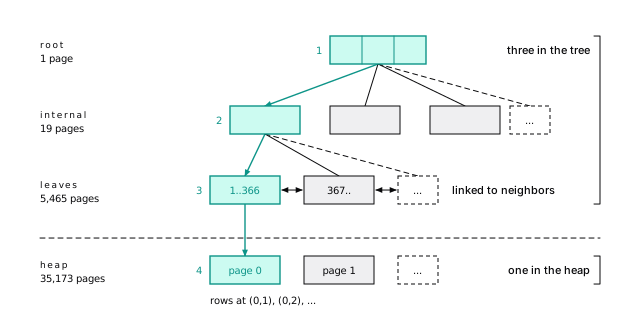
The leaves hold every key in order, each with a TID, the row’s (page, item) address in the heap (its ctid), and link to their neighbors so range scans walk sideways. The pages above only say which child to visit next.
The shape is the whole trick. Each internal page points at roughly 300 children, so three levels hold about 30 million keys and four about 10 billion. Grow the table three-hundredfold and a lookup costs one more page. In A query is pages and round trips, a primary key lookup read four: three in the tree, one in the heap. Hold on to that:
An index lookup costs the depth of the tree plus one heap page per matching row.
The tree’s share is three or four pages and barely grows. The heap pages are where the money goes, and the rest of this chapter is about spending fewer of them.
There’s no clustered index: every index, the primary key included, points into an unordered heap (The table is the primary key in InnoDB).
Block 0 of every B-tree is a metapage that records where the root is. pageinspect reads it and summarizes every page (bt_multi_page_stats is PostgreSQL 16+):
Root at block 412, level 2: three levels. Nineteen internal pages point at about 289 leaves each, and 5,465 leaves hold about 367 entries of 16 bytes (an 8-byte key plus an 8-byte header carrying the TID). One slot per leaf is the high key, the page’s upper bound (the first leaf’s is 367, the first id on the next leaf), so 5,465 leaves of 366 rows is the two million.
16-btreeThe first index: 35,249 pages to 91
Start with the obvious index, on the where column:
From 35,249 pages to 91. Read it bottom up:
- The index: 3 pages to find all 85 of the project’s rows.
- The heap: 85 pages, one per row (
Heap Blocks: exact=85). The events arrived at random times over the year, so each landed on a different page. - The sort: kept the newest 20.
Three pages to find, 85 to fetch. That ratio is normal.
16-btreeAn index helps only as much as its rows sit together
Finding rows in an index is cheap. Fetching them from the heap is the bill, and Postgres has three ways to settle it. An Index Scan fetches each row as it walks the index, so rows come out sorted. A bitmap scan, the plan above, collects every match first, then visits each heap page once, in physical order. An index-only scan skips the heap altogether.
Here’s the uncomfortable truth: an index helps only as much as the matching rows sit together in the heap. Ask for 2% of events by a range of projects and those rows are spread over 68% of its pages. Past some point, reading the whole table in order is cheaper, and the planner switches to a sequential scan. That isn’t the planner being dumb. It’s the planner counting pages.
About 40,000 rows from a range of projects:
The index cost 37 pages; the heap, 23,913. Recheck Cond is the heap scan re-testing each row. If the bitmap outgrows work_mem, the memory one operation may use, it goes lossy, remembering whole pages instead of rows (Heap Blocks: exact=... lossy=...), and the recheck filters every row on those pages.
16-btreeThe best heap page is the one you never read
Counting project 4242’s events needs nothing the index doesn’t hold, so the heap stays closed:
The same 85 rows that cost 91 pages to fetch, counted in 5 pages.
The catch: an index entry doesn’t know whether its row is visible to you (Updates are inserts). So the scan checks the visibility map: one bit per heap page meaning “every row here is visible to everyone” (Two bits per page let scans and vacuum skip work). Where the bit is clear, it fetches the row anyway. Vacuum sets the bits.
Whenever you see Index Only Scan, check Heap Fetches. Close to the rows returned means vacuum isn’t keeping up, and the scan is quietly an ordinary one.
Multicolumn indexes: order is the design
The dashboard doesn’t ask “which rows belong to project 4242?” It asks “what are project 4242’s twenty newest events?” Index the question, not the column.
The single-column index answers the first and leaves Postgres to sort: fine for 85 events, painful for 200,000. Give the index both columns:
No sort. The project’s entries sit together in time order, so Postgres walks back from the newest and stops after 20: 3 index pages plus 20 heap pages, whether the project has 85 events or 85 million.
Cost proportional to rows returned, not rows stored. That’s what you’re designing for.
16-btreeEquality first, then range or sort
A phone book sorted by last name, then first name, finds “the Smiths, A to C” in one stretch. “Everyone named Alice” means reading the whole book.
Here is “this project, last 30 days” on (created_at, project_id), then on (project_id, created_at):
Same 11 rows, 45 times the pages. With created_at first, Postgres reads every entry from the last 30 days and checks the project on each.
Both plans list both columns under Index Cond, which is why this mistake survives code review. What differs is which condition bounds the scan. With (created_at, project_id), only created_at >= '2026-09-06' decides where the scan starts and stops, so it reads all of the last 30 days, about 164,000 entries, testing project_id on each. The dashboard query did worse on that index: 1,399 pages, walking the whole time range backward hunting for project 4242. (The sample data ends on 2026-10-06, so the date is written out; in your app it’s now() - interval '30 days'.)
16-btreeThe rule fits on a sticky note:
- Columns compared with
=(orin) go first. - Then at most one column used for a range or for
order by. - Anything after that gets checked, but doesn’t narrow what’s read.
Among equality columns, put first the one you also query alone: (a, b) serves a by itself too. PostgreSQL 18’s skip scan can rescue an index whose first column the query skips, but only when that column has few values. Don’t count on it.
Skip scan works when the leading column has only a few values: the B-tree does one descent per value. An index on (kind, created_at) counted the last day’s events, a query that never mentions kind, in 44 pages instead of 35,173:
Index Searches (new in PostgreSQL 18’s EXPLAIN) counts descents from the root: 1 for a plain lookup, 6 here for five kinds: one per kind, plus one that runs off the end of the index. Nothing else in the plan says “skip”.
With thousands of leading values, the planner prices skip scan above a sequential scan. A lookup by email alone on the index behind the table’s unique (account_id, email) would need 1,000 descents, one per account, so it still read the whole table.
16-btreeCovering indexes: cover the hot query, not every query
Say the dashboard shows only created_at and kind. The 50 newest still cost 53 pages, nearly all heap pages fetched to read kind. Carry it in the index as a passenger:
Now it’s an Index Only Scan reading 6 pages. INCLUDE (PostgreSQL 11+) stores extra columns only in the leaves. The price: the index grew from 60 MB to 77 MB, and every insert writes those bytes. Cover the two or three queries that run thousands of times a second. Nothing else. Because INCLUDE columns sit outside uniqueness, it’s also the only way to add columns to a unique index without changing what “unique” means.
Update the project’s 85 rows, which clears the all-visible bits on their pages, then run the 50-row query before and after vacuum events. Only these lines differ:
Same plan, 180 pages against 5. There are more heap fetches (99) than rows returned (50) because the update left a dead index entry beside each new one, and the scan has to visit the heap to learn which of the two is visible. On an append-only table autovacuum rarely visits (common before PostgreSQL 13 added insert-triggered autovacuum), Heap Fetches creeps up to the row count and the covering index quietly stops covering. InnoDB plays by different rules (Covering indexes come for free in InnoDB, almost).
16-btreeIndex the rows you ask about, not the whole table
The on-call page wants a slice of the table, not all of it. It lists recent failed deploys, about 6% of events, and reads the whole table to do it. A partial index holds only the rows matching its where clause:
Now it reads 11 pages. At 2,768 KB, against 43 MB for (created_at) on every row, it stays in cache, and inserts that don’t match never touch it. Queues and soft deletes are the classic uses.
One trap: the planner must prove at plan time that your where implies the index’s. Write the predicate’s constants as literals. If your ORM makes them parameters, a generic plan can ignore the index.
A generic plan, built once for any parameter value, can’t know what $1 will be (Prepared statements switch plans after five runs). With the 43 MB (created_at) index also in place:
The partial index is ignored; the plan walks the full index and filters. Use force_generic_plan in a test to see what your query’s sixth execution will do. A partial unique index is how “email is unique among non-deleted users” works (A soft delete needs a partial unique index).
16-btreeAn index stores exactly what you gave it
An index holds the values you indexed, not what a function makes of them. Wrap the column in a function and the index can’t see you: where lower(email) = 'user4242@example.com' read all 1,126 pages of users. Index the expression:
Now it reads 4 pages. The query must use the same expression, written the same way; run analyze users afterward so the planner has statistics on it.
Make it unique and it enforces what a plain constraint can’t:
Now USER4242@example.com is rejected as a duplicate of user4242@example.com. A unique index already answers queries, so never add a second, non-unique one on the same columns “for performance”.
Index expressions accept only immutable functions: same input, same output, forever. Casting a timestamptz to date isn’t, because the day a moment falls on depends on the session’s time zone, and Postgres refuses with functions in index expression must be marked IMMUTABLE. Spell out the zone and it works: ((created_at at time zone 'UTC')::date). Never wrap the cast in your own function labeled immutable to get past the check: the index stores days computed in the zone of whichever session wrote each row, and a query from another zone misses rows.
For plain columns, prefer a unique table constraint to a unique index: it shows in \d, can be deferrable, and on conflict on constraint can name it. Use the index form for expressions and where clauses.
16-btreeDeduplication: repeated keys are stored once (PostgreSQL 13+)
The index on project_id is 14 MB. The primary key, also a bigint over the same rows, is 43 MB. The difference is deduplication: Postgres stores a repeated key once, followed by the list of rows that have it, which shrinks indexes on foreign keys and statuses to about a third of their size.
Smaller doesn’t mean useful. Each of the five values of kind matches at least an eighth of the table, so its rows sit on nearly every page, and an index on kind alone read more pages for kind = 'alert' than a sequential scan. A column with a handful of values belongs inside a multicolumn or partial index, never alone.
Rebuild the project_id index with (deduplicate_items = off) and it’s 43 MB, like the primary key. Inside the leaves:
Thirteen fat posting lists hold what took 367 plain entries. (The kind index dedupes to 13 MB, but the kind = 'alert' bitmap scan still visited 35,154 of the table’s 35,173 pages plus 213 index pages.)
Deduplication is off wherever equal values can differ in bytes: numeric, jsonb, float4 and float8, arrays and other container types, and text with a nondeterministic collation. It’s also off for any index with INCLUDE columns, part of why the covering index grew. allequalimage in bt_metap says whether an index qualifies; indexes carried over from PostgreSQL 12 or earlier by pg_upgrade need a reindex to get it.
16-btreeEvery index is a tax on writes
Every index makes some read faster and every write slower, forever. We inserted the same 200,000 events three times, adding indexes each time:
| Indexes on the table | Buffer accesses | WAL written |
|---|---|---|
| none | 211,120 | 32 MB |
| primary key | 561,333 | 45 MB |
| primary key + 4 secondary | 2,363,118 | 106 MB |
Four ordinary secondary indexes made the same insert touch about four times the buffers and more than double its WAL (Write it down first).
Updates pay too: one that changes no indexed column and fits on its page is HOT and skips every index, and any other adds an entry to all of them (A cold update pays for every index).
You pay for every index on every insert, every non-HOT update, every vacuum, and in cache, WAL, replicas, and backups. Add one for a query you can name, measure before and after, and drop what nothing uses.
Each run is the same insert under explain (analyze, buffers, wal); between runs, truncate events_w and add indexes:
Each index entry is its own descent, its own dirty page, its own WAL record. WAL varies by a few MB between runs, depending on whether a checkpoint lands mid-insert and forces full-page images; the buffer counts don’t. Random keys like UUIDv4 make the tax worse, because every insert lands on a different leaf (Increasing keys append; random keys land anywhere).
16-btreeAn idx_scan of zero is a suspect, not a verdict
An index takes one line to add, and nobody ever removes one. pg_stat_user_indexes counts scans of every index, so an idx_scan of zero is a suspect. Before you drop one:
- Check how long the counters have run (
stats_resetinpg_stat_database). The month-end report’s index looks unused for 29 days. On PostgreSQL 16+,last_idx_scansays when each index was last used, which is easier to reason about than a reset date. - Check every replica. Counters are per server; an index idle on the primary may carry every replica.
- Leave unique and primary key indexes alone. They enforce constraints.
- Drop with
drop index concurrently(Change the schema, keep the site), and keep thecreate indexhandy.
Duplicates need less judgment. Someone adds (project_id) for a foreign key, someone later adds (project_id, created_at) for the dashboard, and the first now only costs writes: the longer index serves every lookup the shorter one did.
Unused indexes, biggest first:
The second row is a copy of the project_id index we planted. The first is the (created_at) index from the partial-index comparison: we only ever ran explain on it without analyze, which doesn’t execute the query, so it never counted as a scan.
Indexes whose key columns are a prefix of another’s:
It compares column numbers only (no operator classes, collations, or sort direction) and skips partial and expression indexes, so read each hit before acting.
16-btreeDesign an index from a query, not a column
- Start from a query, not a column. Get the real SQL from
pg_stat_statements(Start with pg_stat_statements) and write down the pages its plan touches. - Put equality columns first, then one range or
order bycolumn, and let the index do the sorting. - Consider a partial index for a fixed subset, and
INCLUDEonly for a very hot query. - Look for an existing index this one makes redundant.
- Build it with
create index concurrently(Pick the index build that matches the table’s traffic) and compare pages. No drop of an order of magnitude? Find out why before you keep it.
The short version
- A lookup costs the tree’s depth (3 or 4 pages) plus one heap page per matching row.
- Index the question: equality columns first, then one range or sort column. The wrong order turned 14 pages into 643.
- Index-only scans need a current visibility map. Watch
Heap Fetches. - Partial indexes are small and cheap; write their predicate as literals.
- Never index a column with a handful of values on its own.
- Every index taxes every write: four extra made an insert touch four times the buffers.
- Audit
idx_scan = 0over a long window, on every replica.
Further reading
- Indexes, PostgreSQL documentation. The official chapter, including multicolumn, index-only, partial, and expression indexes.
- B-Tree Indexes: implementation, PostgreSQL documentation. Structure, deduplication, and bottom-up deletion.
- src/backend/access/nbtree/README, PostgreSQL source. Right-links, high keys, and page deletion from the people who wrote them.
- Efficient Locking for Concurrent Operations on B-Trees, Philip L. Lehman and S. Bing Yao, ACM TODS, 1981. The B-link tree behind Postgres’s sibling links.
- PostgreSQL 18 release notes, PostgreSQL. Skip scan and the new
Index Searchesline. - Anatomy of an SQL Index, Markus Winand. The clearest mental model of leaf chains and tree depth.
18 Beyond the B-tree
Two indexes on the same column of the same two-million-row table. Both turn a 35,000-page sequential scan into a few hundred pages or less. One is an eighteen-hundredth the size of the other:
The small one is a BRIN index, and whether it’s brilliant or useless depends entirely on how your rows sit on disk. That’s the whole chapter in one example. Every index type answers one question. Ask it that question and it’s the fastest thing in the building. Ask it another and it’s dead weight you pay for on every write.
The B-tree answers “which rows have this value, in order?” Postgres ships five other index types:
| Access method | The question it answers |
|---|---|
| GIN | Which rows contain this element? (jsonb keys, array members, words, trigrams) |
| GiST | Which rows overlap, are near, or contain this shape? (ranges, geometry, similarity) |
| SP-GiST | Same family as GiST, for data that partitions cleanly (prefixes, points, IP ranges) |
| BRIN | Which page ranges could hold this value? (naturally ordered data) |
| Hash | Which rows equal this value? Nothing else. |
As in the B-tree chapter, the evidence is the Buffers: line: 8 KB pages (Buffers are the evidence).
GIN is fast to search and expensive to update
A B-tree has one entry per row, which is useless when you search inside a value: a key in a jsonb document, a tag in an array, a word in a comment. A GIN (Generalized Inverted iNdex) stores one entry per distinct element, followed by the rows that contain it, like the index at the back of a book:
The catch runs the other way: one row produces many entries, so GIN is fast to search and expensive to update.
For containment, jsonb_path_ops beats the default
payload holds documents like {"region": "syd", "status": "failed", "duration_ms": 4242}. Find one duration in one region:
@> means “contains”. GIN has two operator classes for jsonb, and the choice matters:
| Operator class | Index size | Pages, index only | Pages, whole query |
|---|---|---|---|
| no index | 35,173 | ||
jsonb_ops (default) | 20 MB | 987 | 1,068 |
jsonb_path_ops | 14 MB | 121 | 202 |
The default indexes keys and values separately, so this query reads the lists for "region" and "duration_ms", which appear in every row. jsonb_path_ops (using gin (payload jsonb_path_ops)) hashes each value with its path, so duration_ms = 4242 is one rare element.
17-more-indexesThe price: it serves containment and jsonpath (@>, @?, @@) but not key existence (? and friends). Keep the default only if you ask “does this key exist?”
Without an index, the containment query is a parallel sequential scan (Buffers: shared hit=900 read=34273) for 81 rows. With events_payload_pathops in place, a jsonpath query uses the index:
A key-existence test can’t, and falls back to the sequential scan:
The default class’s numbers, measured:
17-more-indexesA GIN index on payload can’t serve payload->>'status' = 'failed' or (payload->>'duration_ms')::int > 1000. Extract-then-compare needs a B-tree expression index on that exact expression. Write the test as containment (payload @> '{"status": "failed"}') to use GIN, or promote a hot field to a real column (You don’t need another database (yet)).
GIN doesn’t help unselective queries
An index is a shortcut to a few rows. payload @> '{"status": "failed", "region": "syd"}' matches about 100,000 events, 5% of the table, and they sat on 33,343 of its 35,173 pages (Heap Blocks: exact=33343). The “index scan” read nearly everything and was slower than the sequential scan it replaced. “Failures per region” wants a sequential scan, a summary table, or a partial B-tree on the slice you care about.
17-more-indexesArrays: spell it as containment
GIN works the same way on arrays: on a tags text[] column of projects, tags @> '{gdpr}' read 53 pages instead of 507. The trap is the spelling. 'gdpr' = any (tags) isn’t a GIN operator, so it’s a sequential scan. Write tags @> array['gdpr'] (or && for “any of”).
Three index pages, then one heap page per tagged project. The = any spelling:
17-more-indexesA full-text GIN search read 51 pages, not 6,671
Full-text search turns text into a tsvector, a sorted list of normalized words (lexemes: “The deploys failed” becomes 'deploy' 'fail'), and GIN indexes the lexemes. On a test table of a quarter-million short comments, a search for “deadlock” read 51 pages instead of all 6,671. The recipe is a stored tsvector column, a GIN index, and @@ to match. Parsing what users type (websearch_to_tsquery) and ranking (which reads every match) belong to Search without a search engine.
Two index pages; the other 49 are one heap page per matching comment. Pass the configuration ('english') explicitly, for both vector and query, so stemming matches and the generated column stays immutable.
17-more-indexesThe pending list makes one insert pay for many
GIN parks new entries in an unsorted pending list and merges them in bulk. The list is on by default (fastupdate) and grows to gin_pending_list_limit, 4 MB. Whichever insert overflows it pays to merge all four megabytes. The symptom: fast inserts, and the occasional one that takes hundreds of milliseconds. The fix: a smaller gin_pending_list_limit on that index, or fastupdate = off to pay a steady cost instead of a spiky one.
Insert 5,000 events (copies of the newest ones) and look at the jsonb_path_ops index with pgstatginindex from pgstattuple:
Every search now scans those 37 pages linearly as well: the containment query went from 121 index pages to 158. Vacuum merges the list, as does select gin_clean_pending_list('events_payload_pathops').
17-more-indexespg_trgm makes a leading wildcard indexable
A B-tree is sorted from the start of the string, so at best it serves a prefix like like 'user42%' (and only with the right operator class, as the next section shows), never like '%r4242@%'. The pg_trgm extension makes substring search indexable by breaking strings into trigrams, every three-character sequence (show_trgm('user4242')):
A string containing r4242@ must contain that fragment’s trigrams, so the index intersects their lists and rechecks the few candidates. Without it, searching by an email fragment read all 1,126 pages of users. With it:
Ten pages, and that was ilike (~~*): the same index serves case-insensitive matches and regular expressions. A pattern needs three fixed characters to have a trigram to look up.
Prefix search needs the right operator class
Even like 'user4242@%' couldn’t use a plain B-tree on email. Under a non-C collation like this database’s en_US.utf8, B-tree order isn’t byte order, so a prefix isn’t guaranteed to be one contiguous range. Build the index with text_pattern_ops (byte-wise order) and the prefix becomes a range:
That index can’t serve <, >, or order by in the database collation. Need both? Build both, or use the C collation on the column.
GIN filters trigrams; GiST ranks by similarity
pg_trgm also has a GiST operator class. For like and regex, GIN wins outright: the GiST index was three times the size (11 MB against 3,504 KB) and read 163 pages where GIN read 10.
But GiST does one thing GIN can’t: return rows in order of similarity (order by email <-> 'usr4242@exmaple.com' limit 5), the “did you mean” query. That’s a nearest-neighbor search, walking the tree in distance order (PostGIS does the same for geography). GIN for filtering, GiST for nearest-match ordering.
<-> is trigram distance (1 minus similarity):
With the GiST index, the plan is an index scan ordered by distance:
Trigram index on users.email | Size | Build time (our machine) | Pages for like '%r4242@%' |
|---|---|---|---|
GIN (gin_trgm_ops) | 3,504 KB | 140 ms | 10 |
GiST (gist_trgm_ops) | 11 MB | 550 ms | 163 |
Without the GiST index, Postgres computes all 100,000 distances and sorts: about 90 ms against 15 ms on our machine. The index touched more pages (1,427) than a sequential scan of the 1,126-page table, because these synthetic emails look alike; it saved CPU, since computing similarity is the expensive part. Data with more variety should prune better.
17-more-indexesGiST indexes values that have no order
A B-tree needs a total order, and many types don’t have one: which comes first, 9:00 to 17:00 or 12:00 to 13:00? GiST (Generalized Search Tree) indexes them anyway. Each internal entry stores a bounding value covering everything beneath it, and a search descends into every child whose bound could match.
Its best-known job is enforcing “no two of these may overlap”, the exclusion constraint, which builds a GiST index to check every insert against. Say projects can declare deploy freezes, at most one at a time per project:
That index hides a lesson. With 480,000 freezes loaded, “which projects were frozen at this moment?” read 7,188 pages through the constraint’s index, which leads with project_id: more than a sequential scan’s 4,548. A GiST index on during alone needed 460, only 7 of them in the index. The index behind a constraint isn’t automatically a good index for your queries.
GiST has no strict “leading column”, but the first column still decides how entries group into pages, so a query on during alone explores nearly the whole index. With create index deploy_freezes_during_idx on deploy_freezes using gist (during):
GiST range operators include && (overlaps), @> (contains), <@ (contained by), and the adjacency and strictly-left/right operators. The checks below also confirm that the constraint does its job: a New Year freeze inside an existing holiday freeze is refused with exclusion_violation.
17-more-indexesYou’ll rarely need SP-GiST
Where SP-GiST fits, a B-tree or GiST usually does about as well, and you already know how those behave. SP-GiST (space-partitioned GiST) is for data that splits into non-overlapping regions (prefixes, points, IP networks), so a search follows one path. On users.email it answered a starts-with query (email ^@ 'user4242@') in 5 pages from a 4,672 KB index, about a B-tree’s size. For inet containment and ranges it’s an alternative to GiST; benchmark both.
BRIN keeps one summary per range of pages
Back to the opening. events is append-only: rows arrive in created_at order and never move. pg_stats.correlation measures how well a column’s order matches the physical row order: 1 for created_at and id, about 0.003 for project_id.
A BRIN (Block Range INdex) cashes in on it. It stores one summary per range of pages_per_range pages (128 by default): the smallest and largest value. Think of labels on moving boxes. A query for one day skips every box whose label can’t match, opens the one or two that might, and checks every row inside.
Each label covers about a day and a third of events. About 275 labels for 35,000 pages: hence 24 KB.
A thousandth of the size, nearly the same pages
A per-kind summary of one day of events:
Index on created_at | Size | Pages for one day |
|---|---|---|
| none | 0 | 35,272 |
| BRIN, 128 pages per range | 24 KB | 261 |
| BRIN, 32 pages per range | 48 KB | 133 |
| BRIN, 8 pages per range | 168 KB | 130 |
| B-tree | 43 MB | 115 |
The B-tree wins on pages, narrowly. But it’s 1,800 times larger than the default BRIN, competes with your data for cache, and every insert descends it. BRIN at 32 pages per range comes within 20 pages of it at under a nine-hundredth of the size. Smaller ranges stop paying: at 8 pages per range, the index itself read 26 pages instead of the 5 it read at 32 pages per range, nearly cancelling the 24 heap pages it saved.
The day is created_at >= '2026-05-01' and created_at < '2026-05-02', grouped by kind. With create index events_created_brin on events using brin (created_at) and parallelism off:
BRIN bitmaps are always lossy (they name pages, never rows), so the heap scan reads every row on 256 pages and the recheck discards 9,078. The rows=2560 on the BRIN node isn’t a row count: BRIN reports ten per matching page as a placeholder (totalpages * 10 in brin.c). pageinspect shows the labels themselves (brin_page_items(get_raw_page('events_created_brin', 2), 'events_created_brin')):
17-more-indexesBRIN is useless without physical order
On project_id, whose correlation is zero, every box holds nearly every project, so every box “might match”. Force a BRIN index there and it reads every page of the table anyway (Buffers: shared hit=50 read=35266).
Use BRIN for columns that track insertion order: timestamps on append-only tables, sequence ids, log offsets (Partition for the delete pairs it with time partitions). Protect the order: rows moved by updates, backfilled old data, and new rows reusing freed space all widen the labels until the index stops pruning.
Vacuum, or brin_summarize_new_values(), summarizes page ranges filled after the index was built; until then, those ranges are always scanned. On a busy append-only table, create BRIN indexes with (autosummarize = on).
A hash index wins only on equality over long keys
Use a hash index for equality on long random values like tokens and content hashes. Everywhere else, use a B-tree.
A hash index stores a 32-bit hash of each key and supports exactly one operator: =. No ranges, ordering, uniqueness, or index-only scans. In exchange, its size doesn’t depend on the key’s width. On a 128-character API key, the B-tree was 16 MB and the hash index 4,112 KB, and a lookup touched 3 pages instead of 5. On email, about 20 characters, the hash index was the same 4,112 KB and the B-tree smaller. Hash indexes have been crash-safe since PostgreSQL 10; their bad reputation is older.
17-more-indexesThe operator picks the index type
| You query with | Use |
|---|---|
=, <, >, order by, prefix like | B-tree (text_pattern_ops for prefixes in non-C collations) |
jsonb @>, @? | GIN jsonb_path_ops |
jsonb key existence (?) | GIN jsonb_ops (the default) |
jsonb ->> with =, <, sort | B-tree expression index, or a real column |
array @>, && | GIN (not x = any (col)) |
full-text @@ | GIN on a stored tsvector |
like '%x%', ilike, regex | GIN gin_trgm_ops |
| “did you mean” | GiST gist_trgm_ops |
| range overlap, exclusion | GiST (plus btree_gist to mix in =) |
| time or id on append-only data | BRIN, if correlation is near 1 |
= on long random keys | hash |
Whichever you pick, measure pages before and after. Every one of these, GIN most of all, makes writes more expensive, so keep only the ones that earn an order of magnitude.
The short version
- GIN indexes the elements inside a value. Fast to search, expensive to update; spiky insert latency means the pending list.
- For jsonb containment use
jsonb_path_ops: 121 index pages instead of 987. GIN can’t servepayload->>'key' = 'x'. - For
like '%x%'use a trigram GIN index; trigram GiST only for similarity ordering. - GiST handles overlap and distance. The index behind a constraint isn’t automatically a good one for your queries.
- BRIN on a naturally ordered column is tiny (24 KB against a 43 MB B-tree) and nearly as good for ranges; on an uncorrelated column it reads the whole table.
- Hash indexes are worth it only for equality on long keys.
- Any index helps only selective queries: a GIN lookup matching 5% of the rows still read 95% of the pages.
Further reading
- Index Types, PostgreSQL documentation. The official overview of every access method and its operators.
- GIN Indexes, GiST Indexes, SP-GiST Indexes, BRIN Indexes, and Hash Indexes, PostgreSQL documentation. One reference page per type, including the built-in operator classes.
- src/backend/access/brin/README, PostgreSQL source. How the range map and summaries are laid out, and why a summarizing index can be so small.
- pg_trgm, PostgreSQL documentation. Trigram operators, similarity thresholds, and the GIN and GiST operator classes.
- jsonb Indexing, PostgreSQL documentation.
jsonb_opsversusjsonb_path_ops, with the operators each supports. - Operator Classes and Operator Families, PostgreSQL documentation. Where
text_pattern_opsand friends are explained.
19 Read the plan, not the clock
This query returns 20 rows and takes about a second and a half on our machine:
Run it under explain (analyze, buffers) and one line explains everything:
loops=20. The inner part ran once per user, and each run read the whole events table: 703,463 page accesses, more than 5 GB, for 20 rows. Once you can read that line, the fix follows, and it takes the query from 703,714 pages to 331.
Most people read a plan by staring at the milliseconds. Don’t: timings move with the cache and the load. The plan also says how many rows each step expected, how many it got, how many times it ran, and how many pages it touched, and those point at the fix. Reading plans isn’t an art. It’s a short list of things to look at, in order.
All plans here are real, from PostgreSQL 18 on the book’s events table (2,000,000 rows, 35,173 pages, only a primary key unless stated). Your page and row counts should match or come close; your timings won’t. Plan lines are long, so we trim the parts a section doesn’t discuss to ..., and wrap the estimate and the actuals onto two lines where both matter.
EXPLAIN guesses; EXPLAIN ANALYZE runs it
explain asks the planner what it would do: nothing runs, and you see only estimates. That’s the right tool when the query takes an hour. Otherwise use explain analyze, which runs the query and prints reality next to the prediction. Here is explain analyze select * from events where kind = 'alert'; plain explain would print only the first parenthesis and the Filter:
PostgreSQL 18 prints Buffers: by default; older versions need explain (analyze, buffers), which this book spells out so it works everywhere.
explain analyze on an insert, update, delete, or merge performs the write. Always wrap it in begin … rollback, and beware of select statements that call functions with side effects.
explain analyze delete from events where created_at < '2025-10-11' really deleted 27,397 rows (and dirtied 482 pages) before the rollback. Nothing was copied back: the rows were stamped by a transaction that then aborted, so they stay visible (Updates are inserts). The rollback undoes the delete, not everything: rows were really locked, triggers fired, sequences advanced, and WAL was written.
18-explainOther options: costs off hides estimates; timing off skips per-node timing on nodes run millions of times; settings, wal, and PostgreSQL 17’s serialize and memory add what their names say; PostgreSQL 16’s generic_plan explains a query with $1 placeholders as a prepared statement would (Prepared statements switch plans after five runs); format json is for tools.
The plan is a tree; read it inside out
A plan is a tree of nodes. Each node does one job (scan, join, sort, aggregate), pulls rows from the nodes below it, and hands rows up. Indentation shows the tree, and -> marks a child. Rows start at the leaves, so read from the innermost node outward, like a recipe printed with its first step last. A two-table join, with each node’s estimate and actuals wrapped onto two lines and the middle nodes’ Buffers: lines trimmed:
(Captured with max_parallel_workers_per_gather = 0 to keep it short.) The same tree, drawn:
Bottom up: scan projects, keep the archived ones, build a hash table. Scan events, keep the last week, look each row up in the hash table. Sort, then count per name.
A node’s numbers include its children’s
Every node has the same parts. The events scan from that plan, taken apart:
The first line is the guess; the rest is what happened. Most diagnosis is comparing 4 with 8, multiplying by 9, and reading 11. Two more rules:
- Times and buffers are cumulative. A node’s numbers include its children’s. Subtract the children to see what a node did itself.
actual time=A..Bis milliseconds to the first row (A) and the last (B). A largeAmeans work before any output, like a sort or a hash build. TheHash Joinproduced its first row at 82 ms because theeventsscan read most of the table before finding a recent row.
The GroupAggregate at the top reports shared hit=2835 read=32532, 35,367 pages for the whole tree. The events scan accounts for 35,173 of them, and the Hash over projects for 191. That leaves 3 pages for the join, the sort, and the aggregate combined: they worked in memory. In a slow plan, this subtraction finds the node where the big number starts.
18-explainCost is a guess in made-up units
cost=0.00..60173.43 is the estimated startup and total cost, in units where reading one page sequentially costs 1.0. The planner prices every plan it considers and runs the cheapest. That’s all cost is for. It isn’t milliseconds, it doesn’t compare across queries, and a high cost isn’t necessarily slow. Use costs to explain why the planner chose a plan; diagnose with rows, loops, and buffers. The unit prices belong to The planner is a cost calculator.
The kind = 'alert' scan is pages plus per-row CPU work, each at its configured price:
That matches the plan to the cent. The counts come from pg_class.relpages and reltuples, which vacuum and analyze keep current. reltuples is an estimate (2,000,034 for a table of exactly 2,000,000 rows), and every lab run re-analyzes its own copy, so it moves by a few rows between runs. That’s why the created_at scan in the join plan above costs 60173.53, not 60173.43: same formula, a slightly different reltuples. Your copy may differ by a few cents; the formula still matches your plan exactly.
18-explainMultiply by loops; buffers are already totals
Some nodes run more than once. The inner side of a nested loop runs once per outer row, and loops counts the runs. actual time and rows are per loop; buffers are totals.
That’s the opening query. Its inner Limit said actual time=70.407..70.408 ... loops=20: 70 ms looks harmless until you multiply by 20 and get the whole 1.4 seconds. Its buffers, 703,463 pages, are already the total, 20 times the table’s 35,173. At the bottom of that subtree:
Nothing can look up events by user, so every loop reads the whole table and throws away nearly two million rows. The inner query asks for “the latest event for one user”, which is a question for an index:
Still 20 loops, now four pages each (three index levels, one heap page). The whole query went from 703,714 pages to 331, and on our machine from 1,409 ms to 0.6 ms. Whenever loops is above 1, multiply before you decide whether a node matters.
The rest of the plan, finding the 20 users, costs 251 pages; the inner subtree has everything else. The fix’s index also covers the unindexed foreign key events.user_id (One catalog query lists the unindexed foreign keys).
18-explainCompare estimated and actual rows
Every choice in a plan rests on estimates, so this habit pays most: for each node, compare estimated to actual rows, starting from the leaves. A factor of 2 or 3 rarely matters. A factor of 10 or more usually means a bad choice above it.
In the kind = 'alert' plan, rows=245404 is the estimate and rows=249714.00 what happened: within 2%, because the planner’s statistics know all five values of kind. The statistics come from a random sample of the table, so your estimate will land a little differently, but close. That’s the good case.
Now a bad case. An on-call dashboard lists the ten projects with the most failed deploys in the last week (kind = 'deploy', payload->>'status' = 'failed', a created_at range, joined to projects). It read 42,397 pages, the whole table plus a lookup into projects per matching event. An index on created_at brought that to 7,990, which looks like a win until you read where the pages went:
The events scan estimated rows=49 and got 2,402: a 49x error at the lowest node. A nested loop is the right join for 49 project lookups; for 2,402 it spent 7,206 pages, when hashing all 191 pages of projects once is cheaper. The 49 is a fixed guess: Postgres keeps no statistics on an expression like payload->>'status' until you ask for them (Functions hide your statistics). With expression statistics (PostgreSQL 14+):
The estimate becomes 2,558, and the planner switches to a hash join on its own: 975 pages instead of 7,990. No rewrite, just better information. That’s the pattern behind most “the planner is being stupid” complaints.
18-explainAfter create statistics and analyze:
The statistics come from a sample, so your estimate lands near 2,558, not on it. Rows Removed by Filter: 35955 is the scan still reading the whole week to find the failed deploys; if the dashboard is hot, a partial index removes that too. (An expression index would also have given the planner statistics, at the cost of maintaining an index.)
18-explainOlder versions printed actual rows as whole numbers, so “0.4 rows per loop” read as a misleading 0; PostgreSQL 18’s two decimals (rows=104.20) fix that.
Buffers are the evidence
Buffers: counts 8 KB pages, the thing this whole book is about, and it’s the most honest line in the plan.
shared hit pages were already in shared_buffers; shared read pages were requested from the OS; dirtied and written show up on writes; temp means a sort or hash spilled to disk.
hit + read is the number of page accesses, and it’s deterministic: same query, same data, nearly the same total every run. How many were hits depends on what else ran. Compare plans by the total; explain one run by the split.
A read isn’t necessarily a disk read: it means “not in shared_buffers, so Postgres asked the kernel”, and the kernel may answer from its own page cache (“Read” does not mean “from disk”). Don’t use I/O Timings on a big scan to tell which. In the kind = 'alert' plan, 35,079 reads show about 1 ms of I/O time, about 33 nanoseconds a page, which is faster than copying a page out of any cache. That’s because PostgreSQL 18 reads ahead asynchronously: background I/O workers (io_method = worker, the default) fetch pages before the scan asks for them, and I/O Timings counts only the time the query itself waited. On a cold server with network storage, the same count could take seconds, and the waits would show.
Nor will a second run of a big scan turn into hits: big scans use a small ring of buffers (Big operations get a ring). And written on a plain read, like the written=3 above, means the query had to flush someone else’s dirty pages to make room (Your query shouldn’t be the one writing dirty pages).
Filter means rows were read and thrown away
The leaves of every plan read tables: Seq Scan, Index Scan, Index Only Scan, and the bitmap pair, all explained in An index helps only as much as its rows sit together. On any of them, tell Index Cond from Filter. Index Cond narrowed what was read; Filter means rows were read and then thrown away, counted by Rows Removed by Filter. A big count there on an index scan means some condition couldn’t use the index: column order, a function on the column, a type mismatch.
Each join method is right only for some row counts
Postgres joins two inputs three ways, and a wrong row estimate picks the wrong one:
- Nested loop: for each row of the outer (first) child, run the inner (second) child. Wonderful when the outer side is small and the inner side is an index lookup; terrible when the outer side is big.
- Hash join: load the inner child into a hash table (the
Hashnode), then stream the outer child past it. The workhorse for large, unsorted inputs. When the table outgrowswork_memtimeshash_mem_multiplier, it splits intoBatcheson disk. - Merge join: walk both inputs in join-key order, like merging two sorted lists. Cheap when both come out of indexes already sorted.
The planner picks by cost, so its pick is only as good as its row estimates, as the 49-row nested loop showed. Why each one wins where it does, and the Memoize cache that can sit inside a nested loop, are in Each join method wins on a cost curve.
Joining 30 days of events to their users (where e.created_at >= '2026-09-06'), parallelism off:
Batches: 1 means the hash fit: 7,274 KB is over the 4 MB default work_mem, but hash_mem_multiplier (2 by default) lets a hash use twice that, 8 MB. The batch count is chosen up front from the planner’s size estimate, so Batches: 1 here also means the planner expected it to fit. With work_mem lowered to 1 MB, it’s Batches: 4 and temp written=474: still correct, slower, and visible in the temp buffers.
18-explainFix the pages before you raise work_mem
Sorts and hashes get up to work_mem (4 MB by default) per node, then spill to temporary files. A monthly report sorts 30 days of events by user (where created_at >= '2026-09-06' order by user_id, created_at):
external merge with Disk:, plus temp buffers, means it spilled. The tempting fix is more memory, and it works: with set local work_mem = '32MB' the sort becomes quicksort Memory: 12566kB. Total time didn’t move (153 ms against 148 ms, inside the noise).
Read the plan again and you see why. The scan finished at 101 ms; the sort added about 43. The real cost is reading all 35,173 pages for 8% of the table, which an index on created_at fixes (even a tiny BRIN index: BRIN keeps one summary per range of pages). Fix page counts first; tune memory second. When a spill does matter, raise work_mem for that transaction with set local, never globally: every sort and hash node in every connection may take that much (work_mem is per node, and you can see it).
In memory, the sort needed 12.5 MB for data that took 5.5 MB on disk: in-memory tuples carry overhead. Besides quicksort and external merge, you’ll meet top-N heapsort (under a limit, keeping only N rows) and incremental sort (input already sorted on a prefix of the key). Hash aggregates spill too (PostgreSQL 13+), showing Batches and Disk Usage like a hash join.
18-explainLimit bets on finding rows early
A Limit stops pulling rows once it has enough, so the planner favors plans that produce the first rows cheaply, betting it won’t have to finish them. When it’s wrong about where the rows are, it hurts. Ask for the ten events with the lowest user_id, joined to users, with no index on events.user_id, and the plan reads 35,176 pages, spills a copy of events to disk, and takes over half a second.
The full nested loop would cost over four billion units, but the Limit is costed at 20,860, because the planner assumed the first users would have plenty of events. It walks users in id order, rescanning a copy of all two million events for each. Users 1 and 2 have no events, so two loops read everything for nothing before the third found ten.
With an index on events (user_id), it reads 16 pages. (Following along? Drop the (user_id, created_at) index from the loops section first, or it serves this query too.) order by ... limit without a supporting index is the classic plan that’s fast in development and terrible in production: when a Limit sits above an expensive subtree, ask whether an index could hand it the rows in order.
loops=3 times 1,418,191 rows is the 4.25 million in the plan’s Rows Removed by Join Filter: 4254564, and the materialized copy of events went to disk. With the index, our copy chose a merge join over two index scans; another copy of the kit, with slightly different sampled statistics, chose a nested loop with a Memoize (9 hits, 1 miss). They cost within a few percent of each other, and both read the same 16 pages.
18-explainParallel query is faster, not cheaper
When a scan is big enough, Postgres splits it among workers: a Gather node over a Parallel Seq Scan, with loops=3 for the leader plus two workers. Counting deploys that way still read all 35,173 pages. Parallelism finishes a big scan sooner by spending more cores on it, so on a busy server, a frequent query that needs a parallel sequential scan needs an index instead.
Each process scans a share of the pages and counts its part; Gather collects the partial counts for Finalize Aggregate. rows=166664.00 times 3 is the 499,992 deploys. Workers Launched below Workers Planned means the server ran out of worker slots, and Gather Merge is the order-preserving variant. How many workers a plan gets is in Parallel plans are priced like everything else.
18-explainA method for slow queries
Everything above folds into one checklist. Work it in order; most problems surface by step 4.
- Get the real plan.
explain (analyze, buffers)with real parameter values on production-sized data. Wrap writes inbegin/rollback. Too slow to run? Use plainexplain, and let auto_explain log the real plan from production (auto_explain logs the plan you can’t reproduce later). - Read the top line. Ask what the answer should cost: 20 rows should need tens of pages, not tens of thousands.
- Find where the buffers went. Walk down to where the big numbers start. Subtract children; multiply by
loops. - Compare estimated and actual rows, bottom up. The lowest node off by 10x or more is usually the root cause; everything above it was planned for a different query.
- Check the usual suspects:
Rows Removed by Filterfar above rows returned (a missing or unusable index);loopsin the thousands;external merge,Batchesabove 1, ortempbuffers (spills);Heap Fetchesnear the row count (vacuum is behind); aLimitabove an expensive subtree. - Fix one thing: an index, a rewrite, or better statistics.
- Measure again and compare buffers. Keep the before-and-after plans in the pull request, so the next person knows why the index exists.
The short version
explain (analyze, buffers)runs the query and shows reality next to the estimates. Wrap writes inbegin/rollback.- Read plans from the innermost node out. Times and buffers are cumulative: subtract children.
actual timeandrowsare per loop: multiply byloops. 70 ms times 20 loops was the whole 1.4 seconds.- Compare estimated and actual rows bottom up. A 49x underestimate picked a nested loop that a hash join beat by 8x in pages.
- Use buffers as the evidence:
hit + readis stable across runs, milliseconds aren’t. - A spill costs less than it looks. Fix the scan first, then raise
work_memwithset local. - Keep before-and-after plans with every index you add.
Further reading
- Using EXPLAIN, PostgreSQL documentation. The official walkthrough, and still the best primary source on plan output.
- EXPLAIN, PostgreSQL documentation. Every option, including
BUFFERS(default in 18),WAL,SETTINGS,SERIALIZE, andMEMORY. - auto_explain, PostgreSQL documentation. Log the plans of slow queries in production, for queries you can’t rerun by hand.
- explain.depesz.com and explain.dalibo.com, Hubert Lubaczewski and Dalibo. Paste a plan and see where the time and rows go, highlighted.
20 The planner is guessing
Here is a query for the 85 events of one project inside one account:
The planner expected one row:
Off by a factor of 85, and nothing is broken. The table was analyzed a minute ago and every number the planner used was correct. It made an assumption that’s false for this data, and it will keep making it until you tell it otherwise.
Most bad plans start with a gap like that one. The planner doesn’t know your data. It guesses from a small summary of it, and the guess is usually good. Learn what it knows and what it assumes, and “the planner is being stupid” becomes a specific misestimate you can point at and fix.
The planner is a cost calculator
Postgres doesn’t try plans to see which is fastest. It lists the candidates (every way to scan each table, every join method and order), prices each with a formula, and runs the cheapest. A plan’s price depends on two things: how many rows each step will produce, which comes from statistics, and what each unit of work costs, which comes from a handful of settings.
Right row counts usually mean a good plan, even with rough prices. Wrong row counts can’t be priced away. So this chapter is about the estimates. How the planner turns them into a choice of scans, joins, and join orders is The cheapest plan wins.
Every price is relative to one sequential page
Costs are arbitrary units anchored to one number: reading one 8 KB page sequentially costs seq_page_cost = 1.0. Everything else is priced relative to it:
| Parameter | Default | What it prices |
|---|---|---|
seq_page_cost | 1.0 | Reading a page as part of a sequential scan |
random_page_cost | 4.0 | Fetching a page out of order (index scans) |
cpu_tuple_cost | 0.01 | Processing one row |
cpu_index_tuple_cost | 0.005 | Processing one index entry |
cpu_operator_cost | 0.0025 | Evaluating one operator or function call |
A sequential scan costs its pages times seq_page_cost plus its rows times cpu_tuple_cost, plus a cpu_operator_cost per row per filter (to the cent). The formula isn’t the hard part. Notice what most of it multiplies: a row count. That’s where the real work lives.
random_page_cost is a ratio, not a measurement. Its default of 4.0 dates from spinning disks; SSD-backed systems often run 1.1 to 2 (random_page_cost assumes spinning disks). And effective_cache_size isn’t a price at all: it tells the planner how much data is probably cached (effective_cache_size is a hint, not memory).
When a plan looks wrong, the reflex is to nudge random_page_cost until it flips. Set server-wide, that fixes one query by making the planner wrong about every other query in a different way, and some of those flip to plans that can sink the server. Fix the estimate first. Change cost parameters only to describe your hardware, once, for the whole server.
pg_stats is the planner’s entire picture
Row estimates come from statistics that ANALYZE stores and the pg_stats view shows, one row per column. For events (ANALYZE samples at random, so your last digits will differ):
That’s the planner’s entire picture of a two-million-row table:
null_frac: the fraction of nulls. (Onprojects,archived_athas 0.80445, soarchived_at is nullis estimated at 80.4%.)avg_width: average bytes per value, which sizes hashes and sorts.n_distinct: distinct values. Positive is a count (kindhas 5); negative is a fraction of the rows, and-1means every value is unique.most_common_valsandmost_common_freqs: the MCV list, the most frequent values and how often each appears.histogram_bounds: the other values, cut into 100 buckets of roughly equal row counts.correlation: how closely physical row order matches the column’s order, from -1 to 1. It prices index scans (Correlation prices the index scan).
Here’s the MCV list for kind:
So where kind = 'deploy' is estimated at rows=502927: 0.25146666 times the table’s 1,999,974 rows. A value in the MCV list gets its frequency; anything else shares the leftover evenly. Ranges count histogram buckets: the week of September 1, 2026 on created_at was estimated at 36,613 rows, against an actual 38,356.
Every row estimate is a formula over pg_stats, and you can check it. On events.account_id (1,000 distinct values; the sample happened to put six slightly busier accounts in the MCV list, with frequencies summing to 0.0091666665):
That second formula is why a skewed column hurts. If a few hundred mid-sized tenants each had 0.5% of the rows, the 100 MCV slots couldn’t hold them all, and the rest would each be estimated at about 2,000 rows instead of 10,000. A higher statistics target (next section) gives big tenants their own entries.
A range finds the histogram bucket holding each end and assumes values spread evenly inside it. For created_at >= '2026-04-01' and created_at < '2026-04-08':
The planner said 38,431 (the difference is our rounding) and the real count is 38,356. A join on = multiplies the two inputs and divides by the larger n_distinct when it has nothing better: events joined to the 173 enterprise accounts is estimated at 2,000,000 x 173 / 1,000 = 346,000. It assumes enterprise accounts produce an average number of events, the same independence assumption as below.
19-plannerpg_stats also has most_common_elems and elem_count_histogram for arrays and tsvector columns, and range histograms for range types: the same idea for other shapes of data.
ANALYZE reads a sample, not the table
ANALYZE samples 300 x default_statistics_target rows. The default target is 100, so 30,000 rows:
The target also caps the MCV list and the histogram at 100 entries each: plenty for most columns, too few for a skewed one with many values. If account_id had a long tail of large tenants, 100 MCV slots couldn’t hold them, and the rest would get the average estimate. Raise the target per column, not globally:
Now ANALYZE reads all 35,173 pages for a 300,000-row sample, and all 1,000 accounts get their own MCV entry. The price is a slower ANALYZE (about 2 seconds instead of 0.2 on our machine) and slightly slower planning. Use 500 to 1000 only where estimates are measurably wrong, typically tenant ids and status columns. If ANALYZE keeps getting n_distinct wrong, pin it with alter table ... alter column ... set (n_distinct = 20000).
Three kinds of change slip past autovacuum’s analyze
Autovacuum analyzes a table after roughly autovacuum_analyze_threshold + autovacuum_analyze_scale_factor x reltuples rows change: 50 plus 10% by default, so 200,050 changed rows on a 2-million-row table. Three cases slip through:
- Bulk loads. The planner works from statistics that predate the load, or none. Run
ANALYZEat the end of every bulk load or large backfill (Vacuum and analyze before you open the doors). - Growing time ranges. Query “the last hour” when
ANALYZElast ran yesterday, and the histogram ends before your rows. Postgres partly compensates for indexed columns, but big append-only tables want a lower per-tableautovacuum_analyze_scale_factor(The defaults are wrong for big tables). - Temporary tables. Autovacuum never touches them. Analyze one before you join against it.
PostgreSQL 18’s pg_upgrade keeps planner statistics, closing the old “slow until analyze finishes” window after an upgrade. It doesn’t keep the extended statistics covered later in this chapter, so follow it with vacuumdb --all --analyze-only --missing-stats-only (also new in 18) to rebuild just those.
The planner assumes your columns are independent
Back to the opening query. The planner knows two facts from pg_stats: account_id = 696 matches about 1 row in 1,000, and project_id = 4242 about 1 in 20,000. To combine them, it multiplies:
Multiplying is right only if the project tells you nothing about the account. But a project belongs to exactly one account, so the second filter removes nothing. The right answer is “about 100 rows”. With single-column indexes on both, the plan shows it:
(BitmapAnd always reports 0 rows: it combines bitmaps and never counts rows.) Each leaf estimate is excellent: 100 against 85 for the project, 1,990 against 1,961 for the account. Only the combination is wrong. Correct leaves, wrong combination: that’s the signature of correlated columns.
This query is fast either way. But the 1-row estimate feeds every node above it: joined to something else, it picks a nested loop, fine for 1 row and painful for 10,000. Correlated columns are everywhere: tenant and project, city and postal code, status and completed_at. Joins inherit the assumption too. A redundant and p.account_id = e.account_id divides a join estimate by another 1,000 (The cheapest plan wins opens with one).
Extended statistics measure columns together
Tell ANALYZE to measure the columns together:
That’s pg_stats_ext, shown one column per line (\x in psql). Read dependencies as “column 3 (project_id) determines column 2 (account_id) with degree 1.0”: the project tells you the account every time. n_distinct says the pair has 19,959 combinations, not 1,000 x 20,000. Run the opening query again and the estimate is rows=100 against the actual 85.
Extended statistics come in three kinds, one per kind of correlation:
| Kind | Fixes | Use for |
|---|---|---|
dependencies | Equality filters where one column determines another | tenant + project, zip + city |
ndistinct | Group counts for GROUP BY and DISTINCT on several columns | Rollups over correlated keys |
mcv | Filters on partially correlated combinations | status + kind, plan + region |
Leave out the kind list to get all three. They’re cheap, but add them where you’ve seen a misestimate, not on every column pair.
19-plannerndistinct fixes group counts. Before it, select account_id, project_id, count(*) from events group by 1, 2 was planned like this:
With no idea how many pairs exist, the planner guessed 10% of the input, 200,005 groups, and planned 4 on-disk partitions for a hash table it expected to overflow work_mem. After: rows=19959, no planned spill, a third of the cost. Runtime barely moved because the table fit anyway; in a bigger query, a 10x overestimate of groups is what flips an aggregate to sorting, or hashes the wrong side of a join three levels up.
mcv handles partial correlation, where one column only usually predicts the other. In a copy of events with a status that’s failed for 95% of alerts and 5% of everything else, multiplying got it wrong in both directions: failed alerts estimated at 42,822 (actual 237,213, 5.5x under), failed builds at 123,067 (actual 37,336, 3.3x over). After create statistics event_outcomes_kind_status (mcv) on kind, status from event_outcomes, both landed within 10%. The stored list shows why:
frequency is what the sample saw; base_frequency is what multiplying the per-column frequencies predicts. Where they differ by almost 6x, independence was badly wrong.
19-plannerAt the node where the estimate goes wrong, if it filters on two or more columns of the same table and each column’s estimate alone is fine, you have correlated columns: create statistics on exactly those columns, analyze, and check again.
Functions hide your statistics
Statistics are per column. Wrap a column in a function and the planner has nothing to look up, so it falls back to constants in its source code: 0.5% of the table for equality, 33% for a range.
10,000 rows is 0.5% of 2 million; the real count is 500,420, 50x more. lower(kind) = 'deploy' gets the same 10,000 (actual 499,992), and (payload->>'duration_ms')::int > 4000 gets a flat third, 666,682 (actual 400,064). These numbers aren’t about your data at all.
The constants are DEFAULT_EQ_SEL (0.005) and DEFAULT_INEQ_SEL (one third) in the planner’s selfuncs.h, next to a handful of others for like, ranges, and booleans. The plan’s cost gives the expression away too: 65,173.71 is the plain scan’s 60,173 plus one more cpu_operator_cost per row, for the ->> call itself.
19-plannerYou can give the planner real numbers two ways. An expression index: ANALYZE collects statistics on every indexed expression as if it were a column. Or expression statistics (PostgreSQL 14+), which collect the same statistics without an index to maintain on every write:
Now the first query is estimated at 500,670 rows against 500,420. Compare estimated and actual rows shows this fix turning a bad nested loop into a hash join. (If a jsonb field needs statistics, ask whether it should be a real column.)
A function in FROM is guessed at 1,000 rows
A function in FROM is a black box, estimated at 1,000 rows unless the planner can see inside:
That’s a PL/pgSQL function returning one account’s recent projects. As a single-statement language sql function, the planner inlines the body, statistics and all: a Seq Scan on projects estimated at 1 row. When you can’t inline, declare a realistic estimate: alter function recent_projects_plpgsql(bigint) rows 5. What blocks inlining, and what volatility promises the planner, are in Volatility is a promise to the planner.
That’s explain select * from recent_projects(42): the body, inlined. Built-ins like generate_series have support functions that compute the real count when the arguments are constants (rows=50 for generate_series(1, 50)). COST, in units of cpu_operator_cost, prices a call; in WHERE clauses the planner evaluates cheaper conditions first.
Prepared statements switch plans after five runs
Most drivers and ORMs use prepared statements: parsed once, executed many times. The first five executions each get a custom plan, built for the actual values. From the sixth on, Postgres also builds a generic plan with the parameters unknown, and if it looks no costlier than the average custom plan, it switches to it for good and stops planning. For short queries run thousands of times a second, that saving is real.
The danger is skew: a generic plan can’t see the value, so it plans for an average one. Take latest($1), the 10 newest events of a kind, with indexes on events (kind) and events (created_at) and 20 rows of a rare new kind, incident, from ten months ago. Custom plans adapt: for incident, fetch the 20 rows by the kind index and sort (23 pages); for build, walk the created_at index backward and stop after 10 (5 pages).
Run it a few more times, as an app would, and the sixth execution switches to the generic plan. Now someone opens the incidents page:
The generic plan assumes kind = $1 matches a fifth of the table (1 over n_distinct), so walking created_at backward should find 10 almost at once. Instead it walked 1.7 million rows and 34,536 pages to reach incidents ten months old, where the custom plan touched 23: a 1,500x difference, caused entirely by plan caching.
Filter: (kind = $1), with $1 instead of a literal, is how you spot a generic plan.
plan_cache_mode controls this: auto (the default), force_custom_plan, or force_generic_plan. Set force_custom_plan per role, function, or session for queries over skewed columns, where a fraction of a millisecond of planning is cheap insurance; it brings the incidents query back to 23 pages. Keep auto for high-frequency, uniform lookups. PL/pgSQL caches plans inside functions the same way (PL/pgSQL caches plans per session).
Fast when you paste it into psql, slow from the application? Suspect a generic plan. psql sends literal values, so it always gets a custom plan; your driver sends parameters. Reproduce it with PREPARE and six EXECUTEs, or set plan_cache_mode = force_generic_plan in your session. On PostgreSQL 16+, explain (generic_plan) takes the query with its $1 placeholders as written and shows the generic plan directly.
The 30,000-row sample usually misses all 20 incidents, so the statistics count 5 kinds (6 when the sample catches one), and the generic plan prices kind = $1 at a fifth of the table: rows=399999. The two custom plans, for reference:
(generic_plans and custom_plans in pg_prepared_statements are PostgreSQL 14+.)
19-plannerA hint freezes a plan; fix the estimate instead
Postgres has no built-in optimizer hints: no /*+ INDEX(...) */, no FORCE INDEX (Postgres fixes estimates instead of taking hints). That’s deliberate, and we think it’s right. A hint freezes a plan that was right on the day it was written, rots silently as the data changes, and hides the real problem: a bad estimate.
Everything in this chapter is what to do instead: find the node where the estimate goes wrong (A method for slow queries), then fix what the planner knows, with fresh statistics after a bulk load, better statistics, a sargable query, or a better index. Often the bad plan was the best one available, given what the planner knew. The next chapter ends with the tools for looking at the plan the planner rejected, and the extension for the night you need a hint anyway.
The short version
- Wrong row estimates cause most bad plans. Fix estimates before you touch cost settings.
pg_statsis the planner’s whole picture of a column. Read it when an estimate looks off.- Raise the statistics target per column (500 to 1000) for skewed tenant ids, and run
ANALYZEyourself after bulk loads. - The planner multiplies as if columns were independent. For correlated columns,
create statisticstook 1 row to 100 against 85 actual. - Expressions on columns get fixed guesses (0.5% for equality, 33% for ranges). Give them an expression index or expression statistics.
- Prepared statements switch to a generic plan after five runs. On skewed data that cost 1,500x;
plan_cache_mode = force_custom_plan, scoped to a role or function, fixes it. - Postgres has no hints. Fix the estimate, the statistics, the index, or the query.
Further reading
- Statistics Used by the Planner, PostgreSQL documentation. What
ANALYZEcollects, including extended statistics; pair it with How the Planner Uses Statistics for worked row-estimation arithmetic. - CREATE STATISTICS, PostgreSQL documentation. Every kind of extended statistic and the expression form.
- Query Planning settings, PostgreSQL documentation. Cost constants and
plan_cache_mode. - PREPARE: notes on custom and generic plans, PostgreSQL documentation. The exact rule for when a prepared statement switches plans.
- How Good Are Query Optimizers, Really?, Leis et al., PVLDB 2015. Evidence, using PostgreSQL, that bad cardinality estimates rather than cost models cause most bad plans.
- OptimizerHintsDiscussion, PostgreSQL wiki. The project’s reasoning for leaving hints out of core.
21 The cheapest plan wins
Here is a join every multi-tenant app writes sooner or later. Every row carries account_id, so you match on it everywhere, just to be safe:
The tenant conditions are redundant: a project belongs to one account, and so does its owner. They change nothing about the answer. They change the plan completely:
The planner expected 2 rows and got 2,000,000. It picked a plan that’s perfect for 2 rows and touched 6,035,364 pages. Drop the redundant conditions and the same count reads 36,490.
The planner is guessing covered the estimates. This chapter is what the planner does with them, and the news is reassuring: it isn’t clever, it’s consistent. It picks the cheapest plan it can price, and every choice is arithmetic you can check. When the plan is bad, a price or a row count was wrong, and you can find which.
Plans are from PostgreSQL 18, with parallelism and JIT off unless the section is about them.
Your query is rewritten before it’s priced
Before a single cost is computed, your query has already been rewritten twice:
Every rewrite gives the search a simpler problem, and every one shows in EXPLAIN. So don’t hand-optimize what the preprocessor already does. IN (subquery) becomes a join the planner can reorder, and a CTE used once is inlined (CTEs: inlined or materialized).
Views and policies are text substitution
A view is a stored query pasted into yours, so it costs nothing at run time. A row-level security policy is pasted in the same way, as one more WHERE condition: the policy you never wrote shows up as the Index Cond, which is why the tenant column needs an index (RLS performance: policies are predicates). One exception to “costs nothing”: policies and security_barrier views won’t let your own conditions run before theirs unless the functions in them are marked leakproof, so a filter that would have been pushed down into an index can end up checked row by row.
Constants are folded
Expressions with no column in them are computed once, at plan time: where id = 2 * 21 becomes Index Cond: (id = 42), and and 1 = 2 plans to a Result with One-Time Filter: false that reads nothing. Stable functions like now() aren’t folded (a prepared statement might run tomorrow), but the planner evaluates them to estimate rows, which is why created_at >= now() - interval '1 day' gets a real estimate and an index.
Filters move down. A filter on a grouped subquery’s grouping column lands below the aggregate, so Postgres counts one project’s rows, not all 20,000 projects’ rows before throwing 19,999 away (GroupAggregate over Seq Scan ... Filter: (project_id = 42)).
Outer joins become inner joins. projects p left join events e ... where e.kind = 'deploy' can’t keep the empty projects (their e.kind is null), so it’s planned as a plain Hash Join the search can reorder. If you meant to keep them, the filter belongs in the ON clause.
Joins nobody reads disappear. select p.* from projects p left join users u on u.id = p.owner_id plans to Seq Scan on projects p alone. ORMs generate joins like this constantly, and this rewrite is why those joins cost less than they look.
PostgreSQL 18 removes self-joins and folds OR lists. A table joined to itself on its primary key loses the second scan, and id = 1 or id = 2 or id = 3 becomes one probe, Index Cond: (id = ANY ('{1,2,3}'::integer[])).
20-plansErrors compound up the join tree
Back to the opening query. A join’s estimate is its inputs multiplied by a selectivity, and with two join conditions the planner multiplies both as if they were independent (The planner assumes your columns are independent):
The second condition removes nothing, so the estimate is 1,000 times too low. Then the error becomes an input. The join to users has its own redundant condition and divides by about 1,000 again: 2 rows. For 2 rows, a nested loop probing users by index is the right plan. For 2,000,000 it’s two million probes, about three pages each.
Without the redundant conditions, every estimate is right, both joins hash, and the query reads 165 times fewer pages. A 10x error at two levels is 100x by the third.
Matching on account_id in every join feels safe, and ORMs with composite keys generate it. Each redundant condition divides the estimate by its column’s distinct count. Join on the key that determines the row. To guarantee the account matches, use a composite foreign key, events (project_id, account_id) references projects (id, account_id): it constrains the data, and the planner reads foreign keys when it estimates joins, so with it in place the two-condition join is estimated correctly too.
Without the redundant conditions:
The users hash cost the 1,126 hits (the whole users table), and the reads are events plus projects. The check below also confirms the composite foreign key fix from the callout.
20-plansAccess paths are priced, not ranked
For each table, the planner builds every scan it could use (three ways to read an index, plus the sequential scan) and prices each one. There’s no rule that says “index beats sequential”. There’s arithmetic, and the number that moves it most is correlation.
Correlation prices the index scan
An index scan’s I/O cost slides between two extremes. At correlation 0, every matching row sits on a different page, fetched in random order. At correlation 1, matching rows sit on consecutive pages, read nearly in order. The planner slides by correlation squared, so only a strong correlation earns much of the discount: at 0.5 you get a quarter of it.
To isolate it, give events an index on created_at and copy the table in random order with the same index: same rows, only the physical order differs. Forced into an index scan for the last day of events (bitmap scans switched off for the session), the shuffled copy costs 82 times as much, and left alone the planner picks a bitmap scan instead.
The 5% rule is wrong in both directions
Widen the window and each table switches plans at some width:
| Table | Plan | Until (window) | Estimated rows |
|---|---|---|---|
| events (correlation 1) | Index Scan | 235 days | 1,293,301 (65%) |
| events (correlation 1) | Seq Scan | beyond | |
| events_shuffled | Index Scan | 2 minutes | 8 |
| events_shuffled | Bitmap Heap Scan | 143 days | 781,520 (39%) |
| events_shuffled | Seq Scan | beyond |
So much for “use an index for under 5% of the table.” On ordered data the index scan held out to 65% of the table. On shuffled data a plain index scan won only for a handful of rows, and the bitmap scan held on to 39%, because once it touches most pages it reads them in physical order.
At the flip points on our machine, with everything cached, the sequential scan was actually faster than the plan it replaced (about 115 ms against 210 ms at the ordered table’s flip): the argument for a lower random_page_cost when your data fits in memory, set once for the whole server.
For created_at >= '2026-10-05', forcing an index scan on both:
Left alone, the shuffled table gets a bitmap scan at 14,360. The lab finds each flip in the table by binary search over the window width. Index-only scans get their own discount for all-visible pages, priced from pg_class.relallvisible.
20-plansSorted order is a property of a path
A path also carries the order its rows come out in (the planner calls it pathkeys), so a costlier path survives the search if its order might save a sort later. ORDER BY ... LIMIT is where that pays. order by created_at desc limit 10 walks the index backward and stops after 4 pages; the Limit pays only for the fraction it reads. Ask for an order no index provides (order by kind, created_at desc) and every row is read and sorted before the first comes out: 35,179 pages.
In between, an incremental sort (PostgreSQL 13+) uses an index for the first sort key and sorts within each group: order by created_at desc, kind limit 10 read 8 pages.
An unexpected sort means no path produced the order (Limit bets on finding rows early shows the expensive version).
The backward index scan reported Buffers: shared read=4 and the sort shared hit=6 read=35173; the incremental sort showed Presorted Key: created_at. The first index scan’s total cost is 87,124, but its Limit costs 0.86. The sort’s startup cost (98,392) is nearly its total: nothing comes out until it has seen every row.
20-plansJoin order is a search, and searches get expensive
With the cheapest paths for each table in hand, the planner looks for the cheapest way to combine them, the way the 1979 System R paper laid out: dynamic programming. Find the best plan for every pair of tables, extend each by one table, and keep only the cheapest plan per set of tables. That pruning makes the search feasible. It still grows fast. Here are 4 to 13 copies of a 1,000-row table, all joined on one key, planned exhaustively (geqo = off) and with default settings:
| Tables | Planning, exhaustive | Planning, default settings |
|---|---|---|
| 4 | 0.4 ms | 0.5 ms |
| 8 | 8.1 ms | 10.5 ms |
| 10 | 75.7 ms | 112.5 ms |
| 11 | 217 ms | 211 ms |
| 12 | 962 ms | 41.8 ms |
| 13 | 2,609 ms | 37.6 ms |
Each extra table roughly triples exhaustive planning, until 12 tables, where the default column falls off a cliff. That’s geqo_threshold = 12: from there the genetic query optimizer (GEQO) replaces exhaustive search with a randomized one that stops after a fixed effort. Planning stays flat; the plan is good rather than guaranteed best.
join_collapse_limit (default 8) keeps big queries from the full search: explicit JOINs beyond 8 items are planned in chunks, each optimal, in your written order. The same 12 tables as explicit JOIN ... ON planned in 9.2 ms against 962 ms for the comma list planned exhaustively. So the exhaustive search reaches 11 tables only for comma lists; with JOIN syntax, which is what ORMs write, it stops at 8. join_collapse_limit = 1 makes the planner follow your join order exactly. Touch these per session, never globally. And past a dozen tables, check Planning Time before you blame the executor: an ORM’s eager load can spend more time planning than running.
Best of three runs on our machine; the shape matters, not the digits. GEQO seeds from geqo_seed, so the same query and statistics get the same plan.
20-plansEach join method wins on a cost curve
Each join method is right only for some row counts shows how to read the three join nodes. Here’s why each gets picked:
The planner prices all three for every pair and keeps the cheapest, so the choice moves when row counts move. One account’s 20 projects joined to their events is a nested loop: each project costs an index lookup of about 383 units, where a hash join would scan all of events (about 55,000) first. Widen it to account_id <= k: at 8 accounts (190 projects) it’s still a nested loop; at 9 (212) it flips to a hash join.
That’s also why a nested loop is the most dangerous plan when the outer estimate is low: it’s chosen for small numbers, and its cost grows with the real count.
Memory moves the choice too, and not always where you’d look. Joining all of events to users order by e.user_id is a merge join at the default work_mem of 4 MB. The hash join isn’t the problem: the 100,000-user hash fits in one batch at 4 MB, because hash_mem_multiplier gives a hash twice work_mem, and the hash join is priced the same at 4 MB and 8 MB. The problem is the sort the hash join needs afterward: two million joined rows, about 35 bytes each, sorted on disk. The merge join sorts only the narrow events side (14 bytes a row) before joining, so at 4 MB it’s cheaper. At 8 MB the big sort needs fewer merge passes, its estimate drops, and the same query becomes a hash join plus a sort: one setting, a different join, which is a good reason to raise work_mem for a reporting role rather than the whole server.
Memoize (PostgreSQL 14+) is a nested loop with a memory: a cache over the inner side, keyed by the join value, added when the outer side’s distinct keys are far fewer than its rows. In its plan node, Misses are real executions of the inner side and Hits are executions saved. Archived projects, each with its account’s user count: 3,911 outer rows but 989 distinct accounts, so the subquery ran 989 times, and the query read 3,444 pages instead of 13,075 with enable_memoize = off. Its input to watch is n_distinct on the join column.
The single-account nested loop’s inner side is a parameterized path: an index scan (Index Cond: (project_id = p.id)) that takes its key from the current outer row, which is why nested loops are fast. At k = 8 the nested loop costs 60,105; at k = 9 the hash join costs 60,688. The crossover is around 19,000 events, 1% of the table. At 4 MB the merge join costs 371,832, against 387,490 for the hash join plus sort; at 8 MB the hash join plus sort costs 332,802. Inside both, the hash join itself costs 63,799 and ran in one batch using 7,274 KB, the same hash the previous chapter ran in one batch (Each join method is right only for some row counts). The whole difference is the sort on top: 382,490 to start at 4 MB, 327,802 at 8 MB, for a sort that spilled about 96 MB either way. The Memoize node:
20-plansParallel plans are priced like everything else
A parallel plan is one more path with two extra prices: parallel_setup_cost (1000) to start the workers and parallel_tuple_cost (0.1, ten times cpu_tuple_cost) for each row a worker hands the leader. So small tables never qualify, scans returning millions of rows rarely do, and scans that boil down to a few rows are the sweet spot.
The worker count comes from the table’s size, not the query: one worker at 8 MB (min_parallel_table_scan_size), one more each time the table triples, so events at 275 MB rates 4, capped by max_parallel_workers_per_gather (default 2).
One unlabeled function keeps a query serial
The planner refuses a parallel plan for queries that write or lock rows (create table ... as and create materialized view are the exceptions: their select can go parallel), for cursors, and for any query calling a function marked PARALLEL UNSAFE, and user-defined functions are PARALLEL UNSAFE by default. One unlabeled helper in a WHERE clause, and a two-million-row scan runs in one process. Mark pure computations parallel safe (Parallel safety is opt-in).
The same count(*) on copies of events, with max_parallel_workers_per_gather = 8 and both parallel costs at zero so the planner always goes parallel: projects (1.5 MB) got none; copies of 10, 28, and 83 MB got 1, 2, and 3 workers; events (275 MB) got 4. With default costs, ev_70k gets no parallel plan at all. Override the size rule per table with alter table events set (parallel_workers = 6). A PL/pgSQL is_slow(payload) filter, unlabeled, planned with no Gather; after alter function is_slow(jsonb) parallel safe it got Workers Planned: 2. Even a language sql function that’s inlined still blocks parallelism while marked unsafe: the check looks at the query as you wrote it.
20-plansJIT is a bet the planner places on its own estimate
Just-in-time compilation turns a query’s expressions into machine code. It’s on by default wherever Postgres was built with LLVM, and compiling costs milliseconds, so the planner bets only when the estimated cost is high: above 100,000 (jit_above_cost) it compiles, and above 500,000 it also inlines and runs LLVM’s expensive optimizations.
A report grouped by kind, costed just over 100,000, compiled for about 5 ms and gained nothing measurable, because its work was jsonb calls JIT can’t speed up. With inlining and optimization on, the same query spent 607 ms compiling and nearly doubled its runtime. JIT pays on long analytic queries over hundreds of millions of rows, and loses whenever the estimate overshoots: a query estimated at 600,000 that runs in 20 ms pays hundreds of milliseconds to compile.
Our default: off on an OLTP primary, on per role for the analytics role that scans whole tables.
On our machine the report’s plan showed JIT: Functions: 9, Emission 5.030 ms, Total 5.584 ms, and Execution Time: 723.054 ms. The query: select kind, count(*), avg((payload->>'duration_ms')::int), count(*) filter (where payload->>'status' = 'failed') from events group by kind. Drop the filter aggregate and the cost falls to 85,172: no JIT. With JIT it took 723 and 778 ms in two runs; with jit = off, 716 and 641 ms. With the inline and optimize thresholds at 0, Timing showed Inlining 347.702 ms, Optimization 209.518 ms ... Total 606.963 ms and Execution Time: 1321.098 ms (175 ms of compiling on a quieter run; it varies, but it’s always large). A cached generic plan makes the JIT decision with the settings at prepare time.
20-plansA wrong plan has one of four causes
Everything above reduces to one sentence: the planner picks the cheapest plan given its estimates and its prices. So a wrong plan has one of four causes, and you check them in this order: a wrong row estimate, a query shape that hides the statistics, a missing or wrong index, or prices that don’t describe your hardware.
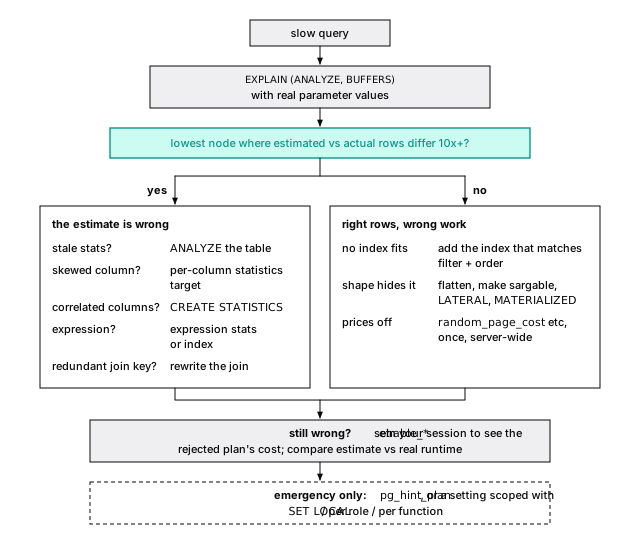
A method for slow queries finds the node; The planner is guessing has the statistics fixes. If you can reproduce the planner’s estimate from pg_stats, the statistics are the problem. If you can’t even write the formula, because it fell back to a constant, the query shape is. The plan you need is the one from production, with production’s parameters, which auto_explain logs (auto_explain logs the plan you can’t reproduce later).
enable_* shows you the road not taken
Turn an enable_* setting off in your session, and EXPLAIN shows the plan the planner rejected and what it thought that plan cost. In PostgreSQL 18 a disabled plan type isn’t priced with a giant penalty anymore: the planner counts disabled nodes, prefers any plan with fewer, and marks one it had to use anyway. With enable_seqscan = off on a table with no other way in:
If the rejected plan runs faster but was priced higher, an estimate below it is wrong, or the prices are.
20-plansSet enable_* only in your own session, to look. A global change silently reshapes every plan on the server, and a setting baked into application code outlives the data that justified it. If you must scope one to a query, use set local inside its transaction and write down why.
pg_hint_plan is for the night a plan flips
Core Postgres has no hints, on purpose (A hint freezes a plan; fix the estimate instead). The pg_hint_plan extension adds them, for the night a production query flips to a bad plan and the statistics fix needs testing first.
Hints live in a /*+ ... */ comment. They can force scan and join methods or join order, and, most usefully, correct a row estimate (Rows), which fixes the cause instead of dictating the plan. Its hint table attaches hints to a query id, so you can fix ORM-generated SQL without touching the app. Every hint is a bet that the data will never change shape: put a ticket next to each one to remove it.
The short version
- Postgres rewrites your query before costing it. Don’t hand-optimize what it already does.
- Join estimates multiply, so errors compound up the tree: a redundant tenant condition made 2,000,000 rows look like 2 and cost 165 times the pages.
- Index scan cost follows correlation squared. On ordered data an index scan won out to 65% of the table, so the 5% rule of thumb is wrong both ways.
- Join search is exhaustive up to 8 explicit
JOINs (join_collapse_limit) or 11 comma-listed tables, roughly tripling per table; at 12 the genetic optimizer takes over. - Nested loops win small and lose badly when the outer estimate is low.
- User functions are
PARALLEL UNSAFEuntil you mark them. JIT bets on the estimate; turn it off on OLTP primaries. - When a plan is wrong, check the estimate, then the shape, the index, the prices.
pg_hint_planis for emergencies.
Further reading
- Planner/Optimizer, PostgreSQL documentation. Path generation, the three join strategies, and when GEQO takes over.
- Parallel Query and JIT, PostgreSQL documentation. Parallel safety rules and the JIT cost thresholds, from the source.
- Access Path Selection in a Relational Database Management System, Selinger et al., SIGMOD 1979. The paper behind cost-based access paths and dynamic-programming join search.
- How Good Are Query Optimizers, Really?, Leis et al., PVLDB 2015. Measured on PostgreSQL: cardinality errors, growing with each join, matter far more than the cost model.
- pg_hint_plan, NTT OSS Center. The hint extension and its hint table.
22 Queries that age well
Page 1 of the activity feed loads in a fraction of a millisecond. Page 50,000 takes 180 ms on our machine and reads 21,000 pages. Same query, same index, same LIMIT 20. The only difference is the number after OFFSET.
Most slow queries are a handful of familiar shapes that make the database work in proportion to the table instead of the answer: fast in the demo, slow in month six. A query that ages well touches pages in proportion to the rows you asked for. The plan’s Buffers: line is how you check (Buffers are the evidence).
For this chapter events gets two indexes (the template has none), and parallel query is off so plans stay readable:
OFFSET reads every row it skips
Stop paginating with OFFSET. Nothing records where row 1,000,000 is, so Postgres walks the index from the start, producing rows and throwing them away:
| Offset | Rows read | Buffers | Time (rough, our machine) |
|---|---|---|---|
| 0 | 20 | 4 | 0.04 ms |
| 100,000 | 100,020 | 2,146 | 15 ms |
| 1,000,000 | 1,000,020 | 21,422 | 180 ms |
A million and twenty entries read to show twenty. Fine for a search page nobody scrolls past page 5 of; a disaster for an API that clients iterate.
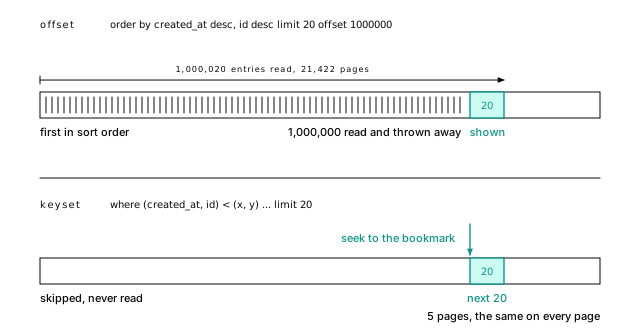
21-queriesKeyset pagination (also called cursor or seek pagination) is a bookmark instead of counting pages from the front cover. Remember where the last page ended and ask for the rows after it:
(created_at, id) < (x, y) means “comes after in this sort order”, and it matches the two-column index directly. It returns the same page OFFSET 1000000 produced, at Buffers: shared hit=4 read=1: five pages instead of 21,422, the same on every page.
Three habits make it hold up. Make the ordering total by adding the primary key as a tiebreaker. Put filter columns first in the index, so one project’s feed wants (project_id, created_at, id). And hand the client an opaque cursor (Encode in the app; SQL can do it for a report is one encoding).
You give up jumping to page 37; infinite scroll never needed it. Batch jobs use the same bookmark: where id > $last order by id limit 1000.
The whole thing as an endpoint would issue it, in TypeScript with node-postgres:
The first page uses 'infinity', which sorts after every timestamp, so there’s one statement and one plan for every page. Two details are load-bearing. The cursor carries created_at::text, not a parsed date: JavaScript dates hold milliseconds and timestamptz holds microseconds, so a round trip through Date lands slightly off the real row and skips or repeats rows. And bigint arrives as a string in node-postgres, which is what you want in a cursor anyway.
Mixed directions like created_at desc, id asc need an index declared that way and can’t use the row comparison.
21-queriesN+1 is a loop, not a slow query
The N+1 problem is a query in a loop: load 100 projects, then look up each owner. Each lookup reads 3 pages in microseconds, so monitoring never flags it. The cost is the round trips: 101 queries that take 8 ms on one host take 152 ms across zones (Round trips cost more than queries). ORMs do this by default when you touch a lazy relation in a loop.
Fix it with one round trip: a join when you want the related row inline, or = any($1) with the whole list as one array parameter when you’ve already loaded the parents:
One round trip and one index scan for all hundred owners; match them up in memory. Don’t generate in ($1, $2, ... $500): its text changes with every list length, so it can’t be prepared once, and it hits the 65,535-parameter ceiling. When each parent needs its own few children, use LATERAL.
Filter with EXISTS, not a join
Filter with EXISTS; join only when you need the other table’s columns. “Which accounts had an alert in the last day?” (the data ends at midnight on October 6, 2026):
Postgres runs it as a semi-join, which stops at each account’s first match: Hash Right Semi Join ... rows=479. The in (subquery) form gets the identical plan. A join returns rows=637, one per alert, and then someone adds distinct to undo duplication that should never have happened.
NOT IN is a trap; use NOT EXISTS
If the subquery under NOT IN yields a single NULL, the query silently returns no rows (One null makes not in return nothing). The same NULL rule keeps Postgres from turning it into an anti-join, so once the subquery’s result outgrows work_mem, it’s rescanned for every outer row. “Users with no events” as not in (select user_id from events) is costed at nearly 3.9 billion, because it can mean 160 billion comparisons (80,000 users with no events, each checked against 2 million user_ids). As not exists it’s a Hash Right Anti Join, one pass over each table, costed at 68,394.
Always write NOT EXISTS. NOT IN is fine only with a short literal list of non-null constants (status not in ('done', 'failed')).
The Filter says SubPlan, not hashed SubPlan: two million user_ids don’t fit in work_mem, so each of the 80,000 users with no events scans all of them. Against projects.owner_id (20,000 rows) it gets hashed SubPlan 1 and runs in 12 ms, which is how NOT IN passes review and fails in production.
21-queriesExact counts read everything
count(*) on a big table is slow, and that’s not a bug. Different transactions see different row counts at the same moment (Updates are inserts), so there’s no stored count; the best case, an index-only scan of the primary key, read 5,469 pages for one number. Ask what the number is for:
- “About 2 million” (admin dashboards, “1 to 20 of about 2,000,000”): the planner’s estimate is free.
select reltuples::bigint from pg_class where oid = 'events'::regclassreturned 1,999,993. - “1,000+”: count a capped subquery,
select count(*) from (select 1 from events where kind = 'deploy' limit 1001) t. It read 159 pages; the work is bounded by the cap, not the table. - Exact per-tenant numbers on every request: keep a counter table, updated with the write or by a periodic rollup. A trigger doing it serializes every writer on that row (A counter trigger serializes your writers).
The planner will estimate any query for you:
It returned 500,598; the exact answer is 499,992. The estimate is only as good as the statistics, and correlated filters throw them off (The planner assumes your columns are independent). Never pass user input to it: it executes whatever string it’s given.
Keep the indexed column bare
A predicate is sargable (“search argument able”) when it compares a bare column to a value computable before the scan. Wrap the column in a function, arithmetic, or a cast, and the index can’t help.
A function on the column hides the index
The natural way to ask for “all events on September 1” is a cast, where created_at::date = '2026-09-01':
Every page for 5,479 rows: the index is sorted by timestamp, not by created_at::date. A range on the bare column, created_at >= '2026-09-01' and created_at < '2026-09-02', reads 25 pages.
The same goes for date_trunc, extract, and arithmetic: created_at + interval '1 day' > now() read all 35,173 pages; created_at > now() - interval '1 day' uses the index. If you truly need a function of a column, index the expression (An index stores exactly what you gave it). That needs an IMMUTABLE expression, and created_at::date on a timestamptz isn’t one: it depends on the session’s time zone, so create index ... ((created_at::date)) is refused. Index ((created_at at time zone 'UTC')::date) and query with the same expression.
21-queriesDate ranges are half-open
Write time ranges as >= start and < end, never between, which counts midnight on the 2nd in two days (and ending at 23:59:59 drops the last second; timestamps have microseconds). Half-open intervals tile. Compute the boundaries in the user’s time zone, not on the column.
A type mismatch is a cast on every row
A type mismatch hides the index with no function in sight. where id = 5.0 is a Seq Scan with Filter: ((id)::numeric = 5.0): the numeric literal makes Postgres cast the bigint column on every row, as it does when a driver binds a number as float. The tell is a :: on the column side of a Filter line.
where id = 42 against where id = 42.0, with parallel workers allowed:
Seven pages became 35,173. When the two sides’ types differ, Postgres casts toward the type that holds both, numeric, which means casting the column. Bind parameters in the column’s type.
21-queriesOR across a join defeats both indexes
An OR on one table is fine: a BitmapOr merges one index scan per condition. An OR spanning two tables of a join is not, even with indexes on projects (name), projects (owner_id) and users (email) (the lab creates all three):
Neither condition restricts either table alone, because a row can qualify through the other one, so Postgres joins everything and filters afterward. Split it into a union of one query per condition and each branch is an index lookup:
Same row, 10 buffers instead of 1,317. Use union all when the branches can’t overlap, and skip the sort.
Both branches found the same project (user 29695 owns project 4242), so Append produced two rows and Unique removed one. The second branch needed projects (owner_id); without it, it fell back to a sequential scan. Unindexed foreign keys keep turning up (Each deleted parent scans the whole child table).
21-queriesA CTE used once is inlined, not fenced
Write CTEs for readability; add materialized only on purpose. Since PostgreSQL 12, a CTE referenced once with no side effects is inlined like any subquery, so your filters reach the table (Your query is rewritten before it’s priced). Advice from the era when every CTE was a fence is now wrong, and following it costs real pages: “project 4242’s events from the last week” read 6 buffers inlined, and 826 plus 584 temp pages marked materialized.
Fence on purpose when a misestimate keeps producing a bad plan (A hint freezes a plan; fix the estimate instead) or to run a volatile function once. A CTE referenced twice is materialized by default; not materialized inlines it.
All 38,357 rows of the week were fetched, and Storage: Disk says they spilled past work_mem. Inlined, it’s one Index Scan with both conditions in its Index Cond.
21-queriesON CONFLICT is the safe upsert
Postgres has two statements for “insert, or update if it exists”, and only INSERT ... ON CONFLICT is safe for application traffic. Here it maintains a rollup table, project_daily_counts, whose primary key is (project_id, day, kind):
excluded is the row you tried to insert. Run it with 3, then 2: the first returns old_n null and new_n 3, the second 3 | 5 (RETURNING old and new are PostgreSQL 18+).
Two sessions upserting the same key won’t both insert, and neither gets an error: one inserts, the other waits, then updates. A hand-rolled “select, then insert if missing” races and throws duplicate-key errors under load. Unlike MySQL, you name the arbiter (Upserts name their conflict).
Let a unique constraint enforce once
A client retries a payment after a timeout and you must charge once. The payments table carries the client’s idempotency key, and the database refuses a second row with it:
The first request returns id 1; the retry returns zero rows, which means “already done”: look up the original and return the same answer. The key is unique per tenant, unique (account_id, idempotency_key).
In Go with pgx:
If two copies arrive at the same instant, the second insert waits for the first transaction, then does nothing; at read committed, the follow-up select sees the committed row. To get the id back in one statement, do update set idempotency_key = excluded.idempotency_key returning id, old.id is null as inserted works (it returned 1 | f on the retry), at the cost of a new row version on every retry.
21-queriesMERGE races where ON CONFLICT waits
MERGE (PostgreSQL 15+) synchronizes a table against a source: insert what’s new and update what changed, and since PostgreSQL 17, delete what’s gone. It does not have ON CONFLICT’s guarantee. It decides “matched” from its snapshot, so two concurrent MERGEs can both insert the same new key, and one fails with a unique violation. Use it for batch syncs you control, not application traffic.
Two dblink sessions run the same statement on the same new key, the first inside an open transaction. With ON CONFLICT, the second waits on the first’s lock (wait_event_type = 'Lock'), and when the first commits it updates the new row: no error, and the count is 2.
21-queriesWith MERGE, both decide the key is missing. When the first commits, the second’s insert fails with duplicate key value violates unique constraint, and the application sees an error it has to retry.
21-queriesMERGE ... RETURNING with merge_action(), and when not matched by source, are PostgreSQL 17+ (Upserts name their conflict shows one).
Commit once, not once per row
Every autocommit statement is its own transaction, and every commit waits for a disk flush (Every commit waits for the disk), so inserting rows one statement at a time pays a flush and a round trip per row. Commit per batch and send each column as one array through unnest, the write-side twin of = any($1); Commit once per batch, not once per row and Batch with arrays, not VALUES lists measure every way in, side by side.
LATERAL reads the top N; row_number() reads them all
“The three most recent events for each of an account’s projects” is common, and its textbook answer ages badly. That answer numbers rows with the window function row_number() over (partition by e.project_id order by e.created_at desc) and keeps rn <= 3. Its plan fetched every event of every project (Sort ... rows=2084, 2,080 heap pages), sorted them, and kept 60, at Buffers: shared hit=367 read=1977. The work grows with events per project, which only goes up.
LATERAL lets a subquery in from refer to the tables before it, so it runs once per outer row, and with a (project_id, created_at) index each run is one short scan:
Twenty short scans, loops=20: 311 pages against 2,344, and the same when a project has a million events. Keep window functions for running totals and rankings, not for reading rows you’ll throw away.
The pattern needs an index leading with the group key, then the sort key. Without it, each lateral run is a scan and a sort, worse than the window version. Use left join lateral (...) on true if projects with no events should still appear. Of the 311 pages, 191 went to scanning projects, which has no index on account_id.
The window version has a Run Condition (PostgreSQL 15+) that stops numbering early in each partition, but the rows were still fetched and sorted. For exactly one row per group, select distinct on (project_id) ... order by project_id, created_at desc is concise and fine when most groups are read anyway.
When a window function is the right tool, two things bite. With an order by and no explicit frame, the default frame is range between unbounded preceding and current row, which includes every row tied with the current one, so a running sum jumps by a whole tied group; write rows when you mean row by row. And a chart built from group by day skips days with no rows, so lag() compares the wrong days: generate the buckets with generate_series and left join the data onto them.
21-queriesThe short version
- Paginate with keyset over a matching index: 5 pages where
OFFSET 1000000read 21,422. - Kill N+1 loops with a join or one
= any($1)array parameter. - Filter with
EXISTS. NeverNOT IN (subquery). - Don’t
count(*)a big table per request: estimate, cap, or keep a counter. - Keep columns bare: half-open ranges, arithmetic on the constant side, matching types.
- Rewrite an
ORacross a join as aUNION. ON CONFLICTfor application traffic,MERGEfor batch jobs, a unique key for idempotency.- Commit per batch, not per row, and send arrays with
unnest. - Get top-N per group with
LATERALover a(group, sort)index.
Further reading
- LIMIT and OFFSET, PostgreSQL documentation. Including the warning that large offsets are slow and that results need
ORDER BYto be stable. - We need tool support for keyset pagination, Markus Winand. The clearest case for keyset pagination, with diagrams and framework notes.
- Subquery Expressions, PostgreSQL documentation.
EXISTS,IN, andNOT IN, including the NULL rules that makeNOT INdangerous. - INSERT: ON CONFLICT clause, PostgreSQL documentation. Arbiter indexes,
excluded, and the concurrency guarantee; read with MERGE for the contrast. - Slow Counting, PostgreSQL wiki. Why
count(*)scans, and the estimate techniques in Count estimate.
23 Search without a search engine
Two ways to give a help center a search box. Same 50,000 articles, same GIN index, same 4,206 matches for “failed payment”, same top 20. One answers in under 5 ms. The other takes 170 ms, because it indexed an expression instead of storing a column, and every match gets parsed again to be ranked.
Search in Postgres is like that: good pieces, each with a cost you only see when you measure it. Most products never need a search engine, and the ones that do can name the reason.
Beyond the B-tree showed the basics: a tsvector column, a GIN index, a @@ match. Here we build text and vector search on one synthetic help center of 50,000 articles (the lab is 22-search.sh). Its embeddings come from no model, so our recall numbers demonstrate trade-offs rather than forecast your data.
Text becomes lexemes
Full-text search never compares your query to your text. It compares normalized words to normalized words. to_tsvector parses a document and keeps lexemes, normalized words, with their positions:
“Deploys” and “deployment” became deploy; “the”, “were”, “so”, and “we” are gone. The 'english' argument is a text search configuration: a parser plus the dictionaries each kind of token goes through.
Stop words and stemming cut both ways
Stemming is suffix rules, not meaning: in english, “organization” matches “organ”. Search for the band The Who and english throws the whole query away as stop words. Stemming helps prose and hurts names and codes, so give each its own configuration: english for text, simple (which only lowercases) for titles, tags, and error codes.
The configuration is part of the index
Always pass the configuration: the one-argument to_tsvector(body) depends on a session setting, so an index refuses it (functions in index expression must be marked IMMUTABLE).
Accents need a configuration of their own. english keeps “Zürich” as zürich, so “zurich” finds nothing. Add the unaccent dictionary from contrib to a copy of the configuration, not as a function call. Ours is app_english, and to_tsvector('app_english', 'Requests from Zürich and Montréal') gives 'montreal':5 'request':1 'zurich':3.
english_stem is a Snowball stemmer with a 127-word stop-word list, so plainto_tsquery('english', 'to be or not to be') comes back empty. The unaccent() function is only stable (its rules file could change), so an index refuses to_tsvector('english', unaccent(body)) but accepts to_tsvector('app_english', body), trusting the configuration. Keep that promise by hand: change app_english and old rows keep their old vectors until you rewrite them. For Japanese or Chinese, which the built-in parser can’t split into words, see PGroonga.
22-search.shStore the tsvector; don’t index the expression
Store the vector in a generated column and index the column. Indexing the expression instead looks thriftier and costs you on every search.
Title words are weighted above body words. For comparison, a second table, docs_expr, skips the column and puts a GIN index on the same expression. Say stored: generated columns are virtual by default in PostgreSQL 18, and a virtual column can’t be indexed (Types are a contract).
| Heap pages | GIN index | WAL to load | |
|---|---|---|---|
| expression index | 3,347 | 9,064 KB | 70 MB |
| stored column | 6,766 | 9,360 KB | 95 MB |
The stored column doubles the heap: a tsvector with positions averages 511 bytes, against 380 for the body it came from.
That’s the cost. The payoff shows when you rank the matches. The stored version took 4.6 ms on our machine; the expression version, 170 ms. Either GIN index finds the 4,206 matches in under a millisecond, but ranking needs each match’s tsvector, and the expression version has to parse all 4,206 documents again to get one.
Pay the heap and the WAL once, on write, instead of paying the parser on every search.
Why the expression version loses: a GIN index on tsvector stores lexemes and row pointers, nothing more, so it can say which rows match but can’t hand ts_rank the vector to score. With no column to read the vector from, the ranking calls to_tsvector on each match’s title and body again, 4,206 times per search. The two GIN indexes come out about the same size; what the stored column adds is the vector itself, in the heap and in the WAL that logged every row of it.
22-search.shThe expression index only wins when you never rank or highlight.
websearch_to_tsquery never raises a syntax error
Never hand what a user typed to to_tsquery: it expects tsquery syntax, so 'failed payment' is a syntax error. websearch_to_tsquery (PostgreSQL 11+) takes search-box syntax and never raises one: '"roll back" -flags or rollback' becomes 'roll' <-> 'back' & !'flag' | 'rollback', and junk like 'payment & ) ( !' becomes 'payment'.
Phrases need positions
Quotes become <->, “followed by”, checked against stored positions: “roll” and “back” both appear in 7,849 articles, but side by side, as a phrase, in only 4,194.
phraseto_tsquery('english', 'roll back the deploy') produces 'roll' <-> 'back' <2> 'deploy', so “roll back a deploy” matches too. Close enough for search; surprising if you expected an exact string.
22-search.shRank by proximity, not frequency
A match is yes or no; ranking orders the yeses. Use ts_rank_cd: it scores cover density, how close together the query’s words are, so “failed payment” as a phrase beats the two words sentences apart. (ts_rank only counts how often they appear.)
For the query “failed payment”:
The norm 2 column is ts_rank with normalization 2.
ts_rank slightly prefers the short title match; ts_rank_cd prefers four adjacent hits; both bury the third. By default a title hit (weight A) counts two and a half times a body hit (B). The normalization bits divide the rank by something about the document: 2 by its length cut the long article to a quarter of the short one. There’s no right setting, only the one your users agree with.
22-search.shRanking reads every match
order by rank limit 20 looks like it should read 20 rows. It can’t. The top 20 are only known once every match is ranked:
The index lookup is 13 pages; fetching all 4,206 matches is the rest, the same 3,283 pages as with no limit. (The 8 ms here includes EXPLAIN ANALYZE’s own overhead; run plain, the same search took the 4.6 ms quoted earlier.) Ranking “deploy”, which appears in 19,507 articles, reads 97 percent of the table. GIN knows which rows contain a lexeme, not how often or where, so it can’t hand back the best first. That’s the scaling limit of built-in full-text search.
So narrow before you rank. In this corpus a tenant owns about 50 articles in all, so a tenant filter leaves a handful of candidates where the whole corpus offered 4,206. Give the filter an index the planner can combine with the GIN scan: a B-tree on account_id for a BitmapAnd, or one combined GIN index through the btree_gin extension. In a multi-tenant app that’s usually the whole fix.
22-search.shts_headline parses the document again
Compute snippets last, only for the rows you show. ts_headline parses the whole original document again, every call. A page of 20 took about 5 ms with snippets or without, because the planner computes them after the limit. Snippets for all 4,206 matches took about 150 ms, and that’s the bill an API or view pays when it snippets every match.
The documentation says it’s no defense against cross-site scripting. Escape the result before rendering, or set StartSel and StopSel to markers your template turns into tags after escaping.
A materialized CTE that computes snippets before ranking defeats this. MaxWords, MinWords, and MaxFragments shape the snippet.
22-search.shFor most applications, Postgres search is enough
Postgres search searches your own content, in the same transaction as the writes, under the same permissions and tenant filters, with nothing to sync. Reach for more when you can name what’s missing: relevance as a product (BM25 scoring that knows how rare a word is across the corpus, boosts, synonyms), typo tolerance on long prose (pg_trgm covers short strings), facets and counts over huge result sets, or many languages in one field.
A separate engine brings a sync pipeline that lags and drifts, a second copy of every permission rule, and no transactions across the two. Start in Postgres. Move when you can show the query a search engine would answer and Postgres can’t.
Search extensions put BM25 in the index
An extension that ranks like a search engine should be judged like one: on your queries and your corpus, not on a feature table. That said, BM25 no longer requires leaving Postgres. Newer extensions keep term frequencies and corpus statistics inside the index, so they return the best k without fetching every match. Four are worth knowing as of October 2026 (none ran in our lab; this comes from each project’s own documentation):
| Extension | Phrase, fuzzy | License | Where it runs |
|---|---|---|---|
| pg_search (ParadeDB) | yes, yes | AGPL-3.0; Enterprise is commercial | self-hosted, ParadeDB Cloud |
| pg_textsearch (Timescale) | yes, no | PostgreSQL | self-hosted, PostgreSQL 17 and 18 |
| VectorChord-bm25 (TensorChord) | no, no | AGPL-3.0 or ELv2 | self-hosted |
| TIN (PlanetScale) | yes, yes | not published | PlanetScale only |
Before you test one, check that your host offers it, that its index survives failover, and how portable the query syntax is (only pg_textsearch keeps tsquery). PlanetScale’s benchmark puts TIN well ahead; it’s a vendor measuring its own product.
pg_search (0.26.0, PostgreSQL 15+) builds a log-structured merge index on Tantivy, a Lucene-style Rust library. Its docs say the open source edition doesn’t replicate the search index, so search runs only on the primary; replicas for it come with the commercial editions.
pg_textsearch (1.5.1) is BM25 over this chapter’s configurations, ranked by order by content <@> 'failed payment'. Its README flags a limit of any shared BM25 index: corpus statistics count rows hidden by row-level security, so a tenant can infer something about other tenants’ data (Trust no tenant).
VectorChord-bm25 (0.3.0, December 2025) ranks sparse vectors of token counts: no positions, so no phrases, and tested only on English, per its README.
TIN (generally available September 16, 2026) uses the row’s ctid as the document id, so posting lists compress as bitmaps of pages, then tuples. We found no published source or license; Lead (AGPL-3.0) is a development stand-in that calls itself “intentionally unsuitable for production”. We haven’t reproduced the vendor’s benchmark.
A vector search finds near points, whatever the words
An embedding model turns text into an array of floats, placed so that similar inputs land near each other. “Find articles like this question” becomes “find the nearest points”, whatever words they use. pgvector (the lab runs 0.8.7) adds a vector type and distance operators: <=> for cosine distance, what most text models want, plus <-> for Euclidean (L2) distance, <#> for negative inner product, and <+> for L1.
A 1,536-dimension vector lives in TOAST
A common 1,536-dimension embedding is 6,152 bytes (4 per dimension plus 8), three quarters of a page and far past the roughly 2 KB at which Postgres moves a value out of line into TOAST (Large values are compressed, then moved out of the row). Store 2,000 and the table is 15 heap pages of ids and pointers, plus 2,000 TOAST pages. Anything that skips the vector is cheap: count(*) reads 15 pages. Exact search reads every vector chunk by chunk: 12,024 buffers, about six per vector.
Set the column to storage plain and the 2,000 vectors sit inline, one per heap page; the same search reads 2,003 buffers. That works only while the row fits in a page (2,100 dimensions is refused: “row is too big”). halfvec(1536) (pgvector 0.7+) is 3,080 bytes and 1,000 TOAST pages; a binary_quantize()d bit(1536) is 200 bytes in the heap, and the table gets no TOAST table at all. Both are approximations (halfvec shrinks the index with no measurable recall loss measures their recall).
22-search.shExact search is a sequential scan
Don’t reach for an approximate index first. From here on the embeddings are 384 dimensions, in their own doc_embeddings table so the article list doesn’t drag them through the cache. With no index, order by embedding <=> $1 limit 10 scans all 10,000 pages, about 20 ms here. It’s exact, needs no tuning, and for tens of thousands of vectors, or one tenant’s slice, it’s fast enough.
HNSW walks a graph greedily, and can miss
HNSW (Hierarchical Navigable Small World) is a graph. Every vector links to some of its near neighbors; a few also appear on sparser upper layers with longer links, like express stops on a subway line:
A search enters at the top, walks toward the query, and drops a layer, touching a few hundred nodes instead of all of them; it can miss what the greedy walk can’t reach. Give the build memory and workers: 57 s with the default 64 MB of maintenance_work_mem and no parallel workers, 8 s with 256 MB and two. The index, 98 MB, is bigger than the 78 MB table.
ef_search trades latency for recall
At query time one setting matters: hnsw.ef_search, the candidate list (40 by default). Recall@10 is the fraction of the true ten nearest neighbors that came back:
hnsw.ef_search | Recall@10 | ms per query (ours) | Buffers, one query |
|---|---|---|---|
| 40 (default) | 0.969 | 0.7 | 722 |
| 400 | 0.995 | 4.0 | 3,925 |
| exact (no index) | 1.000 | 21 | 10,035 |
At the default, 97 percent of the true neighbors for a fourteenth of the pages. An HNSW build is randomized, so recall moves a few points from one build to the next: across our runs the default gave 0.92 to 0.99, and ef_search 400 anywhere from 0.98 to a full 1.0. That’s what “approximate” means, and why you measure recall on your own data. Raise it per query where the stakes are high (set local hnsw.ef_search = 100), and measure recall on your own data by comparing against exact search for a sample of real queries.
With 64 MB the build warns hnsw graph no longer fits into maintenance_work_mem after 28369 tuples. Our timing runs started from a serial build (max_parallel_maintenance_workers = 0; the server default allows two). Memory alone (256 MB) took it from 57 s to 23 s; two parallel workers alone, to 17 s; both, to 8 s. Parallel builds keep the graph in shared memory, so in Docker give the container a bigger /dev/shm.
The sweep also measured 10 (0.956, 340 buffers), 20 (0.968), 100 (0.986, 1,684 buffers), and 200 (0.986). Builds aren’t deterministic: pgvector picks each vector’s graph level at random (and setseed doesn’t reach it), and parallel builds insert in a different order every time. Across our runs the default’s recall ranged from 0.923 to 0.992, so the lab checks for 0.9 or better rather than one run’s number.
22-search.shIVFFlat’s default of one probe is a trap
IVFFlat clusters the vectors at build time into lists groups and searches only the probes lists nearest the query. It builds in under 2 seconds against HNSW’s 8, and its default is a trap: with 50 lists and ivfflat.probes = 1, recall@10 was 0.636. Five probes gave 1.000. Start at sqrt(lists), and build after loading, since the lists come from the rows present. Our default is HNSW.
halfvec shrinks the index with no measurable recall loss
The table can keep 4-byte floats while the index holds something smaller: using hnsw ((embedding::halfvec(384)) halfvec_cosine_ops) shrank the index from 98 MB to 56 MB with no measurable recall loss. Binary quantization, one bit per dimension, made a 17 MB index that found 0.303 of the true neighbors, and 0.915 after re-ranking 400 candidates by the full vector (fetch the 400 nearest by bits, then reorder them exactly). Measure it on your embeddings first.
The bit index is using hnsw ((binary_quantize(embedding)::bit(384)) bit_hamming_ops), and hnsw.ef_search must be at least the inner limit. Re-ranking 100 gave 0.747. Gaussian noise is a hard case for one bit; real models, some trained for it, do much better. Half precision’s 0.980 beat full precision’s 0.969 in this build: graph-building luck.
22-search.shFilters and approximate indexes don’t mix
With an approximate index, your where runs after the index scan: HNSW finds its ef_search best candidates, Postgres discards the ones that fail the filter, and whatever is left is your answer. kind = 'faq' matches one article in ten. Ask for ten:
Four rows, and over 100 queries an average of 3.7, some none. Your app asked for ten and got four, with no error, which is the worst kind of wrong.
For broad filters, turn on pgvector 0.8’s iterative index scans (set hnsw.iterative_scan = relaxed_order), which keep fetching candidates until the filter is satisfied: ten rows every time, at more than three times the pages. For selective filters, put a B-tree on the filter column: for one tenant’s 46 articles the planner used it and computed 46 exact distances, 83 pages, no HNSW. A partial HNSW index per value, or partitions, cover the rest.
With relaxed_order, one query read 2,529 pages against 708, scanning up to hnsw.max_scan_tuples (20,000) candidates. Results may come slightly out of distance order; strict_order keeps it and gets less recall. A filter on a joined table can’t apply during the scan, which is why account_id and kind are copied onto doc_embeddings.
22-search.shKeywords and vectors fail differently, so fuse them
Full-text nails exact terms (an error code, “SAML”) and misses paraphrase: “card declined” matches nothing in our corpus. Vectors find the paraphrase and blur exact terms.
Their scores share no scale, so combine positions instead: reciprocal rank fusion (RRF) gives each document 1 / (60 + rank) from each list that returned it and sorts by the sum. An article both lists found always wins: with 50 results per list, two shares of at least 1/110 beat the best single share, 1/61. For “card declined”, the vector side fills all ten places.
Pass the query vector as a parameter: distance to a column of a joined row can’t use the HNSW index.
With the billing topic’s center as the query embedding, the top ten interleave the two lists. On one build of the index the top result ranked 35th in text and 19th in vectors; on another, no article made both top 50s. An HNSW graph differs from build to build, so the vector list does too. The constant 60 comes from the RRF paper, which calls it k; our function’s k is only the number of results.
22-search.shA vector database needs a reason you can name
Name the property: hundreds of millions of vectors, latency a busy primary can’t meet, filtered search where iterative scans read too much. Below that, vectors next to their rows win: one backup, one permission model, and an embedding that updates in the same transaction as its text.
The short version
- Most products never need a search engine. Move only for a property you can name: BM25 relevance, typo tolerance, facets at scale.
- Pass the text search configuration everywhere.
- Store the
tsvector: ranking through an expression index took 170 ms against 4.6. - Use
websearch_to_tsqueryfor anything a person types. - Ranking reads every match. Narrow by tenant or date first.
- Compute
ts_headlineonly for the rows you show, and escape it. - A 1,536-dimension
vectorlives in TOAST: free to skip, six buffers each to scan. - Exact search first. HNSW gave 0.92 to 0.99 recall at the default, for a fourteenth of the pages.
- Filters run after an approximate scan: turn on
hnsw.iterative_scan, or let a B-tree make a selective filter exact.
Further reading
- Full Text Search, PostgreSQL documentation. The whole subsystem.
- Controlling Text Search, PostgreSQL documentation. Ranking, normalization, and
ts_headline’s cost and XSS warning. - ParadeDB architecture, ParadeDB documentation. A Tantivy index inside Postgres, and what replicates.
- pg_textsearch, source repository. BM25 on Postgres configurations, with its limitations.
- Introducing TIN, PlanetScale blog, September 2026. The
ctid-as-document-id design. - pgvector, pgvector project. The README is the manual.
- Efficient and robust approximate nearest neighbor search using Hierarchical Navigable Small World graphs, Yu. A. Malkov and D. A. Yashunin. The HNSW paper.
- Reciprocal Rank Fusion outperforms Condorcet and individual Rank Learning Methods, Gordon V. Cormack, Charles L. A. Clarke, and Stefan Büttcher, SIGIR 2009. Two pages that introduce RRF.
24 Code in the database
Two functions return the same rows: every event for one account. One is written in SQL, the other in PL/pgSQL, with the same query inside. Ask each for the last day of that account’s events, and the SQL version reads 7 pages through an index. The PL/pgSQL version reads 2,040, fetching all 2,084 of the account’s events and throwing away 2,080 of them.
Nothing is wrong with either function. The difference is what the planner can see. At its best, code in the database is the fastest code you own: it runs next to the data, with no round trips. At its worst, it hides a lock that serializes your writers, a stale plan, or a trigger that taxes every bulk update, all on the one server you can’t add more of.
The primary is your most expensive CPU
Every other tier of your system scales by adding machines: web servers, workers, caches, read replicas. The primary is the one you can’t scale out. Every write goes through one box, and making it bigger is the most expensive rung on the ladder (Earn the bigger box). Every cycle a function or trigger spends there competes with every query: a millisecond spent formatting a report is a millisecond the checkout insert waits for a core.
Our position: the database does the work that makes the data smaller, keeps it correct, or saves a round trip. Everything else goes to the application tier, even when SQL can express it. Especially then.
- Keep in the database: filtering, joining, and aggregating (counting two million events in the app ships the whole table to compute one number); set-based writes; invariants that must be atomic with the write; anything that saves round trips.
- Move to the application: per-row formatting (dates in the user’s locale, currency, HTML); business rules that change often, which deserve feature flags and a rollback measured in minutes, not a migration; anything that calls the outside world, since a function can’t un-send an email when its transaction rolls back (Move work off the request path); anything you’d want to unit test.
Here’s what formatting costs. A reporting endpoint turns 200,000 events into sentences in SQL with format() and to_char(); the alternative returns the six fields the sentence is made of:
| 200,000 rows | Raw fields | Formatted in SQL |
|---|---|---|
| Server time on our machine | about 60 ms | about 230 ms |
| Text sent | 9.2 MB | 18 MB |
| End to end, through psql | about 110 ms | about 280 ms |
Four times the server time, and twice the bytes. The app would spend about the same CPU; the difference is where. App servers you add in a minute. At ten calls a second, those 170 extra milliseconds keep nearly two of the primary’s cores formatting dates all day, and every other query waits behind them.
If the logic protects the data or shrinks it, put it next to the data. If it serves a feature or a person, keep it with the feature. (A jsonb_agg response that replaces a loop of queries is saving round trips, not formatting.)
(One line of output, wrapped here.)
We timed both with explain (analyze, timing off), best of five, casting the raw fields to text so both sides pay for the conversion the server does anyway to send a row. Formatting cost about 0.9 µs more per row. In the app, Intl.DateTimeFormat does the same job in the user’s own locale.
23-functionsTo find candidates: in pg_stat_statements, a statement with high total time but few shared blocks per call isn’t reading pages, it’s computing (Rank the same view four ways, total time first). A wait sample where many sessions show no wait event means they’re on CPU (Sample waits to see where the time goes). And track_functions times each function (Functions are invisible until you turn tracking on).
SQL functions are inlined; PL/pgSQL functions are not
Here are the two functions from the opening, over an index on (account_id, created_at):
The caller asks for one day, select * from account_events(42) where created_at > '2026-10-05', and each twin’s plan:
The SQL version has no function in its plan: the planner pasted in the query, merged the caller’s filter, and used the index. A Function Scan runs the function to completion, then filters, and the planner can only guess at what’s inside (Functions hide your statistics). For your biggest tenant, it reads every event they’ve ever had to show one day.
23-functionsIf a function is one query, write it in SQL. Reach for PL/pgSQL when you need variables, loops, or exception handling, and expect it to behave like a call, not a view.
STRICT, SECURITY DEFINER, or a SET clause stops inlining
A set-returning SQL function is inlined only when its body is a single SELECT and it’s STABLE or IMMUTABLE (not the default VOLATILE), not STRICT, not SECURITY DEFINER, and has no SET clause. We tried each; each came back as a Function Scan. So a definer function with a pinned search_path (as it should have) is a black box: keep those for narrow operations.
A scalar SQL function inlines when its body is a single expression (select <expression>, no FROM) and its declared volatility isn’t stricter than the body’s. is_failed(p jsonb) with body select p ->> 'status' = 'failed' shows up in the plan as ((payload ->> 'status'::text) = 'failed'::text), which an expression index on (payload ->> 'status') can serve. The PL/pgSQL version shows up as Filter: is_failed_pl(payload), called once per row. The PostgreSQL wiki keeps the full list of conditions on its Inlining of SQL functions page.
PL/pgSQL caches plans per session
PL/pgSQL prepares each statement once per session and keeps the plan, so it inherits the switch of prepared statements: five custom plans, then a generic one if it looks no worse on average. That’s the same trap, now hidden inside a function. Wrap the planner chapter’s latest query in latest_ids(k text), call it five times for a common kind, and the sixth call locks in the generic plan that reads 34,536 pages for the rare incident kind instead of 23.
Nothing in the function changed; only the session’s history did, which is why this bug is so hard to reproduce. Pin the fix to the function: alter function latest_ids(text) set plan_cache_mode = force_custom_plan plans every call for its actual value.
PostgreSQL 18 extended plan caching to SQL functions that aren’t inlined: a SQL version declared strict (so it can’t inline) flipped the same way after five calls, to over 30,000 pages for incident. Dynamic SQL (return query execute ... using k) plans fresh every call. And per the PL/pgSQL docs, a statement is only syntax-checked when the function is created; it’s analyzed the first time it runs. A misspelled table or column in a branch that never runs surfaces only when that branch finally does.
23-functionsVolatility is a promise to the planner
Every function is IMMUTABLE (same arguments, same result, forever), STABLE (same result within one statement, writes nothing), or VOLATILE (no promise, and the default), and the planner takes the label at its word. One pure function, a cutoff n days back, written with each label in turn and used to filter projects:
Immutable, first, was folded into a literal at plan time (Constants are folded). Stable stayed a call and drove the same index. Volatile might change from row to row, so a sequential scan called it 20,000 times. Label every function as tightly as the truth allows.
A false IMMUTABLE serves stale answers
Never label tighter than the truth. A settings lookup that reads a table, marked IMMUTABLE, feeds a PL/pgSQL function counting expired projects: 19,271 at 30 days. Change the setting to 365 and the same session still says 19,271, because the “constant” 30 was folded into its cached plan; a new session says 10,913. The bug lives as long as your pooled connections. IMMUTABLE never reads a table, a setting, the time zone, or the clock.
The stable version’s estimate came from peeking at its value: 173 rows from the histogram (the real count is 163). The volatile one fell back to the one-third default, 6,667. With track_functions = 'pl', the immutable version ran once, the stable version twice (once for the estimate, once for the scan), the volatile version 20,000 times.
23-functionsThe stale lookup:
alter function setting(text) stable invalidates the cached plan, and the next call is right. In an index expression, a false IMMUTABLE leaves stale entries until you REINDEX. One more difference: a VOLATILE function takes a fresh snapshot for each query inside it, so it sees changes made by the statement calling it; STABLE and IMMUTABLE use the caller’s snapshot.
23-functionsParallel safety is opt-in
User functions are PARALLEL UNSAFE by default, so one unlabeled helper in a where clause runs a two-million-row scan in one process (One unlabeled function keeps a query serial). Mark pure helpers PARALLEL SAFE. Don’t lie: a function that writes must stay UNSAFE (labeled safe, ours failed with cannot execute INSERT during a parallel operation), and one that touches temporary tables or backend-local state is RESTRICTED.
The planner believes three more labels
Volatility isn’t the only label the planner takes at its word. LEAKPROOF (which only a superuser can set) lets a function run ahead of row-level security filters, so a policy can use an index (A function that isn’t leakproof runs after the policy). A high COST makes the planner run cheaper conditions first. ROWS replaces the default 1,000-row estimate of a set-returning function (A function in FROM is guessed at 1,000 rows); better, write it as inlinable SQL.
Triggers run once per row unless you say otherwise
A trigger is a function the database calls when a table changes, and every foreign key you have is already a few of them. BEFORE ... FOR EACH ROW adjusts the row in flight; AFTER reacts to a change that happened. A FOR EACH STATEMENT trigger runs once and reads every changed row through transition tables. A WHEN clause makes the cheapest trigger of all: the one that doesn’t fire.
A row trigger costs about a microsecond a row
We updated 100,000 rows of an unlogged copy of events, best of five:
| 100,000-row update | Time on our machine | Per row, over baseline |
|---|---|---|
No trigger, updated_at = now() in the statement | 150 to 185 ms | |
BEFORE row trigger setting updated_at | 240 to 300 ms | about 1 µs |
AFTER row trigger writing one audit row | 360 to 400 ms | about 2 µs |
About a microsecond a row: noise for one row at a time, most of a minute of CPU for a nightly job over 50 million. The BEFORE trigger also adds a WAL record per row, a lock taken before the trigger sees the row. Setting the column in the statement does the same work without the trigger’s cost.
The BEFORE trigger is a one-liner, new.updated_at := now(). On a logged copy, 20,000 rows per run, from pg_stat_get_backend_wal (PostgreSQL 18+): no trigger wrote 60,264 WAL records; the BEFORE trigger, the row audit trigger, and the statement audit trigger each wrote 80,264. The audit triggers add one heap insert per audit row, row-level or statement-level alike. The BEFORE trigger writes nothing of its own; pg_walinspect shows its extra records are Heap LOCK: 19,994 for the bare update and 39,994 with the trigger. (The bare update has lock records too, because each new version here goes to a different page.)
For a plain audit log, a statement-level trigger writing all audit rows from transition tables took 270 to 320 ms, about 1.3 µs a row: 10 to 30 percent saved, since the same rows still get written. The big win comes when per-row work collapses, as in the counter below. AFTER row events queue in memory until the statement ends, so a huge update queues a huge list.
23-functionsA counter trigger serializes your writers
The usual way to keep an exact per-project count (Exact counts read everything) is a row trigger on events that runs update projects set event_count = event_count + 1. It’s correct, and it has two problems you won’t see in development.
Every insert now locks the parent row. Two sessions inserting events for project 7 used to proceed side by side. Now each updates project 7, which stays locked until commit, so session B waits for session A’s whole transaction (Row locks live in the row, not in pg_locks). Your busiest project gets the most contention.
A bulk insert rewrites one row thousands of times, each update walking past the versions before it. 500 events for one project took about 16 ms; 4,000 took about 260 ms. Eight times the rows, sixteen times the time.
A statement-level trigger fixes the bulk case. Nothing fixes the lock. Count with an index when asked, or append deltas to a narrow table, which never blocks, and roll them up later (Move hot counters to a narrow table).
One update per statement, computed from the transition table new_rows. The blocked session, seen from a third:
The row-level version’s 1,000 updates were mostly HOT (988 of 1,000): a HOT chain grows on one page until the page is full of versions nobody can prune yet, then one update moves to a fresh page and the chain restarts. That happened 12 times, and projects grew from 191 pages to 202 to hold 1,000 copies of one row. The cost isn’t lost HOT updates; it’s the lock, the growth, and the quadratic time.
23-functionsCOPY fires triggers; replication roles don’t
COPY FROM fires triggers like INSERT does, so a million-row load pays the trigger a million times. session_replication_role = replica skips triggers (setting it needs superuser, or a grant of SET on it in PostgreSQL 15+, which managed services often withhold); logical replication sets it so they don’t fire twice.
Foreign keys are triggers, and replica turns them all off. We inserted an event for project 999,999, which doesn’t exist, and it went in. Use this to speed up a bulk load and you leave orphaned rows no constraint will ever report.
Per trigger, alter table ... enable replica trigger t fires only under replica, and enable always trigger t fires in both modes. On a logical replication subscriber, a trigger that should run when replicated rows arrive (to maintain a local summary table, say) needs one of them, or it silently does nothing.
23-functionsA trigger has to earn its place
Every trigger in this chapter does what it says. Whether it should exist is a separate question, and our answer is: fewer of them than you think.
What they buy.
- Atomicity. The trigger’s work commits or rolls back with the change. An audit row can’t be half-written.
- No forgetful callers. Every write fires it: the app, the second service, the migration, the fix someone runs from psql at 2 a.m.
- History that covers every writer (A history trigger catches every writer, at an insert per row).
What they hide.
- Behavior. An
insertthat reports one row may have bumped a counter, written an audit row, and queued a job. Nothing at the call site says so, and a search of the application code finds none of it. - Cost and serialization. Every backfill pays the per-row cost, and a trigger that updates a parent row turns parallel inserts into a queue.
- Order. Triggers on the same event fire in name order, not creation order. We created
z_normalize,a_validate, andm_stamp, in that order; they ran a, m, z. Rename one and you’ve reordered your business logic. - Deploys and debugging. They ship as migrations, change behavior for every session at once, and fail as an
INSERTwith a PL/pgSQL context line instead of a stack trace.
Our rule. Use a trigger when the work must be atomic with the change and must happen for every writer: audit and history rows, a derived column you can’t trust callers to set, a cross-row invariant no constraint can express. Make it statement-level when bulk writes are likely.
Everything else goes to the application, after commit: notifications, emails, webhooks, cache invalidation, search indexing, counters on hot rows, business workflow. Write an outbox row in the transaction if the side effect must not be lost. A trigger is a hidden write you pay for on every row, forever, so each one should be a trigger you’d defend in a design review.
23-functionsA trigger that writes another table fires that table’s triggers too, so a chain can run several deep before anyone notices.
A constraint trigger can be deferred to commit (deferrable initially deferred), for a cross-row rule that may be briefly false inside a transaction. Two concurrent transactions can still both pass a check that reads other rows (Pick an isolation level on purpose).
Procedures can commit
A procedure (PostgreSQL 11+), called with CALL, can commit as it goes; a function can’t. That makes it the right shape for backfills and purges, where one long transaction would hold locks, keep vacuum from cleaning up, and lose everything on any error. Our backfill updated 100,000 rows in ten committed batches. Run procedures in autocommit mode: inside a BEGIN, which many drivers add for you, the first COMMIT fails with invalid transaction termination.
Walk the key range rather than using OFFSET, as in Backfill in short batches that walk the primary key. A procedure can’t commit from inside a block with an EXCEPTION clause.
23-functionsException blocks are subtransactions
A PL/pgSQL block with an EXCEPTION clause sets a savepoint every time it’s entered, a subtransaction with the costs Subtransactions are not free describes. Entering one 100,000 times took about 18 ms against 3 for a plain block, with no error raised. A loop inserting 1,000 rows, each in a guarded block, used 1,000 subtransaction IDs, past the 64-entry cache from row 65. Use on conflict do nothing so the error never happens, or put one handler around the whole loop.
The 1,000 rows carry 1,000 distinct xmin values; without the exception block, they all share one.
23-functionsFunctions are invisible until you turn tracking on
Every problem in this chapter is easier to fix once you can see it, and the default statistics leave functions invisible. track_functions counts calls and time per function in pg_stat_user_functions. pg_stat_statements.track = all gives statements inside functions their own entries instead of hiding them in a slow INSERT (Start with pg_stat_statements). auto_explain.log_nested_statements logs the plans inside functions that EXPLAIN never shows.
The fast calls log nothing. The seventh logs the nested plan:
Filter: (kind = $1) is the generic plan, caught in the act. In production, log to the server log at your slow-query threshold and look for $1 where a literal should be.
The short version
- The primary is the one CPU you can’t scale out. Keep work there that shrinks data, keeps a rule atomic, or saves round trips.
- If a function is one query, write it in SQL, labeled
STABLEorIMMUTABLE. - PL/pgSQL can go generic after five calls;
force_custom_planfixes skewed arguments. - Label volatility as tightly as the truth allows, never tighter.
- Use a trigger only when the work must be atomic and happen for every writer.
- A counter trigger serializes every writer to its parent row.
session_replication_role = replicadisables foreign keys too.- Keep
EXCEPTIONblocks out of row loops.
Further reading
- User-Defined Functions, PostgreSQL documentation. SQL functions, procedures, and the
SUPPORT,ROWS, andCOSThooks. - Function Volatility Categories, PostgreSQL documentation. The promises behind each label, including the stale-plan hazard.
- Inlining of SQL functions, PostgreSQL wiki. Every condition for inlining.
- PL/pgSQL: Plan Caching, PostgreSQL documentation. How PL/pgSQL prepares statements and when it goes generic.
- Transaction Management in PL/pgSQL, PostgreSQL documentation. Where
COMMITworks inside a procedure. - Triggers and CREATE TRIGGER, PostgreSQL documentation. Firing order, transition tables, constraint triggers.
- auto_explain, PostgreSQL documentation. Logging plans of nested statements.
25 Everyone waits in line
A migration adds a nullable column to accounts. It’s a metadata-only change that completes in milliseconds. The moment it runs, every request that touches accounts hangs, the connection pool fills, and the site goes down. Nothing in the migration was slow. It was waiting, and while it waited, everyone else waited too.
Here is that outage, reproduced with three sessions on the book’s database. migration runs alter table accounts add column note text, and web runs select name from accounts where id = 42:
The reporting session ran select count(*) from accounts inside a transaction and never closed it. The migration needs an exclusive lock, so it waits for the reporting session. The web request only wants to read one row, which the reporting session would happily allow, but it’s queued behind the migration. Every request after it joins the line.
Usually readers and writers don’t block each other (Updates are inserts). When they do, the line is the whole story. Learn to read it.
Pick an isolation level on purpose
Read committed, the default, gives each statement a fresh snapshot; repeatable read gives the whole transaction one; serializable also guarantees a result some one-at-a-time order could produce. Only serializable rules out every anomaly lists what each prevents; here is what each does to your code. (InnoDB defaults to repeatable read: MySQL defaults to repeatable read; Postgres doesn’t.)
Read committed loses updates computed in the app
Most applications run here and are fine. The trap is read-modify-write in application code: two requests each read a balance, subtract in the application, and write back.
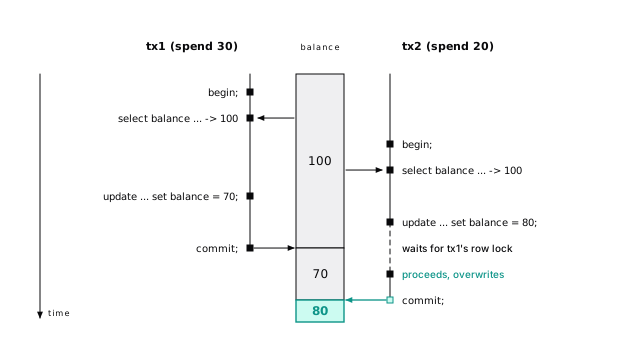
tx1 spent 30 and tx2 spent 20: fifty credits spent, balance down by twenty. That’s a lost update, and no error says so. Do the arithmetic in the database instead:
An update that waited on a changed row re-reads the latest version and re-checks its where, so two concurrent spends return 70 and then 50. When the logic can’t fit in one statement, lock the row as you read it with select ... for update.
Two sessions, both at read committed, each doing what a request handler would:
While tx2 waits, pg_stat_activity shows it on Lock / transactionid, blocked by tx1. When tx1 commits, tx2’s update finds the row changed, re-reads it, re-checks where account_id = 42 (still true), and writes its 80 over tx1’s 70.
24-concurrencyRun the same sequence with both transactions at repeatable read and tx2 fails the moment tx1 commits, because the row it wants to update changed after its snapshot. tx1’s 70 stands.
24-concurrencyRepeatable read turns that race into an error to retry
At repeatable read, an update of a row someone changed since your snapshot is refused instead of overwritten: the same race fails tx2 with could not serialize access due to concurrent update. At this level and at serializable, that error (SQLSTATE 40001) is a normal outcome, not a bug: your code retries the whole transaction, or rare races become user-facing errors.
Serializable catches the write skew repeatable read misses
Repeatable read still allows write skew. An on-call rotation must always have someone on call. Two engineers go off call at the same moment; each counts who’s on call (2, so it’s safe) and deactivates only their own row. Both commit, and nobody is on call; no row was updated twice, so repeatable read saw nothing wrong. At serializable, one fails with could not serialize access due to read/write dependencies among transactions. Postgres tracks what each transaction read, without blocking anyone, and aborts one when no serial order explains the result (Even a read-only transaction can see the impossible).
Two rows, both active; each engineer’s transaction runs:
The read tracking shows as SIReadLock entries in pg_locks. You pay in overhead and in more retryable failures, a few of them false positives.
24-concurrencyOur default: read committed for requests, repeatable read for reports, serializable for rules across rows, with retries.
Retry the whole transaction
Serialization failures (40001) and deadlocks (40P01) mean “nothing happened; try again”. Retry the whole transaction, reads included, with capped, jittered attempts. Those two codes are the ones to retry by default; under serializable, a unique violation (23505) or exclusion violation (23P01) can also be a lost race worth one more try. Retry nothing else blindly. Keep side effects out of the retried function, or an email goes out once per attempt; record the intent and act after commit (Put the message in the same transaction as the order).
One error aborts the whole transaction
In Postgres, any error inside a transaction poisons the rest of it:
The update never ran, and commit came back as ROLLBACK: the first insert is gone too. “Insert, catch the duplicate, carry on” breaks the moment someone wraps it in a transaction. Prevent the error instead (on conflict do nothing), or use a savepoint (MySQL differs; see Errors abort the whole transaction).
24-concurrencySavepoints contain the damage
A savepoint marks a point you can roll back to without losing the rest. ORM “nested transactions” are savepoints (Rails’ requires_new: true, Django’s nested atomic()), and so is every PL/pgSQL EXCEPTION block.
Subtransactions are not free
Each savepoint starts a subtransaction, and one that writes gets its own XID. Each backend caches 64 subtransaction XIDs; past that the cache overflows, and every session’s visibility checks against that transaction fall back to an on-disk structure, pg_subtrans. Replicas are more fragile still: there, any subtransaction alongside one long-running transaction can push lookups into pg_subtrans. This bit GitLab in 2021: on their replicas, a single savepoint during a long-running transaction was enough to stall queries on and off for weeks, until they removed savepoints from the application (GitLab’s write-up). Keep savepoints out of loops, and reach for on conflict first.
pg_stat_get_backend_subxact (PostgreSQL 16+) shows it. After 64 savepoints in one transaction, each followed by an insert: subxact_count 64, subxact_overflowed false. One more: still 64, and true.
24-concurrencyEvery statement locks the table
Every statement also locks each table it touches until the transaction ends. Three facts about the eight table lock modes cover nearly every incident:
- Reads and writes never conflict at the table level. Row conflicts are a separate system.
ACCESS EXCLUSIVEconflicts with everything, including plainselect.drop,truncate, and mostalter tableforms take it.SHAREblocks writes but not reads, which is why plaincreate indexmakes a table read-only andcreate index concurrentlyexists.
Most ALTER TABLE forms take ACCESS EXCLUSIVE
Most ALTER TABLE forms take ACCESS EXCLUSIVE, even when the work is instant: adding a nullable column takes microseconds, but getting the lock is the dangerous part (Change the schema, keep the site). To check a statement, run it in a transaction, read your rows in pg_locks, and roll back.
ROW SHARE is select ... for update; ROW EXCLUSIVE is insert, update, delete; SHARE UPDATE EXCLUSIVE is vacuum, analyze, create index concurrently; SHARE ROW EXCLUSIVE is create trigger and adding a foreign key; EXCLUSIVE is refresh materialized view concurrently.
An X means the requested mode waits. On this server add column, add constraint ... not valid, and rename column took AccessExclusiveLock; validate constraint and set (fillfactor = 90) took ShareUpdateExclusiveLock; add foreign key ... not valid took ShareRowExclusiveLock on both tables.
24-concurrencyA waiting lock blocks everyone behind it
Locks are granted in order, like a single line at a counter. Requests that conflict with a waiting request queue behind it, even if they’re compatible with everything held. That prevents starvation, and it’s exactly what turns a harmless migration into an outage.
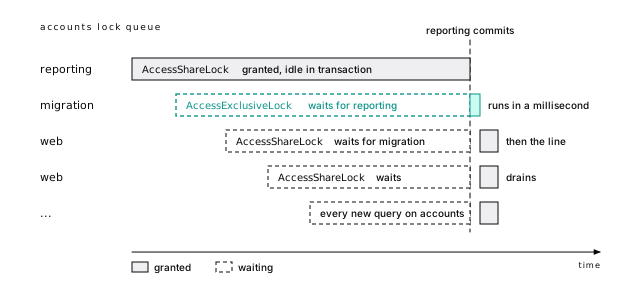
In pg_locks during the opening incident, the web query’s AccessShareLock shows granted = f, though the only granted lock is another AccessShareLock: it’s behind the migration. In production a few hundred requests a second pile up, the pool runs dry, and health checks fail. When the reporting transaction ends, the migration runs in a millisecond and the line drains.
24-concurrencyThe defense is to make DDL give up quickly. With set lock_timeout = '2s', the same alter fails with canceling statement due to lock timeout after two seconds instead of holding the line. Two seconds of blocked traffic is a blip; retry a few times. Then find the session that held the lock: an idle in transaction session holding locks is a bug, and idle_in_transaction_session_timeout caps how long it can last.
Any statement that takes ACCESS EXCLUSIVE can take the site down if it has to wait, so every migration session sets lock_timeout and retries (Rule one: lock_timeout and retry).
Three sessions: reporting runs begin; select count(*) from accounts; and sits idle; migration runs alter table accounts add column note text; web runs select name from accounts where id = 42. Then pg_locks joined to pg_stat_activity on pid, for relation = 'accounts'::regclass:
24-concurrencyRow locks live in the row, not in pg_locks
Row locks aren’t kept in pg_locks while held (there could be millions). A locking transaction writes its ID into the row’s header (xmax, Everything is a page), and a transaction wanting a conflicting lock waits for that transaction to finish. So a row-lock wait usually shows up as an ungranted ShareLock on a transactionid, not on a row. When several sessions queue for the same row, the first waiter also holds a heavyweight tuple lock on it, and the ones behind it wait on that tuple lock instead, so in a pile-up you’ll see ungranted tuple entries too.
| Lock | Taken by | Blocks |
|---|---|---|
FOR UPDATE | DELETE; UPDATE that changes a key column; explicit | All other row locks |
FOR NO KEY UPDATE | Any other UPDATE; explicit | FOR UPDATE, FOR NO KEY UPDATE, FOR SHARE |
FOR SHARE | Explicit select ... for share | FOR UPDATE, FOR NO KEY UPDATE |
FOR KEY SHARE | Foreign key checks on the referenced row; explicit | FOR UPDATE only |
The weaker pair exists for foreign keys. Inserting an event for project 1 takes FOR KEY SHARE on the project, and a rename of the project (FOR NO KEY UPDATE) doesn’t block it. But while a session holds select ... for update on the project, the insert waits: 3.6 seconds in our test, until that session rolled back. So lock with for no key update unless you’ll delete the row or change its key. nowait fails instead of waiting; skip locked skips rows someone holds.
With session A holding for update on project 1, the insert’s locks:
The writer asks for a ShareLock on the locker’s XID: “wake me when that transaction ends”. The granted tuple lock is the writer’s place at the head of the line for this row; a second writer would wait on it, ungranted.
24-concurrencyShared row locks make multixacts, and multixacts wrap too
When two open transactions lock the same row in modes that don’t conflict, such as two child inserts taking FOR KEY SHARE on one parent, Postgres puts a multixact in its xmax: an ID pointing to a member list. A popular parent under many concurrent child inserts gets a new one per insert. Multixacts have their own wraparound (Wraparound stops writes before anything is corrupted): watch mxid_age(datminmxid) next to transaction ID age, and keep child-inserting transactions short.
Three sessions each begin, insert one child row for parent 1, and stay open. pgrowlocks shows one multixact in the parent’s xmax, and pg_get_multixact_members lists three transaction IDs in keysh mode. The third locker got a new multixact holding all three, since multixacts never change.
24-concurrencyautovacuum_multixact_freeze_max_age (400 million by default) forces an anti-wraparound vacuum. The member area has its own limit: past about 10 GB autovacuum gets aggressive everywhere, and at about 20 GB the server refuses to create multixacts (multixact "members" limit exceeded, Routine Vacuuming), which blocks exactly the foreign key inserts into a busy parent. For such a parent, alter table projects set (autovacuum_multixact_freeze_max_age = 100000000) freezes it sooner, and avoid for share in application code.
LWLock waits are fixed in the workload, not the query
Not every line forms on a lock you asked for. Under heavy concurrency, sessions also queue on LWLocks, which no statement of yours mentions. A lightweight lock guards a piece of shared memory for microseconds, and a pile of waits means “too many of us are doing the same internal thing at once”, not “someone holds what I want”. So the fix is in the workload:
LockManager: hot queries lock too many tables and indexes. Each backend has a few private fast-path slots that skip the shared lock table: 16 through PostgreSQL 17, 64 by default in 18.BufferMapping: the working set doesn’t fit in memory.WALWrite: too many tiny transactions commit.
Every query locks every relation it plans against, in a shared lock table split into 16 partitions, each behind one LockManager LWLock. Private fast-path slots skip that for weak table locks; PostgreSQL 18 sizes them from max_locks_per_transaction, 64 at the default (the commit). An unpruned query over 365 partitions took 64 fast-path locks and 1,035 shared ones (Every partition a query can’t prune costs planning time). Drop unused indexes, make partitioned queries prune, and on 18 raise max_locks_per_transaction (a restart) if hot queries touch more than 64 relations.
24-concurrencyBufferMapping is explained in Finding a page takes a hash lookup and WALWrite in Many commits share one flush. A fourth, BufferContent, means one hot page many sessions write, like the last leaf of an ever-increasing key. Two more lines form inside the server: the relation extension lock (Lock:extend) when many sessions grow one table, much cheaper since PostgreSQL 16 (the commit), and the SLRU caches for transaction status, subtransactions, and multixacts, thrashing when pg_stat_slru’s blks_read keeps climbing.
A Postgres queue commits with the business write
Row locks and skip locked add up to a solid job queue, with one decisive advantage over a separate system: the job is enqueued in the same transaction as the business write. Roll back and it never existed. A jobs table needs a partial index on queued jobs only, which stays small however many finished jobs pile up:
Each worker skips the jobs others hold
Each worker must get a different job without waiting on the others:
The subquery skips any job another worker holds and takes the first it can lock: 20 buffers with 200,000 finished jobs in the table. With worker A holding job 1, worker B got job 2 immediately. Without skip locked, a third worker queued behind A until its lock_timeout fired: every worker in line for the same row, throughput collapsed to one.
Short jobs hold the transaction; long jobs commit first
For jobs of a few seconds, hold the transaction for the whole job: a crash rolls it back and frees the job. For jobs that run minutes, which would hold back vacuum, claim and commit, process, then record the result, with a reaper for jobs stuck in running and idempotent handlers. A claim reads about 20 pages, so the queue rarely limits throughput before the jobs do; we didn’t benchmark a ceiling, so measure yours. Delete or archive done jobs on a schedule: the partial index ignores them, but the heap and vacuum don’t.
notify jobs in the enqueuing transaction is delivered only on commit, so workers can listen instead of polling hard. At high enqueue rates, though, every committing transaction that issued a notify takes one database-wide lock to queue its notifications, which serializes those commits. Notify once per batch, or let workers poll at a modest interval.
Take advisory locks per transaction, not per session
For mutual exclusion over something that isn’t a row (“only one nightly rollup at a time”), advisory locks lock an integer key that means whatever you say. Two cron instances each start a transaction and run select pg_try_advisory_xact_lock(hashtext('nightly-rollup')): the first gets t, the second f and exits. The transaction-scoped form is released at commit or rollback, so prefer it to the session-level pg_advisory_lock. Session-level locks leak through any error path that skips the unlock, for as long as the pooled connection lives.
The checks below use the session-level pg_try_advisory_lock to show the difference. In pg_locks the lock shows as locktype = advisory with objid 107030647, which is hashtext('nightly-rollup'). For entity locks, the two-integer form, pg_advisory_xact_lock(1, account_id), avoids hash collisions.
24-concurrencyDeadlocks are an ordering bug
A deadlock is two transactions each waiting for a lock the other holds. After deadlock_timeout (1 second) Postgres finds the cycle and aborts one:
tx1 got ERROR: deadlock detected; tx2 committed. The fix is consistent lock ordering: lock rows in primary key order (select ... order by id for update first, since where id = any($1) doesn’t guarantee order), touch tables in a fixed order, and retry 40P01. Turn on log_lock_waits.
The error’s DETAIL names both processes, the XID each was waiting for, and both statements, which usually points straight at the two code paths that lock in opposite orders. pg_stat_database.deadlocks counts them, so graph it: a steady trickle means an ordering bug in a hot path, not bad luck. With log_lock_waits on, any lock wait that outlasts deadlock_timeout is logged with its blocker even when no cycle forms, which catches the near misses too.
24-concurrencyFind the root blocker
When something is stuck, find the root of the line first. This query lists every session waiting on a lock plus every session blocking one; it produced the table at the top of this chapter, which shows only some of its columns:
wait_event says relation for a table lock, transactionid for a row lock. The root has an empty blocked_by and is often idle in transaction. select pg_terminate_backend(11033) ends it, rolling back its transaction (pg_cancel_backend does nothing for an idle session). Then fix whatever left it open.
Almost every problem in this chapter gets worse with long transactions: they hold locks longer, extend the lock queue, widen the window for deadlocks, keep subtransaction overflow alive, and block vacuum. Never hold a transaction open across a network call or a user’s think time.
The short version
- Read committed loses updates in application read-modify-write. Do the arithmetic in SQL.
- Repeatable read and serializable turn anomalies into
40001errors; retry the whole transaction, side effects after commit. - One error aborts the transaction. Prevent errors instead of catching them, and keep savepoints out of loops.
- One waiting
ALTER TABLEblocks every later query on its table. Always setlock_timeoutfor migrations. LWLockwaits mean the workload is crowding an internal structure: fix the workload.for update skip lockedand a partial index make a job queue that commits with the business write.- Lock in a consistent order. In an incident, find the root blocker first.
Further reading
- Transaction Isolation, PostgreSQL documentation. What each level guarantees, including the read committed re-check rule.
- Explicit Locking, PostgreSQL documentation. Table and row lock matrices, advisory locks, deadlocks.
- Serialization Failure Handling, PostgreSQL documentation. Which SQLSTATEs to retry.
- Why we spent the last month eliminating PostgreSQL subtransactions, GitLab, 2021. The incident above, investigated in full.
- Subtransactions, PostgreSQL documentation. The 64-entry cache and what happens past it.
- src/backend/storage/lmgr/README, PostgreSQL source. Spinlocks, LWLocks, heavyweight locks, and the fast path.
- Multixacts and Wraparound, PostgreSQL documentation. Freezing multixacts and the member-space limits.
26 Change the schema, keep the site
You know why the line forms now. One ALTER waits for an exclusive lock behind a report, and every request after it waits too, even plain reads (A waiting lock blocks everyone behind it). Your pool fills and the site is down over a migration that “does nothing”. GoCardless wrote up exactly this: a quick foreign-key migration queued behind a long read, API requests queued behind the migration, and the API was down for about 15 seconds.
This chapter is the other half: shipping schema changes at 2 p.m. on a Tuesday without ever forming that line.
Schema changes don’t hurt because they’re slow. They hurt because of what they lock and for how long, so ask two questions of every statement: which lock does it take, and how long does it hold it? Almost every dangerous change has a safe version: the same change, split into steps that hold a weak lock for minutes or a strong one for milliseconds. What follows is those splits, measured.
So the first rule of migrations has nothing to do with the DDL.
Rule one: lock_timeout and retry
Set lock_timeout on every migration session. When it expires, the statement fails (canceling statement due to lock timeout), leaves the queue, and the traffic behind it flows again, even while the report is still open.
25-migrationsThat error is the system working. A few seconds of queued requests go unnoticed; an unbounded wait is an outage. The failed statement changed nothing, so retry it a bounded number of times (a timeout without a retry only turns working migrations into failed deploys):
Put it in your migration tool’s connection setup, at one to five seconds: long enough to slip between short transactions, short enough that a stall is invisible. If retries keep failing, find the blocker, usually a long transaction or a session idle in transaction (backend_xmin names the transaction holding vacuum back).
Add a generous statement_timeout too, so an accidental rewrite of a 500 GB table fails in minutes instead of holding an exclusive lock for an hour. Only concurrent index builds (and their siblings, reindex concurrently and drop index concurrently) turn both off (Run a concurrent build alone, untimed, and check it’s valid).
Every change is a catalog edit, a scan, or a rewrite
Once you hold the lock, what matters is how long. A change either edits a few catalog rows (milliseconds at any size), scans every row to check something, or rewrites the table and its indexes, with time, disk, and WAL growing with the table. On events (275 MB, 2 million rows) that’s a deploy nobody notices against a nine-second freeze; on CI’s 1,000 rows you can’t tell them apart.
So test migrations on a restored copy of production (it tests your backups too), and watch two numbers. A rewrite changes pg_relation_filenode, the file the table lives in; a scan bumps seq_scan, the table’s count of full scans.
The lock to aim for is ShareUpdateExclusive, which blocks neither reads nor writes (Most ALTER TABLE forms take ACCESS EXCLUSIVE). Every safe pattern below moves the slow part of a change under it.
Constant defaults are free; volatile defaults rewrite
Since PostgreSQL 11, a column with a constant default is catalog only. A volatile default is not:
The first filenode is the one the table already had: the constant touched no rows. Postgres stored 'web' in the catalog and supplies it when it reads an older row. The UUID needs a different value per row, so Postgres rewrote all 2 million rows, for nine seconds under AccessExclusive. The rule is volatility, not functions: now() is stable, evaluated once, and stored like a constant.
For a per-row value, split it: add the column bare (catalog only), set default so new rows get one (catalog only), then backfill the old rows in batches.
The constant went into pg_attribute as the column’s “missing value”: atthasmissing = t, attmissingval = {web}. Old tuples have fewer attributes than the table, and Postgres fills the gap from there. add column ts2 timestamptz default now() took 17 ms and kept filenode 17220, and every existing row reports the moment of the migration, which may not be what you wanted. Generated columns follow the same logic: a virtual one (the default in PostgreSQL 18+) is catalog only, a stored one rewrites (filenode 19978 to 19986 on a small test table).
25-migrationsNOT NULL goes through a CHECK first
set not null has to prove there are no nulls, so it scans the whole table under AccessExclusive, blocking reads while it pulls every page off disk. Use a CHECK as a stepping stone:
Step 3 is the clever bit (PostgreSQL 12+): a valid CHECK proving col is not null lets SET NOT NULL skip the scan. On PostgreSQL 18 you can skip the CHECK: add the NOT NULL itself NOT VALID, then validate it.
seq_scan in pg_stat_user_tables counts full scans. A bare set not null bumped it from 11 to 12 (130 ms on our cached table). In the pattern, step 2 bumped it (87 ms, under a lock traffic passes) and step 3 didn’t, finishing in under 4 ms.
25-migrationsOn 18:
Between the two, inserting a null is already rejected. The quirk: before validation, \d already shows not null and pg_attribute.attnotnull is true. Check pg_constraint.convalidated instead.
25-migrationsAdd a CHECK NOT VALID, then validate it
Never add a CHECK to a large table in one step. Add it NOT VALID (brief lock, no scan, enforced for new writes at once), then VALIDATE CONSTRAINT (a scan under ShareUpdateExclusive), exactly as steps 1 and 2 above. If validation finds a bad row it fails, and the constraint stays, guarding new writes while you fix the old data.
25-migrationsAdd foreign keys NOT VALID, then validate
A one-step foreign key scans the child table while blocking writes on both tables. Split it the same way:
The add still blocks writes on the parent, maybe your hottest table, and queues like anything else (that’s what bit GoCardless), so it gets lock_timeout. And index the referencing column yourself, concurrently; without it every delete on projects scans events (Constraints, chosen on purpose).
Pick the index build that matches the table’s traffic
Postgres builds an index two ways, and the choice fits in a sentence. A plain CREATE INDEX does the least work and stops every write to the table until it finishes; CREATE INDEX CONCURRENTLY lets writes through and pays for it with twice the reading, a lot of waiting, and a way to fail halfway.
The same (project_id, created_at) index on events, built both ways with nothing else running:
Same index, same WAL, twice the table reads: on our machine the concurrent build took about one and a half times as long as the plain one.
That’s the cost a benchmark sees. The cost your users feel is what happens to writes. Four clients inserted into events as fast as they could while we built the index:
| Build | Inserts completed during the build | Slowest insert |
|---|---|---|
create index | 41 to 56 | 723 to 751 ms |
create index concurrently | 1,848 to 2,119 | 16 to 103 ms |
Every insert that arrived during the plain build waited for all of it. On events that’s under a second. On a 200 GB table it’s the whole build, with every checkout, signup, and webhook in line.
The difference is one lock. A plain build’s ShareLock lets reads through but blocks the RowExclusiveLock every write needs; a concurrent build’s ShareUpdateExclusiveLock blocks neither.
Four pgbench clients ran a one-row insert for 5 seconds, with the build starting 1.5 seconds in; pgbench -l logs each insert’s latency. Builds were serial (no parallel workers), so every page and WAL byte above belongs to the build; timings are medians of five, table cached.
The plain build’s slowest insert is the build itself: each waiting insert finished the moment the build committed, and the few that completed “during” it landed just before it took its lock. The concurrent build’s 16 to 103 ms are ordinary contention for disk and CPU. Holding the migration’s transaction open after a plain build froze the moment:
A primary key lookup sent at the same moment returned at once.
25-migrationsB-tree builds split the scan and sort across max_parallel_maintenance_workers (default 2), but maintenance_work_mem (default 64 MB) budgets the whole build, and each process, leader included, needs 32 MB of it. So at the defaults, two workers allowed means one used. Medians of seven builds on our 8-core machine:
| maintenance_work_mem | workers allowed | processes | median build |
|---|---|---|---|
| 64 MB | 0 | 1 | 0.82 s |
| 1 GB | 0 | 1 | 1.06 s |
| 64 MB | 2 | 2 | 0.53 s |
| 256 MB | 2 | 3 | 0.50 s |
| 1 GB | 4 | 5 | 0.37 s |
Memory alone bought nothing (sorting 2 million keys spills cheaply). It buys workers, and workers bought time: 2.2 times faster with five processes. For a big build on a server with idle cores, raise both in the migration session. A concurrent build parallelizes only its first scan. For server-wide sizing, see Each autovacuum worker takes maintenance_work_mem too.
25-migrationsIf you have to ask whether it’s busy, build concurrently
Use a plain CREATE INDEX only when nobody is writing to the table: a new or empty table (including one created earlier in the same migration, where a plain build keeps table, index, and constraints atomic), a real maintenance window with writes actually stopped, not “usually quiet”, or a table nobody writes, like a lookup table, an archive, or a partition that stopped receiving rows.
Everything that takes writes in production gets CREATE INDEX CONCURRENTLY. If you have to ask whether a table is busy, treat it as busy.
The plain build isn’t a bad default: it’s faster, transactional, and fails cleanly. It’s a bad default for the big, busy tables you most often need to index.
Run a concurrent build alone, untimed, and check it’s valid
- Turn
lock_timeoutoff for this one statement, the exception to Rule one: lock_timeout and retry. A concurrent build’s lock blocks no reads or writes, even while it waits, so the timeout protects no traffic. Worse, Postgres applies it to the build’s waits for other transactions: a 1 s timeout cancels a build stuck behind a slow report and leaves an invalid index. Setlock_timeout = 0andstatement_timeout = 0for the build. (Plain builds keep it: one merely waiting for its lock already blocks the writes behind it.) - Run it alone. It refuses to run in a transaction block, so give it its own migration with your tool’s “no transaction” switch. A second concurrent build on the same table queues behind the first.
- Watch it.
pg_stat_progress_create_indexshows the phase, the pages done, and the session it waits on (current_locker_pid), from anywhere in the database: an uncommitted write to the table, a repeatable read transaction, an open cursor, or a running query. An idle read committed session doesn’t count. - Check
indisvalidwhen it’s done. A failed, canceled, or timed-out build leaves an invalid index behind (When a concurrent build fails). Drop it concurrently before you retry.
create index concurrently if not exists is a trap after a failure: the invalid index exists, so it does nothing and reports success. Drop any invalid index of that name first, then create it, and check indisvalid after every deploy.
A plain build is one pass: lock, scan, sort, write the tree, commit. A concurrent build indexes a table that keeps changing, so it runs in stages (the docs). We sampled pg_stat_progress_create_index every few milliseconds during one, with an uncommitted insert into events and an idle repeatable read transaction open at the start, each released after 0.3 s:
(locker is current_locker_pid; each row is the last sample seen in that phase.)
Read it top to bottom. The index enters the catalog invalid, so new transactions know it exists. The build waits for transactions already writing the table (the insert, pid 2081), scans all 35,173 pages, sorts 2 million entries, and marks the index ready (indisready): writes now maintain it. Validation reads the new index’s 7,703 pages and the table again, adding rows that arrived meanwhile. Last, it waits for every older snapshot (the repeatable read session, pid 2082) and marks itself valid. A plain build shows only the three “building index” phases.
25-migrationsThe final wait covers every transaction in the database whose snapshot predates the validation pass, whatever table it touched. We tested each kind of session:
| Session open when the build started | Holds it up? |
|---|---|
Idle in transaction, read committed, read or wrote accounts | no |
Idle in transaction, repeatable read, read accounts | yes: “waiting for old snapshots” |
Read committed with an open cursor on accounts | yes: “waiting for old snapshots” |
| A query still running on any table | yes: “waiting for old snapshots” |
Uncommitted insert into events | yes: “waiting for writers before build” |
Read committed takes a fresh snapshot per statement, so an idle one holds nothing; repeatable read keeps its snapshot until it ends. The tell is backend_xmin in pg_stat_activity: any session with one older than the build is in the way, a monitoring loop written as one long statement included. The build is harmless while it waits (inserts went straight through); it just won’t finish.
Two more surprises. The build’s lock conflicts with vacuum on that table: autovacuum steps aside, an anti-wraparound vacuum doesn’t, and the build waits. And a unique build enforces uniqueness from its second pass on: while ours sat invalid in “waiting for old snapshots”, a duplicate insert failed with 23505. Left behind by a failure, that invalid index keeps rejecting duplicates until you drop it.
25-migrationsA plain build that fails rolls back. A concurrent one that fails (a duplicate in a unique index, a deadlock, a cancel, a timeout) leaves an invalid index, marked INVALID in \d. Queries never use it; if it got past its first scan, every write still maintains it (one we canceled late grew through 20,000 inserts); and its name collides with your retry. Find them, drop them concurrently, fix the cause, build again:
indisready says which kind you have. A unique build that hits a duplicate fails in its first scan, so its leftover is not ready and writes skip it. One that fails or is canceled in validation is ready, and writes pay for it until you drop it.
25-migrationsBuild a unique index concurrently, then attach it
Adding a unique constraint directly builds its index under AccessExclusive. Build the index concurrently, then attach it. The attach is catalog only but still takes a brief AccessExclusive, so it runs under lock_timeout like any other ALTER:
A primary key works the same way (primary key using index) once its columns are NOT NULL; if they aren’t, the attach runs SET NOT NULL and scans the table under that lock.
Never run a plain REINDEX on a live table. It takes AccessExclusive on the index, and because planning any query locks every index of its table, even a primary key lookup that never touches the rebuilt index waits until it commits. Rebuild with reindex index concurrently (PostgreSQL 12+) instead. A partitioned table refuses concurrently outright, so build each partition’s index concurrently and attach them to the parent’s.
For a bloated index (when to rebuild) or one hit by a collation library change, reindex index concurrently (PostgreSQL 12+) builds a ..._ccnew copy beside the old index and swaps them, with a concurrent create’s lock and caveats. If it fails, drop a leftover _ccnew and retry; a leftover _ccold means it succeeded and only the old copy needs dropping.
Plain REINDEX, the one people reach for in an emergency, is worse than a plain CREATE INDEX: it also takes AccessExclusiveLock on the index, and planning any query locks every index on the table. A plain reindex of events_created_at_idx made select kind from events where id = 42, which never uses that index, wait until it committed, as the REINDEX docs warn.
25-migrationscreate index concurrently on a partitioned table fails (cannot create index on partitioned table "events_m" concurrently), and a plain one on the parent takes ShareLock on every partition at once. Build the pieces concurrently and assemble them. On three monthly partitions of events:
The parent turns valid on its own when the last partition is attached. Partitions created later with partition of get a matching index automatically, built plain, which is fine because they’re empty. attach partition of a table that already holds rows also builds any missing index plain, under lock, so give a table its indexes before you attach it. The partitioning chapter has a generator for the statements.
25-migrationsWidening a type is free; most other type changes rewrite
Loosening a limit is free. Adding a limit, changing scale, or changing representation rewrites the table and every index on the column. On a 100,000 row table:
| Change | Rewrites? |
|---|---|
varchar(20) to varchar(50), varchar(n) to text | no |
text to varchar(100), even when every value fits | yes |
int to bigint | yes |
numeric(12,2) to numeric(12,4) | yes |
timestamp to timestamptz, session in UTC | no |
timestamp to timestamptz, any other time zone | yes |
So express length limits as CHECK constraints. For timestamps, the conversion reads each old value as a time in the session’s zone. If the stored values really are UTC, set timezone = 'UTC' first: the bytes don’t change and nothing is rewritten. If they were written as local wall-clock time, set the session to that zone and accept the rewrite: converting them as UTC would skip the rewrite but shift every value by the offset.
An integer primary key fails inserts at 2.1 billion, and alter column id type bigint rewrites the table and every index under AccessExclusive: hours of outage at that size. The online fix is a small project built from this chapter’s parts, it takes weeks to do safely, and it’s entirely avoidable: use bigint from day one.
For the tables you already have, graph every sequence against its maximum and alert long before it gets there:
One trap: a database upgraded from before PostgreSQL 10 can have serial columns of type integer backed by bigint sequences. Those report a fraction of a percent while the column itself is close to overflowing, so compare last_value against the column’s type, not just the sequence’s max_value.
The online swap, in the order that keeps a foreign key in force the whole time:
- Add and sync. Add
id_new bigint, nullable, no default (catalog only), and a trigger that setsnew.id_new := new.idon every insert and update. - Backfill the existing rows in batches that walk the primary key.
- Make it NOT NULL without a long lock:
add constraint ... check (id_new is not null) not valid, thenvalidate constraint, as in steps 1 and 2 of the NOT NULL pattern above. (On PostgreSQL 18,not null id_new not validandvalidate.) - Build a unique index on
id_newconcurrently. - Do the same to every referencing column. Each child’s
parent_idgets abiginttwin with its own trigger, backfill, and NOT NULL, then a foreign key from the twin to the parent’sid_new, addedNOT VALIDand validated. A foreign key can reference a unique index, so this doesn’t wait for the new primary key. - Swap in one short transaction, with
lock_timeoutand a retry: drop the old foreign keys and the old primary key,add primary key using indexon the new index (no scan: the validated check, or the PostgreSQL 18 not-null constraint, already proves there are no nulls), rename the columns in the parent and every child, move the identity or sequence to the new column (alter sequence ... as bigintfirst, since anintsequence stops at 2,147,483,647), and drop the triggers. The new foreign keys are already validated, so integrity never lapses. - Drop the old columns a release later, once no code reads them.
The type table above, checked by comparing pg_relation_filenode before and after each change. Every “no” kept the table’s file; every “yes” got a new one.
25-migrationsStart the swap while the sequence still has years left. An int identity restarted at 2,147,483,646 takes two rows, then refuses every insert after them:
The monitoring query from the essay then shows tickets_id_seq at 100 percent.
25-migrationsRenames ship as expand and contract
rename column is catalog only. The problem is the dozens of app processes that know the old name: code and schema can’t change at the same instant, so whichever goes first breaks the other. Never make a change that old and new code can’t both survive. Split it into expand and contract, with deploys between:
Renaming events.kind to event_type this way takes three migrations and three deploys. That’s the real price of zero downtime, and the best argument for choosing names carefully. A trigger or a view can stand in for some app code, but neither removes the phases. The same shape splits columns, merges tables, and changes the ids your API hands out (Move an API off integer ids by accepting both).
Backfill in short batches that walk the primary key
update events set status = payload->>'status' is one transaction over 2 million rows: 2 million new row versions and 2 million dead ones (Updates are inserts), every row locked until commit, vacuum held back, a table’s worth of WAL fired at your replicas, and if it fails at the last row, all of it rolls back. Batch it:
- Walk the primary key in ranges (
id > $1 and id <= $1 + 10000 and status is null), neverOFFSET. Every batch costs the same, andstatus is nullmakes the job restartable. - Commit each batch, keeping each well under a second. A procedure can (Procedures can commit); ours filled 2 million rows in about 16 seconds.
- Expect bloat: a fast backfill can double the table before autovacuum catches up, so vacuum partway through a big one.
- Run it as a resumable job outside the schema migration, and pause it when replicas lag.
Loading new rows in bulk is a different job with better tools (Freeze the partition, attach it built, analyze the parent).
Drop code first, then the column
Dropping a column is catalog only but takes AccessExclusive, so it gets lock_timeout. The danger is the app: code that names the column fails, and so can code that doesn’t, like an ORM that cached the column list at startup. Ship code that ignores the column, wait until every old process is gone, then drop it.
Dropping a table takes AccessExclusive on every table linked to it by a foreign key. Drop those keys first, one short lock_timeout statement each, so no single statement needs every lock at once; for a cheap undo, rename the table and drop it a release later.
Transactional DDL holds every lock until commit
Postgres DDL is transactional, so most tools wrap each migration in a transaction and a half-applied migration can’t happen. The cost: every lock is held until commit.
After the update, pg_locks still shows AccessExclusiveLock on both tables, and every query on either one queues until commit.
25-migrationsEvery lock you hold makes the next wait worse. So: one risky table per migration, and no data changes in schema migrations. (MySQL commits each DDL statement on its own; see DDL is transactional.)
The short version
- Every migration sets
lock_timeout(1 to 5 seconds) and retries. DDL waiting for a lock blocks everything behind it, even reads. - Know whether a change is catalog only, a scan, or a rewrite, and test on production-sized data.
- Constant defaults are instant; volatile ones like
gen_random_uuid()rewrite. - Add CHECK, FOREIGN KEY, and NOT NULL constraints
NOT VALID, thenVALIDATEunder a lock traffic passes. - Plain
create indexstops writes for the whole build;concurrentlykeeps them flowing for twice the reading. Use plain only on tables nobody writes. - Run concurrent builds with
lock_timeoutoff, and check forINVALIDleftovers. Never plainreindexa live table. inttobigint,texttovarchar(n), and scale changes rewrite.- Renames ship as expand and contract; backfills run as batched jobs in primary-key ranges, outside the migration.
Further reading
- ALTER TABLE, PostgreSQL documentation. The lock level, rewrite behavior, and
NOT VALIDrules for every form. - CREATE INDEX: building indexes concurrently, PostgreSQL documentation. What the two-phase build waits for and why it can leave an invalid index.
- Zero-downtime Postgres migrations: the hard parts, GoCardless. The lock-queue outage above, told by the team it happened to.
- Zero-downtime Postgres schema migrations need this: lock_timeout and retries, Nikolay Samokhvalov, PostgresAI. The case for rule one, with retry strategies.
- strong_migrations, Squawk, and pgroll. Tooling that encodes these rules so reviewers don’t have to remember them.
27 Load it fast
The import that runs all night and the one that finishes before your coffee cools can load the same million rows into the same table. The difference is what each row drags along: a commit, a round trip, a parsed statement, an entry in every index, a foreign key lookup. Strip those away and Postgres loads rows about as fast as it can write pages.
Then the bill arrives. A big load writes more WAL than the table it fills, and that log forces checkpoints and lands on every replica. Its rows aren’t finished, so the first query to read them writes to every page. And the planner has no idea the table changed.
So do the least work per row while loading, then pay the deferred costs yourself, on purpose, before your users find them.
Load speed ranges from 1,200 rows a second to half a million
We loaded the same events-shaped rows into a fresh copy of events ten ways, each on a server of its own with stock settings, and counted rows per second and WAL, the log every change is written to before it reaches the data files (Write it down first). The two single-row methods load 1,000 rows, because a million would take hours; the rest load 1,000,000:
From about 1,200 rows a second to half a million. Each step down the table removes one kind of per-row overhead, and the rest of the chapter reads it a pair of rows at a time. (Row 8b’s rate is the speed of a table rewrite, not of a load.)
Treat the times as rough. They come from a quiet run; with a dozen other workloads sharing the laptop, some methods ran several times slower. The WAL never moved: within a kilobyte, every time.
Each server ran wal_level = replica, max_wal_size = 1GB, and data checksums; WAL is counted per session with pg_stat_get_backend_wal() (PostgreSQL 18), after a checkpoint. Every million-row table came out 137 to 138 MB. COPY ranged from 125,000 to 508,000 rows a second across our runs, and autocommit from 15 to about 1,200, so the lab checks ratios, never times.
Commit once per batch, not once per row
Rows 1 and 2 are the same 1,000 inserts. The only difference is a begin and a commit around them. That made the load about 15 times faster here, and over a hundred times faster on busier runs, where every flush waited behind other writers.
An autocommit INSERT is its own transaction, and every commit waits for its WAL to reach disk (Commit means flush). The commit record is tiny. The wait is the cost of the row.
One transaction for a whole load has its own problems: a failure at row 999,999 rolls back everything, and vacuum is held back while it runs. Into a live table, commit every few thousand to few hundred thousand rows, like backfills. Into an empty table, one transaction is fine, and it unlocks the fastest paths below.
A single-row insert writes two WAL records, heap and primary key; autocommit adds a commit record. For 500 rows: 1,521 records in 12,884 ms against 1,021 in 88 ms. 500 more records, 17 KB more WAL, and nearly all of the 12.9 seconds was flushes on a busy laptop running Docker. A good NVMe drive flushes in well under a millisecond; the shape holds.
26-loadingBatch with arrays, not VALUES lists
With the commits gone, the cost per row is the statement: a round trip, a parse, a plan. Batch a thousand rows and that cost is shared a thousand ways. How you batch still matters.
Rows 3 and 4 both send 1,000 rows per statement and write identical WAL. Here unnest was only 6% faster; on busier runs, up to nine times.
The difference is parsing. A multi-row VALUES list of literals, the usual shape of an ORM’s “bulk insert”, is 6,000 values of text that Postgres parses from scratch for every statement, and parsing is the first thing to suffer when CPU is scarce. INSERT ... SELECT * FROM unnest($1, $2, ...) sends one array per column: six parameters whatever the batch size, prepared once.
If your driver can bind arrays, use unnest. Neither form saves disk: both write a heap record and an index record per row.
The unnest form, prepared:
Bound as parameters, a VALUES list needs 6,000 placeholders per thousand rows, and new statement text for every batch size; the protocol caps a statement at 65,535. As literals, it was never faster than unnest in our runs: from about as fast on a quiet server to nine times slower on a busy one.
26-loadingCOPY is the bulk path
COPY ... FROM STDIN streams rows in a plain format, text, CSV, or binary, with no statement per row at all. It also writes differently: it buffers rows and fills the heap a page at a time, one heap WAL record per page instead of one per row (each index entry is still logged per row). Read the wal/row column: 239 bytes for every INSERT form, 193 for COPY. And row 5 loads several times as fast as unnest.
Use the client side: COPY table FROM '/path' reads a file on the database server and needs special privileges, while psql’s \copy reads it on your machine and sends it as COPY FROM STDIN:
Every serious driver speaks the copy protocol. From Go, pgx’s CopyFrom sends binary COPY; in Node, pg-copy-streams pipes any stream in.
On 100,000 rows, VALUES and unnest each wrote about 203,000 WAL records (2 per row); COPY wrote 105,243, one per primary key entry plus one per heap page, and 19% fewer bytes.
26-loadingThree things send COPY back to one row at a time. A BEFORE or INSTEAD OF row trigger, because each row must pass through it before the next. A volatile default expression, since it might read the table being loaded (nextval(), behind identity and serial columns, is the one exception the source makes). And a WHERE clause on the COPY with a volatile function. AFTER triggers, including the ones behind foreign keys, don’t stop the batching, but each row still queues an event.
COPY FREEZE writes the rows finished
A row loaded by a plain COPY isn’t finished. Its header names the loading transaction, so the first reader checks that the transaction committed and saves the answer in the row’s hint bits (A read can write). That dirties the page, and with data checksums on (the PostgreSQL 18 default) logs a full-page image. The first count(*) on 100,000 freshly copied rows, after a checkpoint:
A read-only query dirtied all 1,759 pages that hold rows and wrote 14.4 MB of WAL, on a 14 MB table. If that’s a user’s query, they wait. Later, vacuum must come back to freeze every row, marking it visible to all transactions for good, before the transaction ID counter wraps around.
COPY ... WITH (FREEZE) writes the rows already frozen and, since PostgreSQL 14, marks every page all-visible. The condition: the table was created or truncated in the same transaction, so nobody else could have seen it:
Skip the truncate and Postgres refuses. The same count(*) on the frozen table dirties nothing, even the first time, and row 6 cost the same WAL as row 5. If you can load with FREEZE, do.
26-loadingpg_visibility_map_summary('l_freeze') reports 1,759 pages all-visible and 1,759 all-frozen: every page that holds rows. (The file is 1,816 pages; COPY extends a table several pages at a time, and an empty page has nothing to mark.) The WAL was 19.4 MB against 19.3 MB for a plain COPY. Without the truncate, the error is cannot perform COPY FREEZE because the table was not created or truncated in the current subtransaction.
The docs flag the catch: frozen rows are visible to every snapshot, so a transaction that started before your load and reads the table after it commits sees the new rows, which normal MVCC would hide. For a table nobody reads until the load is done, that doesn’t matter.
26-loadingUnlogged, then SET LOGGED, moves the WAL
A popular trick: create the table unlogged, load it with no WAL, then alter table ... set logged. Rows 8a and 8b: the load wrote 34 KB, then SET LOGGED wrote 181 MB, against 184 MB for a plain COPY.
The detour moves the cost; it doesn’t remove it. SET LOGGED rewrites the table and logs every row, because a replica or a restore has no other record of the data. It holds an ACCESS EXCLUSIVE lock while it does, and until then a crash empties the table.
Unlogged tables earn their place as staging tables that never become permanent: load raw data, clean it with SQL, insert the result into the real table, drop the staging table. Only the final insert pays WAL (Skip the WAL for data you can regenerate).
At 100,000 rows, SET LOGGED wrote 18 MB: 100,190 records for the rows, then the rebuilt indexes. That’s about the size of the table plus its indexes, close to what a plain COPY writes (19.3 MB).
26-loadingwal_level = minimal skips WAL for new tables
Row 7 is the trap in common loading advice. “Create the table in the same transaction as the COPY” saved nothing: 184 MB, the same as row 5.
That trick works only under wal_level = minimal, where a transaction that creates or truncates a table and loads it fsyncs the new files at commit instead of logging the rows. On a server started that way, the same load wrote 38 KB instead of 184 MB, and on that server it ran about three times faster than a COPY into a table that already existed.
Everything else about it is expensive: a restart to turn on and off, no replicas, no archiving, so no point-in-time recovery. It fits one job, building a database from scratch before anything depends on it, then taking a fresh base backup. Managed databases usually won’t let you set it.
The second server runs wal_level=minimal and max_wal_senders=0 (it won’t start otherwise). There, COPY into a table that existed before the transaction still wrote the full 184 MB (109,841 rows a second); created in the transaction, 38 KB (352,487 rows a second); truncated in it, 2,939 KB. Since PostgreSQL 13 the skip covers any write into a new or truncated table, not only COPY; writes under wal_skip_threshold (default 2 MB) are WAL-logged at commit, which is cheaper than an fsync. The lab then kills the server with SIGKILL and lets crash recovery run: both loads are intact, because the commit’s fsync made the files durable without the log.
26-loading.shBuild indexes and foreign keys after the load
Rows 9 and 10 load the same rows into the same table with a primary key, two secondary indexes, and three foreign keys. With them in place: 64,047 rows a second and 346 MB of WAL. Bare, with everything added afterwards: 431,132 rows a second and 174 MB. Six to seven times faster across our runs, half the WAL, and the indexes came out 10 MB smaller.
During the load, every row writes a WAL record per index and runs a lookup per foreign key. Built afterwards, an index sorts its keys once and is written a page at a time. Give that sort memory in the building session (set maintenance_work_mem = '1GB'; it’s per operation, so a session-level setting is safe). pg_restore works in this order on its own.
That’s for empty tables and staging tables. A live table keeps its indexes and loads in batches.
Foreign keys: NOT VALID, then VALIDATE
A foreign key checks the parent for every loaded row and queues a trigger event per row until the statement ends; on loads of many millions of rows, the docs warn, that queue can exhaust memory.
Add it afterwards in two steps, as migrations do: NOT VALID enforces it for new rows without checking old ones, then VALIDATE CONSTRAINT checks the old rows in one join, under a lock that lets writes continue. Validation is a real check: in the lab, it found an orphan planted before the constraint and left the constraint unvalidated until we deleted it.
At 100,000 rows, indexes in place cost 348,851 WAL records; built afterwards, 5,194. (The time margin swung between runs; in one early run without a checkpoint between methods, the bare load lost.)
Rows arrive in created_at order, but (project_id, created_at) scatters them across the index, so leaf pages split in half and settle partly empty. A built index is sorted first and packed to its fillfactor (90% for B-tree leaves): 3,104 KB built against 4,328 KB grown, and the grown one stays bigger until a REINDEX. Every index is a tax on writes measures the per-index cost.
CREATE INDEX sorts in maintenance_work_mem (default 64 MB), shared with up to max_parallel_maintenance_workers (default 2), and spills to temporary files past it: the lab’s build spilled with 1 MB and didn’t with 256 MB. Keep the server-wide value modest; each autovacuum worker can take that much too, unless autovacuum_work_mem says otherwise.
26-loadingA big load forces checkpoints and floods replicas
A load that writes gigabytes of WAL doesn’t happen alone.
Checkpoints come early. WAL past max_wal_size (1 GB by default) forces a checkpoint (Checkpoints put a limit on recovery). The heaviest load above wrote 346 MB for a million rows, so ten million rows would pass it three times over. Each early checkpoint competes with the load for the disk and makes the next change to every page log a full-page image again (The first change after a checkpoint logs the whole page). Before a planned load, raise max_wal_size (a reload, no restart), make sure the disk under pg_wal has room, and put it back after.
Every replica receives every byte, and replays it in a single process (Replay is one process). Write less WAL (load bare, stage in unlogged tables, turn on wal_compression), load in batches, and pause when replica lag passes your budget. Logical subscribers apply the load row by row and lag longer still.
The same 500,000 rows into a table with three indexes, with max_wal_size at 128 MB and at 16 GB:
Two forced checkpoints, 999 page images instead of 3. Only 6 MB here, because a load mostly writes new pages, logged in full either way; a load into a big table with existing indexes re-images thousands of scattered old pages after every checkpoint. With log_checkpoints on (the default since PostgreSQL 15), the log says when a checkpoint was requested by WAL volume.
A long COPY reports progress in pg_stat_progress_copy (PostgreSQL 14+); track tuples_processed, since bytes_total is 0 for STDIN.
26-loading.shVacuum and analyze before you open the doors
Pay the deferred costs yourself, right after the load:
One pass sets the hint bits, freezes every row so no anti-wraparound vacuum has to visit these pages again (vacuum’s freeze step), marks pages all-visible so index-only scans work, and gathers statistics. Autovacuum would get there eventually, throttled, on its own schedule, while your users are already querying. On a COPY FREEZE table there’s nothing left to freeze, and the same command writes almost nothing.
Don’t skip the analyze. A table that has never been analyzed has no column statistics, so the planner guesses. Asked how many of 100,000 freshly loaded events were alerts, it estimated 554. The real count was 12,621, off by a factor of 23, and a guess that far off picks nested loops where a hash join belongs. After ANALYZE: 12,550. Make it the last step of every load (Three kinds of change slip past autovacuum’s analyze).
A table with statistics isn’t safe either: after a big load into it, they describe the table before the load until something analyzes it. Autovacuum analyzes a table once 10% of it has changed (autovacuum_analyze_scale_factor, plus 50 rows), so a load that adds 5% to a large table may never trigger it. And the rows you just loaded are usually the newest, the ones queries ask for, sitting past the end of the histogram the planner still holds. Analyze after every big load, not only into empty tables.
26-loadingOne bad value fails the whole COPY
By default one malformed value anywhere fails the whole COPY, and nothing is loaded. PostgreSQL 17 added ON_ERROR ignore, which skips rows whose values don’t convert to the column’s type; PostgreSQL 18 added REJECT_LIMIT, so “skip a few” can’t quietly become “skip half the file”. Only data type errors are skipped: a duplicate key or a failed constraint still stops everything.
For dirtier data, COPY into a staging table of text columns, which accepts anything, and move the rows that pass your checks with one INSERT ... SELECT.
Given four rows, two with a bad integer, on_error ignore loads the other two and, with log_verbosity verbose, prints a notice per skipped row. With reject_limit 1, the second bad row fails the command (skipped more than REJECT_LIMIT (1) rows due to data type incompatibility), and nothing is loaded.
26-loadingFreeze the partition, attach it built, analyze the parent
COPY into a partitioned table routes each row to its partition and still batches per partition. Three differences:
FREEZEworks only on a partition created or truncated in the same transaction, never on the parent.- Build the next partition off to the side: load and index an ordinary table, add a
CHECKmatching the bounds, andattach partitionskips its validation scan (Convert a live table without downtime). - Analyze the parent. Autovacuum never does, and its statistics plan queries across partitions.
Name the partition, not the parent, in the COPY:
Loading a partition directly still checks every row against its bounds: a row for the wrong month fails the command. Truncating a partition takes an ACCESS EXCLUSIVE lock on it, so this fits a partition nobody reads yet, such as next month’s.
26-loadingUpserts in bulk: stage, then one statement
Syncing a feed into an existing table usually gets written as one INSERT ... ON CONFLICT per incoming row: the single-row pattern from the top of the chapter, plus an index lookup. Stage it instead:
For a feed of 19,874 rows, one upsert at a time took 2,811 ms, even inside one transaction. Staged, 605 ms, same result.
One rule bites every bulk upsert: a statement can’t update the same row twice. A feed with a key twice fails with ON CONFLICT DO UPDATE command cannot affect row a second time. Deduplicate the staging table first (group by or distinct on), which you can do because it’s a table.
MERGE (PostgreSQL 15+) from the same staging table produced an identical table; MERGE races where ON CONFLICT waits explains why ON CONFLICT is safer when other sessions write concurrently. Autovacuum never analyzes temporary tables, so run analyze stage before joining against it.
26-loadingA planned load takes seven steps
A planned load into a new or empty table:
- Raise
max_wal_size, and checkpg_walhas the disk for it. - Create the table without secondary indexes or foreign keys, or
truncateit in the loading transaction. COPY ... WITH (FREEZE)in that transaction.set maintenance_work_memhigh and build the indexes.- Add foreign keys
NOT VALID, thenVALIDATEthem. vacuum (freeze, analyze), or onlyanalyzeafterFREEZE.- Put
max_wal_sizeback, and watch replica lag until it catches up.
For a live table: batches through a staging table, indexes kept, pausing when lag grows.
The short version
- Commit per batch, not per row: an autocommit insert waits for a disk flush every time.
- Use
COPY(\copy, or your driver’s copy API): it beats anyINSERTon speed and WAL. If you mustINSERT, sendunnestarrays. - Load bare, then build indexes and add foreign keys
NOT VALIDplusVALIDATE: six times faster, half the WAL. COPY ... FREEZEinto a table created or truncated in the same transaction writes rows finished, so the first read doesn’t write.- Unlogged-then-
SET LOGGEDmoves the WAL, it doesn’t save it. Onlywal_level = minimalskips it, at the cost of replicas and PITR. - Raise
max_wal_sizebefore a big load, and finish it withvacuum (freeze, analyze), or at leastanalyze. - Upsert in bulk from a deduplicated staging table.
Further reading
- Populating a Database, PostgreSQL documentation. The official checklist: COPY, dropping indexes and foreign keys,
maintenance_work_mem,max_wal_size,wal_level = minimal, and analyze afterwards. - COPY, PostgreSQL documentation. Every option, including
FREEZE,ON_ERROR,REJECT_LIMIT, andLOG_VERBOSITY, and the file-access rules for server-side copies. - Write Ahead Log settings, PostgreSQL documentation. What
wal_level = minimalremoves, which commands skip WAL under it, andwal_skip_threshold. - INSERT … ON CONFLICT, PostgreSQL documentation. The upsert rules, including why one statement can’t touch a row twice.
28 Connections aren't free
It goes like this. The app gets slower under load, so the team scales it out. Four pods become forty. Each pod has a pool of 20, so the database now sees 800 connections, and max_connections goes up to 1,000 to make room. Throughput drops. p99 latency triples. Database CPU sits at 100 percent while doing less work than before.
No query is wrong. The database is juggling 800 conversations on a 16-core machine that can do 16 things at once, and the juggling has become the workload.
More connections is not more capacity. Each one is a process with memory, CPU, and setup costs, and the right number comes from the database’s cores and disks, not your user count.
Every connection is a process
When a client connects, the postmaster (the server’s parent process) forks a new operating system process for it. That process, a backend, parses, plans, and runs your queries and holds your session’s state until you disconnect. It never serves anyone else. pg_stat_activity lists them:
Each client backend is one connection. The rest are housekeeping (the io worker processes run asynchronous I/O, PostgreSQL 18+). The model buys crash isolation and lets the OS schedule each connection. The price is that every connection is heavyweight.
MySQL runs one thread per connection, with a thread cache, and its docs describe Linux handling 500 to 1,000 connections routinely. Postgres forks a whole process per connection. Teams that ran MySQL with 2,000 direct connections need a pooler and a much lower max_connections here (Postgres is not MySQL).
On the database host, ps shows each backend as its own postgres process, retitled to say who it serves and what it’s doing, such as postgres: app book 10.0.0.7(51234) idle. Killing one with kill -9 is not like closing a connection: the postmaster treats an unexpected backend death as a crash and restarts every other session with it, so end sessions with pg_terminate_backend() instead. The lab opens a second connection with dblink and finds its process.
27-connectionsMemory: 1.5 MB idle, 109 MB mid-sort
An idle connection is cheap. A working one is not. Every backend has private memory that isn’t shared buffers (Backend memory is private), and on our lab server an idle backend held about 1.5 MB of it in its memory contexts. With work_mem raised to 256 MB, the same backend sorting two columns of all 2 million events rows used 109 MB, because work_mem is granted per sort or hash node, per backend (work_mem is per node, and you can see it). At the default 4 MB the same sort spills to disk instead.
Memory also grows with the schema. A backend that touched 1,000 small tables grew from 1.5 MB to about 14 MB, because the catalog caches only grow. With thousands of tables and partitions, each backend can settle at tens of megabytes.
Multiply by 800.
Measured from pg_backend_memory_contexts and from /proc/<pid>/status in the container, with work_mem at 256 MB:
After the sort it keeps some of what it grabbed. Your numbers will differ slightly; the configuration chapter multiplies work_mem by plan nodes and connections.
27-connectionsCPU: past the core count, connections wait in line
A query that needs 2 ms of CPU still needs 2 ms when 800 run at once. With 16 cores, 16 make progress and the rest wait in line, while the OS burns cycles switching between them. Shared structures (the lock manager, buffer mapping, WAL insertion) see more contention with every active backend, so past a point more connections add contention faster than throughput.
Setup: reconnecting cost a factor of seventy
Opening a connection means a TCP handshake, usually TLS, authentication (SCRAM adds two round trips of its own), a fork, backend initialization, then cold caches. The same primary key lookup on users, 4 clients for 5 seconds with pgbench, first on persistent connections, then reconnecting per transaction (-C):
A factor of seventy, over a local Unix socket with no TLS. Over a real network, setup easily takes 10 to 50 ms, dwarfing a 1 ms query. It costs pages, too: in the playbook’s experiment, an insert on a fresh connection read about 239 pages, mostly catalog pages to set up its foreign key checks, and 36 on a pooled one.
Open few connections, keep them open, and share them.
max_connections in the thousands hurts
max_connections (default 100, restart required) is not a capacity dial. It’s a ceiling, and the right one stops the server from accepting more concurrent work than it can do. Raising it into the thousands hurts three ways:
- Memory. A server fine at 200 connections swaps or meets the OOM killer at 2,000 on a bad day, which is exactly the day every connection runs a heavy query.
- Shared memory sized by it. The lock table, for one, is
max_locks_per_transactiontimes the connection slots, paid even when idle. - It hides the real problem. Hitting the limit means the app doesn’t pool, holds connections during non-database work, or leaks them. Raising the limit removes the symptom and keeps the disease.
A few hundred is a reasonable max_connections for most servers, with a pooler in front if the app needs more.
Past the limit, clients get FATAL: sorry, too many clients already. Keep a door open for yourself: superuser_reserved_connections (default 3), and since PostgreSQL 16, reserved_connections for roles granted pg_use_reserved_connections, the right home for monitoring and admin roles.
pg_settings holds each setting’s compiled-in default (boot_val) and what it takes to change it (context, where postmaster means a restart). Reserved slots come out of max_connections, not on top of it: with the default 100 and 3 superuser slots, ordinary roles get 97. To keep monitoring connected when the app has used up the rest:
27-connectionsPool in the app and in front of the database
Always use your driver’s or framework’s pool; a connection per request is the slow pgbench -C result, every time. But app pools multiply: total connections is processes times pool size, and your autoscaler changes the process count without asking the database:
An external pooler such as PgBouncer sits in between. Clients open as many connections to it as they like (cheap: PgBouncer is one event-driven process, not a backend per client), and it lends them a small, fixed set of server connections:
Use both. The app pool avoids setup cost to the pooler; the pooler caps what reaches the database no matter how many pods exist. If your managed service offers a built-in pooler in the PgBouncer role, turn it on (A managed pooler either pins sessions or leaks state).
Transaction pooling breaks session state
A pooler must decide when a server connection can go to a different client, and that choice decides what your app may do.
| Mode | Server connection returned | Multiplexing | Session features |
|---|---|---|---|
| session | when the client disconnects | low | all work |
| transaction | at the end of each transaction | high | many break |
| statement | after each statement | highest | multi-statement transactions break |
Session pooling is safe but barely reduces connection count. Transaction pooling is the big win: a client holds a server connection only inside a transaction, so 800 mostly idle clients can share a few dozen. Statement pooling forbids multi-statement transactions and suits only narrow workloads.
The catch with transaction pooling: consecutive transactions from one client may run on different backends. Anything that lives in the session leaks or vanishes:
SET. A plainSET statement_timeoutchanges the backend, which the next client inherits, while your next transaction lands somewhere without it. UseSET LOCALinside the transaction, or per-role defaults withalter role ... set .... Tenant variables for row-level security need the same care:set_config('app.tenant_id', $1, true), wheretruemeans transaction-local.- Session advisory locks.
pg_advisory_lockbelongs to the backend. Usepg_advisory_xact_lock, released at transaction end. - Driver prepared statements. Most drivers prepare parameterized queries at the protocol level, on one backend; the next transaction may land on a backend that never saw them. PgBouncer 1.21 and later re-prepare them for you; with an older pooler, or a managed one that doesn’t, turn off statement preparation in the driver.
LISTEN. Notifications go to the backend that listened. Keep listeners on a dedicated direct connection.- Temporary tables that outlive a transaction,
WITH HOLDcursors, SQL-levelPREPARE, and anything else that assumes “my connection” across transactions.
A session SET under transaction pooling doesn’t fail. It succeeds, then quietly applies to some other client’s transactions. A tenant id set with plain SET can be read by the next request on that backend. Audit every SET, set_config(..., false), advisory lock, and LISTEN before switching a pooler to transaction mode.
Client A runs a plain SET statement_timeout = '7s' and finishes. Client B’s next transaction lands on the same backend and inherits a 7-second timeout it never asked for. The transaction-scoped versions behave: SET LOCAL and set_config(..., true) are gone at commit. Advisory locks split the same way. A session lock taken with pg_advisory_lock is still in pg_locks after the transaction that took it ends, held for whoever gets the backend next; pg_advisory_xact_lock is released with the transaction. The lab plays both clients on one shared server connection through dblink.
27-connectionsAs of October 2026:
- Protocol-level prepared statements. PgBouncer 1.21 (October 2023) added tracking that re-prepares them on whichever server connection a client lands on, enabled by a non-zero
max_prepared_statements; since 1.24 (January 2025) it defaults to 200, so it’s on. Before 1.21, the standard advice was to turn off statement preparation in the driver. - Reported parameters. PgBouncer 1.26 (September 2026) tracks every parameter Postgres reports to clients by default, notably
search_pathon PostgreSQL 18+ anddefault_transaction_read_onlyon 14+. On older PgBouncer, or before PostgreSQL 18 (which doesn’t reportsearch_path), a client’sSET search_pathleaks to the next user of that server connection. Parameters Postgres doesn’t report, such asstatement_timeoutand custom settings likeapp.tenant_id, still leak; keep usingSET LOCAL.
Size the pool from cores, not users
The pool size that maximizes throughput is far smaller than you’d expect. A running backend is either on a core or waiting on disk or a lock. With the working set in memory, backends beyond one per core just queue for CPU. If queries wait on disk, a few extra per core keep the cores busy. A widely used starting point, from experience rather than theory:
For a 16-core server on network storage, that’s roughly 32 to 40 active connections. Measure from there: grow the pool under a realistic load and stop where throughput flattens and latency climbs.
Check from the other direction with Little’s law: busy connections equal throughput times the time each transaction holds a connection. An app serving 2,000 requests a second, each holding a connection for 5 ms, keeps 2,000 x 0.005 s = 10 connections busy on average. A load like that needs a pool of a dozen or two for bursts, not hundreds. (The pgbench run above obeys the law by construction: 38,500 lookups a second at about 0.1 ms each is its 4 clients.)
Little’s law also shows what really inflates connection counts: holding a connection while not using it. A handler that opens a transaction, calls a payment API for 800 ms, then commits holds a connection 400 times longer than its 2 ms of database work needs. Do slow external calls before or after the transaction, never inside.
When the pool is exhausted, requests wait. That’s correct: a short queue in front of a pool beats the same queue inside Postgres. Give the wait a timeout of a few seconds.
Decide how many server connections the database should have (say 40), then divide it among everything that connects: app pods, workers, cron jobs, the migration runner, monitoring. Give 40 pods a pool of 20 each and you’ve chosen 800 without meaning to.
Every timeout defaults to off
A query runs forever, a transaction is forgotten, an idle connection holds a slot, a client vanishes. Postgres has a timeout for each. All default to 0 (disabled), and all can be set per role:
statement_timeoutcancels a statement that runs too long (SQLSTATE57014); the connection survives. A statement that outlives the request’s deadline is wasted work holding locks.lock_timeoutbounds the wait for a lock; migrations make it rule one. A bit shorter thanstatement_timeoutturns a lock pile-up into fast errors.transaction_timeout(PostgreSQL 17+) ends a session whose transaction has been open too long, busy or idle: it catches many small statements in one huge transaction, which the others miss.idle_session_timeout(PostgreSQL 14+) ends a session idle outside a transaction. Pooled connections are idle by design, so use it only on roles for humans and ad-hoc tools, or set it longer than your pools’ idle timeouts.
A baseline for an application role:
lock_timeout sits below statement_timeout, and the idle timeout far below transaction_timeout, so the most specific one fires first and its error says what went wrong. Run migrations, backfills, and batch jobs as a separate role with its own, longer limits (or set local them per transaction), so the app’s baseline never kills a deliberate long job.
idle_in_transaction_session_timeout matters most
Of all the timeouts, this one prevents the most damage. It ends a session that sits idle inside an open transaction. A transaction left open (an exception path that skips the rollback, a paused debugger, a script waiting for input) holds its locks indefinitely and stops vacuum from cleaning up anything newer than its snapshot. That’s how a forgotten begin becomes table bloat and blocked migrations. Set it for every application role; 30 seconds is a good default, a few minutes at most.
It, transaction_timeout, and idle_session_timeout are FATAL: they close the whole connection, and many drivers report only a broken connection. Treat that as a normal event; good pools discard the connection and open another.
Three sessions, one per timeout:
In the last one, no statement was slow and the session was never idle; the total was too long. idle_session_timeout ends with FATAL: 57P05: terminating connection due to idle-session timeout. The SQLSTATEs (shown with psql’s \set VERBOSITY verbose) are what the server sends, but a server that kills an idle session can’t deliver the error until the client next talks to it, so many drivers see only SQLSTATE 08006, a broken connection.
27-connectionsA dead client can hold its slot for hours
If a client crashes or the network drops, the backend waits for a next query that never comes, holding its slot and maybe a transaction. TCP keepalives probe the silent peer. The defaults (0) mean “use the OS settings”, which on Linux typically wait two hours before the first probe. Set them to minutes.
The reverse case, a backend running a long query for a client that has gone, is handled by client_connection_check_interval (PostgreSQL 14+, on Linux and a few other platforms), which makes a running query periodically check for its client and cancel if it’s gone. Set driver keepalives too, so the app notices a dead database connection instead of hanging.
Connection storms feed themselves
Serverless and aggressive autoscaling turn multiplication into bursts: hundreds of instances start within seconds, each opening connections, and the failures retry at once. Deploys and failovers do the same, and so does a slow database: requests take longer, so pools grow, so more connections arrive, so the database gets slower.
Defenses, roughly by value:
- Put a pooler in front. For serverless this is not optional; use the platform’s pooler or run one, and mind transaction-mode semantics.
- Cap pools tightly and keep minimum sizes small. A pool that eagerly opens 20 connections at startup turns 100 starting instances into 2,000 connection attempts.
- Retry with exponential backoff and jitter. Clients retrying in lockstep turn a brief overload into a long one.
- Fail fast on pool exhaustion. A short acquisition timeout sheds load instead of amplifying it.
- Roll deploys gradually, so pools reconnect in waves.
Count connections from the server’s side
The first query to run when connections are in question:
Set application_name in every connection string so this names the owner.
Then read the states. A large idle count means oversized pools. Any idle in transaction deserves a look (backend_xmin names the transaction holding vacuum back shows for how long). If active regularly exceeds a couple of times your cores, a smaller pool with a queue in front will likely improve both throughput and latency.
Pool config is a plan; pg_stat_activity is what happened.
The short version
- Every connection is an OS process with its own memory: a few MB idle, a hundred or more mid-sort with a generous
work_mem. Connections are scarce, not free. - Keep
max_connectionsin the low hundreds. Hitting the limit means the app needs pooling, not a bigger limit. Reserve slots for admin and monitoring. - Size total server connections from cores and disks (start near cores x 2 plus disks, then measure), and divide that total among everything that connects.
- Always use an app-side pool, and add an external pooler when many processes or serverless functions connect.
- Transaction pooling breaks session state: use
SET LOCALorset_config(..., true), transaction-scoped advisory locks, and a direct connection forLISTEN. - Never hold a transaction open across slow non-database work.
- Set
statement_timeout,lock_timeout, andidle_in_transaction_session_timeoutfor every application role, plustransaction_timeouton PostgreSQL 17+ (5s, 3s, 30s, and 5min to start). Run migrations and batch jobs as a separate role. - Survive connection storms with a pooler, small minimum pools, short acquisition timeouts, and retries with backoff and jitter.
Further reading
- How Connections Are Established, PostgreSQL documentation. The process-per-connection model from the source of truth.
- Connections and Authentication and Client Connection Defaults, PostgreSQL documentation.
max_connections, keepalives, and every timeout in this chapter. - Analyzing the Limits of Connection Scalability in Postgres, Andres Freund, Microsoft, 2020. Why idle connections cost, and what PostgreSQL 14 fixed.
- PgBouncer features and configuration, PgBouncer project. The pooling-mode compatibility table and
max_prepared_statements. - PgBouncer changelog, PgBouncer project. Check what your version fixed; 1.21, 1.24, and 1.26 each changed transaction pooling.
- About Pool Sizing, Brett Wooldridge, HikariCP wiki. The classic argument for small pools.
- Number Of Database Connections, PostgreSQL wiki. Where the cores-times-two starting point comes from.
29 Measure honestly
Here are two measurements of the same server and the same query. The second ran at 80 percent of the first one’s throughput, a lighter load. In the first, the 99th percentile latency is 0.12 ms. In the second, it’s 2,038 ms. Nothing changed in Postgres between them. One benchmark asked the server how long its work took; the other asked how long a user waited.
Most benchmarks lie, and almost never on purpose. They run for ten seconds on a warm cache, against uniformly random data that fits in memory, with clients that politely stop sending requests whenever the server stalls. Then the number goes into a design doc.
A benchmark is an experiment: a question, a control, enough runs to see the noise, and data that looks like the thing you’re predicting.
Ask one question
Before you run anything, write down the question. Questions come in a few kinds, and each needs its own setup:
| Question | What you hold fixed | What you report |
|---|---|---|
| How much can it do? | the workload mix | peak throughput, and latency at that peak |
| How fast is it at our load? | the arrival rate (-R) | latency percentiles at that rate |
| Is change B better than A? | everything except B | the difference, next to the run-to-run noise |
| Will this plan survive production? | the data shape and statistics | the plan and its buffers |
“How fast is Postgres” is not a question. “Can this box serve our checkout endpoint at 2,000 requests per second with a p99 under 20 ms” is.
It’s also the question behind every request for a bigger server. A benchmark that answers it honestly, after the cheap fixes, is how that request earns its yes (Earn the bigger box).
The ways a benchmark lies (too short, too warm or too cold, too uniform, closed-loop, one run, two changes at once) are also how to read one someone else published: a vendor’s chart is a benchmark you didn’t run, on a workload you didn’t choose (Ask who ran a benchmark before you read its numbers).
pgbench is already installed
pgbench ships with PostgreSQL; if you have psql, you have it. It runs your scripts against any database from as many clients as you ask for, and reports throughput and latency. Earlier chapters used it for commit cost and connection setup. Our numbers come from a shared laptop; the relationships between them are what the lab proves.
It also ships a TPC-B-like schema and script (pgbench -i). Don’t quote its number. On our machine, its select-only mode ran about 99,000 transactions a second and the default script 8, because every default transaction waited for an fsync on a disk busy serving other databases. The second is mostly the speed of a neighbor.
pgbench -i -s 5 creates pgbench_branches (5 rows), pgbench_tellers (50), pgbench_accounts (500,000), and an empty pgbench_history, about 15 MB per unit of scale. The built-in scripts, chosen with -b, are tpcb-like (the default), simple-update, and select-only (-S). Read one before you trust it (pgbench --show-script=tpcb-like): every TPC-B-like transaction updates an account, a teller, and one of the -s branch rows, and ends in a commit. With more clients than branches, they queue on those rows and you’re measuring row lock contention: keep the scale at least the client count. Before a run, pgbench vacuums pgbench_tellers and pgbench_branches and truncates pgbench_history. -n (--no-vacuum) skips that; use it for custom scripts on your own tables, where those pgbench tables don’t exist.
28-benchmarking.shBenchmark your own queries, with skewed keys
The built-ins are a smoke test. The benchmark that matters runs your queries. A pgbench script is a file of SQL plus backslash commands that run in the client, and each execution of the whole file counts as one “transaction”:
\set evaluates an expression into a variable; :u substitutes it. Use skewed keys: random() is uniform, and production traffic almost never is. The script’s random_exponential(1, 20000, 5) is a mild skew: about 5% of draws land on the first 1% of project ids. random_zipfian(1, 20000, 1.1) sent 68% there, closer to a multi-tenant SaaS with a few giant tenants. Pick the one that matches your traffic.
Set -j (threads) equal to -c (clients): one thread can’t drive many fast clients, and on our machine 8 select-only clients ran about six times faster with -j 8 than with -j 1. If CPU on the pgbench side is pinned, you’re benchmarking pgbench.
pgbench has three:
random_zipfian(lb, ub, s): k is drawn((k+1)/k)^stimes as often as k+1, withsfrom 1.001 to 1000.random_exponential(lb, ub, p): roughly, the lowest 1% of the range is drawnppercent of the time.random_gaussian(lb, ub, p): about 67% of draws land in the middle1/pof the range.
Over 20,000 project ids, 40,000 draws each, recorded into a table by a pgbench script (insert into picks values (:z, :e, :g)):
The skew is always toward the low end of the range (or the middle, for gaussian); if low ids are special in your schema, scramble with permute(value, size). Size -c like a pool, and for a real load test run pgbench on its own machine, close to the server.
28-benchmarking.shPrepared statements are faster, by more than the noise
-M picks how pgbench talks to the server. simple and extended (what most drivers do) make the server parse and plan every time; prepared parses once per connection and may switch to a cached generic plan. For a query that takes microseconds, that’s a big share. A one-row lookup, three rounds of 8 seconds, the modes side by side so the machine’s noise hits all three equally:
Prepared is about a third faster. Now look at the spread: three identical runs varied by about 20 percent, so any smaller difference is not a result. This one is: the slowest prepared run beat the fastest simple run.
Two rules come out of it. Benchmark with the protocol your application uses (transaction pooling can take prepared statements away). And report comparisons as ranges, three runs a side, interleaved; a difference counts only when the ranges don’t overlap.
Run one after another on our busy laptop, the modes’ ranges overlapped more often than not, and once simple even came out ahead on the means. So the lab vacuums and checkpoints first, then runs the three at once, one client each, on a machine with cores to spare. Extended isn’t faster than simple: it does the same parsing and planning in more protocol messages.
28-benchmarking.shClosed loops hide the stalls
Back to the opening. Both runs used 4 select-only clients for 15 seconds. Five seconds in, a second session took an ACCESS EXCLUSIVE lock on pgbench_accounts for two seconds, a stand-in for any stall: a lock queued behind a migration, a failover, a checkpoint fsync, a garbage collector pause in the app.
The first run is a closed loop, pgbench’s default: each client sends a query, waits for the answer, then sends the next. The second sets -R to 80 percent of the rate the first achieved, so pgbench schedules transactions on a timeline and measures each one from when it was scheduled to start:
All latencies are in milliseconds. A lighter load, the same stall, and the p99 differs by a factor of more than ten thousand.
The closed loop is wrong because of what it doesn’t record. During the stall, each of the 4 clients had one query stuck: four slow samples out of a million, which don’t move a percentile.
But real users don’t stop arriving because the server is busy. In those two seconds about 100,000 requests would have come in, and every one would have waited. The benchmark coordinated with the server to skip measuring them. This is coordinated omission, a term popularized by Gil Tene, and it’s built into most load generators and plenty of monitoring code.
With -R, those requests stay on the schedule. They start late, and the lateness (the schedule lag) counts in their latency. The damage outlasts the stall: working off the backlog, more than 5 percent of all requests waited over 1.8 seconds, and the median rose from 0.05 ms to 3 ms. Now read the third line: subtract the lag and you get the closed-loop numbers back. The server did its work fast. Your users waited anyway.
28-benchmarking.shSo to answer “how fast at our load”, use -R at a realistic rate, well below the peak, and report percentiles from --log (one line per transaction) with the lag included. If the lag keeps growing, the server can’t sustain that rate, and that’s your answer. Before you believe anyone’s p99, your monitoring’s included, ask whether it was measured from a schedule.
At the full closed-loop rate there’s no headroom to catch up after a stall, and pgbench can fall behind its schedule for good, so the lab checks that the -R run delivered its rate (arrivals are a Poisson process at that average). --latency-limit with -R counts transactions that would have started too late as skipped, which turns “p99 under 20 ms” into a number you can test.
--log writes one line per transaction, one file per thread:
time is the latency in microseconds (under -R, from the scheduled start, so it includes schedule_lag). Sort it and index into it:
For long runs, --sampling-rate=0.1 keeps a tenth of the lines; --aggregate-interval=1 writes one summary line per second, the right shape for “what happened when”.
28-benchmarking.shWarm up, then run through a checkpoint
A benchmark’s first seconds and its tenth minute measure different servers.
Cold and warm caches are different servers
The first time we ran a uniform events lookup, it did 2,700 tps. Minutes later, the same command did 52,900: only the cache had changed. For steady state, warm up until -P (pgbench’s periodic progress report) shows throughput flat, then measure. For failover and deploy questions, the cold number is what users see, so measure it deliberately, with the OS cache dropped too.
Evicting users and its index from shared buffers, as a restart would, then running the same lookup twice: the cold run read 1,401 pages (96,014 tps), the warm run none (111,236 tps). The gap was small only because those pages were still in the OS cache. pg_buffercache_evict_relation() (PostgreSQL 18+) empties one relation from shared buffers; on a Linux host, echo 3 > /proc/sys/vm/drop_caches as root drops the OS cache too. blocks read comes from pg_stat_statements, and hit versus read means the same as in a plan.
28-benchmarking.shA 60-second benchmark can miss every checkpoint
A checkpoint runs every checkpoint_timeout (5 minutes by default), and right after one starts, the first change to each page writes a full-page image into the WAL. A 60-second benchmark can miss every checkpoint, and then its numbers beat anything production will see. A TPC-B-like run, second by second; the columns are seconds from the checkpoint’s start, transactions per second, average latency, full-page images, and WAL bytes per transaction:
The same transaction wrote twelve times the WAL for a second. Here the disk absorbed it; in an earlier run, with the disk busy, throughput halved for two seconds. A benchmark without a checkpoint in it can’t tell you which of those servers you have.
Our rule: a run meant to predict production lasts at least two checkpoint_timeout intervals, at the production setting, and long enough for autovacuum to visit the big tables. Check the checkpointer counters and last_autovacuum afterwards to confirm both happened inside the window.
The lab’s server sets checkpoint_timeout = 30s (the minimum) so one lands inside a one-minute run, with synchronous_commit = off to keep commit fsyncs out of the picture; a sampler reads pg_stat_wal and pg_stat_checkpointer each second (scale 5, 4 clients). Before it, transactions wrote 383 to 420 bytes each; afterwards about four times that over five seconds, settling through 897 and 561 bytes as more pages had their first touch. On storage close to its limit, tps across a long run is a sawtooth with your checkpoint period.
The same minute saw autovacuum process pgbench_tellers and pgbench_branches (small, hot tables cross their thresholds fast), but never the 500,000-row pgbench_accounts: it had about 25,000 dead row versions and needed about 100,000. In production, that big vacuum runs in the middle of your traffic.
28-benchmarking.shChange one thing, and measure it end to end
Same data, same script, same duration, the change alone in between, three runs a side if the difference is less than dramatic. The playbook’s experiment is this method applied eight times in a row.
Then measure from both ends. -r reports each script line’s average latency as the client saw it. The dashboard script, before and after an index on events (project_id):
Throughput went from 39 to 6,083 transactions a second. But the untouched primary key lookup also got three times faster, because client-side latency includes waiting for a CPU on a box saturated by sequential scans. The client’s number tells you what the user felt, not why.
pg_stat_statements tells you why (snapshot and diff it around each run):
The report went from the whole table per call to about a hundred pages. The lookup did exactly 3 blocks before and after. Blocks per call say which statement does the work, time says who suffered, and only blocks are stable from run to run. When timings are noisy, compare buffers. Count the pages.
The two runs bracket the index build, so the build’s own I/O is in neither window. The client-side numbers are -r’s per-line averages. The server-side numbers come from snapshotting pg_stat_statements before and after each run and subtracting: total_exec_time / calls for time, (shared_blks_hit + shared_blks_read) / calls for blocks. Client-side figures swing with whatever else the machine is doing: in an earlier run on the same laptop, the lookup’s -r latency went from 27 ms to 0.2 ms. Its blocks per call were 3 both times.
28-benchmarking.shUniform data lies
The book’s seed is uniform on purpose, so every chapter’s numbers reproduce: the busiest 1% of projects hold under 2% of the events. No production system looks like that.
Skew changes the cache. Event lookups by id on a 275 MB table with 128 MB of shared buffers: uniform ids ran at 40,168 tps with an 81.4% hit ratio; zipfian ids at 97,107 tps and 98.4%. A uniform benchmark here tells you to buy RAM you don’t need. (For writes, skew cuts the other way: hot rows make lock queues.)
Skew changes the plan. Take 500,000 events twice, once as seeded and once with project ids redrawn so project 1 holds about 7% of the rows. Same indexes, same query (project 1’s newest 20 events):
With 25 rows, the planner fetches them all and sorts. With 34,000, it walks the created_at index from the newest end and stops at the 20th match, because pg_stats told it to. Test on uniform data and the big tenant gets the plan nobody looked at.
A month of updates can nearly double a table. Every update leaves a dead row version, and vacuum rarely gives the space back. Thirty “days” of updating a third of projects, vacuumed weekly, took the same 20,000 rows from 224 pages to 399. Benchmark the table you’ll have in six weeks, not the one you loaded this morning.
A realistic test database has production’s row counts, skew, value sizes (a 4 KB JSON blob is well past the roughly 2 KB row size where TOAST takes over), and dead space. The cheapest way to get all four is to start from production.
Redrawing project ids log-uniformly takes one line:
exp(random() * ln(n)) is uniform in the logarithm: project 1 gets about 7% of the rows, and the top 1% of projects over half. power(random(), 3) piles values toward zero, and random_normal() (PostgreSQL 16+) gives a bell curve. Both copies got indexes on project_id and created_at and an analyze; the uniform plan was a Sort over that bitmap scan, under a Limit.
The aging, one statement per “day” (psql’s \gexec runs each on its own, because VACUUM can’t run inside a function or a DO block):
pgstattuple('projects_aged') then reported 49% free.
28-benchmarking.shCopy production without copying people
Never put real personal data on a laptop, a CI runner, or a staging server with weaker access controls than production. Copy the shape and mask the people. The pattern that holds up: mask inside a clone that lives next to production, then dump the clone.
Mask with a keyed hash (hmac from pgcrypto). It’s deterministic, so emails stay distinct, unique constraints hold, and joins still match; an unkeyed hash of an email is reversed by hashing a list of likely addresses. Don’t mask away the shape: replacing every created_at with now() destroys the skew you came for.
The clone itself is not clean: the old values sit on its pages as dead row versions, and in its WAL. That’s why it stays on the production side and gets dropped. Its pg_dump is clean, because a dump reads only live rows. Make the clone by restoring a backup: copying a live database as a template fails while anyone is connected to it.
28-benchmarking.shFor more than a few columns, PostgreSQL Anonymizer, an extension maintained by Dalibo, declares masking rules on columns and produces anonymized dumps or masked clones. And pg_dump --exclude-table-data=sessions keeps a table’s definition without its rows (pg_dump).
Test the plan, not just the speed
Sometimes all you need is the plan. PostgreSQL 18’s pg_dump --statistics-only dumps the planner statistics, so it’s tempting to load schema plus statistics into an empty database and plan there. It doesn’t work. We asked both about alerts:
The statistics arrived intact. But when the planner sizes a table, it checks the table’s actual size on disk and uses reltuples / relpages only as a density to scale by it. Zero pages, zero rows, rounded up to one.
So the order of preference runs: a masked copy at full size; synthetic data at production’s row counts and skew; EXPLAIN on a production replica (plain EXPLAIN doesn’t run the query). Whichever you use, compare plans, not just timings (A method for slow queries). If the plan differs, the timing comparison is meaningless.
The dump is calls to pg_restore_relation_stats() and pg_restore_attribute_stats(): relpages, reltuples, and every column’s pg_stats row, most_common_vals included. The column statistics still shape selectivities; the row counts don’t follow. Where the statistics-only dump earns its keep is with data: restoring a full dump with --statistics means the restored database plans well before its first analyze finishes.
28-benchmarking.shThe short version
- Write the question down first: peak throughput, latency at a given rate, or A versus B.
- Benchmark your own queries with custom pgbench scripts (
-n -f), skewed keys, and the protocol your driver uses. - For latency, use
-Rat a realistic rate and take p50, p95, and p99 from--log. Closed-loop percentiles hide every stall. - Run each variant three times, interleaved, and trust a difference only when the ranges don’t overlap. Change one thing at a time.
- Warm up for steady state, measure cold starts on purpose, and run long enough to include a checkpoint and an autovacuum.
- When timings are noisy, compare blocks per call from
pg_stat_statements. - Test on production-shaped data: real row counts, skew, value sizes, and dead space. Mask a clone on the production side and dump the clone; statistics without data don’t reproduce production plans.
Further reading
- pgbench, PostgreSQL documentation. Every option, the script language and its functions, the log formats, and the “Good Practices” section.
- pg_stat_statements, PostgreSQL documentation. The before-and-after instrument, including targeted resets.
- pg_dump, PostgreSQL documentation.
--statistics-only,--exclude-table-data, and the rest of the options for building a test copy. - wrk2, Gil Tene. The README is the clearest short explanation of coordinated omission and why a constant-rate load generator fixes it.
- How NOT to Measure Latency, Gil Tene, QCon San Francisco 2015. The common ways latency gets measured and reported wrong, and how to do it right.
30 The settings that matter
A stock PostgreSQL 18 server on a 64 GB machine uses 128 MB of it for its own cache. It assumes random reads cost four times as much as sequential ones, as if it sat on a spinning disk. It starts a checkpoint every half gigabyte or so of WAL, and it logs nothing about slow queries, lock waits, or temporary files.
Every one of those defaults is safe, chosen so Postgres can start on the smallest machine anyone might run. That’s right for a default and wrong for your production server.
Of roughly 400 settings, a couple of dozen matter. Here they are, how to pick each, and what to check underneath Postgres. Set them before anyone asks for a bigger server: a stock config wastes whatever box you give it (Earn the bigger box).
Every setting’s compiled-in default is in pg_settings.boot_val, next to its current value and where that value came from. To see everything a server changed from stock, which is also the first thing to read on a server you inherit:
A few rows are written into postgresql.conf by initdb (TimeZone, log_timezone, the lc_* settings, and sometimes max_connections or shared_buffers on a small machine), so source says configuration file even though nobody chose them.
29-configurationKnow where a setting is set and what applies it
Before you change a value, know where it can be set and what it takes to apply. Most “the setting didn’t take” mysteries are one of those two.
The most specific setting wins
Each line overrides those above. Per-role settings are underrated: each workload gets its own limits. The app role’s timeouts are in Every timeout defaults to off; a reporting role gets the opposite treatment, more memory and more patience:
They apply when a session starts, so pooled connections keep old values until they reconnect. When a setting doesn’t seem to take effect, pg_settings.source says where the value came from.
Set work_mem for the database: a new session reports it with source = database, while a session already connected keeps its old value. Add a role setting and it wins, with source = user. Database and role settings live in pg_db_role_setting.
29-configurationContext decides reload or restart
The context column of pg_settings says what a change takes:
| context | how to change it | examples |
|---|---|---|
postmaster | config file or ALTER SYSTEM, then restart | shared_buffers, max_connections, io_method |
sighup | config file or ALTER SYSTEM, then reload | max_wal_size, most autovacuum_* |
superuser | reload, or SET by a superuser | log_min_duration_statement, wal_compression |
user | reload, or SET by anyone, per role, per database | work_mem, random_page_cost, statement_timeout |
For server-wide settings, alter system set ... then select pg_reload_conf(); a reload is harmless, and running queries continue. A postmaster setting is recorded but not applied until a restart, so run this after every config change:
postgresql.auto.conf overrides postgresql.conf. Mix the two and someday a change to postgresql.conf does nothing because an old ALTER SYSTEM still wins. Choose one (config management usually means the file) and clear the other with alter system reset all.
internal settings can’t be changed at all (block_size, data_checksums). pg_file_settings shows each config file line and whether it applied; its error column catches bad values a reload reports only in the server log.
29-configurationMemory: budget it before you tune it
Postgres has one shared pool allocated at startup, plus private memory each connection allocates as it runs (Backend memory is private). The second kind is how servers run out of memory, so add up the ceilings before raising anything. The budget for this chapter’s starter config:
The ceilings overcommit the machine, and that’s normal: most queries use a sliver of work_mem. But know which line grows with traffic: work_mem, times connections.
shared_buffers starts at 25% of RAM, not 80%
shared_buffers is Postgres’s own page cache (shared_buffers is an array of pages), 128 MB by default. Start at 25% of RAM on a dedicated server. Not 80%: Postgres also reads through the OS page cache, a second, larger tier, and a huge shared_buffers squeezes it and caches pages twice. Beyond 40%, measure. It needs a restart.
A big shared_buffers wants huge pages
With a large shared_buffers, use 2 MB huge pages on Linux: with ordinary 4 KB pages, the page tables of hundreds of processes mapping 16 GB of shared memory can take gigabytes. Reserve them in the kernel (vm.nr_hugepages, sized by postgres -C shared_memory_size_in_huge_pages), then set huge_pages = on; the default, try, silently falls back when none are reserved.
effective_cache_size is a hint: set it to 50% to 75% of RAM
It allocates nothing. The planner reads it as a hint about how much can be cached (effective_cache_size is a hint, not memory). Set it to 50% to 75% of RAM; the default is 4 GB.
work_mem: multiply before you raise it
work_mem (default 4 MB) is the memory a query may use for each sort or hash node before spilling to temporary files. Sorting all of events at the default, then at 256 MB:
At 4 MB the sort wrote 50 MB to temp files; at 256 MB it sorted in 109 MB of memory. The threshold is sharp: 64 MB still spilled the same 50 MB, and 128 MB fit. On our machine the in-memory sort wasn’t even faster. Spills matter when they’re big, frequent, or on slow storage.
So why not work_mem = 256MB globally? The word each. A plan can have several sort and hash nodes (work_mem is per node, and you can see it), hash nodes get twice work_mem (hash_mem_multiplier, 2.0 by default since PostgreSQL 15), each parallel worker gets its own allowance, and every connection can do it at once:
The tail is what wakes the Linux OOM killer, and when it kills a backend, the whole server restarts (below). So:
- Keep global
work_memmodest: 16 to 64 MB behind a pooler, lower with many connections. - Raise it per role (like the
reportingrole above) or per transaction (set local work_mem = '512MB') where you know it’s needed. - Turn on
log_temp_files(below) to find what actually spills.
29-configurationThe sort ran with parallelism off; its spill was temp written=12751 blocks. An ordinary select kind, count(*) from events group by kind runs a Sort over a Partial HashAggregate in three processes (leader and two workers). It used kilobytes (25 KB per sort, 32 KB per hash), but its ceiling is work_mem for the sort plus twice that for the hash, per process: nine times work_mem.
Each autovacuum worker takes maintenance_work_mem too
maintenance_work_mem (default 64 MB) serves CREATE INDEX, VACUUM, and restores; few run at once, so 1 GB is reasonable on 16 GB. Each autovacuum worker takes that much too unless you set autovacuum_work_mem explicitly. (Vacuum short on memory rescans every index.)
Tell Postgres what your storage can do
Two groups of settings describe your disks to Postgres: one prices reads for the planner, the other decides how many reads to keep in flight.
random_page_cost assumes spinning disks
The planner prices a sequential page read at 1 and a random one at random_page_cost = 4, a ratio that models disk heads seeking. On SSDs, random reads cost nearly the same, so the default undervalues index scans. The events of the first twenty projects, in project order, with an index on project_id:
Both touch about the same pages (1,919 against 1,970). At 4 the planner priced reading the index in order above a bitmap scan plus a sort, so it gathered pages with a bitmap and sorted; at 1.1 the in-order index scan won and the sort disappeared. Set random_page_cost = 1.1 on SSD-backed servers, cloud block storage included. It’s a user setting, so try it per session first and see which plans change (The planner is guessing).
The limit is a cap the query never reaches (1,967 rows). Estimated costs: 6,748 at 4, 2,244 at 1.1.
29-configurationFast storage wants more reads in flight
effective_io_concurrency sets how many reads Postgres may have in flight when it can predict the pages it needs. PostgreSQL 18 raised its default from 1 to 16 (and maintenance_io_concurrency from 10 to 16); on fast NVMe or high-IOPS cloud volumes, 64 to 200 can help scans that read from disk.
PostgreSQL 18 also added asynchronous I/O for reads, chosen by io_method, which needs a restart. worker, the default, hands reads to io_workers processes; io_uring uses the Linux kernel’s interface; sync is the old behavior. Keep worker. If scans are I/O-bound, raise io_workers first, which takes only a reload.
Space out checkpoints and size max_wal_size to your WAL rate
Write it down first explains what these do; here’s how to set them:
checkpoint_timeout(5 min): raise to 15 to 30 minutes on write-heavy systems. Fewer full-page images, longer crash recovery.max_wal_size(1 GB): a soft cap on WAL between checkpoints; Postgres requests one at aboutmax_wal_size / (1 + checkpoint_completion_target), roughly 540 MB at the defaults. Measure your WAL rate (an LSN diff over a busy hour) and set this comfortably above one interval’s worth: 4 to 16 GB is common on a 16 GB server, with that much free disk inpg_wal.wal_compression(off): setlz4orzstd. In the WAL chapter’s test, it cut image-heavy WAL to 59% and 35%.min_wal_size(80 MB): 1 GB is fine. The rest are already right.
Then confirm that most checkpoints are timed rather than requested (Checkpoints put a limit on recovery shows how to read pg_stat_checkpointer).
wal_buffers defaults to -1: 1/32 of shared_buffers, capped at one 16 MB WAL segment, which is right for nearly every server. Two WAL settings to leave alone: wal_level defaults to replica, enough for standbys and point-in-time recovery (only logical decoding needs logical), and full_page_writes stays on, because without it a crash in the middle of an 8 KB page write can leave a torn page that recovery can’t repair. “The rest are already right” means these.
29-configurationAutovacuum’s defaults suit small tables and slow disks
Vacuum is not optional explains why those defaults fall behind on big tables and fast storage. The server-wide changes worth making:
| setting | default | starting point | why |
|---|---|---|---|
autovacuum_vacuum_cost_limit | -1 (200) | 1000 to 2000 | too slow on SSDs, and shared by all workers |
autovacuum_vacuum_scale_factor | 0.2 | 0.05 | vacuum at 5% dead, not 20% |
autovacuum_vacuum_insert_scale_factor | 0.2 | 0.05 | freeze and set visibility bits sooner |
autovacuum_analyze_scale_factor | 0.1 | 0.02 to 0.05 | fresher statistics on growing tables |
autovacuum_max_workers | 3 | 3 to 6 | more tables in parallel; raise the cost limit with it |
log_autovacuum_min_duration | 10min | 1s | see what autovacuum is doing |
Then add per-table settings for your biggest tables. PostgreSQL 18 also caps the dead-row trigger at autovacuum_vacuum_max_threshold (100 million rows by default), so a billion-row table no longer waits for 200 million dead rows (Vacuum is not optional has the formula).
In PostgreSQL 18, autovacuum_max_workers changes with a reload, up to autovacuum_worker_slots (default 16, restart).
Per-table settings are storage parameters, and they override the server-wide values for that table only. For a big, busy table like events:
A worker’s cost budget is split across the workers running at once, unless the table has its own autovacuum_vacuum_cost_limit, in which case that worker runs on its own budget.
29-configurationParallel query speeds up one query, not the server
Postgres can split a large scan, join, or aggregate across worker processes. That makes one big query faster. It doesn’t raise queries per second, and on a busy OLTP server every core a query’s workers take is a core other connections don’t get.
For 4 vCPUs: max_parallel_workers = 4, max_parallel_workers_per_gather = 2. Analytics servers can go higher; latency-sensitive OLTP can set it to 0 for the application role and let only reporting go parallel.
max_worker_processes (8, restart) caps all background workers, and max_parallel_workers (8) is parallel query’s share. The planner scales workers by table size: past min_parallel_table_scan_size (8 MB) for one, three times more for each additional one, so events (275 MB) gets four.
29-configurationCheap logging answers most 3 a.m. questions
Out of the box, Postgres logs errors and checkpoints (log_checkpoints is on since PostgreSQL 15) and little else. These cost little and answer most “what happened at 3 a.m.” questions:
| setting | default | recommended | what it gives you |
|---|---|---|---|
log_min_duration_statement | -1 | 250ms to 1s | every statement slower than this |
log_lock_waits | off | on | a line whenever a lock wait exceeds deadlock_timeout (1s) |
log_temp_files | -1 | 0 or a size | the queries that spill out of work_mem |
log_autovacuum_min_duration | 10min | 1s | autovacuum runs with full statistics |
Set log_line_prefix to '%m [%p] %q%u@%d %a ' so every line names the user, database, and application_name.
Two cautions: log_min_duration_statement logs query parameters, so personal data can land in your logs; and log_statement = 'all' can produce more I/O than the database itself. Logs show which queries were slow; pg_stat_statements shows which cost the most in total, usually the better question (Watch it run).
auto_explain logs the plan you can’t reproduce later
auto_explain logs the plan of a slow query as it actually ran, which you often can’t reproduce later. Preload it (shared_preload_libraries) with auto_explain.log_min_duration at a couple of seconds, log_analyze and log_buffers on, and log_timing off: per-node timing is the expensive part. The starter config below has the lines.
Loaded into one session with a 50 ms threshold, a count of failed alerts logged:
That plan tells a story on its own: 35,000 pages scanned for one count, and an estimate of 511 rows per process (about 1,200 in all: two workers plus the leader, which the planner expects to do less than a worker’s share) against 62,461 actual (The planner is guessing explains the misestimate).
29-configurationThe kernel can take down a well-tuned server
Every setting above can be right and the server can still fall over: Linux kills the postmaster, a checkpoint stalls behind gigabytes of dirty pages, a container gives parallel queries 64 MB of shared memory. The kernel answers by its own rules. (On a managed service the provider owns it, but an out-of-memory kill still reaches you, as every connection dropping at once.)
Don’t let the OOM killer choose the postmaster
By default Linux grants memory it may not be able to back, and when RAM and swap run out, the OOM killer kills a process. If it picks a backend, Postgres can’t know whether shared memory was left half-changed, so it terminates every other process and runs crash recovery (Checkpoints put a limit on recovery). Every connection drops.
The docs give two fixes, usable together. Strict overcommit (vm.overcommit_memory = 2) makes the kernel refuse allocations past a limit, so a query that wants too much fails alone with out of memory. Protect the postmaster with oom_score_adj = -1000, and set PG_OOM_ADJUST_FILE so its children stay killable. Neither fixes the cause. The memory budget does.
Under strict overcommit the commit limit is (RAM - huge pages) x vm.overcommit_ratio / 100 + swap; the ratio defaults to 50, which refuses allocations with half the RAM free, so raise it (we start at 80 to 90), on a dedicated server only. Under systemd, protection is OOMScoreAdjust=-1000 plus Environment=PG_OOM_ADJUST_FILE=/proc/self/oom_score_adj; without that variable every backend inherits the exemption. If the postmaster itself is killed, no new connections are accepted until a restart (PostgreSQL docs).
29-configurationDecide the OS settings once per machine type
Each of these is a kernel or filesystem choice Postgres can’t make for you:
- Reserve huge pages (
vm.nr_hugepages), and turn transparent huge pages off. The docs discourage the transparent kind. - Keep swap, and keep it rarely used (
vm.swappiness1 to 10). A swapped-out backend is slow; a killed one restarts the server. - Cap dirty pages in bytes (
vm.dirty_background_bytesandvm.dirty_bytes, about one second of what the storage can write). By default the kernel lets 10% of memory sit unflushed, and the checkpoint’sfsyncstalls every commit behind it: the latency spike every few minutes, on the dot. - ext4 or XFS,
noatime, and never disable write barriers, or a power cut can lose commits Postgres reported as durable. - Leave readahead and the I/O scheduler at their defaults, and keep
vm.zone_reclaim_mode = 0. For OLTP prefer fewer, faster cores; on x86 clouds a vCPU is usually half a physical core. - In containers, budget against the cgroup limit, which counts page cache, and give
/dev/shmmore than Docker’s 64 MB, or big parallel queries can fail.
postgres -D "$PGDATA" -C shared_memory_size_in_huge_pages answers even before the server starts (76 on the lab server, for 152 MB). Set vm.nr_hugepages to it, then huge_pages = on. Reserved huge pages are gone from everything else, so reserve only what Postgres needs (docs recipe). Transparent huge pages “has been known to cause performance degradation with PostgreSQL for some users on some Linux versions” (docs); kernels have changed since those reports, but nobody has shown THP helping.
Past vm.dirty_background_ratio (10) the kernel starts flushing; past vm.dirty_ratio (20) writers must flush their own pages: on a 256 GB box, around 25 GB before flushing starts. Postgres nudges the kernel as it writes (checkpoint_flush_after 256 KB, bgwriter_flush_after 512 KB), but bulk-writing backends don’t (backend_flush_after = 0). Set byte limits to about one second of what the storage writes, and compare the sync time in log_checkpoints lines before and after.
29-configurationA cgroup’s memory includes page cache and shared memory (kernel cgroup docs), and at memory.max the OOM killer runs inside it. Size shared_buffers from the limit in /sys/fs/cgroup/memory.max; free inside a container usually reports the host.
Parallel queries share state, such as a parallel hash join’s table, in /dev/shm, where Docker gives a container 64 MB. A few big parallel hash joins at once fail with could not resize shared memory segment ... No space left on device. The lab kit sets shm_size: 512m; on Kubernetes, mount a memory-backed emptyDir there (Kubernetes docs).
29-configurationFor the 16 GB starter box below, on a dedicated server, with storage that sustains about 500 MB/s:
Start from this config for 4 vCPU and 16 GB, then measure
Most values come from a section above; the few that don’t carry a comment saying why. It assumes a dedicated server with SSDs, 4 vCPUs, 16 GB, and an app behind a pooler, checked against PostgreSQL 18.6. Before you copy it: work_mem = 32MB assumes about 100 server connections; max_wal_size = 8GB needs that much headroom on the WAL volume; and everything scales, memory with RAM, parallelism with cores, WAL with write rate.
Put it in a file included from postgresql.conf or set it with ALTER SYSTEM, not both.
Before a change, capture the numbers it should move: pg_stat_statements totals, checkpoint counts, temp file volume, autovacuum frequency. Change one setting, wait a representative period, compare (Change one thing, and measure it end to end). Keep the config in version control so “what changed?” always has an answer.
The lab checks the config the way you’d check your own: every name exists in pg_settings, and every value a session can set is accepted. On your own server, add one query to the pending_restart check from earlier in the chapter. It lists config file lines the server couldn’t apply:
A misspelled name in postgresql.conf shows up here, and a bad value for a postmaster setting stops the server from starting at all, which is why you check before the restart, not after.
29-configurationOn managed services, the settings that matter still move
On a managed service, settings live in the provider’s parameter group, restart-required settings mean a reboot (often a failover), and some are locked (Settings live in a parameter group). Providers that replace the storage layer change how WAL settings behave (Disaggregated storage changes some rules). The settings that matter most are adjustable everywhere, and ALTER ROLE ... SET works even where ALTER SYSTEM doesn’t.
The short version
- Check
pg_settings(source,context) before changing anything, and use per-role settings for anything that differs by workload. - Budget memory first:
shared_buffersat 25% of RAM, pluswork_memtimes nodes times connections. Keepwork_memmodest globally and raise it where you know it’s needed. - On SSDs set
random_page_cost = 1.1; leave asynchronous I/O (io_method = worker) on its default. - Make checkpoints time-driven with a larger
max_wal_sizeand a longercheckpoint_timeout, and turn onwal_compression. - Give autovacuum a much bigger cost limit and smaller scale factors.
- Below Postgres: keep the OOM killer off the postmaster, turn transparent huge pages off, cap dirty pages in bytes, never disable barriers, and in containers budget against the cgroup limit.
- Turn on slow-query, lock-wait, temp-file, and autovacuum logging, and
auto_explain.
Further reading
- Setting parameters, PostgreSQL documentation. Every way to set a value, including includes,
ALTER SYSTEM, and per-role settings. - Resource consumption, PostgreSQL documentation. The memory, I/O, and asynchronous I/O settings, with their exact defaults and limits.
- Write Ahead Log settings, PostgreSQL documentation. Checkpoints,
max_wal_size, andwal_compression. - Error reporting and logging, PostgreSQL documentation. Every
log_*setting and thelog_line_prefixescapes. - Managing kernel resources, PostgreSQL documentation. Huge pages, Linux memory overcommit, and the
oom_score_adjrecipe that keeps the OOM killer off the postmaster. - Documentation for /proc/sys/vm, Linux kernel documentation. The exact meaning and defaults of overcommit, swappiness, the dirty-page thresholds, and zone reclaim.
31 Watch it run
For one minute, our test server ran a mixed workload with pgbench: primary key lookups on users, inserts into events, a project list, and a small report. Here are the most frequent query and the least frequent one:
The query that ran 59 times less often consumed 37 times more database time: two thirds of everything the server did. A dashboard of request rates wouldn’t show it. Neither would a slow-query log at 100 ms, since a typical call took about 57 ms.
The slow query you can see is rarely the problem. The views in this chapter show you the one you can’t, and end with a short list worth waking someone for. Nearly all of them read the cumulative statistics system: counters every backend increments, kept until a reset or a crash. A counter alone tells you almost nothing. Rates and rankings do.
Start with pg_stat_statements
pg_stat_statements is the most useful observability tool in Postgres. It groups statements by normalized shape and keeps running totals per shape: calls, time, rows, buffers, WAL, temp files. It ships with Postgres, and every major managed service offers it.
pg_stat_statements loads at server start
It has to be preloaded, so turning it on takes a restart:
Then create extension pg_stat_statements in each database you’ll query it from; the data is cluster-wide. track_io_timing is cheap on modern Linux (pg_test_timing checks), and the I/O time it records is among the most useful data you can collect.
Constants become placeholders, so every primary key lookup is one row, keyed by queryid, which also appears in pg_stat_activity as query_id.
pg_stat_statements.max (5,000) caps distinct statements; track = top, the default, counts only top-level ones. Since PostgreSQL 18, tables go into the queryid hash by name, so dropping and recreating a table keeps its history. The flip side: same-named tables in different schemas now share one entry, so with a schema per tenant, every tenant’s select ... from orders is one row. %Q in log_line_prefix puts the queryid in the log.
ORMs that send in ($1, $2), then in ($1, $2, $3), used to flood the view with one entry per list length. PostgreSQL 18 collapses them into one entry, in ($1 /*, ... */). = any($1) with an array is still the better habit: one statement shape on every version (Queries that age well).
30-observability30-observability30-observabilityRank the same view four ways, total time first
Every investigation starts with the same view, ranked four ways. Where does the time go? Rank by total_exec_time. It’s the first query to run on any server:
Total time is calls times average time. Fixing the top line frees two thirds of this server’s query time; fixing the most frequent query, at most 1.8%.
What is slow for the user? Rank by mean_exec_time, skipping rare statements. The report averaged 57 ms. A large max_exec_time says a query is sometimes much slower, like the insert here (mean 0.92 ms, max 254 ms) on a disk busy with something else.
What touches the most pages? Rank by shared_blks_hit + shared_blks_read, divided by calls. Time is noisy; pages are not. This is the whole book’s argument as a query:
The report touches 35,248 pages per call, 275 MB: the whole events table, which has no index on project_id (The B-tree does the heavy lifting fixes it). The primary key lookup touches 3. The project list touches 257 for 20 rows, through an unindexed foreign key. Blocks per call is the number to drive down, and it barely moves between runs, so it’s the before-and-after measure (Change one thing, and measure it end to end).
What writes the most? Rank by wal_bytes. The insert wrote 75 MB of WAL in a minute, about 7.5 KB per row, almost all of it full-page images (Write it down first). WAL volume drives replica lag, backup size, and disk throughput.
30-observabilityThe other rankings swap the order by: mean_exec_time (with where calls > 100), shared_blks_hit + shared_blks_read, or wal_bytes. rows / calls catches queries returning more than the app can use. The WAL ranking’s top row was the insert: 10,484 calls, 53,067 records, 9,272 full-page images. That’s about five records per row: the heap tuple, the primary key entry, and a row lock on each of the three parent rows the foreign keys checked (the commit record comes after the statement, so it isn’t counted). Those locks touch three random parent pages per insert, on a server that was checkpointing often, which is where the page images came from.
Also worth knowing: temp_blks_written (sorts or hashes spilling to disk), shared_blk_read_time (with track_io_timing; blk_read_time before PostgreSQL 17), and plans and total_plan_time, filled only with pg_stat_statements.track_planning = on, off by default because of its overhead.
30-observabilitySnapshot and diff; don’t reset
After weeks, accumulated history dominates, and a query that got slow yesterday hides in its long fast past. Don’t reset on a schedule. Snapshot and diff: copy the view every few minutes and compute deltas, so you can ask what the top queries were between 14:00 and 14:15 yesterday. Most monitoring agents do this for you.
Before a benchmark, a targeted pg_stat_statements_reset(userid, dbid, queryid) is fine. And watch dealloc in pg_stat_statements_info: rising means statements are being evicted past pg_stat_statements.max.
pg_stat_activity shows this instant
pg_stat_statements is the past. pg_stat_activity is this instant: one row per server process, with what it’s running, since when, and what it’s waiting for. Its state is active, idle (waiting for the client’s next statement, which is normal), or idle in transaction: inside an open transaction, holding its locks and possibly its snapshot while the application does something else. Milliseconds of that are normal; minutes are a bug.
An active session with no wait event is on a CPU
wait_event_type and wait_event say what a backend is waiting for; an active row with neither is on a CPU. Lock is a heavyweight lock (on a table, or transactionid for a row another transaction holds); LWLock is contention on an internal structure (LWLock waits are fixed in the workload, not the query); IO is a page read or a WAL flush; Client waits for the application. pg_wait_events (PostgreSQL 17+) documents every one. Count them ten times a second and you have a profile.
The examples in this section come from three sessions on account 7. Session a updated the account inside a transaction, then ran pg_sleep(60). Session b opened a transaction, read some users, and went idle without committing. Session c tried to update the same account and blocked. A sleeping session is active, not idle: it’s running a statement, and its wait event is Timeout:PgSleep, which is how a slow application step looks when it runs inside the database. Session a also has a backend_xid, because it wrote; b has none, because a transaction gets an XID only at its first write.
30-observabilitybackend_xmin names the transaction holding vacuum back
Long transactions block vacuum, hold locks, and make migrations time out. List every open transaction by age:
idle in transaction with a large in_state is a forgotten transaction; query is the last statement it ran. backend_xmin is the oldest transaction its snapshot needs, which is what holds vacuum back. Session 9733, idle in read committed, has none, because read committed drops its snapshot between statements; repeatable read keeps it for the whole transaction.
pg_blocking_pids(pid) shows who blocks whom: 9745’s update was blocked by {9726}, which updated the same account and hasn’t committed. In an incident, pg_cancel_backend(9726) cancels its statement and releases the row; a session idle in transaction has no statement to cancel, so pg_terminate_backend ends it (Everyone waits in line).
What silently hurts a database is an old snapshot, not a slow query. Vacuum can’t remove any row version the oldest snapshot might need, across the whole database. Check max(age(backend_xmin)) in pg_stat_activity, plus the xmin of replication slots and of standbys using hot_standby_feedback, which hold back the same horizon (Vacuum can’t remove what an old snapshot might need).
Isolation level decides whether an idle transaction holds the horizon. Session b, idle in read committed, shows neither an XID nor an xmin: between statements it holds no snapshot, so it blocks vacuum not at all, though it still holds its locks. A fourth session, d, ran begin isolation level repeatable read, one select, and went idle; its backend_xmin stays set for as long as the transaction is open, because every later statement must see the same snapshot. That’s why a reporting job in repeatable read that forgets to commit is worse than an app transaction that does the same. To find the session behind the horizon:
30-observabilitySample waits to see where the time goes
One look at pg_stat_activity is a photo. Take one ten times a second for a minute, count what you saw, and you have a profile: how much of your sessions’ busy time went to CPU, to reading pages, to locks, to flushing WAL. It needs no extension, and it answers what pg_stat_statements can’t: not which query, but what the queries waited on.
Each sample must be its own transaction
Create a table, then run one insert over and over from psql:
\watch reruns the insert every 100 ms, 600 times: one minute (count is psql 16+). Each run must be its own transaction: Postgres takes one snapshot of pg_stat_activity per transaction, so a sampling loop written as one DO block records its first sample 600 times.
Call pg_stat_clear_snapshot() before each sample and stamp rows with clock_timestamp(), since now() and statement_timestamp() are frozen too. (A minute-long DO block is also a minute-long transaction, its own small problem.)
30-observabilityA CPU line above your core count means queuing
Count samples per wait event. An active session with no wait event is on a CPU, so label it that:
Over a toy workload of four sessions (one spinning in a loop, one sleeping, one holding a row lock and idling, one waiting for that row), sampled 20 rounds:
With 20 rounds, the query divides by 20 instead of 600. Each line is exactly one average session; the session idling in its transaction isn’t there, because the profile counts active rows only. avg_sessions is the unit managed dashboards plot. Compare the CPU line to your core count: above it, sessions are queuing for a processor.
Then join query_id to pg_stat_statements to see which statements own each wait. A statement whose samples are mostly CPU or DataFileRead is slow because of its own work, and the fix is in its plan. One whose samples are mostly Lock or LWLock is slow because of everyone else, and the fix is in whatever it waits for.
30-observabilityThe join can return a statement twice if several users or databases run it; filter pg_stat_statements by dbid and userid on a shared server.
30-observabilityA handful of events lead most profiles
Each one points to a different fix:
- CPU: the queries are doing work. Rank by total time and blocks per call.
IO:DataFileRead: reading pages not in shared buffers. Rank byshared_blks_readand fix the query before buying memory.LWLock:WALWriteandIO:WalSync: commits waiting for WAL to reach disk. Fewer, larger transactions or faster WAL storage (Many commits share one flush).Lock:transactionid: sessions waiting for a row another transaction holds. Find the root of the chain (Find the root blocker).Lock:relationis usually DDL in a lock queue.
Samples aren’t a timer, but over a minute every event shows up in proportion to its total time, which is what you want to rank. To compare with last week, sample continuously: the pg_wait_sampling extension does it inside the server, and managed providers’ “database load” charts are this same profile (Provider dashboards are wait-event samplers). Learn to read your own SQL version and you can read any of them.
Table counters find missing indexes and unused ones
In pg_stat_user_tables, seq_tup_read is the number to look at. A sequential scan of a 10-row lookup table is fine; rows read by sequential scans are what cost. After the one-minute workload, events showed 1,054,772,482: a billion rows in a minute, the report again. A big table with large, rising rows per scan is missing an index. (events counted 1,573 scans for 525 reports, because each parallel worker’s share counts. Watch rates.)
pg_stat_user_indexes finds indexes nobody uses: idx_scan = 0 over weeks. But events_pkey showed 0 after 10,484 inserts, because uniqueness checks don’t count as scans. Never drop an index backing a constraint because it looks unused, and check replicas, which count their own usage (An idx_scan of zero is a suspect, not a verdict).
Cumulative statistics reset with pg_stat_reset(), vanish on a crash, and aren’t copied when you create a database from a template: in our freshly cloned database, n_live_tup read 0 for 100,000 users. Before calling an index unused, check stats_reset in pg_stat_database.
Also in pg_stat_user_tables: n_dead_tup and last_autovacuum (Vacuum is not optional), the HOT share n_tup_hot_upd / n_tup_upd (Keep your updates HOT), last_seq_scan (PostgreSQL 16+), and total_autovacuum_time (PostgreSQL 18+).
30-observabilityThe cache hit ratio is a trend, not a target
The buffer cache hit ratio, the share of page requests found in shared buffers, is the most quoted Postgres health metric. Ours was 40.64%, alarming next to the usual “stay above 99%” rule. Look closer and it falls apart:
- A “read” isn’t a disk read. Postgres counts a page served from the OS page cache in microseconds as a read: the
userslookup had a 67.7% hit ratio and averaged 0.03 ms. - One query can dominate. Nearly all these reads came from the report, whose scans use a small ring of buffers and so read most of their pages from the OS on every run.
- An average hides the tail. 99.9% can coexist with one query reading 50,000 pages from disk every run.
So graph the ratio and watch for sudden drops, then rank pg_stat_statements by shared_blks_read to find out what changed.
A sequential scan of a table bigger than a quarter of shared_buffers reads through a 256 KB ring of buffers instead of the whole cache, so one big scan can’t evict everything else. The price falls on the scan itself: each of its pages is pushed out of the ring almost as soon as it’s read, so the next run reads them all again. The hits it does get are pages some other query had already cached. The report found about a third of its pages in shared buffers, run after run, and no amount of repetition raises that; an index (or a bigger cache than the table) does.
30-observabilitypg_stat_io catches backends writing dirty pages (PostgreSQL 16+)
pg_stat_io breaks all I/O down by who did it, on what, and in which context (normal, or the bulkread, bulkwrite, and vacuum rings). Its best question: are client backends writing dirty pages themselves? Ideally the checkpointer and background writer do nearly all of it (Your query shouldn’t be the one writing dirty pages).
On our lab server, after a morning of loading data, client backends wrote 151,031 pages, more than the background writer’s 60,192. The default 128 MB of shared_buffers was too small for that write load, and a more aggressive background writer (bgwriter_lru_maxpages) is the other lever. During a bulk load some of this is expected; in steady state it shouldn’t be.
The 151,031 writes were in the normal context; the checkpointer wrote 119,725. Client backend fsyncs on relations should be zero (here, 0); nonzero means the checkpointer’s request queue overflowed. The largest readers were parallel workers in bulkread, doing the report’s scans. In PostgreSQL 18 the view also reports bytes and covers WAL: here, client backends did most WAL writes and 7,711 fsyncs, the commit path.
30-observabilityCheckpoints should be timed
Nearly every checkpoint should be timed, not requested by WAL volume. Our lab server’s pg_stat_checkpointer (PostgreSQL 17+) showed 1 timed checkpoint and 28 requested: WAL was outrunning the default 1 GB max_wal_size (Checkpoints put a limit on recovery explains the counters and the fix). On PostgreSQL 18, also read num_done, the checkpoints actually completed: num_timed counts the ones skipped on an idle server too, which can make a quiet server look healthier than it is. Graph WAL bytes per second from pg_stat_wal next to them.
An abandoned slot will fill the disk
pg_stat_replication on the primary shows each standby’s lag (Copies of the truth). One check belongs on every server, replicas or not: a replication slot with no consumer keeps WAL forever and will fill the disk.
An inactive slot with growing retained is an incident in progress. Two settings put a ceiling on it: max_slot_wal_keep_size bounds how much WAL a slot may hold, and idle_replication_slot_timeout (PostgreSQL 18+) invalidates a slot that has gone unused for too long. Both default to off; an invalidated slot means its consumer must be rebuilt, which beats a full disk.
Estimate bloat cheaply, measure it off-peak
Bloat is space taken by dead row versions or empty pages. n_dead_tup is the cheap estimate, good enough for a graph. pgstattuple_approx skips all-visible pages: after deleting a quarter of events, it reported 24% dead tuples. The exact pgstattuple() and pgstatindex read the whole relation, so run them off-peak (Vacuum is not optional says what to do next).
scanned_percent is 100 because nothing was vacuumed yet, so no page was all-visible. pgstatindex('events_pkey') reported avg_leaf_density 90.03: a fresh B-tree on an increasing key sits around 90%, its fillfactor. Far below that on an index that should be dense suggests a REINDEX CONCURRENTLY.
30-observabilityAlert only on what needs a human soon
Alert only on what needs a human soon and gets worse on its own. Everything else is a graph.
Alert on:
- Database unreachable, or connections failing.
- Transaction ID age:
age(datfrozenxid)at 500 million to 1 billion, well below the 2 billion limit. Near the limit, Postgres stops assigning transaction IDs on purpose, and writes stop until vacuum catches up (Wraparound stops writes before anything is corrupted). - Long transactions: older than your app’s threshold, or
idle in transactionfor more than a few minutes. - Replication: lag beyond what your app tolerates, a standby gone, or an inactive slot retaining WAL.
- Disk space for data and WAL, with lead time (80% and rising).
- WAL archiving failing (
failed_countinpg_stat_archiver): your point-in-time recovery has a hole.
Graph: query time per second by top statement; connections by state and application_name; sessions by wait event; blocks read and hit; checkpoints by kind and WAL bytes per second; dead tuples for your largest tables; temp file bytes; replication lag; and the host’s CPU, memory, IOPS, and disk latency.
Every view here shows “right now” or “since the last reset”, and neither answers “what changed at 14:05 yesterday?”. Scrape them into a time series system every 15 to 60 seconds and keep weeks of history. In an incident the question is almost always a comparison with last week.
The short version
- Install
pg_stat_statementseverywhere and rank bytotal_exec_timefirst: the most frequent query is rarely the most expensive. - Rank by blocks per call to find queries that touch too many pages; it’s the best before-and-after measure. Snapshot and diff; don’t reset.
- In
pg_stat_activity, huntidle in transactionsessions and oldbackend_xminvalues. - To learn what sessions wait on, sample
pg_stat_activityten times a second for a minute with\watchand count by wait event. Active with no wait event is CPU; compare it with your core count. - Large, rising
seq_tup_readon a big table points to a missing index;idx_scan = 0to an unused one, unless it backs a constraint. - Treat the cache hit ratio as a trend, not a target. Check that checkpoints are mostly timed.
- Alert on a short list: unreachable, transaction ID age, long transactions, replication, disk space, archiving. Graph everything else, and keep the history.
Further reading
- pg_stat_statements, PostgreSQL documentation. Every column, the settings, and how statements are normalized.
- The cumulative statistics system, PostgreSQL documentation. The reference for
pg_stat_activity, the table and index views,pg_stat_io,pg_stat_checkpointer, and every wait event. - pg_wait_sampling, Postgres Professional. An extension that samples wait events inside the server and keeps a profile per event and per query.
- Viewing locks and progress reporting, PostgreSQL documentation.
pg_locksand thepg_stat_progress_*views for vacuum, index builds, and more. - The USE Method, Brendan Gregg. A checklist for utilization, saturation, and errors that keeps host metrics honest.
32 An untested backup is a rumor
Picture 14:02 on a Monday. Someone runs a migration script against the wrong database and drops a column holding three years of billing addresses. The nightly backup finished at 03:00. If that is all you have, you lose eleven hours of every write in the system to recover one column. With continuous WAL archiving, you restore to 14:01:59 and lose nothing but the mistake.
With backups, mostly right is the same as wrong. A backup you can’t restore, fast enough, to the moment you need, doesn’t count. And you don’t know which kind you have until you try.
Write down RPO and RTO first
RPO, recovery point objective: how much data you can afford to lose, in time. A nightly dump: up to 24 hours. Continuous archiving: seconds or minutes. Synchronous replication: zero for a server failure, but not for a human mistake, which replicates instantly.
RTO, recovery time objective: how long you can be down while restoring. Reloading a 2 TB logical dump, every index rebuilt, can take most of a day; a physical copy is limited by how fast you can move 2 TB and replay WAL.
| Method | Typical RPO | RTO driver |
|---|---|---|
Nightly pg_dump | up to 24 h | reload data, rebuild every index |
| Physical base backup only | time since last backup | copy files |
| Base backup + WAL archive (PITR) | seconds to minutes | copy files + replay WAL |
| Streaming replica (failover) | seconds (async) | promote: seconds |
A replica is not a backup. It covers hardware failure, not drop table, a bad migration, or an app bug, which replicate in milliseconds. You need both.
pg_dump is portable, small, and slow to restore
pg_dump reads a snapshot, a frozen view of everything committed when it starts (Updates are inserts), and writes SQL definitions plus the rows, consistent while the app keeps writing.
It holds the weakest table lock on every table it dumps. Reads and writes don’t care, but a migration waits for the dump, and every query queues behind the migration (A waiting lock blocks everyone behind it).
Our sample database (345 MB, two million events), copied to scratch and dumped in custom format:
A 345 MB database became a 47 MB dump: compressed, and holding no index data, only create index statements. That’s why dumps are small and restores are slow. A restore re-inserts every row and rebuilds every index.
31-backups.shUse custom (-Fc) or directory (-Fd -j N) format: both compress, restore in parallel, and can restore one table out of the whole dump. Keep plain SQL for small databases and for reading.
After any logical restore, run analyze, or the first queries are planned on guesses. PostgreSQL 18’s pg_dump --statistics can carry planner statistics with the data, but it’s off by default; on its own, without the data, it won’t reproduce production’s plans (Test the plan, not just the speed).
pg_dump leaves out roles; dump them separately
pg_dump dumps one database. Roles, memberships, and tablespaces belong to the whole cluster, so it leaves them out. Dump them separately:
Without them, a restore onto a new server errors on every alter ... owner to app_owner. Store the globals next to each dump. On a managed service, where you have no superuser to read password hashes, add --no-role-passwords and set the passwords again after the restore.
Run pg_dump as a role that can see every row. If your tenant tables force row-level security, the owner is bound by the policies too, and pg_dump errors out rather than write a partial table; give the backup job a superuser or a BYPASSRLS role (RLS skips the table owner unless you force it).
| Format | Flag | Parallel dump | Parallel restore | Selective restore |
|---|---|---|---|---|
| Plain SQL | -Fp | no | no (psql) | no |
| Custom | -Fc | no | yes | yes |
| Directory | -Fd | yes | yes | yes |
| Tar | -Ft | no | no | yes |
Directory format with -j 4 parallelizes per table, over -j plus one connections sharing one snapshot. Per table is the catch: in our sample data one table, events, holds nearly all the rows, so -j 4 (a 45 MB directory) was no faster than -Fc (both took 3.5 to 4.5 s on our machine). Parallel dumps pay off when the data is spread over many tables. Since PostgreSQL 16, -Z also accepts lz4 and zstd; on our sample data a zstd directory dump came out the same 45 MB as gzip.
31-backups.shA custom or directory dump carries a table of contents, which pg_restore -l lists:
createdb scratch_restore && pg_restore -j 4 -d scratch_restore scratch.dir brought back all 2,000,000 events. The options you’ll use in a real restore:
-t tablerestores one table (data and definition);-n schemarestores one schema.-lwrites the table of contents to a file; comment out lines with;and pass it back with-L fileto restore exactly what you kept.--section=pre-data,data,post-datasplit definitions, rows, and indexes plus constraints.--no-owner --no-privilegesfor environments with different role names, such as a laptop.-1(--single-transaction) makes the restore all-or-nothing. It can’t be combined with-j.
31-backups.sh31-backups.shOn statistics: a plain dump has zero STATISTICS DATA entries in its table of contents, and adding --statistics puts them in.
31-backups.shAnd the roles really are missing from the dump, while pg_dumpall --globals-only has them.
31-backups.shPast a few hundred gigabytes, a logical restore takes hours, because it rebuilds every index. Keep pg_dump for portability, single-table recovery, and migrations; use physical backups with WAL archiving for disaster recovery.
At size, only a physical backup restores fast
A physical backup copies the 8 KB pages exactly as they sit on disk, indexes and bloat included. Restoring is copying files back and starting the server: no rows re-inserted, no indexes rebuilt. At size, it’s the only restore that’s fast.
A plain cp -r of a running server gets a torn mix of pages from before and after each write. pg_basebackup fixes that with the WAL, the log of every change written before the change itself (Write it down first): replaying the WAL from the copy’s start to its end repairs every torn page, exactly as crash recovery does.
Then run pg_verifybackup on it. It checks every file against the backup’s manifest (PostgreSQL 13+) and catches a truncated or corrupt copy before you need it.
The limits: it’s the whole cluster, restorable only onto the same major version and platform, and getting one table back means restoring everything somewhere first.
A typical invocation:
-Ft -zwrites compressed tar files instead of a directory tree.-X streamstreams the WAL generated during the backup alongside it, so the backup is self-contained.--checkpoint=fastruns the starting checkpoint at full speed instead of spreading it out, so the copy begins right away.- The
backuprole needs theREPLICATIONattribute and areplicationline inpg_hba.conf.
For a tar-format backup like this one, run pg_verifybackup -n /backups/base/2026-10-05: in PostgreSQL 18 it checks tar files against the manifest but can parse the WAL only in plain-format backups.
31-backups.shPoint-in-time recovery is replay that keeps going
A base backup alone is still a snapshot. But replay doesn’t have to stop at B: keep every WAL segment since the backup and you can roll it forward to any moment in that window. That’s point-in-time recovery, PITR, and it turns “lose eleven hours” into “lose nothing but the mistake”.
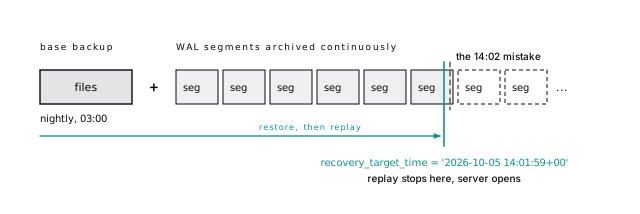
A failing archive fills the disk and stops the primary
PITR depends on an unbroken archive, so that’s where to start. When a 16 MB WAL segment fills, the server hands it to your archive_command. Turning archiving on takes a restart:
That cp is for illustration: it doesn’t flush the copy to disk, so a crash can leave a segment the archive thinks it has. In production, use your backup tool’s archive command (Use a backup tool).
archive_timeout bounds RPO on a quiet system: a segment that takes an hour to fill is an hour you lose with the disk.
Watch the archiver. If archive_command keeps failing, Postgres keeps every unarchived segment in pg_wal, the disk fills, and the primary stops. Alert when pg_stat_archiver.last_failed_time is newer than last_archived_time, or when the newest archived segment is more than a few minutes old.
Recovery pauses at the target so you can look first
To undo the 14:02 mistake, copy the last base backup from before it into an empty data directory, on a new server, and say where the archive is and when to stop:
The server replays every transaction that committed at or before the target and stops at the first commit after it, without applying it. With 'pause' (the default, spelled out so nobody wonders) it then opens read-only and waits. Check that the column is back, then select pg_wal_replay_resume() to open read-write, or move the target and try again. At 3 a.m., you will want that pause. (It needs hot_standby = on, also the default; without it, pause acts like shutdown.)
31-backups.shFor a human mistake (a bad delete, a dropped column), restore to a point in time on a separate server, then copy the affected rows back with pg_dump -t or copy. Rolling production itself back also throws away every legitimate write since the target.
Besides a time, you can stop at recovery_target_lsn (an exact WAL position), recovery_target_xid (a transaction’s XID), or recovery_target_name, a label made earlier with select pg_create_restore_point('before_billing_migration'). A named restore point before risky migrations is a cheap habit.
Recovery starts a new timeline, a fresh branch of WAL history, so the restored server’s WAL never collides with the old history in the archive. Keep the .history files too.
Replay runs in roughly one process, so replaying a week of busy WAL can take hours. That’s why you still take base backups daily or weekly: each one bounds the replay, and so the RTO.
On archive_timeout: at 60 seconds the worst case is about a minute of loss, at the cost of a mostly empty 16 MB segment for each quiet minute that had any writes. And the archiver’s counters, for the alert above:
Incremental backups are only as good as their chain
A full base backup of a 2 TB database copies 2 TB every time, even if 20 GB changed. PostgreSQL 17 added incremental backups to core.
With summarize_wal = on (off by default), the server tracks which blocks changed. Hand pg_basebackup --incremental the previous backup’s manifest and it copies only those blocks. pg_combinebackup stitches a full backup and its chain of incrementals into a full backup you can restore.
The catch is the chain. Every link must exist and be intact; lose Monday’s backup and Tuesday’s is useless. Verify each link.
pg_combinebackup checks the chain and refuses a gap (here, the full backup and Tuesday without Monday):
31-backups.shUse a backup tool
Build PITR by hand once, to understand it. In production, use pgBackRest, WAL-G, or Barman, all open source; the first two are the most widely used. Each one compresses, encrypts, and uploads WAL to object storage with retries; takes full and incremental base backups in parallel; expires old backups together with exactly the WAL they no longer need; and restores to a target time with one command.
Pick one, don’t mix them, and check that it’s maintained: pgBackRest’s maintenance stopped in April 2026 and restarted in May with sponsor funding (pgBackRest news, as of October 2026). Store backups where the database server’s credentials can’t delete them (a separate account, object lock, a versioned bucket). Ransomware and a bad cleanup script delete backups the same way.
Managed backups still need a copy you own
Managed services build in snapshots, WAL archiving, and a “restore to point in time” button. The button has limits: restores create a new server, retention is a fixed window of days or weeks, and automated backups live in the instance’s own account, sometimes deleted with it. Copy snapshots elsewhere, and keep your own periodic pg_dump, your only portable copy. Backups are snapshots plus WAL, and restores make new servers covers what the restore button leaves out.
Test your restores
Backups fail silently: the archive command has failed for a week, a lifecycle rule deleted needed WAL, the encryption key lived on the dead server, the restore takes nine hours against a one-hour RTO. You find out when you restore, so restore before you have to.
GitLab’s January 2017 outage is the standard lesson. An engineer wiped the primary’s data directory, believing it was the secondary. Then every backup failed in turn: pg_dump had been failing silently (9.2 binaries against a 9.6 server), disk snapshots had never been enabled, and the secondary had just been wiped to re-sync it. A six-hour-old LVM snapshot took around 18 hours to copy back, and about 5,000 projects were lost. Every method existed on paper. None had been proven by a restore.
Automate it. On a schedule, restore the latest backup to a scratch server with your normal procedure, then check that the server starts, key row counts are close to production, the newest row is within your RPO of the target, and amcheck passes on a sample of indexes. Time every step: that’s your real RTO. Tear it down, and alert if anything failed.
A few times a year, have someone who didn’t build the backups restore from the runbook alone. Better they find the gaps than an incident does.
“The backup job exited 0” is not evidence. Alert on the age of the newest successful base backup, the age of the newest archived WAL segment, pg_stat_archiver.failed_count rising, and the result of the last automated restore test.
Take minor releases promptly; rehearse major ones
Upgrades belong in this chapter because a major upgrade is a restore you schedule: the same copy, the same fallback, the same rehearsal. A minor release (18.5 to 18.6) keeps the on-disk format: read the release notes in case they ask for a reindex, install the binaries, and restart. A major version (17 to 18) changes the catalog format, so the new server can’t open the old data directory.
There are three ways across a major version. Dump and restore works across any versions and leaves no bloat, but the downtime is the whole dump plus restore, so it’s for small databases. The other two scale.
pg_upgrade –link is fast and one-way
pg_upgrade builds new catalogs and reuses the old data files as they are. With --link it hard-links them instead of copying, so a terabyte upgrade takes minutes. The price: once the new server writes to the shared files, the old cluster is unusable, so your fallback is a backup or replica. Take a backup first, and run pg_upgrade --check before the real thing.
Two PostgreSQL 18 changes matter on upgrade night. The good one: pg_upgrade now carries most planner statistics over, so queries don’t run on guesses for an hour afterward (extended statistics from create statistics still need an analyze). The trap: initdb now turns on data checksums by default, and pg_upgrade refuses to pair clusters whose checksum settings differ. For a 17 cluster without them, create the new one with initdb --no-data-checksums.
Plan the replicas too: they can’t follow a primary across a major version, so they’re rebuilt or upgraded with the documented rsync procedure.
| Mode | What it does | Speed | Old cluster usable after? |
|---|---|---|---|
--copy (default) | copies every file | slow, needs 2x disk | yes |
--link | hard links files | seconds to minutes | no, once new server starts |
--clone | copy-on-write clone (filesystem support) | fast | yes |
--swap (PostgreSQL 18+) | moves the data directories into the new cluster | can be the fastest | no |
It can reuse the files because user table and index formats have stayed compatible across recent majors; with --link, the work scales with the number of files, not their size. To turn checksums on in the old cluster instead of off in the new one, run pg_checksums --enable on it while it’s shut down; it rewrites every page, so that downtime scales with the size of the cluster, not the number of files. --no-statistics skips the PostgreSQL 18 statistics transfer, and at the end pg_upgrade prints the vacuumdb --analyze-in-stages --missing-stats-only command that fills in what it didn’t carry over.
31-backups.shLogical replication shrinks upgrade downtime to the cutover
For the least downtime, subscribe a new-version cluster to the old one with logical replication: it copies every row, then streams changes until you cut over, in seconds to a minute or two. The costs: a freeze on schema changes (DDL isn’t replicated), a primary key or replica identity on every table, a full copy over the network, and sequences and large objects, which aren’t replicated either. Advance every sequence on the new cluster before it takes writes, or the first insert fails on a duplicate key. The bonus: a bloat-free cluster and a cutover you can rehearse as often as you like. Some managed services sell this as a blue/green upgrade.
Copy the schema first (pg_dump --schema-only), create the subscription, and wait for the initial copy. Then, at cutover:
- Stop writes to the old cluster (maintenance mode, or revoke write access).
- Wait for the subscriber to catch up (the slot’s confirmed position equals the old primary’s current WAL position).
- Advance every sequence on the new cluster past its old value, since sequences are not replicated.
- Point the application at the new cluster.
Whatever the method, rehearse it on a restored copy of production first.
The short version
- Write down your RPO and RTO first; they decide which backups you need. A replica is not a backup.
- Use
pg_dump -Fd -j N(or-Fc) for portable, selective backups, pluspg_dumpall --globals-onlyfor roles (--no-role-passwordson managed services). Runanalyzeafter any logical restore. - For disaster recovery, use physical base backups plus continuous WAL archiving, through a tool like pgBackRest or WAL-G, to storage the database host can’t delete.
- To undo a human mistake, recover to a point in time on a separate server with
recovery_target_action = 'pause', and copy the rows back. - Alert on
pg_stat_archiverfailures beforepg_walfills the disk. - Incremental backups are in core since PostgreSQL 17; verify every link in the chain.
- Automate restore tests and measure the real RTO. A backup you have never restored is a rumor.
- Upgrade majors with
pg_upgrade --linkfor speed or logical replication for near-zero downtime (advance sequences at cutover); on 18, mind the checksum default.
Further reading
- Backup and Restore and Continuous Archiving and PITR, PostgreSQL documentation. The full procedures, including every recovery target setting.
- pg_basebackup and pg_combinebackup, PostgreSQL documentation. Incremental backups and their chains.
- pg_dump and pg_upgrade, PostgreSQL documentation. Formats, parallelism, upgrade modes, and the replica procedure.
- pgBackRest User Guide, pgBackRest project. A complete, opinionated walk-through of production backups.
- WAL-G and Barman. The other widely used backup tools, if pgBackRest doesn’t fit.
- Postmortem of database outage of January 31, GitLab, 2017. Four backup and replication methods, none of which saved the day; read it before you trust yours.
- amcheck, PostgreSQL documentation. Verify index and heap integrity in a restored copy.
33 Trust no tenant
Most multi-tenant apps keep tenants apart with one line repeated a thousand times: where account_id = ?. It works until someone writes the thousand-and-first query and forgets it, and one customer’s dashboard shows another’s data. That isn’t a performance bug. It’s a breach notification.
Postgres can enforce that line below the application, where nobody can forget it. It takes an app role that doesn’t own its tables, privileges granted on purpose, and row-level security policies that are correct and fast. Each piece has a way to fail silently, and we’ll show you where.
The app never connects as postgres
Postgres has one kind of principal: the role. A “user” is a role with LOGIN; a “group” is a role without it that others are members of.
Roles are cluster-wide, not inside a database, which is why pg_dump skips them (pg_dump leaves out roles; dump them separately).
Role attributes are the powerful switches (SUPERUSER, CREATEROLE, CREATEDB, REPLICATION, BYPASSRLS), and your app role gets none of them. The most common Postgres security mistake is an app connecting as postgres or the managed service’s admin user: every SQL injection becomes a full compromise, and no policy applies (the superuser bypasses them; the managed admin usually owns the tables, which skips them too).
Grant one role to another and the grantee becomes a member, which by default inherits the granted role’s privileges. Before inventing roles, check the predefined ones, such as pg_monitor for the views in Watch it run and pg_maintain (PostgreSQL 17+) for vacuum and reindex without owning the tables.
Since PostgreSQL 16 a grant carries three options: inherit (use the role’s privileges automatically), set (may set role to it), and admin (may grant it). So a migrator can become the owner deliberately:
As wg_migrator, ordinary queries fail until it runs set role wg_owner: the “sudo” behavior you want for schema changes. (wg_analyst is a login role made a member with a plain grant wg_readonly to wg_analyst.) Other predefined roles worth knowing: pg_read_all_data and pg_write_all_data (PostgreSQL 14+), and pg_signal_backend for cancelling queries.
32-securityComing from MySQL: accounts there are 'user'@'host' pairs, and roles (8.0+) are a separate thing you grant to them. In Postgres, login, group, and owner are all the same object with different attributes, and host rules live in pg_hba.conf (Postgres is not MySQL).
The app never owns its tables
An owner can alter, drop, and grant anything on its tables, and by default ignores row-level security on them. None of that belongs in a process handling web requests. So you have at least two roles:
| Role | Login | Used by | Can do |
|---|---|---|---|
| owner / migrator | migrations only | the deploy pipeline | DDL, owns every object |
| app | yes | the running application | select, insert, update, delete on granted tables |
| readonly (optional) | via members | analysts, BI tools | select |
The owner can be nologin, with migrators that set role into it (switch to it, like sudo, only for schema changes). The app’s connection string never holds its credentials.
Reaching a table takes two grants
USAGE on a schema lets a role look inside, and touching a table takes USAGE plus the table privilege:
Grants on all tables miss next week’s table
grant ... on all tables in schema app covers only tables that exist now. Next week’s table gets permission denied, and someone “fixes” it by granting everything to everyone. Default privileges close that gap: they apply to objects a given role creates later.
Now every table wg_owner creates in app arrives with the right grants. For this chapter we created two of them, app.projects and app.events: copies of the sample tables with every row but fewer columns (no user or owner column). The app can select, insert, update, and delete, and nothing else: no truncate, no alter, no drop.
The letters: a insert, r select, w update, d delete, D truncate, x references, t trigger, m maintain. The app has arwd.
32-securityalter default privileges applies to objects created by the role that ran it (or the role named with for role). A migration that runs as a different role gets no automatic grants. Always create objects as the owner role, and check with \ddp in psql.
Older databases still let anyone create in public
search_path (by default "$user", public) decides where Postgres looks up an unqualified name. For years every role could create objects in public, which enabled a classic attack: plant a function there named like one a privileged user calls, and wait. PostgreSQL 15 closed it for new databases; everyone but the database owner gets only USAGE:
A database upgraded or restored from an older version keeps the old grants: if \dn+ public shows =UC for everyone, run revoke create on schema public from public. For app schemas, qualify names in SQL (app.events) or set the path on the role: alter role wg_app set search_path = app.
A policy makes other tenants’ rows invisible
Row-level security (RLS) attaches policies to a table: boolean expressions Postgres adds to every query, so rows where the policy isn’t true are invisible to reads and impossible to write.
The tenant is a custom setting, app.account_id, that the app sets per request; current_setting(..., true) returns null if it was never set. With no separate with check expression, using governs reads and writes.
MySQL has no row-level security; isolation lives in application code, or in views that a query on the base table bypasses. Here the policy is attached to the table (Postgres is not MySQL).
With 2,000,000 events across 1,000 accounts, the app role with no tenant set sees nothing:
account_id = null is never true, so every row is hidden. RLS fails closed, which is the failure you want. Set tenant 42 and it sees its 2,084 events and nothing else. Asking for tenant 7 by name returns zero rows, and writing a row into tenant 7 fails:
32-securityRLS is the check; unguessable public ids are the backup for the day a check is missing (A counter is an invitation).
Foreign keys look through policies
Foreign key checks bypass RLS, so tenant 42 can attach an event to a project it can’t see. The fix is the multi-tenant key design from Make cross-tenant references impossible: carry the tenant in the foreign key, (account_id, project_id) referencing projects (account_id, id), so the referenced row must belong to the same tenant.
As tenant 42, project 1 is invisible:
Yet the insert goes through:
32-securityWith the tenant in the key, the same insert fails:
RLS skips the table owner unless you force it
RLS doesn’t apply to a table’s owner by default. As the owner, with the same tenant set, app.events returns all 2,000,000 rows. If your app connects as the owner (common when the ORM’s migration tool shares its connection string), RLS silently does nothing. After alter table app.events force row level security, the owner sees 2,084.
Force RLS on every tenant table. It costs nothing at query time, but it binds every job that runs as the owner. pg_dump as the owner errors out rather than dump a partial table, and a backfill update run as the owner with no tenant set quietly changes zero rows. Superusers and BYPASSRLS roles still skip policies, so give backups and deliberate cross-tenant work a dedicated BYPASSRLS role, and make the bypass explicit (the backup side is in pg_dump leaves out roles; dump them separately).
32-securityThe app connects as a superuser, as a BYPASSRLS role, or as the table owner without force row level security. In all three, queries succeed and return every tenant’s rows. Test it: connect with the app’s exact credentials, set no tenant, and confirm a tenant table returns zero rows.
Pooled connections leak tenants
A pool hands the same server connection to request after request (Transaction pooling breaks session state). A tenant set for the session outlives its request, and the next request that forgets to set one runs as the previous tenant. A cross-tenant leak, with RLS fully on.
The rule: set the tenant inside the transaction, scoped to the transaction. set_config’s third argument is the scope, and true means “until commit”, like set local:
One trap: after that commit, a request that sets no tenant gets invalid input syntax for type bigint: "" instead of zero rows. Once set in a session, a custom setting reverts to an empty string, not to “not set”. Still closed, but a forgotten tenant becomes a 500. Treat empty as missing:
Then make the safe path the only path: one app helper that begins, sets the tenant from a bind parameter, runs the request, and commits.
32-securityThe helper, with node-postgres:
The tenant is a bind parameter, never concatenated into SQL. Every query goes through db; one on the bare pool has no tenant and, thanks to the policy, sees nothing. And set_config(..., true) beats SET LOCAL from app code because SET can’t take bind parameters.
RLS performance: policies are predicates
A policy is one more condition in the where clause (Views and policies are text substitution), so it needs an index like any other. Without one, counting tenant 42’s deploys as the app role read 33,309 pages: a parallel sequential scan, filtering on kind and the policy. Lead every tenant table’s main index with the tenant column:
Now the same count reads 2,036 pages, and the policy is the index condition. The tenant’s 20 newest events read 23 pages, and the query never mentions the tenant.
Keep policies simple: a subquery in a policy joins into every query on the table. Resolve membership once per request and set the result as the tenant.
Before the index:
After:
current_setting is stable, so in an index condition Postgres evaluates it once and probes the index with the value. In the sequential scan’s filter, it runs for every row. The newest-20 query is an Index Scan Backward on the same index, Buffers: shared hit=23.
32-securityA function that isn’t leakproof runs after the policy
Postgres won’t run every condition before the policy. A function whose error message contains its input could leak rows you can’t see, so anything not marked LEAKPROOF (promising never to reveal its input) runs after the policy, and can’t drive an index scan ahead of it. = and < on text, bigint, and timestamptz are leakproof. like, ilike, and jsonb containment (@>) are not.
The cost is real. With a GIN index on payload, a containment search with the tenant written into the query read 434 pages. Through the policy it read 2,036: the GIN index wasn’t allowed, so the planner fetched all the tenant’s rows and filtered. For your biggest customer, that’s a scan of all their data on every search.
The fix is to promote the field to a typed column whose comparison operators are leakproof. A stored generated duration_ms int column, indexed on (account_id, duration_ms), answers the same search in four pages. Adding a stored column rewrites the table under an ACCESS EXCLUSIVE lock, so on a big table plan it like any rewrite (Every change is a catalog edit, a scan, or a rewrite).
Read plans as the app role: a superuser never sees the policy predicates at all.
As postgres (which bypasses RLS), with the tenant in the query, where account_id = 42 and payload @> '{"duration_ms": 1234}':
As the app role, through the policy, where payload @> '{"duration_ms": 1234}':
32-securityThe generated-column fix. (The other way out, marking a function LEAKPROOF, takes a superuser and a function verified never to raise input-dependent errors.)
SECURITY DEFINER functions need a pinned search_path
A security definer function runs with its owner’s privileges, like a setuid program: right for a narrow operation such as “accept this invitation”, and a classic escalation. Unqualified names inside resolve through the caller’s search_path, so a caller can put their own count first and have the owner run it. Pin the search path:
Three habits: pin search_path with pg_temp last, schema-qualify every table, and revoke execute from public (new functions are executable by everyone).
Forced RLS binds the owner too, so tenant 42 calling app.account_event_count(7) gets 0; an owner that bypasses RLS would have returned tenant 7’s count. And a definer function is never inlined, so the planner sees a black box (STRICT, SECURITY DEFINER, or a SET clause stops inlining).
The lab defines a second function, app.unpinned_event_count, identical but without the set search_path clause. Then, as wg_app, in a schema it controls, it defines its own count(*) whose state function records who ran it, and puts that schema ahead of pg_catalog:
pg_catalog is searched first only when the path doesn’t name it; naming it later hands the caller the first pick. The unpinned function runs the impostor as wg_owner. The pinned one ignores the caller’s path, runs the real count, and returns 2,084.
32-securityUse scram-sha-256 and verify-full, never trust
Everything above assumes the right role is the one connecting. pg_hba.conf decides who may connect, from where, and how they prove it. The server uses the first line that matches the connection type, database, user, and address:
hostssl matches only TLS connections, so unencrypted ones don’t match at all. Use scram-sha-256, never trust on a network line, and end with an explicit reject. Its address all covers IPv6 too, which 0.0.0.0/0 would miss.
Passwords: scram-sha-256 has been the default since PostgreSQL 14, and MD5 is deprecated as of PostgreSQL 18, which warns when MD5 passwords are set. Find old roles with where rolpassword like 'md5%' on pg_authid and reset them.
TLS: set ssl = on and connect with sslmode=verify-full, so clients check the certificate and host name; require encrypts but doesn’t stop impersonation. Managed databases ship a CA bundle for this.
Start auditing with the server log; it’s free
Locked doors still need a record of who opened them. Start with the server log: log_statement = 'ddl' records every create, alter, and drop with its user, and with the owner/app split, any DDL in the log came from your migration role. Log connections too. Don’t set log_statement = 'all' on busy production: the log grows enormous and fills with sensitive values.
And for TLS, which sessions use it:
For compliance-grade auditing, use pgaudit. For application history (“who changed this invoice”), write an audit table in the same transaction (History is a table you design) and revoke update and delete on it from the app role.
Then check privileges in CI. This query finds tenant tables without RLS enabled and forced:
Run against a migrated test database, it fails the build on a new tenant table without RLS. On this chapter’s setup it already finds one: app.projects, which never got force. Add a second check for login roles with rolsuper, rolbypassrls, or rolcreaterole.
The short version
- The app connects as a role that is not a superuser, has no
BYPASSRLS, and doesn’t own the tables. Migrations run as a separate owner role. - Use
alter default privilegesso new tables get the right grants automatically, and revokecreateonpublicin databases that predate PostgreSQL 15. - For multi-tenant isolation, enable and force row-level security on every tenant table with a policy on
account_id(backups and cross-tenant jobs then need aBYPASSRLSrole), and add composite(account_id, id)foreign keys so references can’t cross tenants. - Set the tenant with
set_config('app.account_id', $1, true)inside each request’s transaction, through one helper; wrap it innullif(..., '')in policies. - Policies are predicates: lead indexes with the tenant column, keep policies simple, and promote jsonb fields you search through a policy to typed columns.
- Every
security definerfunction getsset search_path = pg_catalog, pg_temp, schema-qualified names, andrevoke execute ... from public. - Use
hostsslandscram-sha-256inpg_hba.conf,sslmode=verify-fullin clients, and log DDL and connections.
Further reading
- Row Security Policies and CREATE POLICY, PostgreSQL documentation. Permissive versus restrictive policies, per-command policies, and the exact rules for
usingandwith check. - Privileges and ALTER DEFAULT PRIVILEGES, PostgreSQL documentation. The full privilege model, including the letters
\dpprints. - CREATE FUNCTION, PostgreSQL documentation. How to write SECURITY DEFINER functions safely.
- A Guide to CVE-2018-1058: Protect Your Search Path, PostgreSQL wiki. The
search_pathattack, and why PostgreSQL 15 changed the public schema. - Abusing SECURITY DEFINER functions, Laurenz Albe, CYBERTEC, 2019. A worked privilege escalation through an unpinned search path.
- The pg_hba.conf File, PostgreSQL documentation. Every authentication method and match rule.
- pgAudit, pgAudit project. Statement and object auditing when the server log isn’t enough.
34 Someone else runs the box
The graph says read IOPS have been flat at exactly 3,000 for an hour. Not near 3,000: exactly. Latency climbs, the app times out, and the dashboard shows the database “healthy”. Nothing is broken. You bought a volume with a ceiling, and your workload found it.
That’s a managed service on most days. The provider patches the OS, takes the backups, and promotes the standby at 3 a.m. It does not choose your indexes or tune autovacuum. Those were never the server’s job. They were yours, and they still are. This chapter is the diff, starting with how much of the box to hand over at all.
Provider behavior here is quoted from each provider’s documentation as of October 2026; check the link before you build on it. The services are examples of the mechanics, not a ranking. Pick a provider you can leave holds the per-vendor numbers.
Buy as much management as you can afford
Running Postgres well is a full-time skill, and most teams don’t have anyone whose full time it is. Backups that restore, failover that doesn’t split the brain, upgrades, vacuum, pooling, and a pager someone answers: every one is a job, and every job is done by somebody. The only question is who.
Our answer, for most teams: let someone else do as many of those jobs as your budget allows.
Management is a spectrum, not a switch
From the most work on your side to the least:
- Self-hosted on VMs or bare metal: total control, total responsibility, and the pager.
- A Kubernetes operator (Self-managing gives you the superuser and the pager) automates replicas, backups, and failover; you still run the cluster under it.
- A hyperscaler’s managed service (the hyperscalers) runs the machine, backups, standby, and patching, and hands you an admin role.
- A specialist managed service (specialist managed Postgres): the same platform jobs, with a support desk that should know Postgres internals. Test that with a real question.
- Managed plus expert help: a top support tier or a fractional DBA, so a human who has tuned a thousand databases looks at yours.
No rung is right for everyone. Each moves jobs from your column to someone else’s, at a price.
Some jobs stay yours whoever runs the box
Here is how the jobs this book teaches split. The hyperscaler and specialist columns came out identical, so they share one.
| Job | Self-hosted | Operator | Managed service |
|---|---|---|---|
| Backups taken | you | shared | provider |
| Restore testing | you | you | you |
| Point-in-time recovery | you | shared | shared |
| Failover and HA | you | shared | shared |
| Upgrades and OS patching | you | shared | provider (minor), shared (major) |
| Vacuum and configuration | you | you | you, in a console |
| Connection pooling | you | shared | shared |
| Monitoring and on-call | you | you | shared |
| Capacity planning | you | you | you |
| Query, index, and schema design | you | you | you |
Read the last row again. It says “you” in every column, and it is most of this book.
“Shared” hides the real division of labor. The provider takes the backups; only you can prove your restore meets your RTO. The provider promotes the standby; your app has to reconnect and retry. The provider pages itself for a dead disk; your pager still covers slow queries, lock queues, and full connection slots.
- Backups and PITR: an operator schedules base backups and WAL archiving, and you own the bucket, its lifecycle rules, and the credentials. A provider archives and replays; you pick the retention window, notice the mistake inside it, and repoint everything at the new server the restore creates.
- Failover: an operator depends on the Kubernetes cluster you run; a provider’s promotion still needs your app to reconnect and retry. You schedule the drills either way.
- Upgrades: an operator rolls the version you choose through the replicas (some automate majors; check yours). A provider patches minors in a window you pick, and for majors runs
pg_upgradeor blue/green while you test the app and extensions and runanalyze. - Vacuum and configuration: the provider sets defaults sized for the instance, not your hottest table, and locks some settings. Per-table autovacuum,
work_mem, timeouts, and logging are yours.
Expert help moves a few cells, never to “provider”:
| Job | Managed alone | Plus a support contract | Plus a fractional DBA |
|---|---|---|---|
| Restore testing | you | you | shared |
| Vacuum and configuration tuning | you | shared (advice on request) | shared |
| Incident at 3 a.m. | you, with provider escalation | shared, on the contract’s response time | shared, if their hours cover it |
| Query, index, and schema review | you | you, or advice by ticket | shared |
Self-managing costs people, not servers
The VM is the cheap part. Self-managing costs the expertise in the whole operations half of this book, and an on-call rotation of several people who can each restore a backup and promote a replica. One expert is a single point of failure with a vacation calendar. It also carries the failure modes that end companies: backups nobody had proven by a restore (GitLab, 2017), or two primaries taking writes. Neither needs bad engineers, only a job nobody owned.
Price both sides in the same unit:
The managed side’s second line never reaches zero; the table’s last rows never leave you. But the people lines usually dwarf the markup until the fleet is large, steady, and staffed. Count the hours you’d really spend, not the hours you hope to.
Managed costs markup, control, and an exit
The service has its own price, and the rest of this chapter itemizes it: a markup, with I/O priced in ways that have their own failure modes; less control (no superuser, no postgresql.conf, no shell); the provider’s calendar; and an exit cost. For most teams that’s less than an on-call rotation. Write it down anyway.
Managed doesn’t mean optimized
A provider keeps your database running. It does not make it fast. It won’t notice your dashboard query reading 35,249 pages to return 20 rows, but it will sell you the next instance size in one click. A bigger box hides the query, the cost compounds monthly, and the query is still at the top of the list (Earn the bigger box).
Hand a provider the operations; keep the design yourself
Concretely, and especially without a dedicated database engineer: let a provider own backups, PITR, failover, patching, and the hardware. Add expert help when you can; an hour of a specialist on your slowest queries is often worth more than a size up.
Then spend your own expertise where no provider can: query, index, and schema design. That’s most of this book, and where the large wins live: the dashboard query above drops to 91 pages with its first index, and no service tier does that for you.
Self-manage for a concrete reason, with the people to own it: cost at a scale where the markup pays for a team, control you can name, compliance, or an extension no provider runs. “Cheaper on paper” isn’t a reason until the people lines are in the math. And none of it is permanent; stay on community PostgreSQL features and you can move either way.
There is no superuser
Every managed service withholds SUPERUSER and gives you an admin role instead: rds_superuser, cloudsqlsuperuser, azure_pg_admin. The reason is that a superuser can read server files and run programs as the server’s OS user, which is a shell on the provider’s machine.
Expect alter system, pg_read_file, copy ... to program, C functions, and untrusted extensions to fail, so test your runbooks’ commands before an incident does. For monitoring and on-call accounts, grant predefined roles (pg_monitor, pg_read_all_stats, pg_signal_backend), never the admin password.
The lab’s mg_admin has LOGIN CREATEROLE CREATEDB and nothing else. alter system, pg_read_file, pg_ls_dir, copy ... to program, create function ... language c, set log_min_duration_statement, and create extension pg_visibility (untrusted) all fail with 42501; create extension hstore (trusted) works. Without pg_read_all_stats, another role’s session shows its query as <insufficient privilege>. Even pageinspect, which this book uses for raw pages, is superuser-only by default.
33-managed33-managedThe providers, as of October 2026: AWS’s rds_superuser page prints CREATE ROLE postgres WITH LOGIN NOSUPERUSER INHERIT CREATEDB CREATEROLE ... and says rds_superuser can add RDS’s extensions, see every session, and terminate any connection. Cloud SQL customers “cannot create or have access to users with superuser attributes”; AlloyDB grants alloydbsuperuser. On Azure, “only Microsoft is part of the superuser role” (Microsoft). Neon’s neon_superuser holds pg_monitor and pg_signal_backend with ADMIN OPTION; Supabase keeps supabase_admin for itself. The admin role should then create the owner, migrator, and app roles from The app never connects as postgres.
Settings live in a parameter group
No superuser also means no config file. You can’t edit postgresql.conf; the provider writes it from a console object (managed notes).
Static means restart, and the console won’t do it for you
A setting that needs a restart is “static”. On RDS, a static change sits in pending-reboot, which “doesn’t result in an automatic reboot during the next maintenance window” (AWS), so it can wait for months and arrive with an unrelated reboot. Batch static changes into a window you choose.
The defaults are not the book’s defaults
Providers size memory from the instance, not by the 25 percent rule: Cloud SQL gives shared_buffers one third of memory, Aurora roughly two thirds. Read pg_settings before you assume.
Per-role settings are the portable tool
alter role ... set needs no console and moves with you between providers. Keep timeouts, work_mem overrides, and search_path per role in migrations; leave the console for memory, logging, and autovacuum.
33-managedCloud SQL’s flags table marks each flag “Restart Required?” and gives shared_buffers “one-third of the instance’s total VM memory”. Aurora sets it to SUM(DBInstanceClassMemory/12038,-50003) 8 KB pages. Azure says shared_preload_libraries “requires a server restart” (Microsoft). RDS default parameter groups can’t be edited; create a custom one first. In pg_settings, source says whether the provider or you set a value.
A setting marked superuser is refused per role until someone runs GRANT SET ON PARAMETER (PostgreSQL 15+), the hook a provider can use to delegate it. On stock Postgres, alter role mg_app set statement_timeout = '5s' works, and the same for log_min_duration_statement fails with 42501.
33-managedExtensions come from an allowlist
You can only create extension what the provider compiled and allowed, and the footnotes matter as much as the list: a version behind, a restart-requiring flag, a missing background worker, a paid plan. Check before you design around one (what each is for), and run alter extension ... update after every major upgrade; extensions don’t upgrade themselves.
The provider adds its own gate on CREATE EXTENSION
Since PostgreSQL 13, a trusted extension can be installed by a non-superuser with CREATE on the database. Untrusted ones need a superuser, which here means the provider or nobody. Providers add their own gate, with opposite defaults: RDS allows everything available, Azure nothing until you list it.
| Extension | RDS | Aurora | Cloud SQL | AlloyDB | Azure | Neon |
|---|---|---|---|---|---|---|
pg_stat_statements | yes | yes | yes | yes | yes | yes |
vector | 0.8.2 | 0.8.2 | 0.8.5 | 0.8.2 | 0.8.2 | yes |
pg_partman | 5.4.3 | 5.4.3 | 5.4.3¹ | 5.4.3 | 5.4.3 | 5.1.0 |
pg_repack | 1.5.3 | 1.5.3 | 1.5.2 | 1.5.3 | 1.5.3 | paid² |
pg_hint_plan | 1.8.0 | 1.8.0 | flag | flag | 1.8.0 | 1.8.0 |
Versions on PostgreSQL 18 (18.6 on RDS and Aurora). ¹ No background worker. ² Paid plans only. Sources, October 2026: RDS, Aurora, Cloud SQL, AlloyDB, Azure, Neon; Supabase lists all but pg_hint_plan. Cloud SQL’s pg_partman “doesn’t include the background worker” (call maintenance from pg_cron instead); pg_hint_plan hides behind cloudsql.enable_pg_hint_plan (restart required) or alloydb.enable_pg_hint_plan; Neon’s pg_repack is “available only on paid Neon plans”; AlloyDB can’t autoprewarm “because you can’t configure the shared_preload_libraries”, so the autoprewarm trick is out.
pg_available_extension_versions shows trusted for each. As the lab’s admin role, create extension hstore (trusted) works and create extension pg_visibility (untrusted) fails with 42501.
33-managedRDS’s rds.allowed_extensions defaults to '*' and is dynamic (AWS); Azure says to “add them to the allow list” in azure.extensions first (Microsoft); on Cloud SQL, only cloudsqlsuperuser members create extensions. AWS: extension versions “don’t automatically upgrade during engine version upgrade workflows”.
The volume is your bottleneck now
On a managed service you rarely run out of CPU first. You run out of I/O, because the database sits on network block storage with a provisioned ceiling, and the numbers are smaller than people expect: an RDS gp3 volume under 400 GiB has a baseline of 3,000 IOPS, a 128 GiB Azure Premium SSD 500.
Two ceilings, and you hit the lower one
The disk has a limit, the instance has a limit, and you get the smaller.
A faster volume behind a small instance buys you nothing, and the small instance’s burst runs out with no change in your traffic.
Throttled I/O shows as flat IOPS and rising latency
Inside Postgres, active sessions wait on IO, mostly DataFileRead (a page that wasn’t in shared buffers); sample the wait events a few times. In the provider’s metrics, it’s the opening of this chapter: IOPS flat against a number while latency and queue depth climb. Then fix it in this book’s order: read fewer pages, give the working set more RAM, and buy IOPS last.
As of October 2026: RDS gp3 gives 3,000 IOPS and 125 MiB/s for 20 to 399 GiB, and from 400 GiB stripes four volumes for 12,000 IOPS and 500 MiB/s; gp2 gives 3 IOPS per GiB and bursts to 3,000 (AWS). Azure Premium SSD gives 128 GiB 500 IOPS, “up to 3,500” bursting, and 512 GiB 2,300; v2 starts at 3,000 at any size (Microsoft). Cloud SQL SSD IOPS follow machine type and capacity, and “you can’t configure the values”; Hyperdisk Balanced defaults to 4,000 IOPS for 20 to 256 GB (Google). Supabase says it plainly: “The effective IOPS is the lower of the IOPS supported by the compute size or the provisioned IOPS of the disk”, and its Micro compute has a 500 IOPS baseline (Supabase). AWS warns an instance “might not be able to fully utilize the provisioned IOPS”; Microsoft that the VM type “also has IOPS limits”; Google that “the machine type sets the maximum”.
| Signal | RDS (CloudWatch) | Azure |
|---|---|---|
| I/O pinned at a ceiling | ReadIOPS, WriteIOPS, ReadThroughput | disk_iops_consumed_percentage |
| Requests queuing | DiskQueueDepth, ReadLatency | disk_queue_depth |
| I/O burst running out | BurstBalance (gp2), EBSIOBalance% | disk_iops_consumed_percentage near 100 |
| CPU burst running out | CPUCreditBalance (T classes) | cpu_credits_remaining (Burstable) |
Names from AWS and Microsoft; AWS’s IO:DataFileRead page describes the same wait. EBSIOBalance% is the instance’s burst bucket: a gp3 volume has no burst, but the instance in front of it might.
Disaggregated storage changes some rules
Aurora, AlloyDB, and Neon keep Postgres above the buffer cache and replace what’s below it: the server ships WAL to a distributed storage service that builds the pages (how that changes benchmarks). On Aurora and AlloyDB, which skip full-page writes, the post-checkpoint WAL spike goes away, so don’t port a checkpoint tuning guide. Replicas share storage instead of copying it, I/O can be a line item, and a cache miss is a network fetch. Row versions, vacuum, bloat, and the planner’s page counting don’t change at all.
As of October 2026:
- Aurora replicates writes “to six storage nodes” across three Availability Zones; replicas read the same volume, with lag “usually much less than 100 milliseconds” (storage, replication, HA). Its parameter reference doesn’t list
checkpoint_timeout,max_wal_size, orfull_page_writes. Aurora Standard bills “per 1 million requests for I/O operations”; I/O-Optimized doesn’t, and is “the best choice when your I/O spending is 25% or more of your total Aurora database spend”. - AlloyDB writes WAL to “a low-latency, regional log storage service”, with “no need to checkpoint the database layer” and no full-page writes (Google Cloud blog, 2022).
- Neon commits “once a quorum of safekeepers has acknowledged the WAL record via the Paxos protocol”, and pageservers rebuild pages on request (Neon). A compute that scales to zero wakes with empty buffers (its entry has the timings). Read-your-writes still needs care: lag is small, not zero.
Provider dashboards are wait-event samplers
Every provider’s performance dashboard is the wait-event profile, sampled and stored. Read it the same way: an IO band means pages coming from storage, a Lock band a lock queue. The fix is still in the query.
“CPU” is not a wait event
Every dashboard has a CPU band, and Postgres has no wait event by that name. The band is sessions active with no wait event: running, or waiting for the OS scheduler, which is how it can rise above the core count.
33-managedAs of October 2026: RDS Database Insights “samples the number of sessions concurrently running a query” every second and defines CPU as “active in CPU or is waiting for CPU” (AWS). Cloud SQL Query Insights shows wait events only on Enterprise Plus (Google), and Google notes CPU load “can go beyond the maximum core line”. AlloyDB splits “CPU and CPU Wait”, “IO Wait”, and “Lock Wait” (Google). Azure Query Store samples waits, but not on Burstable, “as it causes performance problems” (Microsoft). Dashboards have retention limits; the observability chapter’s SQL works everywhere.
A managed pooler either pins sessions or leaks state
In transaction mode, session state either breaks or has to be tracked (Transaction pooling breaks session state), and managed poolers pick different sides.
RDS Proxy pins: once a client changes session state (a SET, a prepared statement, even nextval), it gets its own server connection until it disconnects. Correct, and the multiplexing you paid for is gone; an ORM that sets a variable on checkout pins every connection. The PgBouncer-style poolers on Cloud SQL, Azure, Neon, and Supabase don’t track SQL-level session state (SET, PREPARE, advisory locks): full multiplexing, and silent leaks. Some do track protocol-level prepared statements, the kind most drivers send, when the provider turns that on.
Know which you have, and use SET LOCAL and per-role settings either way.
As of October 2026: RDS Proxy also pins on cursors, LISTEN, temp tables, session advisory locks, and statements over 16 KB, and a pool that resets with DISCARD ALL pins everything; watch DatabaseConnectionsCurrentlySessionPinned (AWS). Cloud SQL pooling needs Enterprise Plus, and enabling it “results in a database restart”; SET, LISTEN, and PREPARE “aren’t supported” in transaction mode (Google). Azure’s PgBouncer 1.25.2 ships with pgbouncer.max_prepared_statements at 0, “isn’t supported on Burstable”, and restarts with every failover (Microsoft). Neon runs PgBouncer behind a -pooler hostname (Neon); Supabase’s transaction mode “does not support prepared statements” (Supabase).
Backups are snapshots plus WAL, and restores make new servers
Every service builds point-in-time recovery the way the backups chapter describes, from snapshots plus archived WAL. The button works. It doesn’t mention that retention is a fixed window (each provider’s is in Superuser access and retention rule services out), that the last few minutes of WAL may not have shipped, or that deleting an instance can take its automated backups with it.
Restore time is longer than the button suggests
A managed restore is a new server, so your app, pooler, secrets, and firewall rules all have to follow it. Its data may not be there yet: RDS loads a restored snapshot’s blocks lazily, so the first hours can run at object-storage speed. And its cache is cold. Available in 20 minutes can mean production-ready in four hours. Time a restore of production-sized data, warm-up included, and keep your own pg_dump where the provider account can’t delete it.
As of October 2026:
- RDS “uploads transaction logs … to Amazon S3 every five minutes”, and unless told otherwise, “all automated backups are deleted with the DB instance” (PITR, backups). A restored block not yet loaded “immediately downloads the requested data from Amazon S3”; AWS suggests full-table scans to warm hot tables (AWS).
- Cloud SQL: “A point-in-time recovery always creates a new instance” (Google); for a deleted instance, contact support “within four days” (backups).
- Azure: “the delay RPO … can be up to five minutes” (Microsoft).
Blue/green is the logical upgrade, limits included
In-place upgrades run pg_upgrade with downtime, and can surprise you: Cloud SQL’s “deletes all existing logical replication slots on the instance”, and RDS can only go back by restoring the old snapshot. The low-downtime path is the logical replication upgrade, which RDS sells as Blue/Green Deployments. Its limits come along (freeze DDL, a primary key on every table), so rehearse on a clone and let the rehearsal find the table without one.
In-place: RDS says “You experience an outage until the upgrade is complete”; Cloud SQL; Azure says to “run the ANALYZE command in each database”. RDS Blue/Green uses logical replication for supported major upgrades (AWS), says switchover “typically takes under a minute”, and per its considerations: DDL on blue degrades replication and forces a rebuild (disable pg_partman, which runs DDL on its own), sequences sync only at switchover, large objects and unlogged tables don’t replicate, and single-threaded apply can fall behind a busy blue.
Failover is DNS, and your pool has to notice
Failover is the main thing you pay a provider for. Documented times mostly land between 30 and 120 seconds, and every connection dies. Most services then point a DNS name at the new primary (Cloud SQL and AlloyDB keep a static IP instead); either way, your pool holds dead connections until it notices. Your side of the contract: reconnect instead of caching the old address (AWS recommends a JVM DNS TTL of “no more than 60 seconds”), retry the whole transaction, check that logical replication slots survived, and fail over on purpose, in business hours, on a schedule (the three questions to ask).
| Setup | Typical failover, per its docs |
|---|---|
| RDS Multi-AZ instance | typically 60 to 120 seconds |
| RDS Multi-AZ cluster (two readable standbys) | “typically under 35 seconds” |
| Aurora with a replica | “less than 60 seconds, and often less than 30” |
| Aurora without a replica | “typically takes less than 10 minutes” |
| Cloud SQL HA | unavailable “about sixty seconds” |
| AlloyDB HA | detection “up to 30 seconds”, then “typically less than 30 seconds” |
| Azure zone-redundant HA | “within 60-120 seconds with zero data loss” |
Sources, October 2026: RDS Multi-AZ, RDS cluster, Aurora, Cloud SQL, AlloyDB, Azure. AWS: “large transactions or a lengthy recovery process can increase failover time”. Microsoft: the standby “typically recovers WAL files at 40 MB/s”, and slot synchronization to the standby is native from PostgreSQL 17 when configured. RDS and Azure move DNS; Cloud SQL and AlloyDB keep a static IP.
You can’t SSH in, so plan your logs
No shell means no tail -f. Logs live where the provider puts them, for as long as it keeps them: RDS keeps log files 3 days by default, 7 at most (AWS). Set the logging that pays off on day one and ship it somewhere you control, or the evidence is gone before the incident review.
The bill has its own failure modes
Managed pricing turns performance problems into line items, so a slow query shows up twice: once on the dashboard, once on the invoice. On Aurora Standard, every unneeded sequential scan is billed I/O. AWS charges “$0.01 per GB in/out” across Availability Zones (AWS, October 2026), so an app reading a replica in another zone pays for every result set.
The most expensive trap is the instance you upsized for a slow query: the relationships chapter’s delete reads all 35,173 pages of events without an index and three with one. RAM hides that; the index fixes it, for nothing a month.
The short version
- Buy as much management as you can afford, and spend your own expertise on query, index, and schema design. Self-manage only for a concrete reason, with the people to own it.
- Managed doesn’t mean optimized. Price both options in people hours, not only the bill.
- There is no superuser: give monitoring and on-call accounts predefined roles, not the admin password.
- Static settings wait for a reboot you schedule; keep per-role settings in migrations. Check the extension list’s footnotes before designing around one.
- You get the lower of the volume’s and the instance’s I/O limits. Flat IOPS plus
DataFileReadwaits means fix pages first, buy IOPS last. - Know whether your pooler pins or leaks. Time a real restore, rehearse upgrades on a clone, and make your app reconnect and retry through failover.
Further reading
- Understanding the rds_superuser role, AWS documentation. The exact attributes of the RDS admin role and what it can do.
- Avoiding pinning an RDS Proxy, AWS documentation. The full list of what pins a PostgreSQL session, and how to see it.
- RDS Blue/Green Deployments considerations, AWS documentation. Every logical-replication limit you’ll meet in a blue/green major upgrade.
- PgBouncer in Azure Database for PostgreSQL, Microsoft documentation. A managed transaction pooler’s settings and limits, spelled out.
- Cloud SQL high availability, Google Cloud documentation. How a regional standby fails over, and what your app sees while it does.
- Neon architecture overview, Neon documentation. Safekeepers, pageservers, and what a quorum commit means.
- Predefined roles, PostgreSQL documentation. What each built-in role grants, for building least-privilege accounts on any provider.
35 Pick a provider you can leave
Two providers, same 4 vCPU and 32 GB of RAM, same benchmark. One vendor’s published run puts itself at 18,000 queries per second and its rival at 12,000. Take the numbers at face value and they still don’t say either one runs a better PostgreSQL. One keeps its pages on a drive inside the machine, the other on storage across the network, and the dataset is fifteen times the size of RAM.
That’s most of the provider landscape. Above the buffer cache, everyone runs the same engine. Below it and around it, they bet differently: where pages live, who holds the superuser, what you pay for, and how hard it is to leave.
Decide how much management to buy before you decide whose; Buy as much management as you can afford makes that case. Then our advice is short: pick for the workload you have, and pick something you can leave.
Vendor facts come from each provider’s documentation, pricing page, or blog as of October 2026, linked where stated; check the link before you build on one. Order is not a ranking, and our opinions are marked as ours. On versions: PostgreSQL 18 is the newest release; 19 was at Beta 4 on September 24, 2026, with the project saying GA “may also occur in October” (PostgreSQL). No provider here offers 19 for production yet.
Know the shape and you know the tradeoffs
Every option is one of five architectures, or a blend, and the shape tells you most of the tradeoffs before you read a feature list.
| Shape | Where the pages live | Good at | Costs you | Examples |
|---|---|---|---|---|
| Classic managed | VM plus network volume | Familiar, portable | A miss is a network trip | RDS, Cloud SQL, Azure |
| Local NVMe | Drive in the machine | Fast past RAM | Replicas carry durability | PlanetScale Metal |
| Disaggregated | Storage fed by WAL | Shared replicas, auto-growth | Proprietary storage | Aurora, AlloyDB |
| Serverless | Disaggregated, scales to zero | Cheap idle, branches | Cold starts, busy bills | Neon |
| Platform bundle | Any of the above | Auth, APIs, storage | More of your app on one vendor | Supabase |
Most specialists are classic managed too.
Self-managing, on VMs or Kubernetes, is the sixth option, and it can take any of the first three shapes.
Storage decides the benchmark
When one provider posts twice the throughput of another on the same vCPU and RAM, look at the disk first. Once the working set no longer fits in memory, where the pages live sets the speed.
The latency chapter has the ladder: RAM in nanoseconds, local NVMe in tens of microseconds, network storage in hundreds of microseconds or more. And the ladder only matters for misses (shared_buffers is an array of pages). If your hot pages fit in memory, all three storage designs look alike.
Network block storage: every miss is a round trip
RDS, Cloud SQL, Azure, and most specialists put the data directory on a network volume, so a read that misses memory becomes a request to storage servers elsewhere in the data center. The volume has an IOPS ceiling, and the instance in front of it often has a lower one: an EC2 r8g.xlarge (4 vCPU, 32 GiB) sustains 6,000 IOPS once its burst is spent, whatever volume you bought (Two ceilings, and you hit the lower one).
It earns its place as the default anyway. The volume outlives the instance, so a dead host means reattaching, not rebuilding. Snapshots are cheap, storage and compute resize independently, and even a single instance survives a dead disk, because the storage replicates underneath it (not forever: AWS rates gp3 at 99.8 to 99.9 percent durability a year).
Local NVMe: fast, and gone with the host
Instance storage is a drive in the same machine. AWS rates an i8g.xlarge, the same 4 vCPU and 32 GiB, at 150,000 random-read IOPS on its one 937 GB drive: twenty-five times the network path’s 6,000.
The price is durability. AWS: “the data does not persist if the instance is stopped, hibernated, or terminated”. So a database on local NVMe gets its durability from replication, and that has consequences. A commit must reach a replica in another zone before it’s safe, which costs a round trip. A lost node is rebuilt by copying the whole database, hours for terabytes. And disk size is instance size: outgrowing the drive means migrating to a bigger node.
As of October 2026, per AWS:
- gp3 includes a 3,000 IOPS baseline (the managed chapter shows what that ceiling looks like), can be provisioned up to 80,000 IOPS and 2,000 MiB/s, and does not burst (AWS). Its durability is listed as “99.8% - 99.9%” (AWS).
- io2 Block Express is “designed to deliver an average latency of under 500 microseconds for 16KiB I/O operations”, reaches 256,000 IOPS on Nitro instances, and is rated “99.999% durability”, priced per provisioned IOPS.
r8g.xlargehas a baseline of 6,000 IOPS and 156.25 MB/s and a maximum of 40,000 IOPS and 1,250 MB/s; instances in its tier “can sustain the maximum performance for 30 minutes at least once every 24 hours, after which they revert to their baseline performance” (AWS).i8g.xlargeis rated at 150,000 random-read and 82,500 write IOPS, at 4 KiB and full queue depth (AWS). AWS says “do not rely on instance store volumes for valuable, long-term data” (AWS).
Google’s Local SSD, “physically attached to the server”, “can provide only temporary storage” (Google). AWS also uses local NVMe for a narrower job: RDS Optimized Reads puts temporary tables on local storage for “up to 50% faster query performance” while the data stays on EBS (AWS).
Log-structured storage: ship WAL, not pages
Aurora, AlloyDB, Neon, and Azure’s HorizonDB (in preview) send WAL to a storage service that builds pages from it, so a write waits on a network quorum and a read miss is a network fetch, softened by a local cache. What that changes for tuning is in Disaggregated storage changes some rules. For choosing, the difference is the bill: Aurora Standard charges per million I/O requests, AlloyDB has no I/O charges, and Neon’s local cache can spill to NVMe.
The best-known benchmark tested storage at fifteen times RAM
The best-known comparison is PlanetScale’s, published July 1, 2025 with its Postgres launch and still on its benchmarks page as of October 2026. On a TPCC-like test with a roughly 500 GB database on 32 GB machines, it reports itself, on local NVMe, at about 18,000 QPS, and Aurora at about 12,000. All of it is vendor-reported; we have not reproduced it.
The architecture explains the shape. With the dataset fifteen times RAM, most reads miss memory: a local read on NVMe, a network round trip under an IOPS policy everywhere else. PlanetScale pays the network on every commit instead, waiting for a replica in another zone, and saves it on every read miss. The rivals’ replies confirm the physics: put the hot pages on local flash or in RAM, and the network penalty shrinks.
Per its methodology post:
- System under test: PlanetScale’s
M-320, ani8gnode (4 vCPU, 32 GB RAM, 937 GB local NVMe), as a primary and two replicas across three zones; only the primary served the benchmark. - The others: single instances matching or exceeding that vCPU and RAM, such as Aurora on
db.r8g.xlargeand Neon at 8 compute units, all of which “use network-attached storage”. - Workloads: Percona’s TPCC-like sysbench script at a scale that “produces a ~500 gigabyte Postgres database”, 5 minutes at 32 and 64 connections; sysbench read-only on “a ~300 gigabyte” dataset; and
SELECT 1repeated for round-trip latency. Settings “left at each platform’s defaults” except connection limits and timeouts; cost compared as its three-node price against each rival with replicas added.
Headline TPCC-like results, as PlanetScale states them: about 18,000 QPS for itself, Aurora about 12,000 (Aurora page), Neon about 12,500 (Neon page), and lower figures for AlloyDB, Crunchy Data, Supabase, TigerData, and Heroku. Read-only: PlanetScale and Aurora both “around ~35,000 QPS”, PlanetScale steadier at p99. Its architecture page says changes are “confirmed by at least one replica”.
- Xata (July 16, 2025) ran the test on its own NVMe-over-Fabrics network storage and reported about 25,000 QPS at 64 connections on 8 vCPU with Postgres tuned for the run, and about 20,000 on 4 vCPU. It calls its chart “not an apples-to-apples comparison”, and faulted the method: no checkpoint or vacuum before the run, untuned defaults, a “very write heavy” workload. PlanetScale replied that Xata tuned for the workload and declined to give PlanetScale access to reproduce it.
- Neon (July 11, 2025) reran the test with a 500 GB local cache on NVMe and reported 17,030 QPS against 12,512 at its defaults, and about 10 percent less peak QPS with a 180 GB cache sized to the working set. Its counterpoint: fixed local disks make you buy the next size up.
Ask who ran a benchmark before you read its numbers
These questions apply to every vendor benchmark, including the ones that flatter a service you like:
- Who ran it? A vendor tunes its own product and tests rivals’ defaults; “vendor-reported” belongs next to every number.
- Which workload? Percona’s README says its script “is NOT an implementation of TPCC workload” and asks that vendor comparisons say so (Percona).
- Dataset against RAM? A dataset 15 times RAM tests storage. Production is usually sized so the working set fits in memory.
- Same durability, same tuning? Synchronous replicas, quorum storage, and one volume promise different things, and provider defaults differ widely.
- Normalized and reproducible? Price per query depends on tier, region, and replica count; published scripts make a claim checkable.
A day with your schema and your ten heaviest queries on two candidate services tells you more than every published chart (how to run it).
Prove the disk is the problem before you move
A benchmark can tell you a faster disk exists. Only your own numbers can tell you that you need one. Compare the working set to RAM (size RAM to the working set). Sample wait events: sessions mostly in IO / DataFileRead mean reads are leaving memory. Rank pg_stat_statements by shared_blks_read (four rankings); often one query reads most of the pages. And look for a cap: IOPS flat while latency climbs (how to tell).
Then try the cheap fixes in order: fewer pages read, more RAM, provisioned IOPS, a bigger instance (Earn the bigger box). Move architectures only when storage reads still dominate after all that.
Hyperscalers win on breadth and cost you complexity
Each big cloud sells a classic managed service and a disaggregated one. They win on breadth: regions, compliance programs, private networking to everything else you run there. They cost you complexity: bills with many line items, and paid extended support if you fall behind on major versions.
As of October 2026:
Amazon RDS for PostgreSQL. A VM on EBS, up to 64 TiB (AWS). 14 to 18 in standard support, 18.6 current; 19 only in a preview environment where “you can’t use a Preview version for production” (release calendar, preview); new majors targeted within 30 days of the community’s first minor. A long extension list (AWS); a Multi-AZ standby that “doesn’t serve read traffic”, or a cluster with two readable semisynchronous standbys (AWS); up to 15 read replicas. Without a superuser, roles come out with pg_dumpall --globals-only --no-role-passwords, passwords reset by hand. Old majors move to paid Extended Support, per vCPU-hour, up to three years, standbys included (AWS). Priced by instance-hour, storage, extra IOPS, and backup storage (AWS).
Amazon Aurora PostgreSQL. A shared volume across three zones that “can grow up to 256 tebibytes (TiB)”, up to 15 replicas on it (AWS). PostgreSQL 18 arrived June 11, 2026; majors are targeted within eight months of the community’s first minor (AWS). Global Database reaches “up to 10 read-only secondary AWS Regions” with lag “typically under a second” (AWS). Aurora serverless scales “from 0 ACUs to 256 ACUs”, about 2 GiB each, and auto-pauses on 13.15, 14.12, 15.7, 16.3 and later (AWS, auto-pause). Limitless Database, GA since October 2024, shards (managed sharded Postgres). Exits are logical only, with Aurora as publisher (AWS). I/O-Optimized drops per-request I/O billing and can be switched “once every 30 days” (AWS; when it pays off).
Aurora DSQL is a different database. GA since May 2025 and based on PostgreSQL 16, but isolation “is fixed at PostgreSQL Repeatable Read”, conflicts error instead of waiting, and there are no temporary tables, triggers, or PL/pgSQL (AWS). A migration, like the distributed SQL databases.
Google Cloud SQL. “Each Cloud SQL instance is powered by a virtual machine” on a network disk (Google); 9.6 to 18, 18.6 the default (Google). Enterprise Plus, the default from 16, adds a local-SSD cache, read pools, “Sub-second downtime” maintenance, PITR logs “Up to 35 days” (7 on Enterprise), and a 99.99% SLA (Google). HA writes synchronously to two zones’ disks (Google). Extended support has been charged since May 1, 2025 (Google). vCPU and memory, doubled for HA (pricing).
AlloyDB. “A disaggregated compute and storage architecture that spans multiple availability zones” (Google) with a columnar engine for analytics (Google). 18 GA on March 18, 2026; majors “within five months” of community GA (Google). Continuous backup, 1 to 35 days, “RPO of zero” (Google); no I/O charges (pricing). AlloyDB Omni runs the same engine in your own data center, on any public cloud, or on a laptop, licensed per vCPU (Google). Leaving is logical, via pglogical or pg_dump (extensions, export).
Azure flexible server. “The database engine runs on a container inside a Linux virtual machine”, data in “three locally redundant synchronous copies” (Microsoft). Storage to 64 TiB (Microsoft); 18.6 current (Microsoft). Zone-redundant HA with “zero data loss”, five read replicas (Microsoft), and elastic clusters, “a managed offering of the open-source Citus extension” (Microsoft). On 18, “You can’t configure the server to use the new Async I/O io_method = io_uring”. Microsoft says extended support for 11 to 13 bills from “September 1, 2026”, with no opt-out (Microsoft). Per vCore plus storage (Microsoft). Azure HorizonDB, “currently in preview”, is the disaggregated one: “Data pages aren’t written from the compute replicas to the storage layer” (Microsoft).
Specialists buy you closer support and fewer regions
These companies sell Postgres and little else. Our view: that focus buys Postgres-specific features and closer support, at the cost of fewer regions and a smaller company behind the service.
Read the HA and backup lines closely; they vary far more here than among the hyperscalers, from 2 days of PITR to 30, and from hot standbys to asynchronous ones that can lose the last commits. Of those that say, only Crunchy Bridge gives you superuser.
As of October 2026:
Crunchy Bridge and Snowflake Postgres. Snowflake announced its intent to acquire Crunchy Data on June 2, 2025; its blog later says “In June 2025, Snowflake acquired Crunchy Data” (press release, blog). Crunchy Bridge runs VMs on AWS, Google Cloud, and Azure, 15 to 18 (15 retired for new clusters in May 2026), and gives “your Postgres super user account” (versions, users); WAL every 60 seconds, 10 days kept; HA “doubles the cluster price” (HA, plans). Snowflake Postgres, GA February 24, 2026, runs 16 to 18 with 10-day PITR, and its admin “is not a full Postgres superuser” (Snowflake, roles).
Aiven. VMs in the major clouds, 13 to 18, retired at upstream end of life (Aiven); one standby on Business, two on Premium (Aiven). “Superuser-only and untrusted extensions … cannot be installed with a few exceptions”; backups 2 to 30 days by plan (Aiven); a free tier (Aiven).
EDB Postgres AI Cloud Service. EDB “will no longer offer the Hosted Cloud Service option for new customers”; managing clusters in your own cloud account continues (EDB). Advanced Server is now “Enterprise Postgres (Oracle Compatible)” (EDB), priced at three times community PostgreSQL per vCPU-hour (EDB); its Oracle features don’t move to community Postgres.
Fly.io Managed Postgres. “A primary and replica, pg bouncers, and backups” on every plan, 16 and 17, to 1 TB (Fly.io); Fly.io lists “Security patches and version upgrades” as “under development”. The old unmanaged Fly Postgres “is no longer maintained” (Fly.io).
PlanetScale Postgres. GA September 22, 2025: a primary and two replicas across zones, on local NVMe (“Metal”) or network storage, 17 and 18 (GA, versions), CDC through logical replication (PlanetScale). Metal is “Fixed storage capacity based on instance size”; backups “retained for 2 days” by default (PlanetScale); Neki sharding is “currently in Platform Preview” (PlanetScale); priced by cluster size (PlanetScale).
Tiger Cloud. “Timescale is now Tiger Data” (June 17, 2025, Tiger Data): TimescaleDB on 16 to 18 (Tiger Data), for event data past what the models chapter’s BRIN and partitions handle. “Tiger Cloud does not provide superuser access” (Tiger Data); PITR 3 or 14 days; hourly compute plus storage (Tiger Data).
DigitalOcean. 14 to 18 (DigitalOcean), PITR “within the previous seven days” (DigitalOcean), no superuser. From October 15, 2026 for new accounts and November 30 for all, new Standard Edition clusters “cannot use plans with more than 4 GiB of RAM or add standby or read-only nodes”; HA moves to the pricier Advanced Edition.
Render. 13 to 18 (Render); HA is an asynchronous standby taking over after 30 seconds (Render), which can lose the last commits; PITR 3 or 7 days (Render); free databases “expire 30 days after creation” (Render).
Heroku Postgres. Its Advanced tier, “decoupled compute and storage” to 100 TB, is in “limited general availability” (Heroku, Advanced); 18 is the default (Heroku). The owner is “one step below the superuser” (Heroku); failover can lose “a small, but bounded, amount of recently committed data” (Heroku). On February 6, 2026, Heroku said it “is transitioning to a sustaining engineering model … rather than introducing new features” (Heroku).
Serverless platforms optimize for the developer’s day
Their pitch: databases that cost nothing when idle, branches per pull request, and sometimes a whole backend around the database. The tradeoffs are cold starts, unit-based bills that are harder to forecast, and, for bundles, more of your app tied to one vendor.
As of October 2026:
Neon. Compute and storage linked by “a stream of write-ahead log (WAL) records”, now branded Lakebase Postgres (Neon); Databricks announced its intent to acquire Neon on May 14, 2025, and Neon “is part of the Databricks Platform” (Databricks). 14 to 18 (Neon). Scales to zero after 5 idle minutes, waking “within a few hundred milliseconds” (Neon); branches “from a current or past state” (Neon); restore windows up to 30 days by plan. A major upgrade means a new project; a connected logical replication subscriber keeps compute awake, and inactive slots go after about 40 hours (Neon). Billed by compute-unit hours, with a free plan (Neon).
Supabase. A platform bundle on a Postgres instance per project: Auth, a REST API via PostgREST, Realtime, Storage, and Edge Functions (Supabase), on PostgreSQL 15 or 17 (Supabase). Built on row-level security, with documented logical replication out (Supabase). Branches start “Data-less by default” (Supabase); PITR is an add-on needing at least Small compute; OrioleDB, a storage engine without vacuum, “is in public beta” (Supabase). Plan plus compute plus usage (Supabase).
Xata. “Branch-native Postgres”: each branch is “a Copy-on-Write snapshot of the underlying logical volume” (Xata), with anonymized clones; 14 to 18 (Xata); in Xata’s cloud, yours, or self-hosted (Xata). Only minor upgrades in place; Xata’s public docs don’t describe backups or PITR.
Nile. Postgres for multi-tenant SaaS: each storage page belongs to one tenant, and tenants go on shared or dedicated compute (Nile), what the sharding chapter does by hand. PostgreSQL 15 only, and no user-defined functions, triggers, or sequences on tenant tables (Nile).
Railway. Not managed: its templates are “unmanaged services”, leaving you “responsible for” backups, tuning, security, and monitoring (Railway). Optional Patroni HA (Railway); backups are volume snapshots, not WAL-based recovery (Railway).
Smaller entries exist too, such as Prisma Postgres, billed per operation (Prisma).
Self-managing gives you the superuser and the pager
Self-managing on VMs or Kubernetes gives you the superuser, every extension, any version on release day, and the cheapest path at large, steady scale. It costs you the on-call rotation, and everything in the replication and backups chapters becomes yours. The standard parts are Patroni for HA, pgBackRest, WAL-G, or Barman for backups, and an operator such as CloudNativePG on Kubernetes.
As of October 2026:
- Patroni: “a Python template for building PostgreSQL high availability (HA) clusters”, with etcd, Consul, ZooKeeper, or Kubernetes for leader election; MIT, PostgreSQL 9.3 to 18 (GitHub).
- pgBackRest: full, differential, and incremental backups to S3, Azure, or GCS-compatible storage, with PITR (pgbackrest.org). Its maintainer announced on April 27, 2026 that it was “no longer being maintained”, then on May 18 that “a coalition of sponsors has come together to fund ongoing development” (news).
- WAL-G (Apache-2.0) and Barman (GPL-3.0) (WAL-G, Barman).
- CloudNativePG: an operator that “integrates directly with the Kubernetes API” instead of using Patroni; Apache-2.0, a CNCF Sandbox project since January 2025, backups through its Barman Cloud plugin (GitHub, CNCF).
- Crunchy Postgres for Kubernetes (PGO): Patroni plus pgBackRest, Apache-2.0; its default images fall under the Crunchy Data Developer Program terms, so read those first (GitHub).
- Zalando postgres-operator: Patroni via its Spilo image, MIT, PostgreSQL 14 to 18 (GitHub).
- StackGres: AGPL-3.0, Patroni-based, with a web console and a large extension catalog (StackGres). Percona Operator for PostgreSQL is “based on Postgres Operator developed by Crunchy Data”, Apache-2.0 (GitHub).
Superuser access and retention rule services out
The major services in one table, as of October 2026, from the sources in the entries. “Versions” means majors offered for new databases. Read it for the columns that rule services out: only one hands you a superuser, and backup retention runs from a couple of days to five weeks.
| Service | Shape | Versions | Superuser | PITR window |
|---|---|---|---|---|
| RDS | classic | 14 to 18 | no | 0 to 35 days |
| Aurora | disaggregated | 14 to 18 | no | 1 to 35 days |
| Cloud SQL | classic | 9.6 to 18 | no | 7 or 35 days |
| AlloyDB | disaggregated | 14 to 18 | no | 1 to 35 days |
| Azure | classic | 14 to 18 | no | 7 to 35 days |
| Crunchy Bridge | classic | 15 to 18 | yes | 10 days |
| PlanetScale | NVMe or network | 17, 18 | no | 2 days default |
| Neon | serverless | 14 to 18 | no | up to 30 days |
| Supabase | bundle | 15, 17 | no | add-on |
Supabase takes daily backups on every plan; point-in-time recovery is the add-on. Azure still runs 11 to 13 for existing servers, under paid extended support.
Choose by elimination
Work through these in order. The early answers rule out most of the list.
- How big, and how fast is it growing? Check the storage ceiling (1 TB on Fly.io Managed Postgres, 64 TiB on RDS and Azure, 256 TiB on Aurora), whether disk is tied to instance size, and your working set against affordable RAM.
- How much do you write? Writes care about commit latency and WAL volume; reads about replicas and cache misses.
- Superuser or a specific extension? Check the exact version and footnotes. Superuser narrows the list to Crunchy Bridge, your own containers, or self-managed.
- What compliance? Certifications and data residency differ per provider and region. Ask for the reports, not the logo wall.
- Which regions? The app’s region. Cross-region round trips undo everything else in this book (round trips cost more than queries).
- What RPO and RTO? Write them down first: asynchronous HA can lose recent commits, and a 2-day PITR window won’t cover a bug found on day 3.
- Which budget model? Fixed instances are predictable; usage-based compute is cheap idle and surprising busy; I/O-priced storage bills you for a missing index.
- How do you leave? Answer the next section before you sign.
Our opinion: most teams starting today do well with a classic managed service on the cloud their app already runs on, sized so the working set fits in RAM. Reach for local NVMe, disaggregated storage, or serverless when you can name the problem they solve for you.
Plan the exit before you need it
Every provider makes leaving possible. Few make it easy. The cost depends on how much of your system speaks something other than PostgreSQL.
Community Postgres moves cleanly
Your schema, data, roles (mostly), and SQL come with you, as long as they stay on community PostgreSQL and community extensions. Two paths carry them.
pg_dump (pg_dump) works everywhere, but the database is read-only or diverging for the hours it takes (logical backups), and roles may need scripting, since pg_dumpall needs superuser.
Logical replication then a cutover (logical replication) takes minutes of downtime instead of hours, if the old provider lets you publish. RDS, Aurora, Cloud SQL, AlloyDB (via pglogical), Azure, Neon, Supabase, and PlanetScale document it; mind its limits.
Proprietary storage, features, and glue stay behind
- Proprietary storage. Aurora, AlloyDB, and HorizonDB run Postgres on storage you can’t take with you; only logical paths leave. AlloyDB Omni, the same engine licensed to run on your own machines, is the partial exception. Neon’s storage is open source, but running it yourself is a project of its own.
- Proprietary features. EDB’s Oracle-compatible syntax, AlloyDB’s columnar engine for analytics, Aurora’s Babelfish (SQL Server wire compatibility), and the sharded tables of Aurora Limitless Database. Fine to use; count each as work to redo.
- Platform services. Supabase Auth, Storage, and generated APIs; Heroku’s add-on wiring; Nile’s per-tenant storage model. The data comes out with
pg_dump. The application around it does not. - Provider extensions, roles, and glue. One-service extensions,
rds_superuser-style roles, dashboards, IAM authentication, private networking, backup policies. Not code, but weeks of work.
Keep the door open
- Stay on community PostgreSQL features unless a proprietary one is worth its exit cost, and write that decision down.
- Run a logical export on a schedule to storage the provider account can’t delete, and restore it somewhere else once a quarter. That’s your exit rehearsal and your tested backup in one.
- Check publisher support now: subscribe a plain PostgreSQL server you control to staging.
- Keep major versions current. Each major gets five years: 13 reached end of life on November 13, 2025 and 14 follows on November 12, 2026 (PostgreSQL). Extended support charges you for staying behind, and a current version widens where you can move.
The short version
- Above the buffer cache, every provider runs the same PostgreSQL. Below it, where the pages live dominates benchmarks once the working set exceeds RAM.
- Network storage costs a round trip per miss but survives the host; local NVMe is far faster per read and dies with it.
- Treat every published benchmark as vendor-reported, and run your own on your queries.
- Before moving for faster storage, prove reads dominate: working set against RAM,
IOwaits,shared_blks_read. Fix queries and buy RAM first. - Hyperscalers win on breadth, specialists on Postgres focus, serverless platforms on idle cost and branching. Find each one’s documented limit before you commit.
- Choose by data size, write volume, extension and superuser needs, compliance, region, RPO and RTO, and budget model, in that order.
- Plan the exit up front: logical replication out, a scheduled
pg_dumpyou control, and a written list of every proprietary feature you depend on.
Further reading
- Amazon EBS volume types, AWS documentation. IOPS, throughput, latency, and durability for each network volume type.
- Amazon EBS-optimized instance types, AWS documentation. The per-instance storage ceilings and burst windows that often bind first.
- Data persistence for instance store volumes, AWS documentation. Exactly when local NVMe data disappears.
- Benchmarking Postgres, PlanetScale blog. The methodology behind the most-cited provider comparison; read it with the caveats above.
- Reaction to the PlanetScale PostgreSQL benchmarks, Xata blog. A competitor’s critique of the same method, and the case for fast network storage.
- sysbench-tpcc README, Percona. What the most-used TPCC-like script is, and isn’t, in its authors’ words.
- Logical replication, PostgreSQL documentation. The exit path every provider decision should be checked against.
- Versioning policy, PostgreSQL. Five years per major; the dates every provider’s support calendar hangs off.
36 Fix the work, then the box
We took a small app’s workload, ran it against the book’s sample data on one laptop, and changed one thing at a time. Same machine, same data, same requests. It started at 91,448 pages per transaction and 13 transactions per second. Eight changes later it read 38 pages per transaction and ran more than ten thousand transactions per second.
None of those changes was a bigger machine. Not one was a replica, a partition, or a new database. They were three indexes, two rewrites, a table setting, one query in place of twenty-one, a connection pool, a few settings, and a rollup.
The machine was never the problem.
That’s this chapter’s argument: making Postgres fast is mostly a matter of order. Find the expensive work, fix it where it’s cheapest, and measure after every change. Hardware comes near the end. Scaling out comes after that.
The order is the method
The sections below are the levers, ranked by what they typically buy per hour of effort: cheap, big, and reversible first; expensive, small, and hard to undo last. You skip the ones your measurements say are fine. You don’t skip ahead.
The ranking isn’t a law of nature: a system with 3,000 unpooled clients should pool before it touches an index. That’s why lever 1 is measurement.
Two rules hold across the list. Change one thing at a time and measure the same workload before and after (Change one thing, and measure it end to end). And count pages, not milliseconds: pages touched per call barely move between runs, so they tell you what a change did even on a noisy machine (Buffers are the evidence). The checklists at the back of the book follow the same order, one line per habit.
1. Find the expensive work
The slow query you’re thinking of is rarely the one costing the most. Rank pg_stat_statements by total time and by blocks per call, and sample wait events to learn whether sessions are working, reading, or queueing. Then write one sentence before you change anything: “we are bound by X, because Y shows Z.”
Learn it: Rank the same view four ways, total time first, Sample waits to see where the time goes, A method for slow queries.
2. Fix the query and the index
Most wins live here. A query that reads 35,000 pages to return 20 rows is a missing index or an unusable predicate, and the fix is one line of DDL or one changed where: the book’s first index took a query from 35,249 pages to 91. Deep OFFSET pagination belongs here too: it reads every row it skips, and keyset pagination reads only the page it returns. The signal: high blocks per call, Rows Removed by Filter far above the rows returned.
Learn it: Design an index from a query, not a column, Keep the indexed column bare, OFFSET reads every row it skips, A wrong plan has one of four causes.
3. Fix the schema
The schema decides how many pages every row costs, forever. The levers: narrow types, columns ordered by alignment, 8-byte types first (27 percent saved on one table), sequential or UUIDv7 keys, HOT-friendly tables. It ranks below queries only because reshaping a big table is a migration, not a deploy. The signal: a low HOT share, wide rows, WAL per insert.
Learn it: Every byte is paid per row, Pick your keys once, HOT is a design decision you make once.
4. Fix the round trips
A request that sends 21 fast queries pays 21 round trips, and pg_stat_statements never flags it because no single statement is slow. The fixes are all “fewer, bigger statements”: a join or lateral instead of the N+1 loop, batched writes instead of one insert per row. The signal: queries per request.
Learn it: N+1 is a loop, not a slow query, Load it fast.
5. Keep vacuum and statistics healthy
This isn’t tuning; it’s upkeep. When it falls behind, every lever above stops working: dead rows bloat every scan, and stale statistics plan for a table that no longer exists. The signal: n_dead_tup, the oldest transaction’s age, Heap Fetches.
Learn it: The defaults are wrong for big tables, Vacuum can’t remove what an old snapshot might need, Three kinds of change slip past autovacuum’s analyze.
6. Pool connections
Every connection is a process. Connect per request and you pay a fork, authentication, and cold caches every time; keep thousands open and you pay in memory and contention. Pool, and size the pool from cores, not users. The signal: connection rate and connections by state.
Learn it: Every connection is a process, Size the pool from cores, not users.
7. Tune the configuration
Configuration sets the budget the work runs in. It can’t make a query read fewer pages: a 35,000-page scan reads 35,000 pages with any shared_buffers. What it does is remove ceilings, so tune when you can name one: temp files, requested checkpoints, a working set missing the cache.
Learn it: Memory: budget it before you tune it, Start from this config for 4 vCPU and 16 GB, then measure.
8. Precompute and cache
Once every query reads only what it needs, stop asking the same expensive question twice. It comes this late because a rollup or cache is a second copy of the truth, with a freshness story to maintain. The signal: blocks per call that grow with tenant size.
Learn it: Precompute what you show, Move work off the request path.
9. Buy the resource that ran out
Now, and only now, the box: the resource your measurements say is exhausted, not the next size up.
Learn it: Earn the bigger box, Prove the disk is the problem before you move.
10. Scale out only for the signal that asks for it
Replicas, partitioning, and sharding each carry a cost that never goes away, so each waits for its own signal.
Learn it: You’re done scaling up when the evidence says so.
Typical outcomes, from this book’s measurements where we have them. Your gains depend on how far from right you start.
| Lever | Typical gain | Effort | Undo |
|---|---|---|---|
| Query and index | 10x to 1,000x fewer pages for the statement | hours | drop the index |
| Schema | up to about 30% fewer pages; fewer cold updates | a migration | another migration |
| Round trips | N queries become 1; latency falls with network distance | a code change | easy |
| Vacuum and statistics | prevents decay; fixes bad plans | per-table settings | easy |
| Pooling | 5x to 70x throughput if connecting per request | a day | easy |
| Configuration | ceilings removed; pages unchanged | hours, maybe a restart | easy |
| Rollups and caches | aggregates stop growing with data | days, plus freshness | moderate |
| Bigger instance or storage | headroom for the exhausted resource | money, monthly | resize back |
| Replicas | read capacity; failover | days, plus routing | moderate |
| Partitioning | cheap retention and vacuum | a migration project | hard |
| Sharding | write and storage capacity | months | very hard |
And where to look for the number that says each lever is next: pg_stat_statements and EXPLAIN for queries and indexes; pg_stat_user_tables and pg_column_size for the schema; app tracing for round trips; pg_stat_activity and pooler stats for connections; logs and pg_stat_checkpointer for configuration; pg_stat_statements over time for rollups; wait samples and pg_stat_io for hardware; pg_stat_progress_vacuum for partitioning; pg_stat_wal and write waits for sharding.
The proof: one app, eight changes
A list costs nothing to write. So we ran this one on the book’s sample data: one workload, changed one lever at a time in the playbook’s order, measured after each change. Every claim below is a check in the lab.
The app has four endpoints, each written the way a first version often is. A dashboard counts an account’s events per day for 30 days, filtering on a cast (created_at::date >= ...). A feed pages with OFFSET. A projects page loads 20 projects, then asks for each one’s latest event in its own query: the N+1 loop an ORM writes for you. An ingest endpoint inserts a deploy and bumps the project’s counter. And the app opens a new connection per request, like a serverless function. events starts with only its primary key.
Page counts are deterministic: you’ll get the same numbers within a few percent. Throughput belongs to our laptop, and at the fast end it varied two- to threefold between executions of the lab, so the table shows two complete executions side by side. The lab proves only directions with wide margins.
The lab also runs with synchronous_commit = off, because inside Docker Desktop each commit’s flush takes tens of milliseconds and would bury every other effect. That inflates throughput, especially for the writes, but changes how long a commit waits, not how many pages anything reads (Commit means flush). With durable commits on real disks, expect lower numbers and the same shape.
Each endpoint is a pgbench script in the lab’s workload/playbook folder, mixed by weight: 30 percent dashboard, 30 percent feed, 10 percent projects page, 30 percent ingest.
A new connection per request is pgbench -C. Every run sends the same requests in the same order. “Pages per transaction” is shared hit plus read for each endpoint’s statements, divided by its transactions, weighted by the mix.
Every pgbench run uses 4 clients. Within one execution of the lab, the baseline runs once with 120 transactions in total, because it’s slow; the index step runs once with 1,000; every later step runs three times with 4,000, and its throughput is the median of the three. The whole lab takes two and a half to four minutes, so a fast step’s run lasts only a second or two, which is part of why throughput wobbles. Each throughput column in the results table is one complete execution of the lab.
The baseline: 91,448 pages per transaction
With no indexes, the dashboard and the feed each read the entire events table, 35,173 pages, to return 30 rows and 20 rows. The projects page reads it 20 times over: 21 statements and about 703,000 pages for one page view. The mix averaged 91,448 pages per transaction and ran at 13 transactions per second.
35-playbookTuning first changes nothing that matters
First we did the obvious thing and tuned the server. work_mem = 64MB, random_page_cost = 1.1, effective_cache_size = 8GB, jit = off, four parallel workers per query.
Pages per transaction: 91,510, within a tenth of a percent of the baseline. Throughput: 8 in one run, 17 in the other, against 13. Noise. Configuration changes how the work runs, not how much work there is.
35-playbookEight changes, in the playbook’s order
Each step keeps everything before it. The two throughput columns are two complete executions of the lab; each figure is the median of that step’s runs.
| Step | Lever | Pages per txn | Txn/s, lab 1 | Txn/s, lab 2 |
|---|---|---|---|---|
| 0 | Baseline | 91,448 | 13 | 13 |
| Tuning first (not kept) | 91,510 | 8 | 17 | |
| 1 | Indexes | 752 | 299 | 329 |
| 2 | Bare-column date range | 214 | 1,024 | 1,197 |
| 3 | Keyset pagination | 143 | 1,128 | 1,005 |
| 4 | Fillfactor 90 | 143 | 1,185 | 1,260 |
| 5 | One query, not 21 | 144 | 1,113 | 1,273 |
| 6 | Pooled connections | 81 | 10,624 | 9,076 |
| 7 | Configuration | 82 | 4,135 | 11,297 |
| 8 | Daily rollup | 38 | 13,978 | 17,028 |
Pages are from the first execution; the second matched within one percent.
35-playbookStep 1, indexes. Each designed from the queries that need it, equality first and then the sort column:
Pages per transaction fell from 91,448 to 752, a 120x cut. The projects page now reads about 108 pages: four per project lookup (three index pages, one heap page) plus the list. The dashboard still reads about 1,960 per call: created_at::date puts a function on the column, so the index finds the account’s 2,000 or so rows for the year but can’t narrow them to 30 days.
Step 2, the bare column. The same filter written as and created_at >= '2026-09-06' (the lab’s sessions run in UTC, so the results are identical). The dashboard drops to about 172 pages, and throughput more than triples.
Step 3, keyset. With an average offset of 240, OFFSET read about 260 pages per page of 20 rows, growing with depth. Starting from the last row the user saw, the same index serves any page in about 22:
Pages per transaction dropped from 214 to 143. Throughput barely moved, and step 6 shows why.
35-playbookStep 4, fillfactor. The counter update changes no indexed column, so it’s HOT-safe. But projects was loaded packed, at fillfactor 100, so the first update on most pages found no room and went cold, writing a new entry in every index. Over steps 0 to 3, hundreds did.
From then on every counter update was HOT. Pages per transaction didn’t move in a run this short; the payoff is indexes that don’t grow, less WAL, less vacuum (Keep your updates HOT).
Step 5, one query. The projects page as a single left join lateral (... order by created_at desc limit 1). Same pages, about 108, because the database does the same 20 index lookups; what disappeared is 20 round trips, parses, and plans. Mean latency fell in both runs (3.3 ms to 1.5 ms, and 3.0 ms to 2.4 ms) with pgbench on the same host. Across a real network at half a millisecond a round trip, that’s 10 ms or more per page view.
Step 6, the pool. Through steps 2 to 5 throughput sat near 1,000 to 1,200 while pages fell by a third. Opening a connection, about 2 ms on our machine, was the bottleneck. Keeping four connections open took throughput to between 9,000 and 10,600. Pages fell too, from 144 to 81, because ingest dropped from about 239 pages to 36: a fresh session reads catalog pages to set up the insert’s foreign-key checks, and a pooled one does it once.
Step 7, configuration. The same five settings as “tuning first”. Pages: 82 against 81. Nothing here sorts enough to spill, scans enough to go parallel, or costs enough for JIT. That’s not an argument against the settings that matter, which prevent problems that a lab lasting a few minutes can’t show. It’s an argument against tuning instead of fixing.
Step 8, the rollup. A table of (account_id, day, events, failed_deploys) with primary key (account_id, day), built day by day as an incremental refresh writes it, serves the dashboard in about 34 pages. Its refresh job isn’t in the mix; it’s the scheduled upsert in Keep it fresh with an upsert.
Where the pages went, per call of each endpoint:
| Step | Dashboard | Feed | Projects page | Ingest |
|---|---|---|---|---|
| 0 Baseline | 35,182 | 35,208 | 702,683 | 207 |
| 1 Indexes | 1,963 | 262 | 108 | 247 |
| 2 Bare-column range | 172 | 261 | 108 | 245 |
| 3 Keyset | 175 | 23 | 109 | 242 |
| 4 Fillfactor 90 | 178 | 23 | 108 | 239 |
| 5 One query | 182 | 23 | 108 | 239 |
| 6 Pooled | 179 | 23 | 102 | 36 |
| 7 Configuration | 182 | 23 | 102 | 36 |
| 8 Rollup | 34 | 23 | 102 | 36 |
35-playbookWhat the table says
The first lever did most of the work. Indexes cut pages per transaction 120-fold; everything after them, another 20-fold. That’s the shape on almost every system: one or two statements own most of the cost, and fixing them is cheap.
Throughput moves where the bottleneck moves. It jumped at the indexes, the date rewrite, and pooling. In between, keyset and the N+1 fix cut real work, but throughput stood still because every request still paid for a new connection, which pg_stat_statements never sees. Measure the whole request.
Some levers pay later. Fillfactor moved nothing here. It changes what the indexes look like after a month of updates.
A bigger machine wouldn’t have helped. It would still have read 91,448 pages per transaction. The same laptop, after an afternoon of the playbook, ran three orders of magnitude more transactions. When someone asks for a bigger database, run this experiment first.
Before you scale out
You’ve run the playbook. If the measurements still say a resource is exhausted, now consider a bigger box. The next part of the book starts there: Scale up before you scale out turns that evidence into an upsize request, then climbs the rungs that come after it.
The short version
- Fix in order: find the expensive work, queries and indexes, schema, round trips, upkeep, pooling, configuration, precomputing. Only then buy hardware or scale out.
- Start with
pg_stat_statementsand a wait sample, and write down what you’re bound by. - Change one thing at a time; count pages, which don’t move with noise.
- Indexes alone cut pages per transaction 120-fold; eight changes took them from 91,448 to 38 and throughput up about a thousandfold, on the same laptop.
- Tuning first left pages where they were. Configuration sets ceilings; it can’t make a scan read less.
- Throughput moves where the bottleneck moves: a connection per request hid every query fix until we pooled.
- Earn the bigger box: an upsize request comes with its evidence.
Further reading
- Performance Tips, PostgreSQL documentation. EXPLAIN, statistics, and populating a database, from the source.
- pg_stat_statements, PostgreSQL documentation. Every column, including the buffer counts this chapter divides by calls.
- pgbench, PostgreSQL documentation. Custom scripts, weights,
--random-seed, and-C, all used in the experiment. - The cumulative statistics system, PostgreSQL documentation. Wait events and the table statistics behind the HOT share.
- Server configuration: query planning, PostgreSQL documentation.
random_page_cost,effective_cache_size, and the rest of the cost model. - Routine vacuuming, PostgreSQL documentation. Why vacuum is upkeep, not tuning.
37 Scale up before you scale out
Eight clients, each inserting one event per transaction, run at about 5,000 transactions per second on our test container. Add one line to each transaction, update account_totals set events = events + 1 where account_id = 42, a “live counter” for a dashboard, and throughput drops to between 390 and 600. A tenth of what it was.
No read replica fixes that. Neither does sharding, a bigger instance, or a new database. Eight sessions are standing in line for one row, and the fix is to stop updating that row on every insert.
When a Postgres database struggles, the instinct is to buy a bigger one. One big box goes a very long way. But the work comes first, and every step up is earned with data.
Hardware comes after the work
The playbook ranked the levers: measure, fix the queries, change the shape of the work, then the hardware. After the bigger box come replicas, partitioning, and sharding, each with a cost that never goes away. Climb only as far as the evidence pushes you.
Earn the bigger box
When someone asks us for a bigger database, our answer is no. Not never: no until the cheaper fixes in front of them are used up, and the request comes with data that shows it. The bigger box is the first rung that costs money every month, so it’s the first one with a gate.
The gate isn’t about being cheap. Three things make it worth holding.
A bigger box hides the query; it doesn’t fix it. A query that reads 35,249 pages to return 30 rows still reads 35,249 pages on an instance twice the size, a little faster, until the table doubles. Now the bill is bigger and the same statement is still at the top of the list. Hardware buys time. Fixing the query buys it back and keeps it.
Cost compounds. An upsize is a line on every invoice from then on, and replicas are sized to match the primary, so a bigger primary brings bigger copies. The index that fixes the query costs nothing a month.
Most slow databases aren’t short of hardware. They have a handful of statements reading far more pages than they need. The proof: one app, eight changes runs the whole ladder on one app: about a thousandfold more throughput, same laptop.
So the request carries its evidence, and that turns a negotiation into a review. If the data says the box is out of a resource the work really needs, we buy the box, without argument, and the evidence becomes the baseline for the next request.
An upsize request brings six pieces of evidence
Each is something an earlier chapter shows you how to collect:
- The top statements, and what was done about each.
pg_stat_statementsranked by total time and by shared blocks (four rankings), diffed over a busy window. Next to each of the top five: fixed, why it can’t be, or why it’s already cheap. - Pages per call, before and after, for every fix. Pages, not milliseconds, because pages don’t move with load. The first index: 35,249 pages to 91 is what a good line looks like.
- A wait profile that names a resource, sampled under the load that hurts. A bigger box helps sessions on CPU, waiting on
IO:DataFileRead, or short of memory. It does nothing forLockwaits, connection exhaustion, or a workload shaped wrong. - Working set against RAM (Size RAM to the working set), and how reads trend. If the working set already fits, more RAM buys nothing.
- The exhausted resource and the headroom: how close peak runs to the limit, and how many months the new size lasts at your growth rate, measured honestly.
- What was tried and ruled out: indexes, rewrites, rollups, pooling, configuration, vacuum, and, when the profile says CPU, moving per-row work off the primary. A sentence each, not a checkbox.
The request, as a ticket
Paste this into the ticket and fill it in. Every blank is a number or a sentence from the list above.
The template does its best work before anyone files it: somewhere around the second section, the person filling it in finds the query that was the problem. And a request that arrives complete is easy to say yes to, because the argument has already been made.
Measure before you buy anything
“The database is slow” has at least five causes (CPU, I/O, locks, connections, one hot query), and each has a different fix. So measure before you choose one. In the opening benchmark, pg_stat_statements showed the counter update, a primary-key update on a 1,000-row table, averaging 14 ms and owning almost all the time.
A trivial statement with a big mean time is waiting, not working. Wait event samples said on what. Insert-only, then with the counter:
Two different problems. The first waits on WAL flushes (Commit means flush): batch commits, and more cores won’t help. The second waits on a row lock: Lock transactionid is “waiting for another transaction to finish so I can touch its row”, Lock tuple the queue behind it. Faster disks won’t help. Changing the work will.
36-scaleWhat each bottleneck looks like, and its usual fix:
| The bottleneck | What you see | The usual fix |
|---|---|---|
| CPU | cores pinned, wait events mostly empty | fix the query doing the work, then more cores |
| I/O | DataFileRead waits, cache misses | indexes, less data per query, RAM |
| Locks | Lock waits: transactionid, tuple | change the work so sessions stop colliding |
| Connections | hundreds of idle backends, pool timeouts | a pooler and a smaller pool |
| One hot query | one statement dominates total time | fix that query |
The ranking from the opening benchmark:
The insert ran 120,225 times at 0.05 ms; the update 10,612 times at 14 ms. The samples come from pg_stat_activity a few times a second, where a null wait_event on an active session means it’s on a CPU (swap the application_name filter for your app’s):
The trimmed tails: 1 LWLock BufferContent and 1 Client ClientRead for insert-only, 2 CPU running with the counter.
Fix the query you found
The measurement usually points at one query, and the fix is earlier in this book. Our September dashboard for one account read 35,249 pages to find 154 rows; an index on (account_id, created_at) made it 156, a 226x cut.
But 149 of those are heap pages, one per event, to produce 30 rows, and every dashboard view reads them again. That cost grows with the account, and the busiest accounts look at dashboards most.
Precompute what you show
Dashboards, usage meters and billing summaries ask the same aggregate questions over and over, about data that doesn’t change once written. A rollup table stores the answer instead of the inputs. Count it once, store the count, read the count.
The grain, the columns you group by, decides whether it’s worth having. Our two million events make 1.75 million project-days, barely a summary, but 363,496 account-days, about five events a row. So: account_daily, one row per account per day, primary key (account_id, day), which is also the dashboard’s index.
| Query | Raw events | Rollup |
|---|---|---|
| One account, 30 days (no index) | 35,249 pages | 4 pages |
| One account, 30 days (with index) | 156 pages | 4 pages |
| Top 10 accounts by failed deploys, one quarter | 14,846 pages | 4,218 pages |
Thirty days is 30 rows, whether the account had 154 events or 154,000. The raw side grows forever; the rollup grows a few thousand rows a day.
36-scaleIt’s 363,496 rows: 2,673 heap pages (21 MB), and 32 MB with its primary key. The day is UTC on purpose: a rollup needs one definition of “day”, and the session’s time zone isn’t a stable one. If customers need their own zones, store hourly rows and sum them. (The grain check was count(distinct (project_id, created_at::date)) against the same for account_id.)
The September chart becomes an Index Scan using account_daily_pkey with Buffers: shared hit=2 read=2. The bulk insert wrote rows in (account_id, day) order, so a month sits on a page or two; a rollup filled day by day spreads 30 rows over up to 30 pages, still a few dozen at most.
The quarterly “who fails the most deploys” report, raw, then from the rollup:
The planner walked the rollup’s primary key once per account (a PostgreSQL 18 skip scan) and read 1,662 of its 2,673 heap pages; a plain scan would have cost about the same.
Keep it fresh with an upsert
A rollup is only as good as its freshness. The refresh that holds up best is a scheduled job that recomputes a recent window, from the start of yesterday, and upserts it with on conflict (account_id, day) do update ... where (...) is distinct from (excluded...). It’s idempotent: run it twice and you get the same table. After 5,000 new events around midnight, it recomputed 1,998 account-days in about 16 ms: 1,000 new, 299 changed, 699 identical and skipped. Run it again and nothing is rewritten.
That is distinct from is worth its length: without it every refresh rewrites every row in the window, dead tuples and WAL included (Updates are inserts). Recompute whole days, not “everything after the last id I saw”, which misses transactions that committed late. Run one refresher at a time, and show “updated a minute ago”.
It needs an index on created_at to find recent events:
We ran it the next morning with the window start written as '2026-10-05', so the demo comes out the same whenever you run it:
The second run: Rows Removed by Conflict Filter: 1998, Tuples Inserted: 0. Every conflicting row is still locked, which costs a little WAL, but there are no new row versions. If events can arrive days late (mobile sync, imports), widen the window or recompute the affected days from the importer; guard the job with pg_try_advisory_lock (advisory locks).
36-scaleDon’t count with a hot row
The opening benchmark is the tempting alternative: bump a counter in every insert’s transaction so the total is always exact. What it costs is serialization: every writer takes the same row lock and waits for the last to commit (A counter trigger serializes your writers). About 5,000 transactions per second became under 600. Aggregate in batches instead, or spread the counter over several rows (account_id, slot, summed on read).
A materialized view recomputes everything
A materialized view stores a query’s result as a table. A plain refresh locks out every reader while it runs; refresh ... concurrently doesn’t, by diffing against the old result, and needs a unique index. On a 30-day summary the concurrent refresh took 181 ms against 41, and wrote 27 KB of WAL against 2.1 MB, because almost no rows had changed since the last refresh. When most rows change, the plain form is cheaper on both counts.
Either way, it recomputes everything. When the source grows forever, use a rollup.
After create unique index on project_activity_30d (project_id), from pg_stat_statements:
When most rows change on every refresh, the plain form is faster and cheaper, if you can tolerate the lock. A rollup table also lets you pick your own indexes and keep history the source query would drop.
36-scaleCache in the app, and price the invalidation
For data read far more often than it changes, a cache removes the reads entirely. The cost is invalidation: every write path must know which keys it makes stale, and delete-on-write works until a write happens somewhere you forgot. Short TTLs bound how wrong you can be; versioned keys are precise. And don’t cache a primary-key lookup that costs about the round trip to the cache.
Move work off the request path
Emails, webhooks, and recomputed summaries hold a connection while they run. Put them in a job queue (Postgres makes a fine one: A Postgres queue commits with the business write) and they run at a fixed rate, not at whatever rate users click.
Skip the WAL for data you can regenerate
Data you could rebuild from its source still pays full price in WAL. An unlogged table skips the WAL (An unlogged table is emptied after a crash has the full trade-off): the same 476,712 rows wrote 77 MB of WAL into an ordinary table and none into an unlogged one, bytes no replica receives and no archive stores. It fits a staging table for an import you can rerun.
It’s truncated after a crash and not replicated, so after a failover it’s empty. Only for data you can regenerate. Making it logged later writes all of it to WAL (Unlogged, then SET LOGGED, moves the WAL).
Archive cold rows
Rows nobody reads anymore still cost you: bigger indexes, more vacuum, slower restores. Moving them out in paced batches is fine once; as a nightly routine it’s a delete per row, forever. If they age out by time, partition and drop a month instead.
Each batch of 10,000 rows took between 70 and 400 ms on our container (the first, with a cold cache, was the slow one). Loop with a short pause, like the backfills, so replicas and vacuum keep up.
The question is which resource runs out first
Earned, the bigger machine is a good step: no engineering time, reversible, and room to do the later rungs calmly. At the time of writing, the major clouds rent single machines with well over 100 vCPUs and terabytes of RAM (Prove the disk is the problem before you move). So the question is rarely “can one box hold us?” It’s which resource runs out first.
Every write funnels into one WAL stream
Reads scale with cores; every write funnels into one WAL stream. Our single-row inserts into events wrote about 600 bytes of WAL each: at 50,000 a second, 30 MB/s, about 2.6 TB a day, flushed, shipped, and archived. Every standby replays all of it with one process, so a busy enough primary leaves every replica behind, however big (Replay is one process).
pg_stat_statements recorded 72,265,853 bytes of WAL for the opening benchmark’s 120,225 single-row inserts, about 601 bytes each. Each insert logs a heap record carrying the row, an insert into the primary key’s index, and a commit record; now and then the first change to a page after a checkpoint logs the whole 8 KB page, and that is averaged in too. Batching rows per commit shares the commit record, but the row and index records stay. The lab repeats the measurement with 1,000 inserts.
36-scaleOne process vacuums the whole table
Autovacuum scans a table with one process: minutes on 50 GB, days on 5 TB, while dead rows and transaction ID age climb. Freezing our 275 MB events wrote 278 MB of WAL, because the first change to each page after a checkpoint logs the whole page, so a huge table writes about its own size the first time (wraparound is why you can’t skip it). Partitions freeze once, and later vacuums skip their pages.
35,190 full page images for about 35,200 pages: nearly every page logged whole.
36-scaleA bigger box fixes neither connections nor restores
A bigger box doesn’t fix connection counts: thousands of processes cost memory on any number of cores, so pool. And the ceiling people forget is operational: 10 TB restored at 500 MB/s takes five and a half hours before WAL replay begins. With a one-hour recovery time objective, that database is already too big for one instance restored from backup. Measure your restore before it decides your architecture.
You’re done scaling up when the evidence says so
Each sign below is something you can measure. “The bill feels big” isn’t one of them.
- WAL outruns its consumers: replicas lag under normal load, and the lag grows.
- Write waits dominate on the biggest box, with fast storage and batched commits.
- Vacuum can’t finish on the largest table.
- The working set outgrows the largest RAM you can buy.
- Restore time breaks your RTO.
- A hard requirement forces data apart: residency, or a contract to isolate a tenant.
- Analytics over billions of rows, which is a different engine’s job (rows against columns).
Not on the list: high CPU where nobody has read pg_stat_statements, or “we might need it someday”. When a sign is real, pick the rung for what ran out: reads or failover, replicas; retention and vacuum, partitioning; writes or storage of one primary, sharding.
The short version
- Earn the bigger box: no upsize until the top statements are fixed and the request names the exhausted resource, with evidence.
- A trivial statement with a big mean time is waiting, not working. Fix the wait, not the hardware.
- Precompute what dashboards show: a rollup turned 35,249 pages into 4, and an idempotent upsert keeps it fresh.
- Never keep an exact counter by updating one row in every transaction.
- Unlogged tables write no WAL and are empty after a crash or failover.
- One big box goes very far. The real ceilings are WAL and replica replay, vacuum on huge tables, and restore time.
Further reading
- pg_stat_statements, PostgreSQL documentation. Every column, including
wal_bytes, and how statements are normalized. - The cumulative statistics system, PostgreSQL documentation. The full list of wait event types and events, for decoding what your sessions are waiting on.
- REFRESH MATERIALIZED VIEW, PostgreSQL documentation. The exact requirements for
CONCURRENTLYand when the plain form is cheaper. - Materialized views, PostgreSQL documentation. How materialized views work and worked examples of using them for summaries.
- CREATE TABLE, PostgreSQL documentation. The
UNLOGGEDguarantees, stated plainly: truncated after a crash, not replicated. - Table partitioning, PostgreSQL documentation. The next rung, and its best practices on partition counts.
38 Copies of the truth
We put a standby five milliseconds away from a primary, made it synchronous, and ran one client inserting single rows. Commits per second fell from 757 to 136. Then we stopped the standby and ran one more insert with a three-second statement_timeout. It waited two minutes and eight seconds, until we cancelled it by hand, and when it returned, the row was committed anyway.
A replica, the first rung past the bigger box, is not a cache, not a backup, and not a second primary. It’s a copy of the primary’s pages, always a little behind. That “a little behind” is this chapter: how far, what closing the gap costs, and what happens to reads and data that fall into it. (Every demo ran on three disposable containers: a primary, a replica, and a logical subscriber.)
A replica is a server stuck in recovery
After a crash, Postgres reapplies WAL from the last checkpoint to the data pages (Write it down first). A streaming replica does that forever, with WAL that arrives over the network.
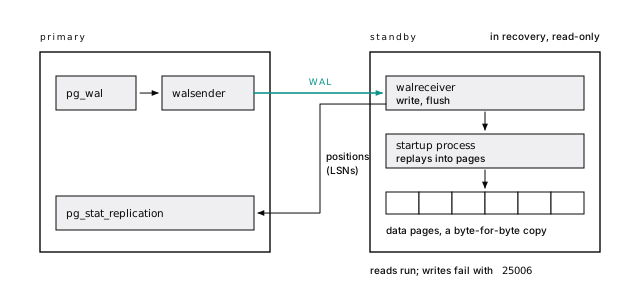
The standby reports its progress as LSNs, byte offsets in the WAL stream (LSNs are byte offsets). Replaying physical WAL makes it a byte-for-byte copy of the whole cluster: no single tables, no replica-only indexes, no mixed versions. Those are jobs for logical replication.
It takes reads and refuses anything that writes, even a temp table, with SQLSTATE 25006. In production logs, that code means a write was routed to a replica, or a failover demoted your “primary”.
A MySQL replica replays a logical binlog and can be writable. A Postgres streaming replica replays pages: identical schema, no writes. The binlog-like feature is logical replication (Postgres is not MySQL).
Those are an insert, a create temp table, an analyze, and select txid_current() (the older name for pg_current_xact_id(), which is why the error names the new one). With verbose errors the first reads ERROR: 25006: cannot execute INSERT in a read-only transaction; 25006 is read_only_sql_transaction, so your app can catch it.
37-replication.shOne command copies a primary into a standby
On a managed service, a replica is a button. By hand, you need wal_level of at least replica (the default), a role with the replication attribute allowed in pg_hba.conf, and then one command that copies the data directory as a standby:
-R writes the standby settings, --slot with --create-slot creates a replication slot (next section), and application_name is how the standby shows up everywhere: name every one.
Replication connections match the database name replication in pg_hba.conf, not all. Our first pg_basebackup sat at “waiting for checkpoint to complete” for over two minutes: by default it requests a spread checkpoint. Add --checkpoint=fast when you’re waiting. -R appended this to postgresql.auto.conf:
That password sits in plain text in the data directory; in production use .pgpass or certificates. Started, the replica logs:
At “consistent”, it has replayed past the end of the backup, and reads are safe.
37-replication.shReplication slots are a promise to keep WAL
A replication slot is the primary’s record of how far one consumer has gotten, and the primary won’t recycle WAL a slot still needs. With one, a replica can be down an hour and catch up. Without one, a replica that falls far enough behind finds its WAL recycled and has to be rebuilt.
The promise has no expiry by default. With our replica stopped, twenty seconds of pgbench left its slot holding 173 MB. A forgotten slot holds WAL until the disk fills, and a full pg_wal stops the primary. Capped with max_slot_wal_keep_size (PostgreSQL 13+), a forgotten slot is marked lost instead and the primary keeps running. A replica recloned in minutes beats a primary with a full disk.
Set max_slot_wal_keep_size well below the disk on every primary with slots. Alert on inactive slots and on retained WAL. Decommission a replica or subscriber and its slot in the same change.
A slot named forgotten, with no consumer and a 256 MB cap, went from unreserved (327 MB retained, safe_wal_size of -71 MB) to this after the next checkpoint (the lab repeats it at a smaller scale, 100 MB against a 64 MB cap):
invalidation_reason and inactive_since are PostgreSQL 17+; PostgreSQL 18 adds idle_replication_slot_timeout, which invalidates a slot left idle too long (off by default). A slot carrying an xmin (from hot_standby_feedback, below) also blocks vacuum.
37-replication.shFour LSNs show where a standby falls behind
One view on the primary tells you how far behind each standby is. pg_stat_replication has a row per connected standby, and its four positions read as a pipeline: sent_lsn (sent), write_lsn (written to the standby’s OS), flush_lsn (durable on its disk), replay_lsn (applied, visible to queries). A gap between flush_lsn and replay_lsn means replay is falling behind, the common case. Byte lag is pg_wal_lsn_diff(pg_current_wal_lsn(), replay_lsn), and replay_lag is the same in time.
The alert that matters most is a standby missing from the view: it isn’t connected at all.
When the primary goes idle, the *_lag columns turn NULL: “nothing to measure”, not “broken”. On the standby, pg_stat_wal_receiver shows the same connection (no row means disconnected). now() - pg_last_xact_replay_timestamp() there is the lag humans understand, but it grows forever while the primary is idle; alert on byte lag, or keep it honest with a heartbeat write every few seconds.
Lag follows WAL volume
Under 16 pgbench clients (about 2,070 transactions per second) the replica stayed kilobytes behind, worst sample 31 ms. One bulk update across 1.2 million rows wrote 574 MB of WAL in 9.8 seconds, and the replica fell at worst 24 MB and 0.7 seconds behind, catching up half a second after it finished. (The lab repeats it with 400,000 rows.) That’s a floor on a shared laptop disk, not a forecast, but the shape transfers: lag follows WAL volume, so batch bulk work (A big load forces checkpoints and floods replicas).
Every half second: bytes behind for sent, flush, and replay, then replay_lag, from pg_wal_lsn_diff(pg_current_wal_lsn(), ...) over pg_stat_replication:
37-replication.shReplay is one process
The primary generates WAL from every backend at once; a standby applies it with a single startup process, record by record, in order. Through PostgreSQL 18 there is no parallel replay. So a primary writing on dozens of cores can produce WAL faster than one core can apply it, and then replay lag grows steadily however big the replica is: more cores on the standby don’t help, because only the speed of one core and the storage behind it matter. The fixes are on the primary’s side: write less WAL (batch bulk work, drop unused indexes, turn on wal_compression for full-page images), or split the writes across primaries (Every write funnels into one WAL stream puts numbers on the volume). Alert on replay_lag that keeps rising under normal load: it’s the first sign that one primary is outgrowing its replicas.
Asynchronous is the default, and it can lose commits
Lag isn’t only a stale read. By default a commit returns once its WAL is flushed on the primary; replicas get it milliseconds later. If the primary dies inside that window and you promote a replica, commits the app saw succeed are gone (Durable here is not durable everywhere). For most apps that’s fine. Write it down as an RPO (Write down RPO and RTO first). If the answer is “zero lost commits”, you need synchronous replication, and its price.
Synchronous commit costs a round trip
Synchronous replication makes a commit wait until a standby named in synchronous_standby_names confirms it; synchronous_commit says how far it must have gotten. With a synchronous standby 5 ms away and one client inserting single rows:
synchronous_commit | Commit returns after… | Mean latency | Commits/s |
|---|---|---|---|
off | WAL in memory on the primary | 0.051 ms | 19,571 |
local | flushed on the primary | 1.32 ms | 757 |
remote_write | …and written on the standby | 6.41 ms | 156 |
on | …and flushed on the standby | 7.35 ms | 136 |
remote_apply | …and replayed on the standby | 7.62 ms | 131 |
The jump that matters is local to remote_write: five milliseconds, one round trip. In the same zone it shrinks toward a millisecond; across a continent every commit pays 60 ms or more. With 16 clients, group commit shares round trips, and on cost half the throughput instead of five sixths.
You don’t have to pay it everywhere. Set it per transaction, so payments wait for the standby and page-view logging doesn’t:
on is enough for durability. remote_apply costs a little more and buys something else: the row is already visible on the standby when the commit returns, which matters for reads after a write.
We set synchronous_standby_names = 'FIRST 1 (replica1)', added tc qdisc ... netem delay 5ms on the standby, and changed the setting per connection: ten seconds per level, five rounds, medians (the local flush was noisy, 1.1 to 2.8 ms). With 16 clients, local ran 1,708 commits per second at 9.37 ms and on 854 at 18.73 ms. It hurts most where your app is least concurrent, like a batch job committing row by row.
Without a synchronous standby, remote_write, on, and remote_apply all behave like local, which is why on is a safe default. set local synchronous_commit = off goes the other way, for writes you could lose in a crash (synchronous_commit = off can lose about 600 ms of commits).
The list takes a count, by priority or by quorum:
With FIRST, replica2 becomes synchronous only when replica1 disappears. With ANY, each commit waits for whichever answers first, smoothing out one slow standby, but at failover your tooling must work out which standby has every commit.
37-replication.shWhen the synchronous standby goes away, writes stop
This is the part that bites. We stopped the synchronous standby and ran one insert with statement_timeout = '3s'. It hung in wait event SyncRep; the timeout never fired. Two minutes later, we cancelled it:
Read the detail twice. The commit was written locally before the wait began, so cancelling can’t undo it: the row exists, and a client that gave up on a timeout believes it failed. Every write queues like this until a synchronous standby returns.
With one synchronous standby, losing either server stops writes. Run two candidates (FIRST 1 (a, b) or ANY 1 (a, b)), alert on sync_state in pg_stat_replication, and decide in advance whether failover may drop to asynchronous.
statement_timeout covers running the statement, and Postgres disarms it before the commit begins. The wait for the synchronous standby happens inside the commit, after the commit record is already flushed locally, so no timeout of yours interrupts it. pg_cancel_backend() or a client-side cancel ends the wait with the warning above, and pg_terminate_backend() ends the session; neither can take the commit back. That’s why the fix is a second candidate standby, not a shorter timeout. The lab stops the standby, starts the insert in the background, and checks it six seconds later.
37-replication.shRead replicas scale reads, not writes
Every replica replays every write, so replicas add no write capacity, and they inherit the primary’s bloat, missing indexes, and slow queries. A query that reads 35,000 pages reads 35,000 pages on the replica too. Fix it first (Scale up before you scale out).
When reads really are the bottleneck, replicas serve the ones that tolerate being a little behind: dashboards, search, exports, reports. Route them in the app, two pools and an explicit choice per call site. A proxy that guesses gets fooled by a select that calls a function that writes.
After a write, a replica can show the old value
The classic replica bug: a user changes their name, the redirect reads from a replica that hasn’t replayed the update, and they see their old name. They change it again. Support gets a ticket. (We reproduced it by pausing replay: the replica had received the update but not replayed it.) The fixes, simplest first:
- Stick to the primary after a write, for a few seconds. Enough for most apps.
- Route by need: anything that renders the user’s own action reads from the primary.
- Wait for the LSN: after the write commits, read
pg_current_wal_lsn()in a separate statement, carry it, and read from a replica once itspg_last_wal_replay_lsn()has passed it, else fall back. Take it after the commit, not inside the transaction (returning pg_current_wal_lsn()is too early): the commit record comes later in the WAL, and a replica past the earlier LSN can still hide the row. remote_apply, per transaction, for the few writes worth its price.
After the update committed, select pg_current_wal_lsn() on the primary returned 0/9FAFAB90. On the replica, with replay paused:
select pg_last_wal_replay_lsn() >= '0/9FAFAB90'::pg_lsn said f. After pg_wal_replay_resume() the very next check still said f, because resuming is asynchronous; a moment later, t. So the app polls, then falls back:
Exact, works with any number of replicas, one extra round trip. PostgreSQL 19 (in beta as of October 2026) adds a WAIT FOR command that makes the standby wait for an LSN itself; until then, this loop works on every version since 10.
37-replication.shReplica queries fight replay
A replica query holds a snapshot, and replay sometimes has to change pages out from under it. The common case: vacuum on the primary removes row versions no primary query needs, but a replica query still does. The primary has no idea that query exists. So replay waits, up to max_standby_streaming_delay (30 seconds by default), lag grows, and then the replica cancels the query:
Each way out moves the cost. Let replay wait longer, and lag grows. Turn on hot_standby_feedback, and vacuum on the primary spares the replica’s rows: no cancellations, but bloat, as if a long transaction ran on the primary (Long transactions hold everything back). Or retry (SQLSTATE 40001).
So separate the workloads: app-read replicas with feedback off and retries, a reporting replica with feedback on and a statement_timeout. Never use a replica that can fall minutes behind as your failover candidate.
Without feedback, our replica’s replay_lsn froze for half a minute while a repeatable-read query held its snapshot, a row inserted on the primary stayed invisible on the replica, and the query was cancelled after 33.7 seconds. pg_stat_database_conflicts counted it as confl_snapshot. (confl_lock comes from replaying an access exclusive lock: drop table, truncate, many alter table forms, vacuum truncating a table’s end.)
With hot_standby_feedback = on and the same long query, the primary deleted half of a table and vacuumed:
The replica’s query finished undisturbed. The feedback lived in the replica’s slot xmin, 2492494, the same number as vacuum’s cutoff, not in backend_xmin. It arrives every wal_receiver_status_interval (10 seconds by default); once it moved on, the next vacuum read tuples: 1133508 removed.
37-replication.shPoint a new replica’s primary_conninfo at an existing replica and it streams from there. WAL crosses an expensive link once, to a replica in another region, which fans it out to its neighbors and takes walsender load off the primary. The cost: lags add up along the chain, only standbys connected directly to the primary can be synchronous, and the middle replica needs its own max_wal_senders and slots.
Promotion takes one call and starts a new timeline
When the primary dies, you promote a replica with select pg_promote(). Ours took writes 200 ms later, on a new timeline, a branch of history forked at that point. (Its first id was 1035 where the old primary stopped at 1004: sequences log values ahead. If your app treats ids as dense, it was already wrong.)
The old primary doesn’t know
Promotion is the easy half. Our old primary was still running, because nothing told it to stop, and it took an insert. Two servers accepting writes, each with rows the other lacks: split brain, and nothing merges it back. Any client still pointed at the old primary writes into a branch about to be discarded.
37-replication.shRestarted as a standby of the new primary, the old one refused to follow:
It had written past the fork. pg_rewind copies back only the blocks changed since then; it needs data checksums (on by default in PostgreSQL 18’s initdb) or wal_log_hints = on, plus the old primary’s WAL back to the last checkpoint before the fork. Ours had recycled it:
With an archive, pg_rewind -c fetches it through restore_command; without one, you reclone. (Then recreate the slot on the new primary: slots aren’t part of a base backup.) The row “Written to the OLD primary” was gone. In a real split brain those are customer writes, dug out by hand before the old server is wiped.
Don’t hand-roll failover
A script that calls pg_promote() when a health check fails makes split brain on purpose. A failover must decide the primary is really dead (a slow one looks dead), fence it so it can’t take writes, pick the replica with the most WAL, move clients, and rejoin the old primary.
Patroni is the most widely used open-source tool for this: nodes compete for a leader lock with a time-to-live in a consensus store, and a primary that can’t renew it demotes itself. On Kubernetes, operators such as CloudNativePG do the job; on a managed service, it’s what you pay for. Either way, fail over on purpose, on a schedule: an unexercised failover is the untested backup of availability.
Logical replication copies rows, not pages
Streaming replication copies pages. Logical replication copies row changes: the publisher decodes its WAL into “insert this row, update that one”, and a subscriber applies them to ordinary tables. The subscriber is a normal, writable database with its own indexes and tables, even on a different major version. It needs wal_level = logical on the publisher (changing it takes a restart, so plan it), a publication, and a subscription:
It creates a logical slot on the publisher, copies the existing rows, and streams; ours applied changes within a second. Everything about slots applies: a stalled subscriber holds WAL on the publisher.
Logical replication skips DDL and sequences
Logical replication leaves things behind: DDL, sequence state (through PostgreSQL 18), large objects, and views. Two of those bite:
- DDL. Add a column on the publisher and use it, and the subscription stops (
missing replicated column: "region") while its slot holds WAL. Additive DDL goes to the subscriber first. - Sequences. The subscriber’s never move, so its first insert collided with id 1. Before an upgrade cutover,
setvalevery sequence. (PostgreSQL 19, in beta as of October 2026, lets a publication include sequences withfor all sequencesand syncs them on request.)
And give every table a primary key: the subscriber finds rows by replica identity, the primary key by default, and a keyless table in a publication makes every update to it fail on the publisher, in your app’s write path.
A primary key fixed it. The alternatives are replica identity using index or replica identity full, which logs the whole old row: more WAL, and possibly a table scan on the subscriber per change. The DDL error repeated in the subscriber’s log until we added the column there; pg_stat_subscription_stats (PostgreSQL 15+) counts such failures. And the initial copy is a plain select run on the publisher as the user in the subscription’s connection string, so a table added without a grant select stays empty.
Since PostgreSQL 15 a publication can send a subset of rows and columns:
The publish = 'insert' is load-bearing. If a publication publishes updates or deletes (the default), row filters may only reference replica identity columns, checked on the publisher’s write path: without that option, this filter made every update of accounts fail.
37-replication.sh37-replication.shLogical replication is for upgrades, moves, and feeds
Reach for it when the copy has to differ from the source: a major version upgrade with seconds of downtime (the cutover), a few tables synced elsewhere, a move between providers, or a feed for change-data-capture, search, and cache consumers.
One catch: logical slots live on the server that made them, so after our promotion the subscriber still followed the old primary. PostgreSQL 17’s failover slots fix that (failover = true, sync_replication_slots = on); before 17, resync after every failover.
Since PostgreSQL 16, logical decoding works on a standby (with wal_level = logical there too):
Slot creation on a standby waits for a snapshot record; pg_log_standby_snapshot() on the primary produces one. With failover slots, synchronized_standby_slots on the primary keeps logical consumers behind the standbys that might replace it. And pg_createsubscriber (PostgreSQL 17+) turns a physical standby into a subscriber, skipping the initial copy.
Streaming for failover, logical for a job
| You need | Use |
|---|---|
| A failover target with no data loss window to speak of | Streaming, synchronous to at least one of two standbys |
| A failover target, small loss window acceptable | Streaming, asynchronous |
| More capacity for stale-tolerant reads | Streaming replicas, routed per call site |
| A different major version, or an upgrade | Logical |
| A few tables, or a filtered subset, elsewhere | Logical |
| Row changes for a queue, search, or cache | Logical decoding |
| More write capacity | Neither. See Shard last |
Most production setups end up with both: streaming standbys for failover, run by a tool that knows how to promote them, and logical replication brought in for a specific job, often temporarily.
The short version
- A streaming replica is an identical, read-only copy of the whole cluster, always a little behind.
- Cap every slot with
max_slot_wal_keep_sizeand alert on inactive ones. - Synchronous commit costs a round trip per commit (1.3 ms became 7.4 ms with a standby 5 ms away). Set it per transaction; run two candidates.
- Route reads per call site; for read-your-writes, pin to the primary or wait for the write’s LSN.
- Long replica queries get cancelled, delay replay, or bloat the primary. Keep failover candidates apart from reporting replicas.
- Never hand-roll failover, and practice it on a schedule.
- Logical replication copies rows, not DDL or sequences: additive DDL to the subscriber first, a primary key on every table.
Further reading
- Log-shipping standby servers, PostgreSQL documentation. Streaming replication, slots, cascading, and synchronous replication with
FIRSTandANY, from the source. - Hot standby, PostgreSQL documentation. What runs on a standby, every kind of replay conflict, and how each setting changes them.
- Replication settings, PostgreSQL documentation. Defaults and exact semantics for every setting in this chapter, including slot limits and failover slot synchronization.
- Logical replication, PostgreSQL documentation. Publications, subscriptions, row filters, conflicts, failover, and upgrades.
- pg_rewind, PostgreSQL documentation. Its requirements, and what to do when the WAL it needs is gone.
- Patroni, GitHub. The most widely used open-source failover manager; its docs explain leader locks, fencing, and synchronous mode.
39 Partition for the delete
We deleted one month of events from the book’s events table, 164,383 rows, with an ordinary delete ... where created_at .... It wrote 32 MB of WAL, left 164,383 dead tuples behind, and the vacuum that cleaned them up wrote another 12 MB. Then we removed the same month from a partitioned copy of the table by detaching and dropping one partition. That wrote under 150 KB.
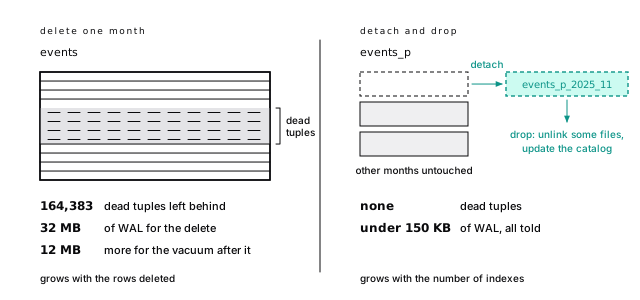
At two billion rows, that delete becomes the nightly job that runs for hours and floods the replicas. The drop stays the same size: unlink some files, update the catalog.
That’s the honest pitch. Partitioning is a data lifecycle feature first. It isn’t a general speedup, and for queries that don’t carry the partition key it makes things slower.
Every benefit comes from separate tables
A partitioned table is a parent that holds no rows. Every row lives in exactly one child, a partition, chosen by the value of the partition key. Each partition is an ordinary table with its own heap, indexes, visibility map, and autovacuum schedule. That separation buys four things:
- Retention is a drop. Removing old data is dropping a table: no dead tuples, almost no WAL, nothing for vacuum.
- Maintenance works on pieces. Autovacuum handles a 30 GB partition, not a 3 TB table. Old partitions freeze once, and later vacuums skip their pages. You can reindex or repack one at a time.
- Hot indexes stay small. The current month’s indexes fit in memory even when the full history doesn’t.
- Pruning. A query that filters on the key touches only the partitions that can match.
Partitioning doesn’t make lookups faster
A B-tree descent costs three or four pages at a million rows or a billion (A B-tree is a shallow tree of pages), so splitting a table doesn’t make a well-indexed lookup faster. When the query doesn’t name the key, splitting multiplies the lookups: a lookup by id read 7 pages on events and 39 on events_p, its monthly-partitioned copy, searching every partition’s index. With 14 partitions that’s small. With 1,000 it isn’t (Every partition a query can’t prune costs planning time).
For faster time-range reads there’s a cheaper tool: a 24 KB BRIN index on created_at (BRIN keeps one summary per range of pages) counted March’s events in 3,251 pages; the partitioned table, pruned to March, in 2,988.
So partition for what only partitioning gives you: cheap retention, per-partition maintenance, or a table whose vacuum and index builds no longer fit your windows. Leave a table under tens of gigabytes alone unless it has a retention requirement, and wait until pg_stat_statements confirms your top queries carry the key.
Planning time went from 0.055 ms to 0.284 ms (in a fresh session; your numbers will differ slightly), because the planner had to consider every partition.
38-partitioningRange fits time; list and hash have narrow jobs
Declarative partitioning (partition by, PostgreSQL 10+, better in every release since) has three strategies:
| Strategy | Key | Good for |
|---|---|---|
| Range | a continuous value, usually time | events, logs, metrics, anything with retention |
| List | discrete values | regions, a few very large tenants |
| Hash | hash of the key, modulo N | splitting one huge hot table into equal pieces |
This chapter’s events_p is range-partitioned by month: fourteen partitions of about 3,000 pages each, against 35,173 for events. Its primary key is (id, created_at), which is required (why).
List fits few, stable values, like EU data on its own storage. Hash gives no lifecycle benefit; it only splits one huge, busy table into medium ones for maintenance.
Range bounds include the lower end and exclude the upper, the same half-open interval you should use in queries. Generate the partitions; in psql, \gexec runs each result row as a statement:
Then copy the data with insert ... overriding system value select ... from events, move the identity sequence past the copied ids with setval, and vacuum analyze. Counting rows by tableoid::regclass (the system column naming the table a row physically lives in) confirms the routing:
A fourteenth partition, November 2026, exists empty, ready before its rows arrive.
A list partition rejects a row whose key matches nothing (no partition of relation "audit_log" found for row). A hash-partitioned sessions_h with modulus 4 spread 400,000 rows into buckets of 100,504, 99,912, 99,884 and 99,700, and where user_id = 42 scanned exactly one.
38-partitioningChoose the key you delete by
The partition key should be what you retire data by, and ideally what most queries filter on. For events, logs, and metrics those are the same column, the timestamp, which is why they partition so well.
When they differ, retention usually wins. A SaaS app filters by account_id, but partitioning by account makes retention a row-by-row delete again. Partition by time and lead each partition’s indexes with account_id; spreading tenants across machines is sharding’s job.
Let retention pick the granularity, and aim for partitions of several gigabytes and counts in the tens to low hundreds. Monthly for ten years is 120 partitions. Daily is 3,650, and you’ll feel it.
The bounds are a free, coarse index
Partition pruning is skipping the partitions that can’t hold matching rows. Counting March’s events, with no index on created_at, read 2,988 pages on events_p against 35,173 on events: only March’s partition even appears in the plan.
When the value isn’t known at plan time (now(), a generic plan’s parameter), Postgres prunes as execution starts, and the plan says Subplans Removed: 11. Either way it needs the bare key: date_trunc('day', created_at) = ... scans all fourteen partitions, the half-open range scans one (Keep the indexed column bare).
Without the key, even a cheap query pays at planning time: “account 42’s latest 20 events” read partitions newest first and stopped at 23 pages, like the plain table, but planning touched 455 pages against 54.
38-partitioningThe other thirteen partitions never show up. With where created_at >= now() - interval '7 days' (PostgreSQL 11+ prunes at run time):
A generic prepared plan’s where created_at >= $1 shows the same Subplans Removed: 11. A partition marked (never executed) can be run-time pruning too, or, as in the next plan, a Limit that stopped before reaching it.
Newest first, stopping early (PostgreSQL 12+ appends range partitions in order instead of merging them):
Planning took about ten times as long as on the plain table (1.25 ms against 0.1 ms in a fresh session).
38-partitioningPartition-wise plans are for reports
Pruning works one table at a time. enable_partitionwise_join joins two identically partitioned tables partition by partition, and enable_partitionwise_aggregate groups per partition. Both are off by default because every per-partition hash or sort gets its own work_mem: a plan over 100 partitions can use 100 times your budget.
On a quarterly join of events_p to a deliveries_p partitioned by the same months, it cut 46.9 ms to 17.6. But stating the range on both sides, so each side prunes alone, was the simpler fix. Use the settings per session for reports, never for OLTP.
With set enable_partitionwise_join = on:
More buffer hits (51,723 against 12,059), from thousands of cached index probes, but no hash build over eleven useless partitions. With enable_partitionwise_aggregate, grouping by the key aggregates whole inside each partition; by anything else, partially per partition then combined; by date_trunc('month', created_at), neither.
38-partitioningConstraints must carry the partition key
Unique constraints must include the key
Here’s why events_p’s primary key is (id, created_at):
Postgres has no global index. An index on a partitioned table is one index per partition, so uniqueness is checked within one partition. If the unique key contains the partition key, equal keys land together; if not, duplicates can sit in different months unseen. (The same id went into May and September without complaint.) on conflict targets follow the same rule.
References into a partitioned table must carry the key
Every unique key on events_p includes created_at, so references events_p (id) fails, and a referencing table must carry the partition key too, as deliveries_p does with (event_id, event_created_at). Event tables partition well partly because few tables reference them.
List every unique constraint and foreign key that touches the table before you start, and decide what replaces each: include the key, keep a small unpartitioned table for the unique value, or don’t partition.
Indexes have their own catch: create index concurrently isn’t supported on a partitioned parent. Create the index on only the parent, build each partition’s concurrently, and attach each; the parent index turns valid after the last.
38-partitioningThe duplicate needs something to supply ids explicitly (imports, overriding system value); an identity column hands out unique values on its own.
The index build, generated per partition:
create index concurrently can’t run inside a transaction block, so run the statements one at a time (psql’s \gexec does, outside begin). If one build fails it leaves an invalid index on that partition; drop it and build again (When a concurrent build fails).
Avoid the default partition
A default partition catches rows that match no other. It looks like a safety net. It’s closer to a trap: creating a partition must scan it under lock and fails if a stray row for that range is there, it blocks detach ... concurrently, and with a foreign key pointing at the table you can’t drop it directly.
Make sure future partitions always exist instead, and treat a “no partition found” error as the alarm it should be.
(We emptied it, then detach partition events_p_default followed by drop table worked.)
38-partitioningRetention: detach, then drop
This is the payoff. Deleting November 2025 (164,383 rows) two ways:
delete + vacuum | detach + drop | |
|---|---|---|
| WAL written | 32.5 MB + 12.5 MB | about 140 KB |
| WAL records | 175,000+ | 226 |
| Dead tuples for vacuum | 164,383 | none |
| Index cleanup | every index, every row | none |
| Grows with | rows deleted | number of indexes |
The delete took under 100 ms, on small, cached data. Its cost grows with the rows, and so does the WAL every replica replays. The drop’s doesn’t. Both finished in well under a second here; only one will at a billion rows.
38-partitioningThe delete under explain (analyze, wal):
The vacuum it left behind:
Detach and drop, from pg_stat_statements: 135 records and 103,569 bytes, then 91 records and 36,971 bytes. Most of those bytes are full-page images, so the total moves with checkpoint timing: between 80 and 150 KB across our runs.
Detach concurrently, or everything queues behind you
A plain detach takes an ACCESS EXCLUSIVE lock on the parent and queues everything behind it (the lock queue). detach partition ... concurrently (PostgreSQL 14+) doesn’t block queries. It can’t run in a transaction block, and if interrupted it leaves the partition “detach pending” until detach partition ... finalize.
Foreign keys set the order
With deliveries_p referencing events_p, detaching the events partition first fails with a foreign key violation. Retire the referencing partition first.
Daily, in order: create missing future partitions, finalize pending detaches, detach expired partitions concurrently (children first), archive if needed, drop, analyze the parent. Set lock_timeout so it gives up instead of queueing, and let the next run retry.
38-partitioningCreate partitions before you need them
Retention removes partitions at one end; something has to add them at the other. A missing partition doesn’t degrade gracefully: every insert for that range fails. Keep several future partitions ready, created by a scheduled job, and alert when the furthest-ahead one is less than a few weeks out. The \gexec generator is most of that job. If you’d rather not own it, pg_partman is the extension most teams use (pg_cron and pg_partman keep time on your side); read its defaults for your version, because they matter.
- Version 5 manages only native declarative partitioning; the older trigger-based method was removed.
create_parent()registers an existing partitioned table with a control column and an interval, and creates partitions ahead of time (p_premakedefaults to 4).run_maintenance()(orrun_maintenance_proc(), which commits after each partition set) creates new partitions and applies retention. Run it from its background worker or a scheduler likepg_cron.- Retention lives in its
part_configtable:retentionsets the age, andretention_keep_table(default true) detaches old partitions and keeps them rather than dropping them. create_parent()creates a default partition unless you passp_default_table := false. Given the problems above, consider turning it off, or at least monitor it for rows.
Convert a live table without downtime
You can’t alter table ... partition by. Instead, make the whole existing table the first partition, covering all of history, and let new partitions take the future. The trick is a check constraint that proves every row fits, so attach partition skips its validation scan:
- Online: build a unique index on
(id, created_at)concurrently, and addcheck (created_at < '2026-11-01')asnot valid, thenvalidateit without blocking writes (the two-step move). - One short transaction, with
lock_timeout: rename the old table, make that index its primary key, move the identity column to a new partitioned parent, attach the old table up to the bound, create the next partitions, andsetvalthe parent’s sequence past the old ids. A partition can’t keep its own identity, so skipping that step fails the attach.
On a 1.8 million row copy the transaction took about 20 ms. Without the constraint, the attach scanned every row under its lock: minutes or hours on a terabyte. (Filling new partitions in bulk: Freeze the partition, attach it built, analyze the parent.)
Our first attach failed twice, with The new partition may not contain an identity column. and then multiple primary keys for table "events_copy_old" are not allowed. The old primary key on (id) has to go, the step 1 index becomes the new one (which attach adopts instead of building an index under lock), and the identity moves to the parent:
With client_min_messages = debug1, the attach says partition constraint for table "events_copy_old" is implied by existing constraints, in 0.468 ms. Afterwards an insert of one row for now and one for 2026-11-15 got ids 2000001 and 2000002, in events_copy_old and events_copy_2026_11.
The old partition holds all of history, and retention on it stays a delete until its range expires (or you split months out of it in the background). Before trying this for real, check foreign keys that reference the old table, triggers and grants (they don’t move by themselves), and code that names the sequence.
38-partitioningPartitioning costs most when queries can’t prune
Every partition a query can’t prune costs planning time
A query that prunes barely notices how many partitions there are. One that can’t pays for each, in planning time, memory, and locks. We planned a query with the key and one without (where account_id = 42) on 12 to 3,000 daily partitions:
| Partitions | With key, warm | Without key, warm | Without key, cold | Planner memory, without key |
|---|---|---|---|---|
| 12 | 0.02 ms | 0.05 ms | 0.9 ms | 124 KB |
| 365 | 0.13 ms | 4.2 ms | 19 ms | 3.1 MB |
| 1,000 | 0.13 ms | 15.0 ms | 55 ms | 8.4 MB |
| 3,000 | 0.14 ms | 52.0 ms | 170 ms | 27 MB |
With the key, the count barely matters. Without it, planning takes 52 ms, and the first query on every new connection about three times that. Unpruned queries also lock every partition and index, spilling into the shared lock table until it can run out with “out of shared memory”. Keep counts in the tens to low hundreds, and make the hot queries prune.
Warm numbers are medians of 15 runs in one session; cold is the median of five first plans, each in a new session. Each table had a primary key and an index on account_id. Planner memory is from explain (memory), PostgreSQL 17+. The lab re-runs the first three rows.
Locks held by select count(*) from pt_N where account_id = 42 inside a transaction:
| Partitions | Fast-path locks | Locks in the shared lock table |
|---|---|---|
| 12 | 40 | 0 |
| 365 | 64 | 1,035 |
| 1,000 | 64 | 2,940 |
| 3,000 | 64 | 8,940 |
Each backend has a few fast-path lock slots that avoid shared memory. In PostgreSQL 18 their number scales with max_locks_per_transaction (64 here); earlier versions had a fixed 16. The rest go into the shared lock table (LWLock LockManager waits under concurrency), sized at roughly max_locks_per_transaction times the number of connections.
38-partitioningFour smaller traps catch partitioned tables
- Lookups by id alone search every partition. Put the time in the URL, or use an id that encodes it (UUIDv7 does).
- The parent is never analyzed by autovacuum. Analyze it from the retention job.
- Updates that change the key move the row: a delete plus an insert, never HOT. Pick a key that doesn’t change.
- Partitioning too small. A 5 GB table in 365 daily partitions gets all the overhead and none of the benefit.
The short version
- Partition for lifecycle. Deleting a month cost 45 MB of WAL and 164,383 dead tuples; dropping its partition, under 150 KB.
- It’s not an OLTP speedup: queries without the key search every partition, and BRIN gives most of the time-range benefit.
- Partition by the key you delete by (usually time); keep counts in the tens to low hundreds.
- Compare the bare key with a half-open range, and check pruning in
EXPLAIN. - Every unique key must include the partition key, and references must carry it.
- Retire with
detach ... concurrentlyanddrop, children first, withlock_timeout. Avoid default partitions. - Create future partitions ahead of time, and alert when they run short.
- Convert a live table by attaching it whole, with a validated
checkconstraint so the attach skips its scan.
Further reading
- Table partitioning, PostgreSQL documentation. The reference for declarative partitioning, its limitations, and the best-practices section on partition counts.
- ALTER TABLE, PostgreSQL documentation. The exact locks for
ATTACHandDETACH PARTITION, thecheckconstraint that skips the scan, and the rules forCONCURRENTLY. - Query planning configuration, PostgreSQL documentation. What
enable_partitionwise_joinandenable_partitionwise_aggregatedo and why they cost memory. - CREATE TABLE, PostgreSQL documentation. The
partition byandpartition ofsyntax, including list, hash and default partitions. - pg_partman, GitHub. The common extension for creating partitions ahead of time and applying retention; read the docs for your version’s defaults.
40 Shard last
On a small sharded cluster built for this chapter, the same join between projects and users ran in about 10 milliseconds one way and about 950 milliseconds the other. Same rows, same machines, same answer. The difference was one extra equality in the on clause, u.account_id = p.account_id. With it, every shard joined its own rows locally. Without it, the cluster had to reshuffle both tables across the network first, and by default it refused to try.
That’s sharding. Every query is either kept local by the shard key or pays for the network, and you choose which on the day you pick the key.
We think most teams shard too early, and too few design for it before they do. Design for it from day one, then wait as long as you can. When the day comes, the tool matters less than the key.
Sharding multiplies everything
Sharding splits one logical database across several independent primaries. A shard is one subset of the rows; the shard key (or distribution column) decides which shard a row lives on: here, account_id, with a router in front that knows where each account lives.
Short of splitting the database by function, it’s the only rung of the scaling ladder that raises the ceiling on writes and total data. The price is a boundary through everything Postgres did for you inside one server:
- Queries that don’t name one shard key go to every shard and get merged; joins across shards ship rows over the network.
- Transactions across shards need two-phase commit to stay atomic.
- Constraints live on one shard:
(account_id, email)can be unique,emailalone can’t. - Migrations and operations happen N times: N sets of replicas, backups, vacuum backlogs, and places a 3 a.m. page can come from.
None of that is a reason never to shard. It’s a reason to make sure the alternative is worse first.
Shard when one primary can no longer absorb writes or hold data
Three signals say one primary, on the biggest machine you’re willing to run, can no longer absorb your writes or hold your data:
- Write throughput is pinned: writes, not reads, saturate the primary even after tuning WAL and checkpoints and batching.
- The data no longer fits the box, operationally: a restore longer than your recovery time objective, a vacuum that never catches up.
- A hard requirement splits tenants: data residency, or dedicated hardware by contract. The one case where sharding early is right.
Not signals: “we might be big one day”, a slow query, a connection count, read load. Try the cheaper rungs first, including the underrated one: split by function, moving events and its writers to their own database, so each side still behaves like one Postgres.
Measure your WAL rate (pg_current_wal_lsn() sampled a minute apart), your largest table’s growth per month, and your restore time. Project them a year out against the biggest instance you can buy. If the line crosses in three years, you don’t have a sharding problem yet. You have a calendar reminder.
The shard key is the whole design
Pick the shard key so your hottest queries, and the transactions you can’t afford to split, stay on one shard. A good one is in almost every hot query’s filter, is shared by rows joined or written together, and has many evenly spread values.
For multi-tenant SaaS, that’s the tenant id: the app serves one account at a time, and an account’s rows are joined together, never with another account’s. Shard events by id and every “my account’s events” query hits every shard; by created_at, all of today’s writes land on one. Cross-tenant reports become fan-out: fine if rare.
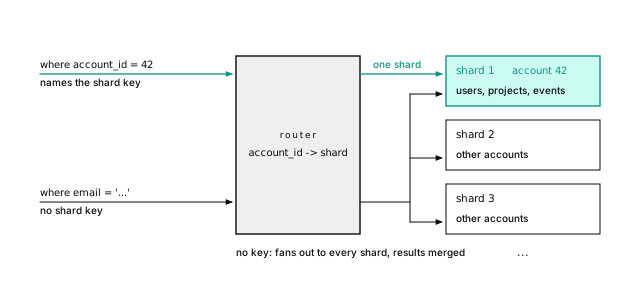
A hash spreads tenants, not load. One customer’s CI system adding 400,000 events turned its 13 MB shard into 61 MB, shared with every account that hashes there. Big tenants need their own shard, so moving one tenant must be routine.
Colocation keeps joins local. Shard users, projects, and events by account_id the same way and account 42’s rows sit together, joined locally, if the join condition includes the shard key: the 10 ms against 950. Small tables every tenant reads are copied to every shard as reference tables.
That’s citus_shards for events, largest first. A tenant that outgrows the biggest machine alone would need a second key inside it; very few products get there.
39-sharding.shKeep the door open from day one
You can make sharding cheap without doing it. The same habits make row-level security simpler and cross-tenant bugs harder to write. Put account_id on every tenant-owned table, in every primary key, unique constraint, and foreign key, and in every query’s where clause (Carry the tenant everywhere, Make cross-tenant references impossible). On one server those composite keys prevent cross-tenant references; sharded, they’re the only kind that can be enforced.
Already on single-column keys? Migrate on one server, step by step: composite unique constraints, composite foreign keys (not valid, then validate), then queries. Each step pays for itself.
No sharded table can enforce one account per email across the system. Keep a small table of (email, account_id), unique on email, in one unsharded database, and claim the email there first. Then create the user on its shard, and release the claim if that fails. A separate database can’t share the user’s transaction without two-phase commit, so the claim comes first and a cleanup job removes claims older than a few minutes that never got a user. (On Citus, a reference table can hold the claim and is written in the same distributed transaction.) Decide this before you shard.
Route by tenant, never by id
Each shard has its own sequences, so two shards both hand out id = 1. If ids leave the database, use shard bits (the top bits of a bigint name the shard, Snowflake-style) or UUIDv7 (no coordination, uuidv7() in PostgreSQL 18); the id landscape compares the rest.
With 16 shard bits, each shard can issue 281 trillion ids. But an id says where a row was created, not where it lives after its tenant moves: route by tenant, never by id.
Citus uses shard bits for identity columns. The same insert (returning id, id >> 48 as node_bits) on the coordinator and each worker:
Each node’s sequence starts at its group number shifted left 48 bits. (The coordinator is group 0, so its ids look ordinary.)
39-sharding.shCross-shard queries fan out
A query without the shard key goes to every shard, and something merges the results: sums add, averages need sums and counts, limit 10 needs each shard’s top 10, distinct counts need the values. Latency is the slowest shard’s, and 100 such queries a second on 32 shards is 3,200 tasks a second. Tenant queries get cheaper per node as you add shards. Fan-out doesn’t. Keep it to jobs and internal tools.
Cross-shard transactions need two-phase commit
Writes have the same boundary. A write to two shards is two transactions; if one fails, you have half a transfer. Two-phase commit has every shard prepare transaction before any commits. It holds locks everywhere until the second phase, and a coordinator that dies in between leaves prepared transactions holding locks and blocking vacuum. Plain PostgreSQL ships with it off (max_prepared_transactions = 0), and postgres_fdw doesn’t use it. The best cross-shard transaction is the one your shard key made unnecessary.
On Citus, an update with no tenant filter sent PREPARE TRANSACTION, then COMMIT PREPARED, to both workers. Between the two, each worker holds a prepared transaction: it survives a restart, keeps its row locks, and holds back vacuum’s horizon until someone commits or rolls it back. Citus records each one in its own metadata and its maintenance daemon finishes or aborts leftovers on its own; with hand-rolled 2PC that job is yours, and pg_prepared_xacts is where you look for the stragglers.
39-sharding.shResharding means moving tenants
Sooner or later a tenant needs a machine of its own. Logical replication with a row filter (PostgreSQL 15+, what it’s for) copies one tenant’s rows, then streams changes.
With a tenant directory, a table mapping each tenant to its shard, the move takes four steps: publish where (account_id = 42) and subscribe; when lag is near zero, mark the tenant read-only; at zero, point the directory at the destination; clean up the source in batches. The read-only window lasts seconds. Logical replication doesn’t carry sequences, so ids minted on the destination must not collide with the moved ones: one more reason for shard bits or UUIDv7.
The shard moves in Citus (an extension that shards inside Postgres, below) and the resharding in PgDog (a sharding proxy, below) use the same protocol, a good sign it’s the right primitive.
It copied the 500 existing rows; one more insert on the source arrived within seconds, and the source’s slot showed zero bytes of lag.
39-sharding.shThere are seven ways to shard a Postgres workload
The seven differ in where routing lives, who merges cross-shard results, and how much of Postgres you keep. Every fact about other projects in this section is from their own documentation as of October 2026; check before you commit. We ran postgres_fdw and Citus because both are open source and run anywhere: easy to demonstrate, not the default answer.
An application router makes every hard problem yours
You run ordinary primaries, and a router in your code looks up each tenant’s shard. Any Postgres works, managed or not, and every hard problem (merges, moves, atomicity) is yours.
Hash ranges need no lookup, but can’t move one tenant alone. A directory can place each tenant anywhere; for SaaS, pick it:
No database handle without an account id, so no query can skip the routing step. The directory can still be stale in the seconds a tenant moves, which is what the state column is for: reload the directory when it changes, and refuse writes to a tenant marked read_only or moving. Fits: a modest number of large tenants, managed Postgres you can’t extend. Costs: you build fan-out merges, moves, migration tooling, and any two-phase commit.
postgres_fdw is a building block
Make each partition of a hash-partitioned table a foreign table on another server and the parent routes rows across machines. Tenant queries push their filter to one server; cross-tenant aggregates pull every row back. No two-phase commit, constraints, or rebalancing: a kit, not a car.
On a plain PostgreSQL 18 database, pointing at two plain databases on our Citus worker hosts (Citus plays no part):
50,000 rows for 100 accounts routed 26,000 and 24,000. Account 42’s query sent WHERE ((account_id = 42)) to one server. Grouping by the key, with enable_partitionwise_aggregate, pushed whole aggregates to both concurrently (async_capable, PostgreSQL 14+); grouping by kind pulled every row back and counted locally, because on PostgreSQL 18 postgres_fdw doesn’t push partial aggregates.
39-sharding.shCitus routes and merges inside Postgres
Citus is an open-source extension (AGPL-3.0) that makes a group of Postgres servers one distributed database: a coordinator you connect to, workers holding the shards, and routing, merges, two-phase commit, DDL, and rebalancing handled for you.
The latest release is 14.2.0 (14.0 added PostgreSQL 18). On our cluster (14.2.0 on PostgreSQL 18.4, the version its image ships; two workers, 32 colocated shards by account_id), a tenant query was one task on one worker, a cross-tenant one was 32 tasks merged on the coordinator, and the opening’s join without account_id was refused.
Constraints must include the distribution column
A shard can only check its own rows, so Citus rejects any primary key, unique, or exclusion constraint without the distribution column: the original primary key (id) can’t be distributed by account_id, nor unique (email). Foreign keys must join colocated tables on the distribution column, or point at a reference table. The day-one composite keys were all accepted.
Each table hashes into 32 shards (the default citus.shard_count); distributing a 2.4-million-row copy of events took about ten seconds on our laptop cluster. (Distribute first and add foreign keys after; the other order failed.) The constraint error:
Account 42’s last week, counted by kind:
Inside the task it’s an ordinary plan (read it as usual: 1,100 heap pages, because the primary key finds account 42 but not the last week). The cross-tenant version was Task Count: 32, the coordinator summing 160 partial rows. count(distinct ...) and windows not partitioned by account_id pull raw rows up instead.
The join without account_id: ERROR: the query contains a join that requires repartitioning. With citus.enable_repartition_joins = on, two MapMergeJobs reshuffled both tables before 12 tasks joined: about 950 ms for a count(*), against about 10 ms with u.account_id = p.account_id added (laptop timings; the gap is the point).
39-sharding.shselect id from users where email = 'user4242@example.com' is valid on a sharded cluster. It has Task Count: 32: every shard searches for what one index probe handled on a single server. Nothing errors. Check your hottest queries’ plans before and after you shard, and treat a fan-out on a request path as a bug.
Since Citus 11, metadata syncs to the workers, so any node can route (our worker-side inserts in Route by tenant, never by id did), and DDL on the coordinator reaches every shard in a distributed transaction: the migration rules, times 32.
That gave account 7 shards of its own (a hash range of a single value), splitting the colocated users and projects shards too. citus_move_shard_placement(..., shard_transfer_mode => 'force_logical') moved them with writes allowed, over logical replication: about 2 seconds for 51 MB. In one earlier session an online split stalled on a duplicate key conflict we couldn’t reproduce, so rehearse on a copy of production; call citus_cleanup_orphaned_resources() cleans up after an interrupted move. The rebalancer (citus_rebalance_start()) has been open source since Citus 10, and Citus 11 opened up the non-blocking moves.
Citus 12 and later can also shard by schema (citus.enable_schema_based_sharding): each schema becomes a colocation group on one node. Ours put tenant_acme and tenant_globex on different workers, and a join inside one was a single task. It inherits schema-per-tenant’s costs, below.
39-sharding.shA proxy keeps the shards plain Postgres
A sharding proxy sits where a pooler would, parses each query, and sends it to the right plain-Postgres primary, so the shards need no extension. Three have public code: PgDog, SPQR, and Multigres. What one can merge across shards is whatever its parser supports today; test your own queries through it.
- PgDog is “an open source proxy for scaling PostgreSQL” (AGPL-3.0, Rust) that also pools and load-balances reads. It finds the sharding key with the PostgreSQL parser, fans out and merges the rest (partial
count,sum,min,max,avg, ordering), supports two-phase commit, and reshards over the logical replication protocol. Its README says it “is used in production and at scale”, with some features experimental. - SPQR (Stateless Postgres Query Router), from Yandex Cloud’s data platform team, calls itself “production-ready” for “single-shard OLTP queries” on a database “well splitted by a sharding key”.
- Multigres is “a Vitess adaptation for Postgres” that Supabase is building with a co-creator of Vitess (Apache-2.0), “currently in the early stages of development”.
Managed sharding costs you features and an easy exit
Three providers run the cluster for you: Amazon Aurora PostgreSQL Limitless Database (generally available since October 31, 2024), Azure Database for PostgreSQL elastic clusters (managed Citus), and PlanetScale Neki (platform preview since September 10, 2026). You take the provider’s versions and feature subset, and the exit is harder (the hosts themselves).
- Aurora PostgreSQL Limitless Database: routers hold metadata, split queries, and “manage distributed transactions”; shards are Aurora PostgreSQL instances; tables are sharded (hash only), reference, or standard. Generally available since October 31, 2024, launched with PostgreSQL 16.4 compatibility. Its requirements page lists: special
16.X-limitlessengine versions only (the newest listed is 16.13-limitless; no 17 or 18 build), no serializable isolation, shard keys you can’t update, splits but no merges, and a subset of extensions and Aurora features. - Azure Database for PostgreSQL elastic clusters are “a managed offering of the open-source Citus extension”, row- and schema-based. The older Cosmos DB for PostgreSQL, also Citus, “is on a retirement path and no longer recommended for new projects”.
- PlanetScale Neki is “sharded Postgres” from the team behind Vitess, built from scratch: stateless routers with a full Postgres parser and distributed planner (at least three, across zones) in front of ordinary Postgres shards, each with at least two replicas. A JSON data topology maps the shard key through a hash (
xxhash) or integerrangefunction; reference tables and global secondary indexes serve other lookups; resharding is an online copy-and-stream workflow with verification. It entered platform preview on September 10, 2026 (beta terms, no SLA), and its docs are plain about the gaps: a multi-shard read doesn’t share one snapshot, a multi-shard write commits shard by shard with no two-phase commit, and DDL fans out without being atomic. Asingletransaction mode rejects any transaction that would reach a second shard.
Neki’s shards are plain Postgres, but its router isn’t something you can run yourself; elastic clusters run an extension you could self-host.
Distributed SQL speaks Postgres but isn’t Postgres
CockroachDB and YugabyteDB speak the Postgres protocol and much of its SQL, but underneath they’re different databases: small Raft-replicated units that split and rebalance themselves, with distributed transactions built in. What this book says about pages, vacuum, and the heap describes Postgres, not them. Choosing one is a migration to a different engine.
- CockroachDB is its own implementation. Its compatibility page (for v26.3) lists unsupported features including triggers, range types, foreign data wrappers, and session-scoped advisory locks, and some behavior differs (integer division returns a decimal). Transactions default to
SERIALIZABLE. Since version 24.3 it ships under the proprietary CockroachDB Software License, with a free tier for smaller businesses. - YugabyteDB runs a fork of the PostgreSQL query layer on its own storage engine, DocDB. Its v2025.1 release rebased that fork from PostgreSQL 11.2 to 15.0, so it trails current Postgres. The core database is Apache-2.0.
Schema-per-tenant costs grow with every tenant
The low-tech option is a schema, or a whole database, per tenant, placed on whichever server you like. Isolation is structural, and moving one tenant is one dump. The cost grows with tenant count: 1,000 tenants with three empty tables added 16,000 relations and over 40 MB of catalog before storing a row, and every migration runs 1,000 times, each with its own lock and its own chance to fail.
Sixteen relations per tenant (tables, indexes, sequences, TOAST); a real schema means millions at 10,000 tenants, each one autovacuum visits and pg_dump locks. Production migrations run per tenant, with lock timeouts and retries. Database-per-tenant adds a pool per database, and suits a few large tenants.
39-sharding.shChoose by where the hard parts live
Each option moves the hard parts somewhere else
How each handles the hard parts:
| Approach | Routing in | Cross-shard joins | Cross-shard writes |
|---|---|---|---|
| App router | Your code | You write them | Yours (2PC if you build it) |
postgres_fdw | A router database | Pulled to the router | Not atomic |
| Citus | Coordinator, or any node | Colocated: local; else opt-in | 2PC, automatic |
| Proxy | The proxy | Merged, per its parser | PgDog: 2PC |
| Managed | Provider’s routers | Colocated: local | Varies (note 1) |
| Distributed SQL | Any node | Yes | Built in |
| Schema per tenant | Your code | Within one database | Within one database |
And what it costs to live with:
| Approach | Rebalancing | Operational load | Lock-in |
|---|---|---|---|
| App router | You build it | High | None |
postgres_fdw | Manual | High | None |
| Citus | Online moves | Medium | Low |
| Proxy | Tool-dependent | Medium | Low |
| Managed | Service-run (note 2) | Low | High (note 3) |
| Distributed SQL | Automatic | Medium | High |
| Schema per tenant | Move one tenant | Grows with tenants | None |
Notes on the managed row: (1) Limitless and elastic clusters make cross-shard writes atomic; Neki, in preview, commits them shard by shard. (2) Limitless splits shards but can’t merge them; Neki reshards online. (3) High for Limitless and Neki, lower for elastic clusters, whose Citus you could run yourself. “Proxy” means PgDog and the others above; Citus “any node” is since Citus 11. Operational load is high for the do-it-yourself options because you run N primaries plus your own tooling; a proxy adds a service on the critical path; distributed SQL is a different database to learn.
Most teams don’t need to shard yet
- You don’t need to shard yet if a bigger box, replicas, partitioning, or splitting off one workload buys two more years. That’s most teams.
- Tens of large tenants, or residency rules: database-per-tenant or an application router with a directory.
- Many tenants on shared tables, and you want Postgres to merge: Citus, self-hosted or managed (Azure elastic clusters), or a sharding proxy to keep the shards extension-free. Prototype both.
- Deep in AWS and fine with its feature subset: Aurora PostgreSQL Limitless Database. Read its unsupported-features list first.
- A managed router over plain Postgres, without atomic cross-shard writes yet: PlanetScale Neki, while in preview. Read its limitations first.
- Multi-region writes or hands-off resharding over full compatibility: a distributed SQL database, knowing it’s a different engine.
Whichever you look at, run your ten most important queries on it and read the plans.
The short version
- Shard last. Short of splitting by function, it’s the only rung that scales writes and storage past one machine, and it makes every cross-shard query, transaction, constraint, and migration harder.
- Real signals: writes saturating the biggest primary, data too big to restore within your RTO, or residency. Not read load, not “someday”.
- Shard multi-tenant SaaS by tenant id, and start today:
account_idon every tenant table, in every key, and in every query. - Colocated joins on the shard key stay local: about 10 ms with
account_idin theonclause, about 950 ms without. - Anything globally unique, like email, needs its own unsharded table.
- Plan to move hot tenants: a directory plus row-filtered logical replication.
- Pick the approach by where routing, merging, and two-phase commit should live, and check your hottest queries’ plans for fan-out.
Further reading
- postgres_fdw, PostgreSQL documentation. Foreign tables, pushdown,
async_capable, and the note that it doesn’t do two-phase commit. - Citus, source repository. The extension used here, its license, and row- and schema-based sharding.
- Aurora PostgreSQL Limitless Database architecture, AWS documentation. Routers, shards, and table types; read the requirements page beside it.
- PgDog, source repository. A sharding proxy’s view of routing, merges, two-phase commit, and resharding.
- Neki query planning, PlanetScale documentation. How a router picks one shard or all, and what cross-shard operations don’t guarantee.
- CockroachDB PostgreSQL compatibility, CockroachDB documentation. The concrete list of what differs.
41 Where Postgres loses
Every chapter before this one showed how far one Postgres goes. Documents, queues, search, vectors, time series, tenants, rollups that turn a scan of the whole table into a dozen pages. Most products never need anything else, and we stand by that.
But “most” isn’t “all”, and a book that only argues one side isn’t telling you the truth. Some workloads run an order of magnitude better on a different kind of system, for reasons rooted in how Postgres stores and moves data. You should know which ones, why, and roughly where the line is, so that when you add a second database it’s for a reason you can measure.
We measure the biggest gap, analytics, with the same two million events in Postgres and two column stores. Then we map the rest, and give one rule for adding a system.
A row store reads every column to use two
Postgres stores rows. Every heap page holds whole rows, header and all (Every page has the same layout). That’s ideal for “fetch this order” and “update this user”: one page, every column you need.
An analytical query wants the opposite. “Events per kind per day for the year” touches every row but only two columns, and a row store reads every page anyway. A column store keeps each column in its own files, compressed, and reads only the columns a query names. Here’s what that difference costs, measured.
Every system returned the same answers, to the row
The lab runs, each capped at 3 GB of memory: PostgreSQL 18.6 with the book’s seed; ClickHouse 26.8, a column-oriented server (image tag 26.8.18.2); DuckDB 1.5.6, an embedded column-oriented engine; and a second PostgreSQL 18.1 (the version the pg_duckdb image ships) with the pg_duckdb extension. They’re open source, they start from one docker compose file, and each stands in for its class.
To be fair to Postgres, the lab also builds events_flat, with the payload’s fields as typed columns. Then it runs three dashboard queries: events per kind per day, p95 of duration_ms per region, and the ten busiest of 20,000 projects. All three systems agree to the row. A benchmark that compares different answers measures nothing.
Each system gets its own dialect (toDate and quantileExactInclusive in ClickHouse, quantile_cont in DuckDB): 1,826 kind-day groups with identical counts, identical p95s (4,745 to 4,749 ms in every region), the same ten projects with the same averages. In ClickHouse the table is a MergeTree sorted by (project_id, created_at) with LowCardinality(String) for the short text columns, as its docs suggest; DuckDB gets plain types and a primary key, like Postgres.
40-limits.shColumn stores keep a tenth of the bytes
Same two million rows, on disk:
| System | Size |
|---|---|
Postgres, events (jsonb), heap + index | 317.8 MB |
Postgres, events_flat, heap + index | 220.9 MB |
| ClickHouse, compressed parts | 32.1 MB |
| DuckDB, database file | 33.3 MB |
The column stores keep under a fifth of the bytes of the typed Postgres table (about a seventh), and a tenth of the table as the book stores it. Both Postgres sizes include the primary key index on id; DuckDB’s file includes its own primary key, and ClickHouse has no such index to store.
Two things account for the gap. Half the typed heap (22,784 pages, 178 MB) is bookkeeping: the values themselves come to about 92 MB as ClickHouse counts them, with the short text columns already dictionary-encoded, and every row adds a 24-byte header, a line pointer, and padding (A row costs more than its columns), the price of MVCC. And similar values stored together compress to almost nothing.
project_id: 15.3 MB of values (8 bytes a row) compressed to 0.2 MB. The table is sorted by project, so each column file holds long runs of the same value; account_id and user_id follow the project and compress as well. Random-looking duration_ms barely shrinks. Compression in a column store isn’t magic: it’s what happens when similar values sit next to each other, and the sort key decides which ones do. Typing the payload made Postgres a third smaller, because jsonb repeats every key name in every row, and it still wasn’t close.
40-limits.shPostgres read every page for every query
Postgres read all 35,173 pages of events for each query: 275 MB, though each query names only two columns. ClickHouse also read all 2,000,000 rows, but only the named columns, compressed:
| Query | Postgres reads | ClickHouse reads (compressed) |
|---|---|---|
| kind by day | 275 MB | 14.6 MB |
| p95 by region | 275 MB | 6.9 MB |
| top projects | 275 MB | 6.0 MB |
The p95 query names region and duration_ms, and ClickHouse read exactly 10,000,000 bytes of column data, 5 bytes a row (6.9 MB as it came off the disk, compressed). Postgres read 144 bytes a row to get the same 5.
That’s the whole mechanism in one number. A row store pays for the width of the row on every scan; a column store pays for the width of the question.
Parallel workers count a few pages twice, so explain reported up to 35,257. The typed events_flat helped only by being smaller: 22,784 pages, all of them read, every time.
ClickHouse’s numbers come from its system.query_log: read_rows and read_bytes (uncompressed column data) per query, plus the ReadCompressedBytes profile event for what came off the disk. Uncompressed, the three queries read 17.2, 9.5 and 22.9 MB; the top-projects query reads the most column data (two 8-byte columns) but compresses best, because project_id is the sort key. Compressed, each is about 5 percent of Postgres’s 275 MB, or less.
40-limits.shColumn stores were about ten times faster, and still faster on one core
Bytes are the evidence; time is what users feel. Best-of-three, warm-cache milliseconds from one run of the lab: Docker on a desktop, 8 cores of a 13th-generation Intel i9 visible to the containers, 16 GB, shared with other databases. Each system timed itself on the server, with results discarded: Postgres with clock_timestamp() around each query in a PL/pgSQL function, ClickHouse from its query log, DuckDB with its command-line .timer.
Stock Postgres is deliberately conservative, so it ran three ways. Stock is the defaults: 4 MB of work_mem, which made the p95 sort spill to disk, and at most two parallel workers. Typed is the same settings on events_flat. Tuned is events_flat with work_mem = '256MB' (no spill) and up to eight parallel workers, the fairest row-store baseline we could give it.
| ms, default settings | kind by day | p95 by region | top projects |
|---|---|---|---|
| Postgres, stock | 324 | 816 | 158 |
| Postgres, typed | 312 | 675 | 108 |
| Postgres, tuned | 354 | 474 | 82 |
| ClickHouse | 43 | 16 | 15 |
| DuckDB | 57 | 6 | 13 |
Against tuned Postgres, the three queries took 910 ms in all; ClickHouse took 74 and DuckDB 76, about twelve times faster. More workers didn’t help Postgres on the first query: the planner used a few of them, and splitting rows across processes cost about what it saved.
The column stores use every core by default, so the lab runs it again with one core each (Postgres with no parallel workers):
| ms, one core each | kind by day | p95 by region | top projects |
|---|---|---|---|
| Postgres, stock | 313 | 1,087 | 363 |
| Postgres, typed | 315 | 675 | 199 |
| Postgres, tuned | 334 | 474 | 191 |
| ClickHouse | 81 | 26 | 24 |
| DuckDB | 278 | 22 | 15 |
On one core the totals were 999 ms for tuned Postgres, 131 for ClickHouse (about 7.6 times faster), and 315 for DuckDB (about 3.2 times). The gap nearly closes on the first query: DuckDB on one core is barely faster than Postgres at bucketing timestamps by day. It stays wide on the other two. The exact p95 is the extreme: even with the sort in memory, Postgres sorts two million values one tuple at a time, while the column stores run through a tight, already-decoded integer column.
One small dataset, three queries, one machine, one run, with only the obvious Postgres settings tuned and the column stores at their defaults. It shows a mechanism and an order of magnitude, not which column store is faster, nor your data at a hundred times the size. Measure honestly has the rules for running your own.
Three mechanisms, and they compound.
Layout. A column store’s cost scales with the columns a query touches, not the width of the table. Postgres’s cost scales with pages, and every page holds whole rows.
Compression. A column holds one type of value, often sorted or repetitive, so cheap codecs work well (ClickHouse uses LZ4 by default on a self-managed server, per its CREATE TABLE docs; DuckDB picks among dictionary, run-length, and bit-packing encodings, per its storage docs). Postgres compresses only large values, one at a time, through TOAST (Large values are compressed, then moved out of the row). A 100-byte row is never compressed.
Vectorized execution. Both column stores process a batch of one column’s values at a time, in tight loops the CPU can pipeline. Postgres’s executor pulls one row at a time through each plan node, deforming each tuple to find its columns: fine for the few rows an OLTP query touches, the whole cost across two million.
40-limits.shColumn stores give up what an application database is for
Column stores pay for that speed with exactly the things an application database is for. The lab checked four:
- Point lookups. Postgres found one event by
idin 4 pages. ClickHouse indexes only its sort key,(project_id, created_at), so a lookup byidread all 2,000,000 rows, and even a lookup on the sort key reads a whole 8,192-row granule. - Constraints. A ClickHouse primary key is a sort order, not a promise: it stored a second event with
id1. (DuckDB enforces keys and rejected it.) - Updates and transactions. Updating one event in ClickHouse rewrote a part of 2,000,000 rows; Postgres wrote 264 bytes of WAL.
begin transactionanswered “Transactions are not supported”. - Concurrent writers. DuckDB runs inside your process, and only one process may write: a second got “Could not set lock on file”.
A column store is happiest with one wide, append-mostly table. Your application schema is the opposite.
ClickHouse’s sparse index is described in its docs, and they say plainly that a primary key allows multiple rows with the same values. It checks CHECK constraints on insert; its table docs offer nothing like foreign keys. Its docs call a mutation “a heavy operation not designed for frequent use”, asynchronous by default. Lighter options exist: a lightweight DELETE that masks rows until a merge removes them, and a lightweight UPDATE that writes small patch parts, marked beta and needing two table settings. They help; they don’t make it an OLTP store. Transactions need ClickHouse Keeper (its transactions guide). Joins work, with several algorithms, but its joins guide recommends denormalization, dictionaries, and materialized views, and warns that a hash join wants the right-hand table in memory.
DuckDB’s concurrency docs describe the one-writer model. Its answer for many writers is Quack, a client-server protocol released as a beta extension in 2026 and planned to mature with DuckDB 2.0 (announcement). Today an embedded analytics engine is superb for a report, a notebook, or a pipeline step, and not something a hundred app servers write to.
40-limits.sh40-limits.sh40-limits.shRollups and a column extension close much of the gap
Before you add a server, try two things inside Postgres.
Rollups. If the questions are known in advance, precompute them. A daily rollup of kind by day is 1,826 rows on 12 pages and gives the same answer as the 35,173-page scan (Precompute what you show). No column store beats reading 12 pages. Rollups stop helping when the questions are ad hoc.
A column engine as an extension (the current ones). pg_duckdb runs DuckDB’s vectorized executor over plain Postgres tables. The p95 ran about five times faster, with the same answers; the other two queries barely moved (the top-projects one got a little slower). And it still read all 22,752 heap pages of its copy of the typed table (on its own server, so not quite the 22,784 above), so DuckDB on its own columnar file was about six times faster again (474 ms for the three queries against 76). Vectorized execution fixes the CPU half; only columnar storage fixes the I/O half.
The three queries on one pg_duckdb server, in milliseconds:
| ms, same server | kind by day | p95 by region | top projects |
|---|---|---|---|
| Postgres executor | 292 | 623 | 92 |
| DuckDB executor | 252 | 113 | 109 |
| DuckDB, own file | 57 | 6 | 13 |
That’s why the executor pairs best with columnar files: Parquet or Iceberg in object storage, or a mirror like pg_mooncake’s. Columnar table access methods (Citus’s and Hydra’s) store a table by column instead. The Citus one is append-only, as its README says: on Citus 14.2 with PostgreSQL 18.4, an update on a columnar table failed with “UPDATE and CTID scans not supported for ColumnarScan”. TimescaleDB’s columnstore, which converts older chunks of a hypertable to compressed columns, shrank the book’s events from 324 MB to 30 MB when that chapter measured it, the same order as the column stores here.
40-limits.shMove analytics out when four things are true together
Over 200 million events, the same scans would read about 100 times the pages: arithmetic, not a measurement, but the arithmetic that turns a dashboard into a coffee break.
Move analytics out when four things are true together: the queries are ad hoc, they scan most of a large table, the data is append-mostly, and running them on the primary or a replica measurably hurts. Until then, a replica with rollups runs reporting for a long time. When you move, the column store is a copy fed from Postgres, never where a row is born.
The other gaps show up only at scale
Analytics is the gap we could measure on a laptop. The others show up at scale, so for each: the mechanism, the class of system that does better, and the line, sourced rather than benchmarked. Names are examples of a class, not recommendations.
Search: Postgres ranks without corpus statistics
Postgres’s ranking functions “do not use any global information” (Ranking Search Results) and read every match. Engines in the class of Elasticsearch and OpenSearch score with corpus statistics (BM25), add synonyms and facets, and shard the index. The line: relevance is a product feature someone owns (when Postgres is enough; try the BM25 extensions first).
Caching: a database is not a cache
As a cache in front of itself, Postgres fails on its own mechanics: every connection is a process, every write a new row version (Updates are inserts), nothing expires, and it shares the box it’s meant to protect. Stores in the class of Valkey (a BSD-licensed fork of Redis) and Redis keep data in memory with time-to-live, and durability as a dial. The line: request rates where connections and per-write overhead show up in your measurements; until then, an unlogged table.
Streams: a table is not a log
A job queue in Postgres is excellent. An event log for many consumers, kept for days, isn’t: consuming makes dead tuples, and each consumer’s position is a cursor you build. A log in the class of Apache Kafka keeps events after consumption (seven days by default, per its topic configuration), each consumer at its own pace. Feed it from logical decoding, through CDC tools in the class of Debezium, not a second write. The line: fan-out, and replay measured in days.
Time series: the write path is the limit
BRIN and partitioning handle time-ordered data well (Time series fits BRIN and monthly partitions). At very high ingest the write path is the limit: a 24-byte header per row, about 600 bytes of WAL per single-row insert (Every write funnels into one WAL stream), and one replay process per replica (Replay is one process). Time-series databases batch into compressed columnar blocks; TimescaleDB does it inside Postgres (partitioning with opinions). The line: ingest that WAL or replay can’t sustain even after batching.
Global writes: every commit pays the round trip
A user in Sydney writing to Virginia pays the round trip on every commit, and a regional failover can lose what hadn’t shipped. Distributed SQL databases (Spanner, CockroachDB, YugabyteDB; the last two speak Postgres, with differences) commit by consensus and survive a region loss. They don’t repeal physics; they choose where the round trip lands. The line: multi-continent write latency or zero-loss region failure as a real requirement.
Vectors: an indexed column tops out at 2,000 dimensions
pgvector keeps similarity search next to your data (A vector search finds near points, whatever the words), within limits: an indexed column tops out at 2,000 dimensions (4,000 with halfvec, per the pgvector README), and filters fight approximate indexes. Dedicated vector databases distribute and quantize the index. The line (when to use one): hundreds of millions of vectors, or an index bigger than your biggest box’s memory.
Graphs: every hop is still a join
Recursive CTEs and closure tables handle trees and a few hops (Postgres stores a graph three ways), but each hop is a join, and an exponential frontier makes each join bigger. Graph databases follow stored relationships directly; Apache AGE brings openCypher to Postgres, but each hop is still a join. The line: graph algorithms over large, dense graphs, or many-hop matching on the request path. Org charts are nowhere near it.
Blobs: bytes belong in object storage
Every byte you store goes through WAL, into every replica, backup, and restore, and a TOASTed 20 MB image is read whole for a thumbnail. Object storage takes objects up to terabytes (50 TB in Amazon S3) behind a CDN. The line is low: anything over a few kilobytes that isn’t queried as data goes in the bucket from day one, with its metadata in a Postgres row.
Know the signal before you need it
| Workload | Postgres goes far with | Signal to add a system | Class of system |
|---|---|---|---|
| analytics | rollups, partitions, a replica, pg_duckdb | ad hoc scans of most of a large table hurt OLTP | column store |
| search | tsvector, GIN, BM25 extensions | relevance is a product; facets on huge result sets | search engine |
| cache | primary keys, unlogged tables | request rates where connections and writes show up | in-memory key-value |
| event streams | skip locked queues, outbox | fan-out, days of retention, replay | distributed log |
| time series | BRIN, partitioning, TimescaleDB | ingest beyond what WAL and replay sustain after batching | time-series or column |
| global writes | one primary, read replicas | low write latency on several continents, region loss | distributed SQL |
| vectors | pgvector, halfvec, quantization | hundreds of millions of vectors, index exceeds memory | vector database |
| graphs | recursive CTEs, ltree, closure tables | many-hop traversals and graph algorithms on big graphs | graph database |
| blobs | metadata rows | almost always: files bigger than a few KB | object storage |
Add a second system for a measured reason
Every row in that table has the same shape: a mechanism, a signal, and a number you can measure. That’s the rule.
Add a system when you can name the property Postgres lacks and show the measurement that says you need it. “The p95 dashboard query scans 300 GB, takes four minutes, and the questions change weekly” is a reason. “We’ll need analytics eventually” is not. And price the second system honestly: another thing to back up, upgrade, secure, and page someone for.
Keep Postgres the source of truth. A row is born in Postgres, inside a transaction, with its constraints checked. The index, the cache, the column store, and the stream are derived from it, and can be rebuilt from it.
Move data out with change data capture, not dual writes. Writing to Postgres and then to a second system fails in the gap between them, and nothing notices. Read the committed stream with logical decoding (and watch its slot), or write an outbox row in the same transaction. Make consumers idempotent: they’ll see some changes twice.
Starting in Postgres doesn’t lock you in. With logical decoding and an outbox, you can stand up the column store or the search engine beside Postgres, backfill it, stream changes into it, compare results, and move readers over one query at a time. Undoing a premature second database, with its data drifted and its writers scattered through the code, is far harder.
Leave on evidence
That rule is the book’s two habits, one last time.
Count the pages. The book opened with a query that touched 35,173 pages to return almost nothing. Here the same 35,173 pages, read for a question about two columns, send analytics elsewhere; the same question answered from 12 pages of a rollup keeps it home.
Earn the bigger box. A second database is the biggest box of all, with its own pager, and it passes the same gate.
Together they are the principle the book started with: start with one database, and leave on evidence. Most of the time the evidence says stay. One Postgres, read page by page, goes further than its reputation. When the evidence says go, you’ll know why, in a number.
The short version
- A row store reads every column of every row: 35,173 pages for each of our three queries, however few columns they named.
- ClickHouse and DuckDB stored the same events in under a fifth of the bytes, read under a tenth per query, and answered about twelve times faster than a tuned Postgres; on one core, about seven and three times (our machine, one run).
- Column stores give up what applications need: point lookups, enforced keys, cheap updates, transactions, concurrent writers.
- Try the middle ground first: rollups (12 pages instead of 35,173), a replica for reports, pg_duckdb.
- Search, caching, streams, extreme ingest, global writes, huge vector sets, deep graphs, and blobs each have a mechanism and a signal; know them before you need them.
- Add a system only for a property you can name and a number you can measure, and keep Postgres the source of truth.
- Count the pages, earn the bigger box, and start with one database: leave it only on evidence.
Further reading
- Parallel query, PostgreSQL documentation. When Postgres scans with more than one process, and the settings that cap it, which decide how a row store fares in benchmarks like this one.
- Logical Decoding, PostgreSQL documentation. The change stream every CDC tool builds on.
- A Practical Introduction to Primary Indexes, ClickHouse documentation. Granules, sparse indexes, and why the sort key is the whole design.
- Concurrency, DuckDB documentation. What an embedded engine can and can’t share between processes.
- pg_duckdb, DuckDB project. Running DuckDB’s executor inside Postgres, and reading lake formats from SQL.
- Debezium connector for PostgreSQL, Debezium documentation. A complete reference for CDC from Postgres: slots, snapshots, and failure modes.
- What Goes Around Comes Around… And Around…, Michael Stonebraker and Andrew Pavlo, SIGMOD Record 2024. Why specialized systems keep appearing and the relational model keeps absorbing them.
42 Checklists
A checklist is this book with the arguments taken out: one line per habit, each linked to the section that shows why. The sections follow the playbook’s order, cheapest lever first (The order is the method). Find the expensive work. Fix plans, indexes, and schema. Keep upkeep, connections, and configuration healthy. Only then ask for a bigger box.
Work top to bottom. Skip an item only when your measurements say it’s fine, never because a later one looks easier. The last section is for the day it’s already slow.
Find the expensive work before you fix anything
The slow query you’re thinking of is rarely the one costing the most. Measure first, and keep measuring after every change.
- Install
pg_stat_statementswithtrack_io_timing = on(setting it up), and diff two snapshots over a busy window (snapshot and diff). - Rank statements by total time and by shared blocks per call (four rankings).
- Sample wait events under the load that hurts, and name the resource (sample waits).
- Write one sentence before you change anything: bound by X, because Y shows Z (find the expensive work).
- Change one thing at a time, and measure the same workload on production-shaped data before and after (measure it end to end).
- Record pages per call before and after every fix; 35,249 to 91 is what a good line looks like (the first index).
Review the plan, not the code
An ORM call that looks harmless can read the whole table. Every query that runs per request gets one explain (analyze, buffers) before it ships.
- Run the plan on production-shaped data; wrap writes in
beginandrollback(EXPLAIN guesses; EXPLAIN ANALYZE runs it). - Read the
Buffersline first, and compare pages touched with rows returned (buffers are the evidence). - Multiply a node’s
actual timeandrowsby itsloopsbefore you judge it: 70 ms atloops=20is 1.4 seconds (Multiply by loops; buffers are already totals). - Compare estimated and actual rows bottom up; at the lowest node off by 10x or more, fix that estimate before anything above it, with extended statistics for correlated columns (extended statistics).
- Keep indexed columns bare: no function or cast on the column, parameters in its type (functions on columns, implicit casts).
- Write time ranges half-open (date ranges).
- Paginate with keyset over a matching index, never deep
OFFSET(OFFSET reads every row it skips). - Replace N+1 loops with a join, one
= any($1)array, orlateral(N+1 is a loop, not a slow query). - Grep the code for
not in (select; rewrite each asnot exists, which is also correct when the subquery returns a NULL (NOT IN is a trap; use NOT EXISTS). - Don’t
count(*)a big table per request: estimate, cap, or read a rollup (exact counts). - When a plan with an
oracross two joined tables shows a sequential scan on either side, rewrite it as aunionof two indexed queries (OR across a join defeats both indexes). - Write CTEs for readability, and add
materializedonly on purpose (A CTE used once is inlined, not fenced). - Use
on conflictfor application upserts,mergefor batch jobs, and an idempotency key for retried writes (idempotency keys). - Do read-modify-write arithmetic in SQL, not in the app (read committed).
- Commit per batch, every few thousand to few hundred thousand rows on a live table, never per row, and load bulk data with
COPY(commit once per batch). - Select only the columns you render; wide values live in TOAST (Large values are compressed, then moved out of the row).
- Keep logic on the primary only if it shrinks data, keeps a rule atomic, or saves a round trip; format in the app (our position).
- Suspect the generic plan when a prepared query slows after five calls (prepared statements).
- Distrust a
Limitabove an index scan that throws away most of what it reads; index the filter (Limit bets on finding rows early). - Never hold a transaction open across a network call or a user’s think time (long transactions).
Edges that bite once
Each of these runs, returns something plausible or fails politely, and surprises most teams once. Catch them in review, so the surprise happens in a test.
SQL that runs and is wrong
- Use
clock_timestamp()when you mean the wall clock;now()is the transaction’s start (timestamps). - Cast one side to
numericbefore dividing integers;7/2is 3 (division, ||, and NULL ordering). - Join strings that may hold a NULL with
concat_ws()orcoalesce(), not bare||(same section). - Add
nulls lastto newest-first sorts on nullable columns, and to the index that serves them (same section). - Group by every selected column or the primary key, and say
any_value()when any value will do (smaller things). - Update in batches chosen by key; there is no
UPDATE ... LIMIT(backfills). - Skip updates that change nothing; a no-op still writes a row version and its WAL (where the WAL comes from).
Transactions
- Expect one error to abort the whole transaction; prevent it with
on conflict, or contain it with a savepoint (one error aborts). - Keep savepoints, exception blocks, and ORM nested transactions out of loops; past 64 in one transaction, every session pays (subtransactions).
- Retry the whole transaction on
40001and40P01, with capped, jittered backoff, and on nothing else (retry). - Lock a parent row
for no key updateunless you’ll delete it or change its key;for updateblocks inserts of its children (row locks). - Keep
truncatefor staging tables and tests; an older snapshot sees the table empty (a delete only stamps the row).
An index earns its write tax or it goes
Every index is a bet: faster reads for some queries, a tax on every write for as long as it exists. Make each one name the query it serves.
- Design from the query, equality columns first, then one range or sort column, and name the query it serves (step by step).
- Don’t index a column with a handful of values on its own (Why 2% of the rows can cost 68% of the table).
- Use a partial index for the hot subset, with its predicate written as literals (partial indexes).
- Use an expression index when the query must use the expression, like
lower(email)(expression indexes). - Pin the time zone in date expressions,
((created_at at time zone 'UTC')::date), and never label a functionimmutableto pass the check (why created_at::date can’t be indexed). - Under a linguistic collation, serve
like 'abc%'with atext_pattern_opsindex, and'%abc%'with trigrams (prefix search). - Cover the hot query with
include, not every query (covering indexes). - On every
Index Only Scan, compareHeap Fetcheswith the rows returned; close to the row count means vacuum isn’t keeping the visibility map current (index-only scan). - Pick the index type for the operator: GIN, trigram, GiST, BRIN, or hash (choosing an index type).
- Use
jsonb_path_opsfor containment; no GIN servespayload->>'key' = 'x'(jsonb containment). - Find and index unindexed foreign keys (the query).
- Count the write tax before you add one: every index is touched by every insert and can turn updates cold (a tax on writes).
- Drop indexes with
idx_scan = 0over a long window, checked on every replica, unless they back a constraint, and drop duplicates (unused and duplicate). - Ask HypoPG before building on a big table (hypothetical questions).
- Rebuild a bloated index with
reindex concurrently(measuring bloat). - Use plain
create indexonly on new, empty, or write-free tables; everything that takes writes getsconcurrently(the decision rule). - After a concurrent build, check for an
INVALIDleftover and drop it before retrying (when a build fails). - Reindex text indexes after any OS, glibc, or ICU upgrade, and only then refresh the recorded collation version (collations, detect it).
Search inside Postgres before you add an engine
Full-text and vector search are indexes with their own costs. Measure recall and pages the way you’d measure any other query.
- Pass the text search configuration, such as
'english', in every call; an index built for one doesn’t serve another (the configuration). - Store the
tsvectorin a generated column with a GIN index; ranking through an expression index took 170 ms against 4.6 (store the tsvector). - Parse anything a person types with
websearch_to_tsquery(user input). - Narrow by tenant or date before ranking, and run
ts_headlineonly on the rows you return (snippets). - Before trusting an approximate vector index, measure recall@10 against an exact search on your own queries (exact search).
- On HNSW, keep
hnsw.ef_searchat 40 or above (recall 0.97 in our test) and raise it per query where misses are expensive (ef_search trades latency for recall). - On IVFFlat, never leave
ivfflat.probesat 1: recall@10 was 0.636 at one probe and 1.000 at five (IVFFlat’s default of one probe is a trap). - With a filter on a vector search, turn on
hnsw.iterative_scan, or let a B-tree make a selective filter exact (filters). - Merge keyword and vector results with reciprocal rank fusion, not by adding their scores (hybrid search).
Review the schema before the first insert
The schema decides what every row costs for as long as the table lives, and changing it later is a migration, not a deploy.
Types
- Use
bigintfor every id and every column that references one (ids are bigint). - Use
timestamptzfor every moment, with sessions in UTC (always timestamptz). - Use
textwith a check constraint, notvarchar(n), and neverchar(n)(just use text). - Store money as
numericorbigintcents beside a currency column, never as a float (money). - Prefer
archived_attois_archived, andtextplus a check to an enum you’ll want to change (small sets). - Choose one case-insensitive strategy per column and enforce it in the schema (pick one).
- Default new databases to the builtin
C.UTF-8collation, and ask for a linguistic one only where a person reads the order (three providers). - Never quote identifiers: unquoted
snake_case, with the ORM’s naming strategy set before the first migration (smaller things). - Use identity columns, not
serial; skipmoney,char(n), andtimetz(types to avoid).
Keys and public ids
- Give every table a surrogate
bigint generated always as identitykey; make natural keysunique(natural keys change). - Never build invoice numbers or change feeds on a sequence: it has gaps and isn’t ordered by commit (gaps).
- Use
uuidv7()stored asuuidif you need UUIDs; random v4 keys cost 3.8 times the WAL (random keys). - If clients mint ids, keep a server
created_at, validate each id, and answer a conflict withdo nothingplus a lookup scoped to the caller’s account, neverdo update(A client’s UUIDv7 is input, not a clock). - Never hand out a counter: publish a separate public id, stored as
uuid, printed with a prefix (store the uuid, print the prefix). - Put
account_idon every tenant table and lead keys with it (carry the tenant). - Use composite foreign keys so references can’t cross tenants (make it impossible).
Constraints, chosen on purpose
- Store each fact once, and give every deliberate copy exactly one writer (one writer).
- Keep foreign keys on accounts, users, projects, memberships, and money (where we keep them).
- Drop them, or declare them
not enforced, on events, logs, metrics, audit trails, cross-boundary references, and imports (same section). - Schedule an orphan check for every reference you stopped enforcing (check what you no longer enforce).
- Index every enforced foreign key on the referencing side (the delete that scans).
- Cascade deletes only to small dependent rows (use cascade deliberately).
- Make columns
not nullunless unknown is a real state, and say the rest withcheck(check constraints). - Don’t trust
uniqueon nullable columns, since it admits any number of NULLs: make the columnsnot null, or writeunique nulls not distinct(nulls are distinct). - Use an exclusion constraint for “no overlaps”, not application code (exclusion constraints).
- Give soft-deleted tables a partial unique index (soft deletes).
- Replace polymorphic
type/idpairs with real foreign key columns (polymorphic associations). - Enforce rules across rows with a constraint, serializable, or a parent-row lock, never a check that reads other rows (invisible to constraints).
Layout and HOT
- Order columns from 8-byte fixed-width down to 1-byte, variable-length last (column order is free space).
- Give update-heavy tables
fillfactor = 90; leave append-only tables at 100 (leave room). - Don’t index
updated_ator anything most updates change (don’t index updated_at). - Move constantly changing counters to a narrow table (hot counters).
- Watch the HOT share of update-heavy tables, and find out why when it falls (measuring HOT).
jsonb or columns
- Use
jsonb, neverjson, for documents (jsonb). - Promote any field you filter, join, sort, or constrain on to a typed column; the planner can’t see inside
jsonb(when to promote). - Never build entity-attribute-value tables (a trap).
Functions and triggers
- Write a function that is one query in SQL, labeled
stableorimmutable, so the planner can inline it (inlining). - Label volatility as tightly as the truth allows, never tighter (volatility).
- Budget a row trigger at about a microsecond a row, and an audit trigger at about two, before you put one on a table that takes bulk jobs (trigger cost).
- Never maintain a parent’s counter from a child’s trigger; it serializes every writer on that parent row (counter triggers).
- Add a trigger only when the work must be atomic with the write and happen for every writer (earn its place).
- Turn on
track_functionsso functions show up inpg_stat_user_functions, andpg_stat_statements.track = allso statements inside them get their own entries (tracking).
Check every migration for the lock it waits on
A migration is safe when it can’t queue the site behind it. The ALTER is rarely slow; the wait for its lock is the outage.
- Set
lock_timeoutto 1 to 5 seconds on every migration session, retry, and add a generousstatement_timeout(rule one). - Never let DDL wait in the lock queue: one waiting
ALTERblocks every later query on its table, reads included (the lock queue). - Check for long and idle-in-transaction sessions before you start (long transactions).
- Label each step catalog only, scan, or rewrite before you run it (metadata, scan, or rewrite).
- Add columns with constant defaults; never a volatile default on a big table in one step (defaults).
- Add
checkconstraintsnot valid, thenvalidatein a separate transaction (check constraints). - Add foreign keys
not valid, thenvalidate; both lock the child and the parent (foreign keys). - Reach
not nullthrough a validated check, ornot null ... not validon PostgreSQL 18 (NOT NULL goes through a CHECK first). - Choose the index build by the table’s traffic (pick the build).
- Run concurrent builds outside a transaction, with
lock_timeoutoff, then checkindisvalid(four rules). - Build unique constraints and primary keys from a concurrent unique index (unique constraints).
- Never run plain
reindexon a live table (Rebuild with REINDEX CONCURRENTLY; plain REINDEX blocks reads too). - Treat type changes as rewrites unless they widen, and plan
inttobigintas an online swap (the int to bigint problem). - Ship renames as expand and contract, across deploys (expand and contract).
- Backfill in batches by primary-key range, outside the migration, each batch its own transaction (backfills).
- Drop the code first, then the column (drop code first).
- Keep each migration transaction short; DDL holds every lock until commit (transactional DDL).
- Attach partitions with a validated
check, and detach themconcurrently(convert a live table). - Rehearse on a production-sized clone (copy production).
Bulk loads and partitions
- Load with
COPY, orunnestarrays if you mustinsert; never one autocommit insert per row (COPY is the bulk path). - Load into a bare table, then build indexes and add foreign keys
not validplusvalidate: six times faster and half the WAL in our load (after the load). - Use
copy ... freezeinto a table created or truncated in the same transaction, so the first read doesn’t write (COPY FREEZE writes the rows finished). - Raise
max_wal_sizebefore a big load, and finish withvacuum (freeze, analyze), or at leastanalyze, before traffic reads the table (before you open the doors). - Upsert in bulk from a deduplicated staging table in one statement (bulk upserts).
- Partition by the key you delete by, usually time, and keep the count in the tens to low hundreds (choose the key).
- Run
explainon every hot query against a partitioned table and confirm pruning: only the matching partitions appear, orSubplans Removedis above zero (pruning). - Create future partitions ahead of time, and alert when they run short (create ahead).
- Analyze a partitioned parent yourself after loads and retention; autovacuum never does (smaller traps).
Production readiness
Most outages in this book grow quietly for months, then fail all at once. Check these before launch, and again every time the data grows tenfold.
Backups and recovery
- Write down RPO and RTO first; a replica is not a backup (Write down RPO and RTO first).
- Take physical base backups plus continuous WAL archiving, to storage the database host can’t delete (use a backup tool).
- Practice point-in-time recovery to a separate server with
recovery_target_action = 'pause'(recovering to a point in time). - Automate restore tests and record the real RTO (test your restores).
- On a managed service, time a real restore; it builds a new server (restore time).
Monitoring and alerts
- Alert on the short list: unreachable, transaction ID age, long transactions, replication, disk, archiving (what to alert on).
- Turn on slow-query, lock-wait, temp-file, and autovacuum logging, plus
auto_explain(logging).
Connections and timeouts
- Use an app pool everywhere, and an external pooler for many processes or serverless (pool in both places).
- Size the pool from cores and disks, not users (size the pool).
- Keep
max_connectionsin the low hundreds, with slots reserved for admin (max_connections). - Set timeouts on the app role, starting from
statement_timeout = '5s',lock_timeout = '3s',idle_in_transaction_session_timeout = '30s', andtransaction_timeout = '5min'on PostgreSQL 17+; run migrations and batch jobs as a separate role with their own limits (timeouts). - Make the app reconnect and retry through a failover (failover is DNS).
- Before moving a pooler to transaction mode, replace session
set, session advisory locks,listen, SQLprepare, and temp tables (transaction pooling). - Run PgBouncer 1.21 or later for prepared statements in transaction mode; 1.24 turns it on by default (newer PgBouncer).
- Build queues on a table claimed with
for update skip locked, committed with the business write, and keeplisten/notifymodest (the queue).
Configuration and the box
- Budget memory before tuning:
shared_buffers, thenwork_memtimes nodes times connections (memory). - Raise
work_memper role for reports, never globally (work_mem). - Set
random_page_cost = 1.1on SSDs (cost model). - Raise
max_wal_sizefor timed checkpoints, and turn onwal_compression(Space out checkpoints and size max_wal_size to your WAL rate). - Keep the OOM killer off the postmaster (the OOM killer).
- Never run with
fsync = offorfull_page_writes = off(durability).
Vacuum and wraparound
- Set per-table scale factors of 0.01 to 0.05 on big tables, and raise the cost limit well above 200 (the defaults are wrong).
- Find whatever holds back the cleanup cutoff: sessions, slots, feedback, prepared transactions (what blocks vacuum).
- Alert on
age(datfrozenxid)at 500 million to 1 billion, and never kill an anti-wraparound vacuum (wraparound). - Graph sequences against their type’s maximum (the int to bigint problem).
Replication and failover
- Cap every slot with
max_slot_wal_keep_size, and alert on inactive ones (slots). - Decide how many acknowledged commits a failover may lose (asynchronous is the default).
- Use a failover manager, never a script, and practice on a schedule (don’t hand-roll failover).
- Keep failover candidates apart from reporting replicas (replica queries fight replay).
- Route read-your-writes to the primary, or wait for the write’s LSN (read-your-writes).
Security and tenancy
- Connect the app as a role that isn’t a superuser, has no
BYPASSRLS, and doesn’t own the tables (the app never owns its tables). - Set default privileges so new tables get the right grants (default privileges).
- Enable and force row-level security on every tenant table (RLS skips the table owner unless you force it).
- Set the tenant per transaction through one helper (pooled connections leak tenants).
- Lead indexes with the tenant column; policies are predicates (RLS performance: policies are predicates).
- Pin
search_pathon everysecurity definerfunction (SECURITY DEFINER functions need a pinned search_path). - Require
hostssl,scram-sha-256, andsslmode=verify-full(Use scram-sha-256 and verify-full, never trust).
Managed or self-managed
- Buy as much management as you can afford; self-manage only for a named reason, with the people to own it (what we’d do).
- Write down the lower of your volume’s and instance’s I/O limits (two ceilings).
- Check the extension allowlist before designing around one (allowlist).
- Rehearse major upgrades on a clone (upgrades).
- Plan the exit before you need it (plan the exit).
Before you ask for a bigger database
Our answer to an upsize request is no until the sections above are done and the data shows it (Earn the bigger box). On one app, the playbook took pages per transaction from 91,448 to 38 on the same laptop, with no new hardware at all (the proof).
- Write next to each of the top five statements: fixed, why it can’t be, or why it’s already cheap (what an upsize request brings).
- Stop if the profile says
Lock,LWLock, orClient: a bigger box doesn’t shorten a queue (measure before you buy). - Look for one hot row that every transaction updates before buying cores (don’t count with a hot row).
- Measure the working set against RAM; if it fits already, more RAM buys nothing (size RAM to the working set).
- Prove reads dominate before paying for faster storage (is storage your bottleneck?).
- When the bound is CPU, move per-row formatting and side effects off the primary first (the primary is your most expensive CPU).
- Rule out indexes, rewrites, round trips, pooling, configuration, vacuum, and rollups, one sentence each (precompute what you show).
- State the headroom: peak use today, what the new size gives, and how many months it lasts at your growth (ask one question).
- File it on the template (the request, as a ticket).
- Don’t reach for replicas, partitions, or shards to fix a slow query; each answers its own signal (the ceiling).
If the evidence says the box is out of a resource the work needs, buy it without argument, and keep the evidence as the baseline for next time.
Before you scale out or add a second system
Each step past one primary answers one signal and multiplies operations. Name the signal and the number before you take it.
- Add a read replica for read load or failover, never for a slow query, and route reads that must see their own writes to the primary (read-your-writes).
- Partition for retention and maintenance, not lookup speed; queries that don’t filter on the key search every partition (not faster lookups).
- Shard only on a real signal: writes saturating the biggest primary after tuning and batching, data too big to restore within your RTO, or a residency rule (when to shard).
- Until then, keep the door open:
account_idon every tenant table, in every key, and in every query (keep the door open). - Check the hottest queries’ plans for fan-out before you pick a sharding approach (cross-shard queries).
- For analytics, try a rollup, a reporting replica, or pg_duckdb before a column store; a rollup read 12 pages where the table read 35,173 (the middle ground).
- Add a second system only for a property you can name and a number you measured, and keep Postgres the source of truth (a measured reason).
Incident triage: the database is slow right now
Look before you touch. A restart clears the evidence along with the cache, and the cause comes back with the traffic (warm the cache after a restart). Run these in order; each answer tells you which step matters.
1. Count sessions by state and wait. The first query on any slow server:
- Read the result:
activewith no wait event is CPU, compared with your core count;Lockmeans go to step 2;IODataFileReadis page reads;LWLockis a crowded internal structure; manyidle in transactionis the app (wait events). - Compare the total with
max_connections:select count(*), current_setting('max_connections') from pg_stat_activity;(count connections).
2. Find the root blocker. Every session waiting on a lock, and every session blocking one:
- Find the root: the row with an empty
blocked_by, oftenidle in transaction(find the root blocker).
3. List the oldest transactions. They hold locks and hold back vacuum:
- Treat
idle in transactionfor minutes as a bug;queryis its last statement, not its current one (finding long transactions).
4. End the right session. select pg_cancel_backend(pid) stops a running statement; an idle-in-transaction session has none, so use select pg_terminate_backend(pid), which rolls its transaction back.
- Note what you ended and why, then fix whatever left it open (same section).
5. Sample waits for a minute. One look is a photo; ten a second for a minute is a profile.
- Run the sampler and read it as average active sessions per wait event (take the samples, read the profile).
6. Rank what ran since the trouble started. Snapshot pg_stat_statements, wait a minute, diff:
- Look for a trivial statement with a big mean: it’s waiting, not working (measure before you buy).
- Run
explain (analyze, buffers)on the top statement with real parameters (a method). - Suspect a plan that flipped: the generic plan, or stale statistics after a load (when the plan is wrong).
7. Check what runs under the queries.
- Check vacuum progress:
select pid, relid::regclass, phase from pg_stat_progress_vacuum;(monitoring vacuum). - Check replica lag:
select application_name, state, replay_lag from pg_stat_replication;(watching replication). - Check archiving:
select failed_count, last_failed_time from pg_stat_archiver;(archiving). - Check wraparound:
select datname, age(datfrozenxid) from pg_database order by 2 desc;(wraparound). - Check the host: CPU against cores, disk latency, and IOPS flat at the volume’s ceiling (Throttled I/O shows as flat IOPS and rising latency).
8. Close the loop.
- Write one sentence: bound by X, because Y shows Z (find the expensive work).
- Add the alert or graph that would have shown it an hour earlier (what to alert on).
43 Glossary
Most Postgres vocabulary names something physical: a slot on a page, a counter in a header, a file next to the table. Each entry here links to the section that shows the thing in real output, so you can go and watch it happen.
Headwords follow one convention: SQL commands and keywords in capitals (VACUUM, NOT VALID), settings, functions, and other identifiers exactly as you’d type them (work_mem, ctid), and everything else in sentence case. Entries are in letter-by-letter order, ignoring case and punctuation.
A
ACID
The four promises a transaction makes: atomicity, consistency, isolation, and durability. In Postgres each one is a specific mechanism you can watch, from the commit record to the fsync. See Four promises, four mechanisms.
Advisory lock
A lock on an integer key that means whatever your application says, for mutual exclusion over something that isn’t a row (“one nightly rollup at a time”). Prefer the transaction-scoped kind, released at commit. See Take advisory locks per transaction, not per session.
ANALYZE
The command that samples a table and stores the statistics the planner estimates from. Autovacuum runs it after enough rows change. See ANALYZE reads a sample, not the table.
Anomaly
A result no one-at-a-time order of the transactions could have produced, such as a lost update or write skew. Isolation levels are defined by which anomalies they allow. See Only serializable rules out every anomaly.
Autovacuum
Background workers that vacuum and analyze a table when its dead tuples, inserts, or transaction ID age cross a threshold. The thresholds scale with table size, so the defaults are too lazy for big tables. The anti-wraparound vacuum it forces at 200 million transactions runs even with autovacuum off. See Autovacuum fires on dead rows, inserts, or age.
B
Backend
The operating system process Postgres starts for each connection. It parses, plans, and runs that session’s queries, holds its state, and serves no one else. See Every connection is a process.
Base backup
A physical copy of the whole data directory, taken while the server runs, with pg_basebackup or a backup tool. Restoring one and replaying archived WAL from where it started is how physical restores and point-in-time recovery work. See At size, only a physical backup restores fast.
Bitmap scan
A scan that collects every matching row address from the index first, then visits each heap page once, in physical order. Past work_mem the bitmap goes lossy and remembers pages instead of rows. See An index helps only as much as its rows sit together.
Bloat
Space in a table or index that isn’t live data and won’t be reused soon, left by dead tuples that piled up between vacuums. A table at five times its live size makes every scan read five times the pages. See Vacuum frees space inside the table, not on disk.
BM25
A relevance score that weighs how often a word appears in a document against how rare it is across the corpus. Built-in ranking doesn’t do it; newer search extensions keep the statistics in the index. See Search extensions put BM25 in the index.
BRIN
A Block Range INdex: the smallest and largest value for each range of pages, like labels on moving boxes. Tiny and nearly as good as a B-tree when physical order matches the column, useless when it doesn’t. See BRIN keeps one summary per range of pages.
B-tree
The default index: a shallow, sorted tree of 8 KB pages whose leaves hold every key in order with the address of its row. Three or four page reads find one row among millions. See A B-tree is a shallow tree of pages.
Buffer
One 8 KB slot in shared memory that holds one page. Every process reads and writes pages through buffers, never straight from the file. See shared_buffers is an array of pages.
Buffer ring
A small private set of buffers that big scans, vacuum, and bulk writes recycle, so they evict their own pages, not yours. A big sequential scan’s ring is 2,304 KB in PostgreSQL 18. See Big operations get a ring.
Buffers (in a plan)
The explain (analyze) line counting the pages a node touched: hit in shared buffers, read from below, dirtied, written. Unlike timings, these counts don’t move with load, which makes them the book’s main evidence. See Buffers are the evidence.
C
Checkpoint
The periodic write of every dirty buffer to the data files, fsynced, so crash recovery can start there instead of at the beginning of time. See Checkpoints put a limit on recovery.
Checkpointer
The background process that runs checkpoints, spreading its writes of dirty buffers over most of the interval (checkpoint_completion_target, 0.9 by default). Its partner, the background writer, cleans buffers ahead of the clock sweep so backends rarely write their own. See Your query shouldn’t be the one writing dirty pages.
Citus
An open-source extension (AGPL-3.0) that makes a group of Postgres servers one distributed database: a coordinator you connect to, workers holding the shards, and routing, merging, and two-phase commit handled inside Postgres. See Citus routes and merges inside Postgres.
Clock sweep
The algorithm Postgres uses to pick a buffer to evict: a hand circles the buffers, skips pinned ones, takes a point off each usage count, and evicts the first it finds at zero. One pass of cold data can’t push out the hot pages. See The clock sweep picks the victim.
Collation
The rules for comparing and sorting text: whether 'a' sorts before 'B', and whether two spellings are equal. Every text index is built in one, and an operating system upgrade that changes the rules can corrupt it. See Collations decide what equal means.
Colocation
A sharding layout that splits related tables by the same key, so one tenant’s rows in all of them share a shard and join there. Small tables every tenant reads are copied everywhere as reference tables. See The shard key is the whole design.
Column store
A database that keeps each column in its own compressed files and reads only the columns a query names. It wins scans over billions of rows and loses point lookups and updates. See A row store reads every column to use two.
Coordinated omission
The benchmarking error where a load generator waits out slow answers before sending more, so it never measures the requests a stall delayed. Closed-loop runs have it built in. See Closed loops hide the stalls.
COPY
The bulk loading path: one statement streams many rows with far less per-row overhead than inserts, and its freeze option writes rows already frozen into a table created or truncated in the same transaction. See COPY is the bulk path.
Correlation
A statistic, from -1 to 1, of how closely a column’s order matches the physical order of rows. The planner uses it, squared, to price index scans. See Correlation prices the index scan.
Cost
The planner’s price for a plan, in arbitrary units anchored to reading one page sequentially (seq_page_cost = 1.0). It’s a guess built from row estimates, not a time. See Cost is a guess in made-up units.
Covering index
An index holding every column a query needs, often via include, so it can be answered by an index-only scan. Cover the hot query, not every query. See Covering indexes: cover the hot query, not every query.
CREATE INDEX CONCURRENTLY
The index build that doesn’t block writes, at the price of two table scans and a wait for older transactions to finish. A failed build leaves an INVALID index that queries ignore; drop it and retry. See Pick the index build that matches the table’s traffic.
CTE
A common table expression, the with clause. Since PostgreSQL 12 a CTE referenced once is inlined; materialized forces it to run alone, which can hide your indexes from the outer query. See A CTE used once is inlined, not fenced.
ctid
A row version’s physical address: a page number and a line pointer number, like (0,3). Every table has it as a hidden column, and every index points at it. See A line pointer lets a tuple move without changing its address.
D
Data checksums
A checksum on every data page, so a flipped bit from a disk becomes an error instead of silently wrong rows. On by default in initdb since PostgreSQL 18. See With checksums, even a read writes WAL.
Deadlock
A standoff in which two transactions each wait for a lock the other holds. Postgres detects it after deadlock_timeout and aborts one; the fix is to take locks in a consistent order. See Deadlocks are an ordering bug.
Dead tuple
A row version no transaction can ever see again: deleted or replaced, and older than every running snapshot. Pruning and vacuum reclaim its space; until then it costs pages. See A version is dead only when no snapshot can see it.
Deduplication
The B-tree’s way (PostgreSQL 13+) of storing a repeated key once, followed by a posting list of the rows that have it. It makes indexes on foreign keys and statuses about three times smaller. See Deduplication: repeated keys are stored once (PostgreSQL 13+).
Dirty buffer
A page changed in memory and not yet written to its file. The change is already safe in the WAL; the checkpointer, background writer, or a backend needing the buffer writes it later. See Your query shouldn’t be the one writing dirty pages.
Disaggregated storage
A managed design (Aurora, AlloyDB, Neon) that keeps Postgres above the buffer cache and replaces the disk with a storage service that builds pages from shipped WAL. Checkpoint tuning and replica behavior change on them. See Disaggregated storage changes some rules.
E
Exclusion constraint
A generalization of unique: no two rows may satisfy a combination of operators, such as “no two bookings for one room overlap”. It’s enforced with a GiST index. See An exclusion constraint makes overlaps impossible.
Expand and contract
A way to ship a breaking schema change in steps that old and new code both survive: add the new shape, deploy code that uses it, backfill, then drop the old shape in a later deploy. See Renames ship as expand and contract.
EXPLAIN
The command that shows the plan Postgres chose. Plain explain only estimates; explain analyze runs the query and prints reality beside the prediction, so wrap writes in a transaction you roll back. See EXPLAIN guesses; EXPLAIN ANALYZE runs it.
Expression index
An index on the result of an expression, like lower(email), which serves queries written with exactly that expression. ANALYZE also gathers statistics on it, which fixes estimates. See An index stores exactly what you gave it.
Extended statistics
Statistics across columns, created with create statistics, for when the planner’s assumption that columns are independent is wrong. ndistinct fixes group counts and mcv fixes correlated filters. See Extended statistics measure columns together.
Extension
A package of types, functions, and index methods installed with create extension and tracked by version. Managed services allow only the ones on their allowlist. See An extension is a package the database tracks.
F
Failover
The promotion of a replica when the primary dies. The hard parts are deciding it’s really dead and fencing it; miss either and two servers accept writes (split brain), with nothing to merge them. Use a tool, not a script. See Promotion takes one call and starts a new timeline.
Fillfactor
A storage parameter telling inserts to stop filling a page early and leave room, 100 percent by default for tables. The room is for updates: a new version that fits on the same page can be HOT. See Fillfactor leaves room for updates.
Foreign key
A constraint that a value exists in another table’s key. Inserting a child checks the parent cheaply; deleting a parent scans the child table unless you index the referencing column yourself. See A foreign key is checked both ways, at different prices.
Fork
One of the files that make up a table: main holds the rows, _fsm the free space map, _vm the visibility map, and unlogged tables add an empty _init. See A table is more than its main file.
Free space map
A small fork that records roughly how much room each page has, so inserts and updates fill existing pages instead of growing the file. Vacuum keeps it current. See Inserts find room without scanning the table.
Freezing
The vacuum step that marks a tuple visible to everyone forever once its inserting transaction is old enough, so it survives transaction ID wraparound. An all-frozen page is never visited for it again. See Old rows must be frozen before the XID counter wraps.
fsync
The system call that forces written data to durable storage. Every commit waits for one on the WAL, so your disk’s fsync latency sets the commit rate. See Every commit waits for the disk.
Full-page write
An 8 KB image of a page, logged with its first change after each checkpoint, so recovery can repair a torn page (half written when the power failed). It’s why WAL spikes after a checkpoint. See The first change after a checkpoint logs the whole page.
G
Generic plan
A prepared statement’s plan built with its parameters unknown. From the sixth execution Postgres switches to it for good if it doesn’t look costlier than the custom plans, which can make a fast query slow. See Prepared statements switch plans after five runs.
GEQO
The genetic query optimizer: from 12 joined tables (geqo_threshold), a randomized search for a join order replaces the exhaustive one. Planning stays fast; the plan is good rather than guaranteed best. See Join order is a search, and searches get expensive.
GIN
A Generalized Inverted iNdex: one entry per distinct element (a jsonb key, an array tag, a word) with the rows that contain it, like the index at the back of a book. See GIN is fast to search and expensive to update.
GiST
A Generalized Search Tree whose entries store a bounding value covering everything beneath them. It indexes overlap and distance: ranges, geometry, trigram similarity, exclusion constraints. See GiST indexes values that have no order.
Group commit
One WAL flush covering several transactions that committed at nearly the same moment. Postgres does it for you, and it’s why throughput can exceed one commit per fsync. See Many commits share one flush.
H
Hash index
An index of 32-bit hash codes that serves exactly one operator, =, and whose size doesn’t depend on the key’s width. Worth it for equality on long random values like tokens; use a B-tree everywhere else. See A hash index wins only on equality over long keys.
Hash join
A join that loads the inner input into a hash table, then streams the outer input past it. The workhorse for large, unsorted inputs; past work_mem times hash_mem_multiplier it splits into batches on disk. See Each join method is right only for some row counts.
Heap
A Postgres table: an unordered pile of pages where rows go wherever there’s room. Every index, the primary key included, points into it by ctid. See A line pointer lets a tuple move without changing its address.
Hint bits
Flags on a tuple caching whether its transactions committed, set by the first reader to check the commit log (pg_xact). Setting them dirties the page, which is how a select can write. See A read can write.
Histogram
The histogram_bounds statistic: a column’s values outside the most-common list, cut into about 100 buckets of equal row counts. The planner estimates range filters from it. See pg_stats is the planner’s entire picture.
HNSW
Hierarchical Navigable Small World, an approximate vector index: a layered graph where each vector links to near neighbors, a few sit on sparser upper layers like express stops, and a search walks it greedily. See HNSW walks a graph greedily, and can miss.
HOT chain
The versions of one row linked through their headers on a single page by HOT updates. Indexes point at the chain’s first slot; pruning later turns the head into a redirect. See A HOT lookup follows the chain without leaving the page.
HOT update
A heap-only tuple update: it changes no indexed column and fits on the same page, so no index hears about it. An update that isn’t HOT (a cold update) writes an entry into every index. See HOT needs an unindexed change and room on the page.
I
Identity column
An integer key filled from a sequence, generated always as identity: the replacement for serial. Sequences never roll back, so gaps are normal. See Let the database number rows, and never trust the order.
Idle in transaction
A session that opened a transaction and went quiet, often while the app waits on a network call. It holds its locks and snapshot, so vacuum can’t clean up behind it. See idle_in_transaction_session_timeout matters most.
IDOR
An insecure direct object reference: an endpoint that loads whatever id it’s handed without checking the caller may see it. Sequential ids make it trivial to exploit. See A counter is an invitation.
Index-only scan
A scan that answers a query from the index alone, skipping the heap for every page the visibility map marks all-visible. Heap Fetches in the plan counts the rows it had to check in the heap anyway. See The best heap page is the one you never read.
Index scan
A scan that reads an index and fetches each matching row from the heap as it goes, so rows come out in index order. Cheap for a few rows, expensive when matches are scattered over many pages. See An index helps only as much as its rows sit together.
IOPS
I/O operations per second, sold alongside latency and throughput. Provisioned IOPS are only a ceiling: what you get is the lower of that ceiling and the I/Os you keep in flight divided by latency. See IOPS are capped by reads in flight, not by what you paid.
Isolation level
The setting for how much a transaction sees of other transactions’ work. Read committed (the default) takes a snapshot per statement, repeatable read one per transaction, and serializable also guarantees some one-at-a-time order. See Pick an isolation level on purpose.
IVFFlat
An approximate vector index that clusters vectors into lists and searches only the probes nearest the query. Its default of one probe is a trap: recall@10 was 0.636 in our test, five probes 1.000. See IVFFlat’s default of one probe is a trap.
J
JIT
Just-in-time compilation of a query’s expressions to machine code, triggered when its estimated cost passes jit_above_cost. A bet on the estimate: it pays on long analytic scans and loses on short queries. See JIT is a bet the planner places on its own estimate.
K
Keyset pagination
Pagination that remembers where the last page ended (where (created_at, id) < ($1, $2)). Every page costs the same; offset reads every row it skips. See OFFSET reads every row it skips.
L
Lexeme
A normalized word as full-text search stores it: lowercased, stemmed, stop words dropped, with its positions. “The deploys failed” becomes 'deploy' and 'fail'. See Text becomes lexemes.
Line pointer
A 4-byte slot at the top of a page that points at a tuple further down. Indexes point at line pointers, so a tuple can move within its page without its address changing. See A line pointer lets a tuple move without changing its address.
Lock modes
The eight table lock levels, from ACCESS SHARE (every select) to ACCESS EXCLUSIVE (most alter table forms, which blocks even reads). Every statement takes one, so ask which lock and for how long. See The eight modes, the conflict matrix, and what each DDL took.
Lock queue
The line of sessions waiting for a lock. A request that conflicts with a waiting request queues behind it, so one alter table waiting on a long query blocks every query behind it. See A waiting lock blocks everyone behind it.
lock_timeout
The setting for how long a statement waits for a lock before failing. A few seconds, with a retry, turns a migration’s lock-queue outage into a harmless error. See Rule one: lock_timeout and retry.
Logical decoding
The machinery that turns WAL into a stream of row changes, read through a logical replication slot and an output plugin. Logical replication is built on it, and so are change-data-capture tools. See Logical replication copies rows, not pages.
Logical replication
Replication that copies row changes rather than pages: the publisher decodes its WAL into row inserts and updates, and a writable subscriber applies them. Used for upgrades, selective sync, and leaving a provider. See Logical replication copies rows, not pages.
Lost update
The anomaly where two transactions read a value, each computes a new one, and the second write silently overwrites the first. Do the arithmetic in the update or lock the row first. See Read committed loses updates computed in the app.
LSN
A log sequence number: a byte offset into the endless WAL stream, written like 2/8BE4C8B0. Subtract two and you have the bytes of WAL between them. See LSNs are byte offsets.
LWLock
A lightweight lock guarding shared memory for microseconds. A pile of LWLock waits means too many sessions doing the same internal thing, not that someone holds your row. See LWLock waits are fixed in the workload, not the query.
M
Materialized view
A query’s result stored as a table. A plain refresh locks out readers while it runs; refresh ... concurrently doesn’t, but needs a unique index. Either way it recomputes everything, so for data that grows forever use a rollup. See A materialized view recomputes everything.
MCV list
The most common values of a column and how often each appears (most_common_vals and most_common_freqs). The planner estimates equality filters on those values straight from the list. See pg_stats is the planner’s entire picture.
Memoize
A plan node (PostgreSQL 14+) that caches the inner side of a nested loop by join value: a nested loop with a memory. Hits are lookups it saved. See The crossover, the merge join, and the Memoize.
Merge join
A join that walks both inputs in join-key order, like merging two sorted lists. Cheap when both sides come out of indexes already sorted. See Each join method is right only for some row counts.
Multixact
An ID in a row’s xmax when several transactions lock it at once, pointing to a list of lockers. Concurrent foreign key checks on one parent create them fast, and they have their own wraparound limits. See Shared row locks make multixacts, and multixacts wrap too.
MVCC
Multiversion concurrency control, the design in which Postgres never overwrites a row in place, so readers never wait for writers. Updates are inserts, which is where bloat and vacuum come from. See Updates are inserts.
N
N+1 queries
The pattern of one query for a list, then one more per item, usually hidden in an ORM loop. Each is fast; the round trips add up. Fix it with a join or one array parameter. See N+1 is a loop, not a slow query.
Nested loop
A join that runs the inner side once per outer row. Great when the outer side is small and the inner side is an index lookup; terrible when the outer estimate was wrong. See Each join method is right only for some row counts.
Network block storage
A cloud disk reached over the network and priced by IOPS and throughput: durable and detachable, but every page that misses memory becomes a request to storage servers elsewhere. Local NVMe is far faster and is lost with the host. See Storage decides the benchmark.
Node
One step of a query plan: a scan, join, sort, or aggregate that pulls rows from the nodes below it and hands rows up. Read a plan from the most indented node outward. See The plan is a tree; read it inside out.
NOT VALID
The option that adds a constraint without checking existing rows, under a brief lock; validate constraint checks them later under a weaker one. It’s the safe way to add foreign keys and checks to big tables. See Add foreign keys NOT VALID, then validate.
O
OLTP
Online transaction processing: many short transactions, each reading and writing a few rows, the workload Postgres’s row storage and B-trees are built for. Analytics, which scans many rows but few columns, is where column stores win. See A row store reads every column to use two.
Operator class
The part of an index definition that says how to compare a type and which operators the index can serve. text_pattern_ops lets a B-tree serve like 'abc%' under a linguistic collation; jsonb_path_ops is a smaller GIN class for containment. See Prefix search needs the right operator class.
ORM
An object-relational mapper, the library that turns objects into SQL. It writes most of the queries a typical app sends, so read the SQL it generates: N+1 loops and updates that rewrite every column start there. See N+1 is a loop, not a slow query.
OS page cache
The kernel’s cache of file contents in free RAM, a second tier under shared_buffers. A plan’s read may come from here in microseconds, and a hot page can sit in both caches (double buffering). See A page lives in one of three places.
Outbox
A table written in the same transaction as a business change, holding the messages other systems should hear about. A relay publishes them and deletes what it sent, so a commit can’t happen without its message, or a message without its commit. See Put the message in the same transaction as the order.
P
Page
The 8 KB unit Postgres reads, writes, caches, and logs: a header, line pointers from the front, tuples from the back, free space between. A query’s cost is mostly how many it touches. See Every page has the same layout.
Parallel query
A plan that splits a big scan or aggregate among worker processes under a Gather node. It finishes one query sooner and reads the same pages, so it costs more server, not less. See Parallel query is faster, not cheaper.
Partial index
An index on only the rows matching its where clause, such as unprocessed jobs or live rows. Small and cheap to maintain, but a query must imply the same predicate to use it. See Index the rows you ask about, not the whole table.
Partition
One child table of a partitioned table, holding the rows whose partition key falls in its range or list. Each has its own heap, indexes, and vacuum schedule, which is why retention becomes a quick drop. See Every benefit comes from separate tables.
Partition pruning
The step that skips partitions that can’t hold matching rows, at plan time or at run time. It only happens when the query filters on the partition key. Not to be confused with pruning, the cleanup of dead tuples inside one page. See The bounds are a free, coarse index.
pgbench
The benchmarking tool that ships with Postgres. It runs your SQL scripts from as many clients as you ask for and reports throughput and latency. Its built-in TPC-B-like test mostly measures your disk’s fsync, so write scripts shaped like your workload. See pgbench is already installed.
PgBouncer
An external connection pooler: one event-driven process that lends many clients a small, fixed set of server connections. Run it alongside your app’s own pool. See Pool in the app and in front of the database.
pg_stat_statements
The extension that aggregates every normalized statement’s calls, time, rows, and pages. It’s where finding the expensive work starts. See Start with pg_stat_statements.
PITR
Point-in-time recovery: restoring a base backup, then replaying archived WAL (each 16 MB segment copied off as it fills) to just before the mistake. See Point-in-time recovery is replay that keeps going.
Pooling modes
The three ways a pooler lends server connections. Session pooling holds one for the whole session. Transaction pooling holds one only inside a transaction: the big win, and the mode that breaks session state like set. Statement pooling forbids multi-statement transactions. See Transaction pooling breaks session state.
Postmaster
The first Postgres process and the parent of all the others. It listens for connections, starts a backend for each, and starts the background processes. Keep the OOM killer away from it. See Every connection is a process.
Pruning
The on-the-fly cleanup of dead tuples from one page, when a query reads it and it’s nearly full: cheap, one page at a time, no index work. Vacuum does the full job. Not to be confused with partition pruning, which skips whole partitions. See Pruning waits for a nearly full page.
R
Recall@k
The fraction of the true k nearest neighbors an approximate search returned. Recall@10 of 0.9 means nine of the real ten came back; approximate indexes trade it for speed. See ef_search trades latency for recall.
Reciprocal rank fusion
A way to merge rankings that share no score scale, used for hybrid text and vector search: each document gets 1 / (60 + rank) from every list that returned it, and the sum sets the order. See Keywords and vectors fail differently, so fuse them.
Redirect
A line pointer that points at another line pointer on the same page, left when pruning or vacuum removes the head of a HOT chain. Indexes still point at the old slot, and the redirect forwards them. See A version is dead only when no snapshot can see it.
Replication slot
The primary’s record of how far one consumer has read, with a promise to keep the WAL it still needs. An abandoned slot keeps WAL forever and fills the disk. See Replication slots are a promise to keep WAL.
Rollup
A table that stores an aggregate, such as events per account per day, kept fresh as rows arrive, usually by an idempotent upsert. A dashboard reads the rollup instead of the raw rows: 4 pages instead of 35,249 in our test. See Precompute what you show.
Row-level security
Policies Postgres adds to every query on a table, so rows where the policy isn’t true can’t be read or written. With the tenant in a session setting, it holds even when the app forgets a where. See A policy makes other tenants’ rows invisible.
RPO and RTO
Recovery point objective, how much data you can afford to lose, in time; recovery time objective, how long you can be down restoring. Write both down before choosing a backup method. See Write down RPO and RTO first.
S
Sargable
A predicate comparing a bare column to a value known before the scan, so an index can serve it. Wrap the column in a function or cast, and the index can’t help. See Keep the indexed column bare.
Savepoint
A named point inside a transaction that you can roll back to without losing the whole transaction, which is how you contain one failed statement. A savepoint that writes gets its own subtransaction, so keep them out of loops. See Savepoints contain the damage.
search_path
The schemas Postgres searches for unqualified names. A security definer function, which runs with its owner’s privileges, must pin it or a caller can plant an object that runs as the owner. See Older databases still let anyone create in public.
Selectivity
The fraction of rows the planner expects a filter to keep, from the MCV list, the histogram, or fallback guesses. Every later choice builds on it. See Do the planner’s arithmetic by hand.
Sequential scan
A scan that reads every page of a table in physical order and checks each row against the filter. It’s the right plan for a large share of a table and the wrong one for a few rows, where it shows up as Seq Scan with a large Rows Removed by Filter. See Filter means rows were read and thrown away.
Serializable
The strictest isolation level: the result must match some one-at-a-time order, or a transaction fails with SQLSTATE 40001 and your code retries it. See Serializable catches the write skew repeatable read misses.
Shard
One subset of the rows, on its own primary. The shard key decides where each row lives, and a query that doesn’t name it goes to every shard. See Sharding multiplies everything.
shared_buffers
Postgres’s own page cache in shared memory. The default is 128 MB; a dedicated server starts at about 25 percent of RAM. See shared_buffers is an array of pages.
SKIP LOCKED
A row-lock option that skips rows another transaction holds instead of waiting for them. It’s what lets many workers claim jobs from one queue table without blocking each other. See A Postgres queue commits with the business write.
Skip scan
PostgreSQL 18’s way of using a multicolumn B-tree without its first column, one descent per value of that column. It works when the leading column has few values; don’t design for it. See Equality first, then range or sort.
Snapshot
A record, taken when a statement or transaction starts, of which transactions had committed. A row version is visible if it was born before the snapshot and hadn’t died by then. See A snapshot picks one version.
SP-GiST
Space-partitioned GiST, for data that splits into non-overlapping regions (prefixes, points, IP networks), so a search follows one path down the tree. See You’ll rarely need SP-GiST.
Split brain
Two servers accepting writes as primary at once, usually because a failover promoted a replica without fencing the old primary. Their histories diverge and nothing merges them. Use a failover manager that fences, never a script. See Don’t hand-roll failover.
SSI
Serializable snapshot isolation, Postgres’s implementation of serializable: repeatable read’s snapshots, plus tracking of read and write dependencies, aborting a transaction when they form a dangerous cycle. Nobody blocks; somebody retries. See How serializable catches it without blocking anyone.
statement_timeout
The setting for how long one statement may run before it’s canceled. Set it below your request deadline so abandoned work stops holding locks. See Every timeout defaults to off.
Streaming replication
A standby that replays the primary’s WAL as it arrives, a byte-for-byte copy that can answer reads (a hot standby). Asynchronous by default, so a failover can lose the last commits. See A replica is a server stuck in recovery.
Subtransaction
The transaction ID a savepoint or PL/pgSQL exception block gets when it writes. Each backend caches 64; past that, visibility checks fall back to disk. See Subtransactions are not free.
synchronous_commit
The setting for what a commit waits for. Set to off, a commit returns before its WAL is flushed, and a crash can lose a short window of transactions others already saw; it never corrupts. See synchronous_commit = off loses a window.
Synchronous replication
Replication in which each commit waits for a standby to confirm the WAL, so failover loses nothing. Every commit pays a round trip, and writes stop if the standby goes away. See Synchronous commit costs a round trip.
T
Tenant
One customer account in a multi-tenant app, where many customers share the same tables. This book puts account_id on every tenant table and leads keys with it, so queries, row-level security, and any future shard key agree. See Carry the tenant everywhere.
Text search configuration
A parser plus the dictionaries each kind of token goes through, such as 'english'. It’s part of what an index stores, so always pass it explicitly. See The configuration is part of the index.
Timeline
A numbered branch of WAL history. Every promotion starts a new one, and WAL file names carry its number, so recovery and pg_rewind can tell which history a segment belongs to. See Promotion takes one call and starts a new timeline.
TOAST
The Oversized-Attribute Storage Technique: past about 2 KB a row’s large values are compressed and, if needed, moved to a side table in chunks. Changing a toasted value rewrites all of it. See Large values are compressed, then moved out of the row.
Transaction ID
The 32-bit number (XID) a transaction takes at its first write; read-only transactions never take one. Row versions record them, which is why the counter’s wraparound matters. See Every write gets a transaction ID.
Trigger
A function the database runs when a table changes: before or after each row, or once per statement. It fires for every writer, which is its point, and a row trigger costs about a microsecond a row even when it does almost nothing. Foreign keys are enforced by triggers too. See Triggers run once per row unless you say otherwise.
Trigram
A three-character sequence of a string. The pg_trgm extension indexes every trigram with GIN or GiST, which makes like '%x%' and similarity search indexable. See pg_trgm makes a leading wildcard indexable.
tsvector
The full-text type: sorted lexemes with positions, matched against a tsquery with @@. Store it in a column and index that. See Store the tsvector; don’t index the expression.
Tuple
One version of a row, as stored on a page. An update writes a new tuple; the old one stays until it’s dead and cleaned up. See Every page has the same layout.
Tuple header
The 23 bytes that start every tuple: xmin, xmax, a ctid (its own, or its newer version’s), and flags, followed by the null bitmap when there is one. See A row costs more than its columns.
Two-phase commit
One transaction across several databases: each prepares, then all commit. It holds locks until the second phase, and a coordinator that dies in between leaves prepared transactions behind. See Two-phase commit is rarely the answer.
TypeID
A specification for prefixed ids: a lowercase type prefix, an underscore, and a UUIDv7 in base32, like prj_01j6b7yh69fq2vyabwvmba4nr5. Store the uuid; print the prefix. See A prefix makes an id say what it is.
U
ULID
A 128-bit id with UUIDv7’s shape (48 bits of milliseconds, 80 random bits) and no version bits, written as 26 characters of Crockford base32. It fits a uuid column byte for byte. See A ULID fits a uuid column byte for byte.
Unlogged table
A table that skips the WAL: much cheaper to write, emptied after a crash, and not replicated. Right for staging and disposable data. See An unlogged table is emptied after a crash.
Upsert
An insert that updates the existing row instead when its key exists, in one atomic statement: insert ... on conflict. It names the unique index it arbitrates on and is safe under concurrency. See ON CONFLICT is the safe upsert.
UUIDv4
A UUID of 122 random bits. Random keys land anywhere in a B-tree; in our test a million of them wrote 551 MB of WAL against 143 MB for UUIDv7. See UUIDv4 hides creation time, at 3.8 times the WAL.
UUIDv7
A UUID starting with a 48-bit millisecond timestamp, so new keys land at the index’s right edge. Built in as uuidv7() since PostgreSQL 18; it reveals when the row was created. See UUIDv7 is the default, and it reveals creation time.
V
VACUUM
The maintenance command that removes dead tuples and their index entries, records free space, truncates empty trailing pages, freezes old tuples, and maintains the visibility map. It makes space reusable; it rarely shrinks the file. See Vacuum does five jobs.
VACUUM FULL
The command that rewrites the table into a new, compacted file, holding ACCESS EXCLUSIVE for the whole run. Use a maintenance window or an online rebuild tool. See VACUUM FULL is an outage on a big table.
Visibility map
Two bits per heap page: all-visible and all-frozen. Index-only scans and vacuum skip pages on their strength; any change to the page clears them. See Two bits per page let scans and vacuum skip work.
Volatility
A function’s promise to the planner: immutable, stable, or volatile (the default). A false immutable serves stale answers. See Volatility is a promise to the planner.
W
Wait event
What a session is waiting on, in pg_stat_activity: a Lock, an LWLock, IO, or the Client. Sample them and you get a profile of where the time goes. See An active session with no wait event is on a CPU.
WAL
The write-ahead log: every change appended as a compact record before data pages are written. A commit waits only for the log; recovery, replication, and PITR all replay it. See Write the log, not the pages.
Working set
The pages your workload touches over, say, an hour: not the whole database, the part that’s used. Size RAM to it, and more RAM past it buys nothing. See Size RAM to the working set.
work_mem
The memory one sort or hash node may use before spilling to temporary files, 4 MB by default. It’s per node, per connection, so multiply before you raise it. See work_mem is per node, and you can see it.
Wraparound
The point where the 32-bit transaction ID counter laps an unfrozen row, and old rows would suddenly look like the future. Postgres stops accepting writes before that, so freezing has to keep up. See Wraparound stops writes before anything is corrupted.
Write skew
The anomaly where two transactions read the same data, each changes a different row, and together they break a rule neither broke alone. Only serializable catches it. See Serializable catches the write skew repeatable read misses.
X
xmin and xmax
The two transaction IDs in every tuple header: xmin inserted this version; xmax deleted, replaced, or locked it (0 if none). Compared against a snapshot, they decide who sees the row. See Every write gets a transaction ID.
xmin horizon
The oldest snapshot still running. Versions that died before it can go; the rest must stay, so one long transaction holds back cleanup in its whole database (a replication slot, in the whole cluster). See Long transactions hold everything back.
44 Bibliography
Every source the chapters cite, in their Further reading or in their text, is listed here once, so you can find the original behind any claim without hunting. Start with the manual. Read the source notes and papers when you want the why behind a mechanism. Treat vendor pages as snapshots.
Each entry gives the title, the author or publisher, the year where one applies, and the chapters that cite it. A chapter’s Further reading says what a source is good for; this page says where it’s cited. Living documentation has no year, so the chapters say when they checked each vendor fact.
Chapters are cited by short name: preface (Before you start); basics (Know the nouns first); latency (Where the time goes); storage (Everything is a page); buffers (The buffer cache decides what stays); MVCC (Updates are inserts); HOT (Keep your updates HOT); WAL (Write it down first); ACID (ACID, honestly); vacuum (Vacuum is not optional); not MySQL (Postgres is not MySQL); types (Types are a contract); keys (Pick your keys once); relationships (Constraints, chosen on purpose); models (You don’t need another database (yet)); extensions (Extensions worth knowing); B-tree (The B-tree does the heavy lifting); more indexes (Beyond the B-tree); EXPLAIN (Read the plan, not the clock); planner (The planner is guessing); plans (The cheapest plan wins); queries (Queries that age well); search (Search without a search engine); functions (Code in the database); concurrency (Everyone waits in line); migrations (Change the schema, keep the site); loading (Load it fast); connections (Connections aren’t free); benchmarking (Measure honestly); configuration (The settings that matter); observability (Watch it run); backups (An untested backup is a rumor); security (Trust no tenant); managed (Someone else runs the box); providers (Pick a provider you can leave); playbook (Fix the work, then the box); scale (Scale up before you scale out); replication (Copies of the truth); partitioning (Partition for the delete); sharding (Shard last); limits (Where Postgres loses).
PostgreSQL documentation
The PostgreSQL Global Development Group’s manual, version 18 (/docs/18/) unless the entry says otherwise. It’s the primary source for nearly every claim in the book, and the first place to look when a version changes.
- Additional Supplied Modules and Extensions. Cited in extensions.
- ALTER DEFAULT PRIVILEGES. Cited in security.
- ALTER TABLE. Cited in migrations, partitioning.
- amcheck. Cited in types, backups.
- Architectural Fundamentals. Cited in basics.
- Asynchronous Commit. Cited in WAL, ACID.
- auto_explain. Cited in EXPLAIN, functions.
- Backup and Restore. Cited in backups.
- BRIN Indexes. Cited in more indexes.
- B-Tree Indexes. Cited in HOT, B-tree.
- Collation Support. Cited in types.
- Concurrency Control. Cited in not MySQL.
- Concurrency Control: introduction. Cited in MVCC.
- Constraints. Cited in relationships.
- Continuous Archiving and Point-in-Time Recovery (PITR). Cited in backups.
- Controlling Text Search. Cited in search, limits.
- COPY. Cited in loading.
- CREATE FUNCTION. Cited in security.
- CREATE INDEX (including CONCURRENTLY). Cited in migrations.
- CREATE POLICY. Cited in security.
- CREATE STATISTICS. Cited in planner.
- CREATE TABLE. Cited in relationships, scale, partitioning.
- CREATE TRIGGER. Cited in functions.
- Database Page Layout. Cited in storage.
- Database Roles. Cited in basics.
- Data Types. Cited in types.
- Date/Time Functions and Operators. Cited in types.
- EXPLAIN. Cited in EXPLAIN.
- Explicit Locking. Cited in concurrency.
- Free Space Map. Cited in storage.
- Full Text Search. Cited in search.
- Function Volatility Categories. Cited in functions.
- GIN Indexes. Cited in more indexes.
- GiST Indexes. Cited in more indexes.
- Hash Indexes. Cited in more indexes.
- Heap-Only Tuples (HOT). Cited in HOT.
- Hot Standby. Cited in replication.
- How Connections Are Established. Cited in connections.
- How the Planner Uses Statistics. Cited in planner.
- Indexes. Cited in B-tree.
- Index Types. Cited in more indexes.
- INSERT (including ON CONFLICT). Cited in queries, loading.
- JSON Functions and Operators. Cited in models.
- JSON Types. Cited in models, more indexes.
- Just-in-Time Compilation (JIT). Cited in plans.
- Large Objects: introduction. Cited in limits.
- Lexical Structure. Cited in not MySQL.
- LIMIT and OFFSET. Cited in queries.
- Logical Decoding. Cited in limits.
- Logical Replication. Cited in providers, replication.
- Log-Shipping Standby Servers. Cited in replication.
- ltree. Cited in models.
- Managing Kernel Resources. Cited in configuration.
- Materialized Views. Cited in scale.
- MERGE. Cited in queries.
- NOTIFY. Cited in models.
- Operator Classes and Operator Families. Cited in more indexes.
- Packaging Related Objects into an Extension. Cited in extensions.
- pageinspect. Cited in storage.
- Parallel Query. Cited in plans.
- Performance Tips. Cited in playbook.
- pg_basebackup. Cited in backups.
- pgbench. Cited in benchmarking, playbook.
- pg_buffercache. Cited in buffers.
- pg_combinebackup. Cited in backups.
- pg_dump. Cited in benchmarking, backups, providers.
- pg_prewarm. Cited in buffers.
- pg_rewind. Cited in replication.
- pg_stat_statements. Cited in benchmarking, observability, playbook, scale.
- pgstattuple. Cited in vacuum.
- pg_test_fsync. Cited in latency.
- pg_trgm. Cited in more indexes.
- pg_upgrade. Cited in backups.
- Planner/Optimizer. Cited in plans.
- PL/pgSQL: Transaction Management. Cited in functions.
- PL/pgSQL under the Hood. Cited in functions.
- Populating a Database. Cited in loading.
- postgres_fdw. Cited in sharding.
- PostgreSQL 18.6 release notes. Cited in extensions.
- PostgreSQL 18 documentation. Cited in preface.
- PostgreSQL 18 release notes. 2025. Cited in preface, B-tree.
- PostgreSQL 19 Beta 4 Released!. 2026. Cited in providers.
- PostgreSQL Limits. Cited in limits.
- Predefined Roles. Cited in managed.
- PREPARE. Cited in planner.
- Privileges. Cited in security.
- Progress Reporting. Cited in observability.
- psql. Cited in preface, basics.
- REFRESH MATERIALIZED VIEW. Cited in scale.
- REINDEX. Cited in migrations.
- Reliability. Cited in latency, ACID.
- REPACK (development version). Cited in extensions.
- Routine Vacuuming. Cited in MVCC, vacuum, concurrency, playbook.
- Row Security Policies. Cited in security.
- Schemas. Cited in basics.
- Sequence Manipulation Functions. Cited in keys.
- Serialization Failure Handling. Cited in concurrency.
- Server Configuration: Client Connection Defaults. Cited in connections.
- Server Configuration: Connections and Authentication. Cited in connections.
- Server Configuration: Error Reporting and Logging. Cited in configuration.
- Server Configuration: Query Planning. Cited in planner, playbook, partitioning.
- Server Configuration: Replication. Cited in replication.
- Server Configuration: Resource Consumption. Cited in latency, buffers, configuration.
- Server Configuration: Vacuuming. Cited in vacuum.
- Server Configuration: Write Ahead Log. Cited in WAL, loading, configuration.
- Set Returning Functions. Cited in preface.
- Setting Parameters. Cited in configuration.
- Sorting Rows (ORDER BY). Cited in not MySQL.
- SP-GiST Indexes. Cited in more indexes.
- Statistics Used by the Planner. Cited in planner.
- Subquery Expressions. Cited in queries.
- Subtransactions. Cited in concurrency.
- System Catalogs. Cited in basics.
- Table Partitioning. Cited in scale, partitioning.
- The Cumulative Statistics System. Cited in observability, playbook, scale.
- The pg_hba.conf File. Cited in security.
- The SQL Language. Cited in basics.
- TOAST. Cited in storage.
- Transaction Isolation. Cited in MVCC, ACID, concurrency.
- Triggers. Cited in functions.
- TRUNCATE. Cited in MVCC.
- User-Defined Functions. Cited in functions.
- Using EXPLAIN. Cited in EXPLAIN.
- UUID Functions. Cited in keys.
- Versioning Policy. Cited in preface, providers.
- Viewing Locks. Cited in observability.
- Visibility Map. Cited in storage.
- WAL Configuration. Cited in WAL.
- WITH Queries (Common Table Expressions). Cited in models.
- Write-Ahead Logging (WAL). Cited in WAL.
PostgreSQL source, commits, and wiki
Once the manual has told you what, the READMEs tell you why, in the words of the people who built it. This section holds those design notes, two commits, and the community wiki, all from the PostgreSQL project. Source links point at the master branch, which moves.
- A Guide to CVE-2018-1058: Protect Your Search Path. PostgreSQL wiki. Cited in security.
- BRIN access method (src/backend/access/brin/brin.c). PostgreSQL source. Cited in more indexes.
- BRIN design notes (src/backend/access/brin/README). PostgreSQL source. Cited in more indexes.
- B-tree implementation (src/backend/access/nbtree/README). PostgreSQL source. Cited in B-tree.
- Buffer manager design notes (src/backend/storage/buffer/README). PostgreSQL source. Cited in buffers.
- Count estimate. PostgreSQL wiki. Cited in queries.
- Don’t Do This. PostgreSQL wiki. Cited in types.
- Fsync Errors. PostgreSQL wiki. Cited in ACID.
- Heap-only tuples (src/backend/access/heap/README.HOT). PostgreSQL source. Cited in HOT.
- Hint Bits. PostgreSQL wiki. Cited in MVCC.
- Increase the number of fast-path lock slots (commit c4d5cb71d). Tomas Vondra, 2024. Cited in concurrency.
- Inlining of SQL functions. PostgreSQL wiki. Cited in functions.
- Lazy vacuum (src/backend/access/heap/vacuumlazy.c). PostgreSQL source. Cited in vacuum.
- Locale data changes. PostgreSQL wiki. Cited in types.
- Lock manager design notes (src/backend/storage/lmgr/README). PostgreSQL source. Cited in concurrency.
- Memory context design notes (src/backend/utils/mmgr/README). PostgreSQL source. Cited in buffers.
- Number Of Database Connections. PostgreSQL wiki. Cited in connections.
- OptimizerHintsDiscussion. PostgreSQL wiki. Cited in planner.
- Row locking and MultiXacts (src/backend/access/heap/README.tuplock). PostgreSQL source. Cited in MVCC.
- Slow Counting. PostgreSQL wiki. Cited in queries.
- SSI. PostgreSQL wiki. Cited in ACID.
- Transaction system and WAL (src/backend/access/transam/README). PostgreSQL source. Cited in WAL.
- Use ExtendBufferedRelBy() to extend tables more efficiently (commit 00d1e02be). Andres Freund, 2023. Cited in concurrency.
Papers
The research behind the mechanisms: write-ahead recovery, isolation, B-link trees, cost-based planning, and the indexes behind vector and hybrid search. You don’t need them to run Postgres. Read one when a chapter leaves you asking where a mechanism came from.
- A Critique of ANSI SQL Isolation Levels. Hal Berenson, Phil Bernstein, Jim Gray, Jim Melton, Elizabeth O’Neil, and Patrick O’Neil, SIGMOD, 1995. Cited in ACID.
- A Simple Guide to Five Normal Forms in Relational Database Theory. William Kent, Communications of the ACM, 1983. Cited in relationships.
- Access Path Selection in a Relational Database Management System. P. Griffiths Selinger, M. M. Astrahan, D. D. Chamberlin, R. A. Lorie, and T. G. Price, SIGMOD, 1979. Cited in plans.
- ARIES: A Transaction Recovery Method Supporting Fine-Granularity Locking and Partial Rollbacks Using Write-Ahead Logging. C. Mohan, Don Haderle, Bruce Lindsay, Hamid Pirahesh, and Peter Schwarz, ACM TODS, 1992. Cited in WAL.
- Efficient and robust approximate nearest neighbor search using Hierarchical Navigable Small World graphs. Yu. A. Malkov and D. A. Yashunin, arXiv, 2016. Cited in search.
- Efficient Locking for Concurrent Operations on B-Trees. Philip L. Lehman and S. Bing Yao, ACM TODS, 1981. Cited in B-tree.
- How Good Are Query Optimizers, Really?. Viktor Leis, Andrey Gubichev, Atanas Mirchev, Peter Boncz, Alfons Kemper, and Thomas Neumann, PVLDB, 2015. Cited in planner, plans.
- Reciprocal Rank Fusion outperforms Condorcet and individual Rank Learning Methods. Gordon V. Cormack, Charles L. A. Clarke, and Stefan Büttcher, SIGIR, 2009. Cited in search.
- Serializable Snapshot Isolation in PostgreSQL. Dan R. K. Ports and Kevin Grittner, PVLDB, 2012. Cited in ACID.
- What Goes Around Comes Around… And Around…. Michael Stonebraker and Andrew Pavlo, SIGMOD Record, 2024. Cited in models, limits.
Books
Two long-form explanations, both free to read online. They’re the best companions to the storage, MVCC, and B-tree chapters when you want the same ideas drawn another way.
- The Internals of PostgreSQL. Hironobu Suzuki, 2015 to present. Heap Table Structure, Concurrency Control. Cited in storage, MVCC.
- Use The Index, Luke: Anatomy of an SQL Index. Markus Winand. Cited in B-tree.
Specifications and RFCs
The standards behind the book’s advice on identifiers and access control.
- Insecure Direct Object Reference Prevention Cheat Sheet. OWASP. Cited in keys.
- RFC 9562: Universally Unique IDentifiers (UUIDs). K. Davis, B. Peabody, and P. Leach, IETF, 2024. Cited in keys.
- TypeID specification. Jetify. Cited in keys.
- ULID specification. ulid project. Cited in keys.
Vendor and project documentation
Vendor pages change often, so check the page again before you rely on a price, a limit, or a version. The chapters date the facts they quote, mostly as of October 2026. Entries are grouped by source, with each cited page linked.
- About Pool Sizing. Brett Wooldridge, HikariCP wiki. Cited in connections.
- Aiven for PostgreSQL documentation. Aiven. Aiven service and tool version lifecycle, High availability, Aiven for PostgreSQL backups, Pricing. Cited in providers.
- AlloyDB for PostgreSQL documentation. Google Cloud. Manage PostgreSQL users with built-in authentication, Supported database extensions, Improve query performance using query insights, AlloyDB high availability overview, Pricing, AlloyDB overview, About the AlloyDB columnar engine, Database version policies, Data backup and recovery overview, AlloyDB Omni overview, Export a DMP file. Cited in managed, providers.
- Amazon Aurora User Guide and Aurora PostgreSQL release notes. AWS. Amazon Aurora PostgreSQL parameters, Extensions supported, Amazon Aurora storage, Replication with Amazon Aurora, High availability for Amazon Aurora, Amazon Aurora DB clusters, Release calendars, Using Amazon Aurora Global Database, How Aurora serverless works, Scaling to Zero ACUs with automatic pause and resume, Overview of PostgreSQL logical replication, Aurora PostgreSQL Limitless Database requirements and considerations, Amazon Aurora PostgreSQL Limitless Database updates, Aurora PostgreSQL Limitless Database architecture. Cited in managed, providers, sharding.
- Amazon EBS, EC2, S3, and Aurora DSQL documentation. AWS. Amazon EBS volume types, Amazon EBS General Purpose SSD volumes, Amazon EBS-optimized instance types, Specifications for Amazon EC2 storage optimized instances, Data persistence for Amazon EC2 instance store volumes, Migrating from PostgreSQL to Aurora DSQL, Uploading objects. Cited in latency, providers, limits.
- Amazon RDS User Guide and RDS for PostgreSQL release notes. AWS. Understanding the rds_superuser role, Overview of parameter groups, Extension versions, Supported PostgreSQL extension versions, Amazon RDS DB instance storage, Amazon CloudWatch metrics, IO:DataFileRead, Database load, Avoiding pinning an RDS Proxy, Backup retention period, Restoring a DB instance to a specified time, Introduction to backups, Restoring to a DB instance, Upgrades of the RDS for PostgreSQL DB engine, PostgreSQL replication methods for blue/green deployments, Limitations and considerations blue/green deployments, Failing over a Multi-AZ DB instance, Failing over a Multi-AZ DB cluster, Parameters for logging in RDS for PostgreSQL, Improving query performance, Release calendars, Working with the Database Preview environment, Multi-AZ DB cluster deployments, Importing data into PostgreSQL on Amazon RDS, Amazon RDS Extended Support. Cited in managed, providers.
- Apache AGE. Apache Software Foundation. Repository, Board meeting minutes. Cited in extensions.
- Apache Kafka documentation. Apache Software Foundation. Introduction, Topic Configs. Cited in limits.
- AWS pricing and announcements. AWS. Amazon RDS pricing, Amazon RDS for PostgreSQL pricing, Amazon Aurora PostgreSQL Limitless Database is now generally available (2024). Cited in managed, providers, sharding.
- Azure Database for PostgreSQL and Azure HorizonDB documentation. Microsoft. Access Management, Load Libraries, List of Extensions and Modules by Name, Allow Extensions, Storage options, Monitor Using Metrics and Logs, Query Store, PgBouncer, Backup and Restore, Major Version Upgrades, High Availability, What is Azure Database for PostgreSQL?, Compute Options, Supported versions of PostgreSQL, Read replicas, Elastic Clusters, Extended Support, Pricing, What Is Azure HorizonDB?. Cited in managed, providers.
- Barman. Barman project. Cited in backups, providers.
- Citus. Citus Data. Repository, Columnar storage. Cited in sharding, limits.
- ClickHouse documentation. ClickHouse. CREATE TABLE, A practical introduction to primary indexes, Transactional (ACID) support, Using JOINs. Cited in limits.
- Cloud SQL for PostgreSQL documentation. Google Cloud. About PostgreSQL users and roles, Configure database flags, Configure PostgreSQL extensions, Choose a storage option, Use query insights to improve query performance, Managed Connection Pooling overview, Perform point-in-time recovery (PITR), Cloud SQL backups overview, Upgrade the database major version in-place, About high availability, Cloud SQL overview, Database versions and version policies, Cloud SQL editions overview, Cloud SQL for PostgreSQL features, Extended support for Cloud SQL, Pricing. Cited in managed, providers.
- CockroachDB documentation. Cockroach Labs. PostgreSQL Compatibility, Replication Layer. Cited in sharding, limits.
- Compute Engine and Spanner documentation. Google Cloud. About Local SSD disks, Spanner: TrueTime and external consistency. Cited in providers, limits.
- Crunchy Bridge documentation. Crunchy Data. PostgreSQL versions, User management, High availability, Plans and pricing. Cited in providers.
- Debezium connector for PostgreSQL. Debezium project. Cited in limits.
- DigitalOcean Managed PostgreSQL documentation. DigitalOcean. PostgreSQL Limits, PostgreSQL Features. Cited in providers.
- DuckDB documentation. DuckDB. Storage Versions and Format, Concurrency. Cited in limits.
- EDB documentation. EnterpriseDB. EDB Postgres AI Cloud Service, Enterprise Postgres (Oracle Compatible) v18, Pricing and billing. Cited in providers.
- explain.dalibo.com. Dalibo. Cited in EXPLAIN.
- explain.depesz.com. Hubert Lubaczewski. Cited in EXPLAIN.
- Fly.io Postgres documentation. Fly.io. Managed Postgres, Unmanaged Postgres. Cited in providers.
- Hermitage. Martin Kleppmann and contributors. Cited in not MySQL.
- Heroku Dev Center: Heroku Postgres. Heroku. Choosing the Right Heroku Postgres Plan, Heroku Postgres Advanced (Limited GA), Heroku Postgres Version Support, Heroku Postgres Credentials, High Availability. Cited in providers.
- HypoPG. HypoPG project. Repository, Documentation. Cited in extensions.
- KSUID. Segment. Cited in keys.
- Kubernetes operators for PostgreSQL. CloudNativePG, CloudNativePG at the CNCF, Crunchy Postgres for Kubernetes, Zalando postgres-operator, StackGres, Percona Operator for PostgreSQL. Cited in providers.
- Lead. PlanetScale. Cited in search.
- Linux kernel documentation. Linux kernel. Control Group v2, Documentation for /proc/sys/vm. Cited in configuration.
- MySQL 8.4 Reference Manual. Oracle. Clustered and Secondary Indexes, InnoDB Multi-Versioning, Transaction Isolation Levels. Cited in not MySQL.
- NanoID. Andrey Sitnik. Cited in keys.
- Neon documentation. Neon. Manage roles, Postgres extensions, The lakebase architecture, Scale to Zero, Connection pooling, Postgres version support, Branching, Logical replication, Neon plans. Cited in managed, providers.
- Nile documentation. Nile. Architecture of Nile Postgres, Postgres Compatibility. Cited in providers.
- ParadeDB architecture. ParadeDB. Cited in search.
- Patroni. Patroni project. Cited in providers, replication.
- pgAudit. pgAudit project. Cited in extensions, security.
- pgBackRest. pgBackRest project. Home, User Guide, News. Cited in backups, providers.
- PgBouncer documentation. PgBouncer project. Features, Configuration, Changelog. Cited in connections.
- pg_cron. Citus Data. Cited in extensions.
- PgDog. PgDog project. Cited in sharding.
- pg_duckdb. DuckDB project. Cited in extensions, limits.
- pg_hint_plan. NTT OSS Center. Cited in extensions, plans.
- pg_lake. Snowflake Labs. Cited in extensions.
- pg_mooncake. Mooncake Labs. Cited in extensions.
- pgmq. pgmq project. Cited in extensions.
- pg_partman. pg_partman project. Cited in extensions, partitioning.
- pg_repack. reorg project. Repository, Documentation. Cited in extensions.
- pgroll. Xata. Cited in migrations.
- PGroonga. PGroonga project. Cited in extensions.
- pg_search. ParadeDB. Cited in search.
- pg_squeeze. CYBERTEC. Cited in extensions.
- pg_textsearch. Tiger Data. Cited in search.
- pgvector. pgvector project. Cited in search, limits.
- pg_wait_sampling. Postgres Professional. Cited in observability.
- PlanetScale documentation, benchmarks, and pricing. PlanetScale. PlanetScale benchmarks, PlanetScale vs Amazon Aurora benchmarks, PlanetScale vs Neon / Lakebase benchmarks, PlanetScale Postgres architecture, PlanetScale vs Xata benchmarks, Supported versions, Logical replication and Change Data Capture (CDC), Point-in-time recovery, Horizontal sharding for Postgres, Pricing, Query planning. Cited in providers, sharding.
- PLJS. plv8 project. Cited in extensions.
- PL/v8. plv8 project. Cited in extensions.
- PostGIS. PostGIS project. Home, Spatial Queries, PostGIS_Extensions_Upgrade, License. Cited in extensions.
- PostgreSQL Anonymizer. PostgreSQL Anonymizer project. Cited in benchmarking.
- Prisma Postgres FAQ. Prisma. Cited in providers.
- Railway documentation. Railway. Databases, Upgrading PostgreSQL to High Availability, Backups. Cited in providers.
- Render documentation. Render. Upgrading Your Render Postgres Version, High Availability, Render Postgres Recovery and Backups, Deploy for Free. Cited in providers.
- Similarity settings. Elastic. Cited in limits.
- Snowflake (2010 release). Twitter. Cited in keys.
- Snowflake Postgres documentation. Snowflake. Snowflake Postgres, Snowflake Postgres Roles. Cited in providers.
- Sqids. Sqids project. Cited in keys.
- Squawk. Squawk project. Cited in migrations.
- strong_migrations. Andrew Kane. Cited in migrations.
- Supabase documentation. Supabase. Postgres Roles, Postgres Extensions Overview, Compute and Disk, Connect to your database, Architecture, Upgrading, Replicate to another Postgres database using Logical Replication, Branching, OrioleDB Overview, Pricing. Cited in managed, providers.
- sysbench-tpcc. Percona. Cited in providers.
- Tiger Data documentation. Tiger Data. Maintenance and upgrades, Manage data security in your service, Pricing. Cited in providers.
- TimescaleDB. Tiger Data. Repository, Apache 2.0 license, Timescale License, Compare TimescaleDB editions. Cited in extensions.
- Valkey documentation. Valkey project. Introduction, Persistence. Cited in limits.
- VectorChord-bm25. VectorChord project. Cited in search.
- Volumes. Kubernetes. Cited in configuration.
- WAL-G. WAL-G project. Cited in backups, providers.
- wrk2. Gil Tene. Cited in benchmarking.
- Xata documentation and pricing. Xata. Branching, Extensions, Pricing. Cited in providers.
- YugabyteDB Query Layer. Yugabyte. Cited in limits.
Reference works
- German tank problem. Wikipedia, n.d. Cited in keys.
Articles, talks, and postmortems
Engineering posts, talks, announcements, and incident write-ups, by author or publisher. Read the postmortems first: other teams’ outages, told by the people who had them, are cheaper than your own.
- Abusing SECURITY DEFINER functions. Laurenz Albe, CYBERTEC, 2019. Cited in security.
- AlloyDB for PostgreSQL intelligent scalable storage. Google Cloud blog, 2022. Cited in managed.
- An Update on Heroku. Heroku, 2026. Cited in providers.
- Analyzing the Limits of Connection Scalability in Postgres. Andres Freund, Microsoft, 2020. Cited in connections.
- Benchmarking Postgres. Ben Dicken, PlanetScale, 2025. Cited in providers.
- Case-insensitive pattern matching in PostgreSQL. Laurenz Albe, CYBERTEC, 2022. Cited in types.
- Databricks Agrees to Acquire Neon to Deliver Serverless Postgres for Developers + AI Agents. Databricks, 2025. Cited in providers.
- Designing APIs for humans: Object IDs. Paul Asjes, Stripe, 2022. Cited in keys.
- HOT updates in PostgreSQL for better performance. Laurenz Albe, CYBERTEC, 2020. Cited in HOT.
- How NOT to Measure Latency. Gil Tene, QCon San Francisco, 2015. Cited in benchmarking.
- How To Correct and Identify Indexes Affected by the GNU C 2.28 Update. David Thomas, Crunchy Data, 2019. Cited in types.
- Introducing TIN: full-text search for Postgres. PlanetScale, 2026. Cited in search.
- Meet the Team Behind Snowflake Postgres. Elizabeth Garrett Christensen, Snowflake, 2025. Cited in providers.
- Numbers Every Programmer Should Know By Year. Colin Scott, n.d. Cited in latency.
- On Uber’s Choice of Databases. Markus Winand, 2016. Cited in not MySQL.
- PlanetScale for Postgres is now GA. PlanetScale, 2025. Cited in providers.
- Postgres LISTEN/NOTIFY does not scale. Recall.ai, 2025. Cited in models.
- Postmortem of database outage of January 31. GitLab, 2017. Cited in backups.
- Quack: The DuckDB Client-Server Protocol. DuckDB, 2026. Cited in limits.
- Reaction to the PlanetScale PostgreSQL benchmarks. Xata, 2025. Cited in providers.
- Separation of storage and compute without a performance tradeoff. Neon, 2025. Cited in providers.
- Snowflake Acquires Crunchy Data to Bring Enterprise Ready Postgres Offering to the AI Data Cloud. Snowflake, 2025. Cited in providers.
- Speed Without Sacrifice: Building the Modern PostgreSQL for the Analytical and Agentic Era. Ajay Kulkarni and Mike Freedman, Tiger Data, 2025. Cited in providers.
- The Part of PostgreSQL We Hate the Most. Andy Pavlo and Bohan Zhang, 2023. Cited in HOT.
- The USE Method. Brendan Gregg, n.d. Cited in observability.
- Thoughts on Uber’s List of Postgres Limitations. Simon Riggs, EDB, 2016. Cited in not MySQL.
- Transaction ID Wraparound in Postgres. Sentry, 2015. Cited in vacuum.
- Uber’s move away from PostgreSQL. Robert Haas, 2016. Cited in not MySQL.
- VACUUM won’t remove dead rows: 4 reasons why. Laurenz Albe, CYBERTEC, 2018. Cited in vacuum.
- We need tool support for keyset pagination. Markus Winand, 2014. Cited in queries.
- What We Learned from the Recent Mandrill Outage. Mailchimp, 2019. Cited in vacuum.
- Why Uber Engineering Switched from Postgres to MySQL. Evan Klitzke, Uber, 2016. Cited in not MySQL.
- Why we spent the last month eliminating PostgreSQL subtransactions. GitLab, 2021. Cited in concurrency.
- Zero-downtime Postgres migrations: the hard parts. Chris Sinjakli, GoCardless, n.d. Cited in migrations.
- Zero-downtime Postgres schema migrations need this: lock_timeout and retries. Nikolay Samokhvalov, PostgresAI, 2021. Cited in migrations.