# An untested backup is a rumor
> Choose between logical and physical backups, set up point-in-time recovery, prove your restores work, and upgrade major versions safely.
---
LLMS index: [llms.txt](/en/llms.txt)
---
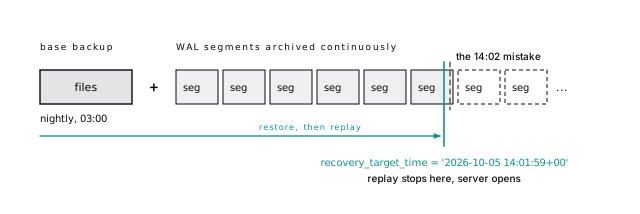
Picture 14:02 on a Monday. Someone runs a migration script against the wrong database and drops a column holding three years of billing addresses. The nightly backup finished at 03:00. If that is all you have, you lose eleven hours of every write in the system to recover one column. With continuous WAL archiving, you restore to 14:01:59 and lose nothing but the mistake.
With backups, mostly right is the same as wrong. A backup you can't restore, fast enough, to the moment you need, doesn't count. And you don't know which kind you have until you try.
## Write down RPO and RTO first
**RPO, recovery point objective:** how much data you can afford to lose, in time. A nightly dump: up to 24 hours. Continuous archiving: seconds or minutes. [Synchronous replication](/en/43-glossary/#synchronous-replication): zero for a server failure, but not for a human mistake, which replicates instantly.
**RTO, recovery time objective:** how long you can be down while restoring. Reloading a 2 TB logical dump, every index rebuilt, can take most of a day; a physical copy is limited by how fast you can move 2 TB and replay WAL.
| Method | Typical RPO | RTO driver |
|---|---|---|
| Nightly `pg_dump` | up to 24 h | reload data, rebuild every index |
| Physical base backup only | time since last backup | copy files |
| Base backup + WAL archive (PITR) | seconds to minutes | copy files + replay WAL |
| Streaming replica (failover) | seconds (async) | promote: seconds |
**Table 32-1.** Write down RPO and RTO first
A replica is not a backup. It covers hardware failure, not `drop table`, a bad migration, or an app bug, which replicate in milliseconds. You need both.
## pg_dump is portable, small, and slow to restore
`pg_dump` reads a snapshot, a frozen view of everything committed when it starts ([Updates are inserts](/en/06-mvcc/#basics-chapter-6)), and writes SQL definitions plus the rows, consistent while the app keeps writing.
It holds the weakest table lock on every table it dumps. Reads and writes don't care, but a migration waits for the dump, and every query queues behind the migration ([A waiting lock blocks everyone behind it](/en/25-concurrency/#a-waiting-lock-blocks-everyone-behind-it)).
Our sample database (345 MB, two million events), copied to `scratch` and dumped in custom format:
```bash
pg_dump -U postgres -Fc -f scratch.dump scratch
```
```text
$ ls -l scratch.dump
-rw-r--r-- 1 root root 47063663 Oct 6 07:51 scratch.dump
```
A 345 MB database became a 47 MB dump: compressed, and holding no index data, only `create index` statements. That's why dumps are small and restores are slow. A restore re-inserts every row and rebuilds every index.
> [!EXAMPLE]- Prove it · lab `31-backups.sh`
>
> ```bash
> sh_ "pg_dump -Fc -f /backups/app.dump app"
> prove "the custom-format dump is a fraction of the database's size (it holds no index data)" \
> [ $((dump_bytes * 4)) -lt "$db_bytes" ]
> prove "indexes are in the dump as definitions: the post-data section is a create index statement" \
> has "CREATE INDEX events_account_id_created_at_idx" "$(sh_ "pg_restore --section=post-data -f - /backups/app.dump")"
> ```
>
> [Full lab script](https://www.flagon.io/books/eight-kilobytes/lab/31-backups.sh)
Use custom (`-Fc`) or directory (`-Fd -j N`) format: both compress, restore in parallel, and can restore one table out of the whole dump. Keep plain SQL for small databases and for reading.
After any logical restore, run `analyze`, or the first queries are planned on guesses. PostgreSQL 18's `pg_dump --statistics` can carry planner statistics with the data, but it's off by default; on its own, without the data, it won't reproduce production's plans ([Test the plan, not just the speed](/en/29-benchmarking/#test-the-plan-not-just-the-speed)).
### pg_dump leaves out roles; dump them separately
`pg_dump` dumps one database. Roles, memberships, and tablespaces belong to the whole cluster, so it leaves them out. Dump them separately:
```bash
pg_dumpall --globals-only > globals.sql
```
Without them, a restore onto a new server errors on every `alter ... owner to app_owner`. Store the globals next to each dump. On a managed service, where you have no superuser to read password hashes, add `--no-role-passwords` and set the passwords again after the restore.
Run `pg_dump` as a role that can see every row. If your tenant tables force row-level security, the owner is bound by the policies too, and `pg_dump` errors out rather than write a partial table; give the backup job a superuser or a `BYPASSRLS` role ([RLS skips the table owner unless you force it](/en/33-security/#rls-skips-the-table-owner-unless-you-force-it)).
> [!DETAILS]- Deep dive: Which format dumps in parallel, and the pg_restore flags you'll want at 3 a.m.
>
> | Format | Flag | Parallel dump | Parallel restore | Selective restore |
> |---|---|---|---|---|
> | Plain SQL | `-Fp` | no | no (psql) | no |
> | Custom | `-Fc` | no | yes | yes |
> | Directory | `-Fd` | yes | yes | yes |
> | Tar | `-Ft` | no | no | yes |
>
>
>
> **Table 32-2.** pg_dump leaves out roles; dump them separately
>
> Directory format with `-j 4` parallelizes per table, over `-j` plus one connections sharing one snapshot. Per table is the catch: in our sample data one table, `events`, holds nearly all the rows, so `-j 4` (a 45 MB directory) was no faster than `-Fc` (both took 3.5 to 4.5 s on our machine). Parallel dumps pay off when the data is spread over many tables. Since PostgreSQL 16, `-Z` also accepts `lz4` and `zstd`; on our sample data a zstd directory dump came out the same 45 MB as gzip.
>
> > [!EXAMPLE]- Prove it · lab `31-backups.sh`
> >
> > ```bash
> > prove "only the directory format dumps in parallel: -Fc -j 4 is refused" \
> > fails_with "parallel backup only supported by the directory format" \
> > "pg_dump -Fc -j 4 -f /backups/nope.dump app"
> > ```
> >
> > [Full lab script](https://www.flagon.io/books/eight-kilobytes/lab/31-backups.sh)
>
> A custom or directory dump carries a table of contents, which `pg_restore -l` lists:
>
> ```text
> ; Archive created at 2026-10-06 07:51:28 UTC
> ; dbname: scratch
> ; TOC Entries: 47
> ; Compression: gzip
> ...
> ; Dumped from database version: 18.6 (Debian 18.6-1.pgdg13+2)
> ```
>
> `createdb scratch_restore && pg_restore -j 4 -d scratch_restore scratch.dir` brought back all 2,000,000 events. The options you'll use in a real restore:
>
> - `-t table` restores one table (data and definition); `-n schema` restores one schema.
> - `-l` writes the table of contents to a file; comment out lines with `;` and pass it back with `-L file` to restore exactly what you kept.
> - `--section=pre-data`, `data`, `post-data` split definitions, rows, and indexes plus constraints.
> - `--no-owner --no-privileges` for environments with different role names, such as a laptop.
> - `-1` (`--single-transaction`) makes the restore all-or-nothing. It can't be combined with `-j`.
>
> > [!EXAMPLE]- Prove it · lab `31-backups.sh`
> >
> > ```bash
> > sh_ "createdb app_restore && pg_restore -j 4 -d app_restore /backups/app.dir"
> > prove "a dump and parallel restore round trip preserves every row of both tables" \
> > [ "$(q -d app "select (select count(*) from accounts) || '/' || (select count(*) from events)")" \
> > = "$(q -d app_restore "select (select count(*) from accounts) || '/' || (select count(*) from events)")" ]
> > ```
> >
> > [Full lab script](https://www.flagon.io/books/eight-kilobytes/lab/31-backups.sh)
>
> > [!EXAMPLE]- Prove it · lab `31-backups.sh`
> >
> > ```bash
> > prove "--single-transaction (-1) can't be combined with -j" \
> > fails_with "cannot specify both --single-transaction and multiple jobs" \
> > "createdb app_one && pg_restore -1 -j 4 -d app_one /backups/app.dir"
> > ```
> >
> > [Full lab script](https://www.flagon.io/books/eight-kilobytes/lab/31-backups.sh)
>
> On statistics: a plain dump has zero `STATISTICS DATA` entries in its table of contents, and adding `--statistics` puts them in.
>
> > [!EXAMPLE]- Prove it · lab `31-backups.sh`
> >
> > ```bash
> > prove "without --statistics, pg_dump writes no statistics (zero STATISTICS DATA entries)" \
> > [ "$(grep -c "STATISTICS DATA" <<<"$toc" || true)" -eq 0 ]
> > sh_ "pg_dump -Fc --statistics -f /backups/app_stats.dump app"
> > prove "with --statistics, the dump carries STATISTICS DATA entries" \
> > [ "$(sh_ "pg_restore -l /backups/app_stats.dump" | grep -c "STATISTICS DATA")" -gt 0 ]
> > ```
> >
> > [Full lab script](https://www.flagon.io/books/eight-kilobytes/lab/31-backups.sh)
>
> And the roles really are missing from the dump, while `pg_dumpall --globals-only` has them.
>
> > [!EXAMPLE]- Prove it · lab `31-backups.sh`
> >
> > ```bash
> > prove "roles are not in pg_dump's output, only referenced by it" \
> > bash -c '! grep -q "CREATE ROLE app_owner" <<<"$1" && grep -q "OWNER TO app_owner" <<<"$1"' _ "$dump_sql"
> > prove "pg_dumpall --globals-only has the roles" has "CREATE ROLE app_owner" "$globals"
> > ```
> >
> > [Full lab script](https://www.flagon.io/books/eight-kilobytes/lab/31-backups.sh)
> [!WARNING] pg_dump is not a disaster recovery plan for big databases
>
> Past a few hundred gigabytes, a logical restore takes hours, because it rebuilds every index. Keep `pg_dump` for portability, single-table recovery, and migrations; use physical backups with WAL archiving for disaster recovery.
## At size, only a physical backup restores fast
A physical backup copies the 8 KB pages exactly as they sit on disk, indexes and bloat included. Restoring is copying files back and starting the server: no rows re-inserted, no indexes rebuilt. At size, it's the only restore that's fast.
A plain `cp -r` of a running server gets a torn mix of pages from before and after each write. `pg_basebackup` fixes that with the WAL, the log of every change written before the change itself ([Write it down first](/en/08-wal/#basics-chapter-8)): replaying the WAL from the copy's start to its end repairs every torn page, exactly as crash recovery does.
```text
backup start backup end
(checkpoint, LSN A) (LSN B)
| |
-----+------------------------------------------+------> WAL
| copying files: pages may change under us |
restore = copied files + replay WAL from A to B
= a consistent cluster as of LSN B
```
Then run `pg_verifybackup` on it. It checks every file against the backup's manifest (PostgreSQL 13+) and catches a truncated or corrupt copy before you need it.
The limits: it's the whole cluster, restorable only onto the same major version and platform, and getting one table back means restoring everything somewhere first.
> [!DETAILS]- Deep dive: What each pg_basebackup flag buys, and what pg_verifybackup can check
>
> A typical invocation:
>
> ```bash
> pg_basebackup -h db.internal -U backup \
> -D /backups/base/2026-10-05 \
> -Ft -z -X stream -P \
> --checkpoint=fast
> ```
>
> - `-Ft -z` writes compressed tar files instead of a directory tree.
> - `-X stream` streams the WAL generated during the backup alongside it, so the backup is self-contained.
> - `--checkpoint=fast` runs the starting checkpoint at full speed instead of spreading it out, so the copy begins right away.
> - The `backup` role needs the `REPLICATION` attribute and a `replication` line in `pg_hba.conf`.
>
> For a tar-format backup like this one, run `pg_verifybackup -n /backups/base/2026-10-05`: in PostgreSQL 18 it checks tar files against the manifest but can parse the WAL only in plain-format backups.
>
> > [!EXAMPLE]- Prove it · lab `31-backups.sh`
> >
> > ```bash
> > sh_ "pg_basebackup -D /backups/base -Ft -z -X stream --checkpoint=fast -P >/dev/null 2>&1"
> > prove "pg_verifybackup checks a tar-format backup against its manifest (-n: WAL parsing is plain-format only)" \
> > sh_ "pg_verifybackup -n /backups/base >/dev/null"
> > prove "pg_verifybackup catches a truncated file" \
> > fails_with "size" "pg_verifybackup /backups/broken"
> > ```
> >
> > [Full lab script](https://www.flagon.io/books/eight-kilobytes/lab/31-backups.sh)
## Point-in-time recovery is replay that keeps going
A base backup alone is still a snapshot. But replay doesn't have to stop at B: keep every WAL segment since the backup and you can roll it forward to any moment in that window. That's **point-in-time recovery**, PITR, and it turns "lose eleven hours" into "lose nothing but the mistake".
**Figure 32-1.** Recovery is a base backup plus replay\. Restore the base backup\, then replay archived WAL forward until recovery\_target\_time\. Replay stops just before the 14\:02 mistake and the server opens there\.
### A failing archive fills the disk and stops the primary
PITR depends on an unbroken archive, so that's where to start. When a 16 MB WAL segment fills, the server hands it to your `archive_command`. Turning archiving on takes a restart:
```ini
# postgresql.conf (primary)
wal_level = replica # the default; 'logical' also works
archive_mode = on # needs a restart
archive_command = 'test ! -f /archive/%f && cp %p /archive/%f'
archive_timeout = 60 # force a segment switch at least every 60 s
```
That `cp` is for illustration: it doesn't flush the copy to disk, so a crash can leave a segment the archive thinks it has. In production, use your backup tool's archive command ([Use a backup tool](#use-a-backup-tool)).
`archive_timeout` bounds RPO on a quiet system: a segment that takes an hour to fill is an hour you lose with the disk.
Watch the archiver. If `archive_command` keeps failing, Postgres keeps every unarchived segment in `pg_wal`, the disk fills, and the primary stops. Alert when `pg_stat_archiver.last_failed_time` is newer than `last_archived_time`, or when the newest archived segment is more than a few minutes old.
### Recovery pauses at the target so you can look first
To undo the 14:02 mistake, copy the last base backup from before it into an empty data directory, on a new server, and say where the archive is and when to stop:
```ini
# postgresql.conf on the server being restored
restore_command = 'cp /archive/%f %p'
recovery_target_time = '2026-10-05 14:01:59+00'
recovery_target_action = 'pause'
```
```bash
touch /var/lib/postgresql/18/main/recovery.signal
pg_ctl -D /var/lib/postgresql/18/main start
```
The server replays every transaction that committed at or before the target and stops at the first commit after it, without applying it. With `'pause'` (the default, spelled out so nobody wonders) it then opens read-only and waits. Check that the column is back, then `select pg_wal_replay_resume()` to open read-write, or move the target and try again. At 3 a.m., you will want that pause. (It needs `hot_standby = on`, also the default; without it, pause acts like shutdown.)
> [!EXAMPLE]- Prove it · lab `31-backups.sh`
>
> ```bash
> restore /backups/pitr_time 5433 "recovery_target_time = '$target'"
> prove "replay stops at the target and pauses, read-only" \
> wait_for 60 "select pg_is_in_recovery() and pg_get_wal_replay_pause_state() = 'paused'" 5433
> prove "the paused server has the dropped column back" \
> holds -p 5433 -d app "select count(*) > 0 from information_schema.columns
> where table_name = 'accounts' and column_name = 'billing_address'"
> prove "and every row committed before the target time, none after" \
> [ "$(q -p 5433 -d app "select count(*) from accounts")" = "$before" ]
> q -p 5433 "select pg_wal_replay_resume()"
> prove "pg_wal_replay_resume() finishes recovery and opens the server read-write" \
> wait_for 60 "select not pg_is_in_recovery()" 5433
> ```
>
> [Full lab script](https://www.flagon.io/books/eight-kilobytes/lab/31-backups.sh)
> [!TIP] Recover the data, not the server
>
> For a human mistake (a bad delete, a dropped column), restore to a point in time on a separate server, then copy the affected rows back with `pg_dump -t` or `copy`. Rolling production itself back also throws away every legitimate write since the target.
> [!DETAILS]- Deep dive: Other recovery targets, timelines, and why replay speed bounds RTO
>
> Besides a time, you can stop at `recovery_target_lsn` (an exact WAL position), `recovery_target_xid` (a transaction's XID), or `recovery_target_name`, a label made earlier with `select pg_create_restore_point('before_billing_migration')`. A named restore point before risky migrations is a cheap habit.
>
> Recovery starts a new **timeline**, a fresh branch of WAL history, so the restored server's WAL never collides with the old history in the archive. Keep the `.history` files too.
>
> Replay runs in roughly one process, so replaying a week of busy WAL can take hours. That's why you still take base backups daily or weekly: each one bounds the replay, and so the RTO.
>
> On `archive_timeout`: at 60 seconds the worst case is about a minute of loss, at the cost of a mostly empty 16 MB segment for each quiet minute that had any writes. And the archiver's counters, for the alert above:
>
> ```sql
> select archived_count, last_archived_wal, last_archived_time,
> failed_count, last_failed_wal, last_failed_time
> from pg_stat_archiver;
> ```
## Incremental backups are only as good as their chain
A full base backup of a 2 TB database copies 2 TB every time, even if 20 GB changed. PostgreSQL 17 added incremental backups to core.
With `summarize_wal = on` (off by default), the server tracks which blocks changed. Hand `pg_basebackup --incremental` the previous backup's manifest and it copies only those blocks. `pg_combinebackup` stitches a full backup and its chain of incrementals into a full backup you can restore.
The catch is the chain. Every link must exist and be intact; lose Monday's backup and Tuesday's is useless. Verify each link.
> [!DETAILS]- Deep dive: A week of incrementals, and what a missing link looks like
>
> ```ini
> summarize_wal = on # PostgreSQL 17+, needed for incremental backups
> ```
>
> ```bash
> # Sunday: a full backup
> pg_basebackup -D /backups/full -X stream --checkpoint=fast
>
> # Monday: only the blocks changed since Sunday
> pg_basebackup -D /backups/incr1 -X stream --checkpoint=fast \
> --incremental=/backups/full/backup_manifest
>
> # Tuesday: changes since Monday
> pg_basebackup -D /backups/incr2 -X stream --checkpoint=fast \
> --incremental=/backups/incr1/backup_manifest
>
> # You can't start a server from an incremental: combine first
> pg_combinebackup /backups/full /backups/incr1 /backups/incr2 \
> -o /restore/main
> ```
>
> `pg_combinebackup` checks the chain and refuses a gap (here, the full backup and Tuesday without Monday):
>
> ```text
> pg_combinebackup: error: backup at "/backups/full" starts at LSN 0/17000028,
> but expected 0/1A000028
> ```
>
> > [!EXAMPLE]- Prove it · lab `31-backups.sh`
> >
> > ```bash
> > prove "an incremental backup copies only changed blocks: incr1 is under half the size of the full backup" \
> > [ $((incr_kb * 2)) -lt "$full_kb" ]
> > sh_ "pg_combinebackup /backups/full /backups/incr1 /backups/incr2 -o /backups/combined"
> > prove "the combined backup starts and has every change from the whole chain" \
> > [ "$(q -p 5435 -d app "select (select count(*) from events) || '/' || (select count(*) from accounts where name like '%!')")" = "$expected" ]
> > prove "lose a link and the chain is useless: full + incr2 without incr1 is refused" \
> > fails_with "but expected" "pg_combinebackup /backups/full /backups/incr2 -o /backups/nope"
> > ```
> >
> > [Full lab script](https://www.flagon.io/books/eight-kilobytes/lab/31-backups.sh)
## Use a backup tool
Build PITR by hand once, to understand it. In production, use pgBackRest, WAL-G, or Barman, all open source; the first two are the most widely used. Each one compresses, encrypts, and uploads WAL to object storage with retries; takes full and incremental base backups in parallel; expires old backups together with exactly the WAL they no longer need; and restores to a target time with one command.
Pick one, don't mix them, and check that it's maintained: pgBackRest's maintenance stopped in April 2026 and restarted in May with sponsor funding ([pgBackRest news](https://pgbackrest.org/news.html), as of October 2026). Store backups where the database server's credentials can't delete them (a separate account, object lock, a versioned bucket). Ransomware and a bad cleanup script delete backups the same way.
## Managed backups still need a copy you own
Managed services build in snapshots, WAL archiving, and a "restore to point in time" button. The button has limits: restores create a new server, retention is a fixed window of days or weeks, and automated backups live in the instance's own account, sometimes deleted with it. Copy snapshots elsewhere, and keep your own periodic `pg_dump`, your only portable copy. [Backups are snapshots plus WAL, and restores make new servers](/en/34-managed/#backups-are-snapshots-plus-wal-and-restores-make-new-servers) covers what the restore button leaves out.
## Test your restores
Backups fail silently: the archive command has failed for a week, a lifecycle rule deleted needed WAL, the encryption key lived on the dead server, the restore takes nine hours against a one-hour RTO. You find out when you restore, so restore before you have to.
GitLab's [January 2017 outage](https://about.gitlab.com/blog/postmortem-of-database-outage-of-january-31/) is the standard lesson. An engineer wiped the primary's data directory, believing it was the secondary. Then every backup failed in turn: `pg_dump` had been failing silently (9.2 binaries against a 9.6 server), disk snapshots had never been enabled, and the secondary had just been wiped to re-sync it. A six-hour-old LVM snapshot took around 18 hours to copy back, and about 5,000 projects were lost. Every method existed on paper. None had been proven by a restore.
Automate it. On a schedule, restore the latest backup to a scratch server with your normal procedure, then check that the server starts, key row counts are close to production, the newest row is within your RPO of the target, and `amcheck` passes on a sample of indexes. Time every step: that's your real RTO. Tear it down, and alert if anything failed.
A few times a year, have someone who didn't build the backups restore from the runbook alone. Better they find the gaps than an incident does.
> [!DANGER] Monitor the pipeline, not just the job
>
> "The backup job exited 0" is not evidence. Alert on the age of the newest successful base backup, the age of the newest archived WAL segment, `pg_stat_archiver.failed_count` rising, and the result of the last automated restore test.
## Take minor releases promptly; rehearse major ones
Upgrades belong in this chapter because a major upgrade is a restore you schedule: the same copy, the same fallback, the same rehearsal. A minor release (18.5 to 18.6) keeps the on-disk format: read the release notes in case they ask for a reindex, install the binaries, and restart. A major version (17 to 18) changes the catalog format, so the new server can't open the old data directory.
There are three ways across a major version. Dump and restore works across any versions and leaves no bloat, but the downtime is the whole dump plus restore, so it's for small databases. The other two scale.
### pg_upgrade --link is fast and one-way
`pg_upgrade` builds new catalogs and reuses the old data files as they are. With `--link` it hard-links them instead of copying, so a terabyte upgrade takes minutes. The price: once the new server writes to the shared files, the old cluster is unusable, so your fallback is a backup or replica. Take a backup first, and run `pg_upgrade --check` before the real thing.
Two PostgreSQL 18 changes matter on upgrade night. The good one: `pg_upgrade` now carries most planner statistics over, so queries don't run on guesses for an hour afterward (extended statistics from [`create statistics`](/en/20-planner/#basics-chapter-20) still need an `analyze`). The trap: `initdb` now turns on [data checksums](/en/43-glossary/#data-checksums) by default, and `pg_upgrade` refuses to pair clusters whose checksum settings differ. For a 17 cluster without them, create the new one with `initdb --no-data-checksums`.
Plan the replicas too: they can't follow a primary across a major version, so they're rebuilt or upgraded with the documented `rsync` procedure.
> [!DETAILS]- Deep dive: The four ways pg_upgrade moves files, and the check you run first
>
> ```bash
> # check first; changes nothing
> pg_upgrade --check \
> -b /usr/lib/postgresql/17/bin -B /usr/lib/postgresql/18/bin \
> -d /var/lib/postgresql/17/main -D /var/lib/postgresql/18/main
>
> # then, with both servers stopped
> pg_upgrade --link --jobs 4 \
> -b /usr/lib/postgresql/17/bin -B /usr/lib/postgresql/18/bin \
> -d /var/lib/postgresql/17/main -D /var/lib/postgresql/18/main
> ```
>
> | Mode | What it does | Speed | Old cluster usable after? |
> |---|---|---|---|
> | `--copy` (default) | copies every file | slow, needs 2x disk | yes |
> | `--link` | hard links files | seconds to minutes | no, once new server starts |
> | `--clone` | copy-on-write clone (filesystem support) | fast | yes |
> | `--swap` (PostgreSQL 18+) | moves the data directories into the new cluster | can be the fastest | no |
>
>
>
> **Table 32-3.** pg_upgrade --link is fast and one-way
>
> It can reuse the files because user table and index formats have stayed compatible across recent majors; with `--link`, the work scales with the number of files, not their size. To turn checksums on in the old cluster instead of off in the new one, run `pg_checksums --enable` on it while it's shut down; it rewrites every page, so that downtime scales with the size of the cluster, not the number of files. `--no-statistics` skips the PostgreSQL 18 statistics transfer, and at the end `pg_upgrade` prints the `vacuumdb --analyze-in-stages --missing-stats-only` command that fills in what it didn't carry over.
>
> > [!EXAMPLE]- Prove it · lab `31-backups.sh`
> >
> > ```bash
> > prove "a default 18 cluster can't take a 17 cluster without checksums: pg_upgrade --check refuses" \
> > fails_with "checksum" "$NEW/pg_upgrade --check -b $OLD -B $NEW -d /tmp/old -D /tmp/new18" upg
> > upg "$NEW/pg_upgrade --link --jobs 4 -b $OLD -B $NEW -d /tmp/old -D /tmp/new >/tmp/upgrade.out 2>&1"
> > prove "PostgreSQL 18's pg_upgrade carried the planner statistics over: pg_stats is filled before any analyze" \
> > upg "[ \"\$($NEW/psql -X -At -c \"select count(*) > 0 from pg_stats where tablename = 'events'\")\" = t ]"
> > ```
> >
> > [Full lab script](https://www.flagon.io/books/eight-kilobytes/lab/31-backups.sh)
### Logical replication shrinks upgrade downtime to the cutover
For the least downtime, subscribe a new-version cluster to the old one with [logical replication](/en/38-replication/#basics-chapter-38): it copies every row, then streams changes until you cut over, in seconds to a minute or two. The costs: a freeze on schema changes (DDL isn't replicated), a primary key or replica identity on every table, a full copy over the network, and sequences and large objects, which aren't replicated either. Advance every sequence on the new cluster before it takes writes, or the first insert fails on a duplicate key. The bonus: a bloat-free cluster and a cutover you can rehearse as often as you like. Some managed services sell this as a [blue/green upgrade](/en/34-managed/#bluegreen-is-the-logical-upgrade-limits-included).
> [!DETAILS]- Deep dive: The logical cutover, step by step
>
> Copy the schema first (`pg_dump --schema-only`), create the subscription, and wait for the initial copy. Then, at cutover:
>
> 1. Stop writes to the old cluster (maintenance mode, or revoke write access).
> 2. Wait for the subscriber to catch up (the slot's confirmed position equals the old primary's current WAL position).
> 3. Advance every sequence on the new cluster past its old value, since sequences are not replicated.
> 4. Point the application at the new cluster.
Whatever the method, rehearse it on a restored copy of production first.
## The short version
- Write down your RPO and RTO first; they decide which backups you need. A replica is not a backup.
- Use `pg_dump -Fd -j N` (or `-Fc`) for portable, selective backups, plus `pg_dumpall --globals-only` for roles (`--no-role-passwords` on managed services). Run `analyze` after any logical restore.
- For disaster recovery, use physical base backups plus continuous WAL archiving, through a tool like pgBackRest or WAL-G, to storage the database host can't delete.
- To undo a human mistake, recover to a point in time on a separate server with `recovery_target_action = 'pause'`, and copy the rows back.
- Alert on `pg_stat_archiver` failures before `pg_wal` fills the disk.
- Incremental backups are in core since PostgreSQL 17; verify every link in the chain.
- Automate restore tests and measure the real RTO. A backup you have never restored is a rumor.
- Upgrade majors with `pg_upgrade --link` for speed or logical replication for near-zero downtime (advance sequences at cutover); on 18, mind the checksum default.
## Further reading
- [Backup and Restore](https://www.postgresql.org/docs/18/backup.html) and [Continuous Archiving and PITR](https://www.postgresql.org/docs/18/continuous-archiving.html), PostgreSQL documentation. The full procedures, including every recovery target setting.
- [pg_basebackup](https://www.postgresql.org/docs/18/app-pgbasebackup.html) and [pg_combinebackup](https://www.postgresql.org/docs/18/app-pgcombinebackup.html), PostgreSQL documentation. Incremental backups and their chains.
- [pg_dump](https://www.postgresql.org/docs/18/app-pgdump.html) and [pg_upgrade](https://www.postgresql.org/docs/18/pgupgrade.html), PostgreSQL documentation. Formats, parallelism, upgrade modes, and the replica procedure.
- [pgBackRest User Guide](https://pgbackrest.org/user-guide.html), pgBackRest project. A complete, opinionated walk-through of production backups.
- [WAL-G](https://github.com/wal-g/wal-g) and [Barman](https://pgbarman.org/). The other widely used backup tools, if pgBackRest doesn't fit.
- [Postmortem of database outage of January 31](https://about.gitlab.com/blog/postmortem-of-database-outage-of-january-31/), GitLab, 2017. Four backup and replication methods, none of which saved the day; read it before you trust yours.
- [amcheck](https://www.postgresql.org/docs/18/amcheck.html), PostgreSQL documentation. Verify index and heap integrity in a restored copy.