# Queries that age well
> The query shapes that stay fast as tables grow, from keyset pagination and N+1 fixes to upserts, batching, and top-N per group.
---
LLMS index: [llms.txt](/en/llms.txt)
---
Page 1 of the activity feed loads in a fraction of a millisecond. Page 50,000 takes 180 ms on our machine and reads 21,000 pages. Same query, same index, same `LIMIT 20`. The only difference is the number after `OFFSET`.
Most slow queries are a handful of familiar shapes that make the database work in proportion to the table instead of the answer: fast in the demo, slow in month six. A query that ages well touches pages in proportion to the rows you asked for. The plan's `Buffers:` line is how you check ([Buffers are the evidence](/en/19-explain/#buffers-are-the-evidence)).
For this chapter `events` gets two indexes (the template has none), and parallel query is off so plans stay readable:
```sql
set max_parallel_workers_per_gather = 0;
create index events_created_at_id_idx on events (created_at, id);
create index events_project_id_created_at_idx on events (project_id, created_at);
vacuum analyze events;
```
## OFFSET reads every row it skips
Stop paginating with `OFFSET`. Nothing records where row 1,000,000 is, so Postgres walks the index from the start, producing rows and throwing them away:
```sql
select id, kind, created_at from events
order by created_at desc, id desc
limit 20 offset 1000000;
```
| Offset | Rows read | Buffers | Time (rough, our machine) |
|---|---|---|---|
| 0 | 20 | 4 | 0.04 ms |
| 100,000 | 100,020 | 2,146 | 15 ms |
| 1,000,000 | 1,000,020 | 21,422 | 180 ms |
**Table 22-1.** OFFSET reads every row it skips
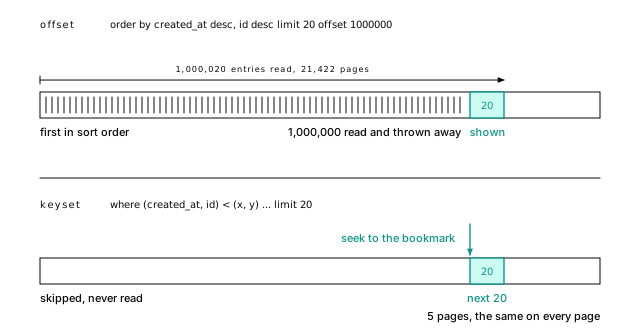
A million and twenty entries read to show twenty. Fine for a search page nobody scrolls past page 5 of; a disaster for an API that clients iterate.
**Figure 22-1.** OFFSET counts from the front\; keyset starts at the bookmark\. OFFSET 1000000 reads 1\,000\,020 index entries and 21\,422 pages to show 20\. The keyset query seeks to where the last page ended and reads the next 20 in 5 pages\, the same on every page\.
> [!EXAMPLE]- Prove it · lab `21-queries`
>
> ```sql
> select lab.prove(
> 'OFFSET 100,000 reads about 2,146 pages',
> lab.buffers($$ select id, kind, created_at from events
> order by created_at desc, id desc limit 20 offset 100000 $$) between 1800 and 2500);
>
> select lab.prove(
> 'OFFSET 1,000,000 reads about 21,422 pages, ten times OFFSET 100,000: linear in depth',
> lab.buffers($$ select id, kind, created_at from events
> order by created_at desc, id desc limit 20 offset 1000000 $$) between 19000 and 24000);
>
> select lab.prove(
> 'OFFSET 1,000,000 walks 1,000,020 index entries to return 20',
> (select (lab.find_node(p -> 'Plan', 'Index Scan') ->> 'Actual Rows')::numeric = 1000020
> from lab.plan($$ select id, kind, created_at from events
> order by created_at desc, id desc limit 20 offset 1000000 $$) p));
> ```
>
> [Full lab script](https://www.flagon.io/books/eight-kilobytes/lab/21-queries.sql)
**Keyset pagination** (also called cursor or seek pagination) is a bookmark instead of counting pages from the front cover. Remember where the last page ended and ask for the rows after it:
```sql
select id, kind, created_at
from events
where (created_at, id) < ('2026-04-06 12:00:15.768+00', 1000001)
order by created_at desc, id desc
limit 20;
```
`(created_at, id) < (x, y)` means "comes after in this sort order", and it matches the two-column index directly. It returns the same page `OFFSET 1000000` produced, at `Buffers: shared hit=4 read=1`: five pages instead of 21,422, the same on every page.
Three habits make it hold up. Make the ordering total by adding the primary key as a tiebreaker. Put filter columns first in the index, so one project's feed wants `(project_id, created_at, id)`. And hand the client an opaque cursor ([Encode in the app; SQL can do it for a report](/en/13-keys/#encode-in-the-app-sql-can-do-it-for-a-report) is one encoding).
You give up jumping to page 37; infinite scroll never needed it. Batch jobs use the same bookmark: `where id > $last order by id limit 1000`.
> [!DETAILS]- Deep dive: What a keyset cursor has to carry
>
> The whole thing as an endpoint would issue it, in TypeScript with node-postgres:
>
> ```ts
> type Cursor = { ts: string; id: string };
>
> const encode = (c: Cursor) => Buffer.from(JSON.stringify(c)).toString("base64url");
> const decode = (s: string): Cursor =>
> JSON.parse(Buffer.from(s, "base64url").toString());
>
> export async function feedPage(after?: string) {
> const cur = after ? decode(after) : { ts: "infinity", id: "0" };
> const { rows } = await db.query(
> `select id, kind, created_at, created_at::text as ts
> from events
> where (created_at, id) < ($1::timestamptz, $2::bigint)
> order by created_at desc, id desc
> limit 20`,
> [cur.ts, cur.id]);
> const last = rows.at(-1);
> return { rows, next: last ? encode({ ts: last.ts, id: last.id }) : null };
> }
> ```
>
> The first page uses `'infinity'`, which sorts after every timestamp, so there's one statement and one plan for every page. Two details are load-bearing. The cursor carries `created_at::text`, not a parsed date: JavaScript dates hold milliseconds and `timestamptz` holds microseconds, so a round trip through `Date` lands slightly off the real row and skips or repeats rows. And `bigint` arrives as a string in node-postgres, which is what you want in a cursor anyway.
>
> Mixed directions like `created_at desc, id asc` need an index declared that way and can't use the row comparison.
>
> > [!EXAMPLE]- Prove it · lab `21-queries`
> >
> > ```sql
> > -- the last row of the page before OFFSET 1000000 is the cursor
> > select created_at as cur_ts, id as cur_id
> > from events order by created_at desc, id desc offset 999999 limit 1 \gset
> >
> > select lab.prove(
> > 'keyset returns exactly the page OFFSET 1,000,000 returns',
> > (select array_agg(id order by created_at desc, id desc) from (
> > select id, created_at from events
> > where (created_at, id) < (:'cur_ts'::timestamptz, :'cur_id'::bigint)
> > order by created_at desc, id desc limit 20) k)
> > = (select array_agg(id order by created_at desc, id desc) from (
> > select id, created_at from events
> > order by created_at desc, id desc limit 20 offset 1000000) o));
> >
> > select lab.prove(
> > 'keyset reads under 10 pages at the same depth',
> > lab.buffers(format($$ select id, kind, created_at from events
> > where (created_at, id) < (%L::timestamptz, %s)
> > order by created_at desc, id desc limit 20 $$,
> > :'cur_ts', :'cur_id')) < 10);
> > ```
> >
> > [Full lab script](https://www.flagon.io/books/eight-kilobytes/lab/21-queries.sql)
## N+1 is a loop, not a slow query
The N+1 problem is a query in a loop: load 100 projects, then look up each owner. Each lookup reads 3 pages in microseconds, so monitoring never flags it. The cost is the round trips: 101 queries that take 8 ms on one host take 152 ms across zones ([Round trips cost more than queries](/en/03-latency/#round-trips-cost-more-than-queries)). ORMs do this by default when you touch a lazy relation in a loop.
Fix it with one round trip: a join when you want the related row inline, or `= any($1)` with the whole list as **one array parameter** when you've already loaded the parents:
```ts
const ids = projects.rows.map((p) => p.owner_id);
const { rows: owners } = await db.query(
"select id, email, name from users where id = any($1::bigint[])", [ids]);
```
One round trip and one index scan for all hundred owners; match them up in memory. Don't generate `in ($1, $2, ... $500)`: its text changes with every list length, so it can't be prepared once, and it hits the 65,535-parameter ceiling. When each parent needs its own few children, use [LATERAL](#lateral-reads-the-top-n-row_number-reads-them-all).
## Filter with EXISTS, not a join
Filter with `EXISTS`; join only when you need the other table's columns. "Which accounts had an alert in the last day?" (the data ends at midnight on October 6, 2026):
```sql
select count(*) from accounts a
where exists (
select 1 from events e
where e.account_id = a.id and e.kind = 'alert' and e.created_at >= '2026-10-05');
```
Postgres runs it as a **semi-join**, which stops at each account's first match: `Hash Right Semi Join ... rows=479`. The `in (subquery)` form gets the identical plan. A join returns `rows=637`, one per alert, and then someone adds `distinct` to undo duplication that should never have happened.
### NOT IN is a trap; use NOT EXISTS
If the subquery under `NOT IN` yields a single NULL, the query silently returns no rows ([One null makes not in return nothing](/en/14-relationships/#one-null-makes-not-in-return-nothing)). The same NULL rule keeps Postgres from turning it into an anti-join, so once the subquery's result outgrows [`work_mem`](/en/43-glossary/#work_mem), it's rescanned for every outer row. "Users with no events" as `not in (select user_id from events)` is costed at nearly 3.9 billion, because it can mean 160 billion comparisons (80,000 users with no events, each checked against 2 million `user_id`s). As `not exists` it's a `Hash Right Anti Join`, one pass over each table, costed at 68,394.
> [!DANGER] Never write NOT IN with a subquery
>
> Always write `NOT EXISTS`. `NOT IN` is fine only with a short literal list of non-null constants (`status not in ('done', 'failed')`).
> [!DETAILS]- Deep dive: The two plans behind 3.9 billion and 68,394
>
> ```sql
> explain select count(*) from users u
> where u.id not in (select user_id from events);
>
> explain select count(*) from users u
> where not exists (select 1 from events e where e.user_id = u.id);
> ```
>
> ```text
> Aggregate (cost=3899296376.00..3899296376.01 rows=1 width=8)
> -> Seq Scan on users u ...
> Filter: (NOT (ANY (id = (SubPlan 1).col1)))
> SubPlan 1
> -> Materialize (cost=0.00..72985.90 rows=1999993 width=8)
>
> Aggregate (cost=68394.12..68394.13 rows=1 width=8)
> -> Hash Right Anti Join (cost=3376.00..68193.50 rows=80249 width=0)
> ```
>
> The `Filter` says `SubPlan`, not `hashed SubPlan`: two million `user_id`s don't fit in `work_mem`, so each of the 80,000 users with no events scans all of them. Against `projects.owner_id` (20,000 rows) it gets `hashed SubPlan 1` and runs in 12 ms, which is how `NOT IN` passes review and fails in production.
>
> > [!EXAMPLE]- Prove it · lab `21-queries`
> >
> > ```sql
> > select lab.prove(
> > 'NOT IN over 2 million events is a plain subplan costed in the billions',
> > (select (p ->> 'Total Cost')::numeric > 1e9
> > and lab.find_node(p, 'Seq Scan') ->> 'Filter' not like '%hashed%'
> > from lab.estimate($$ select count(*) from users u
> > where u.id not in (select user_id from events) $$) p));
> >
> > select lab.prove(
> > 'NOT EXISTS over the same tables is an anti-join costed under 100,000',
> > (select (p ->> 'Total Cost')::numeric < 100000
> > and (lab.join_types($$ select count(*) from users u
> > where not exists (select 1 from events e where e.user_id = u.id) $$))[1] like '%Anti'
> > from lab.estimate($$ select count(*) from users u
> > where not exists (select 1 from events e where e.user_id = u.id) $$) p));
> > ```
> >
> > [Full lab script](https://www.flagon.io/books/eight-kilobytes/lab/21-queries.sql)
## Exact counts read everything
`count(*)` on a big table is slow, and that's not a bug. Different transactions see different row counts at the same moment ([Updates are inserts](/en/06-mvcc/#basics-chapter-6)), so there's no stored count; the best case, an index-only scan of the primary key, read 5,469 pages for one number. Ask what the number is for:
- **"About 2 million"** (admin dashboards, "1 to 20 of about 2,000,000"): the planner's estimate is free. `select reltuples::bigint from pg_class where oid = 'events'::regclass` returned 1,999,993.
- **"1,000+"**: count a capped subquery, `select count(*) from (select 1 from events where kind = 'deploy' limit 1001) t`. It read 159 pages; the work is bounded by the cap, not the table.
- **Exact per-tenant numbers on every request**: keep a counter table, updated with the write or by a periodic rollup. A trigger doing it serializes every writer on that row ([A counter trigger serializes your writers](/en/24-functions/#a-counter-trigger-serializes-your-writers)).
> [!DETAILS]- Deep dive: Estimating a filtered count from the plan
>
> The planner will estimate any query for you:
>
> ```sql
> create function count_estimate(query text) returns bigint
> language plpgsql as $$
> declare
> plan jsonb;
> begin
> execute 'explain (format json) ' || query into plan;
> return (plan -> 0 -> 'Plan' ->> 'Plan Rows')::bigint;
> end
> $$;
>
> select count_estimate('select 1 from events where kind = ''deploy''');
> ```
>
> It returned 500,598; the exact answer is 499,992. The estimate is only as good as the statistics, and correlated filters throw them off ([The planner assumes your columns are independent](/en/20-planner/#the-planner-assumes-your-columns-are-independent)). Never pass user input to it: it executes whatever string it's given.
## Keep the indexed column bare
A predicate is **sargable** ("search argument able") when it compares a bare column to a value computable before the scan. Wrap the column in a function, arithmetic, or a cast, and the index can't help.
### A function on the column hides the index
The natural way to ask for "all events on September 1" is a cast, `where created_at::date = '2026-09-01'`:
```text
Buffers: shared read=35173
-> Seq Scan on events ... rows=5479.00 ...
Rows Removed by Filter: 1994521
```
Every page for 5,479 rows: the index is sorted by timestamp, not by `created_at::date`. A range on the bare column, `created_at >= '2026-09-01' and created_at < '2026-09-02'`, reads 25 pages.
The same goes for `date_trunc`, `extract`, and arithmetic: `created_at + interval '1 day' > now()` read all 35,173 pages; `created_at > now() - interval '1 day'` uses the index. If you truly need a function of a column, index the expression ([An index stores exactly what you gave it](/en/17-btree/#an-index-stores-exactly-what-you-gave-it)). That needs an `IMMUTABLE` expression, and `created_at::date` on a `timestamptz` isn't one: it depends on the session's time zone, so `create index ... ((created_at::date))` is refused. Index `((created_at at time zone 'UTC')::date)` and query with the same expression.
> [!EXAMPLE]- Prove it · lab `21-queries`
>
> ```sql
> -- :'day0' is '2026-09-01' (set at the top of the lab)
> select lab.prove(
> 'created_at::date = a day reads every page of the table',
> lab.buffers(format($$ select count(*) from events where created_at::date = %L::date $$, :'day0'))
> >= 35173);
>
> select lab.prove(
> 'the half-open range on the bare column reads under 50 pages',
> lab.buffers(format($$ select count(*) from events
> where created_at >= %L and created_at < %L::timestamptz + interval '1 day' $$,
> :'day0', :'day0')) < 50);
> ```
>
> [Full lab script](https://www.flagon.io/books/eight-kilobytes/lab/21-queries.sql)
### Date ranges are half-open
Write time ranges as `>= start and < end`, never `between`, which counts midnight on the 2nd in two days (and ending at `23:59:59` drops the last second; timestamps have microseconds). Half-open intervals tile. Compute the boundaries in the user's time zone, not on the column.
### A type mismatch is a cast on every row
A type mismatch hides the index with no function in sight. `where id = 5.0` is a `Seq Scan` with `Filter: ((id)::numeric = 5.0)`: the `numeric` literal makes Postgres cast the `bigint` column on every row, as it does when a driver binds a number as float. The tell is a `::` on the column side of a `Filter` line.
> [!DETAILS]- Deep dive: A decimal key turns 7 pages into 35,173
>
> `where id = 42` against `where id = 42.0`, with parallel workers allowed:
>
> ```text
> Index Scan using events_pkey on events (actual rows=1.00 loops=1)
> Buffers: shared hit=5 read=2
> ...
> Gather (actual rows=1.00 loops=1)
> Buffers: shared hit=13347 read=21826
> -> Parallel Seq Scan on events (actual rows=0.33 loops=3)
> Filter: ((id)::numeric = 42.0)
> ```
>
> Seven pages became 35,173. When the two sides' types differ, Postgres casts toward the type that holds both, `numeric`, which means casting the column. Bind parameters in the column's type.
>
> > [!EXAMPLE]- Prove it · lab `21-queries`
> >
> > ```sql
> > select lab.prove(
> > 'where id = 42 is an index scan that reads under 10 pages',
> > 'Index Scan' = any(lab.nodes('select * from events where id = 42'))
> > and lab.buffers('select * from events where id = 42') < 10);
> > select lab.prove(
> > 'where id = 42.0 casts the column to numeric and reads the whole table (over 35,000 pages)',
> > lab.estimate('select * from events where id = 42.0') ->> 'Filter' = '((id)::numeric = 42.0)'
> > and lab.buffers('select * from events where id = 42.0') > 35000);
> > ```
> >
> > [Full lab script](https://www.flagon.io/books/eight-kilobytes/lab/21-queries.sql)
## OR across a join defeats both indexes
An `OR` on one table is fine: a `BitmapOr` merges one index scan per condition. An `OR` spanning two tables of a join is not, even with indexes on `projects (name)`, `projects (owner_id)` and `users (email)` (the lab creates all three):
```sql
select p.id, p.name
from projects p
join users u on u.id = p.owner_id
where p.name = 'Project 4242' or u.email = 'user29695@example.com';
```
```text
Hash Join (actual time=8.032..17.973 rows=1.00 loops=1)
Rows Removed by Join Filter: 19999
Buffers: shared hit=191 read=1126 written=4
```
Neither condition restricts either table alone, because a row can qualify through the other one, so Postgres joins everything and filters afterward. Split it into a `union` of one query per condition and each branch is an index lookup:
```sql
select p.id, p.name from projects p where p.name = 'Project 4242'
union
select p.id, p.name
from projects p
join users u on u.id = p.owner_id
where u.email = 'user29695@example.com';
```
Same row, 10 buffers instead of 1,317. Use `union all` when the branches can't overlap, and skip the sort.
> [!DETAILS]- Deep dive: Reading the UNION plan
>
> ```text
> Unique (actual time=0.059..0.061 rows=1.00 loops=1)
> Buffers: shared hit=4 read=6
> -> Sort ...
> -> Append ... rows=2.00 ...
> -> Index Scan using projects_name_idx on projects p ...
> -> Nested Loop ...
> -> Index Scan using users_email_idx on users u ...
> -> Index Scan using projects_owner_id_idx on projects p_1 ...
> ```
>
> Both branches found the same project (user 29695 owns project 4242), so `Append` produced two rows and `Unique` removed one. The second branch needed `projects (owner_id)`; without it, it fell back to a sequential scan. Unindexed foreign keys keep turning up ([Each deleted parent scans the whole child table](/en/14-relationships/#each-deleted-parent-scans-the-whole-child-table)).
>
> > [!EXAMPLE]- Prove it · lab `21-queries`
> >
> > ```sql
> > select lab.prove(
> > 'an OR across the join scans both tables: over 1,000 pages for one row',
> > (select (p -> 'Plan' ->> 'Actual Rows')::numeric = 1
> > and (p -> 'Plan' ->> 'Shared Hit Blocks')::int + (p -> 'Plan' ->> 'Shared Read Blocks')::int > 1000
> > from lab.plan($$ select p.id, p.name from projects p
> > join users u on u.id = p.owner_id
> > where p.name = 'Project 4242' or u.email = 'user29695@example.com' $$) p));
> >
> > select lab.prove(
> > 'the UNION of two indexed queries reads under 30 pages for the same row',
> > (select (p -> 'Plan' ->> 'Actual Rows')::numeric = 1
> > and (p -> 'Plan' ->> 'Shared Hit Blocks')::int + (p -> 'Plan' ->> 'Shared Read Blocks')::int < 30
> > from lab.plan($$ select p.id, p.name from projects p where p.name = 'Project 4242'
> > union
> > select p.id, p.name from projects p
> > join users u on u.id = p.owner_id
> > where u.email = 'user29695@example.com' $$) p));
> > ```
> >
> > [Full lab script](https://www.flagon.io/books/eight-kilobytes/lab/21-queries.sql)
## A CTE used once is inlined, not fenced
Write [CTEs](/en/43-glossary/#cte) for readability; add `materialized` only on purpose. Since PostgreSQL 12, a CTE referenced once with no side effects is inlined like any subquery, so your filters reach the table ([Your query is rewritten before it's priced](/en/21-plans/#your-query-is-rewritten-before-its-priced)). Advice from the era when every CTE was a fence is now wrong, and following it costs real pages: "project 4242's events from the last week" read 6 buffers inlined, and 826 plus 584 temp pages marked `materialized`.
Fence on purpose when a misestimate keeps producing a bad plan ([A hint freezes a plan; fix the estimate instead](/en/20-planner/#a-hint-freezes-a-plan-fix-the-estimate-instead)) or to run a volatile function once. A CTE referenced twice is materialized by default; `not materialized` inlines it.
> [!DETAILS]- Deep dive: What the accidental fence cost, line by line
>
> ```sql
> explain (analyze, buffers, costs off)
> with recent as materialized (
> select * from events where created_at > '2026-09-29'
> )
> select id, kind from recent where project_id = 4242;
> ```
>
> ```text
> CTE Scan on recent (actual time=0.931..9.274 rows=3.00 loops=1)
> Filter: (project_id = 4242)
> Rows Removed by Filter: 38354
> Storage: Disk Maximum Storage: 4672kB
> Buffers: shared hit=602 read=224, temp written=584
> ```
>
> All 38,357 rows of the week were fetched, and `Storage: Disk` says they spilled past `work_mem`. Inlined, it's one `Index Scan` with both conditions in its `Index Cond`.
>
> > [!EXAMPLE]- Prove it · lab `21-queries`
> >
> > ```sql
> > -- :'last_week' is '2026-09-29' (set at the top of the lab)
> > select lab.prove(
> > 'a CTE referenced once is inlined: one index scan, under 20 pages',
> > (select p -> 'Plan' ->> 'Node Type' = 'Index Scan'
> > and (p -> 'Plan' ->> 'Shared Hit Blocks')::int + (p -> 'Plan' ->> 'Shared Read Blocks')::int < 20
> > from lab.plan(format($$ with recent as (
> > select * from events where created_at > %L)
> > select id, kind from recent where project_id = 4242 $$, :'last_week')) p));
> >
> > select lab.prove(
> > 'MATERIALIZED fetches the whole week first: a CTE Scan, hundreds of pages, and a temp file',
> > (select p -> 'Plan' ->> 'Node Type' = 'CTE Scan'
> > and (p -> 'Plan' ->> 'Shared Hit Blocks')::int + (p -> 'Plan' ->> 'Shared Read Blocks')::int > 500
> > and (p -> 'Plan' ->> 'Temp Written Blocks')::int > 0
> > from lab.plan(format($$ with recent as materialized (
> > select * from events where created_at > %L)
> > select id, kind from recent where project_id = 4242 $$, :'last_week')) p));
> > ```
> >
> > [Full lab script](https://www.flagon.io/books/eight-kilobytes/lab/21-queries.sql)
## ON CONFLICT is the safe upsert
Postgres has two statements for "insert, or update if it exists", and only `INSERT ... ON CONFLICT` is safe for application traffic. Here it maintains a rollup table, `project_daily_counts`, whose primary key is `(project_id, day, kind)`:
```sql
insert into project_daily_counts (project_id, day, kind, n)
values (4242, '2026-09-01', 'deploy', 3)
on conflict (project_id, day, kind)
do update set n = project_daily_counts.n + excluded.n
returning old.n as old_n, new.n as new_n;
```
`excluded` is the row you tried to insert. Run it with 3, then 2: the first returns `old_n` null and `new_n` 3, the second `3 | 5` (`RETURNING old` and `new` are PostgreSQL 18+).
Two sessions upserting the same key won't both insert, and neither gets an error: one inserts, the other waits, then updates. A hand-rolled "select, then insert if missing" races and throws duplicate-key errors under load. Unlike MySQL, you name the arbiter ([Upserts name their conflict](/en/11-not-mysql/#upserts-name-their-conflict)).
### Let a unique constraint enforce once
A client retries a payment after a timeout and you must charge once. The `payments` table carries the client's idempotency key, and the database refuses a second row with it:
```sql
insert into payments (account_id, idempotency_key, amount_cents)
values (42, '7f3c9a10-retry-safe', 1999)
on conflict (account_id, idempotency_key) do nothing
returning id;
```
The first request returns `id 1`; the retry returns zero rows, which means "already done": look up the original and return the same answer. The key is unique per tenant, `unique (account_id, idempotency_key)`.
> [!DETAILS]- Deep dive: Idempotency from Go, and the id in one statement
>
> In Go with pgx:
>
> ```go
> var id int64
> err := tx.QueryRow(ctx, `
> insert into payments (account_id, idempotency_key, amount_cents)
> values ($1, $2, $3)
> on conflict (account_id, idempotency_key) do nothing
> returning id`, acct, key, cents).Scan(&id)
>
> if errors.Is(err, pgx.ErrNoRows) {
> // A previous request with this key won. Return its result.
> err = tx.QueryRow(ctx, `
> select id from payments
> where account_id = $1 and idempotency_key = $2`, acct, key).Scan(&id)
> }
> ```
>
> If two copies arrive at the same instant, the second insert waits for the first transaction, then does nothing; at read committed, the follow-up `select` sees the committed row. To get the id back in one statement, `do update set idempotency_key = excluded.idempotency_key returning id, old.id is null as inserted` works (it returned `1 | f` on the retry), at the cost of a new row version on every retry.
>
> > [!EXAMPLE]- Prove it · lab `21-queries`
> >
> > ```sql
> > select lab.prove(
> > 'the retry with the same key inserts nothing and returns no rows',
> > (select count(*) from ids) = 0 and (select count(*) from payments) = 1);
> > ```
> >
> > [Full lab script](https://www.flagon.io/books/eight-kilobytes/lab/21-queries.sql)
### MERGE races where ON CONFLICT waits
`MERGE` (PostgreSQL 15+) synchronizes a table against a source: insert what's new and update what changed, and since PostgreSQL 17, delete what's gone. It does **not** have `ON CONFLICT`'s guarantee. It decides "matched" from its snapshot, so two concurrent `MERGE`s can both insert the same new key, and one fails with a unique violation. Use it for batch syncs you control, not application traffic.
> [!DETAILS]- Deep dive: Two sessions, one new key: ON CONFLICT waits, MERGE fails
>
> Two `dblink` sessions run the same statement on the same new key, the first inside an open transaction. With `ON CONFLICT`, the second waits on the first's lock (`wait_event_type = 'Lock'`), and when the first commits it updates the new row: no error, and the count is 2.
>
> > [!EXAMPLE]- Prove it · lab `21-queries`
> >
> > ```sql
> > select dblink_exec('a', 'begin') \g /dev/null
> > select dblink_exec('a', $$insert into project_daily_counts values (1, '2026-01-01', 'x', 1)
> > on conflict (project_id, day, kind) do update set n = project_daily_counts.n + excluded.n$$) \g /dev/null
> > select dblink_send_query('b', $$insert into project_daily_counts values (1, '2026-01-01', 'x', 1)
> > on conflict (project_id, day, kind) do update set n = project_daily_counts.n + excluded.n$$) \g /dev/null
> > select pg_sleep(0.3) \g /dev/null
> >
> > select lab.prove(
> > 'a concurrent ON CONFLICT on the same key waits for the first transaction',
> > (select wait_event_type = 'Lock' from pg_stat_activity where application_name = 'upsert-b'));
> >
> > select dblink_exec('a', 'commit') \g /dev/null
> > select lab.finish('b') as b_result \gset
> >
> > select lab.prove(
> > 'then it updates instead of failing: no error, n = 2',
> > :'b_result' = 'ok'
> > and (select n from project_daily_counts where project_id = 1 and kind = 'x') = 2);
> > ```
> >
> > [Full lab script](https://www.flagon.io/books/eight-kilobytes/lab/21-queries.sql)
>
> With `MERGE`, both decide the key is missing. When the first commits, the second's insert fails with `duplicate key value violates unique constraint`, and the application sees an error it has to retry.
>
> > [!EXAMPLE]- Prove it · lab `21-queries`
> >
> > ```sql
> > -- session a has run this MERGE in an open transaction; session b runs it too
> > select dblink_send_query('b', $$merge into project_daily_counts t
> > using (values (2::bigint, date '2026-01-01', 'x', 1::bigint)) s(p, d, k, n)
> > on t.project_id = s.p and t.day = s.d and t.kind = s.k
> > when matched then update set n = t.n + s.n
> > when not matched then insert values (s.p, s.d, s.k, s.n)$$) \g /dev/null
> > select pg_sleep(0.3) \g /dev/null
> > select dblink_exec('a', 'commit') \g /dev/null
> > select lab.finish('b') as b_result \gset
> >
> > select lab.prove(
> > 'two concurrent MERGEs both decide the key is missing, and the second fails with a unique violation',
> > :'b_result' like '%duplicate key value violates unique constraint%');
> > ```
> >
> > [Full lab script](https://www.flagon.io/books/eight-kilobytes/lab/21-queries.sql)
>
> `MERGE ... RETURNING` with `merge_action()`, and `when not matched by source`, are PostgreSQL 17+ ([Upserts name their conflict](/en/11-not-mysql/#upserts-name-their-conflict) shows one).
## Commit once, not once per row
Every autocommit statement is its own transaction, and every commit waits for a disk flush ([Every commit waits for the disk](/en/03-latency/#every-commit-waits-for-the-disk)), so inserting rows one statement at a time pays a flush and a round trip per row. Commit per batch and send each column as one array through `unnest`, the write-side twin of `= any($1)`; [Commit once per batch, not once per row](/en/27-loading/#commit-once-per-batch-not-once-per-row) and [Batch with arrays, not VALUES lists](/en/27-loading/#batch-with-arrays-not-values-lists) measure every way in, side by side.
## LATERAL reads the top N; row_number() reads them all
"The three most recent events for each of an account's projects" is common, and its textbook answer ages badly. That answer numbers rows with the window function `row_number() over (partition by e.project_id order by e.created_at desc)` and keeps `rn <= 3`. Its plan fetched every event of every project (`Sort ... rows=2084`, 2,080 heap pages), sorted them, and kept 60, at `Buffers: shared hit=367 read=1977`. The work grows with events per project, which only goes up.
`LATERAL` lets a subquery in `from` refer to the tables before it, so it runs once per outer row, and with a `(project_id, created_at)` index each run is one short scan:
```sql
select p.id, p.name, e.id, e.kind, e.created_at
from projects p
cross join lateral (
select id, kind, created_at
from events
where project_id = p.id
order by created_at desc
limit 3
) e
where p.account_id = 42;
```
```text
Nested Loop ... (actual time=0.056..2.658 rows=60.00 loops=1)
Buffers: shared hit=211 read=100
...
-> Limit ... rows=3.00 loops=20)
-> Index Scan Backward using events_project_id_created_at_idx on events
```
Twenty short scans, `loops=20`: 311 pages against 2,344, and the same when a project has a million events. Keep window functions for running totals and rankings, not for reading rows you'll throw away.
> [!DETAILS]- Deep dive: When LATERAL loses, DISTINCT ON, and two window-function traps
>
> The pattern needs an index leading with the group key, then the sort key. Without it, each lateral run is a scan and a sort, worse than the window version. Use `left join lateral (...) on true` if projects with no events should still appear. Of the 311 pages, 191 went to scanning `projects`, which has no index on `account_id`.
>
> The window version has a `Run Condition` (PostgreSQL 15+) that stops numbering early in each partition, but the rows were still fetched and sorted. For exactly one row per group, `select distinct on (project_id) ... order by project_id, created_at desc` is concise and fine when most groups are read anyway.
>
> When a window function is the right tool, two things bite. With an `order by` and no explicit frame, the default frame is `range between unbounded preceding and current row`, which includes every row tied with the current one, so a running sum jumps by a whole tied group; write `rows` when you mean row by row. And a chart built from `group by` day skips days with no rows, so `lag()` compares the wrong days: generate the buckets with `generate_series` and left join the data onto them.
>
> > [!EXAMPLE]- Prove it · lab `21-queries`
> >
> > ```sql
> > select lab.prove(
> > 'row_number() fetches every event of every project: about 2,084 rows and over 1,500 pages for 60 results',
> > (select (p -> 'Plan' ->> 'Actual Rows')::numeric = 60
> > and (lab.find_node(p -> 'Plan', 'Sort') ->> 'Actual Rows')::numeric between 2000 and 2200
> > and (p -> 'Plan' ->> 'Shared Hit Blocks')::int + (p -> 'Plan' ->> 'Shared Read Blocks')::int > 1500
> > from lab.plan($$ select * from (
> > select p.id as pid, p.name, e.id, e.kind, e.created_at,
> > row_number() over (partition by e.project_id order by e.created_at desc) as rn
> > from projects p
> > join events e on e.project_id = p.id
> > where p.account_id = 42) t
> > where rn <= 3 $$) p));
> >
> > select lab.prove(
> > 'LATERAL with LIMIT 3 runs 20 short index scans: the same 60 rows in about 311 pages',
> > (select (p -> 'Plan' ->> 'Actual Rows')::numeric = 60
> > and (lab.find_node(p -> 'Plan', 'Limit') ->> 'Actual Loops')::int = 20
> > and (p -> 'Plan' ->> 'Shared Hit Blocks')::int + (p -> 'Plan' ->> 'Shared Read Blocks')::int < 400
> > from lab.plan($$ select p.id, p.name, e.id, e.kind, e.created_at
> > from projects p
> > cross join lateral (
> > select id, kind, created_at from events
> > where project_id = p.id
> > order by created_at desc
> > limit 3) e
> > where p.account_id = 42 $$) p));
> > ```
> >
> > [Full lab script](https://www.flagon.io/books/eight-kilobytes/lab/21-queries.sql)
## The short version
- Paginate with keyset over a matching index: 5 pages where `OFFSET 1000000` read 21,422.
- Kill N+1 loops with a join or one `= any($1)` array parameter.
- Filter with `EXISTS`. Never `NOT IN (subquery)`.
- Don't `count(*)` a big table per request: estimate, cap, or keep a counter.
- Keep columns bare: half-open ranges, arithmetic on the constant side, matching types.
- Rewrite an `OR` across a join as a `UNION`.
- `ON CONFLICT` for application traffic, `MERGE` for batch jobs, a unique key for idempotency.
- Commit per batch, not per row, and send arrays with `unnest`.
- Get top-N per group with `LATERAL` over a `(group, sort)` index.
## Further reading
- [LIMIT and OFFSET](https://www.postgresql.org/docs/18/queries-limit.html), PostgreSQL documentation. Including the warning that large offsets are slow and that results need `ORDER BY` to be stable.
- [We need tool support for keyset pagination](https://use-the-index-luke.com/no-offset), Markus Winand. The clearest case for keyset pagination, with diagrams and framework notes.
- [Subquery Expressions](https://www.postgresql.org/docs/18/functions-subquery.html), PostgreSQL documentation. `EXISTS`, `IN`, and `NOT IN`, including the NULL rules that make `NOT IN` dangerous.
- [INSERT: ON CONFLICT clause](https://www.postgresql.org/docs/18/sql-insert.html#SQL-ON-CONFLICT), PostgreSQL documentation. Arbiter indexes, `excluded`, and the concurrency guarantee; read with [MERGE](https://www.postgresql.org/docs/18/sql-merge.html) for the contrast.
- [Slow Counting](https://wiki.postgresql.org/wiki/Slow_Counting), PostgreSQL wiki. Why `count(*)` scans, and the estimate techniques in [Count estimate](https://wiki.postgresql.org/wiki/Count_estimate).