# Write it down first
> What happens between COMMIT and "it's safe", how to measure the WAL a statement writes, and why writes get expensive right after a checkpoint.
---
LLMS index: [llms.txt](/en/llms.txt)
---
On a laptop VM whose disk takes 7.7 ms to flush, a loop that inserts one row per transaction manages about 130 commits per second. Change one session setting and the same loop does 16,500. Run eight copies side by side and, instead of slowing each other down, together they do about 1,240.
None of that is about the rows. A single-row insert is a few hundred bytes of real work. The whole difference is one file, the write-ahead log, and the moment Postgres waits for it to reach disk.
Know what goes into that file, when it must hit disk, and why it swells after a checkpoint, and you can make writes cheap without making them unsafe.
## Write the log, not the pages
Postgres changes pages in memory, in `shared_buffers`. A changed page is **dirty**, and sooner or later it has to go back to disk ([Your query shouldn't be the one writing dirty pages](/en/05-buffers/#your-query-shouldnt-be-the-one-writing-dirty-pages)).
Writing every dirty page at every commit would be slow: scattered files, a full 8 KB write for a 20-byte change, hot pages written over and over. So Postgres does what a shop does at the till: it writes each sale in a ledger and restocks the shelves after closing. Each change goes into a compact record appended to one sequential log, the **write-ahead log** (WAL). A commit waits only for the log to reach disk; the data pages follow later, in batches. If the server crashes first, the log holds everything needed to redo the changes.
The name is the rule: the log record must reach disk *before* the page it describes.
**Figure 8-1.** A commit waits for the log\, not the pages\. The update dirties a page in shared\_buffers and appends a WAL record\. COMMIT waits only until that record is flushed to the sequential WAL\; the checkpointer or background writer writes the page to the data files later\.
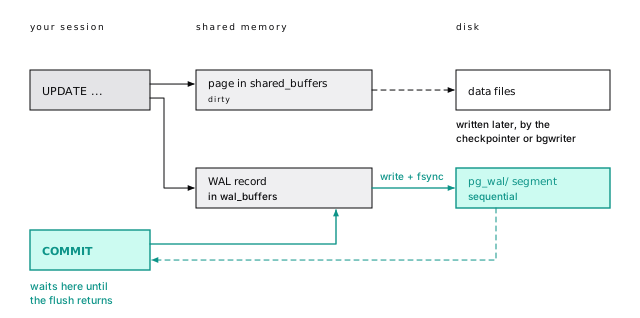
A sequential append is the cheapest durable write there is, and concurrent transactions can share one flush. That second fact explains the opening numbers.
Of the four ACID promises, the WAL keeps durability: a transaction is committed the instant its commit record is safely in the log ([ACID, honestly](/en/09-acid/#basics-chapter-9) takes all four letters apart).
## A WAL record is small; a page image is not
A WAL record says "on block N of relation R, do this", and it's small. Update one row of `wal_demo`, a 200,000-row copy of `events`, and the log gets two records: a 150-byte `HOT_UPDATE` carrying the whole row change, and a 34-byte `COMMIT`, the record your `COMMIT` waits on.
That's the quiet case. When the page hasn't been logged since the last checkpoint (the periodic write of every dirty page, below), the same update also drags in an 8 KB **page image**. On most write workloads, images, not records, are where most of the WAL comes from.
> [!DETAILS]- Deep dive: Reading the records back with pg_walinspect
>
> The `pg_walinspect` extension (PostgreSQL 15+) reads WAL records from SQL. The update changed `kind`, which isn't indexed, so it was HOT ([Keep your updates HOT](/en/07-hot/#basics-chapter-7)):
>
> ```sql
> select resource_manager, record_type, record_length, fpi_length
> from pg_get_wal_records_info(:'before_lsn', pg_current_wal_lsn())
> where xid = :'xid';
> ```
>
> ```text
> resource_manager | record_type | record_length | fpi_length
> ------------------+-------------+---------------+------------
> Heap | HOT_UPDATE | 150 | 0
> Transaction | COMMIT | 34 | 0
> ```
>
> Filter by `xid`: the log is shared by every database in the cluster, so a range of LSNs also holds other sessions' records.
>
> > [!EXAMPLE]- Prove it · lab `07-wal`
> >
> > ```sql
> > select lab.prove(
> > 'the whole row change is one small HOT_UPDATE record (a couple of hundred bytes at most)',
> > exists (select 1 from my_records
> > where record_type = 'HOT_UPDATE' and record_length - fpi_length < 200));
> >
> > select lab.prove(
> > 'the COMMIT record is 34 bytes',
> > exists (select 1 from my_records where record_type = 'COMMIT' and record_length = 34));
> > ```
> >
> > [Full lab script](https://www.flagon.io/books/eight-kilobytes/lab/07-wal.sql)
## LSNs are byte offsets
Every WAL record has an address, its **log sequence number** (LSN): a byte offset into one endless stream, written like `2/8BE4C8B0`. Subtract two LSNs (`pg_wal_lsn_diff()`) and you get bytes of WAL, which is how you'll measure it.
LSNs also enforce the write-ahead rule. Each data page remembers the LSN of the last record that changed it, and Postgres won't write the page until WAL is flushed that far. On disk, the stream is cut into 16 MB **segment files** in `pg_wal/`.
> [!DETAILS]- Deep dive: A WAL file name is a timeline and an LSN
>
> ```sql
> select pg_current_wal_lsn(), pg_walfile_name(pg_current_wal_lsn());
> ```
>
> ```text
> pg_current_wal_lsn | pg_walfile_name
> --------------------+--------------------------
> 2/60C91650 | 000000010000000200000060
> ```
>
> Three hex fields: the timeline (`00000001`, which changes after a failover or point-in-time restore), the high half of the LSN (`00000002`), and the segment within it (`00000060`, which is `0x60C91650` divided by 16 MB). `pg_waldump`, which ships with Postgres, prints the records in those files from the command line, with each block as `rel tablespace/database/relfilenode blk N`.
>
> `pg_current_wal_lsn()` is the current position. Bracket a batch job with two readings and subtract, and you've measured the WAL the whole cluster wrote in that window: the 10,000-row insert below "measured" 1,901 KB on our idle lab kit, and once 5 MB while other databases were busy.
>
> > [!EXAMPLE]- Prove it · lab `07-wal`
> >
> > ```sql
> > select lab.prove(
> > 'WAL is cut into 16 MB segment files',
> > current_setting('wal_segment_size') = '16MB');
> >
> > select lab.prove(
> > 'subtracting two LSNs gives bytes',
> > pg_wal_lsn_diff('0/2000', '0/1000') = 4096);
> > ```
> >
> > [Full lab script](https://www.flagon.io/books/eight-kilobytes/lab/07-wal.sql)
## EXPLAIN shows the WAL a statement writes
`explain (analyze, wal)` (PostgreSQL 13+) runs a statement and reports the WAL it generated. Unlike an LSN diff, it counts only this statement, so other sessions can't skew it:
```sql
explain (analyze, wal, costs off, timing off, buffers off)
insert into wal_demo (id, account_id, project_id, user_id, kind, payload, created_at)
select 3000000 + g, 1, 1, 1, 'login', '{"status":"ok"}', now()
from generate_series(1, 10000) g;
```
```text
Insert on wal_demo (actual rows=0.00 loops=1)
WAL: records=20027 bytes=1934488
...
```
Ten thousand rows, 20,027 records: one heap insert and one primary-key insert per row, plus a few for new pages. About 193 bytes per row, the steady-state price of a table with one index. Each extra index adds a record per row. `explain analyze` really runs the statement, so wrap writes in `begin; ... rollback;`.
For a whole batch job, or a 60-second sample of production, subtract two LSN readings instead. That measures the cluster, not one statement, and it's your WAL rate: the number that sizes replica bandwidth, backup storage, and `max_wal_size`.
> [!DETAILS]- Deep dive: What else the WAL line tells you
>
> The `WAL:` line shows `records`, `bytes`, `fpi` (full-page images, omitted when zero), and `buffers full` (PostgreSQL 18+): how often the WAL buffer filled and a backend had to write it out itself. Occasional is fine; constant means `wal_buffers` is small for your write rate. Across a workload, `pg_stat_statements` tracks `wal_bytes` per query ([Watch it run](/en/31-observability/#basics-chapter-31)).
>
> > [!EXAMPLE]- Prove it · lab `07-wal`
> >
> > ```sql
> > select lab.prove(
> > '10,000 inserted rows write about 20,000 WAL records: one heap and one primary-key insert per row',
> > records between 20000 and 20100) from insert_wal;
> >
> > select lab.prove(
> > 'each extra index adds a WAL record per inserted row (about 30,000 records with two indexes)',
> > records between 30000 and 30200)
> > from (select (lab.plan($$
> > insert into wal_demo (id, account_id, project_id, user_id, kind, payload, created_at)
> > select 5000000 + g, 1, 1, 1, 'login', '{"status":"ok"}', now()
> > from generate_series(1, 10000) g $$) -> 'Plan' ->> 'WAL Records')::bigint as records) r;
> > ```
> >
> > [Full lab script](https://www.flagon.io/books/eight-kilobytes/lab/07-wal.sql)
>
> > [!EXAMPLE]- Prove it · lab `07-wal`
> >
> > ```sql
> > select lab.prove(
> > 'about 1.8 MB of WAL, roughly 190 bytes per row',
> > bytes between 1800000 and 2100000) from insert_wal;
> > ```
> >
> > [Full lab script](https://www.flagon.io/books/eight-kilobytes/lab/07-wal.sql)
## Checkpoints put a limit on recovery
Without checkpoints, crash recovery would replay WAL from the beginning of time. A **checkpoint** writes every dirty buffer to the data files and [fsyncs](/en/43-glossary/#fsync) them. When it finishes, every change before its start (the **redo point**) is safely on disk, so recovery can begin there:
**Figure 8-2.** Recovery starts at the redo point\. A checkpoint begins at its redo point\, writes the dirty pages\, and logs its checkpoint record when done\. Everything before the redo point is already in the data files\, so after a crash\, replay starts there\.
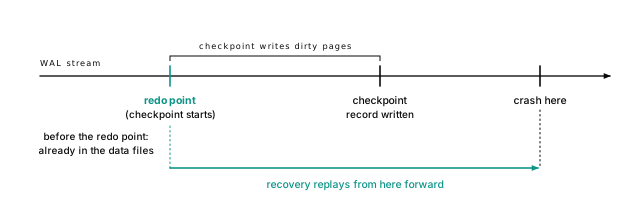
A checkpoint starts when `checkpoint_timeout` elapses (default 5 minutes), or sooner if WAL piles up. `max_wal_size` (default 1 GB) is the WAL Postgres tries to keep between checkpoints, and since a checkpoint's writes are spread out while more WAL arrives, it requests one after a little over half of that: about 540 MB at the defaults.
`pg_stat_checkpointer` (PostgreSQL 17+) counts the first kind as `num_timed` and everything else as `num_requested`, which includes WAL-triggered checkpoints and every manual `CHECKPOINT` command (this chapter's experiments run several). With `log_checkpoints` on, the server log names each one's reason: `time`, `wal`, or `immediate force wait` for a manual one. On a healthy system, timed checkpoints dominate. During a bulk load, `wal` checkpoints are expected. On a steady production workload, raise `max_wal_size` until they're rare.
The checkpointer spreads its writes over 90 percent of the interval (`checkpoint_completion_target`, default 0.9) so it doesn't hammer the disk. Leave it there.
> [!DETAILS]- Deep dive: Where the last checkpoint is, and why it happened
>
> ```sql
> select num_timed, num_requested from pg_stat_checkpointer;
> ```
>
> ```text
> num_timed | num_requested
> -----------+---------------
> 0 | 49
> ```
>
> ```sql
> select checkpoint_lsn, redo_lsn, redo_wal_file from pg_control_checkpoint();
> ```
>
> ```text
> checkpoint_lsn | redo_lsn | redo_wal_file
> ----------------+------------+--------------------------
> 2/424907A0 | 2/20058AA8 | 000000010000000200000020
> ```
>
> That's our lab server after a run of bulk loads and manual `CHECKPOINT`s, never up long enough for a timed one. `num_timed` also counts timed checkpoints skipped because nothing had changed; PostgreSQL 18's `num_done` counts the ones that actually ran.
>
> The redo point is earlier than the checkpoint record because a checkpoint takes a while: it starts at the redo point, writes dirty pages, and logs completion at the end. Before PostgreSQL 17, the counters lived in `pg_stat_bgwriter`. `log_checkpoints` is on by default since PostgreSQL 15, and a "checkpoints are occurring too frequently" hint appears when WAL-triggered ones come closer than `checkpoint_warning` (30 seconds).
## The first change after a checkpoint logs the whole page
Postgres pages are 8 KB, but storage typically guarantees atomic writes of only 4 KB. A power cut mid-write can leave half a new page and half an old one: a **torn page**, which no small "put this tuple at offset 46" record can repair.
So Postgres does something blunt and reliable: **the first time a page changes after a checkpoint, its WAL record includes a complete image of the page**. Recovery restores that **full-page image** (FPI), then applies later records on top. This is `full_page_writes`, on by default. Leave it on.
**Figure 8-3.** Every checkpoint resets the images\. The first change to a page after a checkpoint carries a full 8 KB image of it\; later changes to that page are small records\. After the next checkpoint\, the first change pays again\.
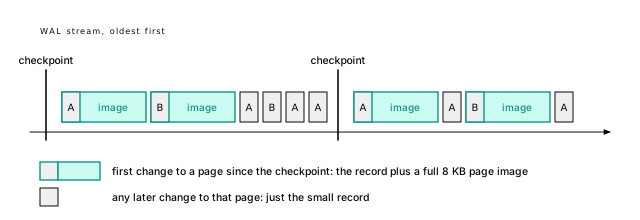
One experiment shows the cost. Checkpoint, update 1,100 rows scattered across `wal_demo`'s 3,759 pages, then run the same update again:
```sql
checkpoint;
explain (analyze, wal, costs off, timing off)
update wal_demo set kind = 'build' where id % 200 = 0;
-- and again: set kind = 'deploy'
```
```text
Update on wal_demo (actual rows=0.00 loops=1)
WAL: records=4037 fpi=2204 bytes=17883448 ...
...
Update on wal_demo (actual rows=0.00 loops=1)
WAL: records=4396 bytes=393614
```
Same rows, same kind of change. Right after the checkpoint: 17.1 MB of WAL, almost all of it 2,204 page images. The second time, with every page already imaged: 384 KB.
That's one forty-fifth of the WAL for the same work.
> [!EXAMPLE]- Prove it · lab `07-wal`
>
> ```sql
> select lab.prove(
> 'right after a checkpoint, updating 1,100 scattered rows writes over 1,000 full-page images',
> first_fpi > 1000) from fpi_test;
>
> select lab.prove(
> 'the second run writes over 10 times less WAL for identical work',
> first_bytes > 10 * second_bytes) from fpi_test;
> ```
>
> [Full lab script](https://www.flagon.io/books/eight-kilobytes/lab/07-wal.sql)
On a live system this makes a sawtooth: WAL jumps after each checkpoint as hot pages get their first images, then decays. Three rules follow:
- **More frequent checkpoints mean more WAL.** Each one resets every page's "already imaged" state. Halving the interval can nearly double the WAL of a random-update workload, which is the main reason to raise `max_wal_size` and `checkpoint_timeout` on write-heavy systems.
- **Scattered writes cost more than clustered ones.** 1,000 updates on 1,000 pages can mean 1,000 images; on 20 pages, 20. Random UUIDv4 keys ([Pick your keys once](/en/13-keys/#basics-chapter-13)) and every index on a cold update ([A cold update pays for every index](/en/07-hot/#a-cold-update-pays-for-every-index)) pay this way.
- **Fewer checkpoints mean longer crash recovery.** That's the trade, below.
### With checksums, even a read writes WAL
A page doesn't even have to change to be imaged. Readers set **hint bits** on a page to cache what they learned about a row's transaction ([A read can write](/en/06-mvcc/#a-read-can-write)). With **[data checksums](/en/43-glossary/#data-checksums)**, on by default since PostgreSQL 18, the first hint-bit change to a page after a checkpoint is logged as a full-page image, or a torn page would fail its checksum. (`wal_log_hints = on` does the same without checksums.)
So a read can write WAL: the first `count(*)` of a freshly loaded 1,667-page table wrote 1,667 page images, about 13 MB. Pay it, because checksums catch silent corruption, but make the burst happen on your schedule ([Vacuum and analyze before you open the doors](/en/27-loading/#vacuum-and-analyze-before-you-open-the-doors)).
> [!DETAILS]- Deep dive: A read that writes 13 MB
>
> ```sql
> show data_checksums; -- on
>
> create table hint_demo (id int, v text) with (autovacuum_enabled = off);
> insert into hint_demo select g, md5(g::text) from generate_series(1, 200000) g;
> checkpoint;
>
> explain (analyze, wal, costs off, timing off)
> select count(*) from hint_demo;
> ```
>
> The insert left every row's commit status unknown on the page. The `select` looks each one up, sets the hint bits, and, being the first change to each page since the checkpoint, logs one image per page.
>
> > [!EXAMPLE]- Prove it · lab `07-wal`
> >
> > ```sql
> > select lab.prove(
> > 'the first plain SELECT of a freshly loaded table after a checkpoint writes a page image per page',
> > fpi >= 0.9 * (select relpages from pg_class where relname = 'hint_demo')) from read_wal;
> >
> > select lab.prove(
> > 'the second SELECT writes no WAL',
> > lab.wal_bytes($$ select count(*) from hint_demo $$) = 0);
> > ```
> >
> > [Full lab script](https://www.flagon.io/books/eight-kilobytes/lab/07-wal.sql)
## wal_compression is a cheap win
If page images are most of your WAL, shrink them. `wal_compression` compresses full-page images (not ordinary records) before they go into the log. It's off by default. We ran the same image-heavy update after a checkpoint, once per setting. Each run followed a warm-up run that leaves the table in the same layout every time; that layout touches fewer pages than the very first run above, so there are fewer images:
| wal_compression | fpi | WAL bytes | vs off |
|-----------------|-------|------------|--------|
| off | 621 | 4,990,834 | 100% |
| lz4 | 619 | 2,927,214 | 59% |
| zstd | 620 | 1,723,491 | 35% |
**Table 8-1.** wal_compression is a cheap win
Same number of images, each smaller. The price is CPU to compress on the writer and to decompress on replicas and in recovery. On any server with real write traffic, turn one on: less WAL I/O, less network to replicas, smaller archives. How well pages compress depends on what's in them, so measure yours.
> [!DETAILS]- Deep dive: How we measured compression
>
> The values are `off`, `pglz` (also accepted as `on`), and `lz4` and `zstd` (PostgreSQL 15+, if the server was built with them). A superuser can set it per session, so you can try each value in one session. After one warm-up run, so every run starts from the same table layout:
>
> ```sql
> set wal_compression = lz4;
> checkpoint;
> explain (analyze, wal, costs off, timing off)
> update wal_demo set kind = 'build' where id % 200 = 0;
> -- repeat with zstd and off
> ```
>
> > [!EXAMPLE]- Prove it · lab `07-wal`
> >
> > ```sql
> > select lab.prove(
> > 'lz4 cuts image-heavy WAL by over a third (under 67% of off)',
> > (select bytes from compression_test where setting = 'lz4')
> > < 0.67 * (select bytes from compression_test where setting = 'off'));
> >
> > select lab.prove(
> > 'zstd cuts it by more than half',
> > (select bytes from compression_test where setting = 'zstd')
> > < 0.5 * (select bytes from compression_test where setting = 'off'));
> > ```
> >
> > [Full lab script](https://www.flagon.io/books/eight-kilobytes/lab/07-wal.sql)
## Commit means flush
Now the opening numbers. With the default `synchronous_commit = on`, `COMMIT` returns only after the WAL through its commit record is written *and fsynced*. That flush is the latency floor of every write transaction. The one-row insert loop under `pgbench`, ten seconds per run:
| synchronous_commit | clients | commits/s | avg latency |
|--------------------|---------|-----------|-------------|
| on | 1 | 130 | 7.7 ms |
| on | 8 | 1,243 | 6.4 ms |
| off | 1 | 16,507 | 0.06 ms |
| off | 8 | 91,740 | 0.09 ms |
**Table 8-2.** Commit means flush
The numbers are from that 7.7 ms VM; good server storage flushes in well under a millisecond ([Where the time goes](/en/03-latency/#basics-chapter-3)). The shape holds everywhere:
- With one client, commits per second is roughly one over the fsync time. The CPU work is noise.
- With eight clients, throughput rose nearly tenfold with no rise in latency. That's group commit.
- Without waiting for the flush, one client is more than a hundred times faster.
> [!EXAMPLE]- Prove it · lab `07-wal`
>
> ```sql
> select lab.prove(
> 'with synchronous_commit = on, 200 commits make this session flush WAL over 100 times (once per commit when the server is quiet)',
> :f1 - :f0 >= 100);
>
> select lab.prove(
> 'with synchronous_commit = off, the same 200 commits wait for no flush at all',
> :f2 - :f1 <= 10);
> ```
>
> [Full lab script](https://www.flagon.io/books/eight-kilobytes/lab/07-wal.sql)
### Many commits share one flush
While one backend waits for its fsync, others queue their commit records behind it, and the next flush covers all of them. One fsync, many commits, nothing to turn on.
For your code, **the number of commits matters more than the number of rows**. 10,000 autocommit inserts cost 10,000 flushes; one transaction costs one ([Every commit waits for the disk](/en/03-latency/#every-commit-waits-for-the-disk)). That's why an ORM import can drop from twenty minutes to twenty seconds when you wrap it in a transaction ([Commit once per batch, not once per row](/en/27-loading/#commit-once-per-batch-not-once-per-row)).
### synchronous_commit = off can lose about 600 ms of commits
With `synchronous_commit = off`, `COMMIT` returns once the commit record is in the WAL buffer, and the WAL writer flushes it within at most three times `wal_writer_delay`: about 600 ms at the default of 200 ms. If the machine crashes, commits that reported success inside that window can vanish ([A real crash took three acknowledged commits](/en/09-acid/#a-real-crash-took-three-acknowledged-commits) watches three of them go). The database comes back consistent, as of a slightly earlier moment, never corrupt.
It can be set per transaction, so keep it on for the payment and turn it off for the analytics event:
```sql
begin;
set local synchronous_commit = off;
insert into events (account_id, project_id, user_id, kind, payload)
values (42, 4242, 7, 'login', '{"region": "iad"}');
commit;
```
Good candidates: telemetry, logs kept elsewhere, caches, heartbeats. Never anything a user was told is done. And don't confuse it with `fsync = off`, which can corrupt the whole cluster ([fsync = off and full_page_writes = off belong only in CI](/en/09-acid/#fsync--off-and-full_page_writes--off-belong-only-in-ci)).
> [!DETAILS]- Deep dive: synchronous_commit has more than two values, and group commit has limits
>
> With replicas, `synchronous_commit` also takes `local` (don't wait for any synchronous standby), `remote_write`, `on`, and `remote_apply`, each waiting for a synchronous standby to reach a further stage. Without synchronous standbys, all of them behave like `local` ([Synchronous commit costs a round trip](/en/38-replication/#synchronous-commit-costs-a-round-trip)).
>
> How much group commit helps depends on the disk: on a busy shared server we've seen closer to 2.5x than 10x. `commit_delay` and `commit_siblings` try to gather more company per flush; on modern hardware they rarely help.
## Recovery only redoes
Suppose the machine loses power. On startup, Postgres finds the last checkpoint's redo point (the diagram above) and replays WAL forward from there. Page images are restored outright, repairing torn writes. Transactions whose commit record made it are committed; the rest count as aborted, their row versions left invisible for vacuum.
Nothing is undone. Recovery only redoes, which is part of why it's reliable.
Recovery time tracks the WAL between the redo point and the crash, which `max_wal_size` roughly bounds. Replaying a gigabyte typically takes seconds; tens of gigabytes, minutes. That's the trade: fewer checkpoints mean fewer page images and a longer restart. A checkpoint every 15 to 30 minutes suits most systems.
> [!DETAILS]- Deep dive: What recovery does, step by step
>
> 1. Read `pg_control` to find the last checkpoint and its redo point.
> 2. Read WAL from the redo point. Restore each full-page image over whatever is on disk. For any other record, skip it if the page's LSN is already newer, otherwise apply it.
> 3. Stop at the end of valid WAL, which a checksum on every record identifies, even after a partial final write.
> 4. Treat transactions with a replayed commit record as committed, the rest as aborted.
> 5. Run a checkpoint and accept connections.
## WAL is the basis of everything else
An ordered log of every change gives you, almost for free:
- **Streaming replication.** A replica is a server in permanent crash recovery, replaying the primary's WAL as it's written ([Copies of the truth](/en/38-replication/#basics-chapter-38)).
- **Point-in-time recovery.** A base backup plus every archived segment after it restores to any moment ([An untested backup is a rumor](/en/32-backups/#basics-chapter-32)).
- **Logical decoding.** With `wal_level = logical`, the WAL carries enough to decode row changes for other databases or queues. `wal_level` needs a restart, so decide early.
> [!NOTE] Coming from MySQL
>
> MySQL keeps a redo log, a binary log, and a doublewrite buffer. Postgres has one log for all three jobs; full-page images play the doublewrite buffer ([Postgres is not MySQL](/en/11-not-mysql/#basics-chapter-11)).
### Three things keep old WAL until the disk fills
Three things make Postgres keep old segments, and each has filled real production disks:
- **A failing archive.** If `archive_command` keeps failing, segments pile up.
- **A replication slot nobody consumes.** A slot keeps WAL until its consumer receives it, and an abandoned one keeps it forever ([Replication slots are a promise to keep WAL](/en/38-replication/#replication-slots-are-a-promise-to-keep-wal)). `max_slot_wal_keep_size` caps it; it's unlimited by default.
- **`wal_keep_size`**, set high on purpose.
```sql
select slot_name, active,
pg_size_pretty(
pg_wal_lsn_diff(pg_current_wal_lsn(), restart_lsn)) as retained_wal
from pg_replication_slots;
```
An inactive slot with a growing `retained_wal` is a disk-full incident in progress. Slots hold back vacuum too ([Vacuum can't remove what an old snapshot might need](/en/10-vacuum/#vacuum-cant-remove-what-an-old-snapshot-might-need)).
> [!DANGER] Never delete files from pg_wal by hand
>
> When WAL fills the disk, don't delete old files from `pg_wal`. If any were still needed for recovery, the database can no longer start. Fix the cause (repair the archive command, drop the abandoned slot, or add disk) and Postgres removes the segments itself at the next checkpoint.
## Find where the WAL comes from before you cut it
When WAL volume is the bottleneck (replicas lag, archives grow, `pg_wal` fills the disk), measure first: `pg_stat_wal` has cluster totals including `wal_fpi`. If page images dominate, fix checkpoints and compression; if not, look at indexes and updates. The levers, roughly in order of impact:
1. **Space checkpoints out** with a bigger `max_wal_size`.
2. **Turn on `wal_compression`.**
3. **Drop unused indexes** ([An idx_scan of zero is a suspect, not a verdict](/en/17-btree/#an-idx_scan-of-zero-is-a-suspect-not-a-verdict)).
4. **Make updates HOT** ([Keep your updates HOT](/en/07-hot/#basics-chapter-7)).
5. **Use keys with locality**: bigint identities or UUIDv7, not random UUIDs.
6. **Don't update rows that didn't change.** A no-op update still writes a row version.
7. **Use unlogged tables for disposable data**, which skip WAL and are emptied after a crash ([Unlogged, then SET LOGGED, moves the WAL](/en/27-loading/#unlogged-then-set-logged-moves-the-wal)).
> [!DETAILS]- Deep dive: Unlogged tables and no-op updates, measured
>
> The same 10,000-row insert into an unlogged copy of `wal_demo` wrote under 1 percent of the logged table's WAL. And `update wal_demo set kind = kind where id <= 1000`, which changes nothing, still wrote over 50,000 bytes: a new version per row, logged.
>
> > [!EXAMPLE]- Prove it · lab `07-wal`
> >
> > ```sql
> > select lab.prove(
> > 'an unlogged table writes almost no WAL: the same 10,000 rows, under 1% of the logged bytes',
> > lab.wal_bytes($$
> > insert into wal_cache (id, account_id, project_id, user_id, kind, payload, created_at)
> > select g, 1, 1, 1, 'login', '{"status":"ok"}', now()
> > from generate_series(1, 10000) g $$)
> > < 0.01 * (select bytes from insert_wal));
> >
> > select lab.prove(
> > 'updating rows to the values they already have still writes WAL',
> > lab.wal_bytes($$ update wal_demo set kind = kind where id <= 1000 $$) > 50000);
> > ```
> >
> > [Full lab script](https://www.flagon.io/books/eight-kilobytes/lab/07-wal.sql)
## The short version
- Every change goes to the WAL before the data page. A commit is durable once its record is flushed, and that flush is the latency floor of every write.
- Measure a statement's WAL with `explain (analyze, wal)`; LSN diffs measure the whole cluster.
- The first change to a page after a checkpoint writes a full 8 KB image: the same 1,100-row update cost 17.1 MB right after a checkpoint and 384 KB a moment later.
- With data checksums (the PostgreSQL 18 default), setting hint bits can write page images too, so even reads can generate WAL.
- Prefer timed checkpoints: raise `max_wal_size` until WAL-triggered ones are rare, and accept a longer crash recovery.
- Turn on `wal_compression = lz4` or `zstd`; it cut image-heavy WAL to 59% and 35% here.
- Commit fewer times, not fewer rows. `synchronous_commit = off` per transaction is a fair trade for disposable writes: you can lose about the last 600 ms, never consistency.
- Watch replication slots and archiving, and never delete files from `pg_wal` by hand.
## Further reading
- [Write-Ahead Logging (WAL)](https://www.postgresql.org/docs/18/wal-intro.html), PostgreSQL documentation. The official statement of the write-ahead rule and what it buys you.
- [WAL configuration](https://www.postgresql.org/docs/18/wal-configuration.html), PostgreSQL documentation. How checkpoints are triggered and paced, and what the checkpoint log lines mean.
- [Write Ahead Log settings](https://www.postgresql.org/docs/18/runtime-config-wal.html), PostgreSQL documentation. Every knob in this chapter: `full_page_writes`, `wal_compression`, `synchronous_commit`, checkpoints.
- [Asynchronous commit](https://www.postgresql.org/docs/18/wal-async-commit.html), PostgreSQL documentation. Exactly what you can lose with `synchronous_commit = off`, and how it differs from `fsync = off`.
- [src/backend/access/transam/README](https://github.com/postgres/postgres/blob/master/src/backend/access/transam/README), PostgreSQL source. The developers' own description of WAL, checkpoints, and the write-ahead rule.
- [ARIES: A Transaction Recovery Method](https://people.eecs.berkeley.edu/~brewer/cs262/Aries.pdf), Mohan et al., ACM TODS, 1992. The classic paper on write-ahead recovery; Postgres takes the redo-only corner of the design space it maps.