2 Know the nouns first
This book argues about pages, plans, and locks. Those arguments assume some SQL and a handful of Postgres nouns. If you’ve written select, insert, and update against Postgres and know what a schema is, skim the headings below and move on; you lose nothing. If you haven’t, this primer is your crash course: the least you need to follow every chapter after it.
Fair warning about what comes next: the rest of the book assumes everything here and goes deep fast, down to the bytes on disk, because that’s where the answers to “why is this slow?” live. Every claim in this chapter runs against the lab server, like the rest of the book, so even the basics come with proof.
A table is rows that share the same columns
Postgres keeps your data in tables. A table has named, typed columns, and every row holds one value for each column, or NULL, which means “no value” (not zero, and not an empty string). Here’s the book’s biggest table, events:
Read it line by line and you’ve met most of what a schema says. bigint is a large integer, text is a string of any length, jsonb is a JSON document, and timestamptz is a moment in time. not null forbids NULL, and default fills in a value when you don’t give one. The id is the primary key: a value no other row shares, which Postgres numbers for you, so any row can be found by it. Each references line is a foreign key: account_id must name a row that exists in accounts.
events holds two million rows, every one with the same seven columns. A table is the shape; the rows are the data.
Prove it · lab 01-basics
SELECT asks, and changes nothing
You read with select. Name the columns you want, the table they come from, and a where clause that keeps only the rows you care about; order by sorts them and limit stops early:
Two more words cover most reports. count(*) counts rows, and group by counts them per value:
A select never changes anything. It doesn’t even take a transaction ID (XID), the number Postgres stamps on every change. That doesn’t make it free. The whole book is about how many pages a select has to read to answer you.
Prove it · lab 01-basics
INSERT adds a row, and in Postgres so does UPDATE
Three statements change data. insert adds rows, update changes them, and delete removes them. Here they are on notes, a scratch table with an id and a body:
Always give update and delete a where. Without one, they apply to every row in the table, and Postgres won’t ask whether you meant it.
Here’s the first thing that makes Postgres Postgres. An update doesn’t change the row where it sits. It writes a complete new copy of the row, on the same page if there’s room, and marks the old copy as replaced. A delete marks the row dead and leaves it in place. Both old copies stay on the page until vacuum, a background cleanup, clears them. On a one-row table, one update left two copies on the page, and after the delete there were still two copies of a row the table no longer has.
That one fact explains why tables grow, why vacuum exists, and why a busy table can be twice the size of its data. The book calls it Updates are inserts, and it comes back in nearly every chapter.
Prove it · lab 01-basics
JOIN puts the tables back together
A good schema stores each fact once: a user’s email lives in users, an account’s plan in accounts. A join brings them back together by matching rows across tables, almost always on a foreign key:
The u and a are short names for the tables, and on says which rows match: here, the account whose id is the user’s account_id. User 295 belongs to account 296. A plain join keeps only rows that match on both sides; left join keeps every row on the left, with NULLs where nothing matched.
Prove it · lab 01-basics
An index makes one read cheap and every write dearer
Ask for one user by email, and without help Postgres reads the whole users table to find it: 1,126 pages for one row. (The unique (account_id, email) constraint has an index, but it’s sorted by account first, so finding an email through it means searching it once per account, and the planner reads the table instead.) An index is a separate, sorted structure that points at rows, like the index at the back of a book. Build one on email and the same lookup reads 4 pages:
Indexes aren’t free. Every insert, and every update that changes an indexed column, has to update each index too. So index the columns your queries actually search on, not every column you have. The B-tree does the heavy lifting shows how an index finds a row in a handful of pages.
Prove it · lab 01-basics
That’s enough SQL to follow the book. The rest of this chapter is the server underneath it.
One server runs many databases, and they don’t share tables
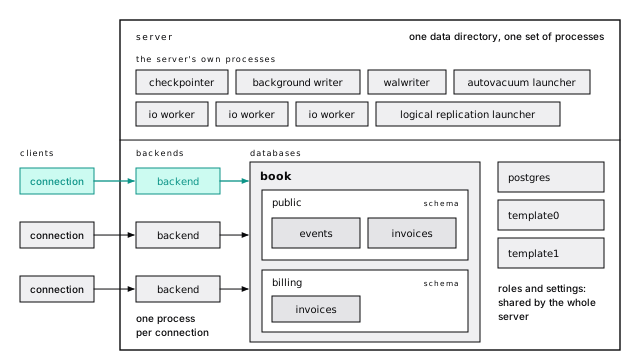
A Postgres server is one data directory and the processes running on it. The documentation calls it a cluster, which has nothing to do with several machines; it’s one server. It holds many databases. The lab server has four:
A connection picks one database and sees only that one. Try to read another and Postgres refuses:
That’s a design decision, not a missing feature: each database has its own tables, its own catalog, and its own extensions. Roles, tablespaces, and the server’s configuration file are the exceptions, shared by the whole server. If two parts of your app need to join their data, they belong in one database, in two schemas.
create database copies template1 unless you name another template; template0 is a pristine spare. The lab marks book as a template too, which is why create database scratch template book is far cheaper than loading the data again.
Prove it · lab 01-basics
Every connection is its own process
When your app connects, the server starts a new operating-system process to serve it, a backend, and that process lives until the connection closes. Ten connections are ten processes, each with its own memory. That one fact explains why connections are expensive, why max_connections is a ceiling and not a capacity, and why every production app ends up behind a pooler (Connections aren’t free).
The server runs its own processes too. On the lab server, beside the one client:
Most of the book is about what those do: the WAL writer flushes the write-ahead log in the background, the checkpointer and background writer write changed pages back to their files, the autovacuum launcher starts vacuum workers, and the io workers (PostgreSQL 18+) do reads on the backends’ behalf.
Prove it · lab 01-basics
Schemas are folders, and search_path picks the one you meant
Inside a database, tables live in schemas: named folders, one level deep. Every new database has one called public, and if you’ve never created another, everything you own is in it. public.invoices and billing.invoices are two different tables.
When you write a bare invoices, Postgres looks through the schemas named in search_path, in order, and uses the first match. Put billing first and the same query reads a different table. That’s convenient for organizing a big schema. It’s also how a function can end up calling something you didn’t write, which is why the security chapter pins search_path on every function that runs with elevated rights.
Prove it · lab 01-basics
A role is a user, a group, or both
Postgres has one kind of principal, the role. A role with the LOGIN attribute is what you’d call a user; a role without it is a group; and any role can be a member of another and inherit its privileges. Every table has an owner role, which can do anything to it, and every other role gets only what it’s granted.
The habit to build now: your application should connect as a role that owns nothing and isn’t a superuser, so a bug in the app can’t drop a table. Trust no tenant shows the setup.
Prove it · lab 01-basics
Every statement runs in a transaction
Postgres never runs a statement outside a transaction. Send one update on its own and Postgres wraps it in a transaction that commits when the statement finishes; that’s autocommit, and it’s what your driver does unless you say begin. Two statements sent that way are two transactions, each paying for its own commit.
Inside begin and commit, everything lands together or not at all, and in Postgres “everything” includes schema changes. A create table rolled back is gone, so a migration that runs in one transaction and fails leaves nothing half-done (ACID, honestly). It also means a long transaction holds everything it touched, locks included, until it ends. You’ll meet that open transaction again and again in this book.
Prove it · lab 01-basics
The server describes itself in tables
Everything Postgres knows about your schema lives in ordinary tables you can query, the system catalog. pg_class lists every table and index, pg_attribute their columns, pg_roles the roles, pg_settings every setting. The pg_stat_ views count what the server has been doing. psql’s backslash commands, like \d events, are queries over these tables.
The catalog already counts pages for you:
That’s the planner’s picture of events: 35,173 pages and about two million rows, updated by vacuum and analyze. That page count is the number this whole book keeps returning to.
Prove it · lab 01-basics
A setting has a value, a source, and a scope
Postgres has a few hundred settings, like work_mem, the memory one sort may use (4 MB by default). Each one has a value, a place that value came from, and a scope. The configuration file sets the server’s default. alter database and alter role override it for one database or one role. set changes it for your session, and set local for one transaction, after which it snaps back.
You’ll use the narrow scopes most. A report that needs more memory for one big sort should set local work_mem inside its transaction, not raise it for every connection on the server. show work_mem reads the current value, and pg_settings tells you where it came from (The settings that matter).
Prove it · lab 01-basics
Extensions arrive with one command
An extension adds types, functions, operators, or index methods to one database with create extension. Some ship with Postgres (the “contrib” modules); others you install on the server first. The lab database has the five this book leans on: pg_stat_statements to rank queries, pageinspect to read raw pages, pgstattuple and pg_buffercache to measure tables and the cache, and pg_trgm for text search.
Managed services allow a fixed list, so check it before you design around one (Extensions worth knowing).
Prove it · lab 01-basics
Your data is files you never touch
Under it all, every table and index is a file in the server’s data directory, named by numbers, not by your table names:
288,137,216 bytes is 35,173 pages of 8,192 bytes, the same count the catalog gave. Postgres reads and writes those files a page at a time, and that’s where the rest of the book begins. Everything is a page opens one up.
Never edit, copy, or delete anything in the data directory by hand, least of all pg_wal. The server is the only thing that understands those files, and a copy taken from under a running server is not a backup.
Prove it · lab 01-basics
A handful of psql commands cover this book
Every example in the book ran in psql, the command-line client that ships with Postgres. GUI clients work fine, but a handful of backslash commands are worth knowing by heart:
| Command | Does |
|---|---|
\d name | describes a table: columns, indexes, constraints |
\dt, \di, \dn, \du | lists tables, indexes, schemas, roles |
\x | prints wide rows vertically, one column per line |
\timing | prints each statement’s time |
\e | opens the last query in your editor |
Add \? for the rest. When a backslash command shows you something useful, \set ECHO_HIDDEN on prints the catalog query behind it, which is the fastest way to learn the catalog.
The short version
- A table is rows that share typed columns. The primary key finds a row; a foreign key points at one in another table.
selectreads and changes nothing. In Postgres anupdatewrites a new copy of the row, and adeleteleaves the old row in place, until vacuum clears them.- An index turned 1,126 pages into 4 for one lookup, and every write pays to keep it current.
- One server holds many databases that can’t query each other; inside one, schemas are folders and
search_pathpicks among them. Roles are shared by the whole server, and apps should connect as one that owns nothing. - Every connection is a process with its own memory, which is why connections cost what they do.
- Every statement runs in a transaction. Schema changes roll back too, and an open transaction holds what it touched.
- The catalog is queryable tables, settings have scopes (use the narrowest), and tables are files of 8 KB pages you never touch by hand.
Further reading
- The SQL Language, PostgreSQL documentation. The manual’s own tutorial: tables, queries, joins, and updates, one short page each.
- Architectural Fundamentals, PostgreSQL documentation. The two-page version of the process model, from the tutorial.
- Schemas, PostgreSQL documentation. Schemas,
search_path, and the usage patterns the manual recommends. - Database Roles, PostgreSQL documentation. Roles, attributes, and membership.
- System Catalogs, PostgreSQL documentation. Every catalog table, column by column, for when
\disn’t enough. - psql, PostgreSQL documentation. Every backslash command and variable.