# 权威数据的副本
> 建立流复制副本,测量复制延迟,算清同步提交的成本,安全地路由读取,避免故障切换时脑裂,并使用逻辑复制。
---
LLMS 索引: [llms.txt](/llms.txt)
---
我们把一个备库放在与主库相隔五毫秒的地方,设为同步,再用一个客户端逐行插入。每秒提交数从 757 降到了 136。随后停掉备库,设置三秒的 `statement_timeout`,再执行一次插入。它等了两分八秒,直到我们手动取消;而返回时,这一行竟然已经提交了。
副本是换更大机器之后的第一个台阶。它不是缓存,不是备份,也不是第二个主库,而是主库页面的拷贝,总会稍微落后一点。本章就讲这一点:落后多少、缩小差距要花什么代价,以及落在这个差距里的读取和数据会怎样。(所有演示都在三个可随时销毁的容器上运行:一个主库、一个副本和一个逻辑订阅端。)
## 副本是一台始终处于恢复中的服务器 {#a-replica-is-a-server-stuck-in-recovery}
崩溃后,Postgres 会把上个检查点之后的 WAL 重新应用到数据页上([先记日志,再写数据](/08-wal/#basics-chapter-8))。流复制(streaming replication)的副本一直都在做这件事,只是 WAL 从网络传来。
**图 38-1.** 副本始终重放主库的 WAL。walsender 把 WAL 流传给备库的 walreceiver,startup 进程将其重放到页面中,备库再把自己的 LSN 位置报告给 pg\_stat\_replication。它接受读取,以 25006 拒绝写入。
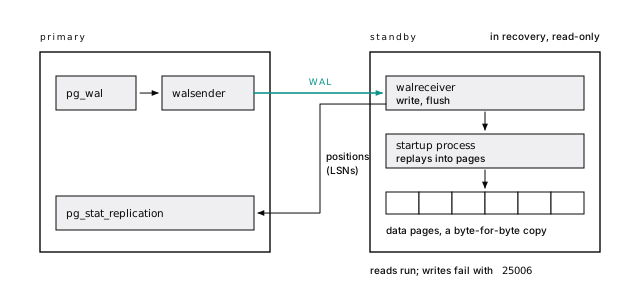
备库用 **LSN** 报告进度,即 WAL 流中的字节偏移量([LSN 是字节偏移量](/08-wal/#lsns-are-byte-offsets))。重放物理 WAL,使它成为整个集簇逐字节一致的拷贝:不能只复制单张表,不能给副本单独加索引,也不能混用版本。这些都该交给[逻辑复制](#logical-replication-copies-rows-not-pages)。
它接受读取,拒绝任何写操作,连临时表也不例外,返回 SQLSTATE `25006`。在生产日志中,这个代码意味着某次写入被路由到了副本,或者故障切换把你的“主库”降级了。
> [!NOTE] 从 MySQL 转过来
>
> MySQL 副本重放逻辑 binlog,并且可以写入。Postgres 流复制副本重放的是页面:模式完全相同,不允许写入。类似 binlog 的功能是逻辑复制([Postgres 不是 MySQL](/11-not-mysql/#basics-chapter-11))。
> [!DETAILS]- 深入阅读:热备拒绝哪些操作
>
> ```text
> ERROR: cannot execute INSERT in a read-only transaction
> ERROR: cannot execute CREATE TABLE in a read-only transaction
> ERROR: cannot execute ANALYZE during recovery
> ERROR: cannot execute pg_current_xact_id() during recovery
> ```
>
> 上面依次是 `insert`、`create temp table`、`analyze` 和 `select txid_current()` 的结果(最后一个函数是 `pg_current_xact_id()` 的旧名称,所以错误里用的是新名称)。开启详细错误信息后,第一个错误是 `ERROR: 25006: cannot execute INSERT in a read-only transaction`;`25006` 对应 `read_only_sql_transaction`,应用可以捕获它。
>
> > [!EXAMPLE]- 动手验证 · lab `37-replication.sh`
> >
> > ```bash
> > prove "not even a temp table" \
> > has "$(err replica 'create temp table t (id int)')" "ERROR: 25006: cannot execute CREATE TABLE in a read-only transaction"
> > ```
> >
> > [完整实验脚本](https://www.flagon.io/books/eight-kilobytes/lab/37-replication.sh)
## 一条命令,把主库复制成备库 {#one-command-copies-a-primary-into-a-standby}
托管服务里,创建副本只需点一个按钮。手动操作时,需要 `wal_level` 至少为 `replica`(默认值),还要有一个带 `replication` 属性、获准通过 `pg_hba.conf` 连接的角色,然后用一条命令复制数据目录,建成备库:
```bash
pg_basebackup -h repl-primary -U replicator \
-D /var/lib/postgresql/18/docker \
-X stream -R -P -v \
--slot=replica1 --create-slot \
-d 'application_name=replica1'
```
`-R` 写入备库设置,`--slot` 与 `--create-slot` 一起创建复制槽(下一节详述),`application_name` 则是备库在各处显示的名称:每个备库都要命名。
> [!DETAILS]- 深入阅读:-R 写了什么,以及我们等的那个检查点
>
> 复制连接用数据库名 `replication` 匹配 `pg_hba.conf`,而不是 `all`。我们第一次运行 `pg_basebackup`,在“waiting for checkpoint to complete”处停了两分多钟:默认请求的检查点会把写入分摊到一段时间内。如果不想等,就加上 `--checkpoint=fast`。`-R` 向 `postgresql.auto.conf` 追加了以下内容:
>
> ```ini
> primary_conninfo = 'user=replicator password=replpw ... host=''repl-primary''
> port=5432 application_name=replica1 sslmode=prefer ...'
> primary_slot_name = 'replica1'
> ```
>
> 密码以明文保存在数据目录中;生产环境要用 `.pgpass` 或证书。副本启动后记录如下日志:
>
> ```text
> LOG: entering standby mode
> LOG: consistent recovery state reached at 0/508CA38
> LOG: database system is ready to accept read-only connections
> LOG: started streaming WAL from primary at 0/6000000 on timeline 1
> ```
>
> 到了“consistent”,它已经重放到备份结束位置之后,可以安全读取了。
>
> > [!EXAMPLE]- 动手验证 · lab `37-replication.sh`
> >
> > ```bash
> > auto=$(compose exec -T replica bash -c 'test -f "$PGDATA/standby.signal" && echo SIGNAL; cat "$PGDATA/postgresql.auto.conf"' | tr -d '\r')
> > prove "-R wrote standby.signal" has "$auto" "SIGNAL"
> > prove "--slot with --create-slot recorded primary_slot_name" has "$auto" "primary_slot_name = 'replica1'"
> > ```
> >
> > [完整实验脚本](https://www.flagon.io/books/eight-kilobytes/lab/37-replication.sh)
## 复制槽承诺保留 WAL {#replication-slots-are-a-promise-to-keep-wal}
**复制槽**(replication slot)是主库对某个消费者进度的记录,只要复制槽还需要某段 WAL,主库就不会回收它。有了复制槽,副本停机一小时也能追上。没有复制槽,副本落后太多后,就会发现所需 WAL 已被回收,只能重建。
默认情况下,这个承诺没有期限。我们的副本停机后,运行二十秒 pgbench,就让它的复制槽保留了 173 MB。一个被遗忘的复制槽会持续保留 WAL,直到磁盘写满,而 `pg_wal` 写满会让主库停摆。用 `max_slot_wal_keep_size`(PostgreSQL 13+)设上限后,被遗忘的槽会被标成 `lost`,主库则继续运行。花几分钟重新克隆副本,总比主库磁盘写满好。
> [!DANGER] 每个复制槽都要有负责人和告警
>
> 在每个使用复制槽的主库上,把 `max_slot_wal_keep_size` 设得远低于磁盘容量。对不活跃的槽和保留的 WAL 量设告警。下线副本或订阅端时,在同一次变更中移除它的槽。
> [!DETAILS]- 深入阅读:复制槽保留 WAL,随后因超过上限而失效
>
> ```sql
> select slot_name, active, inactive_since, wal_status,
> pg_size_pretty(pg_wal_lsn_diff(pg_current_wal_lsn(), restart_lsn))
> as retained
> from pg_replication_slots;
> ```
>
> ```text
> slot_name | active | inactive_since | wal_status | retained
> -----------+--------+-------------------------------+------------+----------
> replica1 | f | 2026-10-06 03:31:14.019976+00 | reserved | 173 MB
> ```
>
> 一个名为 `forgotten` 的槽没有消费者,上限为 256 MB。它先处于 `unreserved` 状态(保留 327 MB,`safe_wal_size` 为 -71 MB),下一个检查点后变成了以下状态(实验用更小的规模重现:100 MB 对 64 MB 上限):
>
> ```text
> slot_name | active | wal_status | restart_lsn | invalidation_reason
> -----------+--------+------------+-------------+---------------------
> replica1 | t | reserved | 0/8D6EAA48 |
> forgotten | f | lost | | wal_removed
> ```
>
> `invalidation_reason` 和 `inactive_since` 从 PostgreSQL 17 起提供;PostgreSQL 18 又增加了 `idle_replication_slot_timeout`,让空闲过久的槽失效(默认关闭)。带有 `xmin` 的槽(来自后文的 `hot_standby_feedback`)还会阻碍[清理](/10-vacuum/#basics-chapter-10)。
>
> > [!EXAMPLE]- 动手验证 · lab `37-replication.sh`
> >
> > ```bash
> > # ... create slot "forgotten", write 100 MB, cap at 64 MB, checkpoint
> > prove "after a checkpoint, the slot is lost: invalidation_reason wal_removed" \
> > wait_for 30 primary "select wal_status = 'lost' and invalidation_reason = 'wal_removed'
> > from pg_replication_slots where slot_name = 'forgotten'"
> > prove "the replica's own slot is untouched: active and reserved" \
> > is "$(on primary -c "select active, wal_status from pg_replication_slots where slot_name = 'replica1'")" "t|reserved"
> > ```
> >
> > [完整实验脚本](https://www.flagon.io/books/eight-kilobytes/lab/37-replication.sh)
## 四个 LSN,指出备库落后在哪里 {#four-lsns-show-where-a-standby-falls-behind}
主库上的一个视图就能告诉你每个备库落后多少。`pg_stat_replication` 为每个已连接的备库保留一行,四个位置按处理顺序排列:`sent_lsn`(已发送)、`write_lsn`(已写入备库操作系统)、`flush_lsn`(已持久化到备库磁盘)、`replay_lsn`(已应用,查询可见)。`flush_lsn` 与 `replay_lsn` 之间有差距,意味着重放落后了,这是最常见的情况。按字节计的延迟为 `pg_wal_lsn_diff(pg_current_wal_lsn(), replay_lsn)`,`replay_lag` 则用时间表达这种延迟。
最重要的告警,是某个备库从视图中消失:它根本没有连接。
> [!DETAILS]- 深入阅读:备库这一端,以及空闲时会说谎的延迟时钟
>
> 主库空闲后,`*_lag` 列变成 NULL,意思是“无从测量”,不是“坏了”。在备库上,`pg_stat_wal_receiver` 展示同一个连接(没有行就表示已断开)。备库上的 `now() - pg_last_xact_replay_timestamp()` 是人们容易理解的延迟,但只要主库空闲,它就会一直增长;应按字节延迟告警,或者每隔几秒写一次心跳,让这个时间值反映实际情况。
### 延迟随 WAL 量变化 {#lag-follows-wal-volume}
16 个 pgbench 客户端运行时(每秒约 2,070 个事务),副本落后的数据量一直是 KB 级,最差的采样为 31 ms。一次覆盖 120 万行的批量 `update`,在 9.8 秒内产生了 574 MB WAL,副本最多落后 24 MB、0.7 秒,在更新结束半秒后追上。(实验用 400,000 行重现。)这是共享笔记本磁盘上测得的下限,不是预测,但趋势可以借鉴:延迟随 WAL 量变化,所以批量工作要分批做([大批量加载会触发检查点并淹没副本](/27-loading/#a-big-load-forces-checkpoints-and-floods-replicas))。
> [!DETAILS]- 深入阅读:批量更新期间的延迟采样
>
> 每半秒采样一次:先是发送、刷盘和重放位置落后的字节数,再是 `replay_lag`;前三项用 `pg_wal_lsn_diff(pg_current_wal_lsn(), ...)` 根据 `pg_stat_replication` 中的位置计算:
>
> ```text
> sampled | sent | flush | replay | replay_lag
> --------------+---------+---------+---------+-----------------
> 03:18:16.194 | 0 bytes | 0 bytes | 0 bytes | 00:00:00.001356
> 03:18:19.694 | 8192 kB | 16 MB | 24 MB | 00:00:00.687615
> 03:18:26.194 | 0 bytes | 0 bytes | 0 bytes | 00:00:00.097072
> ```
>
> > [!EXAMPLE]- 动手验证 · lab `37-replication.sh`
> >
> > ```bash
> > # sample pg_stat_replication while "update commit_test set n = n + 1" (400,000 rows) runs
> > prove "during the burst, the replica fell behind" gt "$maxlag" 0
> > prove "after it, the lag closes: the replica replays to the primary's position" caught_up
> > ```
> >
> > [完整实验脚本](https://www.flagon.io/books/eight-kilobytes/lab/37-replication.sh)
### 重放只有一个进程 {#replay-is-one-process}
主库的所有后端进程同时生成 WAL;备库却用单个 startup 进程按顺序逐条应用。直到 PostgreSQL 18,都没有并行重放。所以,主库用几十个核心写入,产生 WAL 的速度可能超过单个核心的应用速度,之后无论副本多大,重放延迟都会持续增长:增加备库核心数没有用,因为只有单个核心的速度及其背后的存储性能起作用。解法在主库一侧:少写 WAL(批量工作分批做、删除不用的索引、为整页镜像开启 `wal_compression`),或把写入拆到多个主库上([所有写入都汇入同一条 WAL 流](/37-scale/#every-write-funnels-into-one-wal-stream)给出了具体数据量)。对正常负载下持续上升的 `replay_lag` 告警:这是单个主库开始超出副本承受能力的第一个信号。
## 默认使用异步复制,可能丢失已提交的事务 {#asynchronous-is-the-default-and-it-can-lose-commits}
延迟带来的不只是读到旧数据。默认情况下,WAL 在主库刷盘后,提交就会返回;副本几毫秒后才收到。如果主库在这个窗口内故障,而你提升了一个副本,应用已经看到成功的提交也会丢失([这里持久,不等于处处持久](/09-acid/#durable-here-is-not-durable-everywhere))。对大多数应用来说,这可以接受。把它写成恢复点目标(RPO),参见[先写下 RPO 和 RTO](/32-backups/#write-down-rpo-and-rto-first)。如果答案是“已提交事务零丢失”,你就需要同步复制,并承担它的代价。
## 同步提交要付出一次往返 {#synchronous-commit-costs-a-round-trip}
同步复制(synchronous replication)让提交等待,直到 `synchronous_standby_names` 指定的某个备库确认;`synchronous_commit` 则规定它必须推进到哪一步。同步备库相隔 5 ms、一个客户端逐行插入时:
| `synchronous_commit` | 满足什么条件后提交返回 | 平均延迟 | 提交数/秒 |
|---|---|---|---|
| `off` | WAL 在主库内存中 | 0.051 ms | 19,571 |
| `local` | 在主库刷盘 | 1.32 ms | 757 |
| `remote_write` | ……并且在备库写入 | 6.41 ms | 156 |
| `on` | ……并且在备库刷盘 | 7.35 ms | 136 |
| `remote_apply` | ……并且在备库重放 | 7.62 ms | 131 |
**Table 38-1.** 同步提交要付出一次往返
关键的跃升是从 `local` 到 `remote_write`:五毫秒,一次往返。在同一可用区内,它会缩短到接近一毫秒;跨大陆时,每次提交都要付出 60 ms 或更多。换成 16 个客户端,[组提交](/43-glossary/#group-commit)(group commit)可以共用往返,`on` 损失的吞吐量就从六分之五降到了一半。
不必处处都付这个代价。按事务设置,让付款等待备库,而页面浏览日志不等:
```sql
begin;
set local synchronous_commit = on; -- waits for the standby's flush
insert into payments ...;
commit;
```
`on` 已经足以满足持久性要求。`remote_apply` 贵一点,换来的是另一样东西:提交返回时,备库上已经能看到这一行。这对[写后读](#after-a-write-a-replica-can-show-the-old-value)很重要。
> [!DETAILS]- 深入阅读:如何测量往返,以及 FIRST 与 ANY 的区别
>
> 我们设置了 `synchronous_standby_names = 'FIRST 1 (replica1)'`,在备库加上 `tc qdisc ... netem delay 5ms`,按连接改变设置:每个级别十秒,跑五轮,取中位数(本地刷盘噪声较大,在 1.1 至 2.8 ms 之间)。16 个客户端时,`local` 每秒提交 1,708 次,延迟 9.37 ms;`on` 为 854 次、18.73 ms。应用并发越低,受影响越大,比如逐行提交的批处理任务。
>
> 未配置同步备库时,`remote_write`、`on` 和 `remote_apply` 的行为都与 `local` 相同,所以 `on` 是安全的默认值。`set local synchronous_commit = off` 则走向另一端,适合崩溃时可以丢失的写入([synchronous_commit = off 可能丢失约 600 ms 内的提交](/08-wal/#synchronous_commit--off-can-lose-about-600-ms-of-commits))。
>
> 这个列表指定一个数量,可按优先级或法定人数(quorum)选择:
>
> ```ini
> synchronous_standby_names = 'FIRST 1 (replica1, replica2)'
> synchronous_standby_names = 'ANY 1 (replica1, replica2, replica3)'
> ```
>
> 使用 `FIRST` 时,`replica2` 要到 `replica1` 消失后才成为同步备库。使用 `ANY` 时,每次提交等待最先响应的那个,能减轻单个慢备库的影响;但故障切换时,工具必须判断哪个备库拥有全部提交。
>
> > [!EXAMPLE]- 动手验证 · lab `37-replication.sh`
> >
> > ```bash
> > # No injected delay in the lab, so it times off against local, then proves the mechanism.
> > prove "off is far cheaper than local: no flush at all (over 5 times faster)" gt "$(median local)" "$(awk -v x="$(median off)" 'BEGIN { print 5 * x }')"
> > on replica -c "select pg_wal_replay_pause()"
> > prove "with replay paused, a remote_apply commit waits (wait event SyncRep)" \
> > is "$(on primary -c "select count(*) from pg_stat_activity
> > where wait_event = 'SyncRep' and query like '%remote_apply%'")" 1
> > ```
> >
> > [完整实验脚本](https://www.flagon.io/books/eight-kilobytes/lab/37-replication.sh)
### 同步备库消失,写入就停了 {#when-the-synchronous-standby-goes-away-writes-stop}
这才是会咬人的地方。我们停掉同步备库,设置 `statement_timeout = '3s'` 后执行一次插入。它卡在等待事件 `SyncRep` 上,超时一直没触发。两分钟后,我们取消了它:
```text
WARNING: canceling wait for synchronous replication due to user request
DETAIL: The transaction has already committed locally, but might not have been
replicated to the standby.
INSERT 0 1
Time: 128415.478 ms (02:08.415)
```
把 DETAIL 再读一遍。开始等待之前,提交就已经写到了本地,因此取消也撤不回去:这一行确实存在,但因超时而放弃的客户端却认为写入失败。每次写入都会这样排队,直到有同步备库回来。
> [!WARNING] 一个同步备库,意味着两个故障点
>
> 只有一个同步备库时,任一服务器失联都会让写入停止。应运行两个候选备库(`FIRST 1 (a, b)` 或 `ANY 1 (a, b)`),监控 `sync_state`(见 `pg_stat_replication`)并设告警,还要提前决定故障切换时是否允许降级为异步。
> [!DETAILS]- 深入阅读:为什么超时没触发,以及实验验证
>
> `statement_timeout` 管的是语句执行,Postgres 会在提交开始前将其解除。等待同步备库发生在提交过程中,此时提交记录已经在本地刷盘,所以你设的超时无法打断这段等待。`pg_cancel_backend()` 或客户端取消,会结束等待并给出上面的警告;`pg_terminate_backend()` 会结束会话,但它们都撤不回提交。因此解决办法是增加第二个候选备库,而不是缩短超时。实验停掉备库,在后台发起插入,六秒后检查。
>
> > [!EXAMPLE]- 动手验证 · lab `37-replication.sh`
> >
> > ```bash
> > compose stop replica
> > bg "$tmp/hang.txt" primary -c "set statement_timeout = '3s'" -c "insert into accounts (name) values ('Waits for the standby')"
> > sleep 6
> > prove "the insert hangs past its 3 s statement_timeout, waiting on SyncRep" \
> > is "$(on primary -c "select wait_event_type || ' ' || wait_event, now() - query_start > interval '3 seconds'
> > from pg_stat_activity where wait_event = 'SyncRep'")" "IPC SyncRep|t"
> > on primary -c "select pg_cancel_backend(pid) from pg_stat_activity where wait_event = 'SyncRep'"
> > prove "the row exists" is "$(on primary -c "select count(*) from accounts where name = 'Waits for the standby'")" 1
> > ```
> >
> > [完整实验脚本](https://www.flagon.io/books/eight-kilobytes/lab/37-replication.sh)
## 只读副本扩展读取,不扩展写入 {#read-replicas-scale-reads-not-writes}
每个副本都要重放每次写入,因此副本不会增加写入容量,还会继承主库的膨胀、缺失索引和慢查询。读取 35,000 页的查询,在副本上也得读 35,000 页。先修查询([先纵向扩容,再横向扩展](/37-scale/#basics-chapter-37))。
当读取确实是瓶颈时,副本可以承担那些容忍稍微落后的读取:仪表盘、搜索、导出和报表。在应用中路由,建两个连接池,在每个调用点明确选择。靠猜的代理,会被调用写入函数的 `select` 骗过。
### 写入之后,副本可能仍显示旧值 {#after-a-write-a-replica-can-show-the-old-value}
经典的副本问题:用户改了名字,重定向后从尚未重放更新的副本读取,又看到了旧名字,于是再改一次,客服就收到了一张工单。(我们暂停重放复现了它:副本已经*收到*更新,却尚未*重放*。)解决办法由简到繁如下:
1. **写入后几秒内固定读主库**。对大多数应用已经足够。
2. **按需求路由**:凡是展示用户刚刚操作结果的内容,都读主库。
3. **等待 LSN**:写入提交后,用一条独立语句读取 `pg_current_wal_lsn()`,携带这个值;等副本的 `pg_last_wal_replay_lsn()` 越过它后再读副本,否则回退到主库。必须在提交之后取,不能在事务内取(`returning pg_current_wal_lsn()` 太早):提交记录出现在 WAL 的更后面,副本即使越过了前一个 LSN,也仍可能看不到这一行。
4. **`remote_apply`**:对少数值得付出这个代价的写入,按事务设置。
> [!DETAILS]- 深入阅读:读到旧值,以及解决它的 LSN 检查
>
> 更新提交后,在主库执行 `select pg_current_wal_lsn()`,返回 `0/9FAFAB90`。副本暂停重放时的状态如下:
>
> ```text
> pg_last_wal_receive_lsn | pg_last_wal_replay_lsn | pg_is_wal_replay_paused
> -------------------------+------------------------+-------------------------
> 0/9FAFAB90 | 0/9FAF37E8 | t
> ```
>
> `select pg_last_wal_replay_lsn() >= '0/9FAFAB90'::pg_lsn` 返回 `f`。调用 `pg_wal_replay_resume()` 后,紧接着检查仍是 `f`,因为恢复重放是异步的;稍后才变成 `t`。因此,应用先轮询,不满足条件再回退:
>
> ```ts
> async function readAfter(lsn: string, sql: string, params: unknown[]) {
> for (let i = 0; i < 5; i++) {
> const { rows } = await replica.query(
> "select pg_last_wal_replay_lsn() >= $1::pg_lsn as ok", [lsn]);
> if (rows[0].ok) return replica.query(sql, params);
> await new Promise((r) => setTimeout(r, 20));
> }
> return primary.query(sql, params); // replica too far behind: don't wait forever
> }
> ```
>
> 这个办法精确,副本多少都适用,代价是多一次往返。PostgreSQL 19(截至 2026 年 10 月仍在 beta 阶段)新增了 `WAIT FOR` 命令,让备库自行等待某个 LSN;在此之前,上面的循环适用于从 10 起的所有版本。
>
> > [!EXAMPLE]- 动手验证 · lab `37-replication.sh`
> >
> > ```bash
> > prove "with replay paused, the replica still shows the old name" is "$(on replica -c 'select name from users where id = 42')" "User 42"
> > prove "it has received the write's LSN but not replayed it" \
> > is "$(on replica -c "select pg_last_wal_receive_lsn() >= '$lsn', pg_last_wal_replay_lsn() >= '$lsn' as caught_up, pg_is_wal_replay_paused()")" "t|f|t"
> > ```
> >
> > [完整实验脚本](https://www.flagon.io/books/eight-kilobytes/lab/37-replication.sh)
## 副本查询会与重放冲突 {#replica-queries-fight-replay}
副本上的查询持有[快照](/43-glossary/#snapshot)(snapshot),而重放有时必须修改它依赖的页面。最常见的情况是:主库清理掉了主库查询不再需要的行版本,但副本上的查询仍然需要它们。主库根本不知道这个查询存在。于是重放开始等待,最长等到 `max_standby_streaming_delay`(默认 30 秒),延迟随之增长,然后副本会取消查询:
```text
ERROR: canceling statement due to conflict with recovery
DETAIL: User query might have needed to see row versions that must be removed.
```
每条出路都只是把成本转移到别处。**让重放多等一会儿**,延迟就会增长。**打开 `hot_standby_feedback`**,主库清理时就会留下副本需要的行:查询不再被取消,但会产生膨胀,就像主库上运行了一个长事务([长事务会把一切都拖住](/06-mvcc/#long-transactions-hold-everything-back))。或者选择**重试**(SQLSTATE `40001`)。
因此要分开工作负载:服务应用读取的副本关闭反馈,并使用重试;报表副本打开反馈,并设置 `statement_timeout`。绝不要把可能落后几分钟的副本作为故障切换候选。
> [!DETAILS]- 深入阅读:反馈让主库付出了什么
>
> 未开启反馈时,副本上一个可重复读查询持有快照,`replay_lsn` 因此停了半分钟;主库插入的一行在副本上一直不可见,查询在 33.7 秒后被取消。`pg_stat_database_conflicts` 把它计为 `confl_snapshot`。(`confl_lock` 来自重放 `access exclusive` 锁:`drop table`、`truncate`、许多形式的 `alter table`,以及清理时截断表尾。)
>
> 设置 `hot_standby_feedback = on`,运行同一个长查询,主库删除半张表后执行清理:
>
> ```text
> tuples: 0 removed, 1133508 remain, 1133508 are dead but not yet removable
> removable cutoff: 2492494, which was 1 XIDs old when operation ended
> ```
>
> 副本查询不受干扰,正常结束。反馈保存在副本复制槽的 `xmin` 中,值为 2492494,与清理界限相同,而不是保存在 `backend_xmin` 中。反馈每隔 `wal_receiver_status_interval` 发送一次(默认 10 秒);它推进后,下次清理就显示 `tuples: 1133508 removed`。
>
> > [!EXAMPLE]- 动手验证 · lab `37-replication.sh`
> >
> > ```bash
> > out=$(cat "$tmp/conflict.txt")
> > prove "the replica cancels the query: 40001 canceling statement due to conflict with recovery" \
> > has "$out" "ERROR: 40001: canceling statement due to conflict with recovery"
> > prove "vacuum on the primary removes nothing: the dead rows are not yet removable" \
> > bash -c "grep -Eq 'tuples: 0 removed, [0-9]+ remain, [1-9][0-9]* are dead but not yet removable' <<<'$vac'"
> > ```
> >
> > [完整实验脚本](https://www.flagon.io/books/eight-kilobytes/lab/37-replication.sh)
> [!DETAILS]- 深入阅读:级联,让副本供给副本
>
> 把新副本的 `primary_conninfo` 指向已有副本,它就从那里接收 WAL 流。WAL 只需跨过一次昂贵的链路,抵达另一个地域的副本,再由它分发给附近副本,减轻主库的 walsender 负载。代价是延迟沿链路叠加;只有直接连接主库的备库才能作为同步备库;中间副本还得有自己的 `max_wal_senders` 设置和复制槽。
## 一次调用提升副本,开启新时间线 {#promotion-takes-one-call-and-starts-a-new-timeline}
主库故障后,调用 `select pg_promote()` 就能提升副本。我们的副本在 200 ms 后开始接受写入,位于新的**时间线**(timeline)上,也就是从该点分叉出来的一段历史。(它的第一个 id 是 1035,旧主库却停在 1004:序列会提前记录值。如果应用认为 id 必须连续无缺口,那它本来就错了。)
### 旧主库并不知情 {#the-old-primary-doesnt-know}
提升是容易的那一半。我们的旧主库还在运行,因为没人告诉它停下,它又接受了一次插入。两台服务器都接受写入,各自都有对方没有的行:这就是**脑裂**(split brain),也没有什么机制会把它们重新合并。仍指向旧主库的客户端,写入的都是一条即将被丢弃的分支。
> [!DETAILS]- 深入阅读:验证脑裂,把旧主库接回来
>
> > [!EXAMPLE]- 动手验证 · lab `37-replication.sh`
> >
> > ```bash
> > prove "the new primary writes on timeline 2 (WAL file names start 00000002)" \
> > is "$(on replica -c "select left(pg_walfile_name(pg_current_wal_lsn()), 8)")" "00000002"
> > prove "split brain: the old primary doesn't know, and still accepts writes" \
> > is "$(on primary -c "select pg_is_in_recovery()" -c "insert into accounts (name) values ('Written to the OLD primary') returning 'ok'" | tr '\n' ' ')" "f ok "
> > ```
> >
> > [完整实验脚本](https://www.flagon.io/books/eight-kilobytes/lab/37-replication.sh)
>
> 把旧主库作为新主库的备库重新启动,它拒绝跟随:
>
> ```text
> LOG: new timeline 2 forked off current database system timeline 1
> before current recovery point 0/9FB37B20
> ```
>
> 它已经写过了分叉点。**pg_rewind** 只复制回从那时起发生改变的块;它要求启用数据校验和(PostgreSQL 18 的 `initdb` 默认开启)或 `wal_log_hints = on`,还需要旧主库从分叉前最后一个检查点起的 WAL。我们的 WAL 已经被回收了:
>
> ```text
> pg_rewind: error: could not open file ".../pg_wal/00000001000000000000009E":
> No such file or directory
> ```
>
> 如果有归档,`pg_rewind -c` 会通过 `restore_command` 取回 WAL;没有归档,就得重新克隆。(之后还要在新主库上重建复制槽:基础备份不包含复制槽。)“Written to the OLD primary”这一行没了。真正脑裂时,那些都是客户的写入,必须在清空旧服务器前手工挖出来。
### 不要自己拼凑故障切换 {#dont-hand-roll-failover}
健康检查一失败就调用 `pg_promote()` 的脚本,等于主动制造脑裂。故障切换必须判断主库确实已死(慢也可能看起来像死了),用**栅栏机制**(fencing)隔离它,让它无法继续写入,挑选拥有最多 WAL 的副本,迁移客户端,再把旧主库接回去。
Patroni 是这方面使用最广泛的开源工具:节点在共识存储中争夺带有效期的领导者锁,主库如果无法续期就自行降级。在 Kubernetes 上,CloudNativePG 等 Operator 承担这项工作;在[托管服务](/34-managed/#failover-is-dns-and-your-pool-has-to-notice)上,这就是你付费购买的服务。无论哪种,都要按计划主动演练故障切换:没有演练过的故障切换,就是可用性领域的[未验证备份](/32-backups/#test-your-restores)。
## 逻辑复制拷贝行,不拷贝页面 {#logical-replication-copies-rows-not-pages}
流复制拷贝页面。**逻辑复制**(logical replication)拷贝行变更:发布端把 WAL 解码成“插入这一行、更新那一行”,订阅端再将其应用到普通表。订阅端是一个正常、可写的数据库,有自己的索引和表,甚至可以使用不同的主版本。它要求发布端设置 `wal_level = logical`(修改需要重启,要提前安排),还需要一个发布和一个订阅:
```sql
-- on the publisher
create publication app_pub for table accounts, users, projects;
-- on the subscriber, after copying the schema with pg_dump --schema-only
create subscription app_sub
connection 'host=repl-primary dbname=app user=replicator password=replpw'
publication app_pub;
```
它会在发布端创建逻辑复制槽,复制已有行,再开始流式传输;我们的变更在一秒内就应用了。前面关于复制槽的一切仍然适用:订阅端停滞,会让发布端保留 WAL。
### 逻辑复制不复制 DDL 和序列 {#logical-replication-skips-ddl-and-sequences}
逻辑复制会留下这些东西:DDL、序列状态(直到 PostgreSQL 18 都如此)、大对象和视图。其中两项尤其容易踩坑:
- **DDL。**在发布端新增一列并使用它,订阅就会停止(`missing replicated column: "region"`),而复制槽继续保留 WAL。**增加内容的 DDL 要先在订阅端执行。**
- **序列。**订阅端的序列不会前进,所以第一次插入就撞上了 id 1。升级切换之前,要对每个序列执行 `setval`。(PostgreSQL 19,截至 2026 年 10 月仍在 beta 阶段,允许发布通过 `for all sequences` 包含序列,并按请求同步。)
还要给每张表一个主键:订阅端通过**复制标识**(replica identity)定位行,默认就是主键。发布中的表如果没有键,每次更新它都会*在发布端*失败,直接影响应用的写入路径。
> [!DETAILS]- 深入阅读:这些规则背后的错误,以及行过滤
>
> ```text
> ERROR: cannot update table "feature_flags" because it does not have a replica
> identity and publishes updates
> HINT: To enable updating the table, set REPLICA IDENTITY using ALTER TABLE.
> ```
>
> 加上主键就解决了。也可以用 `replica identity using index` 或 `replica identity full`,后者会记录整条旧行:WAL 更多,而且订阅端可能每处理一次变更就要扫描整张表。DDL 错误在订阅端日志中反复出现,直到我们在那里补上缺失列;`pg_stat_subscription_stats`(PostgreSQL 15+)会统计这类失败。初始复制是在发布端以订阅连接字符串中的用户身份执行普通 `select`,因此添加表时如果没做 `grant select`,它就会一直为空。
>
> 从 PostgreSQL 15 起,发布可以只发送部分行和列:
>
> ```sql
> create publication big_accounts
> for table accounts (id, name, plan) where (plan = 'enterprise')
> with (publish = 'insert');
> ```
>
> `publish = 'insert'` 是关键。如果发布包含更新或删除(默认如此),行过滤条件就只能引用复制标识列,且会在发布端的写入路径上检查:没有这个选项,此过滤条件会让每条 `update` 语句在更新 `accounts` 时都失败。
>
> > [!EXAMPLE]- 动手验证 · lab `37-replication.sh`
> >
> > ```bash
> > prove "sequences aren't replicated: an insert on the subscriber collides with id 1 (23505)" \
> > has "$(err subscriber "insert into accounts (name) values ('Written on the subscriber')")" "ERROR: 23505: duplicate key value violates unique constraint \"accounts_pkey\""
> > out=$(err primary "update feature_flags set enabled = true where account_id = 1")
> > prove "on the publisher, updating a published table without a replica identity fails (55000)" \
> > has "$out" 'ERROR: 55000: cannot update table "feature_flags" because it does not have a replica identity and publishes updates'
> > ```
> >
> > [完整实验脚本](https://www.flagon.io/books/eight-kilobytes/lab/37-replication.sh)
>
> > [!EXAMPLE]- 动手验证 · lab `37-replication.sh`
> >
> > ```bash
> > on primary -c "create publication big_accounts for table accounts (id, name, plan) where (plan = 'enterprise')"
> > prove "a row filter on a non-identity column, in a publication that publishes updates, makes updates fail" \
> > has "$(err primary "update accounts set name = name where id = 3")" 'cannot update table "accounts"'
> > ```
> >
> > [完整实验脚本](https://www.flagon.io/books/eight-kilobytes/lab/37-replication.sh)
### 逻辑复制用于升级、迁移和变更数据流 {#logical-replication-is-for-upgrades-moves-and-feeds}
当副本必须与源头不同时,就用它:停机仅几秒的主版本升级([切换](/32-backups/#logical-replication-shrinks-upgrade-downtime-to-the-cutover))、把几张表同步到别处、迁移云服务商,或向变更数据捕获(change data capture)、搜索和缓存消费者提供数据流。
有一个陷阱:逻辑复制槽留在创建它的服务器上,因此我们提升副本后,订阅端仍然跟着旧主库。PostgreSQL 17 的**故障切换槽**(failover slots)解决了这个问题(`failover = true`、`sync_replication_slots = on`);17 之前,每次故障切换后都要重新同步。
> [!DETAILS]- 深入阅读:从备库解码,以及省去初始复制的升级
>
> 从 PostgreSQL 16 起,可以在备库上进行逻辑解码(那里也要设置 `wal_level = logical`):
>
> ```sql
> select slot_name, lsn
> from pg_create_logical_replication_slot('standby_decoding', 'test_decoding');
>
> select lsn, xid, data
> from pg_logical_slot_get_changes('standby_decoding', null, null);
> ```
>
> ```text
> 0/9FB377D8 | 2492514 | BEGIN 2492514
> 0/9FB377D8 | 2492514 | table public.accounts: UPDATE: id[bigint]:7 ...
> 0/9FB37880 | 2492514 | COMMIT 2492514
> ```
>
> 在备库上创建复制槽,要等待一条快照记录;在主库执行 `pg_log_standby_snapshot()` 就能生成。使用故障切换槽时,主库的 `synchronized_standby_slots` 会让逻辑消费者的进度不超过可能接替主库的备库。而 `pg_createsubscriber`(PostgreSQL 17+)可以把物理备库变成订阅端,省去初始复制。
## 故障切换用流复制,具体任务用逻辑复制 {#streaming-for-failover-logical-for-a-job}
| 需求 | 选择 |
|---|---|
| 基本没有数据丢失窗口的故障切换目标 | 流复制,与两个备库中的至少一个同步 |
| 故障切换目标,可接受较短的数据丢失窗口 | 异步流复制 |
| 增加能容忍旧数据的读取容量 | 流复制副本,按调用点路由 |
| 不同的主版本,或升级 | 逻辑复制 |
| 把几张表或过滤后的子集放到别处 | 逻辑复制 |
| 向队列、搜索或缓存提供行变更 | 逻辑解码 |
| 更多写入容量 | 两者都不行。参见[最后再考虑分片](/40-sharding/#basics-chapter-40) |
**Table 38-2.** 故障切换用流复制,具体任务用逻辑复制
多数生产部署最终两种都有:流复制备库用于故障切换,由懂得如何提升它们的工具管理;逻辑复制则为具体任务引入,而且常常只是临时使用。
## 本章要点 {#the-short-version}
- 流复制副本是整个集簇完全一致的只读拷贝,总会稍微落后。
- 用 `max_slot_wal_keep_size` 限制每个复制槽,并对不活跃的槽告警。
- 同步提交每次都要付出一次往返(备库相隔 5 ms 时,1.3 ms 变成了 7.4 ms)。按事务设置,并运行两个候选备库。
- 按调用点路由读取;要读到自己的写入,就固定读主库,或等待写入的 LSN。
- 副本上的长查询,要么被取消,要么拖慢重放,要么让主库膨胀。故障切换候选与报表副本分开。
- 绝不要自行拼凑故障切换,要按计划演练。
- 逻辑复制拷贝行,不拷贝 DDL 或序列:增加内容的 DDL 先在订阅端执行,每张表都要有主键。
## 延伸阅读 {#further-reading}
- [Log-shipping standby servers](https://www.postgresql.org/docs/18/warm-standby.html),PostgreSQL 文档。从源头介绍流复制、复制槽、级联,以及使用 `FIRST` 和 `ANY` 的同步复制。
- [Hot standby](https://www.postgresql.org/docs/18/hot-standby.html),PostgreSQL 文档。备库可以运行哪些操作,各类重放冲突,以及每项设置如何改变它们。
- [Replication settings](https://www.postgresql.org/docs/18/runtime-config-replication.html),PostgreSQL 文档。本章所有设置的默认值与确切语义,包括复制槽限制和故障切换槽同步。
- [Logical replication](https://www.postgresql.org/docs/18/logical-replication.html),PostgreSQL 文档。发布、订阅、行过滤、冲突、故障切换与升级。
- [pg_rewind](https://www.postgresql.org/docs/18/app-pgrewind.html),PostgreSQL 文档。使用要求,以及所需 WAL 已丢失时如何处理。
- [Patroni](https://github.com/patroni/patroni),GitHub。使用最广泛的开源故障切换管理器;其文档解释了领导者锁、栅栏机制和同步模式。