# 经得住数据增长的查询
> 介绍能随着表增长而保持快速的查询形状:从键集分页和 N+1 修复,到插入或更新(upsert)、批处理和分组 Top-N。
---
LLMS 索引: [llms.txt](/llms.txt)
---
活动流第 1 页只需远不到一毫秒就能加载。第 50,000 页在我们的机器上需要 180 ms,并读取 21,000 个页。同一条查询、同一个索引、同一个 `LIMIT 20`,唯一的差别是 `OFFSET` 后面的数字。
大多数慢查询都属于几种熟悉的形状:它们让数据库的工作量与整张表成正比,而不是与答案成正比——演示时很快,第六个月却很慢。经得住增长的查询,其访问页数与所请求的行数成正比。计划中的 `Buffers:` 行可以用来检查这一点([缓冲区才是证据](/19-explain/#buffers-are-the-evidence))。
本章为 `events` 添加两个索引(模板中没有索引),并关闭并行查询,让计划更容易阅读:
```sql
set max_parallel_workers_per_gather = 0;
create index events_created_at_id_idx on events (created_at, id);
create index events_project_id_created_at_idx on events (project_id, created_at);
vacuum analyze events;
```
## OFFSET 会读取它跳过的每一行 {#offset-reads-every-row-it-skips}
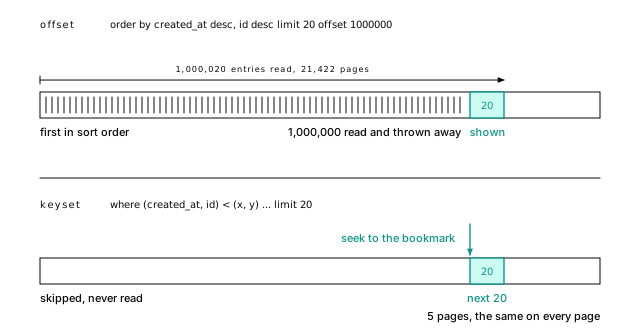
不要再用 `OFFSET` 分页。没有任何东西记录第 1,000,000 行在哪里,因此 Postgres 会从索引头部开始遍历,产生行再把它们丢掉:
```sql
select id, kind, created_at from events
order by created_at desc, id desc
limit 20 offset 1000000;
```
| 偏移量 | 读取行数 | 缓冲区 | 耗时(我们的机器,约值) |
|---|---|---|---|
| 0 | 20 | 4 | 0.04 ms |
| 100,000 | 100,020 | 2,146 | 15 ms |
| 1,000,000 | 1,000,020 | 21,422 | 180 ms |
**Table 22-1.** OFFSET 会读取它跳过的每一行
读取一百万零二十个条目,只为了显示二十个。对于没人会翻过第 5 页的搜索页面,这没问题;对于客户端会逐页遍历的 API,这就是灾难。
**图 22-1.** OFFSET 从头计数;键集分页从书签开始。OFFSET 1000000 会读取 1\,000\,020 个索引项和 21\,422 个页来显示 20 行。键集查询会跳到上一页结束的位置,在 5 个页中读取接下来的 20 行;每一页都相同。
> [!EXAMPLE]- 动手验证 · lab `21-queries`
>
> ```sql
> select lab.prove(
> 'OFFSET 100,000 reads about 2,146 pages',
> lab.buffers($$ select id, kind, created_at from events
> order by created_at desc, id desc limit 20 offset 100000 $$) between 1800 and 2500);
>
> select lab.prove(
> 'OFFSET 1,000,000 reads about 21,422 pages, ten times OFFSET 100,000: linear in depth',
> lab.buffers($$ select id, kind, created_at from events
> order by created_at desc, id desc limit 20 offset 1000000 $$) between 19000 and 24000);
>
> select lab.prove(
> 'OFFSET 1,000,000 walks 1,000,020 index entries to return 20',
> (select (lab.find_node(p -> 'Plan', 'Index Scan') ->> 'Actual Rows')::numeric = 1000020
> from lab.plan($$ select id, kind, created_at from events
> order by created_at desc, id desc limit 20 offset 1000000 $$) p));
> ```
>
> [完整实验脚本](https://www.flagon.io/books/eight-kilobytes/lab/21-queries.sql)
**键集分页**(也称游标分页或寻道分页)使用书签,而不是从封面开始数页。记住上一页结束的位置,请求它之后的行:
```sql
select id, kind, created_at
from events
where (created_at, id) < ('2026-04-06 12:00:15.768+00', 1000001)
order by created_at desc, id desc
limit 20;
```
`(created_at, id) < (x, y)` 的意思是“在这个排序顺序中排在后面”,而且它可以直接匹配两列索引。它返回的正是 `OFFSET 1000000` 产生的那一页,`Buffers: shared hit=4 read=1`:只需 5 个页,而不是 21,422 个页,并且每一页都相同。
要让它经得住增长,需要三个习惯。加入主键来打破并列,让排序成为全序。把过滤列放在索引前面,因此单个项目的活动流适合使用 `(project_id, created_at, id)`。还要给客户端一个不透明的游标([在应用中编码;报告可以交给 SQL](/13-keys/#encode-in-the-app-sql-can-do-it-for-a-report)介绍了其中一种编码方式)。
你放弃了跳到第 37 页的能力;无限滚动本来就不需要这个能力。批处理作业也使用同一个书签:`where id > $last order by id limit 1000`。
> [!DETAILS]- 深入阅读:键集游标必须携带什么
>
> 下面用 TypeScript 和 node-postgres 展示一个端点执行这条查询的完整写法:
>
> ```ts
> type Cursor = { ts: string; id: string };
>
> const encode = (c: Cursor) => Buffer.from(JSON.stringify(c)).toString("base64url");
> const decode = (s: string): Cursor =>
> JSON.parse(Buffer.from(s, "base64url").toString());
>
> export async function feedPage(after?: string) {
> const cur = after ? decode(after) : { ts: "infinity", id: "0" };
> const { rows } = await db.query(
> `select id, kind, created_at, created_at::text as ts
> from events
> where (created_at, id) < ($1::timestamptz, $2::bigint)
> order by created_at desc, id desc
> limit 20`,
> [cur.ts, cur.id]);
> const last = rows.at(-1);
> return { rows, next: last ? encode({ ts: last.ts, id: last.id }) : null };
> }
> ```
>
> 第一页使用 `'infinity'`,它的排序位置在所有时间戳之后,因此所有页都能共用同一条语句和同一份计划。有两个细节至关重要。游标携带的是 `created_at::text`,而不是解析后的日期:JavaScript 的日期只能保存毫秒,`timestamptz` 保存微秒,因此通过 `Date` 往返一次会略微偏离真实行,导致跳过或重复行。而且 `bigint` 在 node-postgres 中以字符串到达,这正是游标所需要的形式。
>
> 像 `created_at desc, id asc` 这样的混合方向需要按这种方式声明索引,而且不能使用行比较。
>
> > [!EXAMPLE]- 动手验证 · lab `21-queries`
> >
> > ```sql
> > -- the last row of the page before OFFSET 1000000 is the cursor
> > select created_at as cur_ts, id as cur_id
> > from events order by created_at desc, id desc offset 999999 limit 1 \gset
> >
> > select lab.prove(
> > 'keyset returns exactly the page OFFSET 1,000,000 returns',
> > (select array_agg(id order by created_at desc, id desc) from (
> > select id, created_at from events
> > where (created_at, id) < (:'cur_ts'::timestamptz, :'cur_id'::bigint)
> > order by created_at desc, id desc limit 20) k)
> > = (select array_agg(id order by created_at desc, id desc) from (
> > select id, created_at from events
> > order by created_at desc, id desc limit 20 offset 1000000) o));
> >
> > select lab.prove(
> > 'keyset reads under 10 pages at the same depth',
> > lab.buffers(format($$ select id, kind, created_at from events
> > where (created_at, id) < (%L::timestamptz, %s)
> > order by created_at desc, id desc limit 20 $$,
> > :'cur_ts', :'cur_id')) < 10);
> > ```
> >
> > [完整实验脚本](https://www.flagon.io/books/eight-kilobytes/lab/21-queries.sql)
## N+1 是一个循环,不是慢查询 {#n1-is-a-loop-not-a-slow-query}
N+1 问题就是循环中的查询:先加载 100 个项目,再逐个查找所有者。每次查找读取 3 个页,耗时以微秒计,因此监控永远不会报警。代价在于往返:同一台主机上的 101 次查询需要 8 ms,跨可用区后则需要 152 ms([往返比查询更昂贵](/03-latency/#round-trips-cost-more-than-queries))。ORM 在循环中访问延迟关联时,默认就会这样做。
用一次往返修复它:如果需要把关联行直接放进结果,就使用连接;如果已经加载了父项,就使用 `= any($1)`,并把完整列表作为**一个数组参数**传入:
```ts
const ids = projects.rows.map((p) => p.owner_id);
const { rows: owners } = await db.query(
"select id, email, name from users where id = any($1::bigint[])", [ids]);
```
一次往返、一次索引扫描,就能处理全部一百个所有者;在内存中把它们匹配起来。不要生成 `in ($1, $2, ... $500)`:它的文本会随列表长度变化,因此无法只准备一次,而且会触及 65,535 个参数的上限。当每个父项都需要自己的几个子项时,使用 [LATERAL](#lateral-reads-the-top-n-row_number-reads-them-all)。
## 用 EXISTS 过滤,而不是用连接 {#filter-with-exists-not-a-join}
用 `EXISTS` 过滤;只有需要另一张表的列时才连接。“哪些账户在最近一天有过告警?”(数据在 2026 年 10 月 6 日午夜结束):
```sql
select count(*) from accounts a
where exists (
select 1 from events e
where e.account_id = a.id and e.kind = 'alert' and e.created_at >= '2026-10-05');
```
Postgres 会把它执行为**半连接**,在每个账户第一次匹配时停止:`Hash Right Semi Join ... rows=479`。`in (subquery)` 形式得到完全相同的计划。连接会返回 `rows=637`,每个告警一行,然后有人再加上 `distinct` 来消除本不该出现的重复。
### NOT IN 是陷阱;使用 NOT EXISTS {#not-in-is-a-trap-use-not-exists}
如果 `NOT IN` 下的子查询产生一个 NULL,查询会悄悄返回零行([一个 NULL 就会让 NOT IN 什么也不返回](/14-relationships/#one-null-makes-not-in-return-nothing))。同一个 NULL 规则也会阻止 Postgres 把它变成反连接,因此一旦子查询结果超过[`work_mem`](/43-glossary/#work_mem),它就会为每个外侧行重新扫描。“没有事件的用户”如果写成 `not in (select user_id from events)`,代价会接近 39 亿,因为这可能意味着 1600 亿次比较(80,000 个没有事件的用户,每个都要与 200 万个 `user_id` 比较)。写成 `not exists` 后,它是一个 `Hash Right Anti Join`,每张表各扫描一次,代价为 68,394。
> [!DANGER] 永远不要使用带子查询的 NOT IN
>
> 始终写 `NOT EXISTS`。只有由不含 NULL 的常量组成的短列表才可以使用 `NOT IN`(`status not in ('done', 'failed')`)。
> [!DETAILS]- 深入阅读:39 亿和 68,394 背后的两个计划
>
> ```sql
> explain select count(*) from users u
> where u.id not in (select user_id from events);
>
> explain select count(*) from users u
> where not exists (select 1 from events e where e.user_id = u.id);
> ```
>
> ```text
> Aggregate (cost=3899296376.00..3899296376.01 rows=1 width=8)
> -> Seq Scan on users u ...
> Filter: (NOT (ANY (id = (SubPlan 1).col1)))
> SubPlan 1
> -> Materialize (cost=0.00..72985.90 rows=1999993 width=8)
>
> Aggregate (cost=68394.12..68394.13 rows=1 width=8)
> -> Hash Right Anti Join (cost=3376.00..68193.50 rows=80249 width=0)
> ```
>
> `Filter` 中写的是 `SubPlan`,而不是 `hashed SubPlan`:两百万个 `user_id` 放不进 `work_mem`,所以 80,000 个没有事件的用户中的每一个都会扫描全部这些值。对于 `projects.owner_id`(20,000 行),它会得到 `hashed SubPlan 1`,并在 12 ms 内完成;这就是 `NOT IN` 能通过评审、却会在生产环境失败的原因。
>
> > [!EXAMPLE]- 动手验证 · lab `21-queries`
> >
> > ```sql
> > select lab.prove(
> > 'NOT IN over 2 million events is a plain subplan costed in the billions',
> > (select (p ->> 'Total Cost')::numeric > 1e9
> > and lab.find_node(p, 'Seq Scan') ->> 'Filter' not like '%hashed%'
> > from lab.estimate($$ select count(*) from users u
> > where u.id not in (select user_id from events) $$) p));
> >
> > select lab.prove(
> > 'NOT EXISTS over the same tables is an anti-join costed under 100,000',
> > (select (p ->> 'Total Cost')::numeric < 100000
> > and (lab.join_types($$ select count(*) from users u
> > where not exists (select 1 from events e where e.user_id = u.id) $$))[1] like '%Anti'
> > from lab.estimate($$ select count(*) from users u
> > where not exists (select 1 from events e where e.user_id = u.id) $$) p));
> > ```
> >
> > [完整实验脚本](https://www.flagon.io/books/eight-kilobytes/lab/21-queries.sql)
## 精确计数会读取一切 {#exact-counts-read-everything}
对大表执行 `count(*)` 很慢,这不是缺陷。同一时刻,不同事务看到的行数可能不同([更新就是插入](/06-mvcc/#basics-chapter-6)),因此不存在一个保存好的计数;最好的情况是对主键执行仅索引扫描,也要为得到一个数字读取 5,469 个页。先问自己这个数字要用来做什么:
- **“约 200 万”。**(管理面板、“约 2,000,000 条中的 1 到 20 条”):规划器的估算是免费的。`select reltuples::bigint from pg_class where oid = 'events'::regclass` 返回了 1,999,993。
- **“1,000+”。** 对一个有上限的子查询进行计数:`select count(*) from (select 1 from events where kind = 'deploy' limit 1001) t`。它读取了 159 个页;工作量由上限决定,而不是由表决定。
- **每次请求都需要每个租户的精确数字。** 保留一张计数器表,随写入更新,或由定期汇总更新。用触发器完成这件事,会让每个写入者都在该行上串行化([计数器触发器会让写入者串行化](/24-functions/#a-counter-trigger-serializes-your-writers))。
> [!DETAILS]- 深入阅读:从计划估算带过滤条件的计数
>
> 规划器可以为任何查询提供估算:
>
> ```sql
> create function count_estimate(query text) returns bigint
> language plpgsql as $$
> declare
> plan jsonb;
> begin
> execute 'explain (format json) ' || query into plan;
> return (plan -> 0 -> 'Plan' ->> 'Plan Rows')::bigint;
> end
> $$;
>
> select count_estimate('select 1 from events where kind = ''deploy''');
> ```
>
> 它返回了 500,598;精确答案是 499,992。估算只能和统计信息一样准确,而相关过滤条件会让它失准([规划器假设各列彼此独立](/20-planner/#the-planner-assumes-your-columns-are-independent))。永远不要把用户输入传给它:它会执行传入的任何字符串。
## 保持索引列裸露 {#keep-the-indexed-column-bare}
当一个谓词把裸列与一个可以在扫描前计算出来的值进行比较时,它就是**可利用索引的**(sargable,“可作为搜索参数”)。把列包在函数、算术表达式或类型转换中,索引就帮不上忙。
### 列上的函数会隐藏索引 {#a-function-on-the-column-hides-the-index}
要查询“9 月 1 日的所有事件”,自然的写法是类型转换:`where created_at::date = '2026-09-01'`:
```text
Buffers: shared read=35173
-> Seq Scan on events ... rows=5479.00 ...
Rows Removed by Filter: 1994521
```
为了取出 5,479 行,却读取了全部页:索引按时间戳排序,而不是按 `created_at::date` 排序。对裸列使用范围条件,`created_at >= '2026-09-01' and created_at < '2026-09-02'`,只读取 25 个页。
对 `date_trunc`、`extract` 和算术表达式也是一样:`created_at + interval '1 day' > now()` 读取了全部 35,173 个页;`created_at > now() - interval '1 day'` 使用索引。如果确实需要对列应用函数,就为表达式建立索引([索引会准确存储你提供的表达式](/17-btree/#an-index-stores-exactly-what-you-gave-it))。这要求表达式是 `IMMUTABLE` 的,而 `created_at::date` 作用于 `timestamptz` 时并不满足这一要求:它取决于会话时区,因此 `create index ... ((created_at::date))` 会被拒绝。请对 `((created_at at time zone 'UTC')::date)` 建立索引,并用相同的表达式查询。
> [!EXAMPLE]- 动手验证 · lab `21-queries`
>
> ```sql
> -- :'day0' is '2026-09-01' (set at the top of the lab)
> select lab.prove(
> 'created_at::date = a day reads every page of the table',
> lab.buffers(format($$ select count(*) from events where created_at::date = %L::date $$, :'day0'))
> >= 35173);
>
> select lab.prove(
> 'the half-open range on the bare column reads under 50 pages',
> lab.buffers(format($$ select count(*) from events
> where created_at >= %L and created_at < %L::timestamptz + interval '1 day' $$,
> :'day0', :'day0')) < 50);
> ```
>
> [完整实验脚本](https://www.flagon.io/books/eight-kilobytes/lab/21-queries.sql)
### 日期范围是半开区间 {#date-ranges-are-half-open}
时间范围应写成 `>= start and < end`,永远不要写 `between`;后者会把第 2 日零点同时计入前后两天(如果结束时间写成 `23:59:59`,又会漏掉最后一秒;时间戳带有微秒)。半开区间可以首尾相接。边界应在用户的时区中计算,而不是在列上计算。
### 类型不匹配会在每一行上进行类型转换 {#a-type-mismatch-is-a-cast-on-every-row}
即使没有显式函数,类型不匹配也会隐藏索引。`where id = 5.0` 会变成 `Seq Scan`,其中有 `Filter: ((id)::numeric = 5.0)`:`numeric` 字面量让 Postgres 对每一行的 `bigint` 列做类型转换,就像驱动把数字绑定为浮点数时一样。判断线索是列一侧的 `::` 出现在 `Filter` 行中。
> [!DETAILS]- 深入阅读:小数形式的键让 7 个页变成 35,173 个页
>
> 对比 `where id = 42` 和 `where id = 42.0`,同时允许并行工作进程:
>
> ```text
> Index Scan using events_pkey on events (actual rows=1.00 loops=1)
> Buffers: shared hit=5 read=2
> ...
> Gather (actual rows=1.00 loops=1)
> Buffers: shared hit=13347 read=21826
> -> Parallel Seq Scan on events (actual rows=0.33 loops=3)
> Filter: ((id)::numeric = 42.0)
> ```
>
> 七个页变成了 35,173 个页。当两侧类型不同时,Postgres 会向能够容纳两者的类型转换,即 `numeric`,这意味着转换列。绑定参数时使用列的类型。
>
> > [!EXAMPLE]- 动手验证 · lab `21-queries`
> >
> > ```sql
> > select lab.prove(
> > 'where id = 42 is an index scan that reads under 10 pages',
> > 'Index Scan' = any(lab.nodes('select * from events where id = 42'))
> > and lab.buffers('select * from events where id = 42') < 10);
> > select lab.prove(
> > 'where id = 42.0 casts the column to numeric and reads the whole table (over 35,000 pages)',
> > lab.estimate('select * from events where id = 42.0') ->> 'Filter' = '((id)::numeric = 42.0)'
> > and lab.buffers('select * from events where id = 42.0') > 35000);
> > ```
> >
> > [完整实验脚本](https://www.flagon.io/books/eight-kilobytes/lab/21-queries.sql)
## 跨连接使用 OR 会击败两个索引 {#or-across-a-join-defeats-both-indexes}
在一张表上使用 `OR` 没问题:`BitmapOr` 会合并各个条件对应的索引扫描结果。但跨越连接两端两张表的 `OR` 就不行,即使 `projects (name)`、`projects (owner_id)` 和 `users (email)` 上都有索引(实验会创建这三个索引):
```sql
select p.id, p.name
from projects p
join users u on u.id = p.owner_id
where p.name = 'Project 4242' or u.email = 'user29695@example.com';
```
```text
Hash Join (actual time=8.032..17.973 rows=1.00 loops=1)
Rows Removed by Join Filter: 19999
Buffers: shared hit=191 read=1126 written=4
```
两个条件都无法单独限制任意一张表,因为一行可能通过另一个条件入选,所以 Postgres 会连接全部数据,最后再过滤。把它拆成两个查询的 `union`,每个条件一个分支,那么每个分支都能进行索引查找:
```sql
select p.id, p.name from projects p where p.name = 'Project 4242'
union
select p.id, p.name
from projects p
join users u on u.id = p.owner_id
where u.email = 'user29695@example.com';
```
同样返回那一行,访问 10 个缓冲区即可,而不是 1,317 个。当两个分支不可能重叠时,使用 `union all`,跳过排序。
> [!DETAILS]- 深入阅读:读取 UNION 计划
>
> ```text
> Unique (actual time=0.059..0.061 rows=1.00 loops=1)
> Buffers: shared hit=4 read=6
> -> Sort ...
> -> Append ... rows=2.00 ...
> -> Index Scan using projects_name_idx on projects p ...
> -> Nested Loop ...
> -> Index Scan using users_email_idx on users u ...
> -> Index Scan using projects_owner_id_idx on projects p_1 ...
> ```
>
> 两个分支找到了同一个项目(用户 29695 拥有项目 4242),因此 `Append` 产生两行,`Unique` 删除其中一行。第二个分支需要 `projects (owner_id)`;没有它,就会退回到顺序扫描。没有索引的外键又一次成了问题([删除每个父行都会扫描整张子表](/14-relationships/#each-deleted-parent-scans-the-whole-child-table))。
>
> > [!EXAMPLE]- 动手验证 · lab `21-queries`
> >
> > ```sql
> > select lab.prove(
> > 'an OR across the join scans both tables: over 1,000 pages for one row',
> > (select (p -> 'Plan' ->> 'Actual Rows')::numeric = 1
> > and (p -> 'Plan' ->> 'Shared Hit Blocks')::int + (p -> 'Plan' ->> 'Shared Read Blocks')::int > 1000
> > from lab.plan($$ select p.id, p.name from projects p
> > join users u on u.id = p.owner_id
> > where p.name = 'Project 4242' or u.email = 'user29695@example.com' $$) p));
> >
> > select lab.prove(
> > 'the UNION of two indexed queries reads under 30 pages for the same row',
> > (select (p -> 'Plan' ->> 'Actual Rows')::numeric = 1
> > and (p -> 'Plan' ->> 'Shared Hit Blocks')::int + (p -> 'Plan' ->> 'Shared Read Blocks')::int < 30
> > from lab.plan($$ select p.id, p.name from projects p where p.name = 'Project 4242'
> > union
> > select p.id, p.name from projects p
> > join users u on u.id = p.owner_id
> > where u.email = 'user29695@example.com' $$) p));
> > ```
> >
> > [完整实验脚本](https://www.flagon.io/books/eight-kilobytes/lab/21-queries.sql)
## 只使用一次的 CTE 会被内联,而不是设栅栏 {#a-cte-used-once-is-inlined-not-fenced}
为提高可读性可以使用[CTE](/43-glossary/#cte);只有有意为之时才添加 `materialized`。从 PostgreSQL 12 开始,一个没有副作用且只被引用一次的 CTE 会像任何子查询一样被内联,因此你的过滤条件可以到达表([你的查询在计算代价之前就已被重写](/21-plans/#your-query-is-rewritten-before-its-priced))。每个 CTE 都是栅栏的时代留下的建议如今已经错误;遵循它会付出真实页数的代价:“上周项目 4242 的事件”在内联时读取 6 个缓冲区,而标记为 `materialized` 时则读取 826 个缓冲区,并写入 584 个临时页。
当错误估算一直产生坏计划时,可以有意设置栅栏([提示会冻结计划;应该修复估算](/20-planner/#a-hint-freezes-a-plan-fix-the-estimate-instead)),或者为了只运行一次易变函数。被引用两次的 CTE 默认会物化;`not materialized` 会将它内联。
> [!DETAILS]- 深入阅读:意外栅栏的代价,逐行看
>
> ```sql
> explain (analyze, buffers, costs off)
> with recent as materialized (
> select * from events where created_at > '2026-09-29'
> )
> select id, kind from recent where project_id = 4242;
> ```
>
> ```text
> CTE Scan on recent (actual time=0.931..9.274 rows=3.00 loops=1)
> Filter: (project_id = 4242)
> Rows Removed by Filter: 38354
> Storage: Disk Maximum Storage: 4672kB
> Buffers: shared hit=602 read=224, temp written=584
> ```
>
> 这一周的全部 38,357 行都被取出,`Storage: Disk` 说明数据量超过了 `work_mem` 限制,已溢写到磁盘。内联后,它变成一个 `Index Scan`,其中的 `Index Cond` 同时带有两个条件。
>
> > [!EXAMPLE]- 动手验证 · lab `21-queries`
> >
> > ```sql
> > -- :'last_week' is '2026-09-29' (set at the top of the lab)
> > select lab.prove(
> > 'a CTE referenced once is inlined: one index scan, under 20 pages',
> > (select p -> 'Plan' ->> 'Node Type' = 'Index Scan'
> > and (p -> 'Plan' ->> 'Shared Hit Blocks')::int + (p -> 'Plan' ->> 'Shared Read Blocks')::int < 20
> > from lab.plan(format($$ with recent as (
> > select * from events where created_at > %L)
> > select id, kind from recent where project_id = 4242 $$, :'last_week')) p));
> >
> > select lab.prove(
> > 'MATERIALIZED fetches the whole week first: a CTE Scan, hundreds of pages, and a temp file',
> > (select p -> 'Plan' ->> 'Node Type' = 'CTE Scan'
> > and (p -> 'Plan' ->> 'Shared Hit Blocks')::int + (p -> 'Plan' ->> 'Shared Read Blocks')::int > 500
> > and (p -> 'Plan' ->> 'Temp Written Blocks')::int > 0
> > from lab.plan(format($$ with recent as materialized (
> > select * from events where created_at > %L)
> > select id, kind from recent where project_id = 4242 $$, :'last_week')) p));
> > ```
> >
> > [完整实验脚本](https://www.flagon.io/books/eight-kilobytes/lab/21-queries.sql)
## ON CONFLICT 是安全的插入或更新 {#on-conflict-is-the-safe-upsert}
Postgres 有两个语句可以实现“插入;如果已存在则更新”,但只有 `INSERT ... ON CONFLICT` 对应用流量是安全的。这里它维护一张汇总表 `project_daily_counts`,其主键是 `(project_id, day, kind)`:
```sql
insert into project_daily_counts (project_id, day, kind, n)
values (4242, '2026-09-01', 'deploy', 3)
on conflict (project_id, day, kind)
do update set n = project_daily_counts.n + excluded.n
returning old.n as old_n, new.n as new_n;
```
`excluded` 是你试图插入的那一行。先用 3,再用 2 执行:第一次返回 `old_n` 为 null、`new_n` 为 3;第二次返回 `3 | 5`(`RETURNING old` 和 `new` 适用于 PostgreSQL 18+)。
两个会话对同一个键执行插入或更新时不会都插入成功,也都不会报错:一个插入,另一个等待,然后执行更新。手写的“先查询,不存在再插入”会发生竞态,在负载下抛出重复键错误。与 MySQL 不同,你要明确指定仲裁者([插入或更新(upsert)要指明冲突目标](/11-not-mysql/#upserts-name-their-conflict))。
### 让唯一约束保证只发生一次 {#let-a-unique-constraint-enforce-once}
客户端在超时后重试支付,而你必须只扣款一次。`payments` 表保存客户端的幂等键,数据库拒绝使用同一键插入第二行:
```sql
insert into payments (account_id, idempotency_key, amount_cents)
values (42, '7f3c9a10-retry-safe', 1999)
on conflict (account_id, idempotency_key) do nothing
returning id;
```
第一次请求返回 `id 1`;重试返回零行,意思是“已经完成”:查找原来的记录并返回相同答案。这个键在每个租户内唯一,`unique (account_id, idempotency_key)`。
> [!DETAILS]- 深入阅读:用 Go 实现幂等,以及在一条语句中取回 ID
>
> 在 Go 中使用 pgx:
>
> ```go
> var id int64
> err := tx.QueryRow(ctx, `
> insert into payments (account_id, idempotency_key, amount_cents)
> values ($1, $2, $3)
> on conflict (account_id, idempotency_key) do nothing
> returning id`, acct, key, cents).Scan(&id)
>
> if errors.Is(err, pgx.ErrNoRows) {
> // A previous request with this key won. Return its result.
> err = tx.QueryRow(ctx, `
> select id from payments
> where account_id = $1 and idempotency_key = $2`, acct, key).Scan(&id)
> }
> ```
>
> 如果两个相同的请求在同一时刻到达,第二次插入会等待第一个事务;第一个事务提交后,第二次插入什么也不做;在读已提交隔离级别下,后续的 `select` 会看到已提交的行。若要在一条语句中取回 ID,`do update set idempotency_key = excluded.idempotency_key returning id, old.id is null as inserted` 可以做到(重试时返回 `1 | f`),代价是每次重试都会产生一个新的行版本。
>
> > [!EXAMPLE]- 动手验证 · lab `21-queries`
> >
> > ```sql
> > select lab.prove(
> > 'the retry with the same key inserts nothing and returns no rows',
> > (select count(*) from ids) = 0 and (select count(*) from payments) = 1);
> > ```
> >
> > [完整实验脚本](https://www.flagon.io/books/eight-kilobytes/lab/21-queries.sql)
### ON CONFLICT 会等待,MERGE 却会发生竞态 {#merge-races-where-on-conflict-waits}
`MERGE`(PostgreSQL 15+)会让一张表与数据源同步:插入新数据,更新发生变化的数据;从 PostgreSQL 17 开始,还会删除已经消失的数据。它**不具备** `ON CONFLICT` 的保证。它根据自己的快照判断“已匹配”,所以两个并发的 `MERGE` 都可能插入同一个新键,其中一个会因唯一性冲突而失败。把它用于你能控制的批量同步,不要用于应用流量。
> [!DETAILS]- 深入阅读:两个会话、一个新键:ON CONFLICT 等待,MERGE 失败
>
> 两个 `dblink` 会话对同一个新键执行同一条语句,第一个会话处于打开的事务中。使用 `ON CONFLICT` 时,第二个会话会等待第一个会话的锁(`wait_event_type = 'Lock'`);第一个提交后,它会更新新行:没有错误,计数为 2。
>
> > [!EXAMPLE]- 动手验证 · lab `21-queries`
> >
> > ```sql
> > select dblink_exec('a', 'begin') \g /dev/null
> > select dblink_exec('a', $$insert into project_daily_counts values (1, '2026-01-01', 'x', 1)
> > on conflict (project_id, day, kind) do update set n = project_daily_counts.n + excluded.n$$) \g /dev/null
> > select dblink_send_query('b', $$insert into project_daily_counts values (1, '2026-01-01', 'x', 1)
> > on conflict (project_id, day, kind) do update set n = project_daily_counts.n + excluded.n$$) \g /dev/null
> > select pg_sleep(0.3) \g /dev/null
> >
> > select lab.prove(
> > 'a concurrent ON CONFLICT on the same key waits for the first transaction',
> > (select wait_event_type = 'Lock' from pg_stat_activity where application_name = 'upsert-b'));
> >
> > select dblink_exec('a', 'commit') \g /dev/null
> > select lab.finish('b') as b_result \gset
> >
> > select lab.prove(
> > 'then it updates instead of failing: no error, n = 2',
> > :'b_result' = 'ok'
> > and (select n from project_daily_counts where project_id = 1 and kind = 'x') = 2);
> > ```
> >
> > [完整实验脚本](https://www.flagon.io/books/eight-kilobytes/lab/21-queries.sql)
>
> 使用 `MERGE` 时,两个会话都会判断键不存在。第一个提交后,第二个会话的插入会失败,并报告 `duplicate key value violates unique constraint`;应用会看到一个必须重试的错误。
>
> > [!EXAMPLE]- 动手验证 · lab `21-queries`
> >
> > ```sql
> > -- session a has run this MERGE in an open transaction; session b runs it too
> > select dblink_send_query('b', $$merge into project_daily_counts t
> > using (values (2::bigint, date '2026-01-01', 'x', 1::bigint)) s(p, d, k, n)
> > on t.project_id = s.p and t.day = s.d and t.kind = s.k
> > when matched then update set n = t.n + s.n
> > when not matched then insert values (s.p, s.d, s.k, s.n)$$) \g /dev/null
> > select pg_sleep(0.3) \g /dev/null
> > select dblink_exec('a', 'commit') \g /dev/null
> > select lab.finish('b') as b_result \gset
> >
> > select lab.prove(
> > 'two concurrent MERGEs both decide the key is missing, and the second fails with a unique violation',
> > :'b_result' like '%duplicate key value violates unique constraint%');
> > ```
> >
> > [完整实验脚本](https://www.flagon.io/books/eight-kilobytes/lab/21-queries.sql)
>
> `MERGE ... RETURNING` 与 `merge_action()`,以及 `when not matched by source`,适用于 PostgreSQL 17+([插入或更新(upsert)要指明冲突目标](/11-not-mysql/#upserts-name-their-conflict)中有一个示例)。
## 一次提交,而不是每行提交一次 {#commit-once-not-once-per-row}
每条自动提交语句都是自己的事务,而每次提交都会等待磁盘刷新([每次提交都等待磁盘](/03-latency/#every-commit-waits-for-the-disk)),因此一条语句插入一行时,每行都要付出一次刷新和一次往返的代价。按批次提交,并通过 `unnest` 把每列作为一个数组发送,这是写入端对应于 `= any($1)` 的做法;[一次提交一个批次,而不是每行提交一次](/27-loading/#commit-once-per-batch-not-once-per-row)和[用数组批处理,而不是 VALUES 列表](/27-loading/#batch-with-arrays-not-values-lists)对各种数据写入方式进行了并列测量。
## LATERAL 读取每组前 N 行;row_number() 会读取全部行 {#lateral-reads-the-top-n-row_number-reads-them-all}
“某个账户名下每个项目最近三个事件”很常见,而教科书式答案经不起增长。那个答案用窗口函数 `row_number() over (partition by e.project_id order by e.created_at desc)` 编号,再保留 `rn <= 3`。它取出了每个项目的每个事件(`Sort ... rows=2084`,2,080 个堆页),将它们排序后保留 60 行;`Buffers: shared hit=367 read=1977`。工作量随着每个项目的事件数增长,而事件数只会越来越多。
`LATERAL` 允许 `from` 中的子查询引用它前面的表,因此它会对每个外侧行运行一次;有了 `(project_id, created_at)` 索引,每次运行只需一次短扫描:
```sql
select p.id, p.name, e.id, e.kind, e.created_at
from projects p
cross join lateral (
select id, kind, created_at
from events
where project_id = p.id
order by created_at desc
limit 3
) e
where p.account_id = 42;
```
```text
Nested Loop ... (actual time=0.056..2.658 rows=60.00 loops=1)
Buffers: shared hit=211 read=100
...
-> Limit ... rows=3.00 loops=20)
-> Index Scan Backward using events_project_id_created_at_idx on events
```
20 次短扫描,`loops=20`:读取 311 个页,而不是 2,344 个;即使一个项目有一百万个事件,所需页数也仍然如此。窗口函数应留给累计总和与排名,而不是用来读取随后会丢弃的行。
> [!DETAILS]- 深入阅读:LATERAL 何时会输、DISTINCT ON,以及两个窗口函数陷阱
>
> 这种模式需要一个以分组键开头、再接排序键的索引。没有它,每次 LATERAL 运行都要扫描并排序,结果比窗口函数版本更糟。如果即使没有事件也应显示项目,就使用 `left join lateral (...) on true`。在 311 个页中,有 191 个用于扫描 `projects`;这张表在 `account_id` 上没有索引。
>
> 窗口函数版本有一个 `Run Condition`(PostgreSQL 15+),会在每个分区中提前停止编号,但行仍然会被取出并排序。如果每组恰好只需要一行,`select distinct on (project_id) ... order by project_id, created_at desc` 简洁有效,前提是大多数分组本来就会被读取。
>
> 窗口函数适合时,还有两个问题会咬你。在有 `order by` 且没有显式指定窗框时,默认窗框是 `range between unbounded preceding and current row`,它会包含所有与当前行并列的行,因此累加和会一次增加整个并列组的值;如果你想逐行计算,就写 `rows`。此外,按日 `group by` 生成的图表会跳过没有行的日期,于是 `lag()` 比较的是错误的日期:用 `generate_series` 生成桶,再把数据左连接到这些桶上。
>
> > [!EXAMPLE]- 动手验证 · lab `21-queries`
> >
> > ```sql
> > select lab.prove(
> > 'row_number() fetches every event of every project: about 2,084 rows and over 1,500 pages for 60 results',
> > (select (p -> 'Plan' ->> 'Actual Rows')::numeric = 60
> > and (lab.find_node(p -> 'Plan', 'Sort') ->> 'Actual Rows')::numeric between 2000 and 2200
> > and (p -> 'Plan' ->> 'Shared Hit Blocks')::int + (p -> 'Plan' ->> 'Shared Read Blocks')::int > 1500
> > from lab.plan($$ select * from (
> > select p.id as pid, p.name, e.id, e.kind, e.created_at,
> > row_number() over (partition by e.project_id order by e.created_at desc) as rn
> > from projects p
> > join events e on e.project_id = p.id
> > where p.account_id = 42) t
> > where rn <= 3 $$) p));
> >
> > select lab.prove(
> > 'LATERAL with LIMIT 3 runs 20 short index scans: the same 60 rows in about 311 pages',
> > (select (p -> 'Plan' ->> 'Actual Rows')::numeric = 60
> > and (lab.find_node(p -> 'Plan', 'Limit') ->> 'Actual Loops')::int = 20
> > and (p -> 'Plan' ->> 'Shared Hit Blocks')::int + (p -> 'Plan' ->> 'Shared Read Blocks')::int < 400
> > from lab.plan($$ select p.id, p.name, e.id, e.kind, e.created_at
> > from projects p
> > cross join lateral (
> > select id, kind, created_at from events
> > where project_id = p.id
> > order by created_at desc
> > limit 3) e
> > where p.account_id = 42 $$) p));
> > ```
> >
> > [完整实验脚本](https://www.flagon.io/books/eight-kilobytes/lab/21-queries.sql)
## 本章要点 {#the-short-version}
- 在匹配的索引上使用键集分页:`OFFSET 1000000` 读取 21,422 个页,而键集分页只读取 5 个。
- 用连接或一个 `= any($1)` 数组参数消灭 N+1 循环。
- 用 `EXISTS` 过滤。永远不要使用 `NOT IN (subquery)`。
- 不要在每次请求中对大表执行 `count(*)`:使用估算、上限或计数器。
- 保持列裸露:使用半开范围,把算术放在常量一侧,并匹配类型。
- 把跨连接的 `OR` 重写为 `UNION`。
- 应用流量使用 `ON CONFLICT`,批处理作业使用 `MERGE`,幂等性使用唯一键。
- 按批次提交,而不是逐行提交;使用 `unnest` 发送数组。
- 使用 `LATERAL` 加 `(group, sort)` 索引查询每组的前 N 行。
## 延伸阅读 {#further-reading}
- [LIMIT and OFFSET](https://www.postgresql.org/docs/18/queries-limit.html),PostgreSQL 文档。包含大偏移量很慢、结果需要 `ORDER BY` 才稳定的警告。
- [We need tool support for keyset pagination](https://use-the-index-luke.com/no-offset),Markus Winand。最清楚地说明键集分页,并附有图表和框架说明。
- [Subquery Expressions](https://www.postgresql.org/docs/18/functions-subquery.html),PostgreSQL 文档。介绍 `EXISTS`、`IN` 和 `NOT IN`,包括让 `NOT IN` 变得危险的 NULL 规则。
- [INSERT: ON CONFLICT clause](https://www.postgresql.org/docs/18/sql-insert.html#SQL-ON-CONFLICT),PostgreSQL 文档。仲裁索引、`excluded` 和并发保证;再结合 [MERGE](https://www.postgresql.org/docs/18/sql-merge.html) 阅读两者的差异。
- [Slow Counting](https://wiki.postgresql.org/wiki/Slow_Counting),PostgreSQL Wiki。解释 `count(*)` 为什么会扫描,以及 [Count estimate](https://wiki.postgresql.org/wiki/Count_estimate) 中的估算方法。